
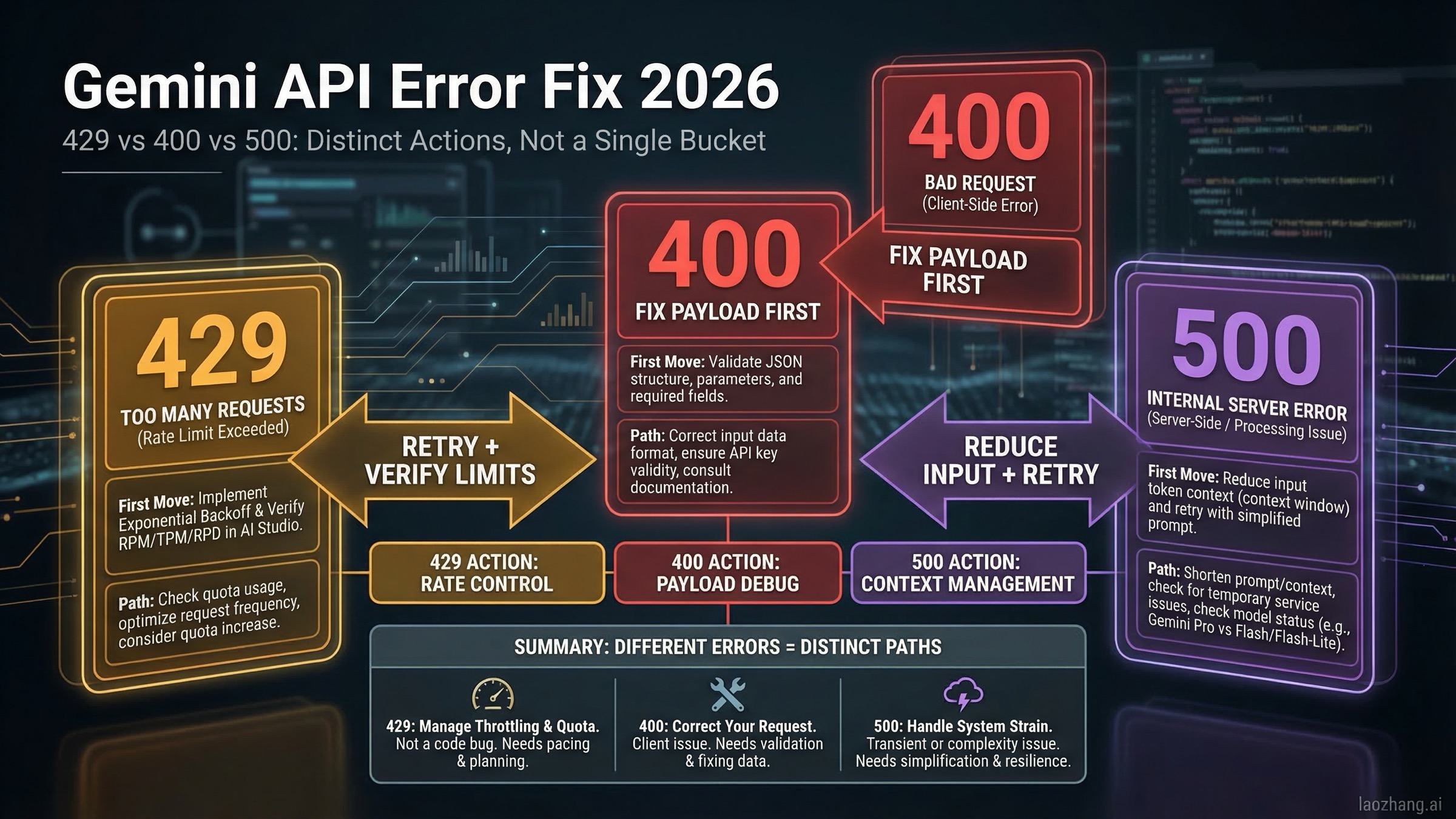
Short answer as of March 18, 2026: a Gemini API 429 RESOURCE_EXHAUSTED error usually means quota, billing-tier, or rate-limit trouble and is often retryable after a short delay; a 400 INVALID_ARGUMENT error usually means your request body, endpoint version, model choice, or billing precondition is wrong and should be fixed before you retry; a 500 INTERNAL error usually means Google-side instability or an input context that is too large, so the fastest fix is to reduce context, retry with capped backoff, and temporarily switch from Pro to Flash if the failure is widespread. That is the decision that matters first, because it determines whether your next request should be another API call or a code change.
Most pages ranking for this topic explain the codes, but they do not explain the part developers actually struggle with in 2026: why 429 became more common after the December 7, 2025 quota adjustment, why some paid-tier accounts still report low-usage 429s, why 400 can mean either a simple malformed body or an endpoint-version mismatch, and why 500 on Gemini 2.5 Pro often has a faster workaround than waiting for a perfect postmortem. This guide is built for incident mode, so it starts with diagnosis and only then moves into deeper explanations.
TL;DR
If you only have a minute, use this table and then jump to the matching section. The fastest way to waste time on Gemini errors is treating all failures as rate limits or all failures as broken code.
| Error | What it usually means in 2026 | Retry now? | First action |
|---|---|---|---|
429 RESOURCE_EXHAUSTED | You hit RPM/TPM/RPD, billing has not fully propagated, or you are seeing a quota-sync anomaly | Usually yes | Check project tier and active limits, then retry with backoff |
400 INVALID_ARGUMENT | Malformed request, wrong model/parameter combo, or using a beta-only feature on the wrong endpoint | Usually no | Inspect request body, endpoint version, and model capabilities |
400 FAILED_PRECONDITION | Billing or region precondition failed | No | Enable billing or use a supported location/plan |
500 INTERNAL | Google-side instability or input context that is too large | Yes, carefully | Reduce context, retry with jitter, and try Flash if Pro is unstable |
Three current facts change the troubleshooting playbook. First, Google-owned documentation outside the core troubleshooting page now explicitly notes that Gemini Developer API quota for Free Tier and Paid Tier 1 changed starting December 7, 2025, which explains why many apps started hitting fresh 429 errors without code changes. Second, Google's billing docs say 400 and 500 failures are not billed but still count against quota, which matters when you decide how aggressively to retry. Third, Google changed billing mechanics again in March 2026 with project spend caps and updated usage tiers, and tier spend caps begin enforcement on April 1, 2026, so "it worked last quarter" is no longer a reliable debugging shortcut.
Diagnose Gemini API 429, 400, and 500 in 30 Seconds
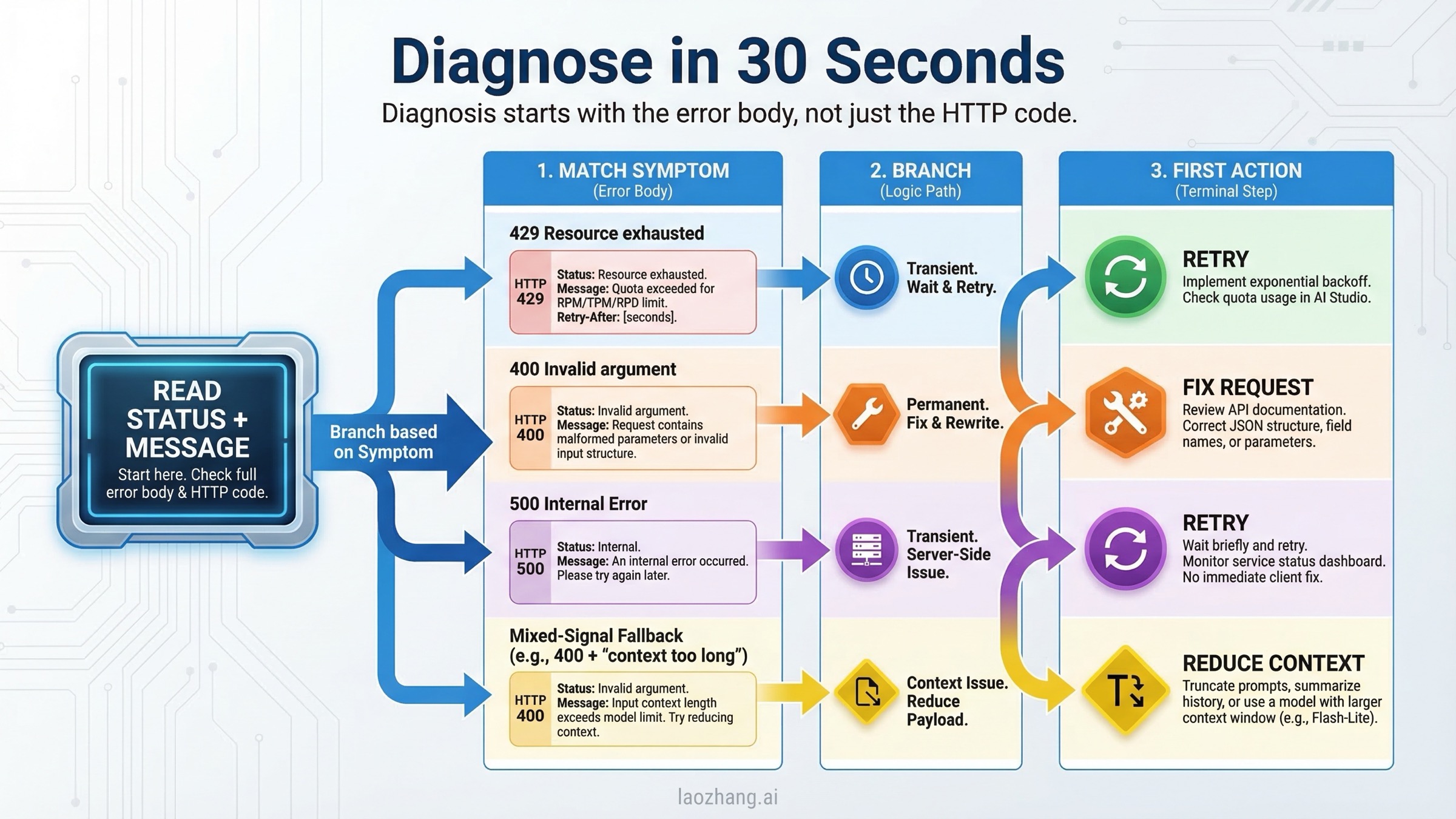
The single most useful debugging habit is to stop reading only the HTTP code and start reading the full response body. Gemini error payloads often include enough detail to tell you whether you should retry, shrink the request, fix your JSON, or check billing. The fields that matter most are error.status, the human-readable message, and any quota-related detail such as QuotaFailure or RetryInfo.
The official Gemini troubleshooting guide is still the canonical starting point, but it compresses multiple real-world cases into a short table. In practice, you should read the code like this. A 429 means the backend believes you should slow down or that your tier/quota state is not what you think it is. A 400 INVALID_ARGUMENT means the backend rejected the request shape itself. A 400 FAILED_PRECONDITION means the request format may be fine, but you are not allowed to use that path from your current region or billing state. A 500 means the request reached Google's side and failed after authentication and validation.
Use the message fragment, not just the code, to decide the next move:
| What you see in the response | Likely branch | What it usually means | Best next step |
|---|---|---|---|
RESOURCE_EXHAUSTED, RetryInfo, quota, per minute, per day | 429 | Genuine limit hit or tier sync confusion | Retry with backoff, then verify project-level quota and billing |
Request contains an invalid argument | 400 INVALID_ARGUMENT | Bad JSON shape, unsupported parameter, or wrong endpoint/model combo | Stop retrying and validate request structure |
free tier is not available in your country or billing/setup language | 400 FAILED_PRECONDITION | Billing or location requirement not met | Enable billing or move to supported usage path |
An internal error has occurred | 500 | Google-side failure or too much context | Reduce context, retry, and test Flash vs Pro |
When you log errors, log enough to answer four questions later: which model failed, which endpoint version you called (/v1 or /v1beta), how large the request was, and whether the same payload succeeds on another Gemini model. Those four data points usually separate local bugs from platform incidents much faster than line-by-line code inspection.
Fix 429 RESOURCE_EXHAUSTED: Quota, Billing-Tier, and Ghost-429 Cases
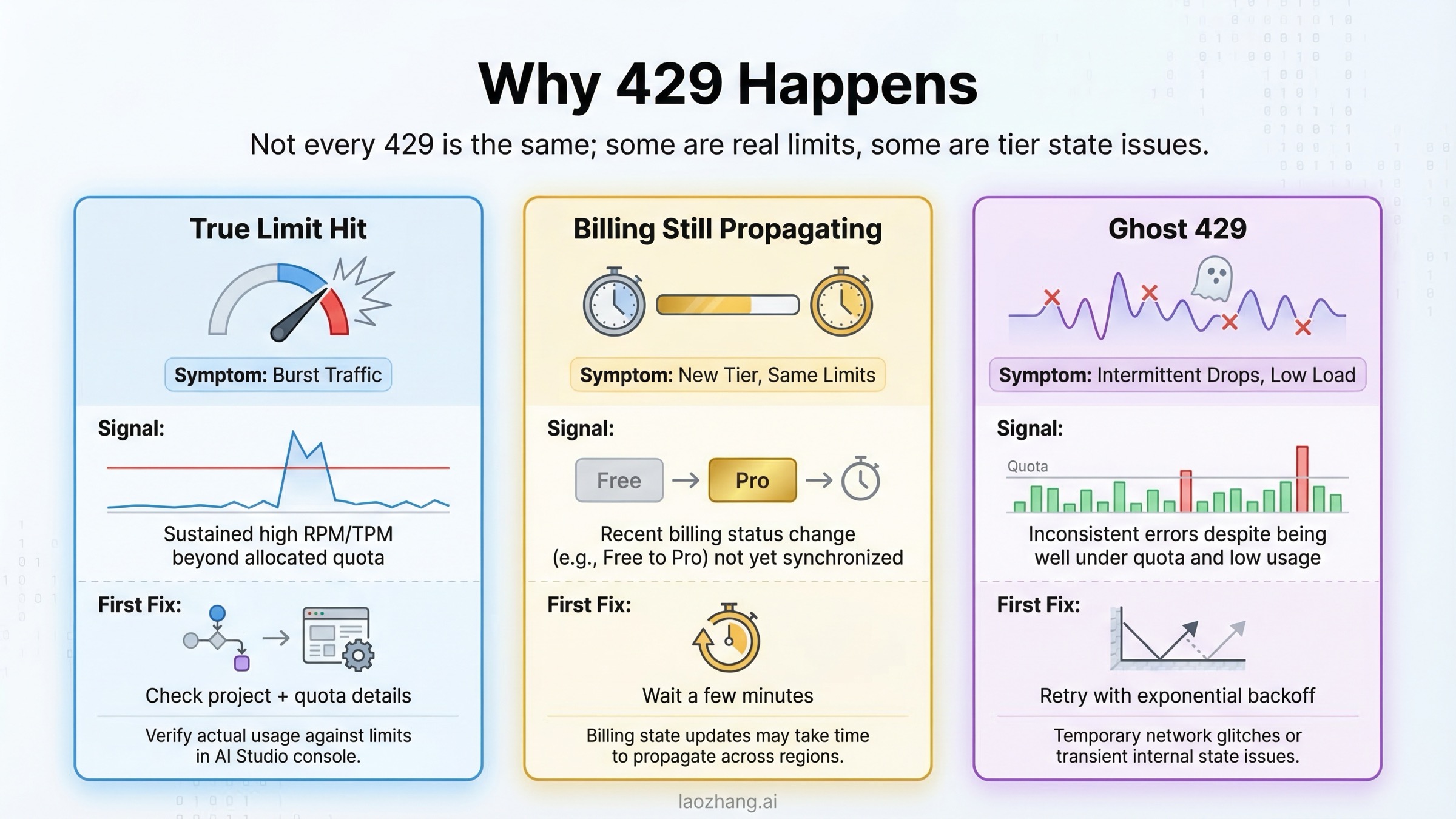
The official explanation for 429 RESOURCE_EXHAUSTED is simple: you exceeded a rate limit. That is true, but it is not the whole story in 2026. Google's rate-limit documentation now makes two details especially important. First, your active limits live in AI Studio and can change over time. Second, the page explicitly says specified rate limits are not guaranteed and actual capacity may vary. That means a developer who is thinking in terms of a fixed static quota table will often misdiagnose what is happening.
The big recency shift is the quota adjustment that took effect on December 7, 2025. Google's Firebase AI Logic FAQ, which also covers the Gemini Developer API, says quota for both the Free Tier and Paid Tier 1 changed starting on that date and warns that the adjustment may lead to unexpected 429 quota-exceeded errors. That is the cleanest current Google-owned confirmation of the change. If your traffic pattern did not change much but your 429 rate did, you should assume the platform moved before your code did.
The second easy-to-miss rule is that limits apply at the project and billing-account level, not as a private budget per API key. Google's billing documentation explains that API keys inherit their project and billing-account tier rather than having independent billing settings. In practical terms, making a new key in the same project does not magically create more capacity. If the project is exhausted or the billing account is misconfigured, a fresh key will fail the same way.
The fastest way to separate common 429 cases is this:
| 429 scenario | What it looks like | What to do first |
|---|---|---|
| Real RPM or TPM exhaustion | Bursts, concurrency spikes, or large prompts; retries succeed after a short wait | Add exponential backoff, queue requests, reduce concurrency, or batch work |
| Billing not enabled or not fully propagated | You recently upgraded, but requests still look like free-tier traffic | Verify the project is actually on Tier 1 and wait a few minutes for propagation |
| Paid-tier low-usage anomaly | Dashboard looks low, but 429s still happen immediately | Confirm the request is hitting the intended project and inspect quota details in the error body |
| Daily limit exhaustion | Small traffic volume, but errors continue until the reset window | Check daily counters and avoid assuming every 429 is minute-based |
Community threads on the Google AI Developers Forum add a useful nuance here. Multiple paid-tier users reported 429 responses in late 2025 and early 2026 despite apparently low quota usage, and some payloads referenced free-tier quota metrics unexpectedly. That does not overturn the official docs, but it does mean you should not tell every user "you obviously sent too many requests." If a low-traffic paid project suddenly starts failing almost immediately, it is reasonable to suspect a tier-sync or quota-state problem after you confirm the project and billing account are the ones you think they are.
For genuine quota pressure, the fix is still boring and effective: send fewer concurrent requests, trim unnecessary tokens, and retry with jittered backoff. If your application absolutely needs higher sustained capacity, the official path is enabling billing for Tier 1 and then graduating to higher tiers as your spend and account age qualify. Google's rate-limit page says the upgrade from Free to Tier 1 typically takes effect instantly, while later tier changes usually take effect within 10 minutes. If your project still behaves like the free tier long after that window, treat it as a configuration or platform-state problem rather than assuming your traffic math is wrong.
If repeated 429 instability on the official endpoint is the real blocker, and the workload is genuinely production API traffic rather than hobby testing, a relay layer can sometimes be more relevant than another round of quota math. For teams that need one stable OpenAI-compatible entry point across providers, laozhang.ai is one relay option, but it only makes sense if your real problem is production routing and availability rather than a single broken request.
For the complete tier-by-tier breakdown, see our Gemini API rate limits per tier and Gemini API quota upgrade guide.
Fix 400 Errors: INVALID_ARGUMENT vs FAILED_PRECONDITION
400 is the error family that developers most often mis-handle because they overfit on the phrase "bad request." In Gemini, not every 400 means the same kind of mistake. The official troubleshooting guide separates 400 INVALID_ARGUMENT from 400 FAILED_PRECONDITION, and that split matters because one is usually about request shape while the other is often about billing or geographic availability.
Start with INVALID_ARGUMENT. Google's official guidance says this status means the request body is malformed, has a typo, or is missing a required field. The same page also warns that using features from a newer API version with an older endpoint can trigger the same error. In other words, your JSON may be valid and your key may be fine, but if you call a /v1 endpoint with a feature that only exists in /v1beta, the backend can still reject it as INVALID_ARGUMENT. That is why "my payload looks correct" is not enough. You have to check the payload, the model, and the endpoint version together.
The most common 400 causes in real Gemini integrations are straightforward. A model ID changed or was deprecated. A parameter is unsupported by that model family. A generation setting is outside the allowed range. A file, modality, or response format does not belong in that endpoint. Or the request size drifts into a shape the model cannot accept. Google's own troubleshooting table points developers back to the API reference, version compatibility, and parameter limits for exactly this reason.
Use this mental checklist before you send the next request:
| 400 type | Usual cause | Fastest fix |
|---|---|---|
INVALID_ARGUMENT with a generic malformed message | Broken JSON or wrong field nesting | Compare payload to the latest official example for that exact model and SDK |
INVALID_ARGUMENT after switching features | Feature exists only on /v1beta or a different model | Align endpoint version and model capabilities |
INVALID_ARGUMENT after changing files or large inputs | File handling or payload size mismatch | Move large files to the proper upload flow and reduce payload complexity |
FAILED_PRECONDITION | Billing or region requirement failed | Enable billing or use a supported location and plan |
The billing-side 400 is easier to explain but easier to overlook. Google's official troubleshooting page says FAILED_PRECONDITION can occur when the Gemini API free tier is not available in your country and billing is not enabled. If you keep reformatting your JSON in that situation, you are fixing the wrong layer. The request format is not the blocker; your plan or region is.
There is one nuance worth keeping in mind before you accuse your own code too quickly. Community reports show occasional temporary 400 incidents on otherwise unchanged request flows, especially around specific models or streaming/file combinations. A good example is the Google AI Developers Forum thread where a gemini-2.5-flash PDF streaming flow started returning 400 INVALID_ARGUMENT and later self-resolved. The right interpretation is not "400 is secretly retryable now." The right interpretation is that if an unchanged request suddenly fails across multiple users or only on one model family, you should validate your request first, then test whether the exact same payload succeeds on a sibling model before rewriting working code from scratch.
If you are hitting repeated billing-related 400s, our Gemini API free tier not working guide and Google Gemini API free tier overview cover the plan and region side in more detail.
Fix 500 INTERNAL: Long Context, Model Instability, and Safe Retries
500 INTERNAL is the error that creates the most pointless debugging work because it feels like a code bug while often being a platform problem. Google's official troubleshooting guide says a 500 can happen when an unexpected error occurs on Google's side, and it adds one especially important example: your input context may be too long. The official fix is to reduce input context or temporarily switch to another model, such as from Gemini 2.5 Pro to Gemini 2.5 Flash, and retry.
That advice lines up with the current model and pricing pages. Gemini 2.5 Pro has a 1,048,576-token input limit and is specifically positioned for large-context reasoning. That long-context strength is useful, but it also means developers keep pushing extremely large prompts into the model and then treat server-side failures as if they were random. If you are repeatedly seeing 500 on large multi-file or long-document requests, reduce context before you do anything else. Cut duplicated instructions, trim old conversation history, and stop sending every retrieved chunk just because the theoretical maximum looks large enough.
The other 500 pattern is the one you cannot fix locally: model-side instability. Google forum threads from 2025 show stretches where Gemini 2.5 Pro produced widespread 500 INTERNAL failures while Flash kept working. This is exactly why the model-switch test matters. If an unchanged request fails on Pro and works on Flash, the fastest operational answer is usually not "investigate for two hours." It is "move the workload to Flash until Pro stabilizes, then return."
In practice, I use this sequence for 500s:
- Check whether the failing request is unusually large or unusually slow.
- Retry with exponential backoff and jitter.
- Try the same payload on
gemini-2.5-flashif you were using Pro. - If the failure is still widespread across smaller requests, treat it as a platform incident and stop chasing local ghosts.
This is also where many developers mix up 500, 503, and 504. You do not need a full encyclopedia to fix the current query, but the distinction is useful. 500 means the backend failed internally. 503 usually means the service is overloaded or temporarily unavailable. 504 usually means processing missed the deadline, which often points back to a request that is too large or too slow. The recovery tactic is similar for all three, but the cleanest first move for 500 remains: shorten context, retry sanely, and test an alternative model.
For a deeper server-side overload case study, see our Gemini 3 Pro Image 503 overloaded guide.
Troubleshooting Workflow for Repeated Gemini API Failures
When the same class of error keeps appearing, stop handling it request by request and switch to a workflow. A repeatable troubleshooting flow prevents you from bouncing between billing pages, model docs, and code diffs without learning anything useful.
Begin by freezing one failing payload and one successful payload if you have them. Compare the exact model ID, endpoint version, token size, and generation parameters. If the only difference is traffic level, think 429. If the only difference is request shape, think 400. If the same request fails on one model but works on another, think incident or model-specific instability before you think syntax. This sounds obvious, but it is the fastest way to avoid three common mistakes: retrying malformed requests, rewriting code during an outage, and assuming new keys create new quota.
Then classify the problem with one question: does time make it better? 429 and many 500 incidents often improve after a short wait. Deterministic 400 problems do not. If you already retried a 400 INVALID_ARGUMENT two or three times with the same payload, you are not being persistent; you are burning quota.
The operational workflow I recommend is:
| Step | What to verify | Why it matters |
|---|---|---|
| 1 | Full error body and model ID | Prevents code-only debugging on platform incidents |
| 2 | Endpoint version (/v1 vs /v1beta) | Catches version-mismatch 400s quickly |
| 3 | Prompt and file size | Explains many 500s and some 400s |
| 4 | Billing tier and project identity | Explains a surprising amount of 429 confusion |
| 5 | Same payload on another Gemini model | Separates request bugs from model-specific outages |
If you run a production service, add one more rule: never let the API exception be the only log line. Record request size, model, endpoint version, and a normalized error category so you can answer after the fact whether the failure was burst traffic, request drift, or model instability. That one bit of discipline is more useful than memorizing another blog post.
Production Retry Wrapper: What to Retry and What to Fail Fast
Retry logic should be selective, not emotional. The rule for Gemini is simple: retry transient capacity errors, fail fast on deterministic request errors, and always cap the retry ladder. Google's Vertex AI generative AI error guide, which follows the same Google API error model, explicitly recommends exponential backoff and warns against hammering overloaded services. That matches the official Gemini troubleshooting table well enough to turn into production code.
Python
pythonimport random
import time
from google import genai
from google.genai import errors

client = genai.Client(api_key="YOUR_GEMINI_API_KEY")

RETRYABLE = {429, 500, 503, 504}
FAIL_FAST = {400, 401, 403, 404}


def generate_with_retry(model: str, contents, max_retries: int = 5):
    for attempt in range(max_retries):
        try:
            return client.models.generate_content(model=model, contents=contents)
        except errors.ClientError as exc:
            status = getattr(exc, "code", None)
            message = str(exc)

            if status in FAIL_FAST:
                raise RuntimeError(
                    f"Non-retryable Gemini error {status}: {message}"
                ) from exc

            if status in RETRYABLE and attempt < max_retries - 1:
                delay = min(2 ** attempt, 30)
                jitter = random.uniform(0, delay * 0.2)
                time.sleep(delay + jitter)
                continue

            raise RuntimeError(
                f"Retry budget exhausted after Gemini error {status}: {message}"
            ) from exc
Node.js
tsimport { GoogleGenAI } from "@google/genai";

const client = new GoogleGenAI({ apiKey: process.env.GEMINI_API_KEY! });
const retryable = new Set([429, 500, 503, 504]);
const failFast = new Set([400, 401, 403, 404]);

export async function generateWithRetry(model: string, contents: string) {
  for (let attempt = 0; attempt < 5; attempt += 1) {
    try {
      return await client.models.generateContent({ model, contents });
    } catch (error: any) {
      const status = error?.status ?? error?.code ?? 0;

      if (failFast.has(status)) {
        throw new Error(`Non-retryable Gemini error ${status}: ${error.message}`);
      }

      if (retryable.has(status) && attempt < 4) {
        const delayMs = Math.min(1000 * 2 ** attempt, 30000);
        const jitterMs = Math.random() * delayMs * 0.2;
        await new Promise((resolve) => setTimeout(resolve, delayMs + jitterMs));
        continue;
      }

      throw error;
    }
  }
}
The important engineering detail is not the exact sleep formula. It is the branch logic. If your code keeps retrying 400 INVALID_ARGUMENT, you are turning a deterministic bug into five noisy failures. If you never retry 429 or 500, you are giving up on requests that often would have succeeded with a short pause.
2026 Changes That Make Old Gemini Error Advice Outdated
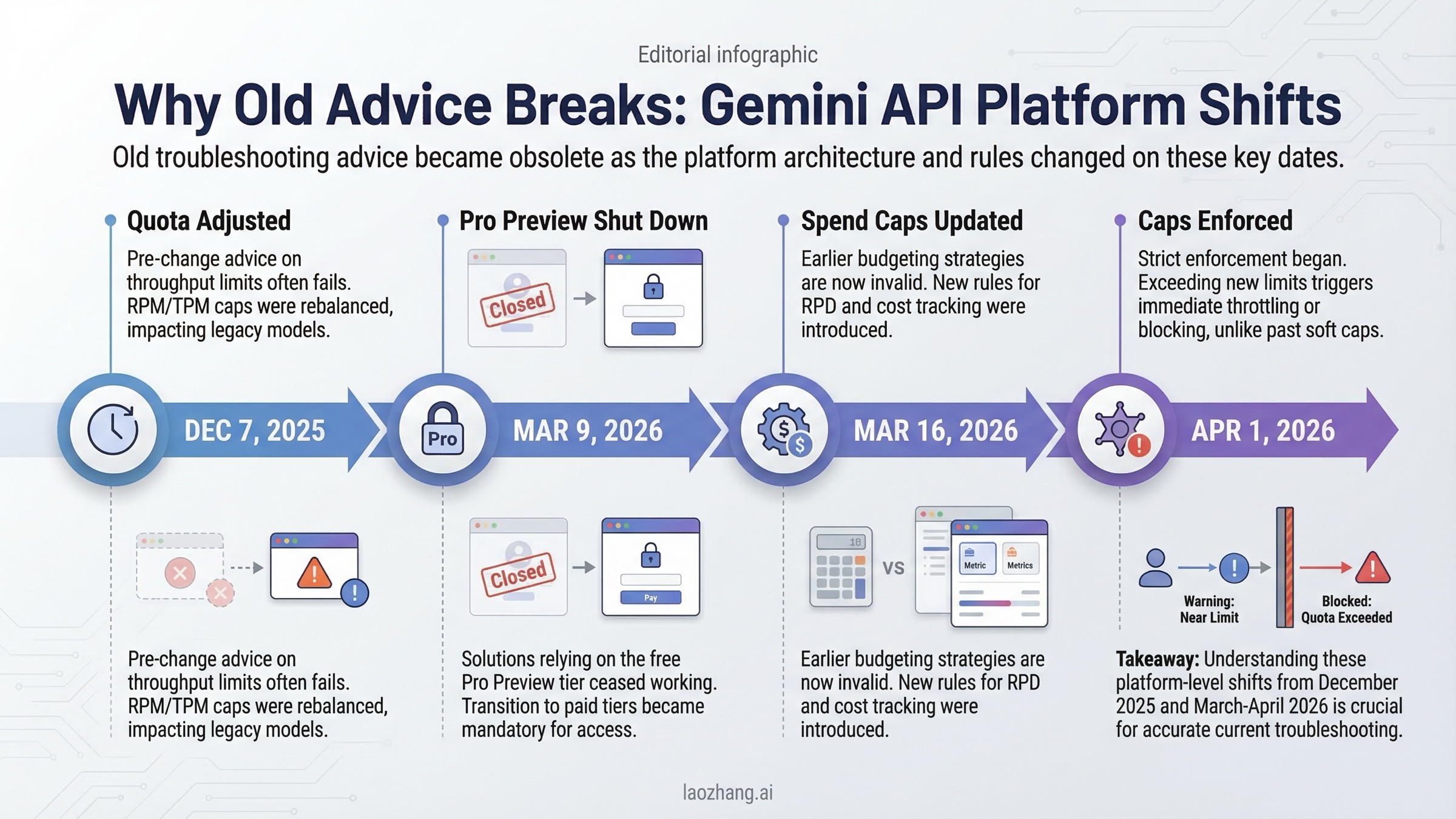
Many Gemini troubleshooting guides still assume a static platform. That assumption is wrong now. Several dated changes materially affect how you should interpret failures:
| Date | Change | Why it affects troubleshooting |
|---|---|---|
| December 7, 2025 | Gemini Developer API quota adjusted for Free Tier and Paid Tier 1 | Explains sudden 429 increases without app-level traffic changes |
| March 9, 2026 | Gemini 3 Pro Preview shut down | Old model names and aliases can surface as confusing request failures |
| March 12, 2026 | Project-level spend caps introduced in AI Studio | Budget controls became part of debugging, not just finance |
| March 16, 2026 | Usage tiers and billing-account spend caps revamped | Tier assumptions from older posts are no longer reliable |
| April 1, 2026 | Tier spend caps begin enforcement | Service suspension can look like random breakage if you miss the date |
This is why older "fix Gemini API errors" pages feel incomplete even when the generic advice is not technically wrong. They do not anchor the advice to exact dates, so users cannot tell whether they are looking at durable debugging rules or expired platform assumptions.
FAQ
Are failed Gemini requests billed?
Usually no for the cases in this article. Google's billing FAQ says requests that fail with a 400 or 500 error are not billed, but they still count against quota. That means aggressive blind retries can still hurt you even when they do not add direct token charges.
Do Gemini limits apply per API key or per project?
Treat them as project- and billing-account-level controls, not private capacity buckets per key. Google's billing docs explain that API keys inherit the billing state and tier of the linked project, so making another key inside the same project does not multiply your quota.
How long should a billing upgrade take?
Google's rate-limit docs say Free to Tier 1 upgrades typically take effect instantly, and later tier upgrades typically take effect within 10 minutes. If you enabled billing well before that and still get free-tier-looking failures, confirm you are using the intended project and key before blaming traffic volume.
When should I switch from Gemini 2.5 Pro to Gemini 2.5 Flash?
Switch when the same request works on Flash but not on Pro, when 500 failures correlate with very large prompts, or when you need the service back online faster than you need maximum reasoning quality. Google's own troubleshooting guide explicitly suggests switching models as a mitigation for some 500 and 503 cases.
Is there a single official page that solves every Gemini error?
No. The official troubleshooting page is the best starting point, but you still need the rate-limit, billing, pricing, and release-notes pages to diagnose the 2026 cases correctly. For a broader all-errors reference, see our complete Gemini API troubleshooting guide.