
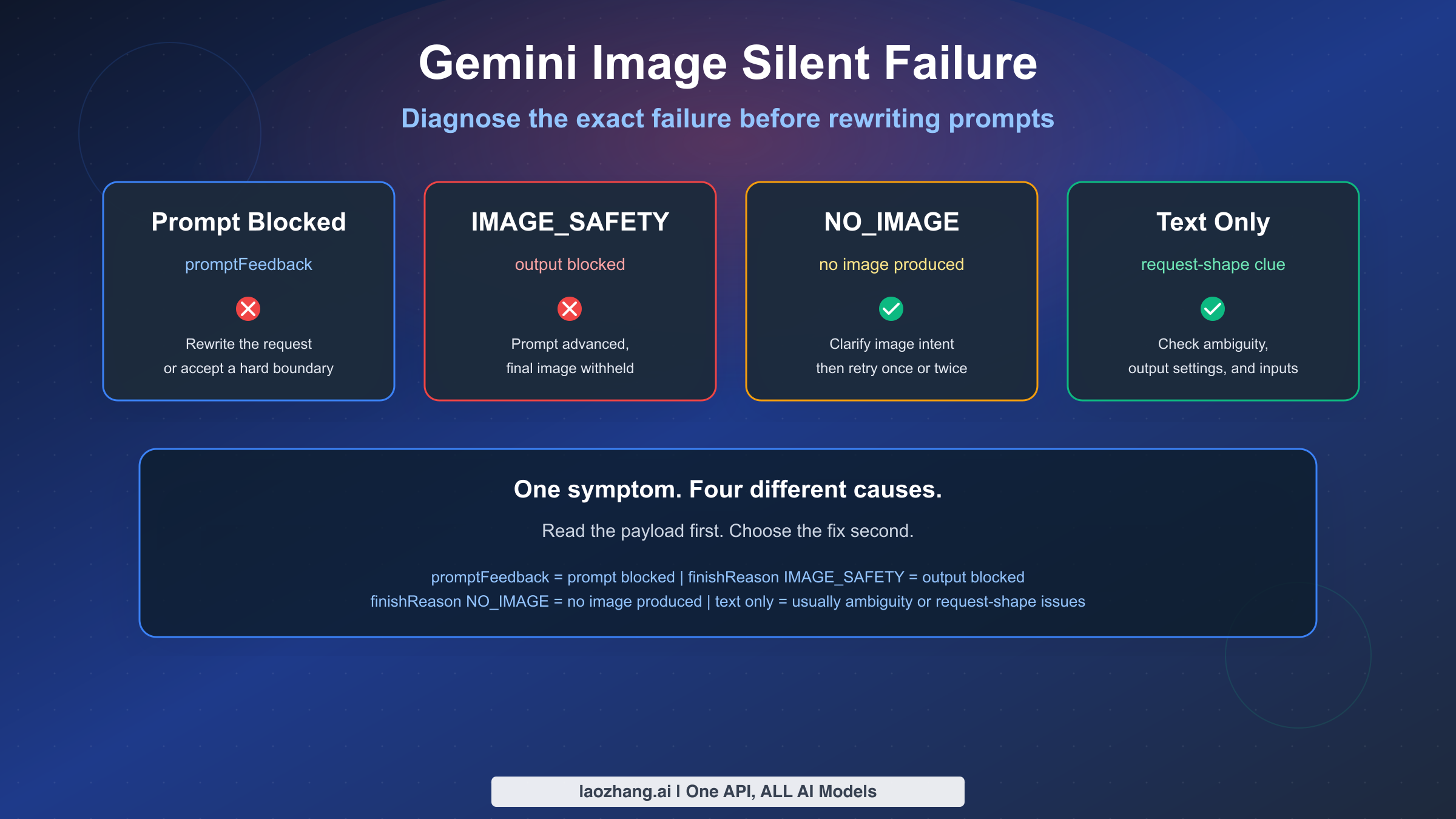
If Gemini image generation seems to fail silently, the most important thing to understand is that "silent failure" is usually not one single problem. As of March 15, 2026, Google's current documentation separates at least four different states that users often lump together: prompt-side blocking, output-side image blocking, no image produced at all, and non-policy failures such as ambiguous prompts or request-shape mistakes. If you treat all four as "Gemini content policy is broken," you will keep applying the wrong fix.
The short version is this: when the input prompt is blocked, promptFeedback is populated and candidates is not returned. When the prompt is accepted but the generated output image is blocked, Google says candidates exists, content is missing, and finishReason tells you why the response was stopped. A finishReason of IMAGE_SAFETY is not the same thing as NO_IMAGE, and neither is the same thing as a text-only refusal with STOP. Those distinctions matter because each one points to a different next step.
This guide focuses on the exact scenarios people search for with phrases like "Gemini image silent failure," "IMAGE_SAFETY fix," and "Gemini image content policy." It is built around current Google docs, not stale 2024 coverage about Gemini's people-generation controversy. It also uses recent Google AI Developers Forum threads from November and December 2025 to show where real-world failures still confuse users, especially when AI Studio or the Gemini API returns no useful image even though the prompt looks safe.
If you are dealing with a broader cross-model prompt refusal problem, not just Gemini image output, our prompt blocked safety warning guide covers ChatGPT, Gemini, Claude, and Azure at the policy level. This article is narrower and more technical: it is about diagnosing Gemini image failures correctly before you rewrite prompts, loosen filters, or assume the platform is down.
TL;DR
- Check the payload before changing the prompt.
promptFeedbackmeans the prompt was blocked before image generation completed. - If
candidatesexists butcontentis missing andfinishReasonisIMAGE_SAFETY, the image output was filtered after generation started. - If
finishReasonisNO_IMAGE, Gemini accepted the request but did not produce an image. That usually calls for clearer image instructions, a retry, or request-shape debugging. - A text-only reply is not always a policy failure. Google's current image generation limitations page says ambiguous prompts can return text and no image.
- Configurable safety settings do not disable all protection. Google's safety settings docs say built-in protections for core harms remain active and cannot be turned off.
- Do not treat 404, 429, and 503 failures as content-policy problems. If you are seeing those, start with our Gemini 3 Pro Image error-code guide.
| Quick diagnosis | Check this first | Meaning |
|---|---|---|
| Prompt blocked | promptFeedback.blockReason | The request was filtered before a usable image candidate was returned |
| Output blocked | candidates[0].finishReason = IMAGE_SAFETY and missing content | The prompt advanced, but the final image was withheld |
| No image produced | finishReason = NO_IMAGE | Gemini accepted the request but did not produce image output |
| Text-only response | Text parts and no image parts | Usually ambiguity, output settings, or request-shape issues |
How To Tell Whether Gemini Blocked The Prompt, Blocked The Image, Or Generated Nothing
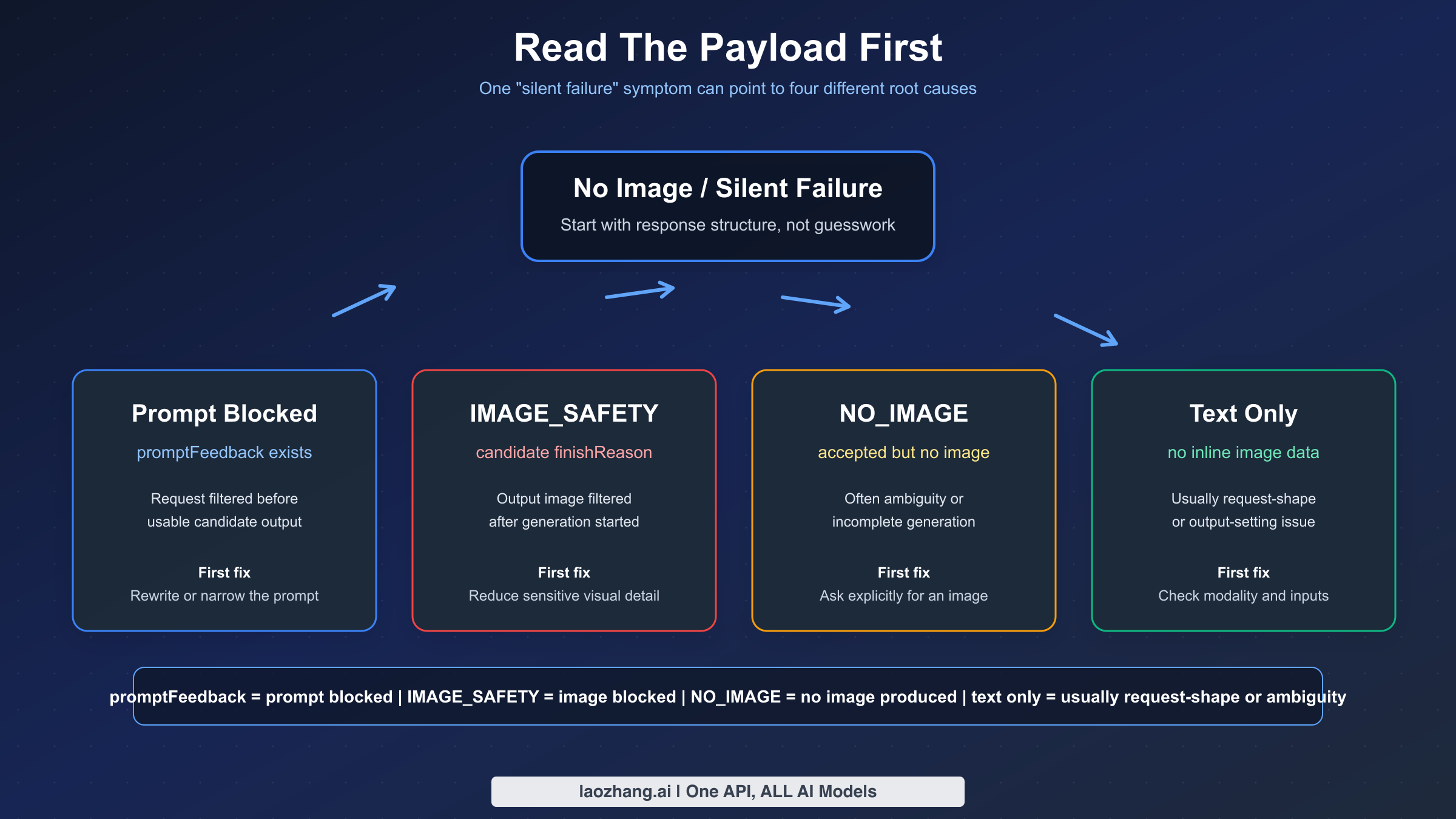
Most wasted debugging time comes from skipping classification. People see "no image," assume "content policy," then spend 20 minutes rewriting a prompt that was not actually the problem. Google's blocked response documentation gives a better workflow: inspect the structure of the response first and only then decide what kind of fix makes sense.
This is the fastest way to think about it:
| What you see | Typical API signal | What it usually means | First fix |
|---|---|---|---|
| Request fails before any usable candidate appears | promptFeedback.blockReason is present and candidates is absent | Prompt-side block before image output is returned | Rewrite the prompt, add safe context if appropriate, or accept that the request hits a prohibited boundary |
| Text refusal instead of an image | candidates[0].finishReason = STOP and the response contains text rather than image data | The model refused or safely redirected the request | Read the text, remove sensitive visual intent, or separate the task into safer stages |
No image data and IMAGE_SAFETY | candidates exists, content is missing, finishReason = IMAGE_SAFETY | The prompt was accepted, but the output image was filtered | Reduce sensitive visual detail, clarify benign intent, and do not assume safety settings can override everything |
No image data and NO_IMAGE | finishReason = NO_IMAGE | Gemini did not actually produce an image | Ask explicitly for an image, reduce ambiguity, retry once or twice, and check request shape |
| Text-only reply with no obvious policy marker | Response contains text but no inlineData image part | Often an ambiguous prompt, a missing image output setting, or a transport bug | Explicitly request image output and verify your request config |
| 404, 429, or 503 | HTTP error instead of an image candidate | Model routing, quota, or overload issue, not content policy | Use the correct operational guide instead of prompt rewrites |
Google's current Vertex AI docs make a clean distinction between prompt blocking and response blocking. If the prompt itself is blocked, promptFeedback is populated and there is no candidate to inspect. If the response is blocked, promptFeedback is absent, candidates is present, and the missing content plus finishReason tells you what happened. That is why a UI-level message like "couldn't generate image" is too coarse to diagnose the issue by itself. The API payload is usually more informative than the product copy.
This also explains why some users call the problem "silent." The payload may not be silent, but the surface they are using can still feel silent. In AI Studio, the Gemini app, or a thin integration layer, the product may show a generic error or no image slot at all. If you can reproduce the request through the API or Vertex and inspect the full response, you often learn whether the system blocked the prompt, blocked the image, or simply never produced one.
If you only have AI Studio or app symptoms and no raw payload, use this quick fallback sequence before escalating:
- Start a fresh session and ask explicitly, "Generate an image of..." instead of sending a short noun phrase.
- Try a tiny benign test prompt such as "Generate an image of a red ceramic mug on a wooden table."
- If the benign test works, your original prompt or prior chat context is the likely cause.
- If the benign test also fails, check whether the same request works through API or Vertex, or treat the issue as a broader product-surface problem instead of a prompt-only issue.
For teams, this classification step should become an invariant. Never log only "image generation failed." Log the model ID, request surface, whether promptFeedback existed, whether candidates existed, the final finishReason, whether any inlineData image parts were returned, and the exact UTC timestamp. Without that data, policy bugs, rollout regressions, and ordinary prompt ambiguity all look the same in incident review.
What IMAGE_SAFETY, NO_IMAGE, and STOP Actually Mean
Google's current Gemini API reference is unusually important for this topic because it tells you which enums belong to prompt blocking and which belong to candidate completion. That split is the foundation of a correct diagnosis.
Prompt-side blocking uses BlockReason values. As of the official reference last updated on January 12, 2026, those include SAFETY, BLOCKLIST, PROHIBITED_CONTENT, and IMAGE_SAFETY. Candidate-side completion uses FinishReason values. For image use cases, the ones that matter most are IMAGE_SAFETY, IMAGE_PROHIBITED_CONTENT, IMAGE_OTHER, NO_IMAGE, and IMAGE_RECITATION. Even if the words look similar, they do not mean the same thing in the same place.
Start with STOP, because it is the one that confuses people most. On Google's responsible AI page for Gemini image generation, Google explains that a potentially unsafe image request can produce a text refusal with FinishReason = STOP. In other words, the system may not be saying "filter error." It may be saying "I am not going to create that image" in normal model text. This is why text-only replies need to be read, not ignored.
IMAGE_SAFETY is different. When you see finishReason = IMAGE_SAFETY, the request got further than a prompt block. Google documents this as an output-side safety stop. The prompt was accepted far enough to produce a candidate record, but the final image content was withheld. This is why many users feel like Gemini "started, then silently failed." In practice, the image candidate exists conceptually, but the content was not released.
NO_IMAGE is different again. It does not automatically mean "policy." It means no image was produced. That can happen because the request was ambiguous, because the model chose text rather than image behavior, because a generation attempt did not complete usefully, or because something in the request shape or transport prevented a valid image response. Google's current image generation limitations page explicitly says Gemini can create text and no image when the prompt is ambiguous, and that the model can stop before it finishes. Those are operational fixes, not policy interpretations.
IMAGE_OTHER is the least satisfying enum because it is broad. In practice, treat it as a catch-all bucket that tells you the request did not end in a normal image output and the immediate next step is to inspect context: prompt wording, model surface, request payload, number of reference images, and whether the issue is reproducible across regions or sessions. It is a reason to log more context, not a reason to guess wildly.
IMAGE_PROHIBITED_CONTENT is stronger than IMAGE_SAFETY. It points toward a prohibited category, not just a tunable safety classification. Google's Vertex safety filter guide makes the broader point that some categories are non-configurable, especially where prohibited material is concerned. If you run into IMAGE_PROHIBITED_CONTENT, you should not think in terms of "how do I make this pass." You should think in terms of "this request is crossing a policy line."
One subtle but important detail: the same label can appear in different layers. IMAGE_SAFETY can appear in prompt-side BlockReason and candidate-side FinishReason. That is why you cannot diagnose from the enum string alone. You need to know where it appeared. Did the model ever return a candidate? Was promptFeedback populated? Was content missing? Those structural clues matter more than the word by itself.
The practical rule is simple:
promptFeedbackpresent: start with prompt-side classification.finishReason = STOP: read the refusal text and treat it as a model refusal.finishReason = IMAGE_SAFETY: treat it as output filtering.finishReason = NO_IMAGE: treat it as accepted-but-no-image-produced until proven otherwise.
That framing will solve more cases than any generic "rewrite your prompt" advice.
Fast Fixes For Text-Only Replies And Other Non-Policy Silent Failures
Google's current Gemini image generation limitations page is the most useful official page for this section because it confirms something many developers only learn from trial and error: some no-image outcomes are not policy refusals at all. They are generation-shape problems. If you skip this section and jump straight to policy tuning, you will misdiagnose a lot of failures.
The first fix is embarrassingly simple but works surprisingly often: explicitly ask for an image. If your prompt reads like analysis, brainstorming, or caption writing, Gemini may return text. Google's own wording says the model might only create text and no image if the prompt is ambiguous. So instead of saying, "A calm Japanese storefront at dusk," say, "Generate an image of a calm Japanese storefront at dusk, cinematic photo style, 16:9 composition." That one additional instruction can change the model's mode selection.
The second fix is to verify you actually requested image output in the way your SDK expects. Different SDKs name the same field slightly differently, but the idea is the same: ask for image output, not just a generic multimodal completion. If you are using the new Gemini SDK and forget the image response modality, the model can still answer with text because from its perspective you asked a general content-generation question, not a strict image-generation question.
Here is a minimal Python example that makes the image intent explicit:
pythonfrom google import genai
from google.genai import types

client = genai.Client(api_key="YOUR_API_KEY")

response = client.models.generate_content(
    model="gemini-2.5-flash-image",
    contents="Generate an image of a ceramic coffee cup on a walnut desk, soft morning light, editorial product photo.",
    config=types.GenerateContentConfig(
        response_modalities=["IMAGE"]
    )
)
If your response is text-only, do not stop at "Gemini is broken." Inspect the parts that came back. If you only received text parts and no inlineData, you are looking at a mode-selection or request-shape issue until the payload proves otherwise.
The third fix is to retry incomplete generations in a disciplined way. Google's image generation limitations page, last updated on March 14, 2026, says the model might stop generating content even when it is not finished and specifically recommends retrying or changing the prompt. This is not permission to retry blindly 30 times. It means a small number of controlled retries is reasonable when the payload suggests incomplete generation rather than a policy stop. In practice, one immediate retry and one prompt-adjusted retry are enough to tell you whether the failure is transient.
The fourth fix is to reduce ambiguity created by mixed tasks. Many failing prompts ask Gemini to analyze, summarize, compare, and generate an image all in one turn. That increases the chance of a text-first answer, especially in chat-style integrations. Separate these jobs. If you need the model to understand an image and then generate a new one, do the reasoning step first and the generation step second. The more single-purpose the request is, the easier it is to diagnose when something goes wrong.
The fifth fix is to examine how image inputs are sent. One useful forum thread from November 3, 2025 reported that image-to-image editing worked with inlineData but returned only text when the request used fileData in a specific way. The Google forum responder showed a working upload pattern, and the original poster later confirmed the flow worked. The takeaway is not "never use files." The takeaway is that request transport can change behavior, and a text-only result does not automatically mean content policy. If fileData fails and inlineData works with the same benign prompt, you are likely dealing with an integration issue, not a moderation verdict.
The sixth fix is to respect documented image-input limits. Google's current limitations page says Gemini 2.5 Flash Image performs best with at most 3 input images, while Gemini 3 Pro Image should stay at or below 14 input images. If you stuff too many references into one request, you make the system harder to interpret and harder to debug. Even if the hard limit is not hit, complex reference stacks increase the chance of malformed or unusable outputs. For silent-failure triage, fewer reference images make reproduction easier.
The seventh fix is to check the obvious operational layer before revising content. If the exact same prompt and payload worked yesterday and now fails with 404, 429, or 503, you are not looking at a content policy shift. You are looking at routing, quota, or capacity. That is why we recommend pairing this article with our Gemini 3 Pro Image stable-channel guide when the problem looks systemic rather than prompt-specific.
Finally, do not ignore chronology. If a safe prompt suddenly stops working in a narrow time window and several forum users report similar symptoms, that is a regression clue. A November 25, 2025 Google AI Developers Forum thread described benign photo workflows failing with little or no policy explanation and then partially recovering within roughly 48 hours. That is not proof for every case, but it is a reminder that platform behavior changes over time. Sometimes the right fix is not "invent a better euphemism." It is "log the exact timestamp, create a minimal repro, and verify whether the regression is broader than your account."
Fast Fixes For IMAGE_SAFETY And Prompt Blocks That Stay Within Policy
This section is where a lot of online advice becomes sloppy. Telling users to "bypass Gemini safety" is both bad guidance and inconsistent with Google's Generative AI Prohibited Use Policy, which explicitly forbids attempts to circumvent abuse protections or safety filters. The right question is not "how do I sneak around the filters?" The right question is "how do I express a legitimate request clearly enough that Gemini can classify it correctly?"
Start with benign context, not coded wording. If your prompt is actually for ecommerce, catalog work, medical education, or a historical scene, say that directly. Do not replace sensitive terms with euphemisms and hope the model guesses your benign intent. Direct but safe context generally works better than clever avoidance language because the model has more signal for classification.
For example, if you are editing fashion or product imagery, avoid vague prompts like "make this more sexy" or "adult vibe," which can drag a benign request toward sexually explicit interpretation. A safer and clearer version is something like: "Create a studio ecommerce photo of a beige cotton sports bra on a white seamless background, catalog lighting, no model, no pose emphasis, retail product style." The second version is still commercially useful, but it removes a lot of ambiguous cues that can push the request into IMAGE_SAFETY.
If you are working on a legitimate medical, safety, or historical use case, move the goal closer to explanation and farther from graphic depiction. Requests that explicitly ask for blood, injury detail, humiliation, or erotic framing are much harder to defend as benign even if your broader project is legitimate. Where possible, ask for diagrams, non-graphic illustrations, labeled educational layouts, or before/after process visuals rather than photorealistic harm.
A second benign rewrite pattern outside fashion is to replace scene-level ambiguity with audience and format. Instead of asking for "a protest injury scene from history," which can collapse into violence classification, try "Create a non-graphic educational illustration for a museum panel about 1960s civil-rights history, poster style, no visible wounds, focus on crowd signage and police barriers." That kind of rewrite does not promise approval, but it gives the model a safer, clearer output target than a vague dramatic scene request.
Prompt-side blocks and output-side IMAGE_SAFETY stops need slightly different mental models. When the prompt itself is blocked, the system is telling you the request should not advance as stated. When the prompt is accepted but the final image is blocked, the system is telling you the generated visual outcome crossed a boundary even though the input text was not rejected at the gate. The practical response in both cases is to remove ambiguous or sensitive visual cues, but output-side blocking especially benefits from reducing realism, lowering sensual framing, removing body-emphasis details, or reframing the scene around the non-sensitive object rather than the edge-case visual.
Here are safe prompt-rewrite patterns that usually help without drifting into circumvention:
| Risky pattern | Why it causes trouble | Safer rewrite pattern |
|---|---|---|
| Vague adult or sensual framing | The model has to guess whether the request is erotic or commercial | Specify catalog, studio, editorial, mannequin-free, no pose emphasis, or product-only framing |
| Graphic violence details | Even legitimate projects can read as harmful visual generation | Ask for a non-graphic diagram, aftermath-free illustration, or educational layout |
| Mixed analysis and generation | Gemini can return text or a refusal instead of a clean image flow | Separate planning into one turn and image generation into a second turn |
| Minimal prompt with emotionally loaded nouns | Short prompts give the safety system little benign context | Add subject, setting, lighting, purpose, audience, and style in plain language |
Another important fix is to isolate the image task from surrounding conversation context. In long chats, the model sees more than your last line. If earlier turns discussed violence, sexuality, trauma, crime, or safety-sensitive topics, a later image request can inherit that context. If a prompt unexpectedly starts failing, try a fresh session with only the exact image-generation instruction and the minimum required source image. This is one of the cleanest ways to distinguish context pollution from a hard policy boundary.
Also remember that "worked before" is not the same as "should always work." Community evidence from December 24, 2025 shows that legitimate ecommerce underwear prompts could still end in IMAGE_SAFETY on Vertex AI Studio, even after the user said configurable sexual-content settings were relaxed. That does not mean Google's docs are wrong. It means output-side filtering can still overrule what a user expects adjustable settings to cover. The correct article stance is not "Google ignores its own controls." The correct stance is "adjustable settings exist, but built-in and output-level protections can still decide the image should not be returned."
If your use case is plainly inside a prohibited category, stop there. Google's policy boundaries are not there to be prompt-engineered away. If your use case is legitimate and still being blocked, document the exact model, region, date, payload signal, and sanitized prompt, then escalate with that information. Precision is more useful than ten more rewrite attempts.
What Gemini Safety Settings Can Change And What They Cannot
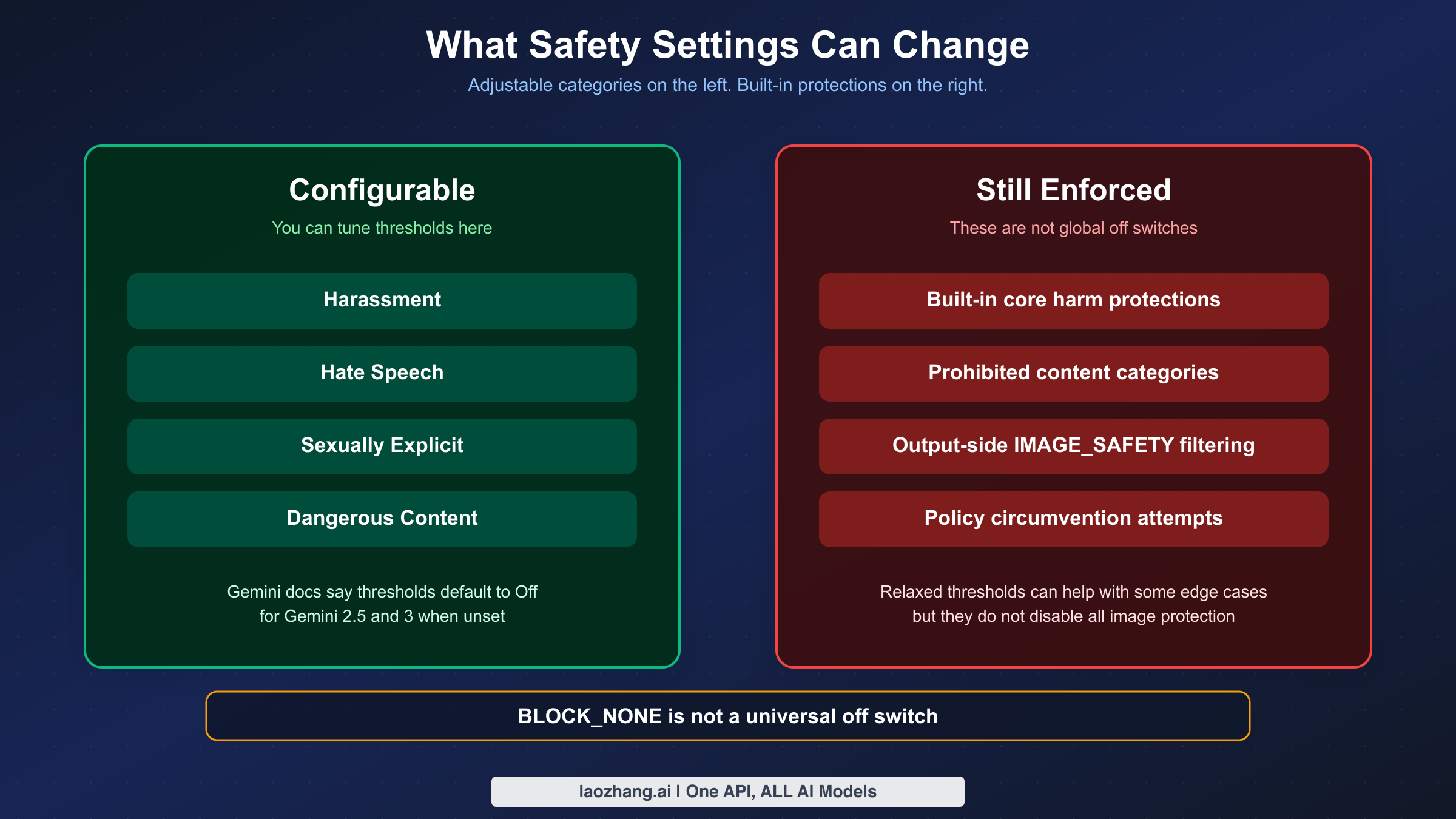
This is the section where many ranking pages get the story half right and therefore become misleading. Yes, Gemini has configurable safety settings. No, that does not mean every image refusal is tunable.
Google's current safety settings documentation, last updated on January 15, 2026, says the adjustable categories cover four areas: harassment, hate speech, sexually explicit content, and dangerous content. That sounds broad, but the same page also says there are built-in protections against core harms that cannot be adjusted at all. In plain English, you can tune some filters, but you cannot turn the whole safety system off.
The same official page also says that if you do not set a threshold explicitly, the default block threshold is Off for Gemini 2.5 and 3 models. This detail matters because many older tutorials still tell users to set the most permissive threshold manually just to get basic image generation working. As of the current doc state, that assumption is outdated. If you are not seeing the result you want, the cause is often not "you forgot to relax the thresholds." It is more likely ambiguous prompting, output-side filtering, or a non-adjustable protection.
Use the control surfaces table below as a reality check:
| Control surface | What you can change | What you cannot change | Common mistake |
|---|---|---|---|
| Gemini API safety settings | Thresholds for harassment, hate speech, sexually explicit content, and dangerous content | Built-in protections for core harms | Assuming BLOCK_NONE disables everything |
| Vertex AI safety filters | Harm thresholds and some filter handling behaviors depending on surface | Non-configurable prohibited-content categories | Treating every blocked image as a threshold bug |
| Product UI settings in tools like AI Studio | Surface-specific convenience toggles or defaults | Underlying platform-level policy boundaries | Assuming UI labels map 1:1 to raw API behavior |
| Prompt rewriting | Context, specificity, benign framing, visual emphasis | Policy-prohibited requests | Confusing clarity with circumvention |
Google's Vertex AI safety documentation adds another important nuance: prompt rejection codes can include PROHIBITED_CONTENT, and blocked responses can end in safety-related finish reasons while the blocked content itself is withheld. That means there are layers to enforcement. A request can fail because of a configurable category, a non-configurable category, or the final generated output itself. If you are only looking at one knob, you are seeing only part of the system.
This is the right way to talk about BLOCK_NONE or other permissive thresholds in 2026: they can reduce additional configurable blocking for certain categories, but they are not a master override for all image-safety behavior. If you see a legitimate request still returning IMAGE_SAFETY, that is not automatically evidence of a broken setting. It may simply mean the output-level classifier or a built-in protection still decided not to release the image.
For teams building product flows on top of Gemini, the engineering implication is clear. Treat safety settings as one input to the system, not the whole system. Build logging and UX that can explain, "This request hit an output-side image safety block," not just, "Generation failed." The more accurately your product names the failure, the less likely users are to assume your app is flaky or dishonest.
API, AI Studio, Vertex AI, And App Failures Are Not Identical
Many bad articles talk about "Gemini" as if there is one universal product surface. There is not. The same underlying model family can feel very different depending on whether you are using the raw Gemini API, Vertex AI, AI Studio, or the consumer Gemini app.
The raw API and Vertex AI are the best places to debug because they let you inspect payload structure. You can see promptFeedback, candidates, missing content, and finishReason. That is why technical diagnosis should start there whenever possible. If you are only using a UI layer, you are debugging from symptoms rather than evidence.
AI Studio sits in the middle. It is close enough to the platform to be useful, but it is still a product surface with its own UX choices, release cadence, and occasional regressions. That is why two people can report "Gemini silently failed" while only one of them is actually hitting a policy block. The other may be hitting a request-shape bug, a product regression, or a surface-specific behavior that the API would make clearer.
The consumer Gemini app is even further removed from the payload. App availability, plan entitlements, feature rollout state, and UI-level limits can all affect whether image creation appears to work. If you are debugging a serious workflow, do not rely on app symptoms alone. Reproduce through the API or AI Studio when possible so you can see whether the issue is policy, capability, or product-surface behavior.
Region and model availability also complicate the picture. A community thread from April 20, 2025 reported that switching to the us server location resolved a gemini-2.0-flash-exp-image-generation not-found error. That is not a content-policy issue, but users often experience it as "Gemini image not working." The lesson is broader than the specific experimental model: region, routing, and deployment state can mimic policy failures in user perception.
The same goes for quota and overload. A user hitting 429 or 503 can still describe the outcome as "nothing was generated." If your logs show quota exhaustion or service unavailability, stop thinking about content policy. Start with quota and capacity. We cover those separately in our Gemini API rate-limit guide and the related Gemini image error-code article linked earlier.
The best practice for support teams is to ask three questions before suggesting any prompt fix:
- Which surface are you using: API, Vertex AI, AI Studio, or app?
- Do you have the raw payload or only a UI message?
- Is the failure reproducible with a minimal benign prompt in a fresh session?
Those three questions separate half of the false "content policy" tickets from genuine safety false positives.
Troubleshooting Workflow You Can Reuse
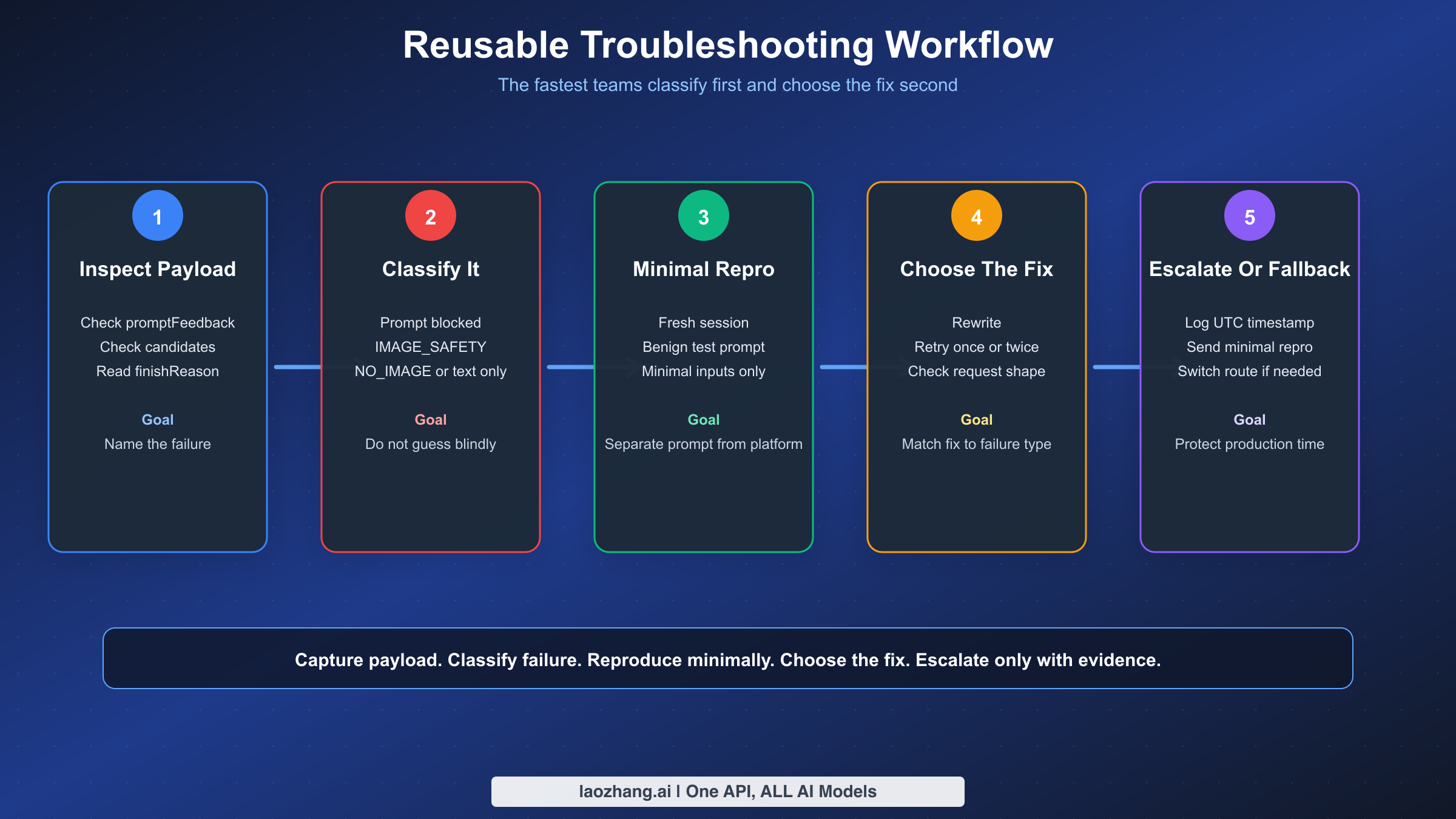
Once Gemini image generation matters to a real workflow, you need a repeatable process instead of intuition. The fastest teams are not the ones with the best prompt hacks. They are the ones that classify failures consistently and collect enough evidence to tell prompt issues from platform issues.
Start with a tiny classifier in your application logs. This is not elegant theory. It is operational hygiene.
pythondef classify_gemini_image_result(resp):
    if getattr(resp, "prompt_feedback", None):
        return {
            "kind": "prompt_blocked",
            "block_reason": getattr(resp.prompt_feedback, "block_reason", "UNKNOWN"),
        }

    candidates = getattr(resp, "candidates", None) or []
    if not candidates:
        return {"kind": "no_candidates"}

    candidate = candidates[0]
    finish_reason = getattr(candidate, "finish_reason", "UNKNOWN")
    content = getattr(candidate, "content", None)
    parts = getattr(content, "parts", None) if content else None

    has_inline_image = False
    has_text = False
    if parts:
        for part in parts:
            if getattr(part, "inline_data", None):
                has_inline_image = True
            if getattr(part, "text", None):
                has_text = True

    return {
        "kind": "candidate_returned",
        "finish_reason": finish_reason,
        "has_inline_image": has_inline_image,
        "has_text": has_text,
        "content_missing": content is None,
    }
The code does not need to be sophisticated. It just needs to answer six questions every time:
- Was
promptFeedbackpresent? - Were any
candidatesreturned? - What was the final
finishReason? - Was
contentmissing? - Did any image
inlineDatacome back? - Did the model return text instead of an image?
Once you have that classification, the rest of the workflow becomes much more reliable.
| If you see | Do this next | Do not do this |
|---|---|---|
promptFeedback with a block reason | Review prompt semantics and policy fit | Keep retrying the exact same prompt blindly |
finishReason = IMAGE_SAFETY | Reduce sensitive visual detail and verify the use case is clearly benign | Assume safety thresholds will override everything |
finishReason = NO_IMAGE | Make image intent explicit, simplify the prompt, retry once, and inspect request shape | Treat it as a guaranteed content-policy block |
| Text-only reply | Read the reply, confirm image output settings, and separate mixed tasks | Conclude that the model ignored your prompt on purpose |
| 404, 429, or 503 | Move to routing, quota, or capacity troubleshooting | Spend an hour rewriting content policy terms |
Here is the workflow we recommend in production:
- Capture the raw response payload, not just the user-facing error string.
- Classify the failure using the structural fields above.
- Reproduce with a minimal benign prompt in a fresh session.
- If the minimal benign prompt works, the issue is likely prompt wording or chat context.
- If the minimal benign prompt fails the same way, inspect request shape, region, model ID, and current platform status.
- If the behavior changed suddenly on the same payload, record the exact UTC time and surface for escalation.
- Only after classification should you decide whether to rewrite, retry, wait, or switch routes.
Also log the variables that actually help in root-cause analysis:
- model ID
- surface used
- region or endpoint
- number of reference images
- whether inputs were
inlineDataor files - whether image output modality was requested
- prompt hash
- UTC timestamp
- SDK version or client version
That data will save you every time a regression appears. When support asks, "Can you reproduce?" you will already know. When a forum thread suggests a rollout bug, you will know whether your failures line up by date and surface. And when a failure turns out to be a simple request-shape issue, you will not waste a week calling it a safety problem.
When To Wait, Escalate, Or Use A Fallback Route
Not every failure deserves the same response. Some deserve a prompt rewrite. Some deserve one retry. Some deserve escalation. And some deserve an architectural fallback so your product keeps working even when Google's image behavior shifts.
Wait and retry when the evidence points to incomplete generation rather than a firm block. Google's image limitations page explicitly says generation can stop before it is finished. That is a green light for a limited retry strategy. The right version of this is controlled: retry once immediately, then once with a slightly clearer prompt. If the same classified failure repeats, stop treating it as transient.
Rewrite when the payload shows a prompt block or an output-side IMAGE_SAFETY result on a use case that is still legitimate and potentially classifiable as benign. This is where added context, less ambiguous visual framing, and reduced sensitivity cues can help. If the use case is close to a prohibited line, rewriting may not help and should not be treated as an evasion game.
Escalate when a previously working benign workflow breaks suddenly, especially if:
- the same minimal prompt used to work
- the failure started within a narrow time window
- multiple users or forum threads report similar behavior
- the issue reproduces across fresh sessions
When escalating, send a minimal but complete repro:
- model name
- surface
- region
- exact timestamp
- sanitized prompt
- whether
promptFeedbackexisted finishReason- whether
contentwas missing
That makes your report usable. "Gemini silently failed again" does not.
Use a fallback route when your business cannot tolerate platform ambiguity. For some teams that means routing certain classes of image jobs to a different Gemini image model. For others it means maintaining a second provider or relay path. The point is not that another route is magically less safe. The point is that a production system should not have exactly one narrow dependency for all image work if silent failures directly affect customer experience.
If your real problem is production continuity rather than consumer app usage, a relay layer can be reasonable. laozhang.ai is one OpenAI-compatible relay option for teams that want unified API routing instead of one official endpoint. That is not a fix for prohibited requests, and it should not be framed that way. It is an operations choice for reliability, integration consistency, or multi-model routing. If that is your concern, compare the channel tradeoffs first instead of treating policy and routing as the same problem.
The broader lesson is that "Gemini image silent failure" is not a single bug class. Sometimes the right answer is "your prompt crossed a line." Sometimes the right answer is "your payload shape is wrong." Sometimes the right answer is "Google accepted the prompt but filtered the final image." And sometimes the right answer is "the model did not produce an image at all." The faster you name the right class, the faster you stop wasting time on the wrong fix.
One more production habit is worth adopting: keep a sanitized repro pack for every image-safety incident that reaches a customer. The pack should contain the model name, UTC timestamp, region, request surface, whether the request used text only or image editing, the number of reference images, whether those references were sent as uploaded files or inline image data, the final block or finish reason, and a prompt hash plus a human-readable redacted prompt. That sounds tedious, but it turns a fuzzy complaint into an actionable engineering artifact. It also lets you compare incidents across weeks and see whether a change is tied to one surface, one model family, one prompt template, or one new product release.
The same repro pack is useful when you need to decide whether to stay on the official route or add fallback capacity. If 95% of your failures are clearly prompt-side blocks, more routing layers will not solve the underlying issue. If the failures cluster around incomplete generations, text-only replies, or sudden surface regressions that disappear on a different route, then operational redundancy starts to make sense. This distinction protects teams from buying infrastructure to solve what is really a prompt-design problem and protects them from blaming prompts for what is really an availability problem.
FAQ
The most useful mental model is simple: classify first, fix second. Google's current docs, checked between January 12, 2026 and March 14, 2026, already tell us that Gemini image failures split into prompt-side blocks, output-side blocks, no-image outcomes, and non-policy generation problems. Once you read the payload through that lens, IMAGE_SAFETY, NO_IMAGE, and text-only replies stop looking like one mysterious content-policy blob.
The other key insight is that configurable safety settings are only part of the picture. Google's official safety settings page says adjustable thresholds exist for four main categories, but built-in protections for core harms remain active and are not user-adjustable. That is why a relaxed setting does not guarantee a safe-looking edge case will pass, and why some legitimate workflows still need careful prompt framing or escalation when behavior changes.
If you remember only one thing from this article, remember this: promptFeedback tells you the prompt was blocked, finishReason = IMAGE_SAFETY tells you the output image was blocked, and finishReason = NO_IMAGE tells you Gemini did not actually produce an image. Those are three different operational branches, and treating them as one is why so many Gemini image troubleshooting sessions go in circles.
Why does Gemini return text instead of an image?
The most common reasons are ambiguous prompts, missing image output configuration, or a mixed task that invites a text answer. Google's current image limitations page explicitly says Gemini may create text and no image if the prompt is ambiguous.
Why does BLOCK_NONE or a relaxed safety setting not fix IMAGE_SAFETY?
Because Google's official safety settings docs say built-in protections for core harms cannot be adjusted. Relaxing configurable thresholds does not disable all output-side image filtering.
What is the difference between IMAGE_SAFETY and NO_IMAGE?
IMAGE_SAFETY means the output image was blocked after the request advanced far enough to produce a candidate record. NO_IMAGE means no image was produced. The right fix for NO_IMAGE is often clarity or retry, not policy reinterpretation.
Why did a prompt that worked last week suddenly stop working?
Possible causes include platform regressions, changed model behavior, altered surface defaults, accumulated chat context, or a new request-shape issue. Recent late-2025 forum threads show that benign image workflows can change behavior across updates, so record the exact date, surface, and payload details before assuming the prompt itself is at fault.
Is it safe to keep retrying the same failing request?
For incomplete or ambiguous no-image results, one or two controlled retries are reasonable. For prompt blocks or clear IMAGE_SAFETY stops, repeated identical retries usually add no value. Reclassify, rewrite, or escalate instead.
Official sources used: blocked responses on Vertex AI, Gemini API reference, Gemini safety settings, Gemini image generation limitations, Gemini image generation and responsible AI, and Google's Generative AI Prohibited Use Policy.