
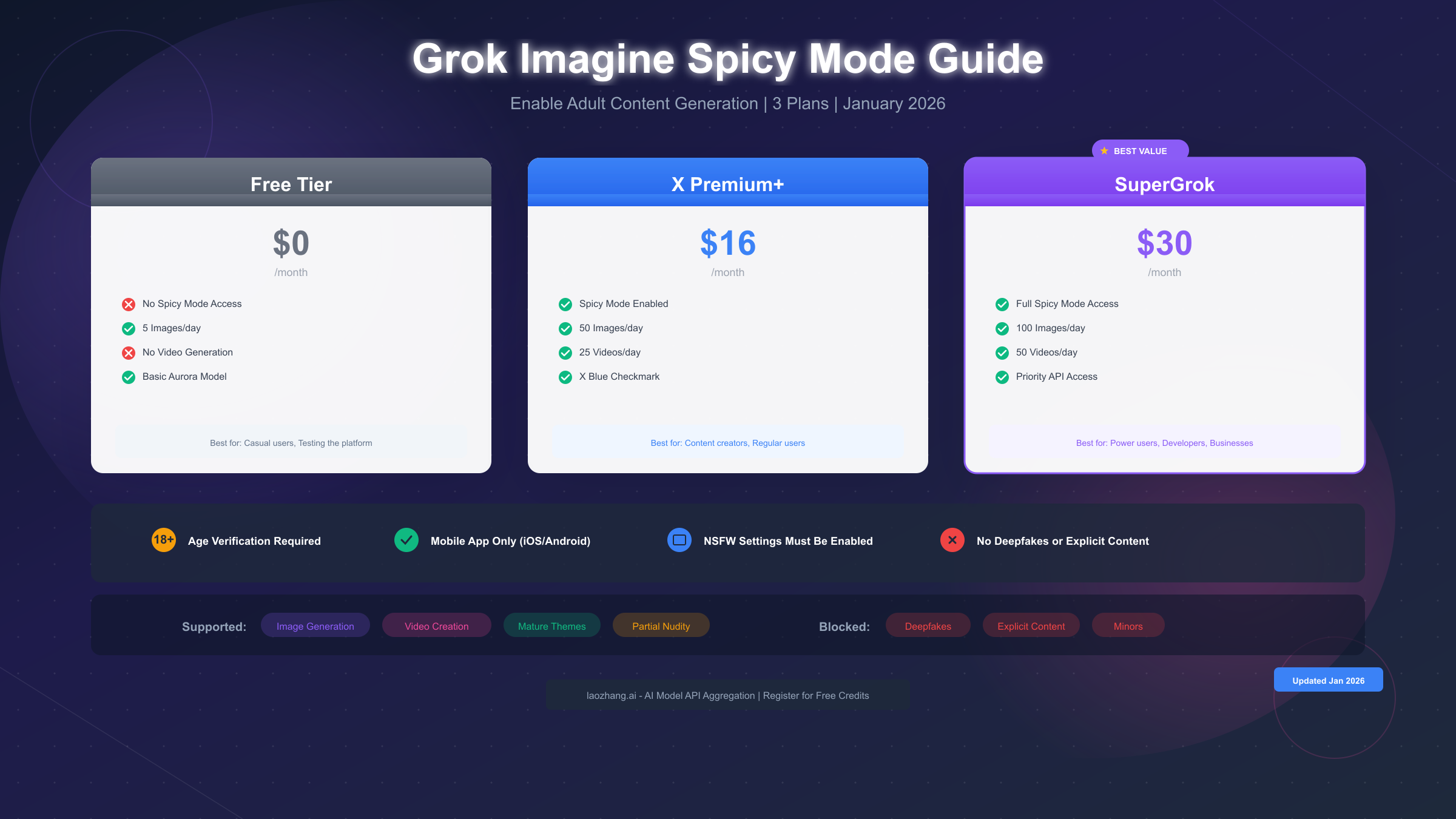
Grok Imagine Spicy Mode is xAI's adult content generation feature that allows creating suggestive images and videos within the Grok app. To enable it in January 2026, you need a SuperGrok or X Premium+ subscription starting at $16/month, complete age verification confirming you're 18 or older, and toggle NSFW settings in your Content Preferences. The mode supports partial nudity and mature themes while blocking explicit content, deepfakes, and any content involving minors. This feature is available exclusively on iOS and Android mobile apps, with the web version offering limited functionality.
What is Grok Imagine Spicy Mode?
Grok Imagine represents xAI's ambitious entry into the AI-powered image and video generation space, launched in August 2025 as part of the broader Grok ecosystem. Unlike traditional image generators that operate with strict content moderation, Grok Imagine introduced a distinctive feature called "Spicy Mode" that pushes the boundaries of what AI content generation platforms typically allow, positioning itself as a more permissive alternative to competitors like DALL-E, Midjourney, and Stable Diffusion.
At its core, Grok Imagine utilizes Aurora, xAI's cutting-edge autoregressive mixture-of-experts neural network that was trained on billions of examples from the internet. According to xAI's official documentation (https://x.ai/news/grok-image-generation-release ), Aurora combines deep understanding of visual concepts with sophisticated generation capabilities, producing images with remarkable photorealism and creative flexibility. The model can generate multiple images from a single text prompt and supports image-to-video conversion, creating short animated clips of up to 15 seconds with native audio support.
Spicy Mode specifically unlocks the ability to generate content with mature themes that would normally be filtered or rejected by other AI image generators. This includes suggestive poses, partial nudity, intimate scenarios, and what xAI describes as "bolder tones and cinematic atmospheres." The feature was quietly released alongside the main Grok Imagine launch, though it requires explicit opt-in and verification steps to access, reflecting xAI's attempt to balance creative freedom with responsible content moderation.
The technical infrastructure behind Spicy Mode differs from the standard generation pipeline. When activated, the system adjusts several internal parameters including content filtering thresholds, stylistic enhancement layers, and motion algorithms for video generation. Users have reported that Spicy Mode produces notably different visual characteristics: warmer color grading, more dramatic lighting, and smoother animation transitions compared to the standard modes labeled Normal, Fun, and Custom.
Understanding the distinction between what Spicy Mode allows versus prohibits is crucial before attempting to use it. The feature permits mature artistic expression including romantic or sensual imagery, suggestive clothing and poses, and thematic content suitable for adult audiences. However, it maintains strict prohibitions against explicit pornographic content, deepfakes of real individuals, any imagery involving minors, and non-consensual scenarios. For a comprehensive overview of xAI's AI capabilities, check out our comprehensive Grok 4 AI guide which covers the full ecosystem of Grok products and features.
Subscription Plans and Pricing
Accessing Grok Imagine's Spicy Mode requires a paid subscription, as the feature is explicitly excluded from the free tier. Understanding the different subscription options and their respective capabilities helps users make informed decisions about which plan best suits their needs and budget.
Free Tier Limitations
The free tier of Grok provides basic access to the Imagine feature but with significant restrictions. Free users can generate up to 5 images per day and have no access to video generation capabilities. Most importantly, Spicy Mode is completely unavailable to free users regardless of any settings they might configure. The free tier serves primarily as a demonstration of Grok Imagine's capabilities, allowing users to test basic image generation before committing to a subscription.
X Premium+ ($16/month)
X Premium+, formerly known as Twitter Blue, represents the entry point for Spicy Mode access. At $16 per month, subscribers receive full access to Spicy Mode along with enhanced daily limits: 50 images per day and 25 video generations. The subscription also includes the verified blue checkmark, priority access during high-demand periods, and reduced advertising across the X platform. For users primarily interested in occasional Spicy Mode usage without intensive generation needs, Premium+ offers a reasonable balance between cost and capability.
SuperGrok ($30/month)
SuperGrok represents xAI's premium subscription tier, designed for power users and content creators who require higher limits and additional features. The $30 monthly fee unlocks 100 images per day, 50 video generations, and priority API access for developers. SuperGrok subscribers also receive early access to new features, extended video duration options, and enhanced customer support. Based on TechCrunch's analysis (https://techcrunch.com/2025/08/04/grok-imagine-xais-new-ai-image-and-video-generator-lets-you-make-nsfw-content/ ), SuperGrok provides the best value for users who plan to use Grok Imagine extensively for creative or commercial projects.
| Feature | Free | Premium+ ($16/mo) | SuperGrok ($30/mo) |
|---|---|---|---|
| Spicy Mode Access | No | Yes | Yes |
| Images Per Day | 5 | 50 | 100 |
| Videos Per Day | 0 | 25 | 50 |
| Max Video Length | N/A | 6 seconds | 15 seconds |
| API Access | No | Limited | Full |
| Priority Support | No | No | Yes |
Payment and Regional Considerations
Subscriptions are processed through the respective app stores on iOS and Android, with pricing varying slightly by region due to local tax and currency conversion factors. Users in some countries may see different pricing structures based on local purchasing power adjustments. The subscription renews automatically unless cancelled through the device's subscription management settings. It's worth noting that API access, which we'll discuss later in this guide, operates on a separate pay-per-use pricing model that can be more cost-effective for developers with specific use cases. For teams requiring cost-effective API access, services like laozhang.ai provide AI model aggregation with official pricing parity while supporting multiple model switching for production environments.
Step-by-Step Guide to Enable Spicy Mode
Enabling Grok Imagine Spicy Mode requires completing several configuration steps in the correct order. Missing any step will prevent the Spicy Mode option from appearing in the generation interface, which is one of the most common issues users encounter.
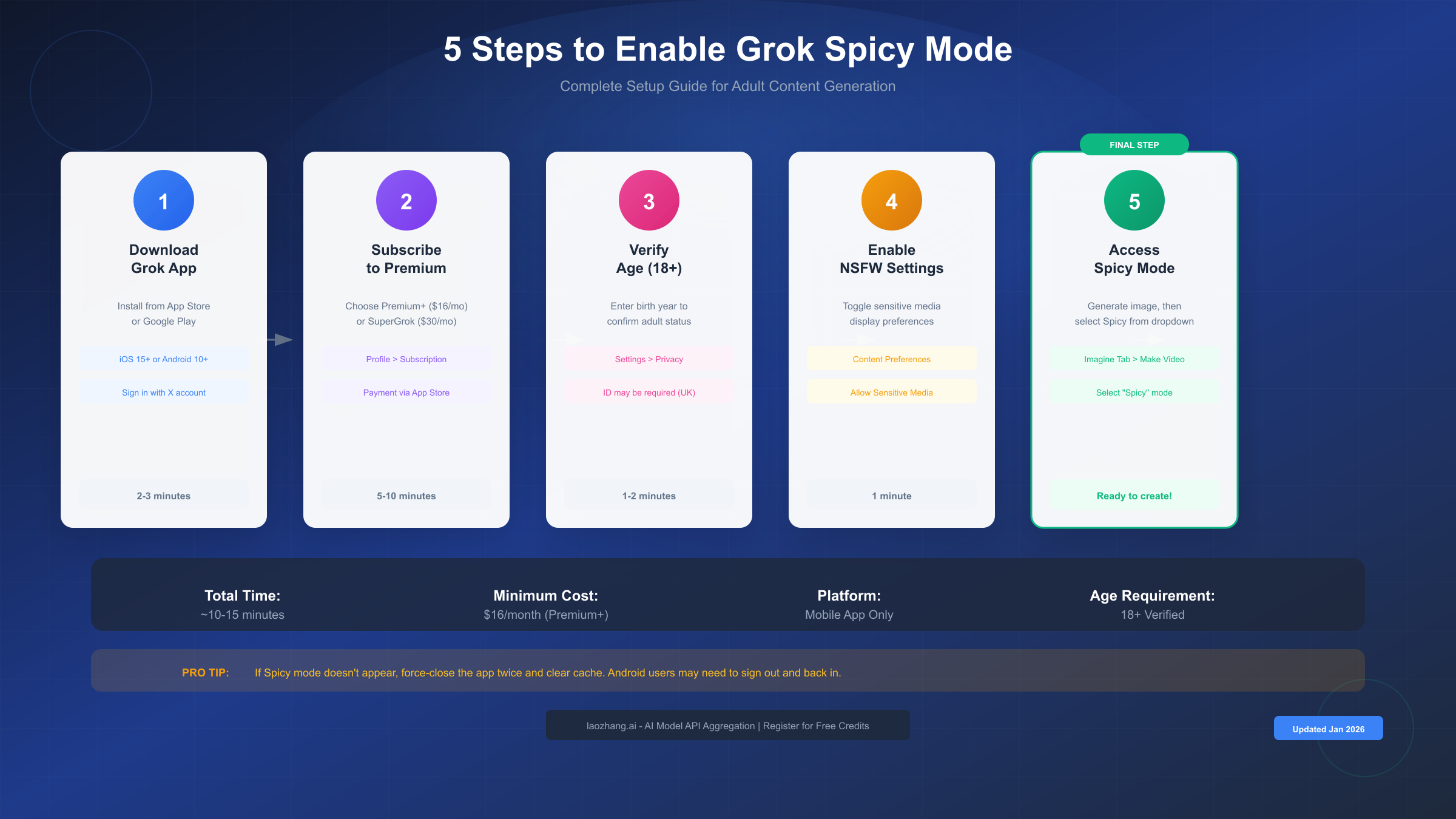
Step 1: Download and Install the Grok App
Spicy Mode is currently available exclusively through the mobile app, not the web interface. Download the official Grok app from the Apple App Store (iOS 15 or later required) or Google Play Store (Android 10 or later). Sign in using your existing X (Twitter) account credentials. If you don't have an X account, you'll need to create one first, as Grok authentication is tied to the X platform. After signing in, allow a few moments for your account settings to sync, as subscription status and content preferences may take up to a minute to fully load.
Step 2: Activate Your Subscription
Navigate to your profile settings by tapping your avatar in the top-right corner, then select "Subscription" or "Premium." Choose either X Premium+ or SuperGrok based on your needs and budget. Complete the payment process through your device's app store. Important: After payment confirmation, you may need to force-close and reopen the app for the subscription benefits to activate fully. Some users report that signing out and back in helps resolve any initial sync issues.
Step 3: Complete Age Verification
Spicy Mode requires users to verify they are 18 years or older. Navigate to Settings > Privacy and Safety > Age Verification. Enter your birth year when prompted. The system calculates your age based on this information and flags your account for adult content access. In certain regions including the United Kingdom and Canada, you may be required to provide government-issued ID verification through a secure third-party service. This additional verification typically takes 24-48 hours to process and is mandated by local regulations rather than xAI policy.
Step 4: Enable NSFW Content Settings
This step is frequently overlooked and is the most common reason Spicy Mode fails to appear. Go to Settings > Content Preferences. Locate and enable "Display sensitive media" or "Show NSFW content" toggle. After enabling this setting, scroll down to find "Imagine Settings" which may be hidden until the previous toggle is activated. Within Imagine Settings, enable "Allow sensitive media generation." Android users should note that these settings may require force-closing the app twice after making changes for them to take effect properly.
Step 5: Access Spicy Mode in the Imagine Tab
With all prerequisites completed, navigate to the Imagine tab in the main interface. Generate or upload an image first, as Spicy Mode only appears after you have an image selected. Tap on your generated or uploaded image to enter the preview screen. Select the "Make Video" button, which reveals a dropdown menu with animation options. The menu should now display four options: Custom, Normal, Fun, and Spicy. Select Spicy to activate the adult content mode for your video generation.
Critical Notes for Success
The order of these steps matters significantly. Enabling NSFW settings before completing age verification may cause the Imagine Settings sub-menu to remain hidden. If you've completed all steps but Spicy Mode still doesn't appear, the troubleshooting section below addresses common causes and solutions.
Content Guidelines and Regional Restrictions
Understanding what Grok Imagine's Spicy Mode will and won't generate helps users work within the system's boundaries and avoid frustrating moderation rejections. The content policy balances creative freedom with legal and ethical considerations.
Permitted Content Categories
Spicy Mode accepts prompts for artistic nudity including tasteful partial exposure in classical or fine art contexts. Romantic and intimate scenarios between consenting adults are generally approved, though explicit sexual acts remain prohibited. Suggestive poses, lingerie and swimwear imagery, and sensual atmospheres with moody lighting typically pass moderation. Fantasy and artistic themes with mature elements, such as mythological scenes or stylized artistic interpretations, also fall within acceptable parameters.
Strictly Prohibited Content
The system maintains firm restrictions regardless of Spicy Mode activation. Deepfakes or realistic depictions of real celebrities and public figures in adult scenarios are automatically rejected. Any content suggesting minors, regardless of prompt phrasing, triggers immediate blocking. Non-consensual scenarios, violence combined with sexual content, and extreme fetish content are prohibited. Attempts to bypass these restrictions through creative prompt engineering may result in account warnings or suspension.
The "Video Moderated" Message
Users frequently encounter messages indicating their video has been moderated or that generation was blocked. This occurs when the internal content classifier identifies elements that exceed Spicy Mode's permitted boundaries. Common triggers include prompts that are too explicitly sexual, requests featuring celebrity names or likenesses, and content that implies non-consensual situations. When moderation occurs, the system may produce a blurred result or reject the generation entirely.
Regional Availability and Restrictions
Spicy Mode availability varies by geographic region due to local content regulations. The United Kingdom imposes additional age verification requirements under the Online Safety Act, requiring government-issued ID verification before adult content access is granted. Canada has similar enhanced verification requirements. Some regions in Asia and the Middle East have Spicy Mode entirely disabled due to local laws governing adult content. Using VPN services to circumvent regional restrictions may work temporarily but risks account suspension if detected, as xAI's terms of service prohibit such circumvention.
| Region | Spicy Mode Status | Additional Requirements |
|---|---|---|
| United States | Full Access | Standard age verification |
| United Kingdom | Restricted | Government ID required |
| Canada | Restricted | Enhanced verification |
| EU Countries | Varies | Country-specific rules |
| Middle East | Disabled | Not available |
| Australia | Full Access | Standard verification |
Troubleshooting Common Issues
Even after completing all setup steps, users frequently encounter issues with Grok Imagine Spicy Mode. This comprehensive troubleshooting guide addresses the most common problems and their solutions.
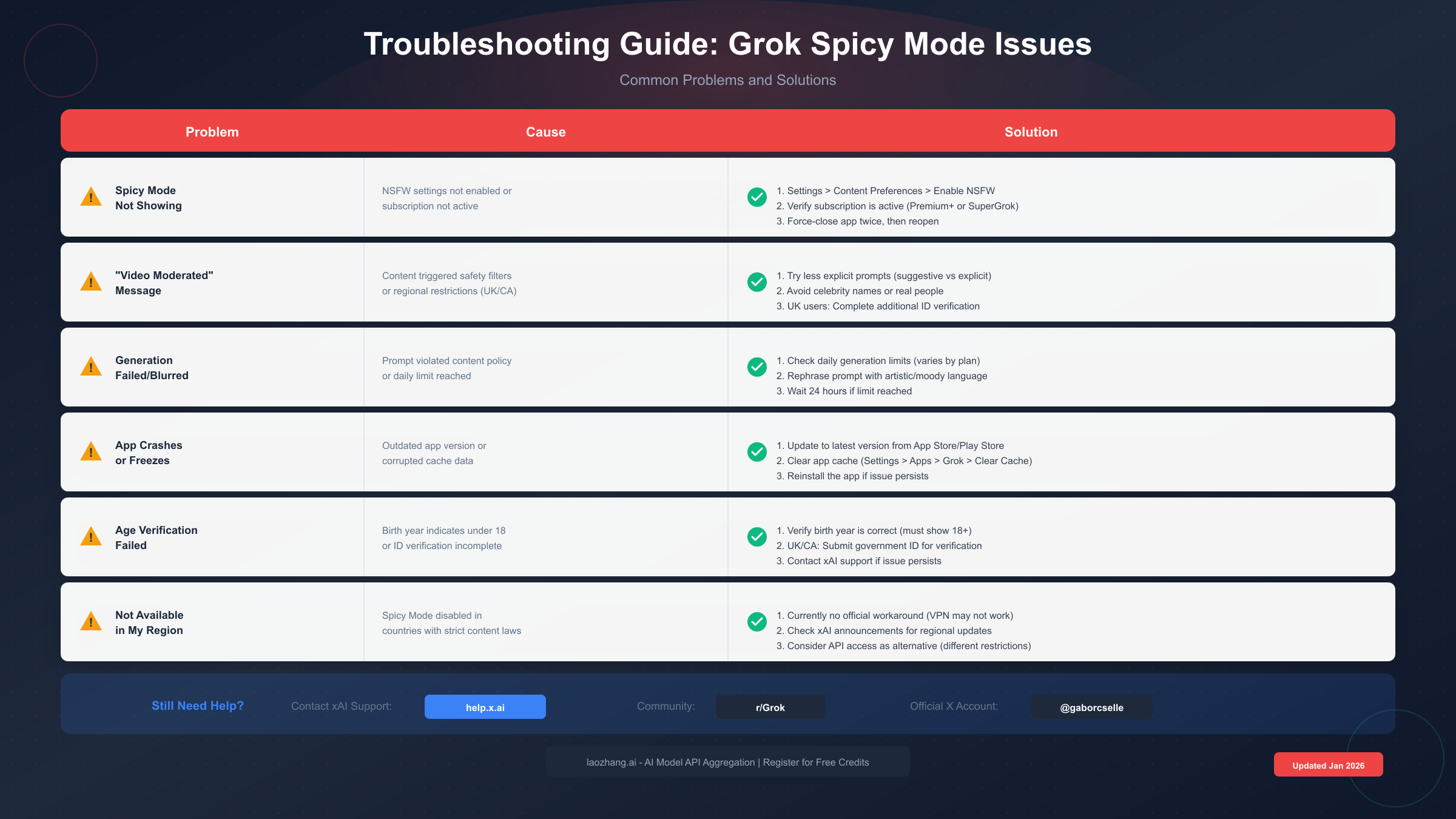
Problem: Spicy Mode Option Not Appearing
This is the most frequently reported issue. The Spicy mode dropdown option simply doesn't show up even after completing all setup steps. The primary causes include incomplete NSFW settings configuration, subscription not being properly recognized, or cached app data preventing the interface from updating.
Solution approach: First, verify your subscription status is active by checking Settings > Subscription. Then navigate to Content Preferences and ensure both "Display sensitive media" and "Allow sensitive media generation" toggles are enabled. For Android users specifically, force-close the app by going to device Settings > Apps > Grok > Force Stop, then clear cache without clearing data, and reopen the app. Some users report needing to repeat this process twice for it to take effect. If the issue persists, try signing out completely, waiting 30 seconds, and signing back in.
Problem: Generations Returning Blurred or Blocked
Your prompts generate images but they come out blurred, or video generation fails with moderation messages.
Solution approach: Review your prompt language for explicit terms that trigger automatic filtering. Replace direct terminology with artistic or euphemistic alternatives. Instead of explicit body part references, use phrases like "elegant silhouette" or "classical form." Remove any celebrity or public figure names from prompts. Try generating the base image first without Spicy mode, then apply Spicy mode only during the video conversion phase. If you've hit your daily generation limit, wait 24 hours for the counter to reset.
Problem: Age Verification Failing or Stuck
The age verification process doesn't complete, shows errors, or loops endlessly.
Solution approach: Ensure you're entering your birth year correctly in YYYY format. If you're in a region requiring ID verification, check your email for verification links from xAI's third-party verification partner. ID verification can take 24-48 hours to process. Contact xAI support through help.x.ai if verification has been pending for more than 72 hours. Some users have resolved stuck verifications by uninstalling and reinstalling the app, then completing verification fresh.
Problem: App Crashes or Freezes During Generation
The app becomes unresponsive or crashes when attempting to generate Spicy content.
Solution approach: Update to the latest app version from your device's app store. Clear app cache through device settings. Ensure your device has at least 2GB of free storage space, as generation requires temporary cache storage. Reduce the complexity of your prompts, as very detailed prompts can stress the generation pipeline. If crashes persist, try using WiFi instead of cellular data, as unstable connections can cause timeout-related crashes.
Problem: Features Missing After Subscription
You've paid for Premium+ or SuperGrok but features aren't appearing.
Solution approach: Wait 5-10 minutes after payment for app store verification to complete. Force-close and reopen the app. Check your app store subscription settings to confirm the purchase processed successfully. If using Family Sharing, ensure the subscription is shared to your specific account. Contact xAI support with your payment receipt if features remain unavailable after 24 hours.
Problem: Region-Based Restrictions
You're in a supported region but receiving regional restriction messages.
Solution approach: Verify your X account's region settings match your actual location. If you recently traveled, the app may still be using cached location data. Disable VPN services if any are active, as they can trigger incorrect region detection. Update your profile's location information in X settings. Note that some restrictions are based on app store region rather than physical location, which may require contacting your app store provider.
Using Grok Imagine via API
For developers and businesses requiring programmatic access to Grok Imagine capabilities, xAI provides API endpoints that offer greater flexibility than the mobile app interface. Understanding the API structure enables integration into custom applications and automated workflows.
API Endpoint Overview
Grok Imagine's image generation API operates at a separate endpoint from the chat functionality. According to xAI's developer documentation (https://docs.x.ai/docs/guides/image-generations ), the primary endpoint is https://api.x.ai/v1/images/generations. The API accepts POST requests with JSON payloads specifying the model, prompt, and optional parameters. Set "model": "grok-2-image" in your request body to access the image generation model. Generated images are returned in JPG format with URLs valid for a limited time period.
Basic API Request Structure
pythonimport requests

headers = {
    "Authorization": "Bearer YOUR_API_KEY",
    "Content-Type": "application/json"
}

payload = {
    "model": "grok-2-image",
    "prompt": "A serene landscape at sunset with mountains",
    "n": 1,
    "size": "1024x1024"
}

response = requests.post(
    "https://api.x.ai/v1/images/generations",
    headers=headers,
    json=payload
)

print(response.json())
API-Specific Content Policies
The API operates under different content moderation parameters than the mobile app's Spicy Mode. While the mobile app's Spicy Mode provides a user-friendly toggle for adult content, the API requires explicit content rating parameters in your requests. Importantly, the API may allow different content thresholds depending on your account verification level and use case approval. Commercial applications requiring adult content generation must apply for enhanced API access through xAI's developer program.
Pricing and Rate Limits
API access follows a pay-per-use model separate from subscription fees. Current pricing sits at approximately $0.02 per image generation at standard resolution, with higher resolutions commanding premium pricing. Rate limits vary by account tier: standard accounts receive 60 requests per minute, while verified business accounts can access up to 300 requests per minute. For teams seeking cost-effective API access alternatives, platforms like laozhang.ai aggregate multiple AI models including image generation capabilities, often at rates lower than direct API pricing while maintaining feature parity.
For those exploring free API access options, our guide to free Grok 4 API access covers several methods to experiment with xAI's capabilities without immediate subscription costs.
SDK Compatibility
The xAI API maintains compatibility with the OpenAI SDK structure, allowing developers familiar with OpenAI's libraries to adapt their code with minimal changes. Simply update the base URL to https://api.x.ai/v1 while keeping the same authentication and request patterns. Note that the Anthropic SDK is not compatible with xAI's API structure.
Tips for Better Results
Maximizing the quality and success rate of Grok Imagine Spicy Mode generations requires understanding both the technical capabilities and the optimal ways to communicate your creative vision through prompts.
Prompt Engineering for Spicy Mode
The language you use in prompts significantly impacts generation success and quality. Artistic and descriptive terminology tends to pass moderation more reliably than clinical or explicit language. Instead of direct descriptions, use metaphorical and atmospheric language. Phrases like "intimate lighting," "sensual atmosphere," or "romantic embrace" convey intent while remaining within acceptable parameters. Include style modifiers such as "cinematic," "fine art," or "classical painting style" to encourage artistic interpretation rather than literal rendering.
Effective Prompt Templates
Based on community experimentation and successful generation patterns, certain prompt structures consistently produce better results:
- Artistic portrait: "Elegant figure in [setting], soft diffused lighting, reminiscent of Renaissance portraiture, warm tones, intimate atmosphere"
- Fantasy scene: "Mythological [character type] in ethereal setting, flowing fabrics, dramatic chiaroscuro lighting, painterly style"
- Romantic scenario: "Two figures in tender embrace, golden hour lighting, impressionist style, emphasis on emotion and connection"
Image-to-Video Optimization
When converting static images to video using Spicy Mode, the source image quality dramatically affects the output. Generate or upload high-resolution base images with clear subjects and good lighting. Simple compositions with single or paired subjects animate more smoothly than complex scenes with multiple elements. For motion suggestions, include directional cues in your prompt such as "gentle movement toward camera" or "slow turn to profile view."
Managing Expectations
Even with optimal prompts and settings, Spicy Mode has inherent limitations. Video clips max out at 6-15 seconds depending on subscription tier. Complex motion requests may result in unnatural artifacts, particularly around hands, fabric edges, and facial expressions. The system sometimes produces inconsistent results, with identical prompts generating varying quality outputs. Iterative generation, running the same or similar prompts multiple times and selecting the best results, often yields superior final content.
Combining with Other AI Tools
For users working on larger creative projects, Grok Imagine works well in conjunction with other AI tools. Generate base concepts in Grok Imagine, then enhance or modify using image editing tools. For more extensive video projects, check our comparison of AI video generation models to understand which tools best complement Grok Imagine for different use cases. Additionally, our guide to free image-to-video AI tools covers alternatives that may suit specific project requirements.
Conclusion and Best Practices
Grok Imagine Spicy Mode represents a significant development in AI content generation, offering creative possibilities that most mainstream platforms explicitly prohibit. Successfully using this feature requires understanding both its technical setup requirements and its content policy boundaries.
Key Takeaways
To successfully enable and use Spicy Mode, remember these essential points. A paid subscription (Premium+ at $16/month or SuperGrok at $30/month) is mandatory. Complete age verification before attempting to enable NSFW settings. Enable both display and generation settings for sensitive content in the correct order. Access Spicy Mode through the video generation dropdown after selecting an image. Expect some moderation rejections even with appropriate prompts, as the filtering system errs on the side of caution.
Responsible Usage Guidelines
While Grok Imagine Spicy Mode offers expanded creative freedom, ethical considerations should guide its use. Never attempt to generate content depicting real individuals without their explicit consent. Respect the platform's content restrictions as they exist for legal and ethical reasons. Store and share generated content responsibly, with awareness of local laws regarding adult content. Remember that content generated using AI tools may still be subject to copyright and intellectual property considerations in certain jurisdictions.
Staying Updated
xAI continues to refine Grok Imagine's capabilities and content policies. Features, pricing, and restrictions may change with updates. The official xAI blog and the @grok X account provide announcements about new capabilities and policy changes. Community forums on Reddit (r/Grok) and Discord servers offer peer support for troubleshooting and prompt optimization.
For developers seeking to integrate AI image and video generation into applications, exploring API options provides greater control and scalability. Our documentation resources at https://docs.laozhang.ai/ cover API integration patterns for multiple AI models including alternatives to direct platform APIs.
Grok Imagine Spicy Mode, while controversial, demonstrates the AI industry's ongoing negotiation between creative freedom and content responsibility. By understanding both its capabilities and limitations, users can explore its potential while operating within appropriate boundaries. Whether for artistic expression, content creation, or simply exploring the current state of AI image generation technology, Spicy Mode offers a unique window into what's possible when content restrictions are relaxed within a structured framework.