
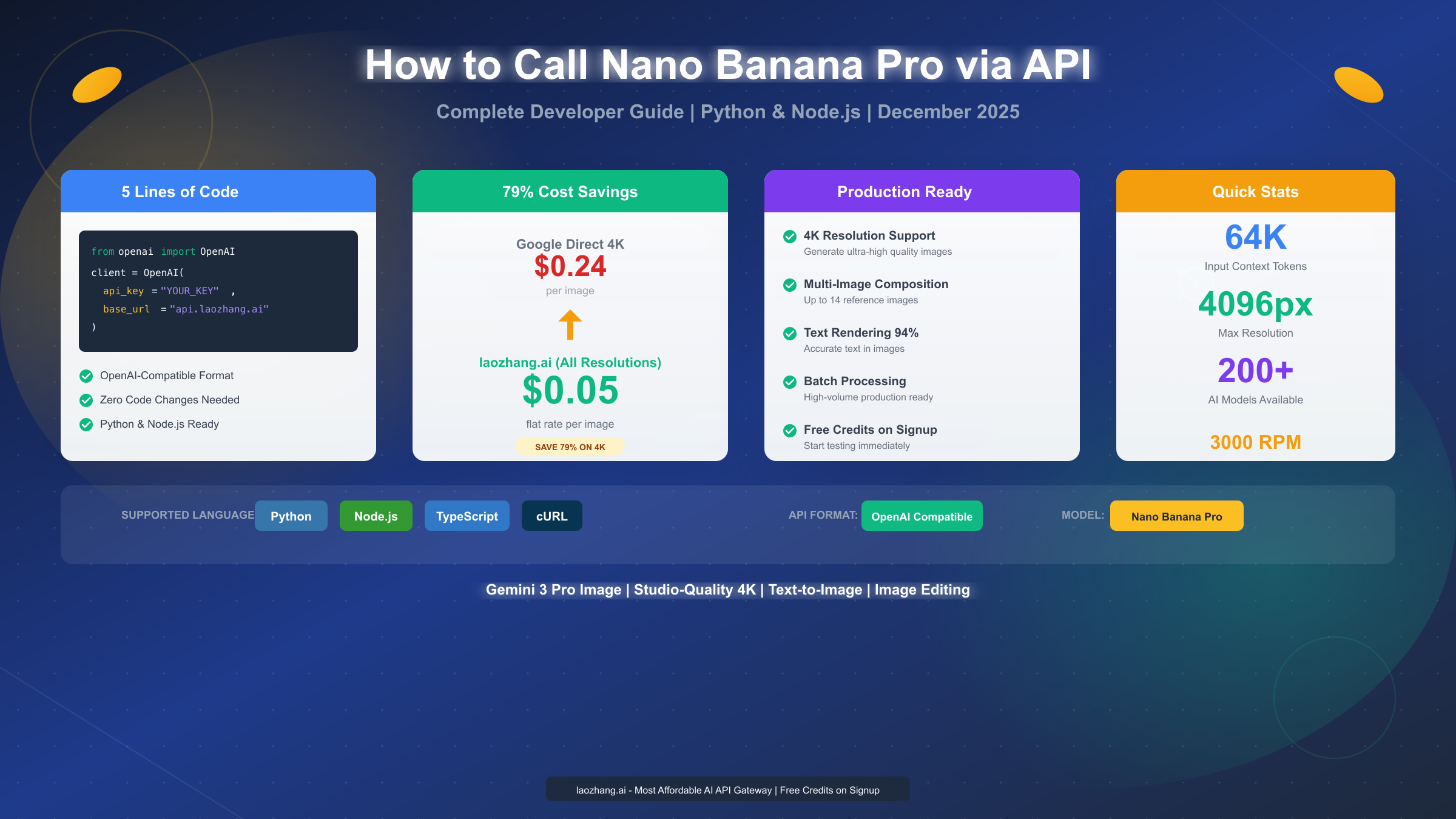
Calling the Nano Banana Pro API requires just 5 lines of code when using laozhang.ai's OpenAI-compatible endpoint. This Google DeepMind image generation model, officially named Gemini 3 Pro Image, produces studio-quality 4K images with exceptional text rendering accuracy. December 2025 pricing through laozhang.ai stands at a flat $0.05 per image regardless of resolution—that's 79% cheaper than Google's direct 4K rate of $0.24 per image.
This guide walks you through everything from initial setup to production deployment, covering both Python and Node.js implementations with real, working code examples you can copy directly into your projects.
What is Nano Banana Pro and Why Use Its API?
Nano Banana Pro represents Google DeepMind's latest advancement in AI image generation, building upon the foundation of the Gemini model family. Released as part of the Gemini 3 series, this model combines powerful text-to-image capabilities with unprecedented control over output quality and style.
The technical specifications that matter for developers include a 64K token input context window and 32K token output capacity. This means you can provide detailed, nuanced prompts that capture exactly what you want to generate. The model supports resolutions from 1K (1024px) up to 4K (4096px), making it suitable for everything from social media graphics to print-ready marketing materials.
What truly sets Nano Banana Pro apart is its text rendering capability. According to Google's benchmarks referenced in their official SynthID documentation (https://deepmind.google/models/synthid/ ), the model achieves approximately 94% accuracy when rendering text within images—a dramatic improvement over previous generation models that struggled with legible text in generated imagery.
For developers considering API integration, three factors make Nano Banana Pro particularly compelling. First, the model handles multi-image composition, accepting up to 14 reference images as input while maintaining consistency across subjects. Second, it offers granular control over camera angles, lighting, depth of field, and color grading through prompt engineering. Third, all generated images automatically include SynthID watermarks for provenance tracking, addressing growing concerns about AI-generated content verification.
The API itself follows familiar patterns if you've worked with OpenAI's image generation endpoints. This similarity becomes particularly valuable when using OpenAI-compatible providers like laozhang.ai, where your existing code can work with minimal modification.
5-Minute Quick Start with laozhang.ai
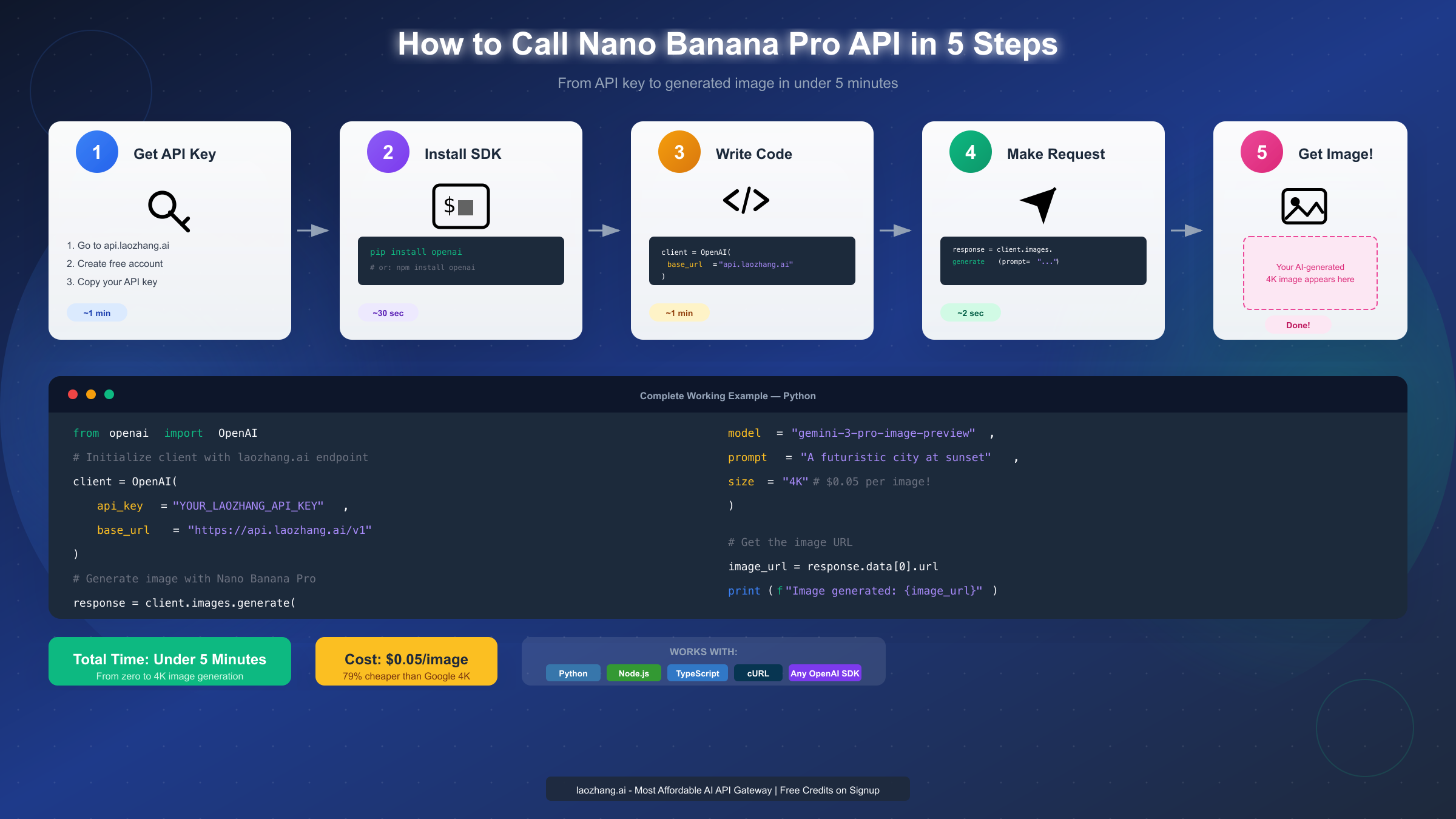
Getting started with Nano Banana Pro through laozhang.ai takes under five minutes. The key advantage here is the OpenAI-compatible API format—if you've ever used OpenAI's Python or Node.js SDK, you already know how to use this.
Step 1: Get Your API Key
Visit api.laozhang.ai and create a free account. New users receive testing credits immediately upon registration, allowing you to experiment before committing any funds. Navigate to the API keys section in your dashboard and generate a new key. Store this securely—you'll need it for all API calls.
Step 2: Install the SDK
For Python projects, install the OpenAI library:
pythonpip install openai
For Node.js projects:
bashnpm install openai
Step 3: Generate Your First Image
Here's a complete working example in Python:
pythonfrom openai import OpenAI


client = OpenAI(
    api_key="YOUR_LAOZHANG_API_KEY",
    base_url="https://api.laozhang.ai/v1"
)

# Generate a 4K image with Nano Banana Pro
response = client.images.generate(
    model="gemini-3-pro-image-preview",
    prompt="A serene Japanese garden at golden hour, cherry blossoms falling gently, koi pond reflecting the sunset, traditional wooden bridge",
    size="4K"
)

# Get the generated image URL
image_url = response.data[0].url
print(f"Image generated successfully: {image_url}")
That's genuinely all it takes. Five lines of meaningful code, and you have access to studio-quality 4K image generation. The response includes a URL where your generated image is temporarily hosted, typically valid for several hours.
The model parameter accepts gemini-3-pro-image-preview for the highest quality output. The size parameter supports "1K", "2K", and "4K" values—all at the same $0.05 flat rate through laozhang.ai.
If you're migrating from existing OpenAI image generation code, notice that the only changes required are the api_key and base_url parameters. Your prompt engineering, response handling, and integration logic remain identical. This OpenAI compatibility makes laozhang.ai particularly attractive for teams with existing DALL-E implementations seeking cost savings or access to different models.
Pricing and Cost Optimization: Complete Provider Comparison
Understanding the pricing landscape helps you make informed decisions about which provider to use. The differences between options are substantial enough to significantly impact project budgets, especially at scale.
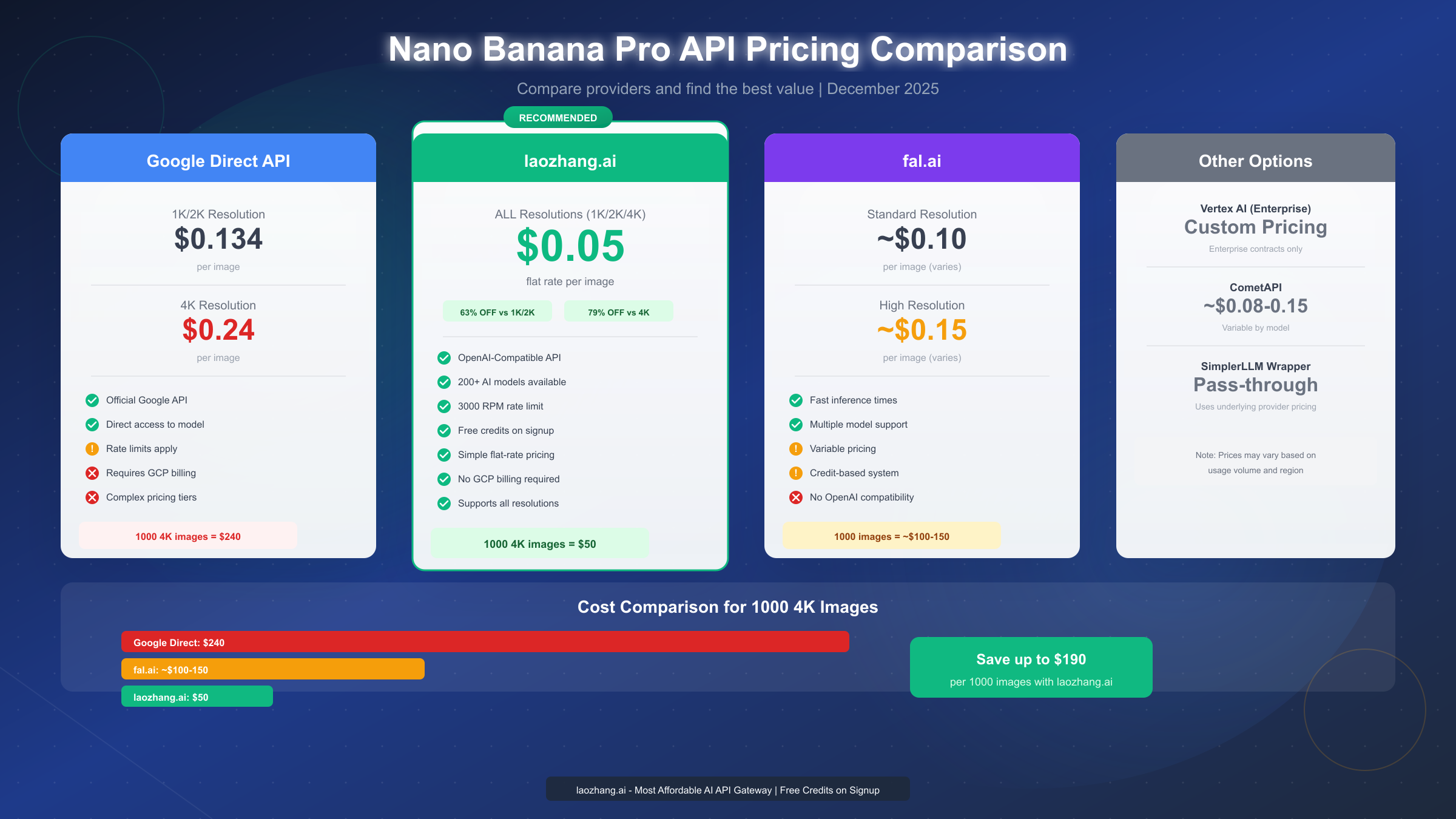
Google's direct API pricing follows a tiered structure based on resolution. According to the official Gemini API documentation (https://ai.google.dev/gemini-api/docs/image-generation ), generating a 1K or 2K image costs $0.134, while 4K images cost $0.24 each. These prices apply when calling the API directly through Google AI Studio or Vertex AI.
laozhang.ai offers a dramatically different approach: $0.05 per image regardless of resolution. This flat-rate pricing means 4K images cost the same as 1K images, eliminating the need to optimize for resolution to manage costs. For high-resolution use cases, the savings are substantial:
| Provider | 1K/2K Image | 4K Image | 1000 4K Images |
|---|---|---|---|
| Google Direct | $0.134 | $0.24 | $240 |
| laozhang.ai | $0.05 | $0.05 | $50 |
| fal.ai | ~$0.10 | ~$0.15 | ~$100-150 |
The math becomes compelling at scale. A project generating 1,000 4K images would cost $240 through Google's direct API versus $50 through laozhang.ai—savings of $190 or 79%. For production applications generating images continuously, these differences compound dramatically.
Beyond raw pricing, consider rate limits and reliability. laozhang.ai supports 3,000 requests per minute per API key, which handles most production workloads comfortably. If you need even higher throughput, the platform offers additional capacity options.
For developers seeking the cheapest Gemini 3 Pro Image API access, the combination of flat-rate pricing and high rate limits makes laozhang.ai the clear value leader. The platform also provides access to 200+ other AI models through the same OpenAI-compatible interface, consolidating your AI infrastructure needs.
When evaluating providers, also consider the hidden costs of complexity. Variable pricing tiers, credit systems, and resolution-dependent rates all add cognitive overhead and complicate budget forecasting. The flat-rate simplicity of laozhang.ai's approach means you always know exactly what you'll pay.
Complete Python Implementation Guide
Moving beyond the quick start, let's explore the full range of Nano Banana Pro API capabilities in Python. This section covers advanced parameters, error handling, and production-ready patterns.
Basic Image Generation with All Parameters
The images.generate endpoint accepts several parameters that control output characteristics:
pythonfrom openai import OpenAI
import base64
from pathlib import Path

client = OpenAI(
    api_key="YOUR_LAOZHANG_API_KEY",
    base_url="https://api.laozhang.ai/v1"
)

response = client.images.generate(
    model="gemini-3-pro-image-preview",
    prompt="Professional product photography: a sleek wireless headphone on a marble surface, soft studio lighting, minimalist aesthetic, shallow depth of field",
    size="4K",
    n=1,  # Number of images to generate
    quality="hd",  # Quality setting
    response_format="url"  # or "b64_json" for base64
)

# Access the generated image
image_url = response.data[0].url
print(f"Generated image URL: {image_url}")
The n parameter controls how many images to generate in a single request, though many providers cap this at 1 for high-resolution outputs. The response_format parameter determines whether you receive a URL or base64-encoded image data directly.
Saving Images Locally
When you need to persist generated images rather than using temporary URLs:
pythonimport requests
from pathlib import Path

def save_image_from_url(url: str, filepath: str) -> None:
    """Download and save an image from URL to local filesystem."""
    response = requests.get(url)
    response.raise_for_status()

    Path(filepath).parent.mkdir(parents=True, exist_ok=True)

    with open(filepath, 'wb') as f:
        f.write(response.content)

    print(f"Image saved to: {filepath}")

# Usage
image_url = response.data[0].url
save_image_from_url(image_url, "output/generated_headphones.png")
Image Editing and Inpainting
Nano Banana Pro also supports image editing operations where you provide a base image and instructions for modification:
pythonfrom PIL import Image
import io

def encode_image_to_base64(image_path: str) -> str:
    """Convert an image file to base64 string."""
    with open(image_path, "rb") as image_file:
        return base64.b64encode(image_file.read()).decode('utf-8')

# Edit an existing image
base_image_b64 = encode_image_to_base64("source_image.png")

response = client.images.edit(
    model="gemini-3-pro-image-preview",
    image=base_image_b64,
    prompt="Change the background to a sunset beach scene, keep the main subject unchanged"
)

edited_image_url = response.data[0].url
Batch Processing for Production Workloads
When generating multiple images, implement concurrent processing to maximize throughput:
pythonimport asyncio
from concurrent.futures import ThreadPoolExecutor

def generate_single_image(prompt: str, index: int) -> dict:
    """Generate a single image and return result with metadata."""
    try:
        response = client.images.generate(
            model="gemini-3-pro-image-preview",
            prompt=prompt,
            size="4K"
        )
        return {
            "index": index,
            "success": True,
            "url": response.data[0].url
        }
    except Exception as e:
        return {
            "index": index,
            "success": False,
            "error": str(e)
        }

def batch_generate(prompts: list[str], max_workers: int = 5) -> list[dict]:
    """Generate multiple images concurrently."""
    with ThreadPoolExecutor(max_workers=max_workers) as executor:
        futures = [
            executor.submit(generate_single_image, prompt, i)
            for i, prompt in enumerate(prompts)
        ]
        results = [f.result() for f in futures]
    return results

# Example usage
prompts = [
    "Mountain landscape at sunrise",
    "Urban cityscape at night",
    "Tropical beach with palm trees"
]
results = batch_generate(prompts)
The max_workers parameter should be tuned based on your rate limits. With laozhang.ai's 3,000 RPM limit, you can safely run many concurrent requests without throttling concerns.
For a comprehensive understanding of Gemini API pricing, including token-based models and other endpoints, our detailed pricing guide covers all the nuances.
Node.js and TypeScript Implementation
JavaScript developers get first-class support through the official OpenAI npm package. The TypeScript types provide excellent IDE support for exploring available parameters.
Basic Setup and Generation
typescriptimport OpenAI from 'openai';

const client = new OpenAI({
  apiKey: process.env.LAOZHANG_API_KEY,
  baseURL: 'https://api.laozhang.ai/v1'
});

async function generateImage(prompt: string): Promise<string> {
  const response = await client.images.generate({
    model: 'gemini-3-pro-image-preview',
    prompt,
    size: '4K' as any, // Nano Banana Pro specific size
    n: 1
  });

  return response.data[0].url!;
}

// Usage
const imageUrl = await generateImage(
  'A cozy coffee shop interior with warm lighting and vintage decor'
);
console.log(`Generated: ${imageUrl}`);
Type Definitions for Better DX
Create proper types for Nano Banana Pro specific parameters:
typescriptinterface NanoBananaProParams {
  model: 'gemini-3-pro-image-preview';
  prompt: string;
  size: '1K' | '2K' | '4K';
  n?: number;
  quality?: 'standard' | 'hd';
  response_format?: 'url' | 'b64_json';
}

interface GenerationResult {
  url: string;
  revised_prompt?: string;
}

async function generateWithTypes(
  params: NanoBananaProParams
): Promise<GenerationResult> {
  const response = await client.images.generate(params as any);
  return {
    url: response.data[0].url!,
    revised_prompt: response.data[0].revised_prompt
  };
}
Express.js API Endpoint
Building a backend service that exposes image generation:
typescriptimport express from 'express';
import OpenAI from 'openai';

const app = express();
app.use(express.json());

const client = new OpenAI({
  apiKey: process.env.LAOZHANG_API_KEY,
  baseURL: 'https://api.laozhang.ai/v1'
});

app.post('/api/generate-image', async (req, res) => {
  const { prompt, size = '2K' } = req.body;

  if (!prompt) {
    return res.status(400).json({ error: 'Prompt is required' });
  }

  try {
    const response = await client.images.generate({
      model: 'gemini-3-pro-image-preview',
      prompt,
      size
    });

    res.json({
      success: true,
      imageUrl: response.data[0].url
    });
  } catch (error: any) {
    console.error('Generation failed:', error);
    res.status(500).json({
      success: false,
      error: error.message
    });
  }
});

app.listen(3000, () => {
  console.log('Image generation API running on port 3000');
});
Async Queue for Rate Limit Management
For production applications handling many requests:
typescriptimport PQueue from 'p-queue';

const queue = new PQueue({
  concurrency: 10,  // Parallel requests
  interval: 1000,   // Per second
  intervalCap: 50   // Max per interval
});

async function queuedGenerate(prompt: string): Promise<string> {
  return queue.add(async () => {
    const response = await client.images.generate({
      model: 'gemini-3-pro-image-preview',
      prompt,
      size: '4K'
    });
    return response.data[0].url!;
  });
}

// Process many requests safely
const prompts = Array(100).fill(null).map((_, i) =>
  `Landscape scene variation ${i + 1}`
);

const results = await Promise.all(
  prompts.map(p => queuedGenerate(p))
);
The p-queue library provides excellent control over request flow, preventing rate limit errors while maximizing throughput. Adjust concurrency based on your specific rate limit allocation.
Advanced Patterns and Production Use Cases
Beyond basic generation, Nano Banana Pro supports sophisticated workflows that unlock creative and business applications.
Character Consistency Across Multiple Images
When generating a series of images featuring the same character or subject:
python# First, establish the reference image
reference_response = client.images.generate(
    model="gemini-3-pro-image-preview",
    prompt="Character design: a young woman with short blue hair, wearing a red jacket, casual modern style, front view, white background",
    size="2K"
)

# Save reference for subsequent generations
reference_url = reference_response.data[0].url

# Generate variations maintaining consistency
# Note: Implementation depends on multi-image input support
variation_prompts = [
    "Same character walking through a busy city street",
    "Same character sitting in a coffee shop reading",
    "Same character standing on a mountain top at sunset"
]
Product Photography Enhancement
E-commerce teams can use the API to enhance product images:
pythondef generate_product_variants(
    product_description: str,
    backgrounds: list[str]
) -> list[str]:
    """Generate product images across multiple background settings."""
    results = []

    for bg in backgrounds:
        prompt = f"""Professional product photography: {product_description},
        {bg}, commercial quality, studio lighting,
        shallow depth of field, no text"""

        response = client.images.generate(
            model="gemini-3-pro-image-preview",
            prompt=prompt,
            size="4K"
        )
        results.append(response.data[0].url)

    return results

# Usage
product = "sleek wireless earbuds in charging case"
backgrounds = [
    "on white marble surface with soft shadows",
    "floating against gradient blue background",
    "on wooden desk with morning coffee aesthetic"
]
variants = generate_product_variants(product, backgrounds)
Text-Heavy Image Generation
Nano Banana Pro excels at generating images with readable text:
pythondef generate_social_media_graphic(
    headline: str,
    subheadline: str,
    style: str = "modern minimalist"
) -> str:
    """Generate social media graphics with text overlay."""
    prompt = f"""Social media promotional graphic, {style} design:
    Main headline text: "{headline}"
    Subheadline text: "{subheadline}"
    Professional typography, clean layout, eye-catching colors,
    Instagram square format, no cutoff text"""

    response = client.images.generate(
        model="gemini-3-pro-image-preview",
        prompt=prompt,
        size="2K"
    )
    return response.data[0].url

# Example: Generate a promotional banner
graphic = generate_social_media_graphic(
    headline="SUMMER SALE",
    subheadline="Up to 50% off all items"
)
The key to good text rendering is explicit instruction about text placement and styling. Specify font characteristics, alignment preferences, and ensure text elements are clearly described in the prompt.
For teams looking at high-volume generation scenarios, the guide on platforms offering unlimited Nano Banana Pro access covers additional provider options and enterprise arrangements.
Troubleshooting and Error Handling
Production applications require robust error handling. Understanding common failure modes helps you build resilient integrations.
Common Error Codes and Solutions
| Error Code | Meaning | Solution |
|---|---|---|
| 401 | Invalid API key | Verify key is correct and active |
| 429 | Rate limit exceeded | Implement backoff, reduce concurrency |
| 400 | Invalid request | Check prompt length, parameter values |
| 500 | Server error | Retry with exponential backoff |
| 503 | Service unavailable | Temporary, retry after delay |
Implementing Retry Logic
pythonimport time
from typing import Optional

def generate_with_retry(
    prompt: str,
    max_retries: int = 3,
    initial_delay: float = 1.0
) -> Optional[str]:
    """Generate image with exponential backoff retry."""
    delay = initial_delay

    for attempt in range(max_retries):
        try:
            response = client.images.generate(
                model="gemini-3-pro-image-preview",
                prompt=prompt,
                size="4K"
            )
            return response.data[0].url

        except Exception as e:
            error_str = str(e).lower()

            # Don't retry on client errors
            if "401" in error_str or "invalid" in error_str:
                raise

            if attempt == max_retries - 1:
                raise

            print(f"Attempt {attempt + 1} failed: {e}")
            print(f"Retrying in {delay} seconds...")
            time.sleep(delay)
            delay *= 2  # Exponential backoff

    return None
Rate Limit Management
When approaching rate limits, implement proactive throttling:
pythonimport time
from collections import deque

class RateLimiter:
    """Simple sliding window rate limiter."""

    def __init__(self, max_requests: int, window_seconds: int):
        self.max_requests = max_requests
        self.window = window_seconds
        self.requests = deque()

    def wait_if_needed(self):
        """Block if rate limit would be exceeded."""
        now = time.time()

        # Remove old requests outside window
        while self.requests and self.requests[0] < now - self.window:
            self.requests.popleft()

        # Wait if at limit
        if len(self.requests) >= self.max_requests:
            sleep_time = self.requests[0] - (now - self.window) + 0.1
            if sleep_time > 0:
                time.sleep(sleep_time)

        self.requests.append(now)

# Usage
limiter = RateLimiter(max_requests=50, window_seconds=1)

def rate_limited_generate(prompt: str) -> str:
    limiter.wait_if_needed()
    response = client.images.generate(
        model="gemini-3-pro-image-preview",
        prompt=prompt,
        size="4K"
    )
    return response.data[0].url
Handling Content Policy Violations
The API may reject certain prompts due to content policies:
pythondef safe_generate(prompt: str) -> dict:
    """Generate with content policy handling."""
    try:
        response = client.images.generate(
            model="gemini-3-pro-image-preview",
            prompt=prompt,
            size="4K"
        )
        return {
            "success": True,
            "url": response.data[0].url
        }
    except Exception as e:
        if "content policy" in str(e).lower():
            return {
                "success": False,
                "error": "CONTENT_POLICY",
                "message": "Prompt was rejected due to content guidelines"
            }
        raise
For comprehensive guidance on handling API errors, especially the common 429 resource exhausted error, see our detailed guide for fixing 429 errors.
Summary and Quick Reference
Integrating Nano Banana Pro via API is straightforward with the right approach. The OpenAI-compatible format through laozhang.ai eliminates learning curves for developers familiar with OpenAI's SDK.
Key Takeaways
The essential points for successful implementation:
- Use laozhang.ai for cost efficiency: $0.05 flat rate versus Google's $0.24 for 4K images represents 79% savings
- Leverage OpenAI compatibility: Existing OpenAI SDK code works with minimal modification
- Choose appropriate resolution: 4K for print quality, 2K for web, 1K for thumbnails—all same price
- Implement retry logic: Production systems need exponential backoff for reliability
- Respect rate limits: 3,000 RPM is generous but manage concurrency appropriately
Quick Reference Table
| Aspect | Value |
|---|---|
| Model identifier | gemini-3-pro-image-preview |
| Max resolution | 4096px (4K) |
| Input context | 64K tokens |
| Text accuracy | ~94% |
| laozhang.ai price | $0.05/image (all sizes) |
| Rate limit | 3,000 RPM |
| Reference images | Up to 14 |
Code Templates
Minimal Python setup:
pythonfrom openai import OpenAI
client = OpenAI(api_key="KEY", base_url="https://api.laozhang.ai/v1" )
url = client.images.generate(model="gemini-3-pro-image-preview", prompt="...", size="4K").data[0].url
Minimal Node.js setup:
javascriptimport OpenAI from 'openai';
const client = new OpenAI({apiKey: 'KEY', baseURL: 'https://api.laozhang.ai/v1'} );
const url = (await client.images.generate({model: 'gemini-3-pro-image-preview', prompt: '...', size: '4K'})).data[0].url;
The path from API key to generated images is genuinely simple. Whether you're building a product photography tool, social media content generator, or any application requiring AI image generation, Nano Banana Pro through laozhang.ai provides the combination of quality, capability, and cost-effectiveness that production applications demand.
For complete API documentation including all supported models and endpoints, visit docs.laozhang.ai. The documentation covers chat completions, embeddings, audio transcription, and the full range of 200+ AI models available through the unified interface.