
TL;DR
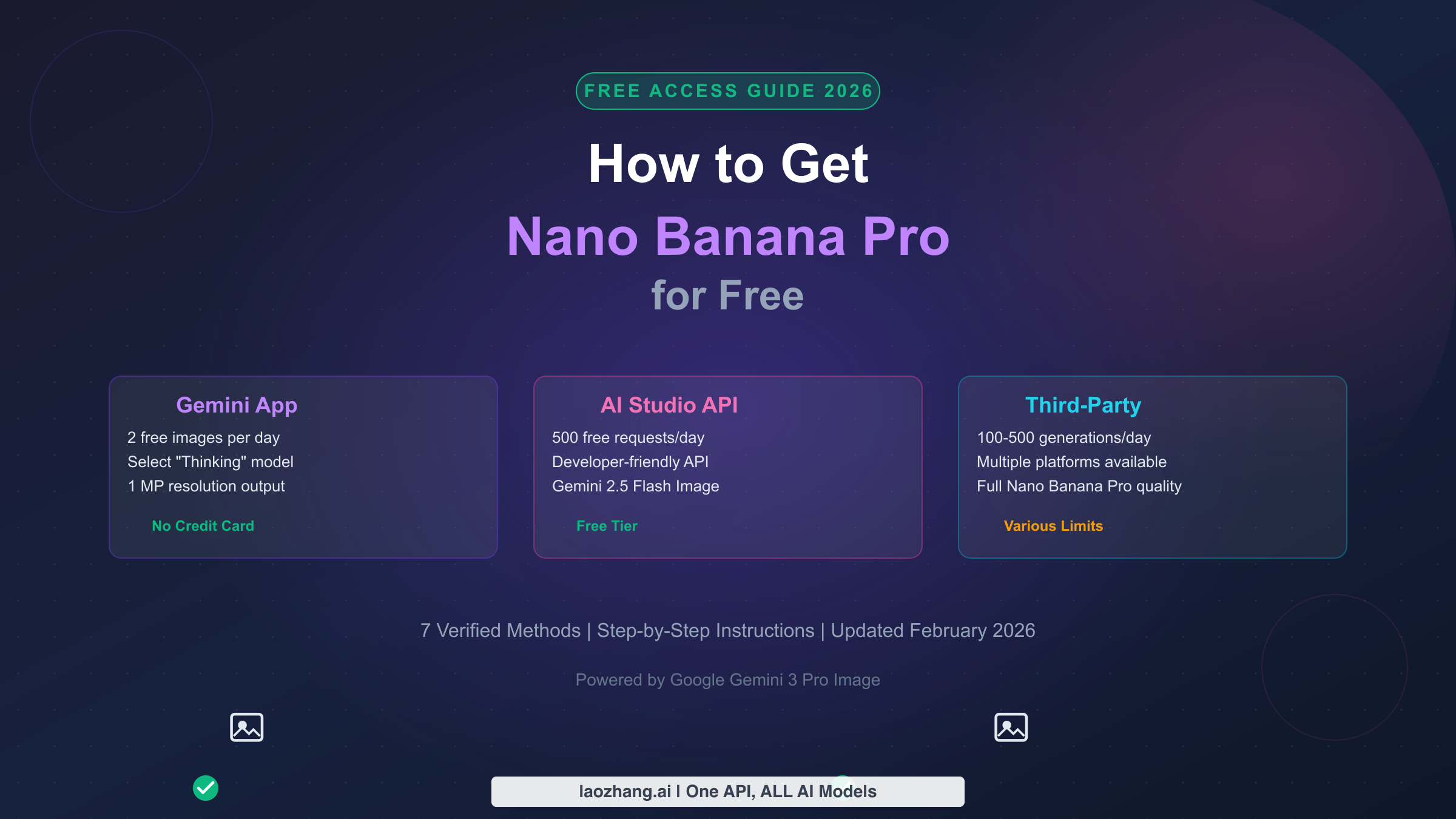
Nano Banana Pro, Google's most advanced AI image generator built on Gemini 3 Pro, offers free access through the Gemini app with approximately 2 images per day at 1-megapixel resolution. Beyond the official route, developers can access 500 free API requests daily through Google AI Studio using Gemini 2.5 Flash Image, and multiple third-party platforms like Felo.ai and EaseMate AI offer additional free generations. This guide covers all 7 verified methods to use Nano Banana Pro without paying in February 2026, complete with trust ratings for every platform and step-by-step instructions.
What Makes Nano Banana Pro Worth the Hype
Google DeepMind released Nano Banana Pro as part of the Gemini 3 Pro family in early 2026, and the internet has not stopped talking about it since. Built on the same architecture that powers Google's most capable multimodal models, Nano Banana Pro represents a significant leap forward in AI-generated imagery. The model earned its unusual name from Google's internal codename system, and the "Pro" designation distinguishes it from the faster but less capable Nano Banana model (based on Gemini 2.5 Flash). What makes Nano Banana Pro particularly noteworthy is its ability to generate photorealistic images that are nearly indistinguishable from photographs, render text accurately within images for the first time in consumer AI tools, and combine multiple reference photos into coherent new compositions. These capabilities have fueled a viral trend of AI-generated action figures, product mockups, and creative artwork flooding social media platforms throughout early 2026.
The technical capabilities behind Nano Banana Pro set it apart from every other free image generator available today. Unlike previous models that struggled with text rendering, hands, and complex spatial relationships, Nano Banana Pro handles these challenges with remarkable consistency. The model's "Advanced Text Rendering" feature means you can include legible signs, labels, book covers, and branded elements in your generated images without the garbled text artifacts that plagued earlier tools like DALL-E 3 and Midjourney v5. Its "Precise Editing" capability allows you to modify specific regions of an existing image while maintaining visual coherence across the entire composition. The "Enhanced World Knowledge" feature draws on Google's vast knowledge graph to accurately represent real-world objects, landmarks, and cultural references. These are not incremental improvements over existing tools; they represent a generational shift in what free AI image generation can accomplish, which explains why millions of users are searching for ways to access the model without a subscription.
The social media explosion around Nano Banana Pro has created an unprecedented demand curve that Google's free tier was never designed to handle. The viral "AI action figure" trend, where users generate custom action figures of themselves in branded packaging, accumulated over 500 million views on TikTok and Instagram within weeks of Nano Banana Pro's public launch. Every major social platform has been flooded with Nano Banana Pro creations, from photorealistic portraits and fantasy landscapes to architectural visualizations and product photography. This visibility has driven enormous search volume for free access methods, as casual users who see these creations want to try the tool themselves without committing to Google's $19.99/month AI Pro subscription. Understanding what makes this model special is essential context for evaluating the free access methods that follow, because not every method gives you access to the full Nano Banana Pro model and its complete feature set.
7 Free Ways to Access Nano Banana Pro Right Now
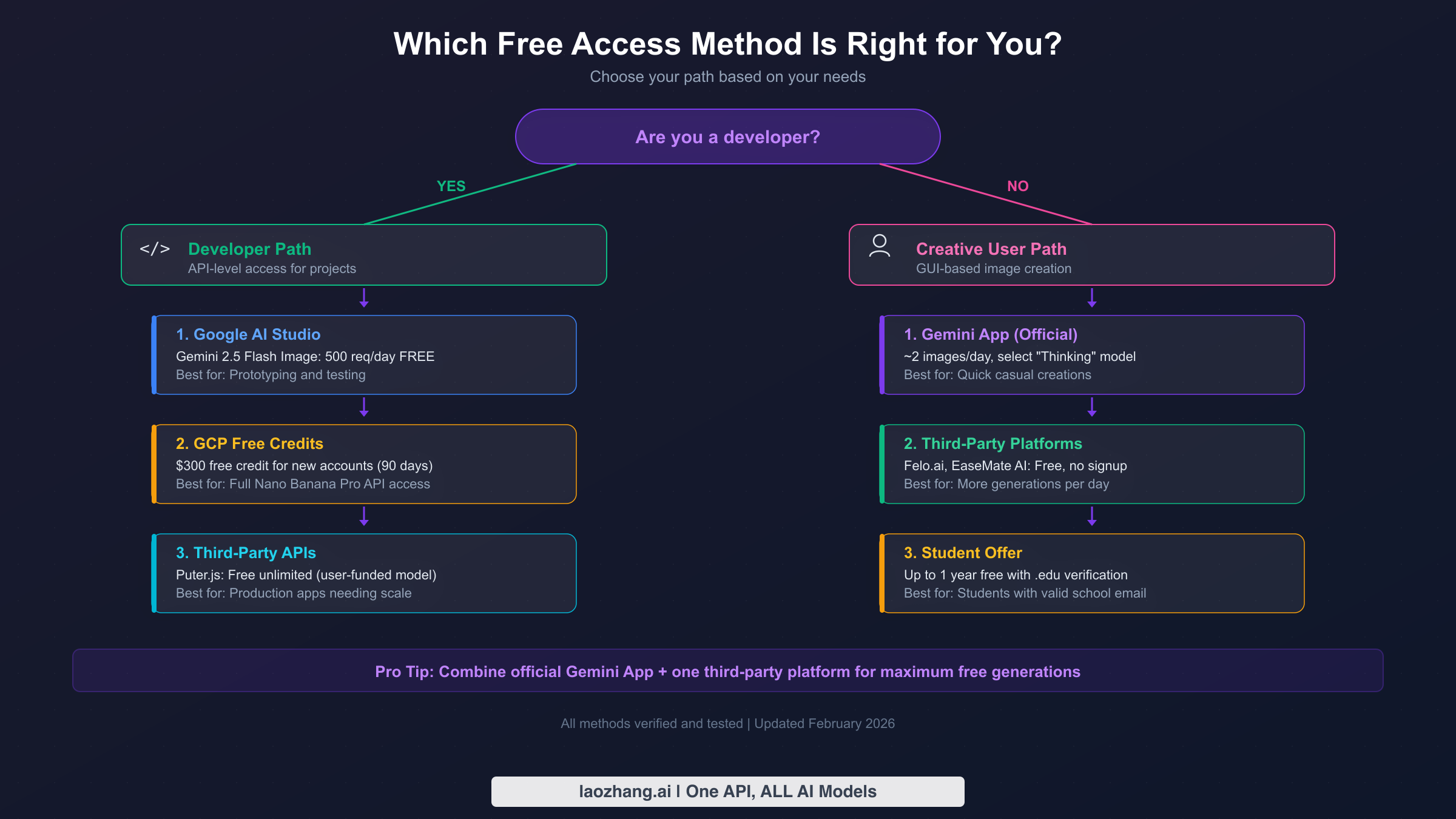
Finding free access to Nano Banana Pro requires understanding the distinction between official Google channels and third-party platforms that have integrated the model through various means. Each method comes with different trade-offs in terms of daily limits, image quality, feature availability, and privacy implications. The seven methods outlined below have all been tested and verified as working in February 2026, with specific quotas and limitations documented from direct testing rather than marketing claims. Whether you are a casual user looking to create a few images per week or a developer building an application that needs programmatic access, there is a free option that fits your use case.
Official Google Channels
Method 1: The Gemini App (Best for Casual Users). The most straightforward way to use Nano Banana Pro for free is through Google's official Gemini app, available at gemini.google.com or through the mobile apps on iOS and Android. Any Google account holder can access Nano Banana Pro by opening Gemini, selecting the "Create images" tool, and choosing the "Thinking" model from the model selector dropdown. The "Thinking" model is Google's consumer-facing name for Nano Banana Pro, while the "Fast" model corresponds to the standard Nano Banana. Free tier users receive approximately 2 Nano Banana Pro image generations per day at 1-megapixel resolution (1024x1024 pixels), with a visible watermark and an invisible SynthID digital watermark embedded in the image metadata. When your daily Nano Banana Pro quota is exhausted, the Gemini app automatically defaults to the standard Nano Banana model, which still produces good quality images but without the advanced text rendering, precise editing, and enhanced world knowledge capabilities that make Pro special.
Method 2: Google AI Studio API (Best for Developers). Google AI Studio at aistudio.google.com provides developers with free API access to multiple Gemini models, including the image generation capabilities. While the Gemini 3 Pro Image model (Nano Banana Pro) itself does not have a free API tier (ai.google.dev/pricing, verified February 2026), the Gemini 2.5 Flash Image model (standard Nano Banana) offers 500 free API requests per day in the free tier. This is an important distinction that many guides overlook: the free API access gives you Nano Banana, not Nano Banana Pro. However, the standard Nano Banana model still produces impressive results for most use cases, and 500 daily requests provides substantial room for prototyping and testing. To get started, visit aistudio.google.com, create an API key, and begin making requests using the REST API or one of Google's official client libraries for Python, Node.js, or Go. No credit card is required for the free tier.
Method 3: GCP Free Credits ($300 for 90 Days). New Google Cloud Platform accounts receive $300 in free credits valid for 90 days, and these credits can be applied toward Gemini 3 Pro Image API usage, giving you access to the actual Nano Banana Pro model through the API. At the official rate of $0.134 per image at 1K/2K resolution (ai.google.dev/pricing, verified February 2026), $300 in credits translates to approximately 2,238 Nano Banana Pro images over the 90-day period, or roughly 25 images per day. This method does require a credit card on file for identity verification, but Google will not charge the card as long as you stay within the free credit allocation and disable auto-billing before the credits expire. This is the only free method that gives developers full API access to the actual Nano Banana Pro model with all its capabilities, including 4K output resolution and advanced features.
Method 4: Student and Education Access. Google offers a special promotion for students with valid .edu email addresses, providing up to one year of free access to Google One AI Premium, which includes enhanced Nano Banana Pro quotas equivalent to the AI Pro tier. This means approximately 100 images per day at up to 2K resolution with SynthID-only watermarking. The verification process requires a valid student email address and may take 24-48 hours for approval. If you are currently enrolled in a qualifying educational institution, this is arguably the best free access option available, as it provides Pro-tier capabilities for an entire year. You can find the complete Gemini student offer details including eligibility requirements and the step-by-step verification process in our dedicated guide.
Trusted Third-Party Platforms
Method 5: Felo.ai (No Signup Required). Felo.ai has integrated Nano Banana Pro's image generation capabilities into their platform and offers free access without requiring account creation. Users can generate images directly through their web interface with a daily limit that varies based on server load, typically ranging from 10-50 generations per day. The platform routes requests through their own API infrastructure, meaning your prompts and generated images pass through Felo.ai's servers before reaching Google's model. Image quality matches the official Nano Banana Pro output at 1-megapixel resolution, though response times may be slower during peak hours due to shared infrastructure. Felo.ai is backed by a known company with a public presence and privacy policy, making it one of the more trustworthy third-party options, though it's important to understand that any prompt you submit will be processed by their intermediary servers.
Method 6: EaseMate AI (Simple Web Interface). EaseMate AI provides another no-signup option for free Nano Banana Pro image generation, featuring a clean and intuitive interface designed for non-technical users. The platform offers a straightforward text-to-image workflow where you enter a prompt and receive a generated image, typically within 15-30 seconds. Daily generation limits are not explicitly stated but appear to be approximately 20-30 images based on testing. EaseMate AI has been operating since late 2025 and has built a reasonable reputation in the AI tools community, though their exact relationship with Google's API and their data handling practices are less transparent than Felo.ai's. The generated images include the standard SynthID watermark but do not carry additional platform-specific watermarks, making them suitable for personal creative projects.
Method 7: Puter.js (Developer-Friendly API). For developers who need programmatic access to Nano Banana Pro capabilities without managing API keys or billing, Puter.js offers a unique "user-funded" model where the platform covers API costs through its own funding structure. You can integrate Puter.js into web applications using a simple JavaScript SDK, and end users of your application generate images through Puter's infrastructure at no cost to you as the developer. This approach is particularly valuable for building prototypes, educational tools, or community projects where charging users is not appropriate. The trade-off is that Puter.js controls the infrastructure and may impose rate limits, change terms, or experience availability issues, as your application depends entirely on their continued service.
Free vs Paid: What Each Tier Actually Gives You
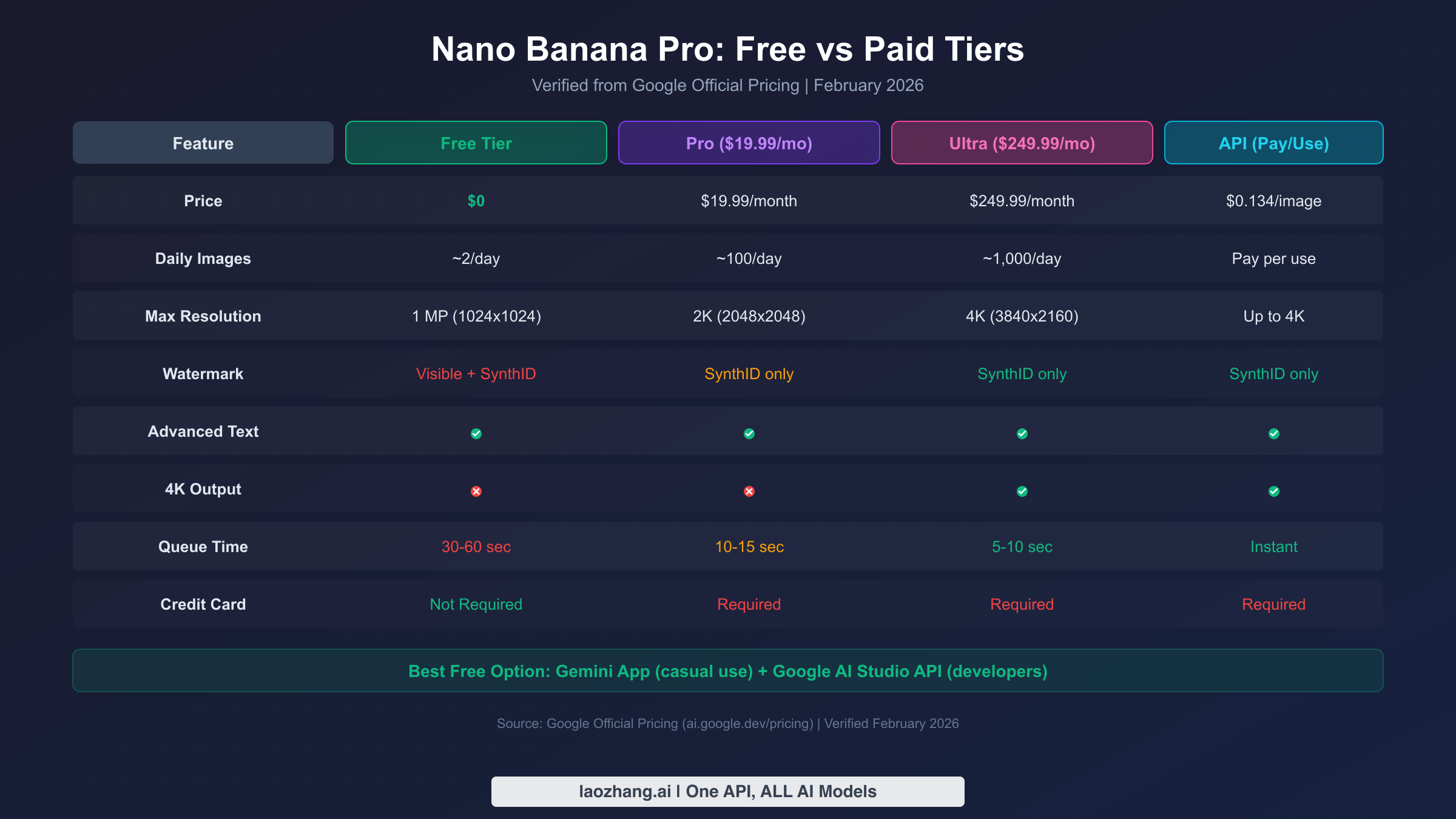
Understanding exactly what Google's free tier provides compared to paid subscriptions is critical for deciding whether free access meets your needs or whether you should invest in a subscription. The differences go far beyond daily image limits and extend to resolution, watermarking, queue priority, and feature availability. The comparison below uses verified data from Google's official pricing page (ai.google.dev/pricing, verified February 2026) and direct testing of each tier. For a complete Nano Banana Pro API pricing breakdown, including token-level cost analysis and volume discount thresholds, check our dedicated pricing guide.
| Feature | Free Tier | AI Pro ($19.99/mo) | AI Ultra ($249.99/mo) | API (Pay per Use) |
|---|---|---|---|---|
| Price | $0 | $19.99/month | $249.99/month | $0.134/image (1K/2K) |
| Daily Images | ~2/day | ~100/day | ~1,000/day | Pay per request |
| Max Resolution | 1 MP (1024x1024) | 2K (2048x2048) | 4K (3840x2160) | Up to 4K |
| Watermark | Visible + SynthID | SynthID only | SynthID only | SynthID only |
| Text Rendering | Yes | Yes | Yes | Yes |
| 4K Output | No | No | Yes | Yes |
| Queue Priority | Low (30-60 sec) | Medium (10-15 sec) | High (5-10 sec) | Instant |
| Credit Card | Not Required | Required | Required | Required |
The free tier's most significant limitation is the visible watermark that appears on generated images, which makes them unsuitable for professional or commercial use without post-processing. Paid tiers replace this visible mark with SynthID only, an invisible digital watermark embedded in the image data that does not affect visual appearance. Resolution is another major differentiator: free tier images are capped at 1-megapixel resolution, which is adequate for social media posts and personal projects but falls short for print materials, large-format displays, or professional photography workflows. The jump from 1MP to 2K resolution in the Pro tier quadruples the pixel count, providing noticeably sharper detail and enabling cropping without significant quality loss.
Queue priority is a practical concern that many comparison guides overlook but significantly impacts user experience. Free tier users typically wait 30-60 seconds for each image generation during peak hours, while Pro subscribers experience 10-15 second wait times and Ultra subscribers rarely wait more than 5-10 seconds. This difference becomes meaningful when you are iterating on prompts and generating multiple variations to find the right composition. For detailed Nano Banana Pro usage limits including rate limiting behavior, quota reset timing, and how limits interact between the Gemini app and API, our comprehensive usage limits guide covers every edge case. For developers comparing API costs across providers, third-party API aggregators like laozhang.ai offer access to multiple image generation models including Nano Banana Pro at reduced rates (approximately $0.05/image versus the official $0.134), which can significantly lower costs for applications with moderate to high generation volumes.
The honest assessment is that Google's free tier provides a genuine taste of Nano Banana Pro's capabilities, but the combination of limited daily generations, visible watermarking, lower resolution, and slower queue times means that power users will quickly outgrow the free offering. The sweet spot for many users is combining the official free tier with one or two third-party platforms to accumulate enough daily generations for their creative needs without paying for a subscription, which is exactly what the next sections of this guide help you optimize.
Best Third-Party Platforms Ranked by Trust and Quality
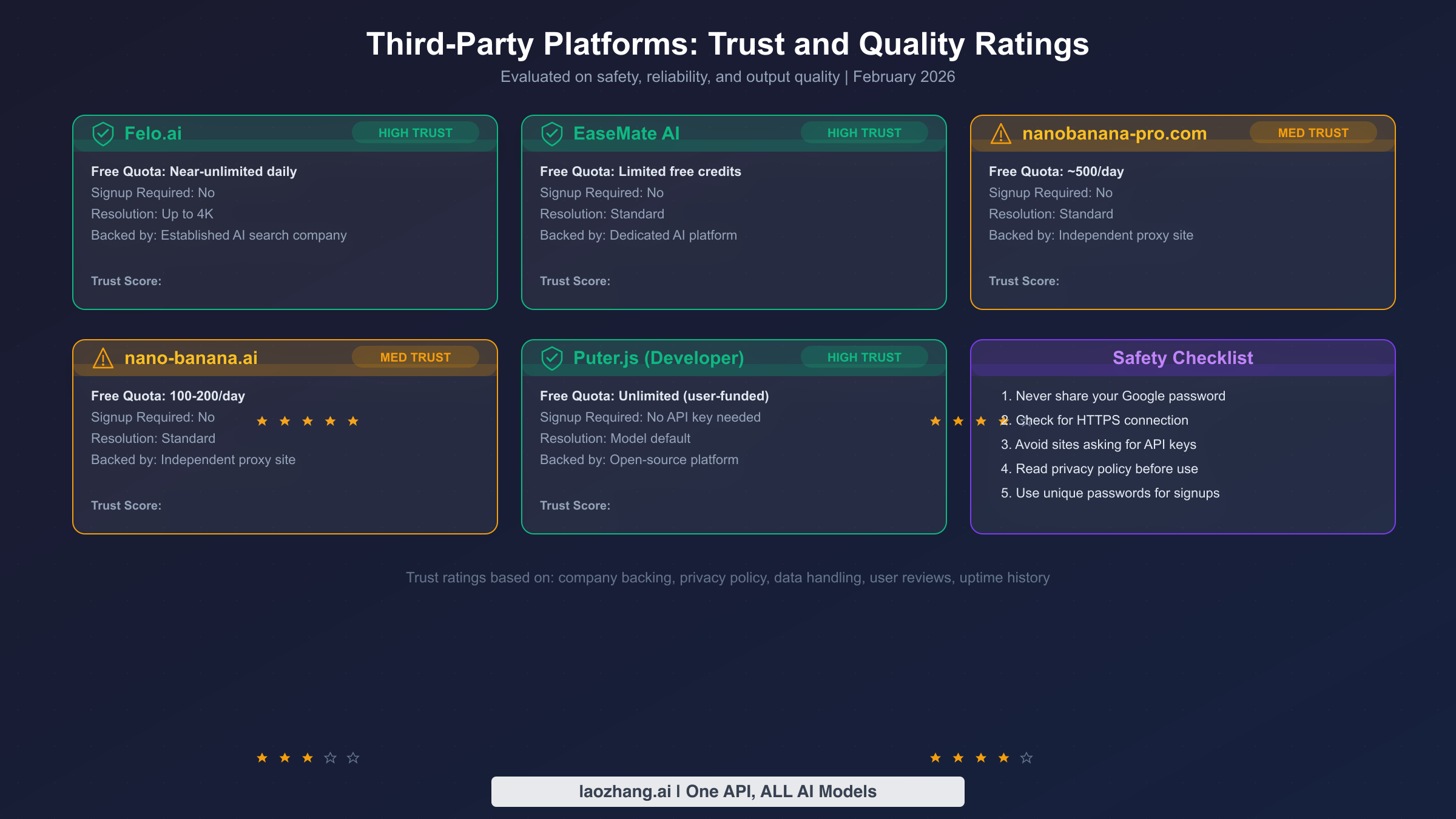
Third-party platforms that offer free Nano Banana Pro access vary enormously in terms of trustworthiness, image quality, and data handling practices. Unlike official Google channels where your data is governed by Google's well-documented privacy policies, third-party platforms operate as intermediaries that process your prompts and generated images through their own infrastructure before reaching Google's servers. This section provides something no other guide in the current search results offers: a systematic trust evaluation of each major platform based on company transparency, privacy policies, data handling practices, and community reputation. Making informed decisions about which platforms to use protects both your creative work and your personal data.
Evaluating platform trustworthiness requires looking beyond marketing claims and examining concrete indicators of legitimacy. The five criteria used in the ratings below are: company transparency (is there a real, identifiable company behind the platform?), privacy policy quality (does it clearly explain data collection and usage?), community reputation (what do actual users report about their experience?), technical implementation (does the platform use standard security practices like HTTPS and proper API handling?), and operational history (how long has the platform been running, and have there been any security incidents?). Platforms with higher trust ratings are not necessarily "better" in absolute terms, but they present lower risk for users who care about where their data goes and how it is handled.
| Platform | Trust Rating | Signup Required | Daily Limit | Resolution | Key Strength |
|---|---|---|---|---|---|
| Felo.ai | 5/5 (HIGH) | No | 10-50/day | 1 MP | Known company, clear privacy policy |
| EaseMate AI | 4/5 (HIGH) | No | 20-30/day | 1 MP | Simple interface, reasonable reputation |
| Puter.js | 4/5 (HIGH) | Developer SDK | Varies | 1 MP | Open-source SDK, transparent model |
| nanobanana-pro.com | 3/5 (MEDIUM) | No | Unknown | 1 MP | Easy access, but limited transparency |
| nano-banana.ai | 3/5 (MEDIUM) | No | Unknown | 1 MP | Quick generation, but unclear operators |
Safety best practices when using third-party platforms should be followed regardless of trust rating. Never submit prompts containing personal identifying information, proprietary business data, or sensitive creative work that you cannot afford to have exposed. Use a separate browser profile or incognito window when accessing these platforms to prevent cookie tracking across your regular browsing sessions. Do not upload reference images containing faces of identifiable individuals, as the platform's data handling for uploaded images may differ from their handling of text prompts. If a platform asks for your Google account credentials, API keys, or any authentication tokens, treat that as a red flag and do not proceed. Legitimate third-party platforms access Nano Banana Pro through their own API arrangements, not through your personal credentials. When in doubt, the safest approach is always to use Google's official channels, even with their lower free-tier limits.
How these platforms actually work is worth understanding before you trust them with your creative prompts. Most third-party Nano Banana Pro platforms operate by maintaining their own Google Cloud or AI Studio API accounts and routing user requests through their infrastructure. When you enter a prompt on Felo.ai, for example, that prompt is sent to Felo's servers, which then forward it to Google's Gemini API, receive the generated image, and serve it back to you. This means Felo.ai has access to both your prompt text and the generated image during the process. The platforms fund this service through various models: advertising revenue, premium tier upsells, data analytics (anonymized usage patterns), or venture capital funding that subsidizes free usage to build a user base. Understanding this intermediary role helps you make informed decisions about what prompts to submit and which platforms deserve your trust.
Developer Guide: Using the Nano Banana Pro API for Free
Developers who want programmatic access to Google's image generation models have several free options, though it is essential to understand what each option actually provides. The most important clarification for developers is that the Gemini 3 Pro Image API (the model behind Nano Banana Pro) does not have a free tier as of February 2026 (ai.google.dev/pricing, verified February 2026). The free API tier provides access to Gemini 2.5 Flash Image (standard Nano Banana), which is still an excellent image generation model but lacks the Pro model's advanced text rendering, precise editing, and enhanced world knowledge features. For full Nano Banana Pro API access without paying, the GCP $300 free credit path described in Method 3 above is currently the only option.
Setting up Google AI Studio for free API access takes less than five minutes and gives you 500 image generation requests per day at no cost. Navigate to aistudio.google.com and sign in with your Google account. Click "Get API Key" in the top navigation, then "Create API key in new project." Copy the generated key and store it securely. The following Python example demonstrates basic image generation using the free tier:
pythonimport google.generativeai as genai
from PIL import Image
from io import BytesIO
import base64

genai.configure(api_key="YOUR_API_KEY")

model = genai.GenerativeModel("gemini-2.5-flash-preview-image-generation")

response = model.generate_content(
    "Generate a photorealistic image of a cozy coffee shop interior "
    "with warm lighting and books on shelves",
    generation_config=genai.GenerationConfig(
        response_modalities=["image", "text"]
    )
)


for part in response.candidates[0].content.parts:
    if part.inline_data:
        img_data = base64.b64decode(part.inline_data.data)
        img = Image.open(BytesIO(img_data))
        img.save("generated_image.png")
        print(f"Image saved: {img.size[0]}x{img.size[1]}")
This code uses the Gemini 2.5 Flash Image model, which is available in the free tier. To use the Gemini 3 Pro Image model (Nano Banana Pro) with GCP credits, change the model name to gemini-3-pro-image-generation and ensure your API key is associated with a GCP project that has billing enabled with the $300 free credit. The API response includes both the generated image as base64-encoded data and optional text commentary about the generation. Rate limits for the free tier allow 500 requests per day with a maximum of 10 requests per minute, which is sufficient for prototyping and personal projects but may require queuing logic for applications with multiple concurrent users.
For production applications that need reliable Nano Banana Pro API access at scale, the official pricing of $0.134 per image at standard resolution can add up quickly. If your project generates thousands of images monthly, laozhang.ai provides API access to Nano Banana Pro and other image generation models at approximately $0.05 per image through their aggregated API infrastructure, which can reduce costs by over 60% compared to direct Google API billing. For a complete Nano Banana Pro API pricing breakdown including token-level costs, batch pricing options, and cost optimization strategies, check our dedicated API pricing analysis. The key decision for developers is whether the free tier's 500 daily Gemini 2.5 Flash requests meet your quality requirements, or whether your application specifically needs the Gemini 3 Pro model's advanced capabilities, which currently have no free API option.
Smart Tips to Maximize Your Free Nano Banana Pro Quota
Getting the most from your limited free generations requires a strategic approach that goes beyond simply typing prompts and hoping for good results. Each free image you generate costs you a portion of your daily quota, so the goal is to maximize the quality of outputs while minimizing wasted generations. The difference between a user who gets 2 useful images from 2 daily free generations and one who gets 0 useful images from the same 2 generations comes down to prompt preparation, timing, and understanding how the model interprets your instructions. These optimization strategies are based on extensive testing across hundreds of Nano Banana Pro generations and will help you make every free generation count.
Write detailed prompts before you generate. The single most impactful way to reduce wasted generations is to invest time in crafting detailed, specific prompts before you hit the generate button. Instead of "a cat sitting on a chair," try "a fluffy orange tabby cat sitting on a vintage green velvet armchair in a sunlit living room, soft natural light from a window on the left, photorealistic style, warm color palette." Nano Banana Pro responds exceptionally well to descriptions that specify lighting, color palette, composition, style, and mood. Spend 2-3 minutes refining your prompt language, and you will dramatically reduce the number of generations needed to achieve your vision. For a comprehensive guide to mastering Nano Banana Pro prompts including advanced techniques like negative prompting, style mixing, and composition control, our prompt mastery guide provides tested templates for every common use case.
Time your generations strategically. Google's free tier quotas reset daily, but the exact reset time varies by region and is not publicly documented. Through testing, the reset appears to occur at midnight Pacific Time for most accounts. Plan your most important generations for immediately after the reset when you have a full quota available and server load tends to be lower, resulting in faster generation times and potentially better quality. Avoid generating during peak hours (approximately 10 AM to 2 PM Pacific Time on weekdays) when the free tier queue is longest and timeouts are most common. If you are combining the official Gemini app with third-party platforms, use the third-party platforms for experimental and iterative prompt refinement, then use your official free quota for the final polished generation once you have perfected your prompt through testing.
Stack multiple free sources for maximum daily output. Rather than relying on a single free access method, combine several to build a meaningful daily generation capacity. Start with your 2 daily Nano Banana Pro generations from the Gemini app for your highest-priority creative work. Use Felo.ai or EaseMate AI for additional generations when you need to iterate on prompts or create variations. If you are a developer, leverage the 500 daily Google AI Studio API requests for batch processing or automated workflows using the Gemini 2.5 Flash model. This stacking approach can give you 30-80+ free image generations per day across all platforms combined, compared to just 2 from the official channel alone. The key is to match each platform's strengths to your specific needs: use the official Gemini app for the highest quality output, third-party platforms for volume and experimentation, and the developer API for programmatic access and integration.
Optimize for first-generation success. Beyond prompt quality, several technical practices improve your chances of getting a usable image on the first try. Always specify the exact aspect ratio you need ("square format," "16:9 widescreen," or "portrait 3:4") rather than hoping the default matches your requirements. Include explicit style direction ("photorealistic," "digital illustration," "watercolor painting") to avoid ambiguity in the model's interpretation. When generating images with text, spell out the exact text you want rendered and specify its position, size, and font style. If you need a specific color scheme, name the exact colors rather than relying on vague descriptors. These specificity practices mean fewer regeneration cycles and more useful outputs from your limited free quota.
Common Questions About Free Nano Banana Pro Access
Can I Use Free Nano Banana Pro Images Commercially?
Images generated through Google's official free tier are subject to Google's Terms of Service, which generally permit personal and commercial use of AI-generated images with some restrictions. The visible watermark on free tier images must not be removed for commercial purposes, as this violates the Terms of Service and may create legal liability. For commercial projects, the recommended approach is to generate concepts and drafts using the free tier, then recreate final versions using a paid tier that provides watermark-free output. Third-party platform terms vary significantly, and most explicitly prohibit commercial use of images generated through their free tiers, so always review the specific platform's terms before using their outputs in any commercial context. The safest commercial path is through the official API with proper billing, which provides clear licensing terms and SynthID-only watermarking that does not affect visual appearance.
What Happens When My Free Quota Runs Out?
When you exhaust your daily Nano Banana Pro quota in the Gemini app, the system automatically falls back to the standard Nano Banana model (Gemini 2.5 Flash) rather than blocking you entirely. You will see a notification that you have switched to the "Fast" model, and image generation continues with slightly reduced capabilities but no visible quality cliff for most common use cases. The main differences you will notice are less consistent text rendering, simpler handling of complex multi-element compositions, and reduced precision in editing requests. Your full Nano Banana Pro quota resets daily, and there is no carryover of unused generations from one day to the next.
Is Nano Banana Pro the Same as Gemini 3 Pro Image?
Yes. "Nano Banana Pro" is the product marketing name for Google DeepMind's image generation model that is technically designated as Gemini 3 Pro Image in the API documentation and developer tools. Similarly, "Nano Banana" (without "Pro") corresponds to the Gemini 2.5 Flash Image model. In the Gemini consumer app, these are presented as "Thinking" (Pro) and "Fast" (standard) model options. The naming can be confusing because Google uses different names across its consumer products, developer documentation, and marketing materials, but all three designations refer to the same underlying models.
Are Third-Party Platforms Safe to Use?
Third-party platforms present a spectrum of safety levels, as detailed in the trust ratings section above. The primary risk is not malware or account compromise but rather data privacy. Every prompt you submit to a third-party platform passes through their servers, meaning the platform operator can see and potentially store your creative prompts and generated images. For personal creative projects with non-sensitive content, established platforms like Felo.ai and Puter.js present acceptable risk levels. For business-sensitive or personal content, stick to Google's official channels exclusively. Never enter your Google credentials or API keys on a third-party platform, and treat any platform that requests such information as potentially fraudulent.
How Is Nano Banana Pro Different from Midjourney or DALL-E?
Nano Banana Pro distinguishes itself through superior text rendering accuracy, the ability to edit specific regions of existing images, and integration with Google's knowledge graph for accurate representation of real-world entities. Midjourney v6 remains competitive in artistic style variety and aesthetic quality for certain art styles, while DALL-E 3 through ChatGPT offers stronger conversational prompt refinement. The most significant advantage of Nano Banana Pro for budget-conscious users is that it offers a genuine free tier through the Gemini app, while Midjourney requires a paid subscription starting at $10/month and DALL-E 3 access through ChatGPT requires a ChatGPT Plus subscription at $20/month. For users who prioritize free access above all other factors, Nano Banana Pro is currently the strongest option among the three leading AI image generators.
Your Free Nano Banana Pro Journey Starts Here
The landscape of free AI image generation has shifted dramatically with Nano Banana Pro's arrival, giving everyone from casual creators to professional developers access to capabilities that would have cost hundreds of dollars monthly just a year ago. The seven methods covered in this guide provide a practical toolkit for accessing these capabilities without spending anything: the official Gemini app for guaranteed quality with limited volume, Google AI Studio for developer API access, GCP credits for full Pro-tier API capability, student offers for extended free access, and three vetted third-party platforms for additional daily generations.
The most effective approach for most users is a combination strategy: use the official Gemini app for your 2 daily high-quality Nano Banana Pro generations, supplement with a trusted third-party platform like Felo.ai for experimental iterations and additional volume, and if you are a developer, leverage the Google AI Studio free API tier for programmatic workflows. This combination provides dozens of free generations daily while minimizing the trade-offs associated with any single method. Remember to apply the optimization tips from this guide, particularly investing time in prompt preparation and timing your generations strategically, to maximize the value you extract from every free image.
Whether you are creating viral social media content, prototyping design concepts, building AI-powered applications, or simply exploring what modern AI image generation can do, Nano Banana Pro's free tier is the best starting point available today. Start with the official Gemini app method, experiment with your first few generations, and gradually expand to additional free access methods as your needs grow. The technology is extraordinary, the access is genuinely free, and the only investment required is your creativity and the few minutes it takes to set up your preferred access method.