
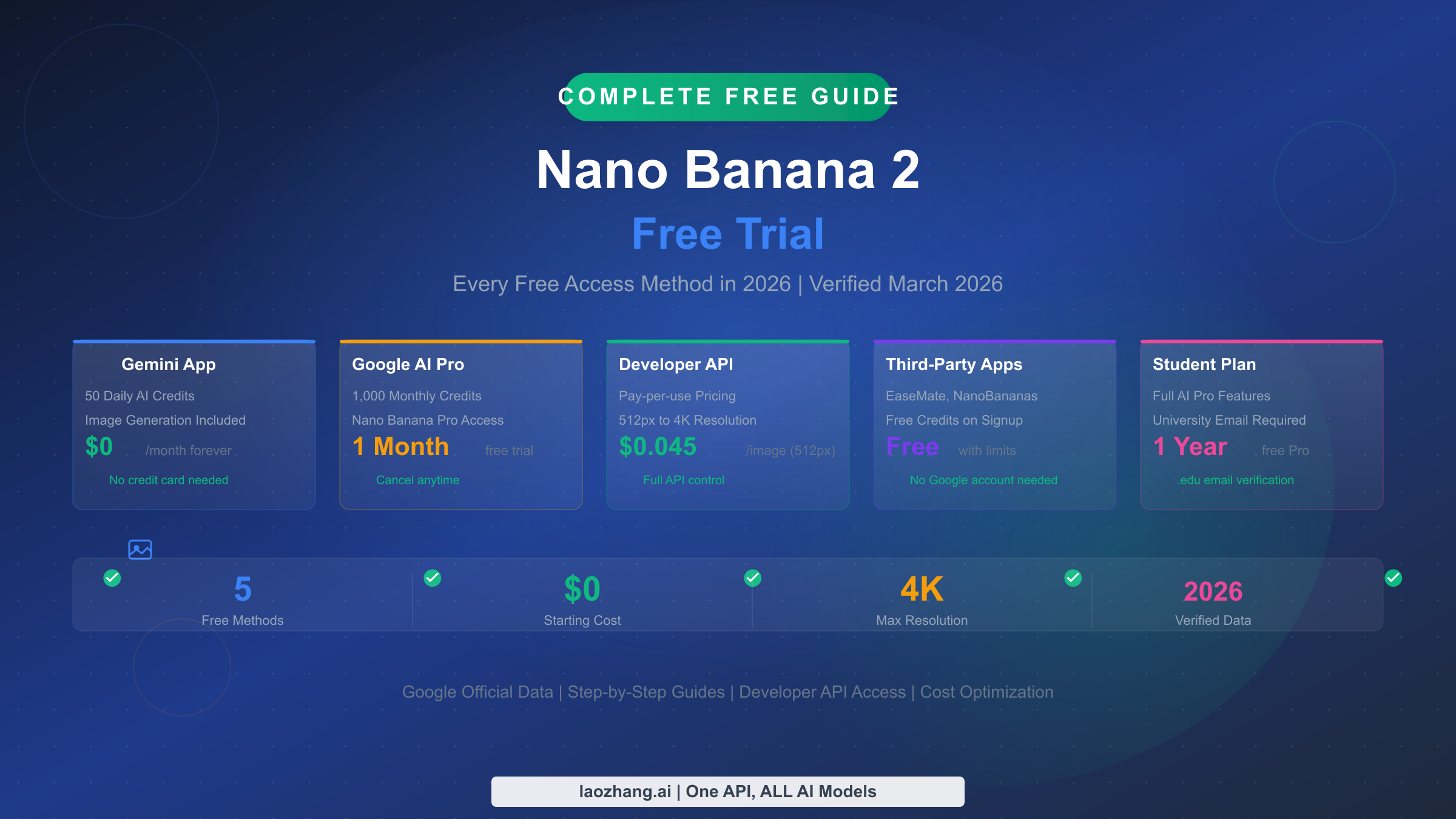
If by Nano Banana 2 free trial you mean an official way to try the model without paying first, start in Gemini Basic. Google's current Gemini Apps limits page, checked on March 30, 2026, says Basic users can generate or edit up to 20 Nano Banana 2 images per day. That is the clean official no-pay route most ranking pages still bury.
If by "free trial" you mean a temporary premium upgrade, Google's current US subscriptions page now advertises Google AI Pro at $0 for one month. That can be useful if you already know the Basic cap is too tight. But it is still a Gemini app plan trial, not a free pass for the official API.
And if your real question is whether the official Nano Banana 2 API can be tried for free in AI Studio, Google's current pricing page still says Free Tier: Not available for gemini-3.1-flash-image-preview, while Google's Nano Banana 2 launch post says a paid API key is required in AI Studio. That app-versus-trial-versus-API split is the whole story.
One reason this keyword stays messy is that Google now spreads the answer across multiple official surfaces: Gemini help pages, subscriptions, student pages, AI Studio, and developer pricing docs. The current US student page adds another important correction: it says the previous student offer expired on March 11, 2026 in that region. So if you still see articles promising a year of free premium access, treat them as stale until they show a fresher official citation.
| Path | Official? | What you get on March 30, 2026 | Best for | Main catch |
|---|---|---|---|---|
| Gemini Basic | Yes | Up to 20 Nano Banana 2 images/day in Gemini Apps | Casual users and prompt testing | Daily limits can change |
| Google AI Pro trial | Yes | 1 month of higher Gemini access in the US | Creators who need a temporary upgrade | It is a plan trial, not a free API tier |
| AI Studio / Gemini API | Yes | Model access for gemini-3.1-flash-image-preview | Developers and automation | Official pricing is paid |
| Third-party wrappers | No | Free credits or demos, depending on the site | Fast experiments and no-login tests | Privacy, quota, and reliability vary |
TL;DR
- The official free path is Gemini Basic, not AI Studio.
- The official temporary premium path is the current Google AI Pro one-month US trial.
- The official API is still paid for
gemini-3.1-flash-image-preview. - Old student-offer articles are often stale for the US because Google's current student page says the previous offer expired on March 11, 2026.
What counts as a real Nano Banana 2 free trial right now
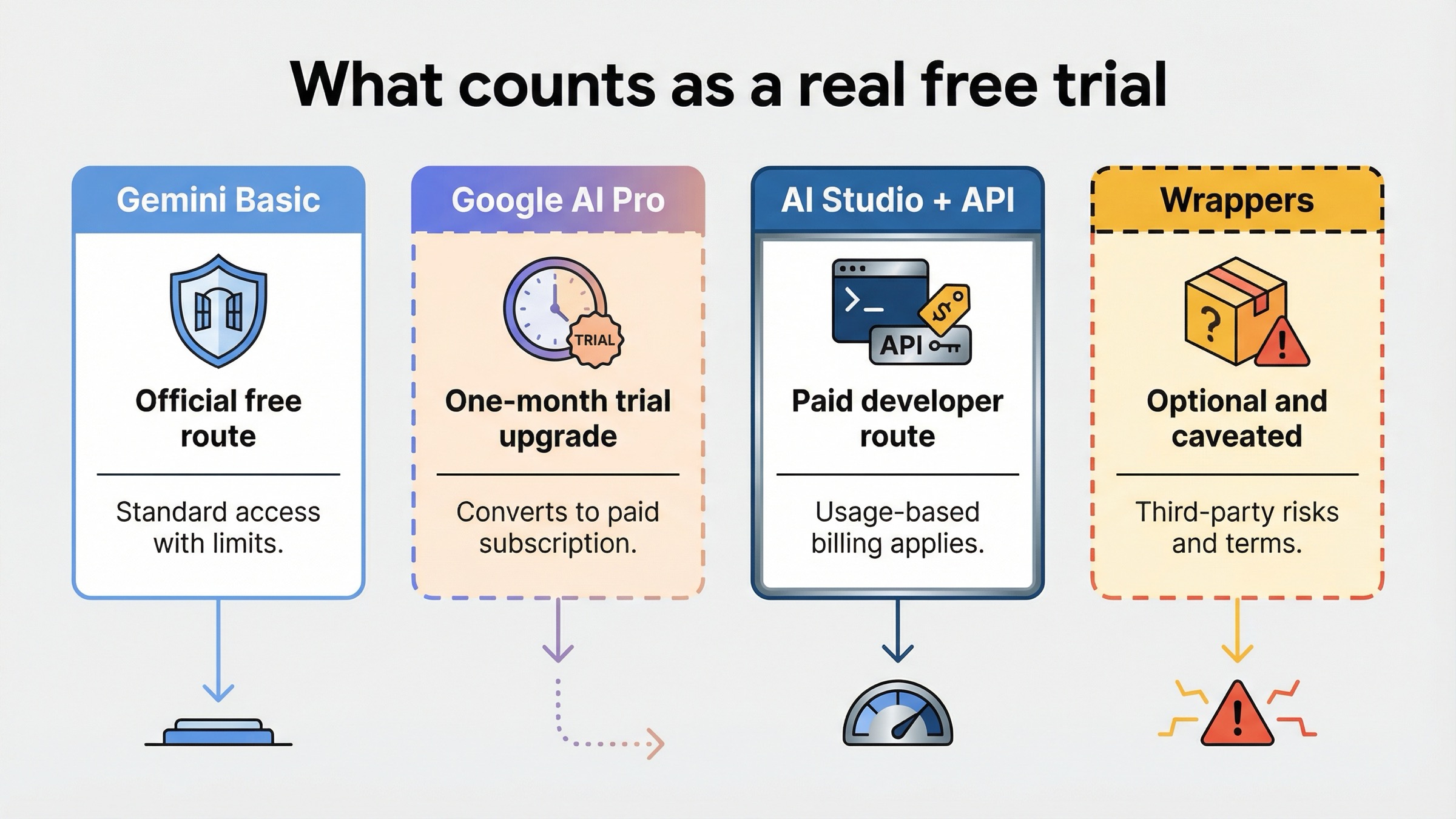
The phrase "free trial" is doing too much work in this query. Readers usually mean one of three different things:
- Official ongoing free use inside Gemini
- A temporary paid-plan upgrade inside Gemini
- Programmatic access through AI Studio or the official API
Those are not interchangeable. If you collapse them into a single "5 free methods" article, you end up with the kind of page one keeps rewarding on clicks and failing on trust.
The clean current answer is this:
- Gemini Basic is the official no-pay path.
- Google AI Pro is the official temporary trial path in the US right now.
- The official API is still a paid developer path.
That is also why wrapper pages feel so compelling. They promise one button, one signup, and one simple answer. Google's official answer is more fragmented because it lives across product help, plan marketing, and developer docs. A good article has to reassemble that official answer for the reader without pretending those surfaces are the same thing.
If your goal is just to see whether Nano Banana 2 is good enough for your prompts, there is no reason to begin in AI Studio. Start in Gemini. Google's own Gemini Apps limits page and image-generation help page are already enough to answer the official free-use side of the question. If you immediately run into the free cap or want higher app-side quality, then the trial question matters. If you need code, batching, or product integration, the API question matters. But the order matters too.
That is the key point this keyword needs to surface early: official free access is not the same thing as official developer access.
What free users get in Gemini today
Google's current Gemini Apps limits page is the most important official page for this topic because it gives actual Nano Banana 2 numbers instead of vague marketing language. As of March 30, 2026, it lists:
- Basic: up to 20 images/day
- Google AI Plus: up to 50 images/day
- Google AI Pro: up to 100 images/day
- Google AI Ultra: up to 1000 images/day
Google also warns that these limits can change frequently and reset daily. That warning matters more than many roundup articles admit. It means you should treat the free Gemini route as a real official access path, but not as a fixed forever contract.
The separate Gemini image-generation help page fills in the practical details. It says free users preview images at high resolution but download them at 1K, while paid subscriptions download at 2K. It also explains that image generation and editing both live directly inside Gemini Apps, so you can test prompt quality, upload an image to edit, or mix multiple images together without going anywhere near API billing.
That makes Gemini Basic the right default for most people who search this keyword:
- you want to test whether the model fits your taste
- you want to learn prompt structure before paying for automation
- you only need a small daily batch of images or edits
- you do not want to set up billing just to try the model
There is another subtle but important detail on the same help page. Paid subscribers can use Nano Banana Pro to redo an image, but Google also says that if you hit your daily Nano Banana 2 quota, you cannot redo additional images with Pro. That means even the premium upgrade still sits inside an app-side quota system. It is not an escape hatch into unlimited usage.
If your free use case is light creative work, prompt practice, or a few client concepts a day, Gemini Basic is already enough to answer the query honestly. If you need more headroom, then the plan-trial question becomes relevant. But it only becomes relevant after you confirm that Gemini itself is the right workflow.
If you want help getting better first-pass outputs before paying for more quota, our Nano Banana 2 prompts guide is the better next read than an API tutorial. Better prompts usually save more money than more quota does.
What the Google AI Pro trial changes and what it does not
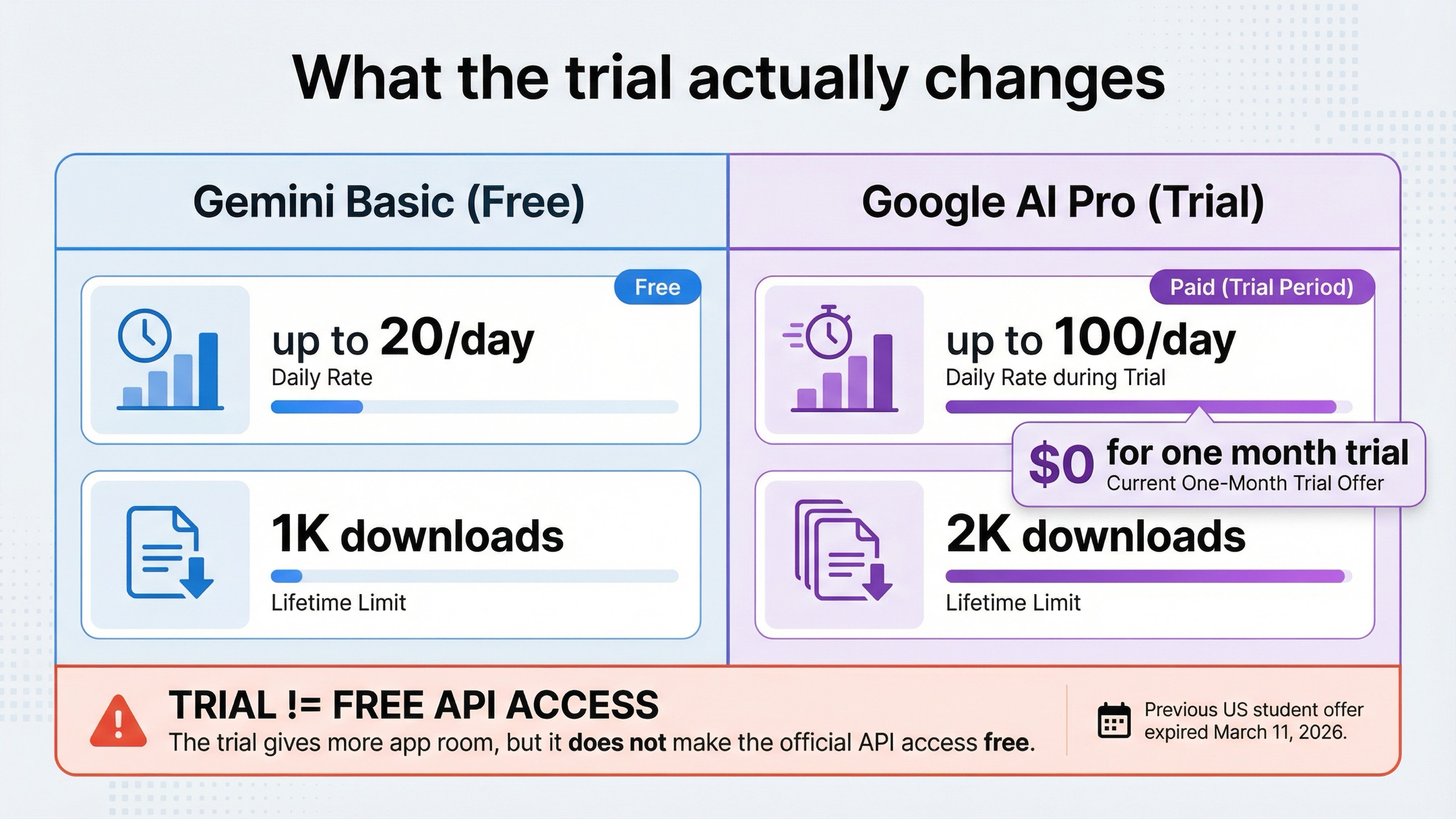
Google's current US subscriptions page lists Google AI Pro at $19.99/month and currently shows it as $0 for one month. That is the cleanest official answer if what you really want is a temporary upgrade rather than ongoing free use.
What the trial changes is mostly Gemini app headroom:
- higher Nano Banana 2 daily image caps in Gemini
- access to regenerate with Nano Banana Pro
- broader access to other Google AI plan features around Gemini, Flow, and Whisk
What it does not change is just as important:
- it does not make the official API free
- it does not turn AI Studio into a no-billing sandbox
- it does not erase daily app-side usage limits
This is where stale student-offer articles create extra confusion. Google's current US student page still promotes Gemini as a student-friendly route, but its FAQ now says the previous student offer expired on March 11, 2026 in that region and that the current page is offering a 1 month Google AI Pro trial instead. So if you find old pages promising a 12-month student free pass, do not assume those are still current for the United States.
The same subscriptions page also shows Google AI Plus at $7.99/month, with $3.99/month for two months on the current US page. That matters because many readers searching "free trial" are really deciding between three app-side states:
- stay free on Basic
- try Pro for a month
- drop to a cheaper ongoing paid tier like Plus if they like the workflow
In plain English, the trial is worth considering when:
- you already know the Basic 20/day cap is too low
- you want the paid app-side experience before choosing a long-term plan
- you care about higher app limits and paid-side image redo behavior more than you care about API automation
It is not the right mental model when your actual goal is developer integration. If you are trying to connect the model to your own app, the relevant docs are still the pricing and rate-limit pages, not the consumer plan trial page.
Why Google's AI credits are not the same as Nano Banana 2 image quotas
This is the fact pattern that breaks the most articles.
Google's current subscriptions page lists 50 daily AI credits on Free, 200 monthly AI credits on Plus, and 1,000 monthly AI credits on Pro. But the same page says those credits are used for video generation across Flow and Whisk. That is not the same thing as Gemini's Nano Banana 2 image cap.
So if you see an article saying something like "Free users get 50 Nano Banana 2 images a day" because it copied the plan page, that article is blending two separate systems:
- AI credits on the subscriptions page
- Nano Banana 2 image limits on the Gemini Apps limits page
The safer rule is simple:
- if you want to know how many Nano Banana 2 images you can generate or edit in Gemini today, trust the Gemini Apps limits page first
- if you want to understand what else a paid Google AI plan includes across Flow and Whisk, then the subscriptions page matters
This distinction sounds small, but it changes the whole article shape. Once you separate those systems, the query becomes much easier to answer honestly. The free-trial story is no longer a confusing bundle of credits, quotas, subscriptions, and wrappers. It becomes a three-part route:
- free Gemini usage
- optional app-side plan trial
- paid developer access
That is also why the current SERP feels noisier than it should. Many ranking pages copy numbers without keeping the product surface attached to the number. The result is a misleading page that sounds specific while still failing the user.
Why the official API is still paid
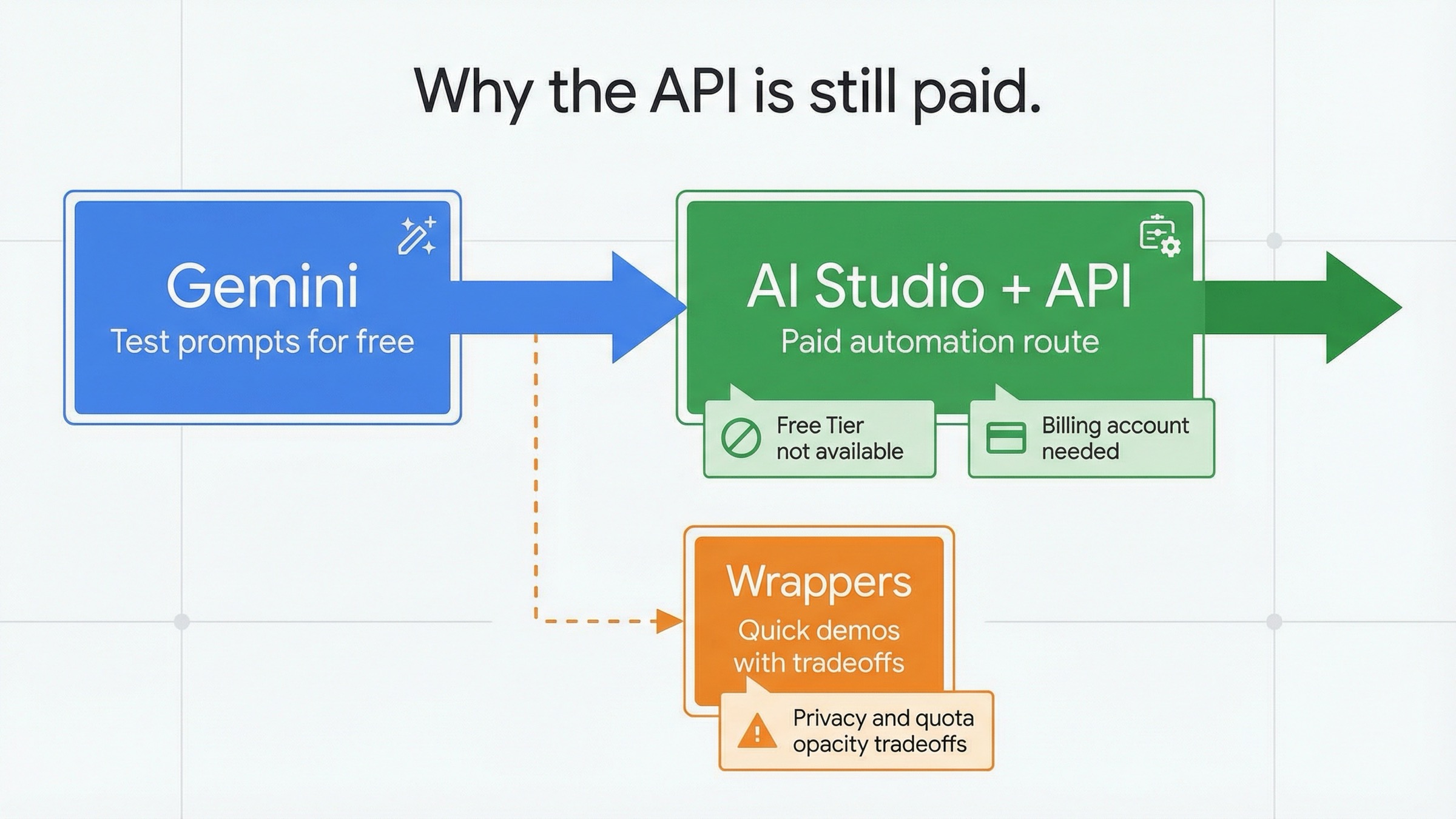
On the developer side, Nano Banana 2 maps to gemini-3.1-flash-image-preview in Google's current image-generation docs. That mapping matters because it is the exact model name that appears in official pricing and rate-limit pages.
Google's own Nano Banana 2 launch post, dated February 26, 2026, says a paid API key is required to use the model in Google AI Studio. Google's pricing page then backs that up with the more specific billing detail: for Gemini 3.1 Flash Image Preview, the pricing table shows Free Tier: Not available.
That pricing block currently lists the following paid output equivalents:
| Output size | Current official price | When it is worth paying |
|---|---|---|
| 0.5K | about $0.045/image | quick tests and low-cost drafts |
| 1K | about $0.067/image | normal web, social, and editorial work |
| 2K | about $0.101/image | sharper marketing or design assets |
| 4K | about $0.151/image | high-resolution output where detail really matters |
Google's rate-limit docs add the operational piece many summary pages skip. They explain that project usage tiers are tied to billing setup, that Tier 1 requires an active billing account, and that moving from the free project tier to a paid tier requires setting up billing in AI Studio. In other words, even if Google's broader platform docs use the language of free and paid tiers at the project level, the model you care about here still does not have a free image-generation tier on the pricing page.
That is the sentence most readers need:
Seeing Nano Banana 2 in AI Studio does not mean the official Nano Banana 2 API is part of the free-trial story.
It just means Google exposes the same model family across both consumer and developer surfaces.
For developers, that changes the safest workflow:
- test prompt quality and product fit in Gemini first
- move to the paid API only when you actually need code, scale, or automation
- do not budget your build under the assumption that a consumer plan trial will somehow cover official API usage
If you are already comparing output sizes and billing math, our Nano Banana 2 API pricing guide is the better next page than any more general "free trial" article.
Common Problems
The same three mistakes keep showing up in this query family:
-
Using the subscriptions page as if it were the Gemini image-quota page.
That is how people end up repeating 50 AI credits as if it were 50 Nano Banana 2 images. -
Treating a consumer plan trial like developer billing.
The Google AI Pro trial changes your Gemini plan state. It does not turn AI Studio into a free API sandbox. -
Trusting old student-offer articles without checking the current region page.
In the US-facing route we checked on March 30, 2026, Google's current student page explicitly says the previous offer expired on March 11, 2026.
If any of those failure modes sounds familiar, the safest reset is simple: go back to Gemini Basic for official free use, then re-evaluate whether you actually need a plan upgrade or paid API access.
How to judge third-party free-trial and no-login sites
Wrapper sites rank well for this keyword because they promise a simpler world than Google does. They give you slogans like "free forever", "no login", "try now", and "unlimited". That is a better click market than "read five official pages and separate three billing systems."
But you should still classify those sites correctly. They are not the same thing as official Gemini access, even when they expose the same model family behind the scenes.
A wrapper can be useful when:
- you want a quick demo without signing into Gemini
- you only need a tiny number of experiments
- you are testing a UI or workflow rather than committing to a long-term route
A wrapper becomes weaker when:
- you care about prompt privacy or client-sensitive images
- you need predictable quota and uptime
- you want a trustworthy long-term workflow
- you need to understand exactly what happens when the free credits run out
The most useful question is not "Is this site lying?" The more useful question is "What business model is paying for these images?" Once you ask that, the hidden tradeoffs become much easier to see:
- promo credits can disappear
- hidden throttles can replace visible limits
- data handling can be weaker than official Google surfaces
- "free forever" can really mean "free until this wrapper changes its offer"
That is why wrapper sites should be treated as optional convenience layers, not as the editorial default. For official free testing, Gemini is still the right answer. For official developer usage, the API is still the paid answer. Wrappers live in the middle and should be judged on wrapper terms.
If your next question is whether there is any honest path to broader no-pay usage beyond Gemini Basic, our Nano Banana 2 free unlimited guide goes deeper into that exact claim market.
Best path for casual users, creators, and developers
If you are a casual user, the answer is straightforward. Use Gemini Basic first. The current Basic limit is enough to evaluate the model, test prompts, and handle light image work without touching billing.
If you are a creator and you keep hitting the Basic cap, then the Google AI Pro trial makes sense as a short, controlled upgrade. It lets you test the higher-access Gemini experience before deciding whether you want to pay for a plan long term. If Pro feels too heavy after the trial, the current Google AI Plus pricing is the next practical comparison.
If you are a developer, skip the false hope stage. Use Gemini to understand whether Nano Banana 2 is the right model for your product, then move to the official pricing table and treat the API as paid infrastructure from day one.
If you are actually deciding whether the upgrade should be about higher quality rather than more access, that is a different article. The right next comparison there is Nano Banana 2 vs Nano Banana Pro, not another free-trial roundup.
The short version is still the same:
- want official free access today: start in Gemini Basic
- need a temporary premium upgrade: use the current Google AI Pro trial
- need automation or AI Studio: assume official paid API pricing
- want instant no-login demos: use wrappers carefully and knowingly
FAQ
Is there still a 12-month Nano Banana 2 student free trial?
Not on the current US student page we checked on March 30, 2026. That page says the previous student offer expired on March 11, 2026 in that region and currently promotes a 1 month Google AI Pro trial instead. If you are outside the US, check your local Google student page before trusting older summaries.
Does the Google AI Pro trial make the Nano Banana 2 API free?
No. The trial changes your Gemini app plan access. Google's pricing page still shows no free tier for gemini-3.1-flash-image-preview, and Google's launch post says a paid API key is required in AI Studio.
How do I avoid being charged after the trial?
Google's current subscriptions FAQ says you should cancel before the trial expires, and it also says there are no refunds for partial billing periods except where required by law. So if you only want the trial, set a reminder and cancel it before the renewal date.
Is Nano Banana 2 completely free if I stay in Gemini?
It is officially free to use in Gemini Basic right now, but it is not unlimited. Google's current help page lists up to 20 images/day for Basic, and the same help system says those limits may change and reset daily.