
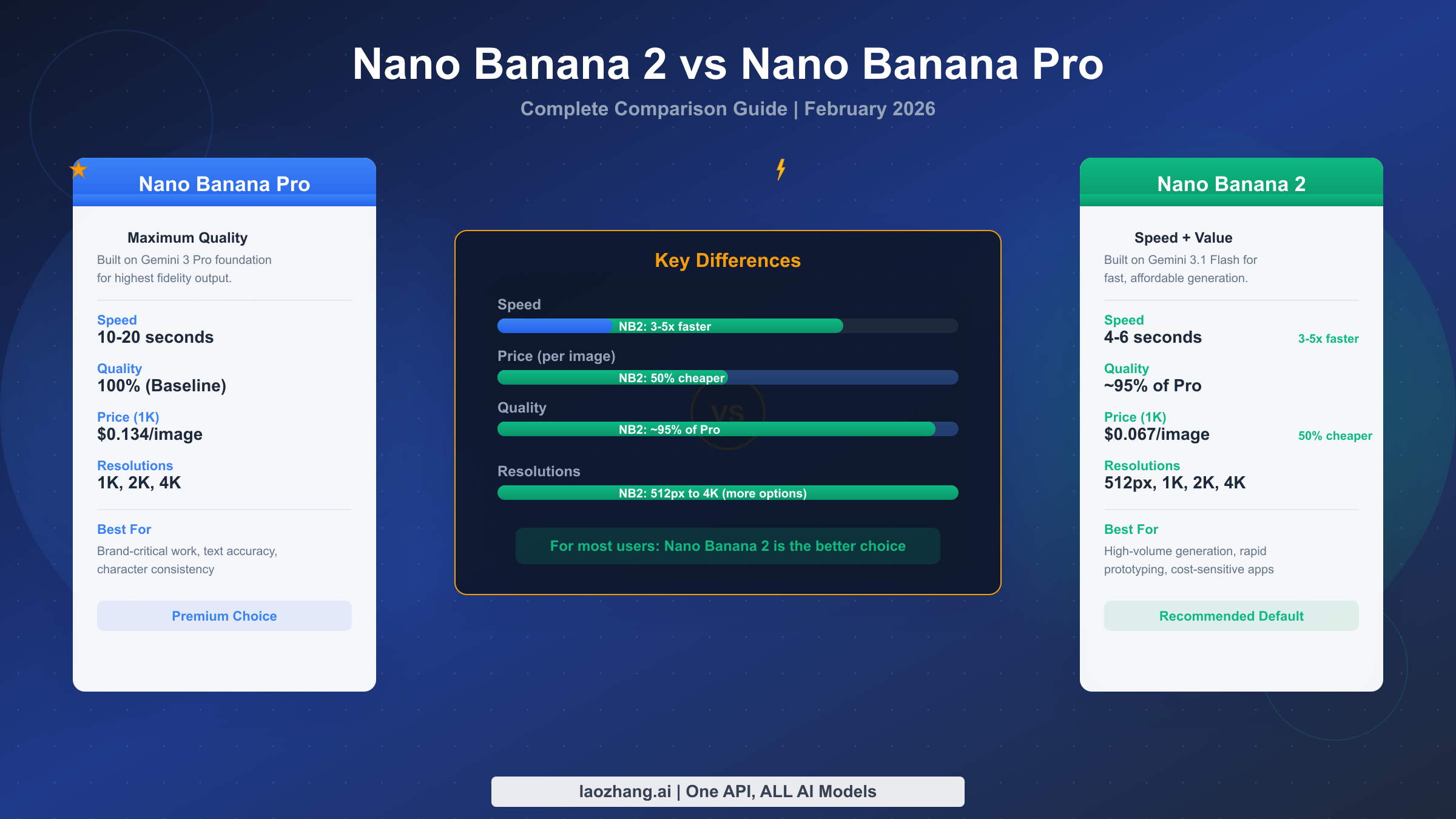
If you need one clean answer in March 2026, start with Nano Banana 2. Google made it the default image model across Gemini app surfaces on February 26, 2026, it costs less on the API, and it already inherited many of the capabilities that used to force people into Nano Banana Pro.
Nano Banana Pro still matters, but it is no longer the obvious default for everyone. It is the upgrade path for the narrower cases where typography, infographics, complex layouts, or premium 4K brand assets carry enough value to justify slower, more deliberate generation and higher pricing. That is a very different recommendation from the one many early comparison posts gave, and it is the main reason this topic needed a refresh.
One caveat matters before anything else: the answer is not identical in the Gemini app and in the API. In Gemini Apps, image generation now starts with Nano Banana 2 and paid subscribers reach Pro through the Redo with Pro flow. In the API, you pick the model directly with gemini-3.1-flash-image-preview for Nano Banana 2 or gemini-3-pro-image-preview for Nano Banana Pro. If a comparison page does not separate those two surfaces, it is hiding the most important part of the decision.
TL;DR
| If this sounds like you | Default pick | Why |
|---|---|---|
| You need a fast everyday model for mockups, ads, social graphics, and iterative work | Nano Banana 2 | It is the cheaper, faster, now-default Google lane for most image tasks |
| You are working in Gemini app and want the simplest path | Nano Banana 2 first | That is how Google now routes image creation in the app |
| You need readable typography inside the image, infographic layouts, or presentation-ready diagrams | Nano Banana Pro | Google still frames Pro as the studio-quality option for text-heavy, contextual image work |
| You are building with the API and want the best default cost posture | Nano Banana 2 | Google's March 23, 2026 pricing makes the Flash Image lane meaningfully cheaper at every published size |
| You are shipping premium hero visuals or brand-critical 4K assets where polish matters more than throughput | Nano Banana Pro | Pro remains the safer premium route when the image itself is the final deliverable |
The practical rule is simple: use Nano Banana 2 as your baseline, and keep Nano Banana Pro as the deliberate escalation path. That gives most teams the right balance of speed, cost, and current Google workflow fit without giving up the higher-end option when the job truly needs it.
What changed when Nano Banana 2 became the default
The comparison only makes sense if you start from the current lineup instead of from last month's assumptions. Google's release notes say Nano Banana 2 launched on February 26, 2026. Google's Gemini Apps help page now says image generation uses Nano Banana 2, and paid subscribers can switch a generated result into Nano Banana Pro only through Redo with Pro. That means the product surface most casual users touch first no longer starts at Pro.
That shift matters because many existing pages were written for an older mental model. Some of them still act as if Nano Banana Pro is Google's main image lane and Nano Banana 2 is just a stripped-down alternative. That is not how Google positions the product now. The official Nano Banana 2 launch post describes it as combining Pro-style capabilities with Flash-speed generation, and Google's models page places Nano Banana 2 and Nano Banana Pro side by side as separate preview lanes in the Gemini 3 family.
There is one more source of confusion: older "Nano Banana" articles may be mixing in the previous Gemini 2.5 Flash Image era. Google's release notes say gemini-2.5-flash-image-preview shut down on January 15, 2026. So if you find an article comparing Nano Banana Pro against the older Nano Banana naming without acknowledging that shutdown and the arrival of Nano Banana 2, you are reading a page from the wrong generation of the lineup.
This is why the right 2026 comparison is not "which model is technically best in the abstract?" It is "which model should be my default now that Google moved the everyday lane to Nano Banana 2 while keeping Pro for more demanding jobs?"
Nano Banana 2 vs Nano Banana Pro on current Google surfaces
Before you compare output quality, you need to know where these models actually live.
In the Gemini app, Nano Banana 2 is the starting point. Google's Gemini Apps help documentation says you generate with Nano Banana 2 first, then paid subscribers can redo a result with Nano Banana Pro from the three-dot menu. The same help page also warns that if you hit your Nano Banana 2 daily quota, you cannot trigger more Pro redos. For consumer readers, that is the decisive workflow fact.
In the developer stack, the decision is more explicit. Google's Gemini models page describes Nano Banana 2 as the high-efficiency visual-creation lane optimized for speed, while Nano Banana Pro is the studio-quality 4K lane. In code, that split becomes the choice between gemini-3.1-flash-image-preview and gemini-3-pro-image-preview. If you need the consumer naming clarified, our separate guide on whether Nano Banana Pro is the same as Gemini 3 Pro Image covers the naming bridge in more detail.
The rate-limit story is also important, because strong comparison pages should not invent fake certainty where Google does not. Google's rate-limits page says quotas are applied per project, preview models have more restrictive limits, active RPM should be checked in AI Studio, and daily quotas reset at midnight Pacific time. That is why this refresh avoids made-up universal request numbers. The right operational advice is to treat both models as preview surfaces whose usable limits depend on your account tier and current AI Studio allocation.
Once you separate those surfaces, the decision becomes much cleaner. Nano Banana 2 is the default route in consumer usage and the lower-cost default route in the API. Nano Banana Pro is the quality-first premium lane that you pull in when the output itself needs more deliberate typography, more controlled layouts, or more final-form polish.
Where Nano Banana 2 is the better default
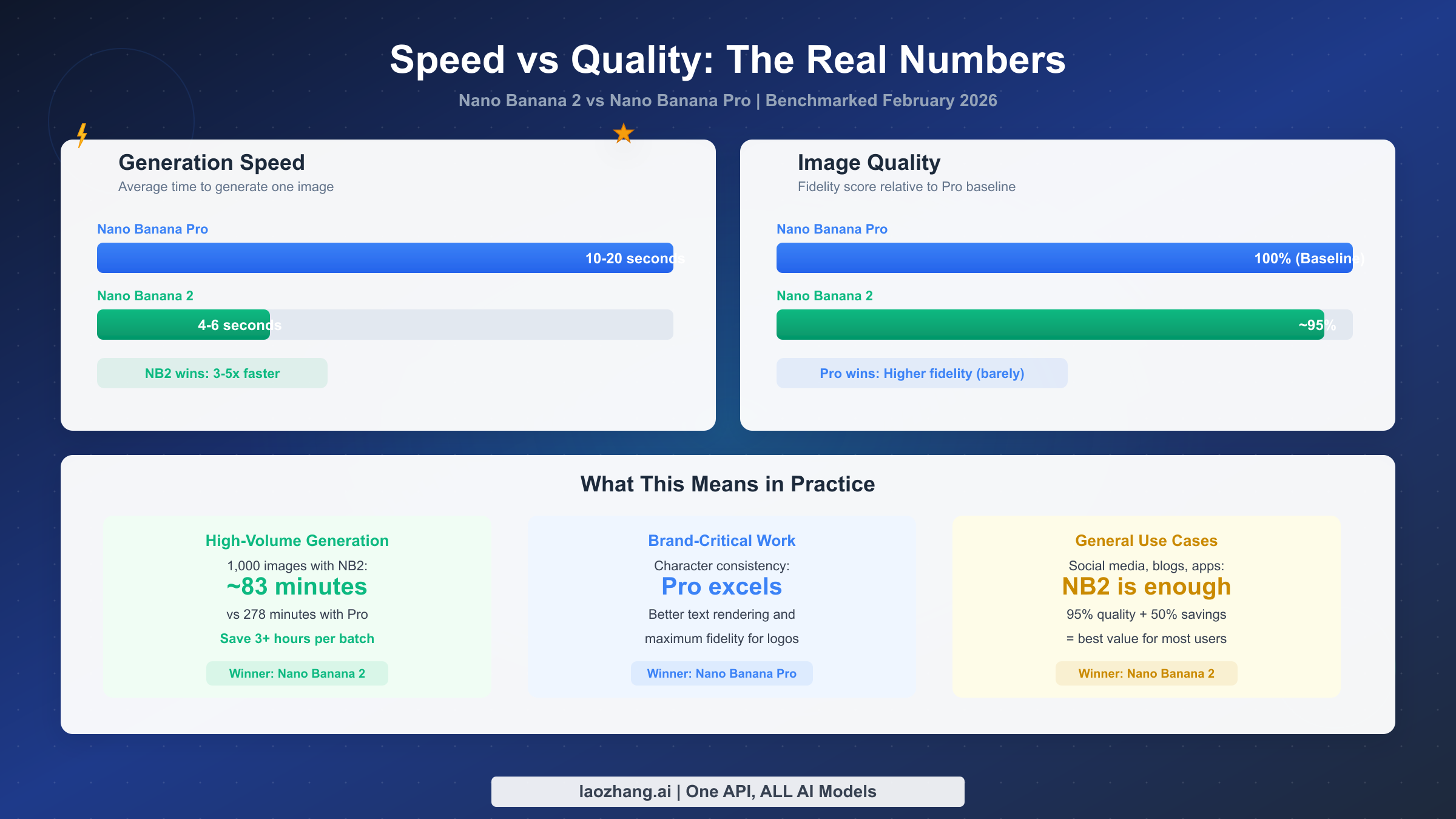
Nano Banana 2 wins the default recommendation because it aligns with how most teams actually work. Most image-generation jobs are not museum pieces. They are ad variants, blog visuals, mockups, landing-page graphics, social creatives, internal decks, and iterative concepts where the fastest useful answer is worth more than the theoretically most polished answer. That is the lane Google is clearly aiming Nano Banana 2 at.
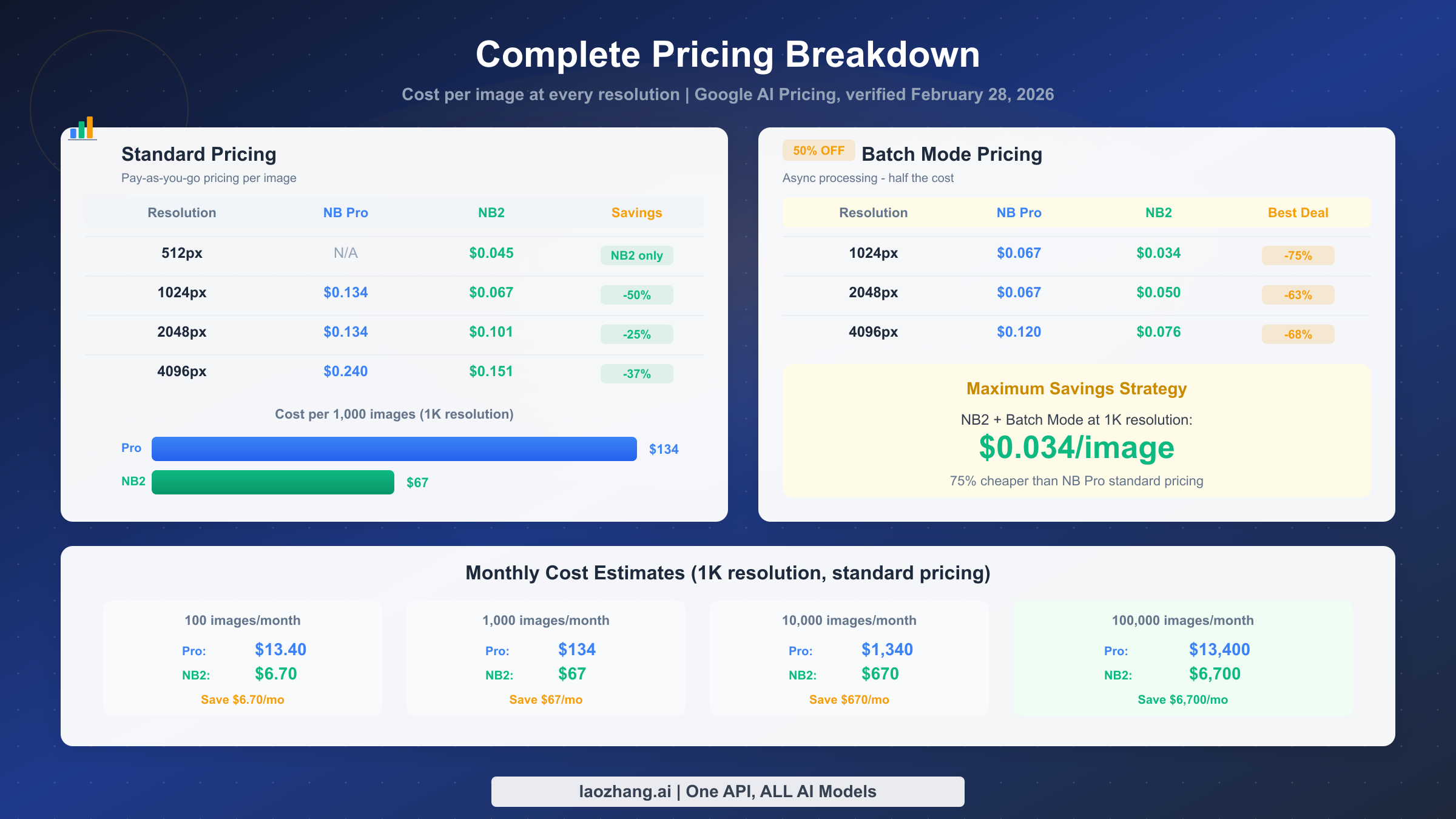
The pricing supports that default. On March 23, 2026, Google's official Gemini API pricing page lists Gemini 3.1 Flash Image Preview at $0.045 per 0.5K image, $0.067 per 1K image, $0.101 per 2K image, and $0.151 per 4K image. If your workflow depends on volume, those numbers matter immediately. You are not saving a tiny rounding error by choosing Nano Banana 2. You are choosing the cheaper lane at every published output size Google currently lists for this family.
The product positioning also supports the default. Google's Nano Banana 2 launch post does not present it as a bare-bones fallback. It emphasizes better text rendering, subject consistency, translation inside images, production-ready specs from 512px to 4K, and broader access across Gemini, Search, Ads, AI Studio, and Vertex AI. In other words, Nano Banana 2 is not just the cheaper lane. It is the lane Google wants most users to succeed with first.
That matters even more for teams that iterate heavily. If your creative workflow depends on many attempts, quick revisions, and "close enough to choose the next direction" rather than "final art on the first shot," the Flash-speed lane fits better than a premium lane you have to justify on every request. It is also the more natural route for builders who want a sane default in product code and then a premium override for higher-value calls.
So when should you not stop at Nano Banana 2? When the image is doing a job where "good enough" is not the right bar. That is where Pro still earns its place.
Where Nano Banana Pro still earns the premium
Nano Banana Pro remains valuable because Google still positions it as the studio-quality image engine for the hardest cases. The Pro launch post focuses on context-rich visuals, multilingual legible text, infographics, diagrams, fine creative control, and up to 14-image input workflows. That is not marketing fluff you should ignore. It is a clear signal about where Google thinks the premium lane still changes the result.
Typography is the most obvious example. If the image needs to carry readable text that customers will actually inspect, Pro is still the safer route. Menus, labels, product mockups, posters, explainers, and infographic-style assets all fall into this bucket. Nano Banana 2 has improved text rendering, and for many casual or low-risk uses that will be enough. But when text accuracy and layout are part of the product itself, Pro is still the cleaner bet.
The same logic applies to complex layout work. Nano Banana Pro's launch materials emphasize accurate infographics, diagram-style outputs, consistency across larger sets of references, and high-fidelity creative controls. That is exactly the kind of work where a team would rather pay more than ship something that feels almost right but not quite trustworthy. If you are producing executive deck visuals, polished campaign mockups, or client-facing brand assets, Pro is still the better escalation path.
Both models now live in a world where 4K is available, so the difference is not simply "Nano Banana 2 cannot do 4K." The real difference is that Nano Banana Pro is still the model Google frames as the premium 4K, studio-grade option. If you are paying for the final asset rather than for iteration speed, that distinction still matters.
This is also why the old "just use Pro if you care about quality" advice is too blunt now. The better rule is narrower: use Pro when the image's text, layout, or final-form polish is business-critical enough that you want the premium lane on purpose. For everything else, Nano Banana 2 should carry the everyday load.
Pricing and workflow decision table
The cleanest way to understand the comparison is to separate app workflow from API pricing.
In the Gemini app, the question is not "which one do I pick from a blank slate?" The question is "do I stay in Nano Banana 2 or use Redo with Pro?" Google's current help documentation answers that directly: you start with Nano Banana 2 and move to Pro only when the result needs the extra push.
In the API, the difference is commercial and architectural. Google's March 23, 2026 pricing page lists Nano Banana 2's API lane at:
0.5K:\$0.045per image1K:\$0.067per image2K:\$0.101per image4K:\$0.151per image
For Nano Banana Pro, Google's March 23, 2026 pricing page lists:
1K/2K:\$0.134per image4K:\$0.24per imageBatch 1K/2K:\$0.067per imageBatch 4K:\$0.12per image
That does not mean Pro is overpriced. It means you should reserve it for jobs where the premium lane changes the business outcome.
| Workflow | Default model | Why this is the right default | Upgrade trigger |
|---|---|---|---|
| Social graphics, blog visuals, concept variants, and rapid A/B testing | Nano Banana 2 | Lower API price, faster everyday route, and current default Google surface | Switch to Pro only if the final asset needs polished embedded text or infographic structure |
| Gemini app users who just want the current Google path | Nano Banana 2 first | That is the documented app flow now | Use Redo with Pro when the first result is close but the typography or layout still feels weak |
| Premium campaign mockups, polished explainers, or branded presentations | Nano Banana Pro | Higher-end control is worth paying for when the image is the deliverable | Stay with Pro if the asset will be reviewed closely or reused commercially |
| Product teams exposing image generation through an API | Nano Banana 2 | Better default cost posture and easier premium upsell design | Offer Pro as a premium mode for text-heavy or client-facing asset generation |
| Diagram, infographic, and poster workflows | Nano Banana Pro | This is still where Google's own Pro positioning is strongest | None; these are the cases where Pro starts as the intentional choice |
For teams going deeper on costs and quotas, the next useful branch is our Nano Banana Pro pricing and quota guide. The point of this page, though, is simpler: your default model should follow your most common workflow, not the most glamorous edge case.
Which one should you use?
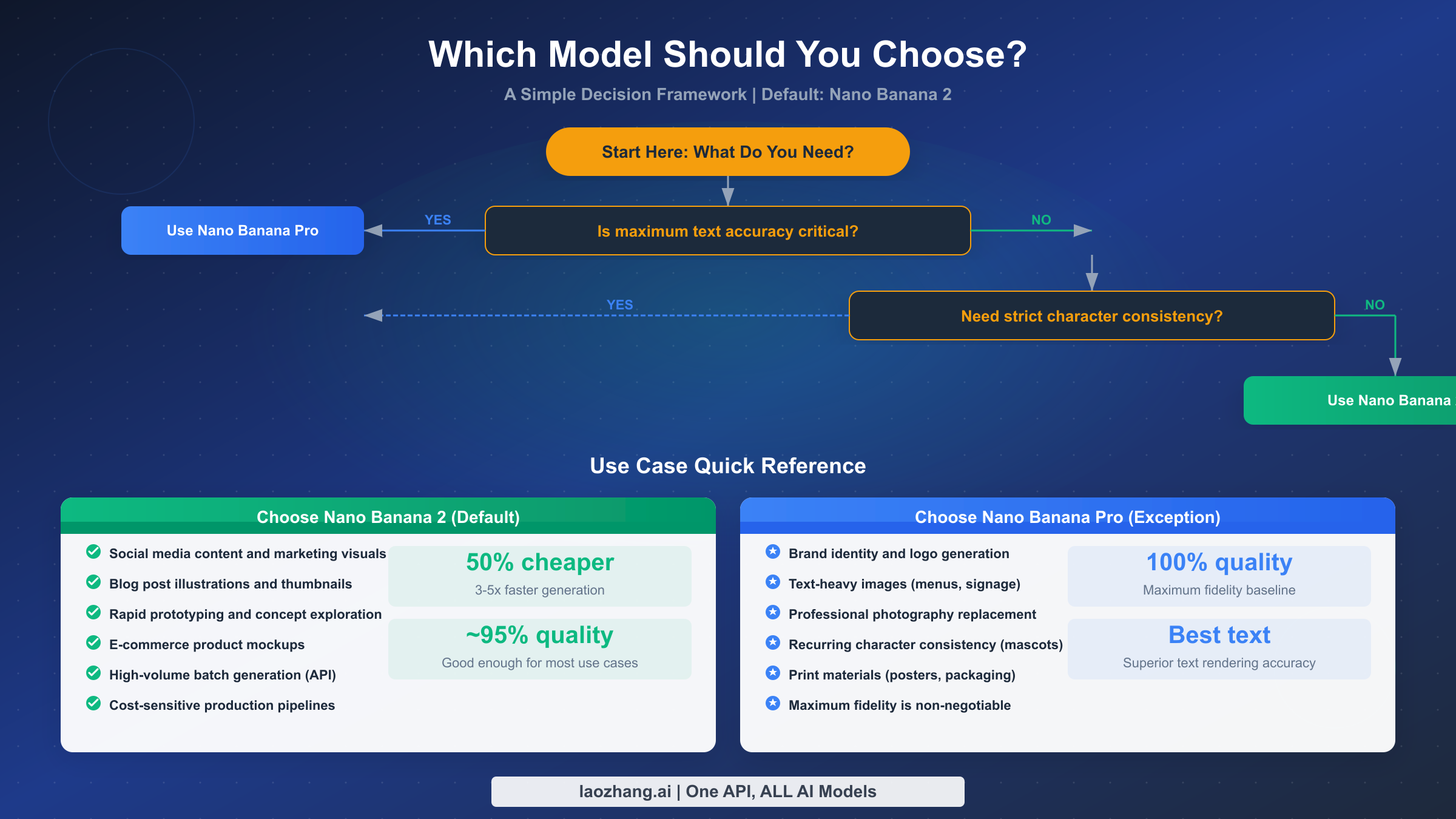
If you are a solo creator, marketer, or founder who just wants the right default in 2026, choose Nano Banana 2. It is the model Google has moved to the front of the product, it is cheaper in the API, and it is good enough to carry the majority of modern image-generation workloads without feeling like a downgrade in day-to-day work.
If you are a brand team or designer producing final-form assets with text, diagrams, or layout sensitivity, keep Nano Banana Pro in the stack. Not as the all-purpose default, but as the high-value path you reach for when the visual itself is under close review. That is the most defensible way to spend Pro dollars right now.
If you are building on the API, the strongest pattern is to make Nano Banana 2 your baseline model and add a Pro upgrade route. That could be a premium user toggle, an internal routing rule for certain prompt types, or a back-office escalation path for assets that failed the first pass. This pattern matches both Google's current product story and the economics of the current pricing page.
So the final recommendation is not complicated:
- Default to Nano Banana 2
- Escalate to Nano Banana Pro for typography, infographic, and premium 4K brand work
- Do not trust old articles that still assume Pro is the everyday starting point
That is the most honest answer the March 23, 2026 source set supports.
FAQ
Is Nano Banana 2 better than Nano Banana Pro?
For most everyday work, yes, in the sense that it is the better default. It is cheaper, more convenient, and now the front-door image model in Gemini Apps. But that is not the same as saying it replaces Pro in every high-stakes use case. Nano Banana Pro still makes more sense for text-heavy, layout-heavy, or brand-critical work.
Is Nano Banana Pro still available in the Gemini app?
Yes, but not as the default creation path. Google's help page says paid subscribers can use Redo with Pro after generating an image with Nano Banana 2.
Are Nano Banana 2 and Nano Banana Pro the same as API model IDs?
Yes. In current Google developer naming, Nano Banana 2 maps to gemini-3.1-flash-image-preview, while Nano Banana Pro maps to gemini-3-pro-image-preview.
Which one is cheaper on the API?
Nano Banana 2 is cheaper at every currently published standard output size on Google's March 23, 2026 pricing page. Nano Banana Pro costs more, but Google also lists batch pricing for the Pro lane.
Should I rewrite my workflow around Pro if I already use Nano Banana 2?
Usually no. The better move is to keep Nano Banana 2 as your baseline and add a Pro escalation path. That gives you the benefit of the cheaper default without giving up the premium lane when a specific asset needs it.