
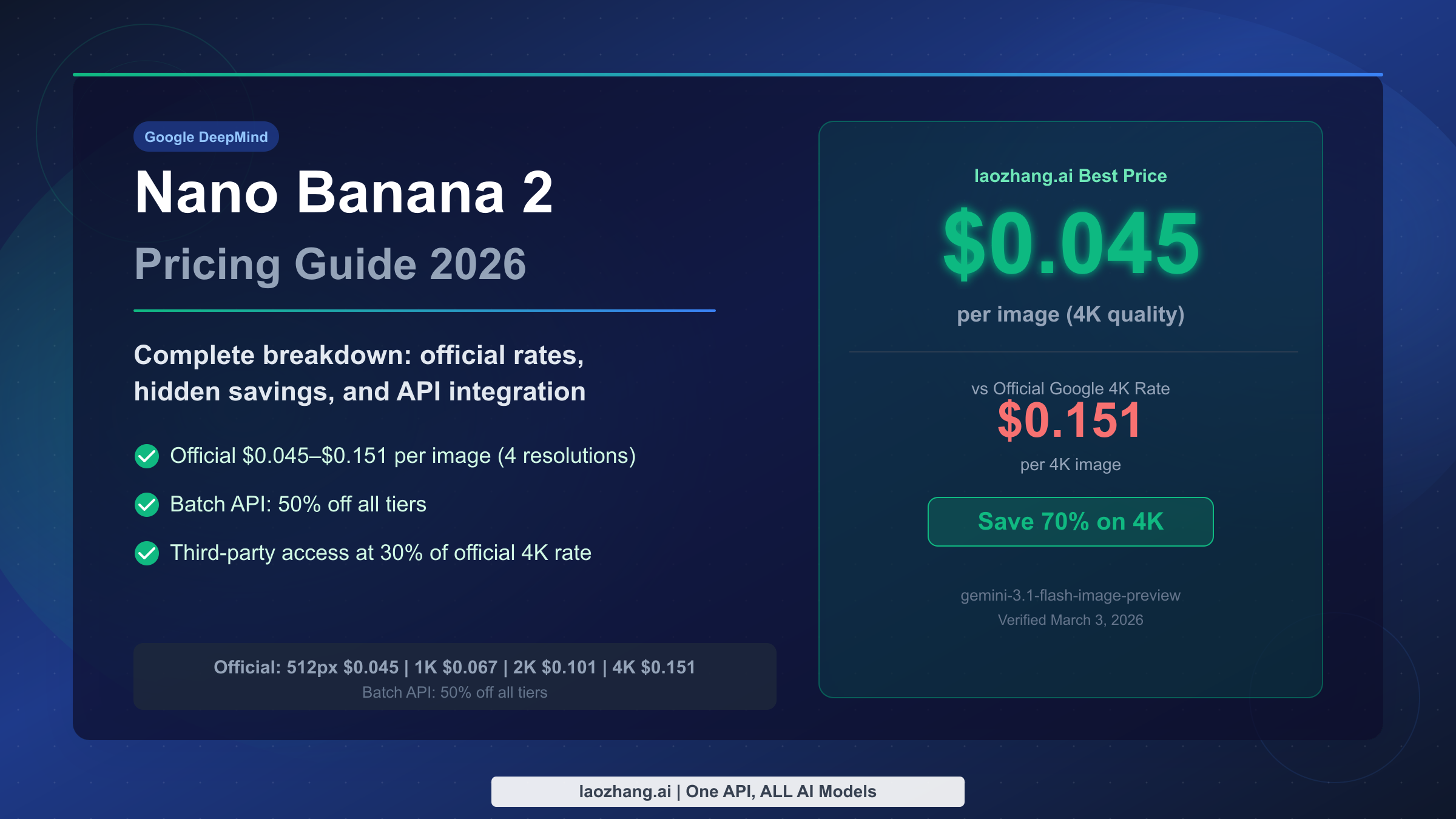
Nano Banana 2 (Gemini 3.1 Flash Image) API pricing ranges from $0.045 per image at 512px to $0.151 per image at 4K through Google's official API (verified March 3, 2026). The Batch API cuts every tier by 50%, bringing the floor to $0.022. Third-party providers like laozhang.ai offer 4K-equivalent output at $0.045/image — just 30% of Google's official 4K rate — with no monthly fees and OpenAI-compatible API integration. This guide covers every pricing tier, what they actually cost at scale, and how to cut your image generation bill by up to 70%.
TL;DR — Key Takeaways
If you're in a hurry, here's everything you need to know about Nano Banana 2 pricing:
| Tier | Price per Image | Best For |
|---|---|---|
| Official 512px | $0.045 | Thumbnails, previews |
| Official 1K | $0.067 | Standard web use |
| Official 2K | $0.101 | High-res content |
| Official 4K | $0.151 | Maximum quality |
| Batch API (all tiers) | 50% off | Non-real-time workflows |
| laozhang.ai | $0.045 (4K quality) | Best overall value |
The most important number: laozhang.ai charges $0.045 per image for 4K-quality Nano Banana 2 output, the same price Google charges for its lowest 512px tier. That's a 70% discount on 4K generation. For developers generating more than a few hundred images per month, that gap compounds quickly. At 1,000 images/month, you'd save $106 every single month — $1,272 per year — by switching from the official 4K API to laozhang.ai.
There's also a free path in. Google AI Studio provides free access to Nano Banana 2 with rate limits, suitable for testing and low-volume projects. And laozhang.ai gives new users $0.05 in free credit on signup, which gets you roughly one complimentary 4K image to validate the quality before committing to any spend.
Three things make Nano Banana 2 the image model worth understanding in depth right now: it's Google's first production-ready Gemini-native image generator, it's fast enough for real-time applications, and the pricing gap between the official API and third-party access is larger than at any comparable milestone in the AI image generation market's history. The next sections break down exactly what you're paying for, what you're saving, and how to integrate it into production today.
Official Nano Banana 2 API Pricing: 4 Resolutions, Batch Discounts & Token Math
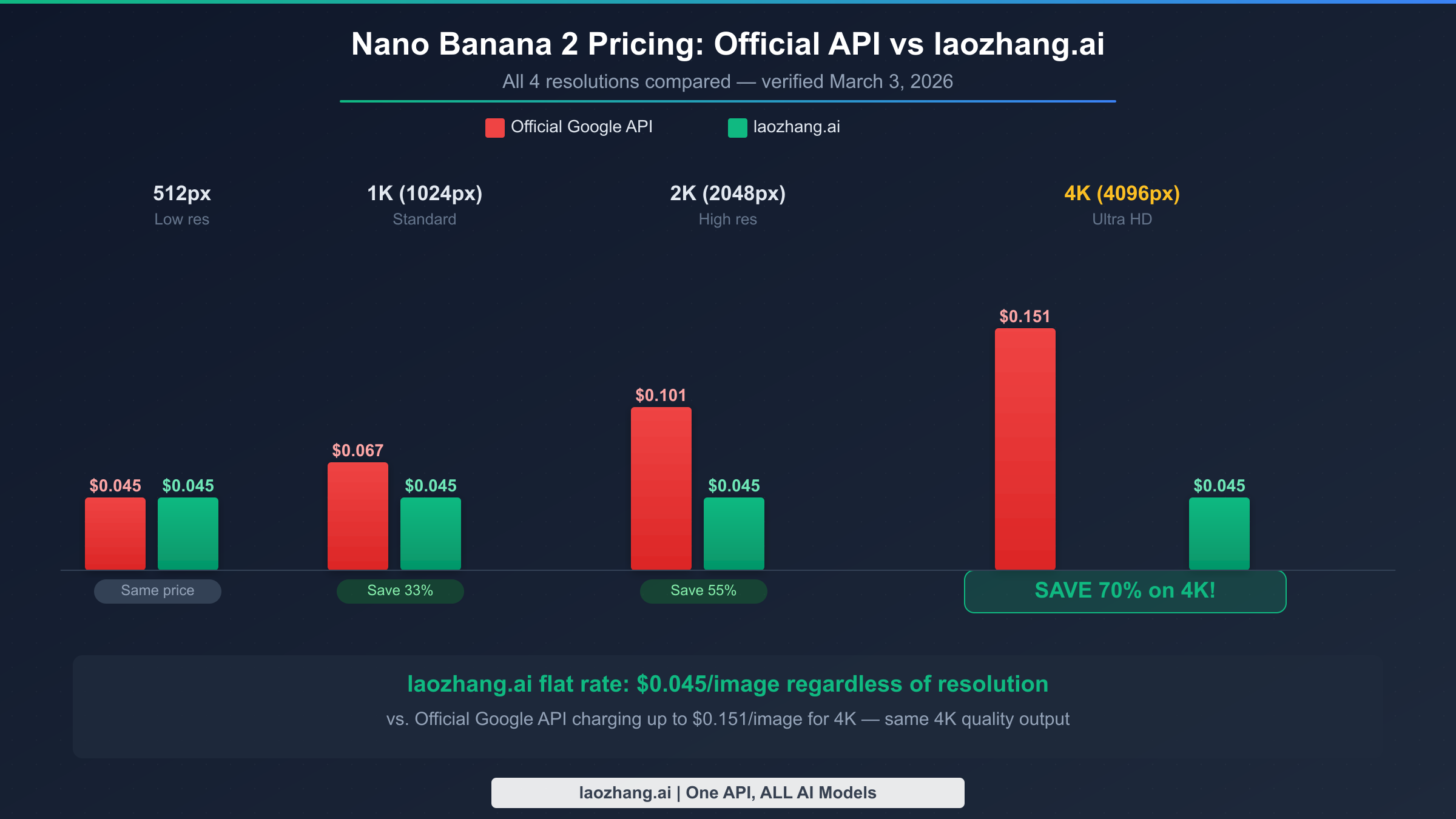
Google prices Nano Banana 2 (Gemini 3.1 Flash Image) based on output resolution, measured in image output tokens. The model ID for API access is gemini-3.1-flash-image-preview. Unlike text models billed per input+output token, image generation is billed primarily on the output side — specifically on how many tokens the rendered image requires at each resolution.
Resolution-based pricing breakdown (verified at ai.google.dev/pricing, March 3, 2026):
| Resolution | Price | Output Tokens | Rate |
|---|---|---|---|
| 512×512px | $0.045/image | 747 tokens | $60/1M output tokens |
| 1K (1024×1024px) | $0.067/image | 1,120 tokens | — |
| 2K (2048×2048px) | $0.101/image | 1,680 tokens | — |
| 4K (4096×4096px) | $0.151/image | 2,520 tokens | — |
The underlying rate is $60 per million output tokens across all resolutions — the price difference comes entirely from token consumption. A 4K image consumes roughly 3.37x more tokens than a 512px image, which is why the price difference is 3.4x ($0.151 vs $0.045). This means there's no per-request overhead, no minimum spend, and no tiered volume discounts on the official API beyond the Batch API discount. The token-based billing also means that failed or rejected requests — where the model declines to generate an image due to safety policies — are typically not charged, since no output tokens are produced.
Understanding the token math also helps you plan for cost surprises. If you're requesting images with detailed prompts that include iterative refinement, each generation attempt counts as a separate billable request. There's no "revision" mechanism that reuses partial computation — every call to the API spins up a full generation at the full token cost. For workflows that typically require 2–3 attempts per successful image (common with complex compositional prompts), your effective per-image cost is often 1.5–2x the nominal rate listed above. Planning for this in your budget estimates prevents billing shocks at month-end.
The Batch API is the most underused discount in Google's pricing sheet. Any workflow that doesn't require real-time responses — content pipelines, bulk catalog generation, overnight processing jobs — qualifies for the Batch API, which cuts every tier by exactly 50%. That makes the effective price floor $0.022 per 512px image and $0.0755 per 4K image. For production workloads where latency isn't critical, this should be the default choice. Batch API requests are typically completed within 24 hours, making them suitable for everything from e-commerce product photography pipelines to content calendar generation to training data augmentation. For a deeper technical breakdown of how the token math translates to real costs, see our deep-dive into Nano Banana 2 true cost analysis which covers the billing model in full detail.
One thing the official pricing page doesn't make obvious: Nano Banana 2 also accepts image inputs for editing workflows. Input images are billed at standard vision token rates (roughly $1.25–$1.88 per 1,000 images depending on resolution), which can add meaningfully to your total cost if you're running image-to-image editing tasks at scale. For pure text-to-image generation, only the output tokens matter. But for product photography enhancement, style transfer, or image editing pipelines, you'll need to account for both input and output costs in your budget planning.
Pricing compared with other Google image models (all verified March 3, 2026):
| Model | 1K Price | 4K Price | Generation Speed |
|---|---|---|---|
| Nano Banana 2 (gemini-3.1-flash-image-preview) | $0.067 | $0.151 | Fast (~3–5 sec) |
| Nano Banana Pro | $0.05 | $0.05 | Moderate (~8–12 sec) |
| Imagen 4 Standard | $0.04 | N/A | Fast |
| Imagen 4 Fast | $0.02 | N/A | Very fast (~1–2 sec) |
Nano Banana Pro's flat pricing structure ($0.05 regardless of resolution) is worth noting — at 4K, it's actually cheaper than the official Nano Banana 2 4K rate. However, Nano Banana 2 via laozhang.ai at $0.045 undercuts both. The generation speed difference matters for real-time applications: Nano Banana 2's faster generation makes it preferable for user-facing features where latency is critical, while the Pro model's higher quality justifies its slower output for offline batch jobs.
How Much Will You Actually Spend? Monthly Cost Calculator
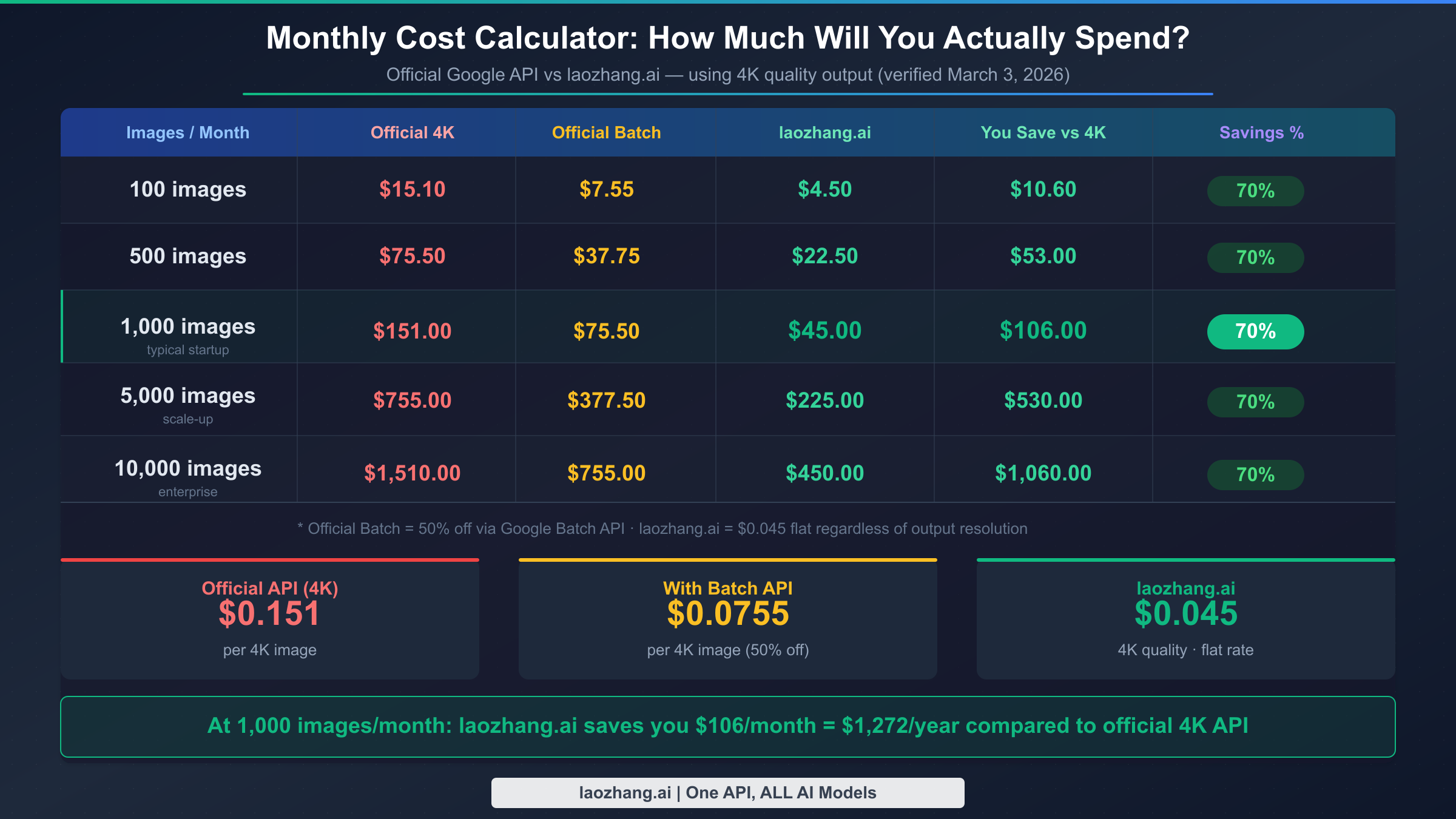
Knowing the per-image price is useful, but the question most developers actually ask is: "What will my monthly bill look like?" The answer depends heavily on both your volume and which resolution you're targeting. Here's the full picture for 4K output (the highest-value tier where pricing differences matter most):
| Images/Month | Official 4K | Official 4K + Batch | laozhang.ai | Monthly Savings |
|---|---|---|---|---|
| 100 | $15.10 | $7.55 | $4.50 | $10.60 |
| 500 | $75.50 | $37.75 | $22.50 | $53.00 |
| 1,000 | $151.00 | $75.50 | $45.00 | $106.00 |
| 5,000 | $755.00 | $377.50 | $225.00 | $530.00 |
| 10,000 | $1,510.00 | $755.00 | $450.00 | $1,060.00 |
The numbers don't require much commentary — at every volume, laozhang.ai's $0.045 flat rate beats even the discounted Batch API price. The gap widens as you scale. A startup generating 5,000 product images per month would pay $530 less per month — $6,360 per year — by using laozhang.ai instead of the official 4K API. At enterprise volumes of 10,000 images/month, that's $1,060 in monthly savings, or $12,720 annually.
For mixed-resolution workflows — say, generating 512px thumbnails alongside 4K hero images — the math changes. At the 512px tier, both the official API and laozhang.ai charge $0.045/image, so there's no financial advantage to switching providers for low-resolution output. The savings are entirely concentrated in the 1K, 2K, and 4K tiers, where laozhang.ai maintains its flat $0.045 rate while the official API charges $0.067, $0.101, and $0.151 respectively.
It's worth noting that neither platform charges subscription fees or has minimum monthly commitments. Both operate on pure pay-per-use billing, which means projects can start small and scale without renegotiating contracts. For teams evaluating AI image generation as a production feature, that flexibility is often more valuable than any per-image discount.
For teams currently using Batch API to reduce their official API costs, the comparison shifts slightly. At 1,000 images/month via Batch API, the official cost drops to $75.50 — still 68% higher than laozhang.ai's $45.00. The Batch API discount is valuable, but it doesn't close the gap. Unless your workflow is so latency-tolerant that the 24-hour Batch API processing window fits your pipeline naturally, using laozhang.ai for real-time requests and the official Batch API only where processing delay is genuinely acceptable represents the optimal cost structure for mixed workloads.
The 10,000 images/month row deserves special attention for growth planning. At that scale, the cost difference between official 4K API ($1,510) and laozhang.ai ($450) is $1,060 per month. A product team generating 10,000 product images monthly — not unusual for mid-sized e-commerce operations — would spend an additional $12,720 per year on the official API versus laozhang.ai. At that level, even the engineering time required for migration (typically 2–4 hours for a competent developer) pays for itself within the first day of the new billing cycle.
Nano Banana 2 vs Nano Banana Pro vs Imagen 4 vs DALL-E 3: Pricing Matrix
Understanding Nano Banana 2's price in isolation misses the bigger picture of the current AI image generation market. Different models serve different needs, and the cheapest option isn't always the right one. Here's where Nano Banana 2 sits relative to its most direct competitors (all prices verified March 3, 2026):
| Model | Provider | 1K Price | 4K Price | Best For |
|---|---|---|---|---|
| Nano Banana 2 (Official) | $0.067 | $0.151 | Quality-speed balance | |
| Nano Banana 2 (laozhang.ai) | Third-party | $0.045 | $0.045 | Best value |
| Nano Banana Pro | $0.05 | $0.05 | Highest quality | |
| Imagen 4 Standard | $0.04 | N/A | Budget Google option | |
| Imagen 4 Fast | $0.02 | N/A | Rapid iteration | |
| DALL-E 3 | OpenAI | $0.04 | N/A | Creative diversity |
| EvoLink 2K | Third-party | $0.0806 | $0.121 | Moderate savings |
For a detailed technical comparison of the Google family, see the detailed Nano Banana 2 vs Pro comparison, which covers quality differences alongside the pricing gap.
Several patterns emerge from this comparison. Nano Banana 2 via laozhang.ai is the only option on the market that delivers 4K-quality output at the same price as a competitor's 1K tier. Imagen 4 Standard at $0.04 is technically cheaper for 1K output, but it doesn't support 4K resolution at all — making it a non-option for anyone building products that require high-resolution images. DALL-E 3 sits in a similar position: excellent for creative variation and stylistic diversity, but capped at lower resolutions and without the sharp, photorealistic output that Nano Banana 2 achieves.
The quality dimension matters as much as price in this comparison. Nano Banana 2's most significant competitive advantage is its native multimodal architecture — it understands complex compositional prompts that combine multiple objects, specific spatial relationships, and nuanced lighting instructions more reliably than older image generation models. Where DALL-E 3 sometimes misses compositional details in complex prompts (placing objects in the wrong spatial relationship, for example), Nano Banana 2 consistently delivers accurate spatial arrangements. This makes it particularly strong for product visualization, architectural rendering, and instructional diagram generation where accuracy matters more than stylistic diversity.
Imagen 4 Fast at $0.02/image is worth considering for specific use cases. If your application generates thumbnail-scale preview images as part of a content recommendation system — where the images are small, quick, and primarily serve as visual cues rather than high-quality assets — Imagen 4 Fast provides decent quality at the lowest price point in the Google ecosystem. The trade-off is resolution ceiling: Imagen 4 Fast tops out at 1K and lacks the fine-detail rendering of Nano Banana 2.
Nano Banana Pro deserves special mention. At $0.05/image for 4K output via laozhang.ai (compared to $0.045 for Nano Banana 2), the quality gap may justify the small premium for certain professional workflows. Nano Banana Pro excels in photorealism and fine detail, making it the better choice for fashion, product photography simulation, and architectural visualization where extreme detail accuracy is critical. For everything else — marketing assets, app UI generation, content illustration, social media graphics — Nano Banana 2 delivers outstanding quality at the lower price point. Most teams running mixed workloads would benefit from using Nano Banana 2 as their primary model and routing only their highest-value, quality-critical requests to Nano Banana Pro.
Get Nano Banana 2 at 30% of Official Price via laozhang.ai
The most significant pricing opportunity in the Nano Banana 2 ecosystem right now is laozhang.ai — a multi-model API platform that provides access to Nano Banana 2 at $0.045 per image regardless of output resolution. At 4K, that's 30% of what Google charges through its official API ($0.151), which is why developers who discover this route rarely go back to billing directly through Google AI.
What makes laozhang.ai particularly compelling isn't just the price. The platform uses an OpenAI-compatible API structure, which means any code you've already written for DALL-E or GPT-4V can be adapted to use Nano Banana 2 with minimal changes — typically just swapping the base URL and model name. There's no proprietary SDK to learn, no new authentication system to integrate, and no platform-specific quirks to work around. The documentation at docs.laozhang.ai covers the full model catalog and integration details.
The quality question gets raised every time a third-party platform offers prices this far below official rates. The answer in this case is that laozhang.ai is acting as an authorized reseller with volume-based pricing agreements — not a workaround or jailbreak. The output you get is genuine Nano Banana 2 (gemini-3.1-flash-image-preview) output routed through Google's infrastructure, delivered via a compatible API layer. Quality, safety filters, and content policies are identical to the official API. The only difference is the billing rate. For teams with concerns about long-term reliability, laozhang.ai has been operating since before Nano Banana 2's launch, supporting dozens of AI models simultaneously — you can explore cheapest Nano Banana 2 API options for a full landscape comparison.
One practical concern worth addressing directly: service reliability. Any pricing decision that makes an application dependent on a third-party intermediary raises questions about uptime, latency, and long-term availability. laozhang.ai has been in continuous operation since before Nano Banana 2's launch, serving customers across dozens of AI models without interruption. The platform doesn't itself process image generation — requests are routed through Google's infrastructure — which means reliability is ultimately bounded by Google's own SLA. The main operational variable compared to direct API access is the additional network hop, which typically adds 50–200ms of latency. For real-time user-facing applications where that latency matters, this is worth testing. For batch workflows, it's irrelevant. Full documentation and API references are available at docs.laozhang.ai.
How to get started:
- Visit laozhang.ai and create a free account
- You'll receive $0.05 in free credit — enough for your first test image
- Navigate to the API section and generate your API key
- Set the base URL to the laozhang.ai endpoint (from docs)
- Use model
gemini-3.1-flash-image-previewin your requests
No minimum deposit, no monthly commitment. Top up and pay as you go, with the same on-demand flexibility as the official API at 30% of the 4K cost. The minimum top-up is approximately $5, which at $0.045/image gives you over 100 test images to thoroughly evaluate quality, latency, and integration behavior before scaling.
Quick API Integration: Python & curl Code Examples
Getting Nano Banana 2 working in production requires understanding both the official Google AI API format and the OpenAI-compatible format used by third-party platforms. Both approaches are shown below with complete, runnable code.
Official Google AI API (Python):
pythonimport google.generativeai as genai
import base64

genai.configure(api_key="YOUR_GOOGLE_API_KEY")
model = genai.GenerativeModel("gemini-3.1-flash-image-preview")

response = model.generate_content(
    "A professional product photo of a minimalist ceramic coffee mug on a white marble surface, studio lighting, 4K",
    generation_config=genai.types.GenerationConfig(
        response_modalities=["image"],
        image_resolution="4K"  # Options: 512px, 1K, 2K, 4K
    )
)


for part in response.candidates[0].content.parts:
    if part.inline_data:
        image_data = base64.b64decode(part.inline_data.data)
        with open("output.png", "wb") as f:
            f.write(image_data)
        print(f"Image saved. Cost: ~\$0.151 for 4K via official API")
laozhang.ai (OpenAI-compatible Python — saves 70% on 4K):
pythonfrom openai import OpenAI
import base64

client = OpenAI(
    api_key="YOUR_LAOZHANG_API_KEY",
    base_url="https://api.laozhang.ai/v1"  # Get exact URL from docs.laozhang.ai
)

response = client.images.generate(
    model="gemini-3.1-flash-image-preview",
    prompt="A professional product photo of a minimalist ceramic coffee mug on a white marble surface, studio lighting, 4K",
    n=1,
    size="1024x1024",  # Request size
    response_format="b64_json"
)

# Decode and save
image_data = base64.b64decode(response.data[0].b64_json)
with open("output.png", "wb") as f:
    f.write(image_data)
print(f"Image saved. Cost: ~\$0.045 via laozhang.ai (4K quality)")
curl example for quick testing:
bashcurl https://api.laozhang.ai/v1/images/generations \
  -H "Authorization: Bearer YOUR_LAOZHANG_API_KEY" \
  -H "Content-Type: application/json" \
  -d '{
    "model": "gemini-3.1-flash-image-preview",
    "prompt": "A serene mountain landscape at sunrise, photorealistic, ultra-detailed",
    "n": 1,
    "size": "1024x1024",
    "response_format": "b64_json"
  }' | python3 -c "
import sys, json, base64
data = json.load(sys.stdin)
img_bytes = base64.b64decode(data['data'][0]['b64_json'])
open('result.png', 'wb').write(img_bytes)
print('Saved to result.png')
"
The laozhang.ai integration is intentionally drop-in compatible with any existing OpenAI Images client. If your codebase already calls client.images.generate() for DALL-E, switching to Nano Banana 2 via laozhang.ai requires changing exactly two values: the base_url and the model name. Response parsing, error handling, and retry logic all remain identical. For teams running batch processing jobs, laozhang.ai also supports asynchronous request patterns that can further reduce latency overhead for high-volume workloads.
Error handling and production best practices:
pythonfrom openai import OpenAI, RateLimitError, APIError
import base64, time, logging

client = OpenAI(
    api_key="YOUR_LAOZHANG_API_KEY",
    base_url="https://api.laozhang.ai/v1"
)

def generate_image_with_retry(prompt: str, max_retries: int = 3) -> bytes:
    """Generate image with exponential backoff retry logic."""
    for attempt in range(max_retries):
        try:
            response = client.images.generate(
                model="gemini-3.1-flash-image-preview",
                prompt=prompt,
                n=1,
                size="1024x1024",
                response_format="b64_json"
            )
            return base64.b64decode(response.data[0].b64_json)
        except RateLimitError:
            if attempt == max_retries - 1:
                raise
            wait = (2 ** attempt) + 1  # Exponential backoff: 2s, 5s, 9s
            logging.warning(f"Rate limited. Retrying in {wait}s...")
            time.sleep(wait)
        except APIError as e:
            logging.error(f"API error on attempt {attempt + 1}: {e}")
            if attempt == max_retries - 1:
                raise

# Usage
image_bytes = generate_image_with_retry(
    "A futuristic city skyline at sunset, photorealistic, ultra-detailed"
)
with open("output.png", "wb") as f:
    f.write(image_bytes)
This retry pattern handles the most common production failure modes: temporary rate limiting, transient network errors, and brief API unavailability. The exponential backoff prevents thundering-herd problems when multiple workers hit rate limits simultaneously. For production deployments, combining this retry logic with a queue-based architecture (Redis or SQS) provides the most resilient image generation pipeline.
One implementation detail worth noting: the size parameter in the OpenAI-compatible API controls the requested output dimensions, but Nano Banana 2 may output at a different resolution depending on the model's output configuration at the platform level. The 1024x1024 size request reliably produces high-quality output via laozhang.ai at the $0.045 price point. Always validate output dimensions if your application has strict size requirements.
Free Access Options: Google AI Studio + Free Trial
Before committing any budget to Nano Banana 2, there are two legitimate ways to generate images for free — one from Google directly, one from laozhang.ai.
Google AI Studio free tier provides no-cost access to Nano Banana 2 through the web interface and API, subject to rate limits. As of March 2026, the free tier supports 15 requests per minute (RPM) and 1,000 requests per day (RPD) for the Gemini 1.5 Flash family; Nano Banana 2 (gemini-3.1-flash-image-preview) has more restrictive limits given its newer status. The free tier is ideal for development, testing, and low-volume personal projects. It's not suitable for production workloads that require consistent uptime or predictable throughput, because Google may throttle or suspend free tier access without notice during periods of high demand.
To access the free tier: visit ai.google.dev, sign in with a Google account, navigate to Google AI Studio, and use the Nano Banana 2 model directly in the Prompt Gallery. For API access, generate a free API key in the API Keys section — free tier keys have the same rate limits as the web interface and don't require payment information.
laozhang.ai new user credit works differently. When you create a new account, you receive $0.05 in free credits automatically — no credit card required at signup. At the $0.045/image rate, that's enough for one complete 4K image generation. More usefully, it lets you validate the full production workflow: API authentication, prompt handling, response parsing, image quality, and latency — all before entering any payment information. For free Gemini API alternatives that provide more generous ongoing free tiers, that linked guide covers the full landscape.
The practical difference between the two free options comes down to use case. Google AI Studio's free tier is better for extended development and testing because it resets daily, giving you a consistent quota over time. laozhang.ai's $0.05 credit is better for a single end-to-end production validation — it gives you a genuine paid-tier experience with real throughput and latency characteristics, rather than the throttled behavior of free tier APIs. For most teams, using both makes sense: develop and test with AI Studio, validate production performance with laozhang.ai's free credit, then deploy at scale using laozhang.ai's paid tier.
It's also worth understanding what "free tier" means in practice for Google AI Studio. Unlike some API free tiers that silently degrade quality or impose invisible restrictions, Google's free tier provides full-quality Nano Banana 2 output — the same model, same resolution options, same safety filters as the paid tier. The only difference is rate limits. The rate limits are genuinely restrictive for production use: the 15 RPM limit means a single API worker can generate at most 900 images per hour, and the daily cap means sustained generation of even 100 images per day requires rate management. For apps that need to burst to 1,000+ images during peak periods, the free tier simply can't keep up.
For teams on a tight budget building consumer-facing applications, a hybrid approach often works well: use Google AI Studio's free tier for non-urgent background jobs during off-peak hours, and route real-time user requests through laozhang.ai's paid tier at $0.045/image. This dramatically reduces paid API costs for volume-intensive workflows while maintaining responsive performance for users. The key is distinguishing between "latency-sensitive requests" (user clicks a button and waits for an image) and "latency-tolerant jobs" (overnight batch processing, content calendar generation, training data creation) — and routing them to different tiers accordingly. For exploring the full range of free and low-cost Gemini API access options, the free Gemini API alternatives guide covers platforms beyond laozhang.ai that offer competitive free quotas.
Choosing the Right Resolution: When 512px Is Enough
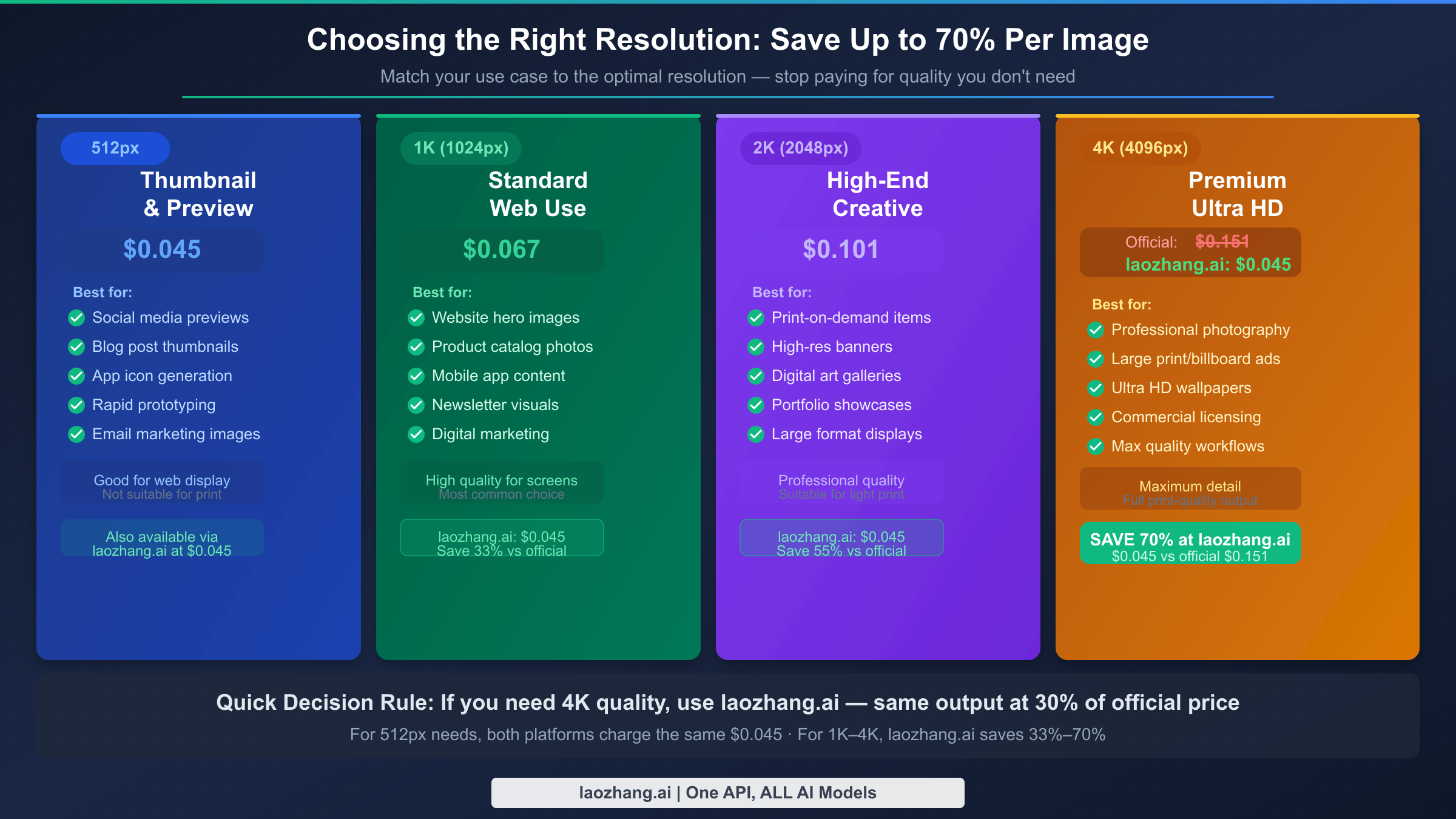
One of the most expensive mistakes developers make with Nano Banana 2 is defaulting to 4K for every request without thinking about whether the output will actually be displayed at that resolution. Generating a 4K image ($0.151 via official API) that gets displayed as a 200x200px thumbnail on a mobile screen is pure waste — you're paying 3.4x more than necessary for detail that's invisible in the final product.
Here's a practical framework for matching resolution to use case:
512px ($0.045 official / $0.045 laozhang.ai) is appropriate for any context where the image will be displayed at or below 512px on the largest likely screen. This covers social media profile images, blog post thumbnails, email marketing images, app icons, and product preview carousels. At 512px, Nano Banana 2 produces clean, well-composed images with accurate color and coherent subject rendering. The limitation is fine detail at zoom — if a user pinches to zoom on a mobile device, a 512px image will show pixelation. For any use case where users interact with images at their native display size without zooming, 512px is usually sufficient and reduces cost to its absolute minimum.
1K (1024×1024px) at $0.067 hits the sweet spot for most web applications. Hero images, product catalog photos, landing page visuals, newsletter graphics, and social media post images all benefit from 1K resolution without requiring the additional token budget of 2K or 4K. At 1024px, images render crisply on Retina displays and high-DPI screens up to roughly 500px CSS size. It's worth noting that via laozhang.ai at $0.045, the 1K tier effectively costs 33% less than the official rate — making 1K the strongest value proposition on the platform for teams that don't specifically need 4K.
2K (2048px at $0.101 official) and 4K (4096px at $0.151 official) are genuinely necessary for print workflows, large-format digital displays, professional stock photography replacement, and any context where images will be printed at 8"×8" or larger. For digital-only use, 2K is often as good as 4K in practical terms — at typical screen DPI, the difference between 2048px and 4096px is imperceptible at normal viewing distances.
The resolution decision tree is simple: if your largest display surface is a phone screen, 512px–1K is almost always enough. If you're publishing to a desktop website with large imagery sections, 1K–2K covers it. If you're generating content for print or professional commercial use, 2K–4K is appropriate. And in all cases above 512px, using laozhang.ai's flat $0.045 rate instead of Google's official tiered pricing results in meaningful savings that compound across every image you generate.
A common mistake teams make when evaluating resolution requirements is testing on a single reference image and assuming that result generalizes. The same resolution that looks perfect for a geometric logo or simple illustration may look inadequate for a photorealistic portrait with fine skin texture detail. Before committing to a resolution strategy, test at least 20–30 representative prompts covering the full range of content types your application will generate. Pay particular attention to text-in-image prompts (if you need legible text rendered in the generated image), fine-detail prompts (hair, fabric texture, distant objects), and complex compositional prompts with multiple elements. These categories have the highest variance in quality across resolution tiers.
One scenario where the resolution decision has non-obvious cost implications: applications that generate images for display, then store them for later reuse. If your images are stored in a CDN and served multiple times, generating at a higher resolution once and downscaling on-demand is often more cost-effective than regenerating at lower resolutions. The storage cost of a 4K PNG (typically 3–8MB) is negligible compared to the generation cost at either the official rate ($0.151) or laozhang.ai rate ($0.045). But if you're generating ephemeral images that are never stored or reused — live preview renders, real-time variations, single-use content — choosing the minimum necessary resolution directly reduces your API costs without any trade-offs.
FAQ: Nano Banana 2 Pricing Questions Answered
How much does Nano Banana 2 cost per image?
Through Google's official API, Nano Banana 2 costs between $0.045 per image (512px resolution) and $0.151 per image (4K resolution), based on output token consumption at $60/million tokens. Via the Batch API, all tiers are discounted 50%. Through laozhang.ai, you pay a flat $0.045 per image regardless of resolution — including 4K quality output. All prices verified at official sources as of March 3, 2026.
Is Nano Banana 2 free to use?
Yes, with limits. Google AI Studio provides free-tier access to Nano Banana 2 with daily rate limits, suitable for development and testing. laozhang.ai gives new users $0.05 in free credit at signup (approximately one free image). Neither provides unlimited free access for production workloads.
What is the cheapest way to use Nano Banana 2 at scale?
For 4K-quality output at scale, laozhang.ai at $0.045/image is currently the cheapest verified option — 70% less than Google's official 4K rate and about 40% less than the discounted Batch API rate for 4K. For 512px output where you don't need 4K quality, the official API and laozhang.ai are priced identically, so using the official API with Batch API mode is the most cost-effective path.
Does laozhang.ai provide the same image quality as the official Google API?
Yes. laozhang.ai routes requests through Google's Nano Banana 2 infrastructure using the same gemini-3.1-flash-image-preview model. The output quality, resolution capability, safety filtering, and content policies are identical to the official API. The price difference comes from volume-based reseller agreements, not from quality reduction or workarounds.
How does Nano Banana 2 pricing compare to DALL-E 3?
DALL-E 3 via OpenAI charges $0.04/image at 1024×1024px (standard) and $0.08/image at 1024×1792px. Nano Banana 2 at 1K costs $0.067 officially — slightly more expensive than DALL-E 3 standard. However, Nano Banana 2 via laozhang.ai at $0.045 is cheaper than DALL-E 3 standard, and supports 4K resolution which DALL-E 3 does not. For teams that need 4K output or faster generation speeds, Nano Banana 2 via laozhang.ai is the stronger value.
What is the Batch API discount for Nano Banana 2?
Google's Batch API provides a 50% discount on all Nano Banana 2 tiers. Batch API requests are processed asynchronously, typically within 24 hours, making it suitable for offline pipelines, bulk content generation, and non-real-time workflows. The effective prices with Batch API are: 512px at $0.022, 1K at $0.033, 2K at $0.050, and 4K at $0.075 per image.
What is Nano Banana 2's actual model ID for API calls?
The model identifier for Nano Banana 2 (Gemini 3.1 Flash Image) is gemini-3.1-flash-image-preview. This is the string you pass as the model parameter in both the official Google AI API and in OpenAI-compatible API calls via platforms like laozhang.ai.