
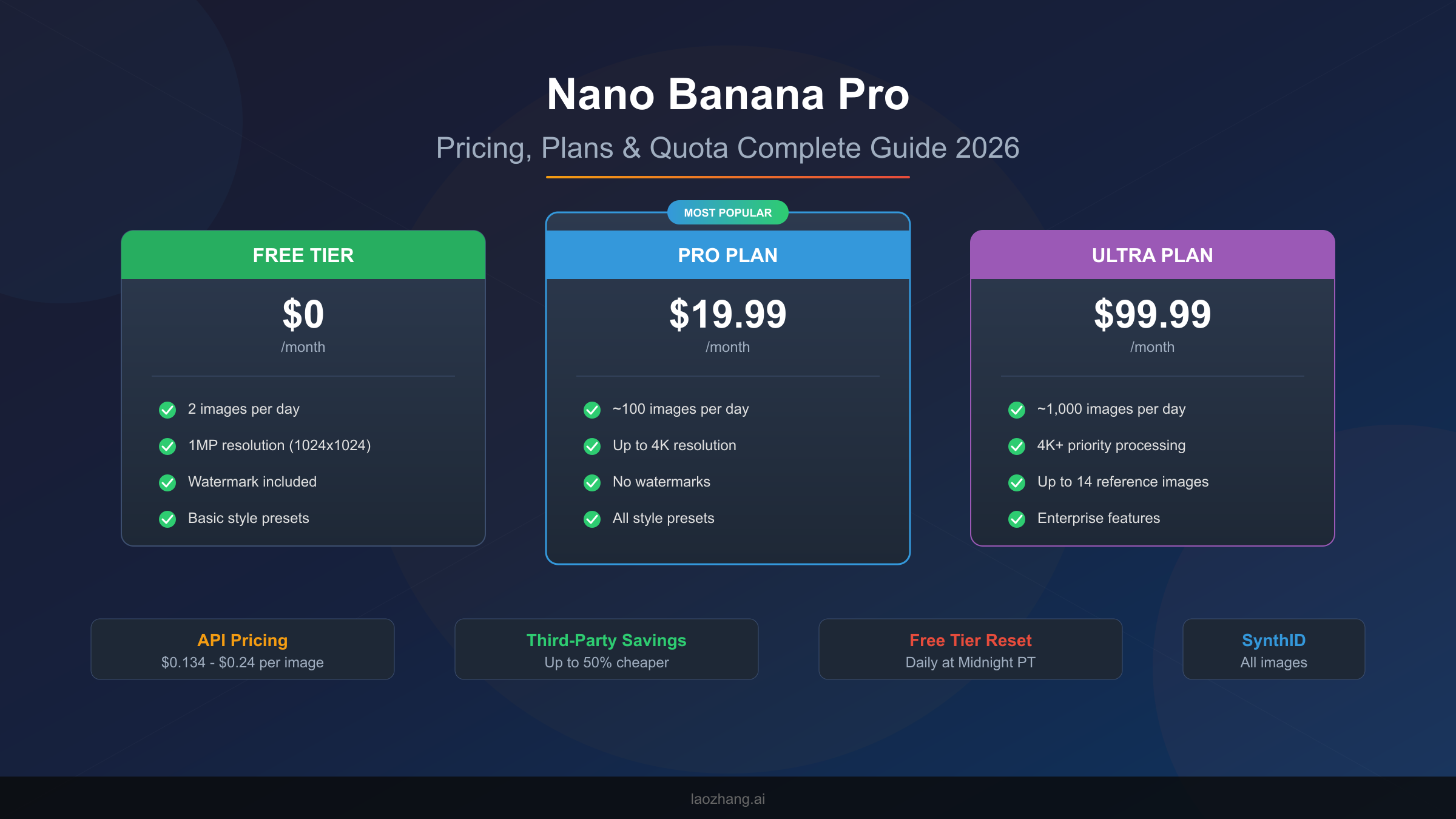
Nano Banana Pro (Google's Gemini 3 Pro Image) offers multiple pricing options: The Free tier provides 2 images daily at 1MP resolution with watermarks. Pro subscription costs $19.99/month for approximately 100 images/day at 4K resolution without watermarks. API pricing runs $0.134/image for 2K and $0.24/image for 4K resolution. Third-party platforms like Kie.ai offer up to 50% savings at $0.09-0.12/image. This guide helps you calculate real costs and choose the best option for your specific use case, with practical scenarios and a decision framework you can apply immediately.
Why Understanding Nano Banana Pro Pricing Actually Matters
The pricing structure for Nano Banana Pro appears straightforward at first glance—free tier, paid subscriptions, and API access. However, the reality involves multiple variables that significantly impact your actual monthly costs. Understanding these nuances before committing to any plan can save you hundreds of dollars annually and prevent frustrating mid-project quota exhaustion.
The complexity begins with how Google structures Gemini 3 Pro Image access. Unlike traditional SaaS products with simple per-seat pricing, Nano Banana Pro combines subscription tiers with separate API quotas, variable resolution pricing, and hidden factors like failed generation attempts counting against your daily limits. Many users discover these gotchas only after subscribing, leading to unexpected costs or workflow disruptions.
Consider this practical example: A content creator generating 300 images monthly might assume the Pro plan at $19.99 covers their needs perfectly. What they might not realize is that failed attempts—when the AI produces unsatisfactory results requiring regeneration—count against their daily quota. If they're hitting limits by mid-afternoon consistently, they're effectively getting half the value they expected.
The financial stakes increase substantially for businesses and developers. An e-commerce operation generating product images at scale could spend anywhere from $90 to $670 monthly depending on their choice between official Google APIs, third-party aggregators, or batch processing options. Making the wrong choice means either overpaying by 50% or potentially compromising on reliability and compliance. This guide addresses these exact scenarios with real calculations and honest trade-off assessments.
Platform proliferation adds another layer of complexity. Beyond Google's official channels (Gemini App, Google AI Studio, Vertex AI), numerous third-party providers offer Nano Banana Pro access at varying price points and reliability levels. Services like Kie.ai, fal.ai, and various API aggregators claim savings of 30-79% compared to official pricing. The question isn't just about price—it's about understanding what you're trading for those savings in terms of uptime, data handling, and long-term availability. For those interested in the broader Gemini API pricing structure, we've covered the complete technical details in our dedicated guide.
The timing of your usage patterns also affects effective cost. Users generating images primarily during peak hours (US business hours) may experience slower processing on free and lower-tier plans as resources get allocated to premium subscribers. Strategic scheduling—generating batches during off-peak hours or over weekends—can improve both speed and effective quota utilization. This operational consideration becomes increasingly important as your volume grows and consistency becomes critical for deadline-driven work.
Understanding the complete pricing picture requires examining not just what you pay, but what value you extract from each dollar spent. A $20 Pro subscription delivering 2,000 usable images monthly (accounting for failures and workflow optimization) costs $0.01 per usable image—dramatically better than the nominal $0.067 cost of API access when factoring in the convenience of unlimited-feeling access within daily limits.
Official Pricing & Plans: Complete Breakdown
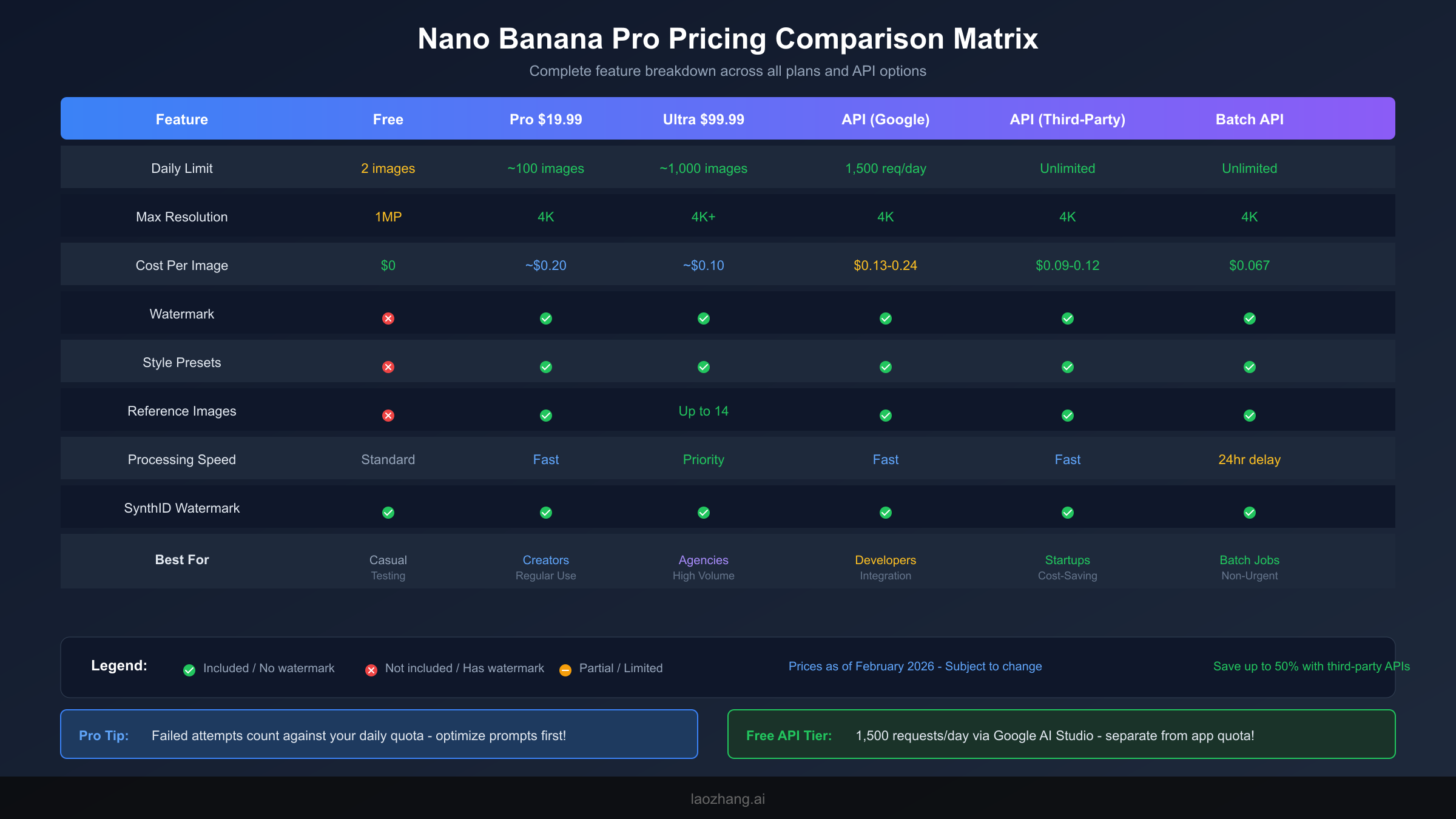
Google offers Nano Banana Pro through several distinct channels, each with different pricing structures, quotas, and feature sets. Understanding these options requires looking beyond the headline prices to the actual value delivered at different usage levels.
Subscription Tiers Comparison
The subscription model follows a freemium approach with three tiers designed for progressively higher usage needs.
| Plan | Monthly Cost | Daily Limit | Max Resolution | Watermarks | Style Presets | Reference Images |
|---|---|---|---|---|---|---|
| Free | $0 | 2 images | 1MP (1024×1024) | Visible | Limited | No |
| Pro | $19.99 | ~100 images | 4K | None | Full access | Yes |
| Ultra | $99.99-$124.99 | ~1,000 images | 4K+ priority | None | Full access | Up to 14 |
The Free tier serves primarily as a trial mechanism rather than a production-ready solution. With only 2 images per day at 1MP resolution with visible watermarks, it's suitable for evaluation purposes only. The reduction from 3 to 2 daily images in November 2025 made this tier even more restrictive for actual use cases. However, it remains valuable for testing prompts and understanding the model's capabilities before committing financially.
Pro subscribers at $19.99 monthly represent the sweet spot for most individual creators and small-scale operations. The approximately 100 images daily at 4K resolution without watermarks handles typical social media, blog, and content creation needs. Style presets unlock creative possibilities unavailable in the free tier, while reference image support enables more controlled outputs matching existing brand aesthetics.
The Ultra tier at $99.99-$124.99 monthly (pricing varies by billing cycle and promotions) targets high-volume users needing enterprise-grade reliability. The roughly 1,000 daily image allowance with priority processing ensures consistent performance even during peak platform usage. The ability to use up to 14 reference images per generation enables sophisticated brand consistency and style matching that professional agencies require.
An often-overlooked aspect of subscription pricing involves the annual billing option. Google occasionally offers 15-20% discounts for annual commitments, reducing the Pro plan to approximately $200/year ($16.67/month effective rate) and Ultra to around $1,000/year ($83.33/month). For users confident in their ongoing needs, this discount compounds meaningfully—saving $240 annually on the Ultra plan alone. However, the lack of refund policies for unused portions makes annual commitment risky for users with variable or project-based needs.
The subscription model also includes access to Google's broader Gemini ecosystem features, including text generation, code assistance, and document analysis within the same interface. While pricing focuses on image generation, the bundled capabilities represent additional value for users who would otherwise pay for separate AI tools. Evaluating Nano Banana Pro pricing in isolation misses this ecosystem benefit—particularly relevant for content creators who regularly use AI for both visual and written content.
API Pricing: Google's Official Rates
For developers and businesses requiring programmatic access, Google offers API-based pricing that scales with actual usage rather than fixed monthly commitments. This model often proves more economical for variable workloads but requires technical implementation.
| Provider | 1K-2K Resolution | 4K Resolution | Free Tier | Billing |
|---|---|---|---|---|
| Google Vertex AI | $0.134/image | $0.24/image | $300 trial credit | Pay as you go |
| Google AI Studio | Same as above | Same as above | 1,500 requests/day | Credit-based |
| Batch API | $0.067/image | $0.12/image | N/A | 24-hour delay |
The Vertex AI pricing represents Google's primary enterprise offering. At $0.134 per image for standard resolution (up to 2K) and $0.24 for 4K output, costs scale linearly with usage. This straightforward model simplifies budgeting for consistent workloads but can become expensive at scale—1,000 images monthly at 4K resolution costs $240, compared to $100 for the Ultra subscription.
Google AI Studio provides an intriguing middle ground with 1,500 free requests daily. This separate quota from the Gemini App means developers can generate substantially more images for free by using the API directly. The $300 trial credit further extends this runway for new users evaluating the platform.
The Batch API deserves special attention for non-time-sensitive workloads. At exactly half the standard API price, it offers compelling savings for use cases where 24-hour turnaround is acceptable. Marketing agencies preparing campaign assets weeks in advance, or e-commerce platforms batch-processing seasonal inventory photos, can halve their API costs through strategic workflow adjustments. For a detailed breakdown of Nano Banana Pro API pricing including implementation examples, see our technical deep-dive.
Understanding how these API pricing tiers interact with resolution selection adds another optimization dimension. A common misconception holds that 4K generation is always necessary for professional work. In practice, generating at 2K resolution ($0.134/image) and using external upscaling tools (many powered by AI themselves) can achieve comparable visual quality at 44% lower cost. This workflow particularly benefits high-volume users where the 79% premium for native 4K generation becomes substantial—an agency generating 5,000 4K images monthly would pay $1,200 through direct API versus approximately $670 using a 2K-generate-then-upscale approach.
Token-based pricing considerations also merit attention for developers building interactive applications. Each API call consumes not just the image generation cost but also token usage for processing the prompt and any attached images. Complex prompts with detailed instructions or reference images can add 5-15% to the effective per-image cost. Optimizing prompt structure—front-loading key instructions and minimizing redundant phrasing—provides marginal but compounding savings at scale.
Free Tier & Daily Quotas: Maximizing Value While Avoiding Hidden Gotchas
Understanding the free tier limitations and quota mechanics across all plans proves crucial for maximizing value and avoiding unexpected workflow disruptions. Several non-obvious factors affect how much you actually get from each tier.
Current Free Tier Limits (February 2026)
The Gemini App free tier provides 2 images daily at 1MP (1024×1024) resolution with visible watermarks. This represents a reduction from the previous 3 images/day limit implemented in November 2025. The quota resets at midnight Pacific Time, not your local timezone—a detail that catches users in non-US regions off guard.
Beyond the Gemini App, the Google AI Studio free tier operates on a completely separate quota system. Developers can access 1,500 requests per day through the API, and these don't count against app-based limits. This separation creates an opportunity for technically inclined users to generate significantly more images for free by combining both access methods.
The $300 trial credit for new Google Cloud accounts adds another free tier dimension. This credit applies to Vertex AI usage, meaning new users can generate approximately 2,200 images at standard resolution before any billing occurs. Strategic use of all three free access methods—Gemini App daily quota, AI Studio API free tier, and trial credits—can support months of moderate-volume use without payment.
Hidden Gotchas That Impact Your Effective Quota
Several lesser-known factors reduce the effective value of any tier's stated quota, and understanding these beforehand prevents frustration and unexpected costs.
Failed generation attempts count against your daily quota across all tiers. When Nano Banana Pro produces an image that doesn't match your expectations—whether due to prompt ambiguity, content filtering triggers, or simple AI unpredictability—that failed attempt still consumes one of your daily allocations. Users report that 10-30% of generations require retries, meaning your effective quota could be 70-90% of the stated limit.
Silent downgrade to non-Pro processing occurs when you exceed daily limits on subscription plans. Rather than hard-blocking generations, the system may process requests with lower priority, longer wait times, or reduced quality. This behavior, while not officially documented, has been consistently reported by users hitting their limits. Understanding this helps explain why images generated late in your daily cycle sometimes appear inferior to earlier ones.
Account-based limits mean you cannot circumvent quotas by switching devices or browsers. Your quota ties to your Google account, and attempting to create multiple accounts to multiply free tier access violates Google's terms of service. However, legitimate use across different Google Workspace accounts for separate business purposes remains permitted.
Resolution selection affects API quota differently than you might expect. While subscription tiers charge the same regardless of output resolution, API users pay substantially more for 4K output ($0.24 vs $0.134—a 79% premium). This creates a strategic choice: default to 2K resolution and upscale externally when needed, potentially halving API costs for many use cases.
Content filtering triggers represent another hidden quota drain that catches users off guard. Nano Banana Pro employs aggressive safety filters that reject certain prompt combinations even when the intended output is perfectly legitimate. Prompts mentioning real people, certain professions, or contextually sensitive scenarios may trigger rejections—each consuming a quota allocation. Learning the filter boundaries through experimentation (ideally during free tier exploration) prevents wasted quota during production work. Community forums and prompt engineering guides document many known trigger patterns, though Google regularly updates filtering logic.
The quota reset timing at midnight Pacific Time creates strategic opportunities for users in other time zones. European users, for example, get their quota reset around 8-9 AM local time—effectively mid-morning. By planning heavier generation sessions for after the reset, these users maximize their available daily allocation for deadline-driven work. Conversely, US West Coast users see reset at midnight, making late-night sessions potentially wasteful if they're approaching daily limits.
For users frequently hitting limits, understanding how Gemini image generation quota resets helps optimize your workflow timing. Our detailed analysis covers timezone considerations and strategies for maximizing daily allocation.
Cost Calculator: Real Scenarios With Actual Numbers
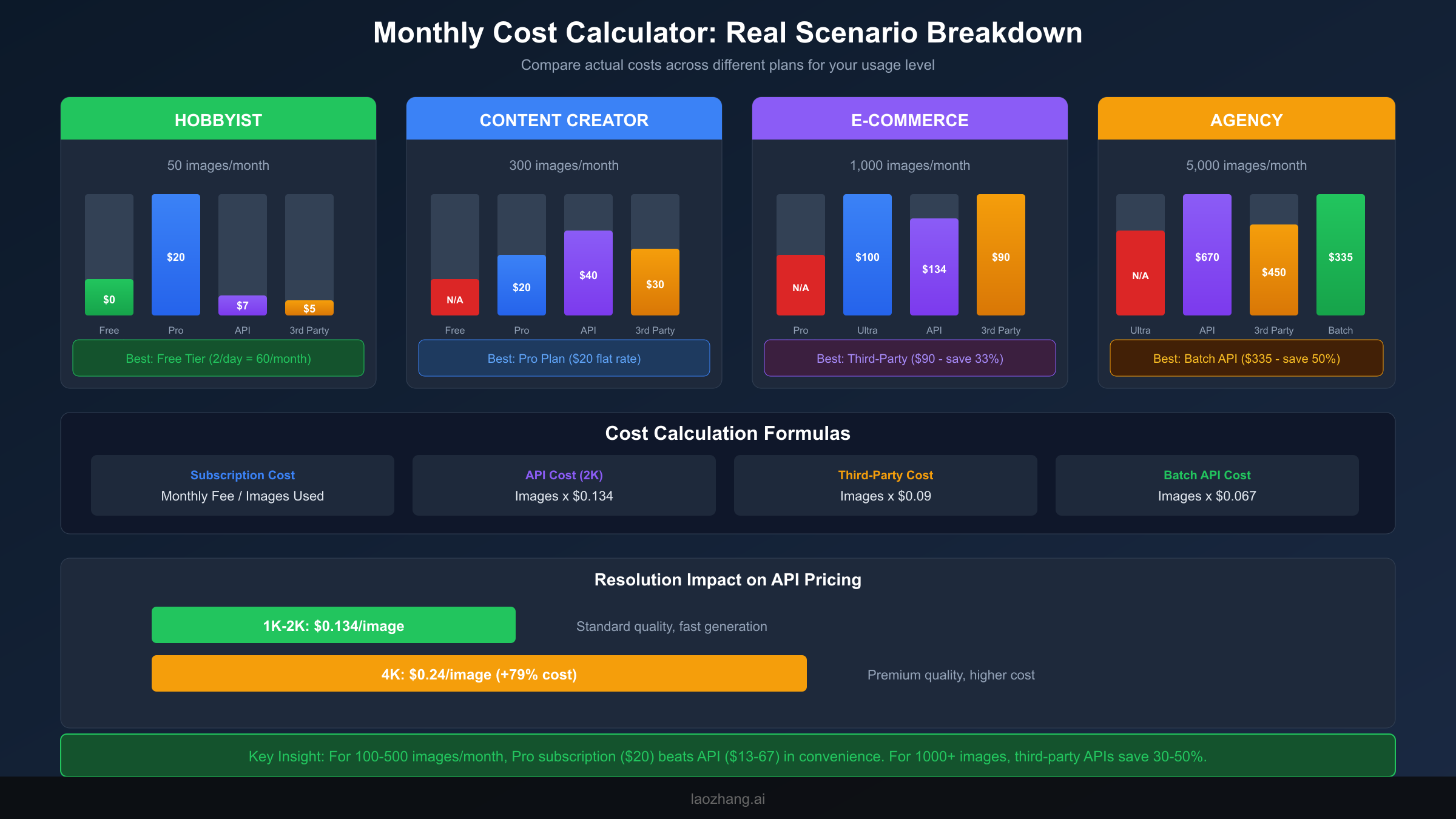
Abstract pricing means little without context. These real-world scenarios demonstrate actual monthly costs across different usage levels and help you identify which pricing option optimizes for your specific situation.
Scenario 1: Hobbyist (50 images/month)
A casual user creating images for personal projects, social media posts, or creative experimentation represents the ideal free tier candidate.
| Option | Monthly Cost | Cost Per Image | Notes |
|---|---|---|---|
| Free Tier | $0 | $0 | 60 images/month limit covers needs |
| Pro | $19.99 | $0.40 | Overkill for this volume |
| API (Google) | $6.70 | $0.134 | Unnecessarily complex |
| API (Third-Party) | $4.50 | $0.09 | Technical overhead not worth savings |
Recommendation: The Free tier perfectly serves this usage level. With 2 images daily providing 60 monthly, even accounting for failed attempts, casual users have sufficient allocation. The visible watermark remains the main limitation—acceptable for personal use but potentially problematic for any semi-professional application.
Scenario 2: Content Creator (300 images/month)
A YouTuber, blogger, or social media manager generating regular visual content for audience engagement represents the Pro plan's target demographic.
| Option | Monthly Cost | Cost Per Image | Notes |
|---|---|---|---|
| Free Tier | N/A | N/A | Limit of 60 insufficient |
| Pro | $19.99 | $0.067 | Best value for this volume |
| API (Google) | $40.20 | $0.134 | 2x cost of Pro |
| API (Third-Party) | $27-36 | $0.09-0.12 | Slightly higher than Pro |
Recommendation: Pro subscription at $19.99 delivers optimal value. The approximately 3,000 monthly image capacity (100/day) provides significant headroom beyond the 300 needed, accommodating failed attempts and creative experimentation. Watermark-free output at 4K resolution meets professional publishing standards.
Scenario 3: E-Commerce Business (1,000 images/month)
An online retailer generating product images, lifestyle shots, and marketing materials operates at a scale where plan selection significantly impacts annual costs.
| Option | Monthly Cost | Cost Per Image | Notes |
|---|---|---|---|
| Pro | N/A | N/A | ~3,000/month limit may be tight with failures |
| Ultra | $99.99 | $0.10 | Reliable but premium priced |
| API (Google) | $134 | $0.134 | Scales linearly with volume |
| API (Third-Party) | $90-120 | $0.09-0.12 | Best cost efficiency |
| Batch API | $67 | $0.067 | Lowest cost if 24hr delay acceptable |
Recommendation: Third-party API providers offer the strongest value proposition at this volume, delivering 25-50% savings compared to Google's direct pricing. For e-commerce use cases where next-day turnaround suffices, the Batch API at $67/month provides exceptional value. The Ultra subscription makes sense primarily when the convenience of unlimited-feeling access outweighs cost optimization.
Scenario 4: Agency (5,000 images/month)
A creative agency serving multiple clients with high-volume image generation needs faces substantially different economics than individual users.
| Option | Monthly Cost | Cost Per Image | Notes |
|---|---|---|---|
| Ultra | N/A | N/A | 30,000/month limit sufficient but expensive at scale |
| API (Google) | $670 | $0.134 | Scales poorly at high volume |
| API (Third-Party) | $450-600 | $0.09-0.12 | Significant savings |
| Batch API | $335 | $0.067 | Maximum savings for non-urgent work |
| Hybrid Approach | ~$400 | Variable | Mix urgent/batch processing |
Recommendation: A hybrid strategy optimizes agency economics. Route time-sensitive client work through third-party APIs at $0.09-0.12/image while batching non-urgent internal content creation through the Batch API at $0.067. This approach can reduce monthly costs from $670 (pure Google API) to approximately $400—annual savings exceeding $3,000.
The agency scenario also benefits from strategic client billing structures. Rather than absorbing AI generation costs as overhead, progressive agencies bill image generation as a line item or build it into retainer packages. At $0.09/image cost and $0.25-0.50/image client billing, each generated image becomes a profit center rather than an expense. This reframing transforms the cost calculation entirely—the question becomes not "how do I minimize cost?" but rather "how do I maximize throughput and quality to increase billable output?"
Multi-client scenarios introduce another consideration: account isolation. Using separate API keys or even separate provider accounts for different clients enables accurate cost attribution, prevents cross-client data exposure, and simplifies invoicing. Some third-party providers specifically support multi-tenant configurations with built-in usage tracking per sub-account—a valuable feature for agencies managing diverse client portfolios.
Resolution Impact on API Costs
Resolution selection creates a significant cost multiplier that many users overlook when budgeting API usage.
| Resolution | Price/Image | 1,000 Images | Notes |
|---|---|---|---|
| 1K-2K | $0.134 | $134 | Standard quality |
| 4K | $0.24 | $240 | +79% cost premium |
The 79% premium for 4K output rarely justifies itself for web-only content. Most social media platforms, blogs, and websites compress images significantly, negating the quality advantage of native 4K generation. A more cost-effective workflow generates at 2K resolution and uses external upscaling tools (many free or low-cost) only when true 4K output is required for print or high-resolution displays.
Beyond monthly calculations, consider the total cost of ownership across your entire project or business cycle. A seasonal e-commerce business might generate 500 images monthly during peak seasons but only 50 during quiet periods. Annual cost calculations using average monthly rates can mislead—this variable usage pattern actually favors pay-as-you-go API pricing over fixed subscriptions, despite API's higher per-image rate. Conversely, a content creator with consistent year-round output benefits from subscription predictability even if some months see lower utilization.
Third-Party Alternatives & Money-Saving Strategies
Beyond Google's official channels, a growing ecosystem of third-party providers offers Nano Banana Pro access at reduced rates. Understanding these options—including their trade-offs—enables informed decisions about cost optimization.
Platform Comparison Matrix
| Platform | Price Range | Savings vs Google | Stability | Compliance | Payment Methods |
|---|---|---|---|---|---|
| Kie.ai | $0.09-0.12/image | ~33% cheaper | Good | Moderate | Credit Card, Crypto |
| fal.ai | ~$0.15/image | ~12% cheaper | Good | High | Credit Card |
| laozhang.ai | $0.08-0.10/image | ~40% cheaper | Excellent | High | Alipay, WeChat, Card |
| Batch API (Google) | $0.067/image | 50% cheaper | Excellent | Full | Google billing |
Third-party aggregators typically achieve their lower pricing through volume discounts with Google, optimized infrastructure utilization, and sometimes geographic arbitrage. The question isn't simply about price—reliability, data handling practices, and long-term availability matter significantly for production workloads.
Honest Trade-Off Assessment
Choosing third-party providers involves accepting certain trade-offs in exchange for cost savings.
Advantages of third-party platforms:
- Cost savings of 25-50% compared to official pricing
- Often simpler onboarding than Google Cloud setup
- Sometimes offer additional model access (multiple AI image generators through one API)
- May provide better developer documentation for specific use cases
Potential concerns:
- Less guaranteed uptime compared to Google's infrastructure
- Data handling policies may differ from Google's enterprise standards
- Platform sustainability—smaller providers could discontinue service
- Some enterprise compliance frameworks require direct Google contracts
For individuals and small businesses where occasional downtime is acceptable and data sensitivity is moderate, third-party platforms offer compelling value. Enterprise users with strict compliance requirements or mission-critical uptime needs should carefully evaluate whether 30-50% savings justify the additional risk.
Geographic payment considerations affect provider accessibility. Google's official billing requires a valid credit card linked to a Google Cloud account—straightforward for most Western users but potentially challenging in regions with banking restrictions or currency limitations. Third-party providers often offer alternative payment methods including cryptocurrency, regional payment systems (Alipay, WeChat Pay), and prepaid credit systems. For users in markets where Google Cloud billing is cumbersome, third-party providers may represent the only practical access method regardless of pricing considerations.
Long-term platform sustainability deserves consideration when building production workflows around third-party providers. Established platforms with clear business models (subscription-based, volume commitments, or diversified service offerings) present lower discontinuation risk than venture-funded startups operating at unsustainable pricing. Evaluating a provider's track record, funding situation, and business model transparency helps assess whether current pricing represents a sustainable offering or a temporary customer acquisition strategy.
How to Choose Between Options
Prioritize Official Google (Vertex AI) when:
- You require enterprise SLAs and guaranteed uptime
- Compliance frameworks mandate direct vendor relationships
- You're processing sensitive data with strict handling requirements
- Budget is secondary to reliability concerns
Consider third-party platforms when:
- Cost optimization is a primary concern
- Your use case tolerates occasional service interruptions
- You're generating non-sensitive content
- You value simpler API integration over enterprise features
Use Batch API when:
- 24-hour turnaround is acceptable for your workflow
- You're batch-processing large volumes of images
- Maximum cost efficiency outweighs speed requirements
- You can plan generation in advance (marketing campaigns, seasonal content)
For developers seeking reliable API access with competitive pricing, aggregator platforms like laozhang.ai provide a middle ground—combining cost efficiency with dependable service. Their documentation covers integration examples for various programming languages.
Which Plan Is Right for You: Decision Framework
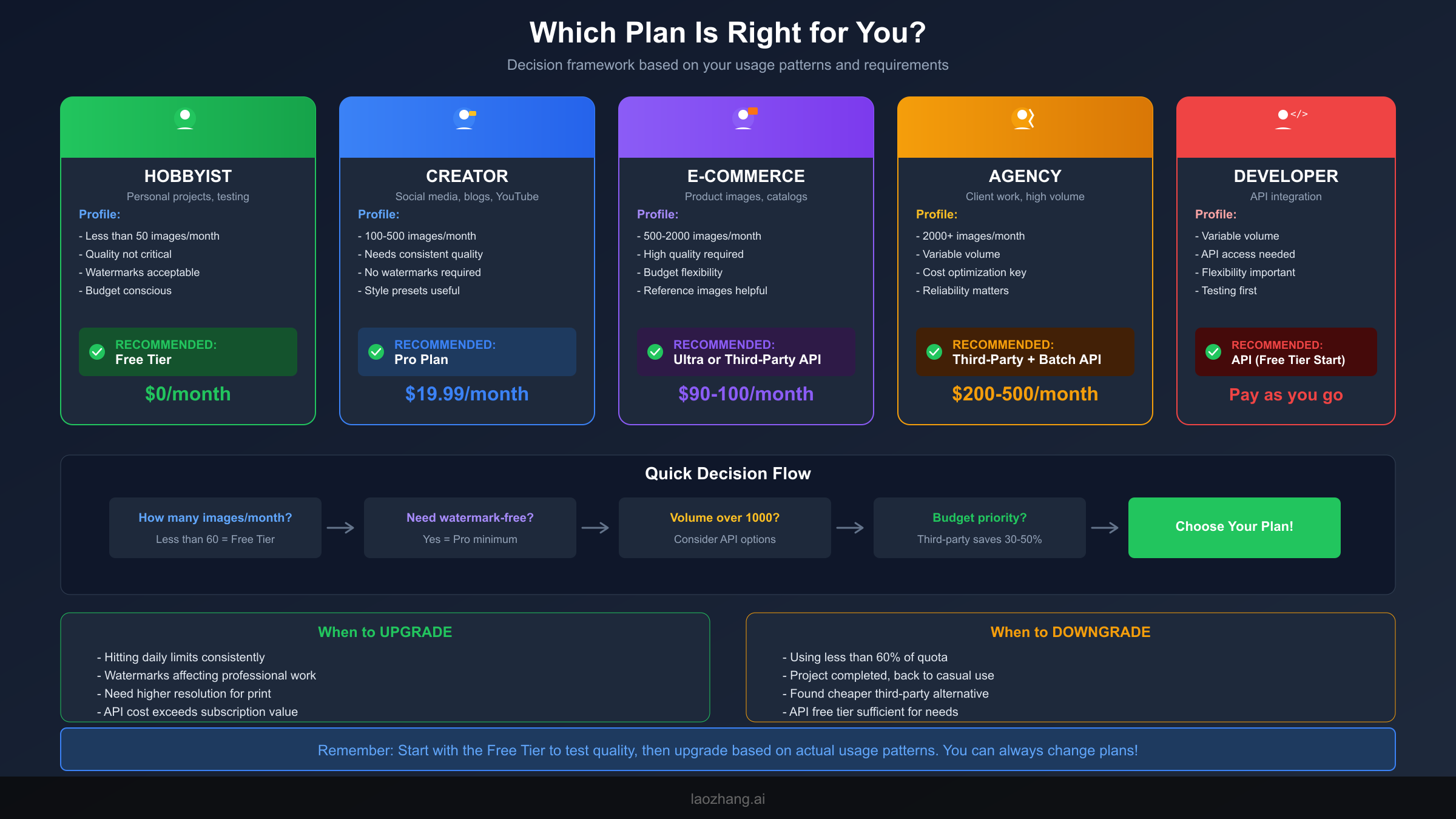
Rather than simply listing plan features, this framework helps you identify the optimal choice based on your specific circumstances.
User Profile Matching
Hobbyist Profile:
- Usage: Less than 50 images monthly
- Quality tolerance: Accepts 1MP resolution and watermarks
- Budget: Strongly cost-conscious
- Technical skill: Minimal API experience
- Recommendation: Free Tier
The free tier's limitations—visible watermarks, 1MP resolution, 2 images daily—perfectly match hobbyist needs where images serve personal rather than professional purposes. The zero cost eliminates financial friction for creative experimentation.
Content Creator Profile:
- Usage: 100-500 images monthly
- Quality requirements: Needs watermark-free, high-resolution output
- Budget: Moderate—willing to pay for quality
- Publishing platforms: Social media, blogs, YouTube thumbnails
- Recommendation: Pro Plan ($19.99/month)
Pro subscription delivers the most straightforward value for consistent creators. The fixed monthly cost simplifies budgeting, while approximately 3,000 monthly images provides significant headroom. Style presets and reference image support enhance creative output without API complexity.
E-Commerce Profile:
- Usage: 500-2,000 images monthly
- Requirements: Consistent quality, reliable output
- Budget: ROI-focused—willing to invest if returns justify
- Operations: Product photography, marketing materials
- Recommendation: Third-Party API or Ultra Plan
At this volume, subscription plans start showing diminishing returns. Third-party APIs at $0.09-0.12/image deliver better unit economics than either Pro or Ultra for most e-commerce operations. The Ultra plan makes sense when operational simplicity outweighs cost optimization.
Agency Profile:
- Usage: 2,000+ images monthly across multiple clients
- Requirements: Enterprise reliability, consistent branding
- Budget: Client billable—efficiency matters more than absolute cost
- Operations: Variable volume, time-sensitive deliverables
- Recommendation: Hybrid API Strategy
Agencies benefit most from combining third-party APIs for cost efficiency with Google's Batch API for maximum savings on non-urgent work. This hybrid approach balances client-facing reliability with backend cost optimization.
Developer Profile:
- Usage: Variable, often experimental
- Requirements: API access, programmatic control
- Budget: Pay-as-you-go preference
- Technical skill: Comfortable with API integration
- Recommendation: Google AI Studio Free Tier → Third-Party API
Developers should maximize free tier access first—the 1,500 daily API requests through AI Studio provides substantial experimentation runway. For production deployment, third-party APIs typically offer the best combination of price and developer experience.
The developer journey typically progresses through predictable phases: initial experimentation (free tier), prototype development (mixed free/paid), MVP launch (third-party for cost efficiency), and scaling (hybrid or official API for reliability). Planning for this progression from the start—architecting applications to easily swap between API providers—prevents costly rewrites when usage patterns evolve. Abstract the image generation layer behind an interface that multiple providers can implement, enabling seamless transitions as requirements change.
Upgrade and Downgrade Triggers
Signs you should upgrade:
- Consistently hitting daily limits before completing work
- Watermarks affecting professional output quality
- Needing higher resolution for print materials
- API costs exceeding equivalent subscription value
- Requiring reference image capability for brand consistency
Signs you should downgrade:
- Using less than 60% of subscription quota consistently
- Project completed, returning to casual usage patterns
- Found third-party alternative meeting quality requirements
- API free tier sufficient for current development needs
- Seasonal business entering slow period where API pricing is more economical
- Quality requirements have decreased (watermarks now acceptable)
The decision framework should be revisited quarterly or whenever your usage patterns change significantly. What optimizes costs at 200 images monthly may be suboptimal at 500 or 50. Building plan flexibility into your workflow—avoiding annual commitments unless discounts are substantial, maintaining familiarity with alternative providers, and tracking actual versus expected usage—ensures you can pivot as needs evolve.
For users wanting to understand Nano Banana Pro free limits in greater detail, our comprehensive analysis covers all access methods and optimization strategies.
Frequently Asked Questions
Is Nano Banana Pro completely free to use?
Nano Banana Pro offers a free tier through the Gemini App with 2 images per day at 1MP resolution. Images include visible watermarks. Additionally, Google AI Studio provides 1,500 free API requests daily, and new Google Cloud accounts receive $300 in trial credits. While not unlimited, strategic use of these free options can support months of moderate usage without payment.
How many images can I generate per day on each plan?
Free tier: 2 images/day at 1MP. Pro ($19.99/month): approximately 100 images/day at up to 4K. Ultra ($99.99/month): approximately 1,000 images/day with priority processing. API users have separate quotas—1,500 requests/day free tier through AI Studio, with pay-as-you-go beyond that limit.
Does the free tier include watermarks?
Yes, all free tier images include visible watermarks. Additionally, all Nano Banana Pro images (including paid plans) contain an invisible SynthID watermark for AI content identification. Only the visible watermarks are removed with paid subscriptions.
What's the most cost-effective option for 1,000 images monthly?
For 1,000 images/month, third-party API providers at $0.09-0.12/image ($90-120/month) typically offer the best value. If 24-hour turnaround is acceptable, Google's Batch API at $0.067/image ($67/month) provides maximum savings. The Ultra subscription ($99.99) makes sense when operational simplicity outweighs cost optimization.
Do failed generations count against my quota?
Yes, failed generation attempts count against daily quotas across all subscription tiers. This includes images rejected due to content filtering, unsatisfactory quality requiring regeneration, or technical errors. Users report 10-30% of attempts requiring retries, effectively reducing usable quota accordingly.
Can I use third-party APIs safely?
Third-party APIs are generally safe for non-sensitive content generation. Established platforms like fal.ai, Kie.ai, and laozhang.ai have track records of reliable service. However, enterprise users with strict compliance requirements should evaluate data handling policies carefully. For mission-critical applications, direct Google API access provides the strongest guarantees.
How do resolution choices affect my costs?
Resolution dramatically impacts API pricing but not subscription costs. API users pay $0.134/image for 2K resolution and $0.24/image for 4K—a 79% premium. Subscription users (Pro and Ultra) can generate at any supported resolution without additional cost, making high-resolution generation more economically attractive for subscribers. For API users, generating at 2K and using external upscaling tools often provides comparable quality at significantly lower cost.
What happens when I exceed my daily limit?
Behavior differs by plan type. Free tier users simply cannot generate more images until quota resets at midnight Pacific Time. Subscription users may experience degraded service quality—slower processing, potential quality reduction, or queuing—rather than hard blocks. API users with pay-as-you-go billing continue generating at standard rates. The Batch API has no daily limits but delays delivery by up to 24 hours.
Are there discounts for annual billing?
Google occasionally offers 15-20% discounts for annual subscription commitments, effectively reducing Pro to approximately $16.67/month and Ultra to around $83.33/month. However, these discounts require upfront annual payment with no refunds for unused portions. Annual billing makes sense for users with predictable, ongoing needs but represents risk for project-based or variable usage patterns.
Final Recommendation: Actionable Next Steps
Choosing the right Nano Banana Pro pricing option ultimately depends on matching your usage patterns, quality requirements, and budget constraints to available options. Here's how to proceed:
For new users evaluating the platform: Start with the free tier to test image quality and prompt effectiveness for your use case. Simultaneously, explore the Google AI Studio free API tier for additional experimentation. Don't commit to paid plans until you've validated that Nano Banana Pro meets your specific needs.
For individual creators and small businesses: The Pro plan at $19.99/month offers the simplest value proposition. If you're consistently generating 100+ images monthly with professional quality requirements, this plan delivers predictable costs and sufficient capacity for most workflows.
For volume users (500+ images monthly): Evaluate third-party API providers against your reliability requirements. The 25-50% savings compared to official pricing compounds significantly at scale. Consider the Batch API for non-time-sensitive workloads to maximize cost efficiency.
For developers building applications: Leverage the 1,500 daily free API requests through Google AI Studio for development and testing. Architect your application to support multiple API backends, enabling flexibility to switch between providers based on cost and reliability requirements.
The pricing landscape for AI image generation continues evolving rapidly. What costs $0.134/image today may be significantly cheaper—or more expensive—within months. Build flexibility into your approach: avoid long-term commitments where monthly plans exist, and maintain awareness of emerging alternatives and pricing changes.
Your optimal choice exists at the intersection of your specific needs and current market options. Use the calculations and frameworks provided here as starting points, then adjust based on your actual usage patterns once you begin generating images at scale.
The most valuable recommendation transcends any specific plan: start tracking your actual usage immediately. Whether through manual logging, API dashboards, or third-party analytics tools, understanding your real consumption patterns—including failed attempts, resolution requirements, and peak usage periods—enables data-driven decisions as you scale. The difference between optimized and unoptimized approaches can represent 50% or more of your monthly AI image generation costs.
Finally, remember that pricing represents just one dimension of the image generation equation. Generation quality, prompt understanding, consistency across outputs, and platform reliability all contribute to the total value equation. The cheapest option that doesn't meet your quality requirements actually costs more when factoring in time spent on revisions and rejected outputs. Balance cost optimization against these qualitative factors, and you'll find the sweet spot that maximizes both budget efficiency and output quality for your specific needs.