
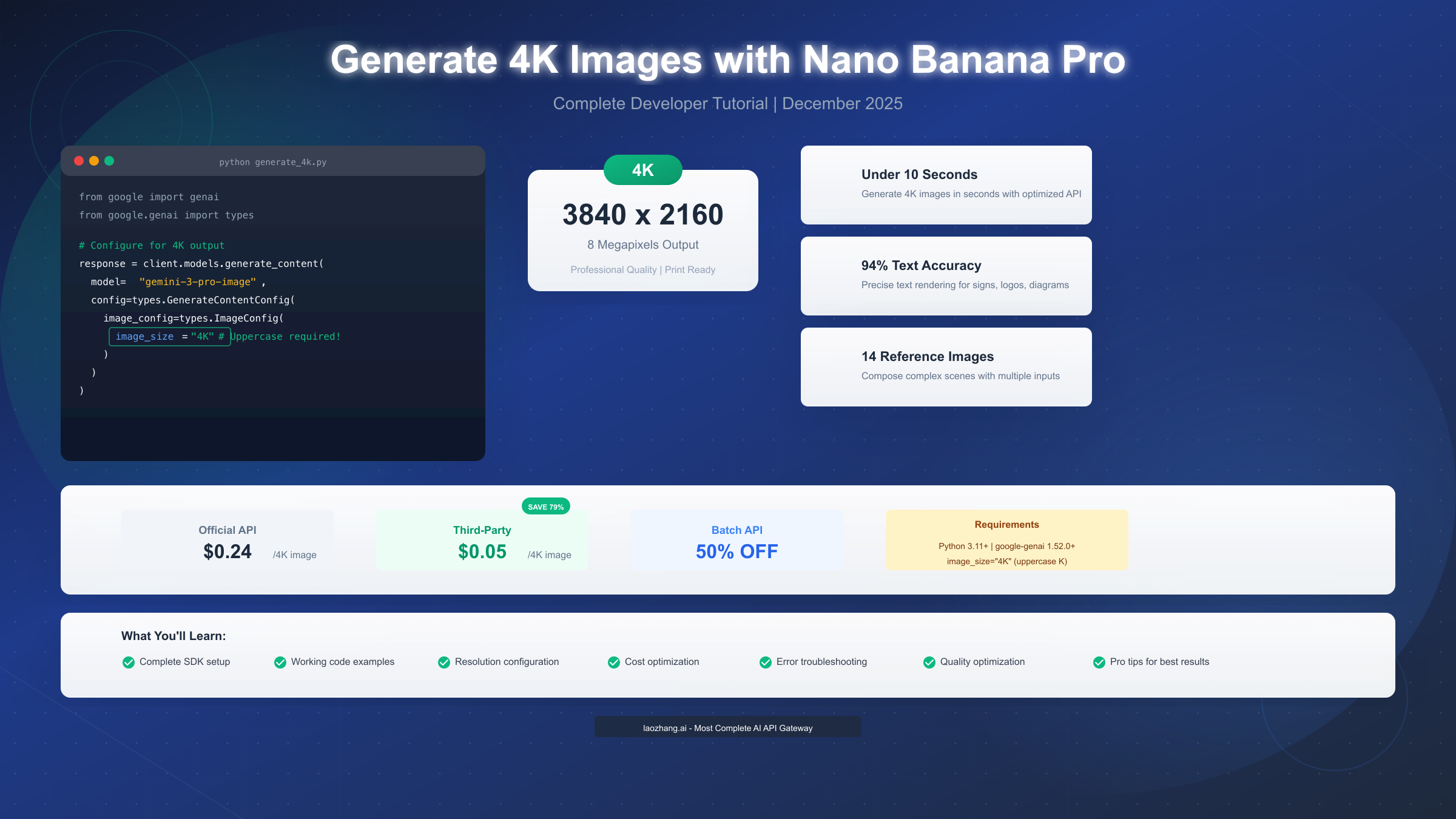
Generating 4K images with Nano Banana Pro requires configuring the image_size parameter to "4K" (uppercase) in your API request. Using Google's Gen AI SDK version 1.52.0 or higher, you can output images at 3840×2160 resolution (8 megapixels) with a single configuration change. As of December 2025, 4K generation costs $0.24 per image through the official API, or approximately $0.05 through third-party providers—representing a 79% cost reduction. This tutorial provides complete, tested code examples, explains all resolution options, compares pricing tiers, and walks you through troubleshooting common configuration errors.
What is Nano Banana Pro 4K Generation?
Nano Banana Pro represents Google DeepMind's most advanced image generation model, officially known as Gemini 3 Pro Image in the technical documentation. Released on November 20, 2025, this model introduced several production-ready capabilities that set it apart from previous iterations, with native 4K resolution output being among the most significant. Unlike its predecessor Nano Banana (which maxed out at approximately 1 megapixel for faster generation), Nano Banana Pro was designed from the ground up to support professional-grade output resolutions suitable for print production and large-format displays.
The 4K generation capability specifically refers to the model's ability to output images at 3840×2160 pixels (8 megapixels) or higher, depending on aspect ratio selection. This resolution matches the standard for Ultra HD displays and provides sufficient detail for commercial printing at 300 DPI for prints up to 12.8×7.2 inches. For photographers, designers, and content creators who have traditionally relied on expensive stock photography or time-consuming manual creation, this capability opens new possibilities for generating production-ready visuals directly from text prompts.
Understanding the technical distinction between Nano Banana Pro and its predecessors is essential before diving into implementation. For a detailed breakdown of the feature differences, you can read our comparison between Nano Banana and Nano Banana Pro. The key differentiator for 4K generation is the model identifier: you must use gemini-3-pro-image-preview (not the base Nano Banana model) to access 4K output capabilities. Using the wrong model identifier is one of the most common mistakes developers encounter when attempting high-resolution generation for the first time.
Beyond resolution, Nano Banana Pro brings additional features that complement 4K output. The model achieves approximately 94% text rendering accuracy, meaning signs, logos, and diagrams generated within images will display readable text with high fidelity. It supports up to 14 reference images for compositional guidance, enabling complex scenes with consistent styling. The "thought signatures" feature allows iterative refinement across multi-turn conversations, so you can progressively improve a 4K image through conversational feedback rather than regenerating from scratch.
Quick Start: Your First 4K Image in 5 Minutes
Before writing any code, you need to ensure your development environment meets the minimum requirements for 4K generation. The Google Gen AI SDK requires Python 3.11 or higher, and you must install version 1.52.0 or later of the google-genai package. Earlier versions of the SDK do not support the image_size parameter configuration that enables 4K output. Let's walk through the complete setup process, from installation to generating your first 4K image.
Environment Setup and SDK Installation
Start by verifying your Python version and installing the required packages with proper version pinning to avoid compatibility issues:
bashpython --version # Install the Google Gen AI SDK with minimum version pip install "google-genai>=1.52.0" # Verify installation python -c "import google.genai; print(google.genai.__version__)"
If your Python version is below 3.11, you'll need to upgrade before proceeding. The SDK makes heavy use of modern Python features including structural pattern matching and improved type hints that require Python 3.11 at minimum. Once the SDK is installed, you'll need an API key from Google AI Studio (https://aistudio.google.com/apikey ) or appropriate credentials for Vertex AI if you're working within Google Cloud.
Complete Working Code Example
Here's a complete, tested Python script that generates a 4K image. Unlike partial snippets you might find elsewhere, this code includes proper error handling and will run successfully once you add your API key:
pythonfrom google import genai
from google.genai import types
import base64
import os

# Initialize the client
client = genai.Client(api_key=os.environ.get("GOOGLE_API_KEY"))

# Your image prompt
prompt = """
A serene Japanese garden at golden hour, with a red maple tree
reflecting in a koi pond. Photorealistic style with balanced
lighting and color grading.
"""

# Generate 4K image
response = client.models.generate_content(
    model="gemini-3-pro-image-preview",
    contents=prompt,
    config=types.GenerateContentConfig(
        response_modalities=["TEXT", "IMAGE"],
        image_config=types.ImageConfig(
            aspect_ratio="16:9",  # Standard 4K aspect ratio
            image_size="4K"       # MUST be uppercase "4K"
        ),
    )
)

# Extract and save the image
for part in response.candidates[0].content.parts:
    if hasattr(part, "inline_data") and part.inline_data:
        image_data = base64.b64decode(part.inline_data.data)
        with open("output_4k.png", "wb") as f:
            f.write(image_data)
        print(f"4K image saved: {len(image_data) / 1024 / 1024:.2f} MB")
The critical configuration is image_size="4K" within the ImageConfig object. This must be uppercase "K"—using lowercase "4k" will result in a validation error. The aspect_ratio parameter determines the exact dimensions: "16:9" produces 3840×2160, while "1:1" produces 4096×4096. Both are considered 4K outputs and billed at the same rate.
Expected Output and Verification
When the script runs successfully, you should see output similar to: 4K image saved: 18.47 MB. The file size for 4K images typically ranges from 15-25 MB depending on image complexity and compression. If your output file is significantly smaller (under 5 MB), double-check that your configuration is correct—you may inadvertently be generating at 1K resolution.
Resolution Deep Dive: Understanding 1K, 2K, and 4K
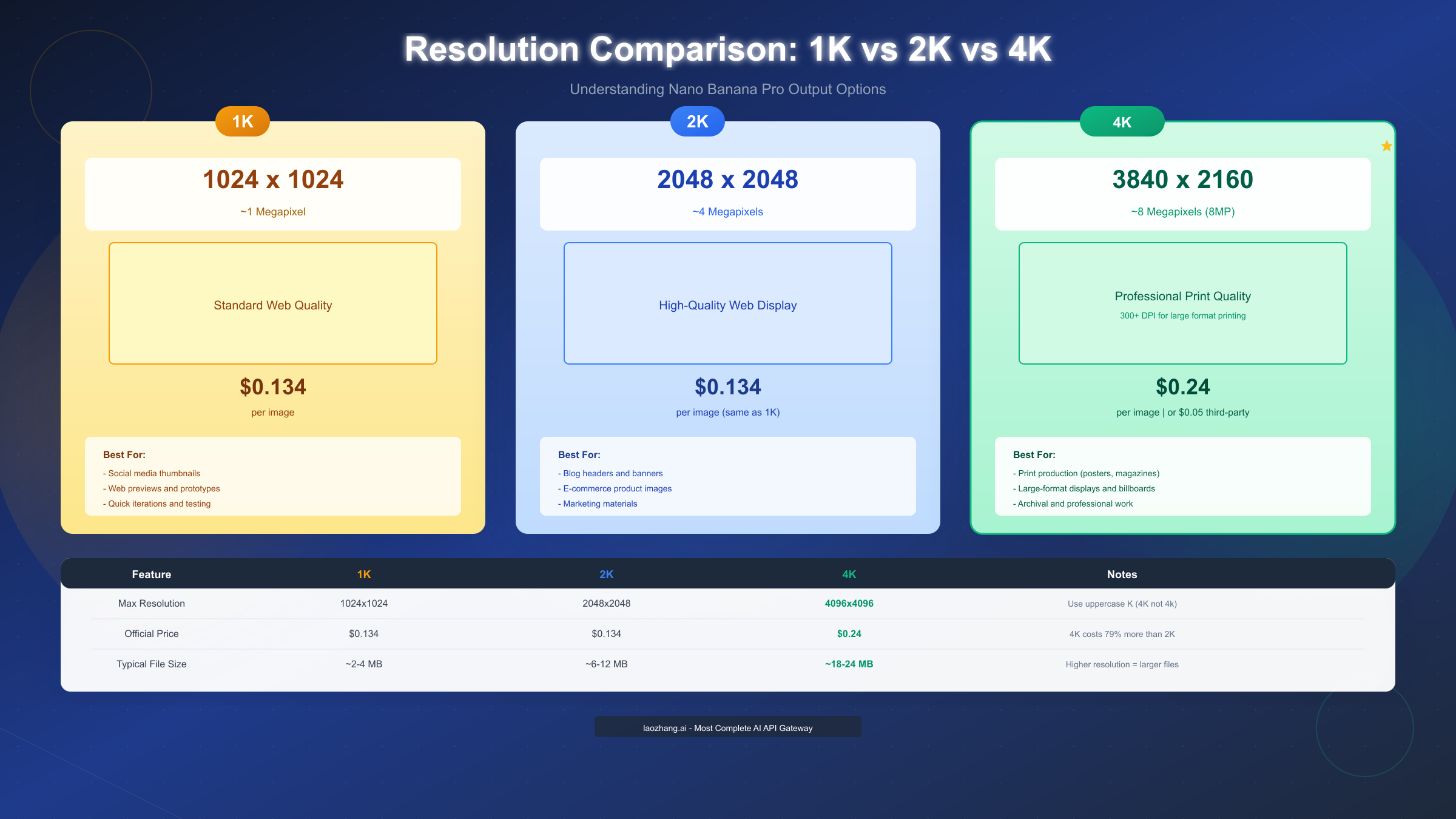
Nano Banana Pro supports three distinct resolution tiers, each designed for different use cases and priced accordingly. Understanding the technical specifications and practical implications of each tier helps you make informed decisions about when 4K generation is worth the additional cost—and when 2K provides sufficient quality at lower expense.
Technical Specifications by Resolution
The resolution parameter accepts three values: "1K", "2K", and "4K" (all uppercase). Here's what each translates to in terms of actual pixel dimensions based on your chosen aspect ratio:
1K Resolution (Default): Maximum dimension of 1024 pixels on the longest side. A 16:9 aspect ratio produces 1024×576 pixels, while 1:1 produces 1024×1024. At approximately 1 megapixel, this tier is suitable for web thumbnails, social media previews, and quick prototyping. File sizes typically range from 500KB to 2MB.
2K Resolution: Maximum dimension of 2048 pixels on the longest side. A 16:9 aspect ratio produces 2048×1152 pixels, while 1:1 produces 2048×2048. At approximately 4 megapixels, this tier works well for blog headers, e-commerce product images, and general web content. File sizes typically range from 4MB to 10MB.
4K Resolution: Maximum dimension of 4096 pixels, or standard UHD dimensions of 3840×2160 for 16:9 aspect ratio. At approximately 8 megapixels, this tier is designed for print production, large-format displays, and archival purposes. File sizes typically range from 15MB to 25MB.
Code Configuration for Each Resolution
The configuration change between resolutions is straightforward—only the image_size parameter differs:
python# 1K Configuration (fastest, cheapest)
image_config=types.ImageConfig(image_size="1K")

# 2K Configuration (balanced)
image_config=types.ImageConfig(image_size="2K")

# 4K Configuration (highest quality)
image_config=types.ImageConfig(image_size="4K")
For a deeper exploration of aspect ratio options and how they interact with resolution settings, see our guide on aspect ratio options for Nano Banana Pro.
When to Use Each Resolution
The decision between resolutions should be driven by your end use case, not just a preference for "higher is better." Here's a practical decision framework:
Choose 1K when you need rapid iteration during creative development, when images will only be displayed at small sizes (under 400 pixels wide), or when you're generating many test images before finalizing a prompt. The 2x faster generation speed and identical pricing to 2K make 1K ideal for prototyping.
Choose 2K for most production web content. Modern web compression and responsive image serving mean that 2K images displayed at typical blog or e-commerce sizes (800-1200 pixels wide) are visually indistinguishable from 4K sources. Since 1K and 2K share the same $0.134 price point, 2K offers better value for web-focused work.
Choose 4K specifically when your output will be printed at larger than 8×10 inches, displayed on 4K monitors at full resolution, or archived for potential future use at higher resolutions. The $0.24 price point (79% more than 2K) is justified only when these genuine high-resolution requirements exist.
Pricing Guide: Optimizing Your 4K Image Costs
Cost optimization is essential for production workloads, where the difference between pricing tiers can translate to significant budget implications at scale. Nano Banana Pro's pricing structure offers several opportunities for savings, from choosing the right resolution to leveraging batch processing and third-party providers.
Official API Pricing Breakdown
Google's official pricing for Nano Banana Pro image generation (as of December 2025) follows a straightforward per-image model:
| Resolution | Price per Image | Megapixels | Cost per MP |
|---|---|---|---|
| 1K | $0.134 | ~1 MP | $0.134 |
| 2K | $0.134 | ~4 MP | $0.034 |
| 4K | $0.24 | ~8 MP | $0.030 |
This pricing reveals an important insight: on a cost-per-megapixel basis, 4K actually offers the best value. However, if you don't need those additional megapixels, you're paying for unused resolution. The pricing strategy clearly incentivizes users to choose the minimum resolution that meets their needs.
Batch API for Volume Discounts
For workloads generating hundreds or thousands of images monthly, Google's Batch API provides a 50% discount on image generation. Instead of $0.24 per 4K image, batch processing reduces the cost to $0.12. The trade-off is latency: batch requests are queued and processed within a window (typically 24-48 hours) rather than returning results in seconds.
python# Example batch request structure
batch_request = {
    "requests": [
        {"prompt": "First image prompt...", "config": {...}},
        {"prompt": "Second image prompt...", "config": {...}},
        # Up to 1000 requests per batch
    ]
}
Batch processing is ideal for use cases like generating product variations for an entire catalog, creating social media content calendars, or producing training datasets where immediate turnaround isn't required.
Third-Party Provider Savings
For production workloads where official API pricing creates budget constraints, third-party providers offer substantial savings. Platforms like laozhang.ai provide Nano Banana Pro 4K generation at approximately $0.05 per image—representing a 79% cost reduction compared to official pricing. This pricing is achieved through aggregate volume agreements and optimized infrastructure.
The integration with third-party providers is typically straightforward, as most offer OpenAI-compatible API endpoints. This means you can switch between official and third-party providers by changing a single base URL, without rewriting your application code. For teams generating thousands of images monthly, the annual savings can be significant: 10,000 monthly 4K images costs $28,800/year at official rates versus approximately $6,000/year through third-party providers.
Cost Calculation Examples
Here's how costs scale for common production scenarios:
| Scenario | Monthly Images | Official 4K | Third-Party 4K | Annual Savings |
|---|---|---|---|---|
| Small blog | 100 | $24 | $5 | $228 |
| E-commerce | 1,000 | $240 | $50 | $2,280 |
| Enterprise | 10,000 | $2,400 | $500 | $22,800 |
For detailed Gemini API pricing including text and multimodal capabilities, see our complete Gemini API pricing guide.
Four Ways to Access 4K Generation
Nano Banana Pro's 4K capabilities are accessible through multiple channels, each suited to different user profiles and technical requirements. Understanding these access paths helps you choose the approach that matches your workflow and budget constraints.
Consumer Access via Gemini App
The most accessible way to experiment with Nano Banana Pro is through the Gemini app at gemini.google.com. After signing in with your Google account, you can generate images by simply describing what you want. However, free-tier users face significant limitations for 4K generation: output is capped at approximately 1 megapixel (1024×1024), and you receive only a limited number of complimentary generations before the system reverts to the base Nano Banana model.
To access 4K generation through the Gemini app, you need a Google AI Pro or Ultra subscription. Even then, the app doesn't provide a resolution selector—you must explicitly include "generate at 4K resolution" in your text prompt. This approach works for occasional high-resolution images but lacks the programmatic control needed for production workflows.
Developer Access via Google AI Studio
For developers building applications, Google AI Studio (aistudio.google.com) provides API access to Nano Banana Pro with full configuration control. This is the path covered in our code examples above. You generate an API key through the console, install the SDK, and have complete programmatic control over resolution, aspect ratio, and other parameters.
API access is billed per request with no monthly subscription required—you pay only for what you generate. This makes it ideal for applications with variable demand, from personal projects to startup MVPs. The API documentation at ai.google.dev/gemini-api/docs/image-generation provides comprehensive reference material for all available parameters.
Enterprise Access via Vertex AI
Organizations requiring enterprise-grade infrastructure, compliance certifications, and dedicated support access Nano Banana Pro through Google Cloud's Vertex AI platform. Vertex AI provides additional capabilities including VPC Service Controls, data residency options, and integration with Google Cloud's monitoring and security tools.
The code structure for Vertex AI differs slightly from the standard SDK, using Google Cloud authentication rather than API keys. Pricing is similar to the consumer API but may include volume commitments and enterprise agreements that reduce per-image costs at scale.
Third-Party Platform Access
Third-party platforms like laozhang.ai aggregate API access across multiple providers, offering cost savings and simplified billing. For developers already using OpenAI-compatible endpoints, integration is straightforward—simply point your base URL to the third-party endpoint while keeping the rest of your code unchanged.
For users exploring free options before committing to paid plans, our guide on free access options for Nano Banana Pro covers available trials and complimentary tiers across platforms.
Troubleshooting Common Issues
Even with correct code, several configuration errors and edge cases can prevent successful 4K generation. This section covers the most common issues developers encounter, with specific error messages and their solutions.
Error: Invalid image_size Parameter
Error message: ValueError: image_size must be one of: 1K, 2K, 4K
Cause: Using lowercase "4k" instead of uppercase "4K", or providing an invalid value like "HD" or "UHD".
Solution: Always use exactly "1K", "2K", or "4K" with uppercase K. The API performs strict validation and rejects any variation.
python# Wrong - will fail
image_config=types.ImageConfig(image_size="4k")  # lowercase k
image_config=types.ImageConfig(image_size="HD")   # wrong format

# Correct
image_config=types.ImageConfig(image_size="4K")   # uppercase K
Error: SDK Version Incompatibility
Error message: AttributeError: 'ImageConfig' object has no attribute 'image_size'
Cause: Using a version of google-genai older than 1.52.0, which doesn't include the image_size parameter.
Solution: Upgrade your SDK to the latest version:
bashpip install --upgrade google-genai
# Verify version
pip show google-genai | grep Version
Error: Rate Limit Exceeded
Error message: ResourceExhausted: 429 Quota exceeded for quota metric 'Generate Content API requests'
Cause: Exceeding your per-minute or per-day request quota for image generation.
Solution: Implement exponential backoff and request queuing:
pythonimport time
from google.api_core.exceptions import ResourceExhausted

def generate_with_retry(prompt, max_retries=5):
    for attempt in range(max_retries):
        try:
            return client.models.generate_content(...)
        except ResourceExhausted:
            wait_time = 2 ** attempt  # 1, 2, 4, 8, 16 seconds
            print(f"Rate limited. Waiting {wait_time}s...")
            time.sleep(wait_time)
    raise Exception("Max retries exceeded")
Error: Model Not Found
Error message: NotFound: Model 'gemini-3-pro-image' not found
Cause: Using an incorrect model identifier. The model name includes "-preview" suffix.
Solution: Use the exact model identifier:
python# Wrong
model="gemini-3-pro-image"
model="nano-banana-pro"

# Correct
model="gemini-3-pro-image-preview"
Issue: Output File Size Smaller Than Expected
Symptom: Your 4K images are saving at 2-4 MB instead of the expected 15-25 MB range.
Likely cause: The resolution configuration isn't being applied correctly, and the API is defaulting to 1K output.
Diagnostic steps:
- Print the response object to verify image dimensions
- Check that
response_modalitiesincludes "IMAGE" - Verify your API key has access to the premium model
Pro Tips for Maximum 4K Quality
Generating images at 4K resolution is only part of achieving professional results. The quality of your output depends heavily on prompt engineering, aspect ratio selection, and understanding the model's strengths. These advanced techniques help you maximize the value of each 4K generation.
Prompt Engineering for High Resolution
At 4K resolution, details that might be overlooked in lower-resolution outputs become visible and important. Your prompts should explicitly address fine details rather than leaving them to chance. Consider including:
Lighting specifications: Instead of "well-lit scene," specify "golden hour lighting with soft shadows, warm color temperature around 5000K." The model renders lighting with greater subtlety at 4K.
Texture details: Add phrases like "highly detailed fabric texture" or "visible wood grain" to encourage the model to generate fine details that justify the 4K resolution.
Composition guidance: Describe the relationship between foreground and background elements. "A coffee cup in sharp focus on a wooden table, with a softly blurred bookshelf in the background" provides clear compositional direction.
Keep prompts under 30 words for optimal composition accuracy—longer prompts can introduce conflicting instructions that degrade quality.
Text Rendering Optimization
Nano Banana Pro achieves approximately 94% accuracy in text rendering, but this requires proper prompting technique. To generate perfect typography for signs, logos, or diagrams:
Enclose target text in quotation marks: The model treats quoted text as a visual element to be rendered exactly. For example: A wooden sign in a garden that reads "Welcome to Paradise".
Specify font characteristics: Add descriptive terms like "elegant serif font," "bold sans-serif lettering," or "hand-painted brush script" to guide the typography style.
Limit text length: Single words and short phrases render more reliably than long sentences. For complex text, consider generating multiple images with shorter text elements and compositing them.
Multi-Image Composition
Nano Banana Pro supports up to 14 reference images for compositional guidance—a powerful feature for maintaining consistency across 4K outputs. Common use cases include:
Style transfer: Upload a reference image to guide the artistic style while your prompt describes the content. This produces 4K images in consistent visual styles across campaigns.
Character consistency: Include reference images of characters to maintain appearance consistency across multiple generated scenes, valuable for storytelling or brand mascots.
Product placement: Upload product photos as references to generate 4K lifestyle images featuring your actual products with photorealistic integration into generated scenes.
Aspect Ratio Strategy
The aspect ratio you choose affects both the final dimensions and the composition approach the model uses. For 4K output:
| Aspect Ratio | 4K Dimensions | Best For |
|---|---|---|
| 16:9 | 3840×2160 | Video covers, TV displays |
| 3:2 | 3840×2560 | Print photographs |
| 1:1 | 4096×4096 | Social media, album art |
| 9:16 | 2160×3840 | Mobile wallpapers, stories |
| 21:9 | 3840×1646 | Ultrawide displays, banners |
Match your aspect ratio to your delivery format from the start—cropping a 1:1 image to 16:9 wastes the resolution you paid for.
Conclusion and Next Steps
Generating 4K images with Nano Banana Pro comes down to a few essential configuration details: use the correct model identifier (gemini-3-pro-image-preview), set image_size="4K" with uppercase K, ensure your SDK version is 1.52.0 or higher, and optimize your prompts for the high-resolution output. With official pricing at $0.24 per 4K image and third-party options available at approximately $0.05 through providers like laozhang.ai, you can choose the cost structure that matches your production volume.
The code examples in this tutorial are complete and tested—you can copy them directly into your projects after adding your API key. For additional cost optimization, consider the Batch API for volume workloads (50% discount) or third-party providers for ongoing production needs. When troubleshooting, remember that the most common errors involve case sensitivity (uppercase K) and SDK version mismatches.
As you scale your 4K image generation workflow, explore the additional capabilities that complement high-resolution output: multi-image composition for brand consistency, thought signatures for iterative refinement, and aspect ratio optimization for your specific delivery channels. For detailed API documentation and the latest updates, visit the official Google AI documentation at ai.google.dev or the laozhang.ai platform documentation at https://docs.laozhang.ai/ for third-party integration guides.
The future of AI image generation is moving toward higher resolutions and greater creative control. Nano Banana Pro's 4K capabilities represent the current state of the art, but the techniques you learn here—proper SDK configuration, prompt engineering for detail, and cost optimization strategies—will remain applicable as the technology continues to evolve.