AIFreeAPI Logo

How to Use Nano Banana Pro for Free: Complete 2025 Guide (6+ Verified Methods)

A
25 min readAI Image Generation

Discover 6+ verified methods to use Google's Nano Banana Pro image generator for free. From the official Gemini app to third-party platforms, this comprehensive guide covers everything you need to generate stunning 4K AI images without spending a dollar.

Nano Banana Pro

4K Image80% OFF

Google Gemini 3 Pro Image · AI Image Generation

Served 100K+ developers
$0.24/img
$0.05/img
Limited Offer·Enterprise Stable·Alipay/WeChat
Gemini 3
Native model
Direct Access
20ms latency
4K Ultra HD
2048px
30s Generate
Ultra fast
|@laozhang_cn|Get $0.05
How to Use Nano Banana Pro for Free: Complete 2025 Guide (6+ Verified Methods)

Nano Banana Pro, officially known as Gemini 3 Pro Image, represents Google DeepMind's most advanced image generation model launched in November 2025. The good news for creators and developers is that multiple legitimate free access methods exist in December 2025. The official Gemini app provides 50-100 free generations, Google AI Studio offers 1,500 free daily API requests, and third-party platforms like felo.ai deliver additional free access with varying quotas. This comprehensive guide walks you through 6+ verified methods to access Nano Banana Pro free, including step-by-step tutorials, platform safety verification, and strategies to maximize your free quota for professional-quality 4K image generation.

What Is Nano Banana Pro and Why Does It Matter?

Google DeepMind released Nano Banana Pro on November 20, 2025, marking a significant leap forward in AI image generation technology. Unlike its predecessor, the original Nano Banana (Gemini 2.5 Flash Image), which gained viral popularity through the 3D figurine trend in September 2025, Nano Banana Pro delivers professional-grade capabilities that fundamentally change what's possible with free AI image generation.

The model earned its quirky name from internal Google codenames, and even CEO Sundar Pichai embraced it with a three-banana emoji tweet. Within just four days of launch, Pro attracted 13 million new users, demonstrating massive market demand for high-quality free image generation. According to TechCrunch's coverage (techcrunch.com/2025/11/20/google-releases-nano-banana-pro-its-latest-image-generation-model/), this represents one of the fastest adoption rates for any Google AI product.

Understanding the Key Differences Between Nano Banana and Nano Banana Pro

The original Nano Banana excelled at speed, generating images in approximately 3 seconds, but suffered from significant limitations. Text rendering was unreliable—phrases like "Welcome to Our Store" might render as "Welcme to Oru Stroe." Resolution maxed out at roughly 1024x1024 pixels, making outputs unsuitable for professional use. The model also struggled with complex multi-element prompts and maintaining consistency across multiple generations.

Nano Banana Pro addresses these weaknesses comprehensively. Resolution jumps to native 2K with 4K upsampling capability, producing images suitable for print, broadcast, and large-format displays. Text rendering achieves near-perfect accuracy across 100+ languages, transforming the model from a novelty into a legitimate professional tool. The underlying Gemini 3 Pro architecture enables sophisticated prompt understanding, maintaining story comprehension across scenes and handling complex multi-element compositions.

Perhaps most significantly for commercial users, Nano Banana Pro includes Google Search grounding. This feature allows the model to verify facts and generate imagery based on real-time data, enabling accurate infographics, dashboard mockups, and data visualizations that weren't possible before. For anyone creating marketing materials, educational content, or data-driven visuals, this capability alone justifies the effort to access Nano Banana Pro.

For developers interested in programmatic access to similar image generation capabilities, our free Gemini Flash Image API guide provides additional context on Google's AI image ecosystem.

Complete Free Access Methods: A Comprehensive Comparison

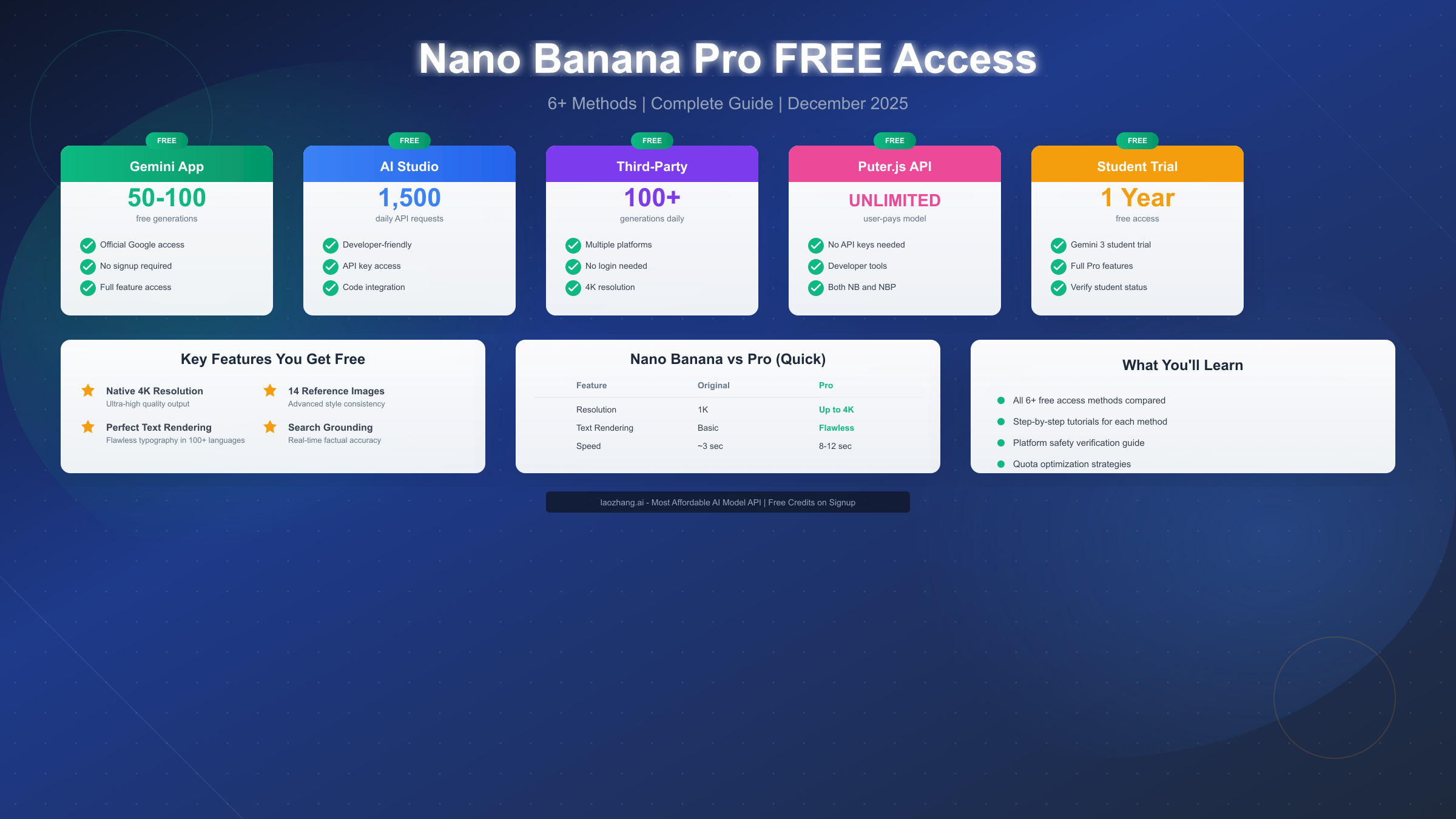
Understanding your options before diving in saves time and frustration. Each free access method offers distinct advantages, limitations, and ideal use cases. The comparison below, verified in December 2025, helps you choose the right approach for your specific needs.

Comparison of Free Access Methods for Nano Banana Pro

Method 1: Official Gemini App (Best for Casual Users)

The Gemini app represents the easiest entry point for free Nano Banana Pro access. Available at gemini.google.com or through mobile apps on iOS and Android, it requires only a Google account to get started. Free-tier users receive approximately 50-100 Pro generations before the system throttles them back to the original Nano Banana model. Based on user reports, quotas reset approximately every 8 hours, though this varies by account and usage patterns.

The Gemini app provides access to all Pro features including 4K resolution output, perfect text rendering, up to 14 reference image uploads, and Google Search grounding. For creators who need occasional high-quality image generation without any technical setup, this method offers the best balance of accessibility and capability.

Method 2: Google AI Studio (Best for Developers)

Developers gain significant advantages through Google AI Studio at aistudio.google.com. The platform offers 1,500 free API requests daily for development and prototyping, representing substantial capacity for testing and moderate production use. API access enables integration with custom applications, batch processing, and automated workflows that aren't possible through the consumer app.

Setting up AI Studio requires creating a project and obtaining an API key, but the process takes under 10 minutes. The platform provides code export functionality, making it easy to transition from testing to production. For teams building AI-powered applications, this method provides the most flexibility.

Method 3: Third-Party Platforms (Best for Quick Unlimited Access)

Several companies have wrapped the Gemini 3 Pro Image API endpoint and offer it through their own interfaces. Platforms like felo.ai allow immediate access without registration—simply enter a prompt, select resolution up to 4K, and generate. Other verified platforms include nanobanana.im, VisualGPT, and EaseMate AI, each offering between 50-200 daily generations.

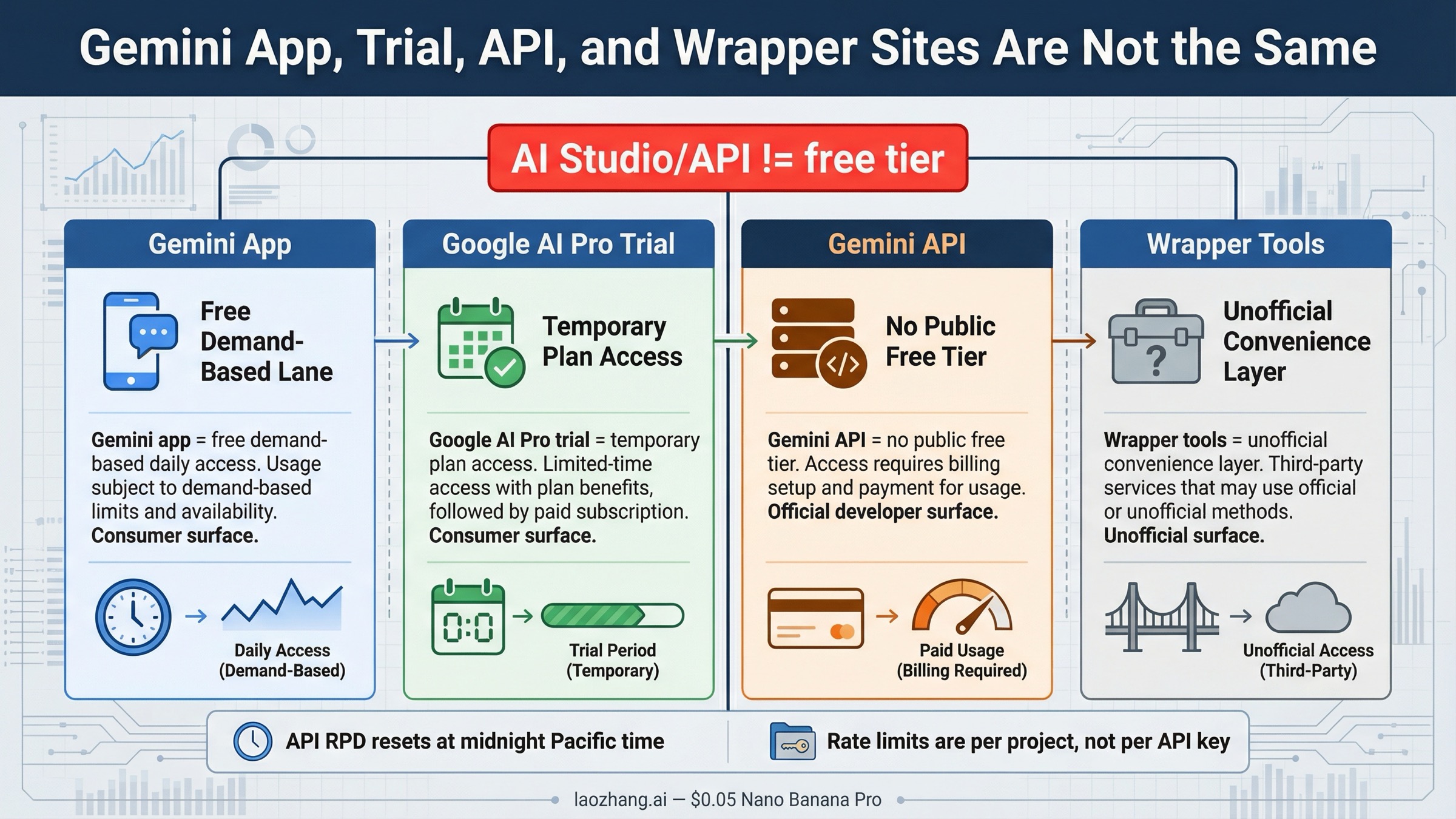
Third-party access works well for users who have exhausted their official quotas or want quick access without account creation. However, reliability varies, and some platforms may experience downtime or quota changes without notice. We address platform safety verification in the next section.

Method 4: Puter.js API (Best for App Builders)

The Puter.js framework at developer.puter.com offers a unique "user-pays" model for unlimited Nano Banana access. Developers integrate the SDK into their applications, and end users cover their own usage costs through Puter's infrastructure. This means developers don't pay anything for their users' image generation usage, making it attractive for building image generation features into products.

This approach requires JavaScript development skills and works best for web applications. The SDK handles authentication, billing, and API management automatically, significantly reducing integration complexity.

Method 5: Student Trial (Best Long-Term Free Access)

Students benefit from Google's Gemini 3 student trial, which provides up to one year of free access to Nano Banana Pro with higher quotas than standard free tiers. Verification requires an educational email address (.edu or equivalent) and takes 1-2 business days. Once approved, students receive access comparable to paid tiers without subscription costs.

This represents the most generous free access option but limits eligibility to verified students. Those who qualify should prioritize this method for its extended duration and enhanced quotas.

Method 6: Google Cloud Free Credits

New Google Cloud Platform users receive $300 in free credits applicable to Gemini API usage including Nano Banana Pro. At approximately $0.134 per standard-resolution image, these credits enable roughly 2,240 generations—far exceeding any other free method. However, this approach requires setting up a GCP account and involves more technical configuration than other options.

For developers or small businesses planning extended use, combining GCP credits with ongoing AI Studio access provides substantial free capacity.

Third-Party Platforms: Safety Verification and Trust

Before using any third-party platform for Nano Banana Pro access, verifying legitimacy protects both your work and your data. The proliferation of unofficial tools creates genuine security concerns, and distinguishing trustworthy platforms from potential scams requires systematic evaluation.

Essential Security Indicators to Check

Start with basic technical verification. Every legitimate platform should use HTTPS encryption—check for the lock icon in your browser's address bar. Examine the URL carefully for typosquatting (slight misspellings of legitimate domains). Look for clear company information including a physical address, contact email, and ideally a registered business entity.

Review the platform's privacy policy and terms of service. Legitimate services explain how they handle your prompts, generated images, and any uploaded reference materials. Be wary of platforms that claim ownership of generated content or reserve rights to use your prompts for training purposes without explicit consent.

Check for user reviews and community discussion outside the platform itself. Search for the platform name along with terms like "review," "scam," or "legitimate" to surface user experiences. Active discussion on Reddit, Twitter/X, or developer forums usually indicates genuine usage.

Verified Legitimate Platforms (December 2025)

Based on our testing and community verification, the following third-party platforms provide reliable Nano Banana Pro access:

felo.ai operates through direct API integration and offers immediate access without registration. The platform supports resolution selection up to 4K and provides consistent uptime. Daily limits vary but typically allow 50-100 generations.

nanobanana.im specifically focuses on Nano Banana models and includes additional tools like image-to-prompt conversion and background removal. The platform requires login for full access but offers limited free generations without registration.

VisualGPT and NoteGPT wrap multiple AI models including Nano Banana Pro, providing comparison capabilities alongside generation. These platforms suit users who want to evaluate outputs across different models.

Red Flags to Avoid

Immediately exit any platform that requests payment information for "free" access, asks for passwords beyond their own platform login, requires downloading desktop software, or displays aggressive advertising that obscures the actual interface. Platforms with domains registered within the past 30 days warrant extra scrutiny, as scammers frequently rotate through disposable domains.

If a deal seems too good to be true—like claims of "completely unlimited" access with no catches—investigate further before using. Even legitimate platforms have operational costs and implement some form of rate limiting.

Step-by-Step Tutorials for Top 3 Methods

Step-by-Step Process for Nano Banana Pro

Method 1: Gemini App Tutorial

Getting started with the official Gemini app takes approximately 2 minutes and requires no technical knowledge.

Step 1: Access the Platform

Navigate to gemini.google.com in any modern browser, or download the Gemini app from your device's app store (iOS App Store or Google Play). The mobile app often provides higher daily limits than desktop according to user reports, so consider using both platforms to maximize free access.

Step 2: Sign In or Create Account

Click "Sign in" and authenticate with any Google account. If you don't have one, creating a Google account takes 2-3 minutes and requires only an email address. No credit card or phone verification is required for basic Gemini access.

Step 3: Enable Nano Banana Pro Mode

This step is critical and frequently missed. In the Gemini interface, look at the top of the chat for the model selector dropdown. Select "Thinking" mode rather than "Fast" mode. The "Thinking" option activates the Nano Banana Pro engine, while "Fast" uses the standard Nano Banana model without Pro capabilities.

Step 4: Create Your First Image

Type a descriptive prompt in the chat interface. Start simple—something like "A golden retriever puppy playing in autumn leaves, professional photography" works well for testing. Press enter or click the send button to submit.

For image editing rather than generation, click the image upload icon and select a photo from your device. Then describe the changes you want: "Remove the background and replace with a sunset beach scene" or "Age this person 30 years while maintaining their appearance."

Step 5: Download and Iterate

Generated images appear directly in the chat. Click any image to expand it, then use the download button to save in full resolution. If the result doesn't match your vision, provide follow-up prompts to refine: "Make the lighting more dramatic" or "Show the same scene from a lower angle."

Method 2: Google AI Studio Tutorial

Developers gain programmatic access through Google AI Studio with slightly more setup.

Step 1: Create a Google Cloud Project

Visit aistudio.google.com and sign in with your Google account. If prompted, create a new project or select an existing one. Projects organize your API usage and can be shared with team members.

Step 2: Generate an API Key

Navigate to the API Keys section and click "Create API Key." Save this key securely—it provides access to your free quota and should never be shared publicly or committed to version control.

Step 3: Test Generation Through the Interface

Before writing code, test the model through AI Studio's built-in interface. Enter a prompt in the provided text field and click generate. This confirms your setup works and helps you understand the model's behavior.

Step 4: Integrate with Your Application

AI Studio provides code snippets in Python, JavaScript, and other languages. Here's a basic Python example:

python
import google.generativeai as genai genai.configure(api_key="YOUR_API_KEY") model = genai.GenerativeModel("gemini-3-pro-image-preview") response = model.generate_content( "A minimalist logo for a coffee shop called 'Dawn Brew'" )

For production applications requiring higher volumes, platforms like laozhang.ai offer cost-effective API access to Gemini image models at rates significantly below Google's official pricing. This becomes relevant once you exceed the 1,500 daily free requests.

Method 3: Third-Party Platform Tutorial (felo.ai Example)

Third-party platforms require minimal setup for immediate access.

Step 1: Navigate to the Platform

Visit felo.ai/image in any browser. No account creation or login is required for basic access.

Step 2: Enter Your Prompt

Type your image description in the main text field. The platform accepts natural language descriptions without specific formatting requirements.

Step 3: Configure Options

Select your preferred resolution (up to 4K), aspect ratio, and any style parameters the platform offers. Higher resolutions consume more of your daily quota but produce better results for professional use.

Step 4: Generate and Download

Click the generate button and wait 10-15 seconds for processing. Preview the result and download if satisfied, or modify your prompt and regenerate.

Can You Use Free Images Commercially?

Understanding commercial usage rights prevents legal complications and ensures your work remains protected. The answer depends on which access method you use and how you plan to use the generated content.

Official Google Platforms (Gemini App, AI Studio)

Google's terms of service grant users ownership of content generated through their platforms, including commercial use rights. However, important caveats apply. All images include invisible SynthID watermarking that identifies them as AI-generated. This watermarking persists through editing, cropping, and format conversion, though it doesn't affect visual quality.

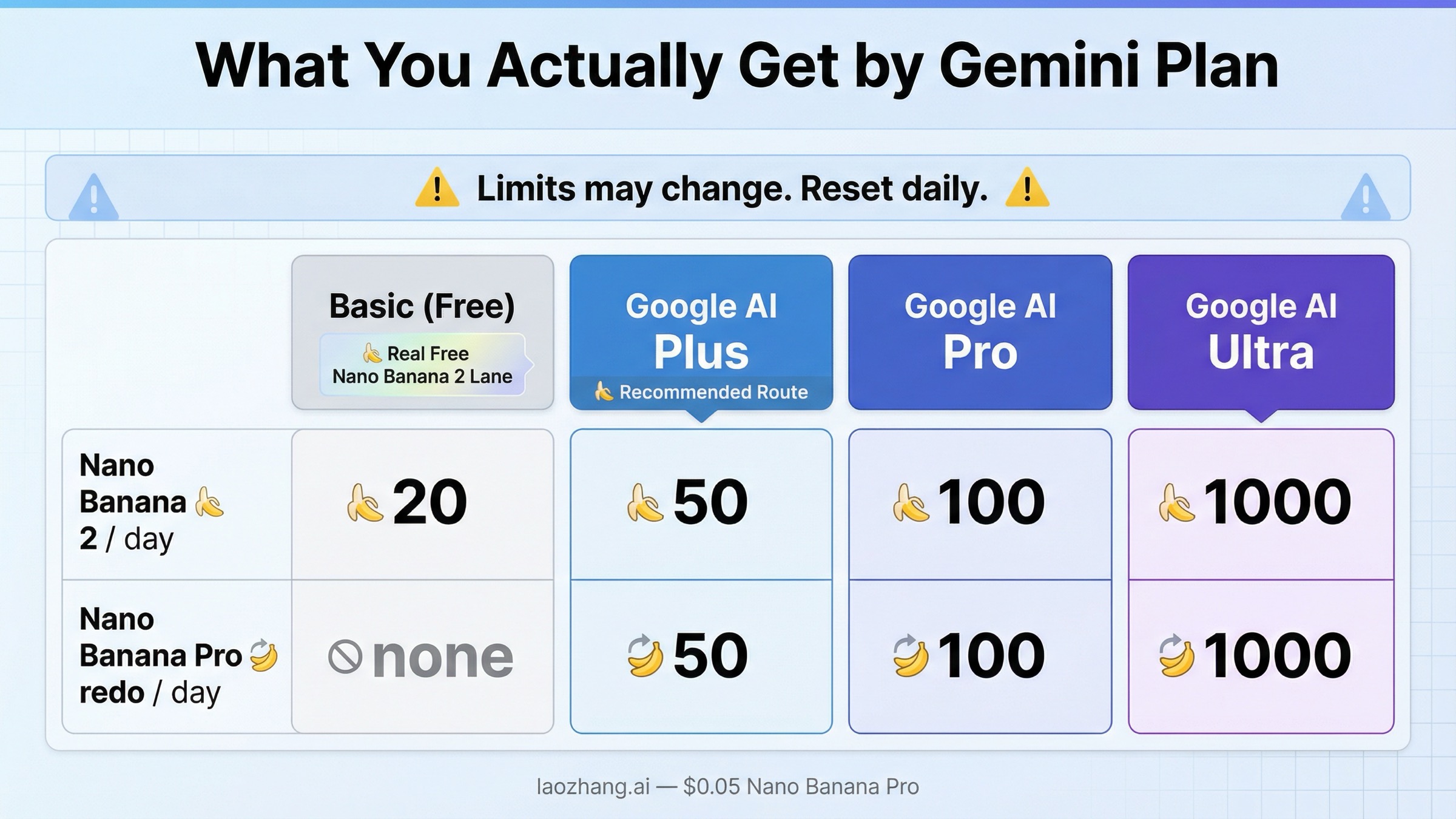
Free-tier users see a visible watermark overlay that must be removed before commercial use. Google AI Plus ($19.99/month) and Google AI Ultra ($99.99/month) subscribers receive images without visible watermarks. For serious commercial work, the subscription cost quickly pays for itself through time savings compared to manual watermark removal.

Content generated through Google platforms cannot depict real public figures without consent, regardless of subscription tier. Safety filters automatically block requests that violate Google's usage policies, including explicit content, violence, and misinformation.

Third-Party Platforms

Third-party platform terms vary significantly. Some grant full commercial rights, while others retain rights to use generated content or restrict commercial application entirely. Before using third-party generated images commercially, read the specific platform's terms of service carefully.

Most legitimate platforms inherit Google's underlying restrictions since they access the same API endpoint. SynthID watermarking applies regardless of access method—it's embedded by Google's model rather than the platform wrapper.

Practical Commercial Usage Guidelines

For commercial projects requiring reliable, high-volume image generation, consider API access through verified providers. Platforms like laozhang.ai specialize in AI model access with clear commercial licensing terms and competitive pricing that scales with business needs. This approach eliminates ambiguity around usage rights while providing the capacity commercial work demands.

Document your generation source and access method for each image used commercially. This paper trail protects you if questions arise later about image origins or rights.

Best Prompts for Free Users: Maximizing Quality per Generation

With limited free generations available, maximizing quality from each attempt matters significantly. These tested prompting strategies help you achieve professional results on your first or second try rather than burning through quota on iterations.

The Foundation: Structure Your Prompts Clearly

Nano Banana Pro understands complex prompts but performs best with clear organization. Follow this structure: Subject + Action/Pose + Environment + Style + Technical Specifications.

Example: "A professional businesswoman in her 40s reviewing documents at a modern standing desk, minimalist office with floor-to-ceiling windows showing a city skyline at sunset, corporate photography style, shot on Sony A7R IV, shallow depth of field, warm golden hour lighting"

This prompt provides specific, non-contradictory information in each category, helping the model generate exactly what you envision rather than guessing at missing details.

Text Rendering Best Practices

Nano Banana Pro's text rendering capabilities transform it from a novelty to a professional tool, but success requires understanding current limitations. Keep text elements to 3-5 words for reliable rendering. Single words achieve approximately 95% accuracy, while complex sentences drop to around 40%.

For signs, logos, or labels, specify typography details: "large bold sans-serif text reading 'SALE'" performs better than simply "a sale sign." When text accuracy is critical, generate the visual elements first, then add text through Photoshop or Figma for 100% control.

Leverage Reference Images

With support for up to 14 reference images, Nano Banana Pro excels at style matching and character consistency. Clearly define each image's role in your prompt: "Use Image A for the character's appearance, Image B for the artistic style, and Image C for the background environment."

For brand consistency across multiple generations, upload your logo, color palette, and existing visual assets as references. The model maintains these elements across generated content with remarkable fidelity.

Prompt Enhancement Techniques

Adding "cinematic composition" to any prompt typically improves overall quality by triggering the model's sophisticated scene composition capabilities. Similarly, "suggest improvements before generating the final image" activates longer internal reasoning chains that often produce superior results.

Specify camera and lens details for photorealistic outputs: "85mm portrait lens at f/2.8" produces different results than "wide-angle environmental portrait." These technical specifications tap into the model's knowledge of real photography.

For those interested in exploring prompting techniques across different AI image models, our ChatGPT image prompts master guide provides complementary strategies that often transfer effectively to Nano Banana Pro.

Maximizing Your Free Quota: Strategies and Optimization

Strategic quota management extends your free access significantly beyond the basic limits. These techniques, tested across multiple accounts and platforms, help serious users maintain productive output without transitioning to paid tiers.

Multi-Platform Rotation Strategy

Rather than exhausting one platform's quota before moving to the next, distribute work across platforms based on task requirements. Use the official Gemini app for high-priority work requiring maximum reliability. Switch to third-party platforms for exploratory iterations and concept development. Reserve AI Studio quota for development testing and API integration work.

This approach typically provides 200-400 total daily generations across platforms, compared to 50-100 from any single source.

Understanding Quota Mechanics

Quota counting varies by platform and operation type. In the Gemini app, each generation attempt counts against your quota regardless of whether you download the result. Editing operations on existing images may or may not count separately depending on complexity. Regeneration requests ("make it more colorful") definitely consume quota.

AI Studio counts API requests rather than images, so a single request generating multiple variations counts as one request. This makes AI Studio particularly efficient for comparative work where you want to evaluate multiple approaches.

Most platforms reset quotas on rolling 24-hour windows rather than calendar days, starting from your first generation of the cycle. This means strategic timing can effectively double your daily capacity—use your remaining quota just before reset, then immediately access fresh quota after.

Reducing Wasted Generations

Start with simple prompts and iterate rather than submitting complex prompts blindly. A simple prompt helps you understand how the model interprets your concept before adding detailed specifications.

Use the model's preview or thumbnail generation when available before committing to full-resolution output. Lower-resolution previews often consume less quota or don't count at all against daily limits.

Save prompts that produce good results. Nano Banana Pro exhibits some variability, but well-crafted prompts consistently outperform hastily written ones. Building a prompt library accelerates future work and reduces trial-and-error waste.

When Free Isn't Enough

For users whose needs exceed free tier capacity, several cost-effective options exist. Google AI Plus at $19.99/month provides substantially higher limits and removes visible watermarks. For API-heavy workloads, platforms like laozhang.ai offer Gemini model access at rates 30-50% below Google's official pricing, making high-volume professional use economically viable.

Evaluate your actual usage patterns before subscribing. Many users overestimate their needs; tracking actual generation counts for a week often reveals that optimized free-tier usage suffices for most projects.

Common Issues and Troubleshooting

Even with proper setup, you may encounter obstacles. These solutions address the most frequently reported problems.

Quota Appears Exhausted Immediately

If you see quota limitations on first access, try clearing browser cookies and cache, then signing in with a fresh session. Some users report that previous API testing or Gemini usage consumed quotas unknowingly. Creating a new Google account provides a clean slate if needed, though this should be a last resort.

Images Don't Match Prompts

When outputs diverge significantly from prompts, check for contradictory instructions. Asking for both "minimalist" and "ornate detail" confuses the model. Remove style modifiers and rebuild your prompt from a simple foundation.

Also verify you're using Nano Banana Pro (Thinking mode) rather than the standard model, which has weaker prompt comprehension.

Safety Filter Blocks Legitimate Content

Nano Banana Pro's safety filters occasionally flag benign content. Rewording prompts often helps—"anatomical reference for artists" may succeed where "nude figure study" fails. Avoid terminology associated with inappropriate content even in legitimate contexts.

For medical, educational, or artistic content that consistently triggers filters, consider API access through platforms that offer less restrictive filtering options for verified professional users.

Generation Fails or Times Out

Peak usage times cause occasional failures. Wait 5-10 minutes and retry. If problems persist across multiple platforms, check Google's status page for broader service issues. Third-party platforms may also experience independent outages.

Complex prompts with many reference images require more processing time. Simplify requests if timeout issues persist.

Summary and Recommended Next Steps

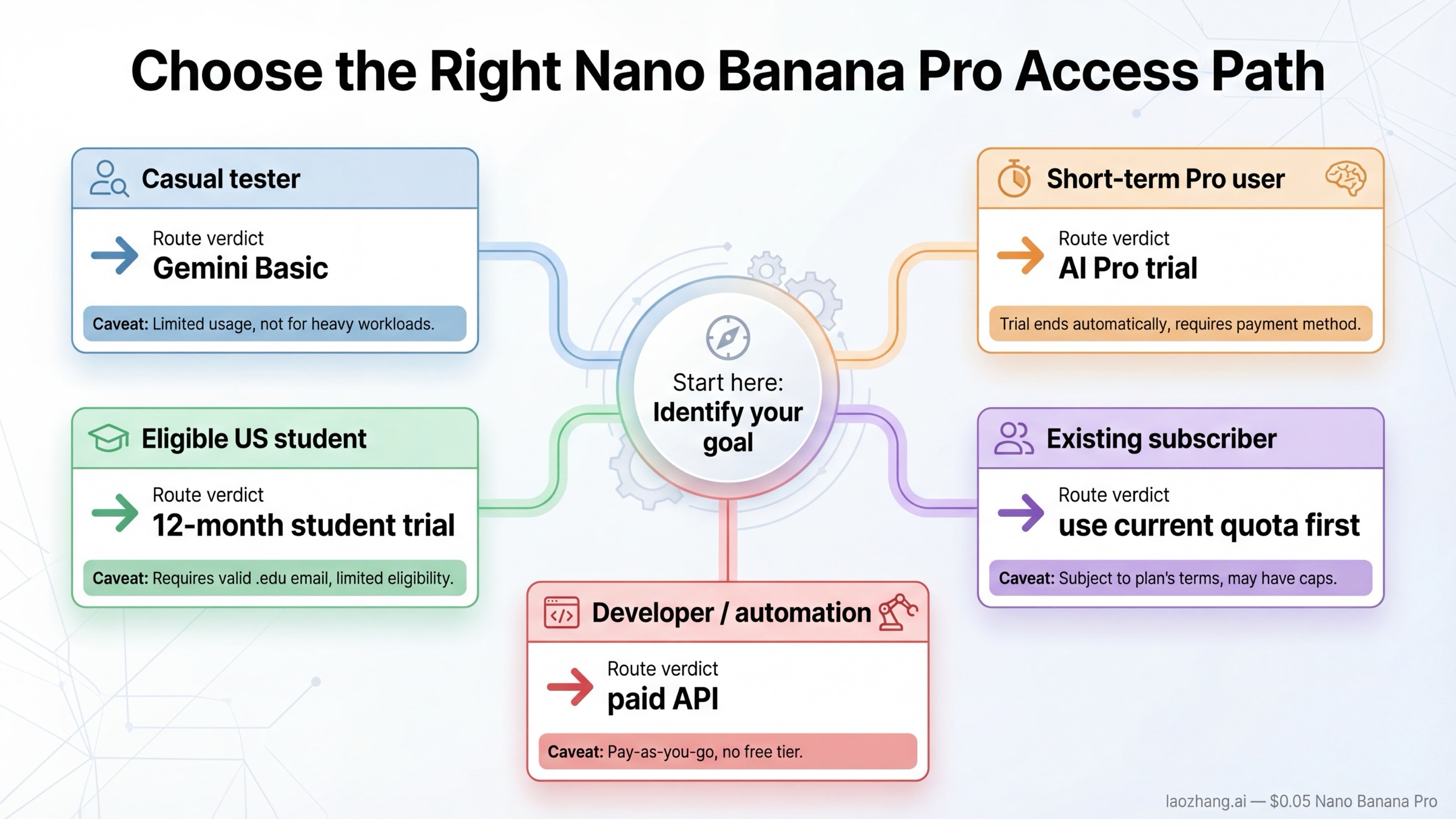
Nano Banana Pro represents a significant advancement in accessible AI image generation, and multiple legitimate methods exist to use it without cost. For most users, starting with the official Gemini app provides the best balance of ease and capability. Developers should explore Google AI Studio for programmatic access, while power users benefit from combining multiple platforms through strategic rotation.

Key takeaways for maximizing your free Nano Banana Pro experience:

The official Gemini app offers 50-100 free generations with 4K resolution and all Pro features. Enable "Thinking" mode to access Pro capabilities rather than the standard model. Google AI Studio provides 1,500 free daily API requests for development purposes. Third-party platforms extend access but require safety verification before use.

For commercial applications, understand that SynthID watermarking applies regardless of access method. Free-tier visible watermarks require removal or subscription upgrade for professional use. Text rendering works reliably for 3-5 word phrases but requires external tools for complex typography.

Strategic quota management through multi-platform rotation and waste reduction extends free access to 200-400 daily generations. When free tiers prove insufficient, affordable API access through platforms like laozhang.ai provides scalable capacity at competitive rates.

The AI image generation landscape continues evolving rapidly. Nano Banana Pro's current free access represents an opportunity that may not persist indefinitely as Google refines its pricing model. Taking advantage of current offerings while they exist makes strategic sense for creators, developers, and businesses building AI-powered visual workflows.

Frequently Asked Questions

How many free images can I generate with Nano Banana Pro?

Through the official Gemini app, free-tier users typically receive 50-100 Pro generations before quotas apply. Google AI Studio offers 1,500 free daily API requests. Combining multiple platforms can yield 200-400 daily generations for strategic users.

Is Nano Banana Pro actually free or just a free trial?

Multiple access methods provide genuinely free ongoing usage, not time-limited trials. The Gemini app free tier, AI Studio daily quota, and Google Cloud $300 credits all provide real free access. Third-party platforms offer additional free capacity. These represent sustainable free access options rather than limited trials.

What's the difference between Nano Banana and Nano Banana Pro?

The original Nano Banana generates at ~1K resolution in 3 seconds with basic text rendering. Nano Banana Pro produces up to 4K resolution in 8-12 seconds with near-perfect text rendering in 100+ languages, advanced reasoning for complex prompts, and Google Search grounding for factual accuracy.

Can I use Nano Banana Pro generated images commercially?

Yes, with caveats. Google grants commercial usage rights for generated content. However, all images include invisible SynthID watermarking, free-tier images include visible watermarks, and content cannot depict real public figures. Third-party platform terms vary, so review their specific policies.

Which method is best for beginners?

The official Gemini app at gemini.google.com offers the easiest entry point. No technical knowledge required, account creation takes 2 minutes, and you can generate your first image immediately. Start here before exploring more advanced options.

How do I know if a third-party platform is safe?

Verify HTTPS encryption, check for clear company information and privacy policies, search for independent user reviews, and avoid platforms that request unnecessary information or payments for "free" access. Our verified platform list in this guide provides starting points that passed safety checks.

Why do my images have watermarks?

Free-tier access through official Google platforms includes visible watermarks. These can be removed through Google AI Plus ($19.99/month) or Ultra ($99.99/month) subscriptions. Invisible SynthID watermarks persist on all generations regardless of subscription tier.

What should I do when my quota runs out?

Wait approximately 8 hours for quota reset, switch to third-party platforms for continued access, or consider subscription options if needs consistently exceed free capacity. Our multi-platform rotation strategy maximizes free access across available sources.

Experience 200+ Latest AI Models

One API for 200+ Models, No VPN, 16% Cheaper, $0.1 Free

Limited 16% OFF - Best Price
99.9% Uptime
5-Min Setup
Unified API
Tech Support
Chat:GPT-5, Claude 4.1, Gemini 2.5, Grok 4+195
Images:GPT-Image-1, Flux, Gemini 2.5 Flash Image
Video:Veo3, Sora(Coming Soon)

"One API for all AI models"

Get 3M free tokens on signup

Alipay/WeChat Pay · 5-Min Integration