
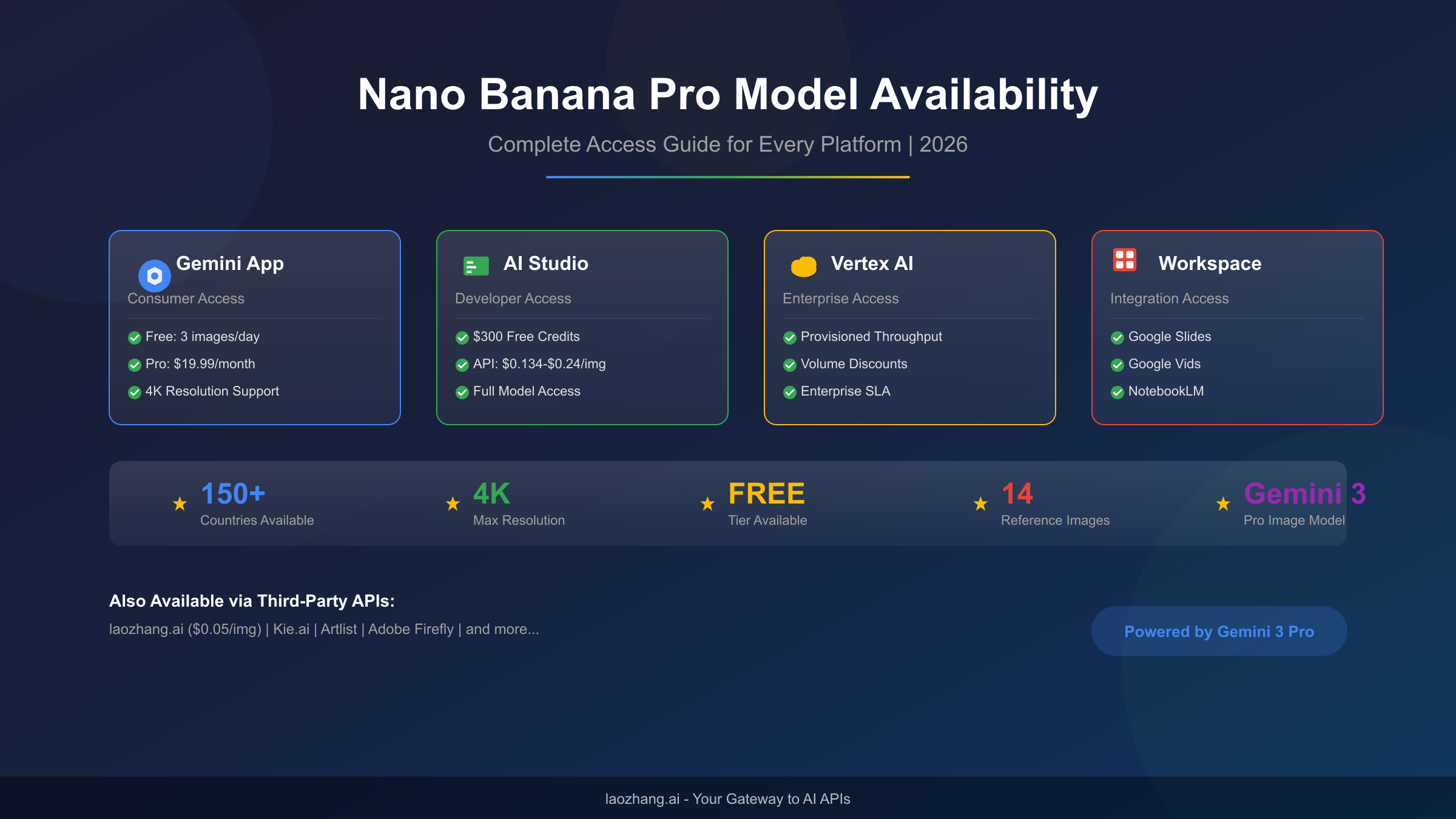
Nano Banana Pro represents Google DeepMind's most capable image generation model, built on the Gemini 3 Pro Image architecture and available across multiple platforms since November 2025. Whether you want free access through Gemini App, developer testing via AI Studio, enterprise deployment on Vertex AI, or cost-effective API access through third-party providers, this guide provides complete platform coverage with verified pricing and step-by-step access instructions for every use case.
Understanding Nano Banana Pro: What Makes It Different
The name "Nano Banana Pro" might sound unusual, but it carries significant meaning in the AI community. Originally appearing as "nanaBaNaNa-Turbo-Banana-5B" on LMArena in August 2025, the model generated massive interest before Google officially revealed it as their next-generation image generation system built on Gemini 3 Pro architecture.
What distinguishes Nano Banana Pro from previous image generation models is its native multimodal understanding combined with exceptional output quality. Unlike traditional text-to-image models that treat text and images as separate modalities, Nano Banana Pro processes both inputs through a unified architecture. This enables capabilities that weren't possible before: you can upload reference images, describe modifications in natural language, and generate outputs that maintain consistent style, lighting, and composition across variations.
The technical specifications demonstrate why developers and enterprises have rapidly adopted this model. Nano Banana Pro supports output resolutions up to 4K (4096×4096 pixels), compared to the 1024×1024 limitation of most competing models. The text rendering capability has achieved unprecedented accuracy, with the model correctly generating complex text in images across multiple languages including English, Chinese, Japanese, and Arabic. For comparison, see our detailed analysis of the differences between Nano Banana and Nano Banana Pro to understand the full scope of improvements.
The reference image capability deserves special attention for creative professionals. Nano Banana Pro accepts up to 14 reference images simultaneously, allowing you to establish style guides, maintain character consistency across multiple generations, and create variations that respect specific visual elements from your input. This feature alone has made it the preferred choice for marketing teams, game developers, and content creators who need consistent visual identities across their work.
Every image generated by Nano Banana Pro includes SynthID watermarking, an invisible digital signature that identifies AI-generated content. This watermark survives common transformations like cropping, resizing, and format conversion, addressing concerns about AI image authenticity without degrading visual quality. Google has committed to maintaining this watermark across all access methods, including third-party API implementations.
Where Nano Banana Pro Is Available: Complete Platform Matrix
Understanding all available access points helps you choose the optimal path for your specific needs. The availability matrix below consolidates information from official Google documentation and verified third-party sources, current as of January 2026.
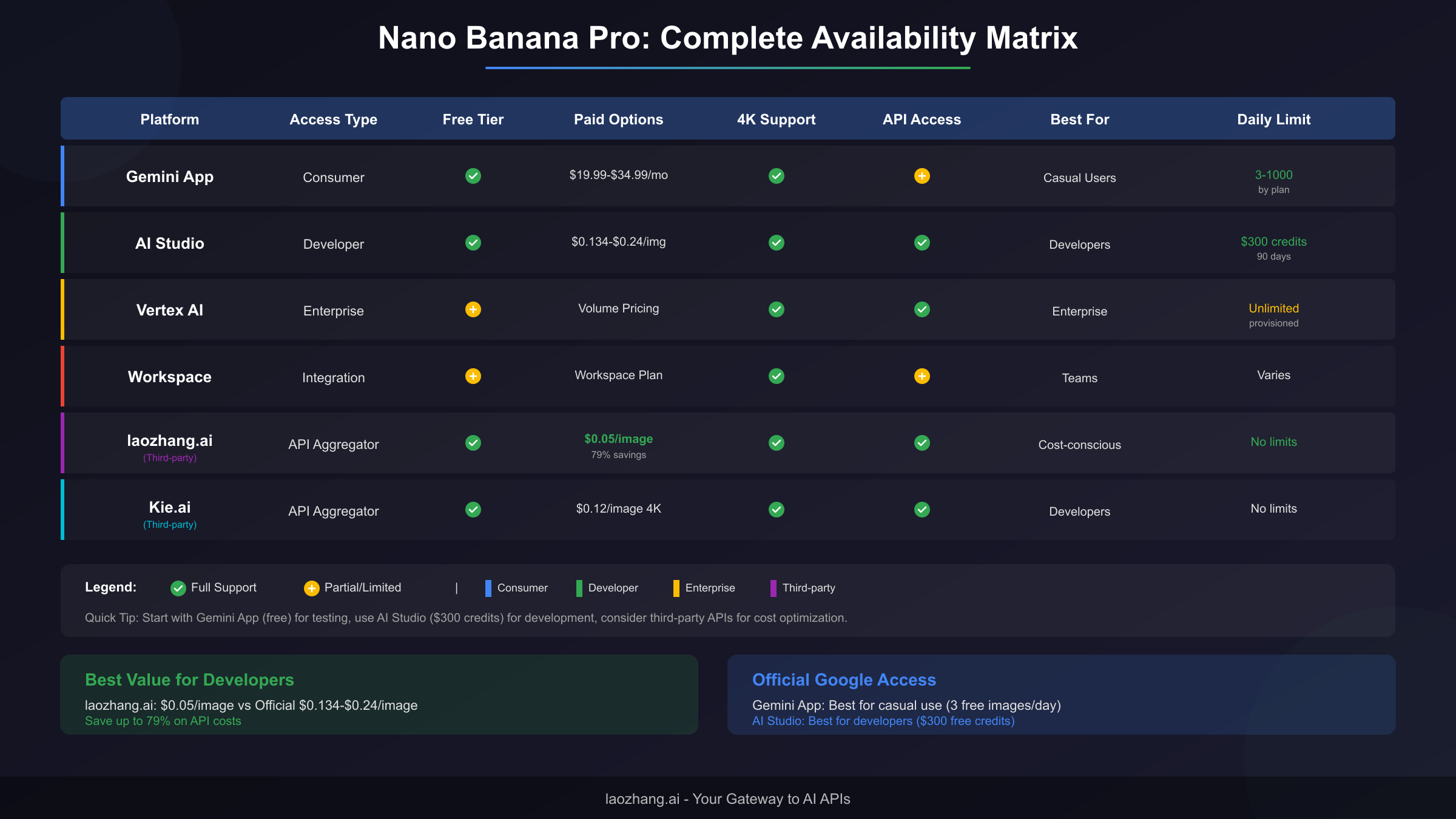
| Platform | Access Type | Free Tier | Pricing | 4K Support | API Access | Best For |
|---|---|---|---|---|---|---|
| Gemini App | Consumer | 3 images/day at 1MP | $19.99-$34.99/mo | Yes (paid) | Limited | Casual users |
| Google AI Studio | Developer | $300 credits (90 days) | $0.134-$0.24/image | Yes | Full REST API | Developers |
| Vertex AI | Enterprise | Trial credits | Volume pricing | Yes | Full API + SDK | Large organizations |
| Google Workspace | Integration | Varies by plan | Included | Yes | Through products | Business teams |
| laozhang.ai | Third-party API | Free tier available | $0.05/image | Yes | OpenAI-compatible | Cost-conscious developers |
| Kie.ai | Third-party API | Free tier available | $0.12/image (4K) | Yes | REST API | Alternative access |
Regional availability extends to over 150 countries, though specific restrictions apply. Users in the European Economic Area (EEA) must meet age verification requirements, and certain regions have limited feature availability. The core image generation functionality remains consistent across regions, but editing features and some advanced capabilities may vary based on local regulations.
The distinction between official and third-party access deserves clarification. Third-party API providers like laozhang.ai don't run their own models—they provide access to the same Google infrastructure through API aggregation. This means you get identical output quality at different price points, with the trade-off being that you're adding an intermediary to your API calls. For most use cases, this distinction is irrelevant to end results, but enterprises with strict data handling requirements may prefer direct Google access.
How to Access Nano Banana Pro: Platform-Specific Guides
The fastest path to generating your first Nano Banana Pro image depends entirely on your use case. The following guides provide exact steps for each platform, tested and verified in January 2026.
For immediate casual use, the Gemini App provides the quickest start. Open gemini.google.com in any browser, sign in with your Google account, and look for the "Create images" option. When you enable the "Thinking" model toggle, your requests route to Nano Banana Pro. Free users receive 3 images per day at 1 megapixel resolution—sufficient for testing but limited for production work. The interface supports both text prompts and image uploads for editing tasks.
Developers building applications should start with Google AI Studio, which offers the most generous free tier for testing. Navigate to aistudio.google.com and create a new project. The platform provides $300 in free credits valid for 90 days, enough to generate over 2,000 4K images during your evaluation period. The API key generation process takes under 2 minutes, and the documentation includes working code examples for Python, Node.js, and curl requests.
The user type navigator below helps match your needs to the optimal platform:
| If You Need... | Recommended Platform | Why This Choice |
|---|---|---|
| Quick testing without setup | Gemini App | Instant access, no API keys |
| Application development | AI Studio | $300 free credits, full API |
| Production deployment | Vertex AI or laozhang.ai | SLA guarantees or cost savings |
| Team collaboration | Workspace integrations | Native Google ecosystem |
| Highest volume at lowest cost | laozhang.ai | 79% savings vs official API |
For those preferring third-party API access, the process mirrors standard OpenAI-compatible implementations. Register at docs.laozhang.ai, generate an API key, and point your existing image generation code at the new endpoint. The OpenAI-compatible interface means you can often switch providers by changing a single configuration line, with no code modifications required.
Free Tier: Maximizing Value Without Paying
Google provides multiple paths to free Nano Banana Pro access, and understanding each option helps you maximize value during evaluation or for light usage scenarios. The free tier ecosystem has evolved since the November 2025 launch, with current limits reflecting Google's capacity planning and monetization strategy.
The Gemini App free tier provides the most accessible starting point but comes with meaningful limitations. Your allocation of 3 images per day resets at midnight Pacific time, and outputs are capped at 1 megapixel (approximately 1024×1024 pixels). While this resolution suffices for social media posts and web graphics, it falls short for print materials or applications requiring fine detail. The free tier also excludes certain features like style transfer and advanced editing modes.
Google AI Studio's $300 credit offer represents significantly more value for developers. At the standard API rate of $0.134 per image (1K-2K resolution), this credit supports approximately 2,240 images. For 4K images at $0.24 each, you're looking at 1,250 generations before credits expire. The 90-day validity window provides adequate time for development and testing, though the credits don't renew automatically. For detailed information about maximizing free access, our comprehensive free access guide covers additional strategies.
Smart strategies for extending free tier value include:
Batching your image generation requests optimizes credit usage. Instead of generating single images iteratively, prepare your prompts in advance and run batch operations. The AI Studio interface supports bulk processing, and the API accepts multiple requests per second, reducing the time cost of high-volume generation.
The variation feature uses fewer resources than new generations. When you need multiple options for a concept, generating variations from a single successful image typically costs less than creating entirely new images with modified prompts. This approach also maintains visual consistency across your options.
Prompt engineering reduces failed generations that waste credits. Specific, well-structured prompts with clear subject descriptions, style references, and composition guidelines produce usable results more consistently. Vague prompts like "a nice landscape" often require multiple attempts to achieve satisfactory results, while detailed prompts like "a Mediterranean coastal village at sunset, whitewashed buildings with blue shutters, fishing boats in the harbor, golden hour lighting, photorealistic style" succeed more reliably on the first try.
Pricing and Cost Optimization Strategies
Understanding the complete pricing landscape enables informed decisions about access methods and volume commitments. The comparison below incorporates official Google pricing and verified third-party rates, accurate as of January 2026.
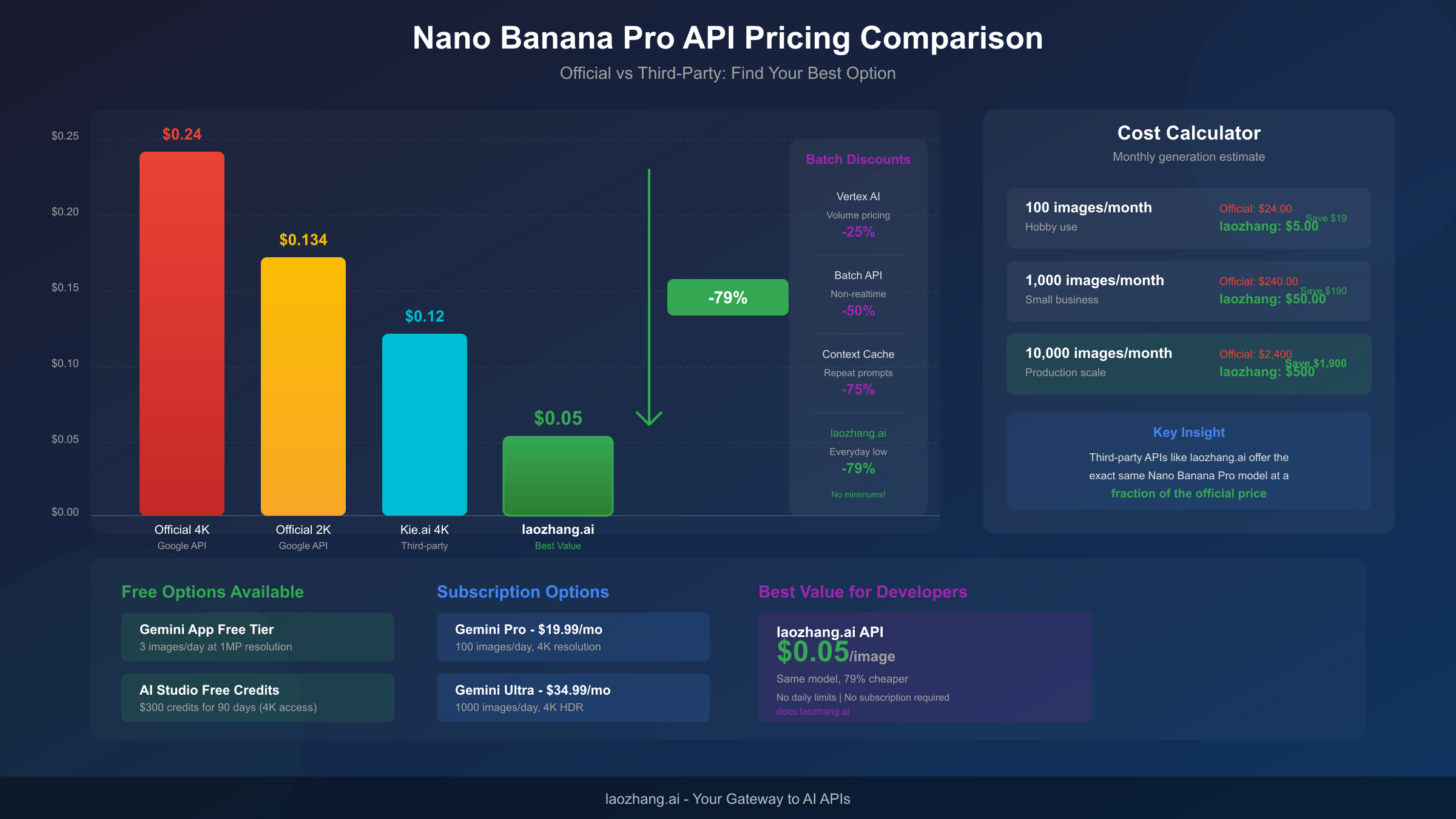
Official Google API pricing follows a resolution-based model:
| Resolution | Price per Image | Typical Use Case |
|---|---|---|
| 1K-2K | $0.134 | Web graphics, thumbnails |
| 4K | $0.240 | Print materials, high-quality content |
| Batch API (non-realtime) | 50% discount | Background processing |
| Context caching | 75% discount on cached portions | Repeated generations |
Third-party API providers offer substantial savings for equivalent outputs:
| Provider | Price per Image | Savings vs Official | Notes |
|---|---|---|---|
| laozhang.ai | $0.05 | 79% | No minimum, instant access |
| Kie.ai | $0.12 (4K) | 50% | Volume discounts available |
| Official Vertex AI | Volume pricing | Up to 25% | Requires commitment |
The mathematics of cost optimization become compelling at scale. For a startup generating 10,000 images monthly, official API pricing at the 4K tier totals $2,400. Through laozhang.ai, the same volume costs $500—a monthly savings of $1,900 that scales linearly with usage. For comprehensive pricing analysis, see our detailed API pricing breakdown.
Batch API processing deserves consideration for non-time-sensitive workloads. Google's batch endpoint offers 50% pricing reduction in exchange for relaxed latency guarantees. Your images generate within 24 hours rather than seconds, making this ideal for content libraries, marketing asset creation, and other scenarios where immediate delivery isn't required. The batch endpoint uses the same model and produces identical quality—only the timing differs.
Context caching provides dramatic savings for repeated generation patterns. When your prompts share common elements—a consistent style guide, recurring subjects, or standard composition templates—context caching stores these elements server-side. Subsequent generations referencing cached context cost up to 75% less than full-prompt requests. This feature particularly benefits brand consistency workflows where every image maintains specific visual standards.
API Access for Developers: Implementation Guide
Developers integrating Nano Banana Pro into applications need practical implementation details beyond pricing considerations. The following sections cover authentication, request structure, rate limits, and error handling based on production deployment experience.
The model identifier for API requests is gemini-3-pro-image-preview for direct Google access. Third-party providers may use different identifiers—consult their documentation for exact model names. The preview designation indicates ongoing development, though Google has committed to maintaining backward compatibility for production workloads.
Python implementation example for direct Google API access:
pythonimport google.generativeai as genai
from google.generativeai.types import HarmCategory, HarmBlockThreshold


genai.configure(api_key="YOUR_API_KEY")

# Initialize the model
model = genai.GenerativeModel('gemini-3-pro-image-preview')

# Generate an image
response = model.generate_content(
    "A serene Japanese garden in autumn, koi pond with maple leaves floating on the surface, traditional wooden bridge, morning mist, photorealistic",
    generation_config={
        "candidate_count": 1,
        "max_output_tokens": 8192,
    },
    safety_settings={
        HarmCategory.HARM_CATEGORY_HARASSMENT: HarmBlockThreshold.BLOCK_ONLY_HIGH,
    }
)

# Access the generated image
if response.candidates:
    image_data = response.candidates[0].content.parts[0].inline_data.data
    # Process image_data as needed
For third-party access through laozhang.ai, the OpenAI-compatible interface simplifies migration:
pythonfrom openai import OpenAI

client = OpenAI(
    api_key="YOUR_LAOZHANG_API_KEY",
    base_url="https://api.laozhang.ai/v1"
)

response = client.images.generate(
    model="nano-banana-pro",
    prompt="A serene Japanese garden in autumn, koi pond with maple leaves floating on the surface",
    n=1,
    size="1024x1024"
)

image_url = response.data[0].url
Rate limits vary by access tier and provider. Free tier users on AI Studio face 60 requests per minute (RPM) limits, while paid API access supports higher throughput. Third-party providers typically impose their own limits—laozhang.ai documentation specifies current limits at docs.laozhang.ai. For complete rate limit details, our rate limits guide provides tier-by-tier breakdowns.
Error handling patterns improve reliability in production systems. Network issues, rate limit hits, and model availability fluctuations all require graceful handling. Implement exponential backoff for retries, respect rate limit headers returned in API responses, and maintain fallback strategies for critical generation workflows. The model occasionally returns safety blocks for edge-case prompts—your application should handle these responses without crashing, optionally rephrasing and retrying the request.
For complete implementation patterns including advanced features like image editing and multi-turn conversations, our API integration guide provides production-ready code examples with error handling and optimization techniques.
Enterprise and Workspace Access
Organizations with scale requirements or compliance obligations have dedicated access paths that provide additional guarantees beyond standard API access. The enterprise ecosystem around Nano Banana Pro has matured significantly since launch, with Google positioning Vertex AI as the primary enterprise deployment platform.
Vertex AI enterprise features address production deployment needs:
The provisioned throughput model guarantees capacity reservation for predictable performance. Unlike on-demand API access where capacity fluctuates with overall demand, provisioned throughput ensures your requests process within guaranteed latency bounds. This matters for customer-facing applications where response time directly impacts user experience.
Enterprise SLAs provide contractual uptime guarantees, typically 99.9% availability with defined compensation for outages. The SLA covers both the API endpoint and the underlying model availability, giving organizations confidence for mission-critical deployments.
Data handling commitments address compliance requirements. Enterprise agreements can include data residency guarantees, processing location restrictions, and audit trail requirements that regulated industries require. Google's standard terms prohibit training on API data, but enterprise agreements can provide additional written guarantees for legal and compliance teams.
Workspace integration brings Nano Banana Pro into Google's productivity suite. Google Slides users can generate and insert images directly within presentations. Google Vids, the AI-powered video creation tool, uses Nano Banana Pro for scene generation and visual effects. NotebookLM integrates image generation for research and documentation workflows. These integrations share your Workspace subscription's access level—premium Workspace plans receive higher quotas and additional features.
Volume pricing negotiations begin at significant monthly spend levels. Organizations consistently generating over 100,000 images monthly should contact Google Cloud sales for custom pricing. Volume commitments typically unlock 25-40% discounts compared to on-demand rates, with additional benefits like dedicated support and early access to new features. For smaller organizations, third-party providers like laozhang.ai offer volume savings without commitment requirements.
Frequently Asked Questions
Is Nano Banana Pro free to use?
Yes, but with limitations. Gemini App provides 3 free images daily at 1 megapixel resolution. Google AI Studio offers $300 in free credits valid for 90 days, supporting approximately 2,240 standard-resolution images or 1,250 4K images. Third-party providers like laozhang.ai also offer free tiers for evaluation. Beyond these free options, paid access ranges from $0.05/image (third-party) to $0.24/image (official 4K API).
How do I get Nano Banana Pro in Gemini?
Open gemini.google.com, sign in with your Google account, and enable the "Thinking" model option. Request image generation by including phrases like "create an image of" or "generate a picture showing" in your prompt. The interface also accepts image uploads for editing and variation tasks. No additional setup or API keys required for basic access.
What's the difference between Nano Banana and Nano Banana Pro?
Nano Banana (standard) uses Gemini 2.5 Flash Image architecture and outputs at 1024×1024 maximum resolution. Nano Banana Pro uses Gemini 3 Pro Image architecture with support for 4K (4096×4096) output, superior text rendering, and up to 14 reference image inputs. The Pro version also includes enhanced style consistency and higher-fidelity output across complex scenes.
How much does Nano Banana Pro API cost?
Official Google API pricing: $0.134/image for 1K-2K resolution, $0.24/image for 4K output. Batch processing (non-realtime) offers 50% discount. Third-party providers offer lower rates: laozhang.ai charges $0.05/image (79% savings), Kie.ai charges $0.12/image for 4K. All providers access the same underlying model.
Is Nano Banana Pro available in my country?
Nano Banana Pro is available in over 150 countries. Primary markets (US, EU, Japan, Australia) have full feature access. Some regions face restrictions on certain editing features due to local regulations. EEA users must complete age verification. Check Google's current country list at the Gemini help center for your specific region.
Can I use Nano Banana Pro for commercial projects?
Yes, with appropriate licensing. API-generated images through paid access (official or third-party) are cleared for commercial use. Free tier images from Gemini App have additional terms—review Google's current terms of service for specific commercial use provisions. All images carry SynthID watermarks regardless of commercial status, but these don't restrict commercial deployment.
What are the daily limits for free Nano Banana Pro?
Gemini App free tier: 3 images per day at 1MP resolution, resetting at midnight Pacific time. AI Studio free credits: no daily limit, but $300 total credit pool valid for 90 days. Third-party free tiers vary by provider. Paid subscriptions: Gemini Pro ($19.99/mo) provides 100 images/day; Gemini Ultra ($34.99/mo) provides 1,000 images/day.
Which third-party APIs offer Nano Banana Pro?
Major third-party providers include laozhang.ai ($0.05/image, OpenAI-compatible API), Kie.ai ($0.12/image for 4K), Artlist (bundled with media subscriptions), and various regional providers. These services access Google's infrastructure through API aggregation, providing identical model output at different price points. Quality is equivalent to official access—the savings come from provider business models, not reduced capability.
For developers seeking the best balance of cost and capability, laozhang.ai provides OpenAI-compatible endpoints at $0.05/image with no minimum commitment. Get started at docs.laozhang.ai with free credits for initial testing.
This guide reflects verified information as of January 2026. Pricing and availability may change—always confirm current details with official sources before making deployment decisions. For the latest updates on Nano Banana Pro and other AI image generation tools, visit our AI image generation resource hub.