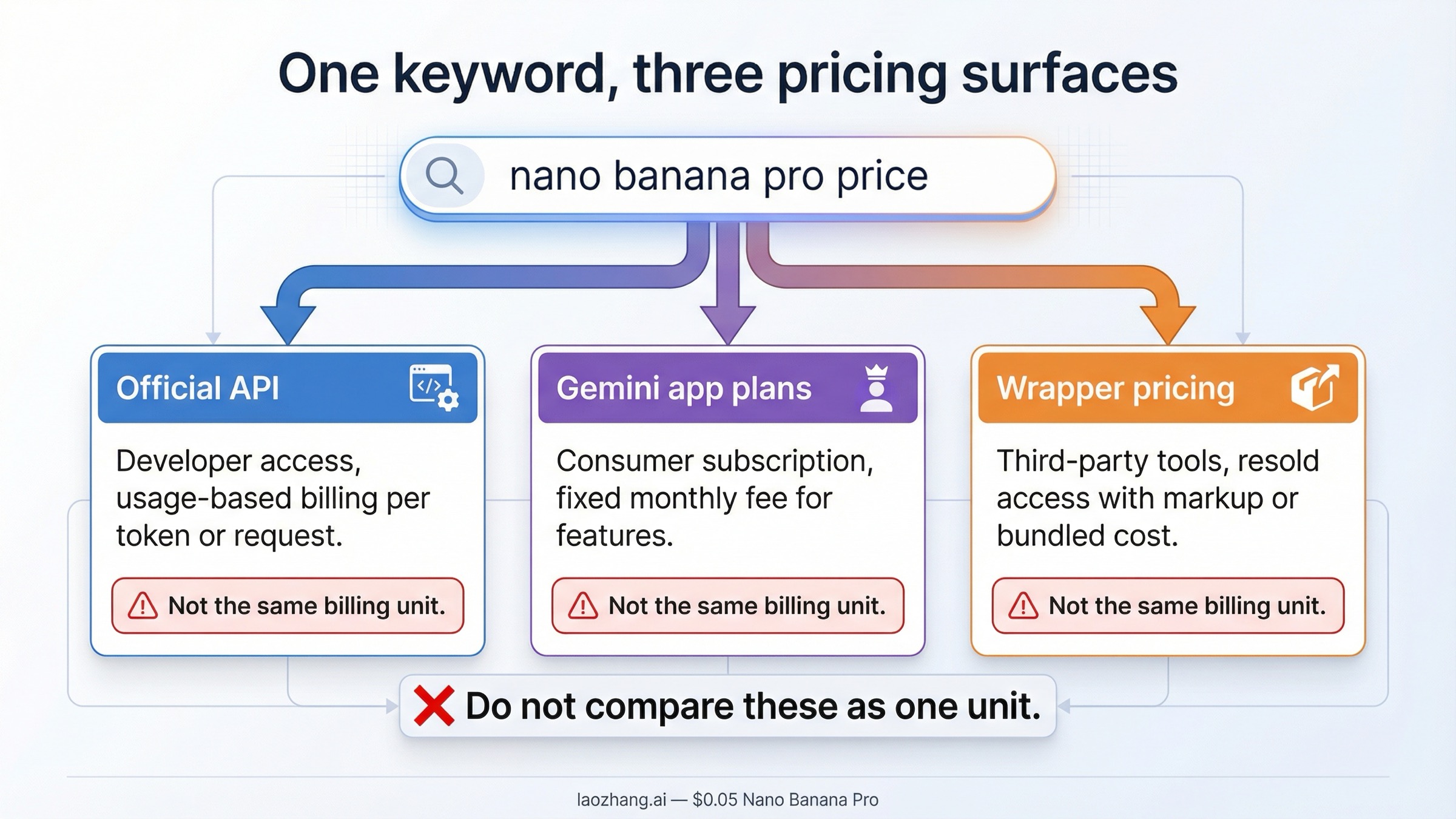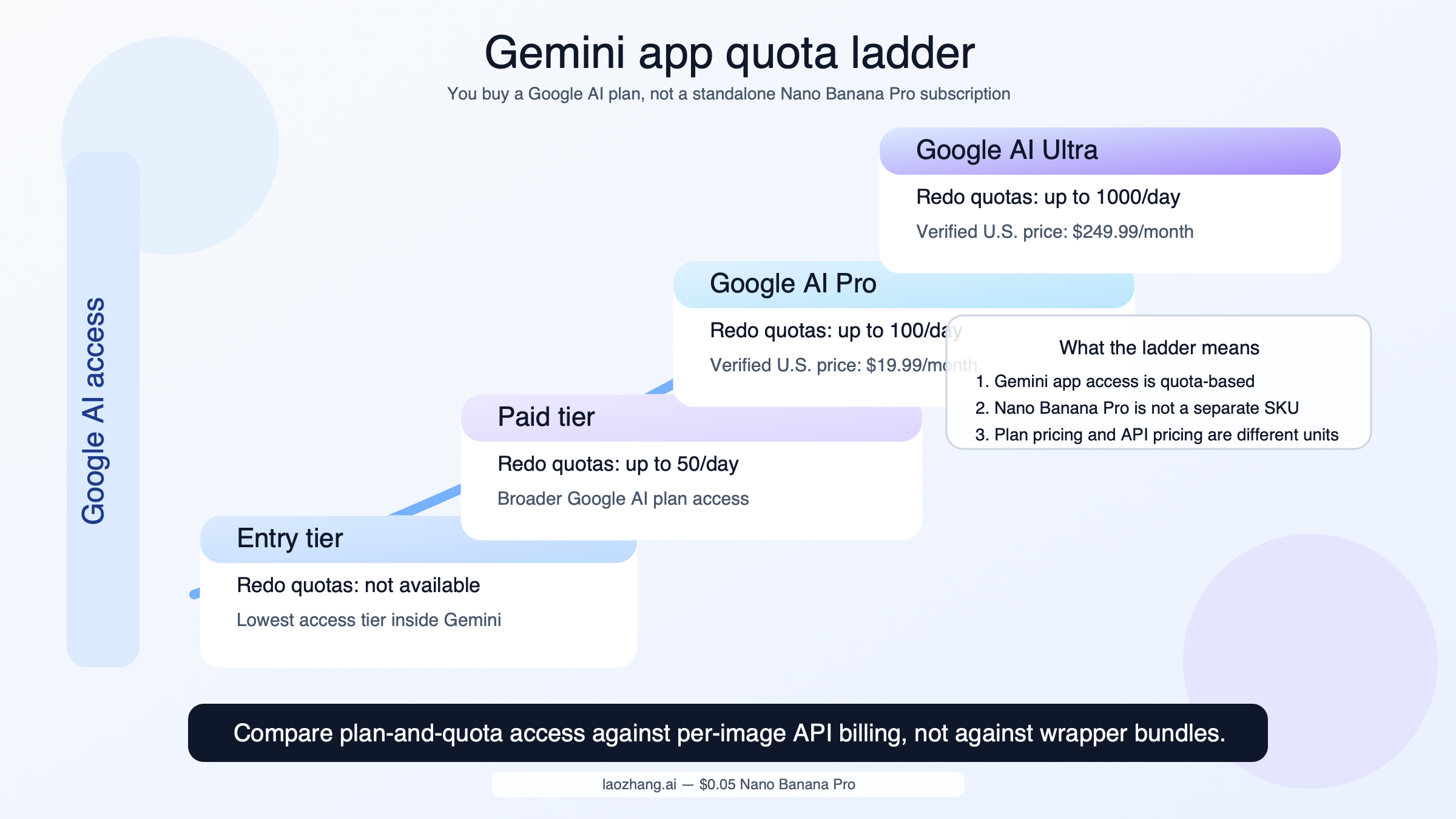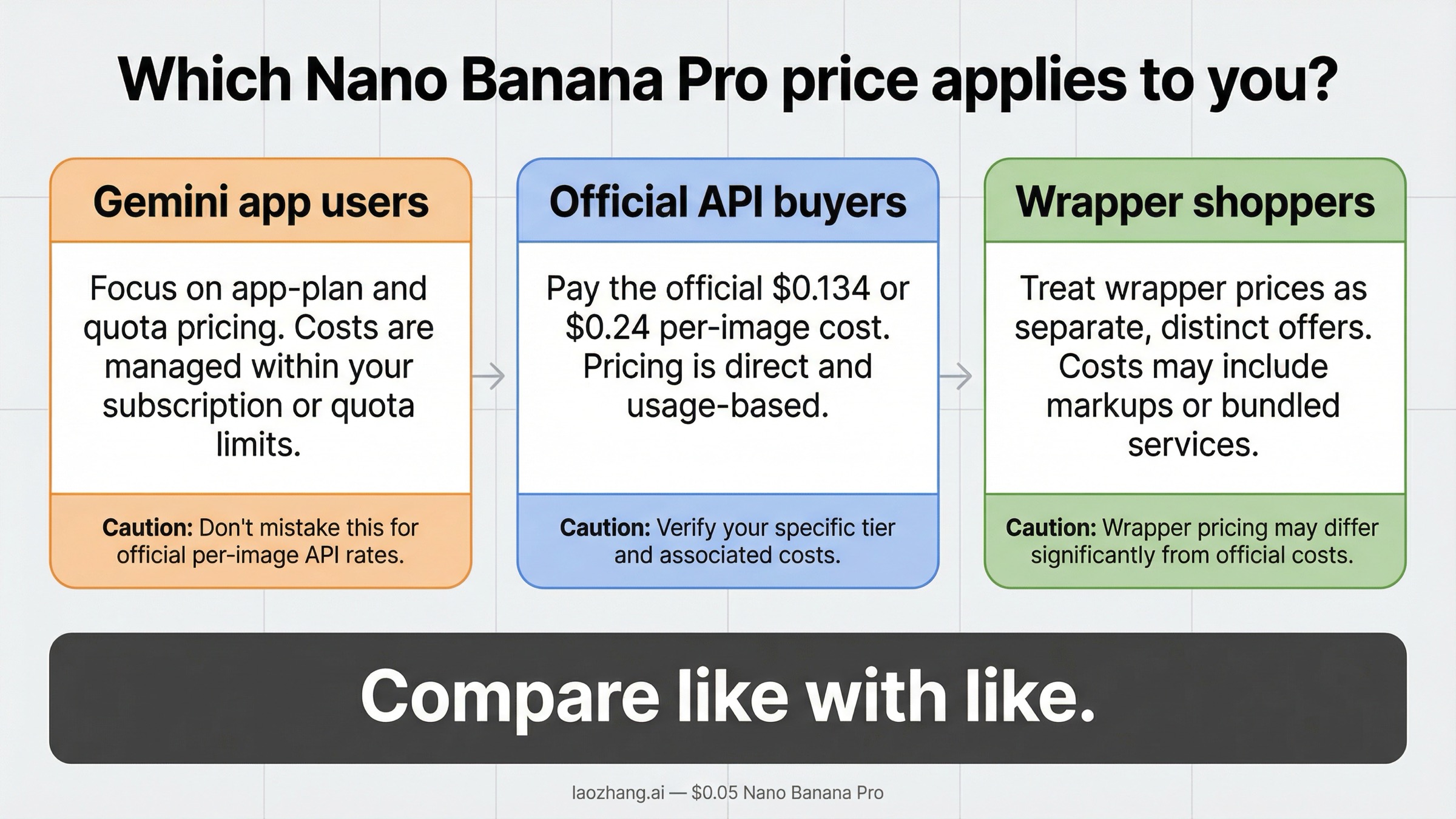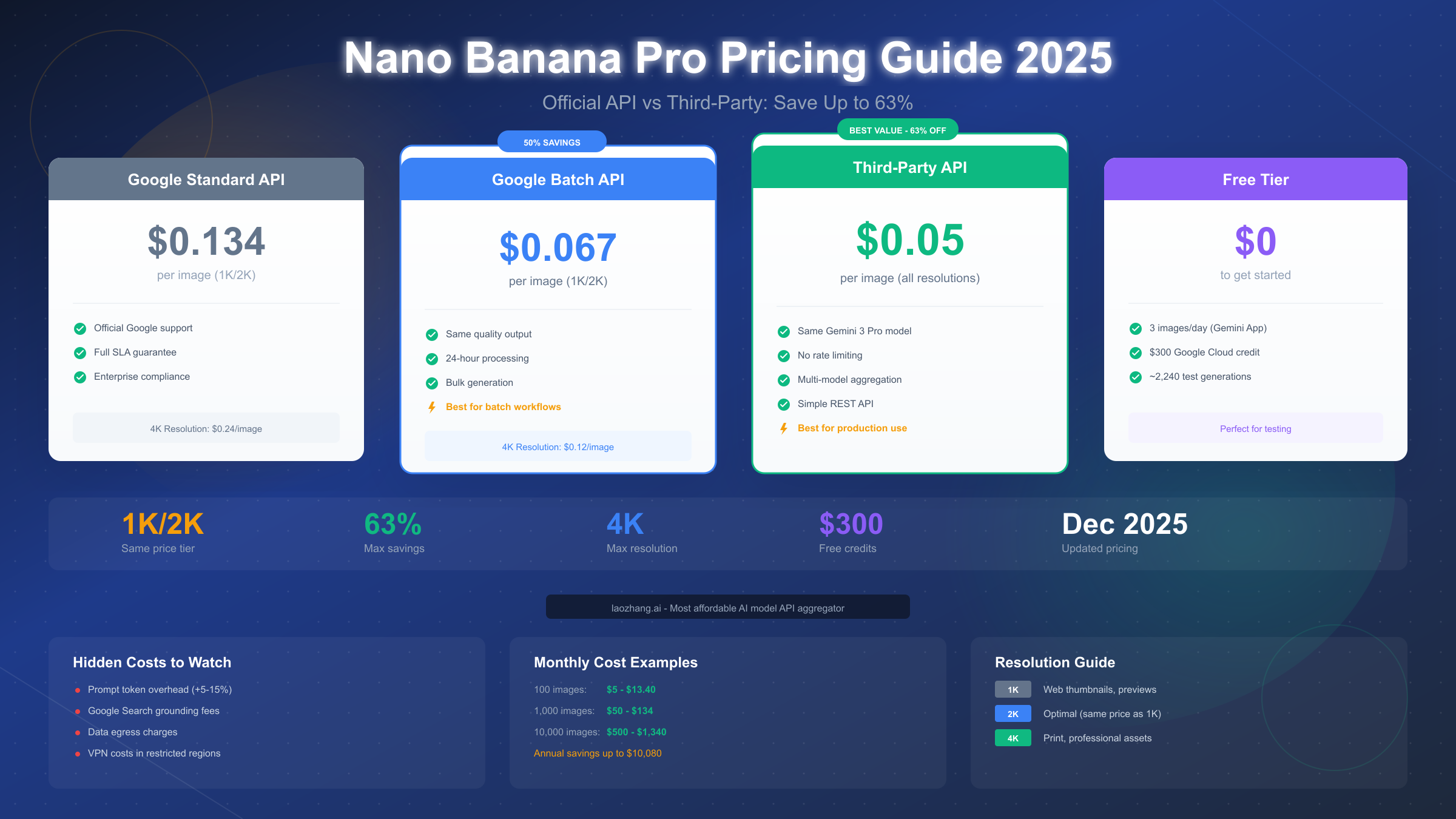
Nano Banana Pro, officially known as Gemini 3 Pro Image, costs $0.134 per image at 1K/2K resolution and $0.24 per image at 4K resolution through Google's official API. As of December 2025, developers can save up to 63% by using third-party API providers like laozhang.ai at $0.05 per image. The Batch API offers 50% savings ($0.067/image), and free tier users get 3 images daily plus $300 in Google Cloud credits for testing.
Nano Banana Pro Pricing at a Glance
Understanding Nano Banana Pro pricing is essential for developers and businesses planning to integrate AI image generation into their workflows. The pricing structure, while seemingly straightforward, involves multiple tiers and options that can significantly impact your total costs. Google designed this model to accommodate various use cases, from hobbyist projects to enterprise-scale deployments, and the right pricing tier can mean the difference between a cost-effective solution and an expensive oversight.
The Nano Banana Pro model represents Google's latest advancement in AI image generation technology, competing directly with OpenAI's DALL-E 3 and Midjourney's API offerings. What sets it apart is its flexible pricing structure that rewards higher usage volumes and batch processing. Before diving into the specifics, let's establish a quick reference table that covers all the essential pricing information you'll need for planning purposes.
| Pricing Tier | Cost per Image | Resolution | Best For |
|---|---|---|---|
| Standard API | $0.134 | 1K/2K | Real-time generation |
| Standard API | $0.24 | 4K | High-quality output |
| Batch API | $0.067 | 1K/2K | Bulk processing |
| Batch API | $0.12 | 4K | High-volume 4K |
| Third-Party | $0.05 | All | Cost optimization |
| Free Tier | $0 | 1K/2K | Testing/Personal |
Token Economics Breakdown
The pricing is fundamentally based on token consumption. Each image generation request consumes approximately 1,024 output tokens for 1K resolution, scaling proportionally with resolution. Input tokens for prompts are charged at the standard Gemini Pro rate of $0.00025 per 1K tokens, which typically adds $0.001-0.003 to each request depending on prompt complexity. This means your actual cost per image is slightly higher than the base rate, a detail many pricing guides overlook.
For teams requiring consistent, predictable costs, understanding this token structure is crucial. A 50-word prompt consumes roughly 70 tokens, while a detailed 200-word prompt with style specifications might use 280 tokens. The difference in cost is marginal ($0.00007 vs $0.00028) but adds up at scale—generating 10,000 images per month, detailed prompts add an extra $2.10 in costs compared to minimal prompts.
Official Google API Pricing Explained
Google's official pricing for Nano Banana Pro follows a straightforward per-image model, but the nuances matter significantly for cost planning. The Standard API pricing represents real-time generation capabilities, where your request is processed immediately and returns results within 10-30 seconds. This immediacy comes at the premium rate of $0.134 per image for 1K or 2K resolution, jumping to $0.24 for 4K output.
Understanding the billing mechanics is essential for accurate cost forecasting. Google charges for successful generations only—failed requests due to content policy violations, malformed prompts, or temporary errors don't incur charges. However, requests that time out after processing begins may still be billed, making robust error handling important for cost control. The billing cycle follows standard Google Cloud conventions with usage aggregated monthly and invoiced based on your billing configuration.
The pricing reflects Google's infrastructure costs for running the underlying Gemini 3 Pro model, which requires significant computational resources for high-quality image synthesis. Each generation request engages multiple GPU cycles, memory allocation for the diffusion process, and storage for the resulting image. The $0.134 price point positions Nano Banana Pro as a premium offering, justified by its superior photorealistic capabilities and Google's reliability guarantees.
The real opportunity for savings lies in the Batch API, which Google introduced specifically for users who don't require immediate results. By agreeing to wait up to 24 hours for generation (though results typically arrive within 2-6 hours), you unlock a 50% discount on all generations. This makes the Batch API incredibly attractive for use cases like content scheduling, marketing asset preparation, or any workflow where images can be pre-generated.
Standard API Rate Structure
When using the Standard API, your charges are calculated based on the resolution of the generated image. The 1K resolution (1024×1024 pixels) and 2K resolution (2048×2048 pixels) share the same $0.134 per image rate, making 2K the obvious choice when you need higher quality without additional cost. This pricing parity is unusual in the AI image generation market—most providers charge incrementally for each resolution step.
The 4K option at $0.24 per image represents an 80% premium over 2K, a significant jump that's only justified for specific use cases like print media, large-format displays, or archival purposes. For most web and mobile applications, 2K resolution provides more than adequate quality while maintaining cost efficiency. If you're working on a comprehensive Gemini API pricing strategy, understanding this resolution-cost relationship is fundamental.
Batch API Advantages
The Batch API's 50% discount transforms the economics of large-scale image generation. At $0.067 per image for 1K/2K and $0.12 for 4K, batch processing becomes the preferred method for any non-time-sensitive work. Google's Batch API accepts up to 10,000 requests per batch, with requests processed in parallel on Google's infrastructure.
Implementation requires minimal code changes from the Standard API. You submit requests to the batch endpoint, receive a batch ID, and poll for completion or set up a webhook for notifications. The typical workflow involves submitting batches during off-peak hours and processing results the next morning—a pattern that fits naturally into content production pipelines.
| API Type | 1K/2K Price | 4K Price | Turnaround | Use Case |
|---|---|---|---|---|
| Standard | $0.134 | $0.24 | 10-30 sec | Live apps |
| Batch | $0.067 | $0.12 | 2-24 hours | Bulk prep |
Volume Commitments
Google offers additional discounts for customers committing to specific monthly volumes, though these aren't publicly advertised. Based on community reports and enterprise discussions, commitments of 100,000+ images per month can unlock 10-20% additional savings beyond the standard rates. These arrangements require direct engagement with Google Cloud sales and typically involve annual contracts with minimum spend guarantees.
Hidden Costs You Need to Know
Beyond the per-image pricing, several additional costs can significantly impact your total expenditure on Nano Banana Pro. These hidden costs aren't immediately apparent in Google's pricing documentation but become critical factors in real-world deployments. Understanding and planning for these expenses prevents budget overruns and ensures accurate cost projections.
The most commonly overlooked cost is prompt token consumption. While image generation pricing focuses on output, every request also incurs input costs for your prompt text. A typical generation request includes the prompt (50-200 words), system instructions (optional, 100-300 words), and any negative prompts or style specifications. At $0.00025 per 1K input tokens, a comprehensive 400-word request adds approximately $0.0001 to each generation—trivial individually, but meaningful at scale.
Google Search Grounding Fees
One of Nano Banana Pro's advanced features is Google Search grounding, which allows the model to reference current information when generating images. This feature, when enabled, incurs additional charges of $0.035 per request. The grounding query adds context from Google's search index, improving accuracy for requests involving current events, trending styles, or real-world references.
Most users don't need this feature for standard creative work. However, for applications generating images of current celebrities, recent product designs, or trending aesthetic styles, grounding significantly improves accuracy. Evaluate your use case carefully—enabling grounding on all requests would add 26% to your per-image cost ($0.134 + $0.035 = $0.169), but selective use on relevant requests balances accuracy with cost control.
Data Egress and Transfer Costs
Generated images must be retrieved from Google's servers, incurring data egress charges. Each 1K image averages 500KB-1MB in PNG format, while 4K images range from 2-4MB. Google Cloud's egress pricing varies by destination and volume:
| Monthly Egress | Price per GB | 10K Images Cost |
|---|---|---|
| 0-1 TB | $0.12 | ~$0.60-$1.20 |
| 1-10 TB | $0.11 | ~$0.55-$1.10 |
| 10+ TB | $0.08 | ~$0.40-$0.80 |
For most users generating under 50,000 images monthly, egress costs remain negligible—typically under $5/month. However, high-volume users generating hundreds of thousands of images should factor this into projections, especially when transferring 4K images to external storage.
Regional Access Considerations
Nano Banana Pro availability varies by region, and users in restricted regions face additional complexity. As of December 2025, direct API access isn't available in certain countries, requiring users to route through VPN services or proxy servers. This adds both latency and cost—quality VPN services range from $10-50/month, and the added latency can impact user experience in real-time applications.
For businesses operating in restricted regions, third-party API providers often offer a more reliable solution. These providers maintain infrastructure in accessible regions and handle the routing complexity, bundling this service into their per-image pricing rather than requiring separate VPN subscriptions.
Development and Integration Time
While not a direct API cost, development time represents a significant investment. Implementing Nano Banana Pro from scratch typically requires 20-40 developer hours for basic integration, plus additional time for error handling, rate limiting, queue management, and monitoring. At typical developer rates, this represents $2,000-8,000 in initial setup costs.
The integration complexity extends beyond initial setup. Production deployments require retry logic for transient failures, queue management for rate limiting compliance, result caching to avoid regenerating identical requests, and monitoring dashboards to track usage and costs. Each component adds development hours and ongoing maintenance burden. Teams often underestimate these requirements, discovering them only after initial deployment when production traffic exposes edge cases.
Storage and Processing Costs
Generated images require storage, and the costs accumulate quickly at scale. Cloud storage pricing (typically $0.02-0.04 per GB/month) seems negligible, but 10,000 2K images at 1MB each occupies 10GB, costing $0.20-0.40 monthly for storage alone. Add image processing for thumbnails, format conversion, or optimization, and costs multiply.
Many applications require multiple versions of each generated image: original high-resolution, web-optimized, thumbnail, and mobile variants. Processing these variations through cloud functions or dedicated services adds $0.001-0.01 per image depending on your infrastructure choices. While small individually, these costs compound with volume and are easily overlooked in initial projections.
Monitoring and Cost Alerting
Implementing cost monitoring isn't optional for production deployments. Without proper alerting, a bug in your application could generate thousands of unnecessary images before anyone notices, resulting in unexpected bills. Google Cloud provides built-in budgeting tools that can alert or even automatically disable APIs when spending exceeds thresholds.
Setting up comprehensive monitoring typically requires 4-8 hours of engineering time plus ongoing attention. However, this investment prevents the scenario where a runaway process generates $500+ in unexpected charges overnight—a surprisingly common occurrence in teams new to usage-based AI services.
Third-Party Providers Comparison
The emergence of third-party API providers has transformed the Nano Banana Pro pricing landscape. These services access the same underlying model through various arrangements—wholesale agreements, geographic arbitrage, or aggregated volume discounts—passing savings to end users. For cost-conscious developers, understanding these alternatives is essential for optimizing image generation expenses.
Among third-party providers, laozhang.ai stands out with its $0.05 per image pricing—a 63% savings compared to Google's official $0.134 rate. The platform aggregates multiple AI models, including Nano Banana Pro, and eliminates rate limiting concerns that plague direct API users during high-demand periods. For teams generating 1,000+ images monthly, this pricing difference translates to $84 in monthly savings, or over $1,000 annually.

| Provider | Price/Image | Rate Limits | Reliability | Best For |
|---|---|---|---|---|
| Google Official | $0.134 | 60/min | 99.9% | Enterprise |
| laozhang.ai | $0.05 | Unlimited | 99.5% | Production |
| Kie.ai | $0.09 | 100/min | 98% | Mid-volume |
| fal.ai | $0.15 | 40/min | 99% | Rapid deploy |
Evaluating Provider Reliability
Price isn't the only consideration when selecting a provider. Reliability, latency, and support quality significantly impact the actual value delivered. Google's official API offers 99.9% uptime SLA with enterprise support options, making it the safest choice for mission-critical applications. However, this reliability premium may not justify the 170% cost increase for all use cases.
Third-party providers typically achieve 99-99.5% uptime without formal SLA guarantees. In practice, this means occasional brief outages (typically under 5 minutes) during provider maintenance or upstream issues. For non-critical applications or those with graceful degradation handling, this reliability level is entirely acceptable. Most reputable providers offer documentation, status pages, and integration guides comparable to official services.
When to Choose Each Option
Your optimal provider choice depends on specific requirements. Google's official API suits enterprises requiring contractual SLA guarantees, regulatory compliance documentation, or direct vendor relationships. The premium pricing buys peace of mind and accountability.
Third-party providers excel for startups, indie developers, and cost-optimized production deployments. The savings enable experimentation and scale that wouldn't be economically viable at official rates. A startup testing product-market fit might generate 50,000 images during development—$6,700 at official rates versus $2,500 through cost-optimized providers, a difference that matters significantly at early stages.
For teams exploring free Gemini Flash image options, combining free tier usage with discounted third-party access for overflow creates an effective hybrid strategy.
Free Tier & Trial Options
Google provides several pathways to explore Nano Banana Pro without immediate cost commitment. Understanding these free options helps developers evaluate the model's capabilities before committing to paid usage. The free tier isn't just for hobbyists—it's a legitimate testing environment for production evaluation.
The Gemini App offers the most accessible free experience, providing 3 image generations per day at no cost. While limited, this allocation suffices for testing prompt strategies, evaluating output quality, and understanding the model's strengths and limitations. The web interface eliminates API integration complexity, making it ideal for initial exploration or non-technical stakeholders evaluating the technology.
$300 Google Cloud Credit
New Google Cloud accounts receive $300 in credits valid for 90 days. These credits apply to all Google Cloud services, including Nano Banana Pro API calls. At the standard $0.134 per image rate, this credit enables approximately 2,240 free generations—substantial runway for development, testing, and initial production deployment.
Maximizing these credits requires strategic allocation. Rather than exhausting credits on exploratory generation, reserve them for integration testing and initial production traffic. This approach validates your implementation under realistic conditions while preserving budget for the learning curve period where prompt refinement typically requires additional iterations.
AI Studio Access
Google AI Studio provides a development environment with daily quotas for API testing. Unlike the Gemini App's 3-image limit, AI Studio quotas vary by model and are designed for developer evaluation rather than end-user consumption. Access requires a Google Cloud account but doesn't require billing enablement for basic testing.
The studio environment includes prompt debugging tools, output comparison features, and API call inspection that aren't available through the consumer-facing Gemini App. For developers building production integrations, AI Studio accelerates the development process by providing visibility into request/response structures and error handling scenarios.
Step-by-Step Free Tier Setup
Getting started with free tier access involves straightforward steps:
-
Create Google Cloud Account - Visit cloud.google.com and sign up with your Google account. New accounts automatically receive the $300 credit.
-
Enable Vertex AI API - Navigate to APIs & Services, search for "Vertex AI API," and enable it for your project.
-
Generate API Credentials - Create a service account with Vertex AI User role and download the JSON key file.
-
Install Client Library - Use
pip install google-cloud-aiplatformfor Python or the equivalent for your language. -
Test Generation - Run your first generation using the quickstart code from Google's documentation.

This setup process typically takes 15-30 minutes for developers familiar with Google Cloud, or 1-2 hours for those new to the platform. The investment pays dividends through access to Google's free tier and the foundation for production deployment.
Resolution Guide: 1K vs 2K vs 4K
Selecting the appropriate resolution significantly impacts both cost and output quality. Nano Banana Pro supports three resolution tiers, each suited to different use cases. Understanding when to use each resolution prevents overspending on unnecessary quality while ensuring outputs meet application requirements.
The 1K resolution (1024×1024 pixels) provides excellent quality for most digital applications. Social media posts, blog thumbnails, app icons, and web graphics rarely require higher resolution—these images are typically displayed at 500 pixels or smaller on user screens. At $0.134 per image, 1K resolution offers the best value for volume-focused use cases where the slight quality improvement of higher resolutions wouldn't be visible to end users.
2K Resolution: The Sweet Spot
The 2K resolution (2048×2048 pixels) shares the same $0.134 price point as 1K, making it the obvious choice when you need flexibility. This pricing parity is unusual—most AI image services charge incrementally for higher resolutions—and represents a strategic decision by Google to encourage quality adoption.
With 2K output, you gain the ability to crop images without quality loss, support larger display formats, and maintain quality for light print applications. E-commerce product images, marketing materials, and website hero images benefit from 2K resolution without the cost premium of 4K. The 4× pixel count compared to 1K provides meaningful quality headroom for downstream editing and repurposing.
When 4K Makes Sense
The 4K resolution at $0.24 per image represents an 80% premium over 2K. This substantial cost increase is justified only for specific applications:
| Use Case | Resolution | Reasoning |
|---|---|---|
| Print media (>8"x8") | 4K | DPI requirements |
| Digital signage | 4K | Large display size |
| Asset archival | 4K | Future-proofing |
| Product photography | 4K | Zoom/crop needs |
| Standard web use | 2K | Sufficient quality |
| Social media | 1K | Size constraints |
| Thumbnails | 1K | Display size |
For developers working with FLUX image generation API, comparing resolution quality and pricing across models helps identify the optimal choice for specific projects.
Quality vs. Cost Analysis
When evaluating resolution choices, consider the entire lifecycle cost. A 2K image that requires manual upscaling for print use may cost more in labor than generating at 4K initially. Conversely, generating all images at 4K "just in case" wastes 80% on the majority that never require that resolution.
The optimal strategy for most teams involves defaulting to 2K resolution while reserving 4K for explicitly identified high-resolution needs. This approach balances quality, flexibility, and cost-effectiveness across varied use cases.
Resolution Selection Decision Tree
For systematic resolution selection, apply this decision framework to each generation request:
First, consider the final display context. Images for social media feeds, email campaigns, or mobile app thumbnails rarely exceed 500px display size—1K resolution provides 2× pixel density for these uses, ensuring sharp display on high-DPI screens without overspending. Web hero images and blog featured images typically display at 1200-1600px, making 2K resolution ideal with room for cropping.
Second, evaluate downstream processing needs. Will this image undergo cropping, rotation, or other transformations? Each edit operation benefits from resolution headroom. A 2K image cropped to 50% retains 1K effective resolution—sufficient for web use but potentially inadequate for print. Plan for your most demanding transformation scenario.
Third, assess archival requirements. Images generated for long-term asset libraries benefit from 4K resolution as a hedge against future high-resolution display needs. The 80% premium amortizes over the image's useful lifetime, often justifying the upfront cost for brand assets, product photography, or portfolio pieces.
| Decision Factor | Recommended Resolution | Cost Impact |
|---|---|---|
| Social media only | 1K | $0.134 |
| Web with flexibility | 2K | $0.134 |
| Print/signage | 4K | $0.24 |
| Uncertain future use | 2K (regenerate if needed) | $0.134 initial |
| High-value asset | 4K (archival) | $0.24 |
Upscaling Considerations
When 4K quality is needed but budget constraints favor 2K generation, post-processing upscaling offers a middle path. Modern AI upscalers (Topaz Gigapixel, Real-ESRGAN, or cloud services like Let's Enhance) can upscale 2K images to 4K with impressive quality retention, typically for $0.01-0.05 per image.
This hybrid approach—2K generation plus AI upscaling—costs $0.14-0.19 versus $0.24 for native 4K, a 20-40% savings. The quality trade-off is minor for most photorealistic content, though fine text and intricate patterns may show artifacts. Evaluate this option against your specific quality requirements before committing to native 4K generation for all high-resolution needs.
Monthly Budget Planning
Accurate budget planning requires understanding your expected usage patterns and selecting the most cost-effective access method. The difference between thoughtful planning and ad-hoc spending can represent 50-70% cost savings at meaningful volumes. This section provides concrete budget scenarios and optimization strategies.
For light usage of approximately 100 images per month, the calculations are straightforward but the provider choice matters significantly. At Google's standard rate of $0.134 per image, monthly costs reach $13.40. Through batch processing, this drops to $6.70. Using cost-optimized third-party providers at $0.05 per image reduces costs to just $5.00—a 63% reduction from standard rates.
Medium Usage: 1,000 Images/Month
At 1,000 monthly images, the economics shift meaningfully. Standard API costs reach $134—enough to justify optimization efforts. Batch processing cuts this to $67, while third-party access reduces costs to $50. The annual savings between standard and optimized approaches reaches $1,008, funding additional development or marketing efforts.
For teams at this volume, optimizing provider selection becomes critical for maintaining healthy unit economics. The difference between $50 and $134 monthly may seem modest, but it represents the margin that determines whether a product feature remains viable or gets cut for cost reasons.
Heavy Usage: 10,000+ Images/Month
Heavy usage scenarios demand sophisticated cost management. At 10,000 images monthly, standard API costs reach $1,340—a significant line item requiring executive attention. The optimization opportunity is equally significant:
| Method | Monthly Cost | Annual Cost | Annual Savings |
|---|---|---|---|
| Standard API | $1,340 | $16,080 | Baseline |
| Batch API | $670 | $8,040 | $8,040 |
| Third-Party | $500 | $6,000 | $10,080 |
| Hybrid* | $420 | $5,040 | $11,040 |
*Hybrid combines free tier (90 images), batch processing, and third-party for overflow.
At these volumes, negotiating directly with providers yields additional savings. Both Google (through committed use discounts) and third-party providers offer volume pricing that isn't publicly advertised. Reaching out with specific volume projections typically unlocks 10-20% additional discounts.
Budget Planning Calculator
To estimate your monthly costs accurately:
- Estimate monthly volume - Track current generation patterns or project future needs
- Identify resolution mix - What percentage need 4K vs. 2K/1K?
- Assess timing requirements - What percentage can use batch processing?
- Calculate base cost - Volume × appropriate rate
- Add hidden costs - Prompt tokens (~1%), egress (~0.5%), infrastructure
- Apply optimization - Third-party, batch, or volume discounts
For teams generating 1,000+ images monthly, the savings from provider optimization (Google vs. third-party) substantially exceed the value of most other cost reduction efforts.
Seasonal and Growth Considerations
Budget planning should account for usage variability. Marketing teams often experience 2-3× volume spikes during campaign periods, product launches, or seasonal peaks. Building headroom into budgets prevents emergency cost overruns during critical business periods when generation needs increase unexpectedly.
Growth planning deserves similar attention. A startup generating 500 images monthly today may reach 5,000 monthly within a year as the product scales. Establishing relationships with providers, understanding volume discount thresholds, and implementing cost monitoring before scale arrives prevents painful surprises during growth phases.
Cost Allocation Strategies
For organizations with multiple teams or projects using Nano Banana Pro, implementing cost allocation enables accountability and optimization. Google Cloud's labeling features allow tagging requests by project, team, or cost center. This granularity identifies which initiatives drive costs and ensures appropriate budget ownership.
Consider implementing per-project quotas to prevent any single team from consuming disproportionate resources. A shared 10,000 image monthly budget allocated 3,000 to marketing, 2,000 to product, and 5,000 to customer-facing features ensures balanced access while maintaining overall cost control.
Competitor Comparison
Understanding how Nano Banana Pro pricing compares to alternatives helps inform technology selection. The AI image generation market offers multiple quality tiers and pricing models, each with distinct advantages. This comparison focuses on API-accessible services relevant to developer integrations rather than consumer-focused platforms.
DALL-E 3, OpenAI's flagship image model, prices at $0.04 per image for standard quality (1024×1024) and $0.08 for HD quality (1024×1792 or 1792×1024). This makes DALL-E 3 significantly cheaper than Nano Banana Pro's $0.134 for comparable resolutions—a 70% cost advantage. However, Nano Banana Pro offers superior photorealistic output for many use cases, and the higher resolution options (up to 4K) provide flexibility DALL-E 3 lacks.
For developers exploring OpenAI's offerings, the GPT Image-1 API access guide provides detailed integration instructions and cost optimization strategies.
Midjourney API Pricing
Midjourney's pricing model differs fundamentally from per-image competitors. The subscription-based approach ($10-60/month) provides generation allocations rather than pay-per-use access. At the Pro tier ($30/month with 30 fast hours), heavy users can generate significantly more images than equivalent spending on Nano Banana Pro or DALL-E 3.
The catch is Midjourney's "fast hours" system, where generation speed depends on subscription tier and usage. Running out of fast hours relegates users to slower "relaxed" generation. For applications requiring predictable, immediate generation, this model introduces operational complexity that per-image pricing avoids.
| Model | Per-Image Cost | Strengths | Weaknesses |
|---|---|---|---|
| Nano Banana Pro | $0.134 | Photorealistic, 4K support | Higher base price |
| DALL-E 3 | $0.04-0.08 | Low cost, good quality | Limited resolution |
| Midjourney | ~$0.03-0.60* | Artistic style, community | Subscription model |
| Imagen 4 | $0.02-0.06 | Google ecosystem | Limited availability |
| Stable Diffusion | $0.01-0.03 | Very low cost | Quality variance |
*Midjourney cost varies significantly based on subscription tier and usage patterns.
Quality vs. Cost Trade-offs
Raw pricing comparison overlooks the quality dimension that often drives model selection. Nano Banana Pro excels at photorealistic human portraits, product photography, and architectural visualization—use cases where its higher price buys meaningful quality improvement. DALL-E 3 offers better value for illustrations, conceptual art, and creative compositions where photorealism matters less.
The optimal strategy for many teams involves multi-model deployment. Using DALL-E 3 for high-volume, lower-stakes generations while reserving Nano Banana Pro for quality-critical outputs optimizes the cost-quality trade-off across a varied workload.
Imagen 4 Comparison
Google's Imagen 4 represents a lower-cost alternative within the Google ecosystem, priced at $0.02-0.06 per image depending on quality settings. While this substantial cost advantage is attractive, Imagen 4 lacks Nano Banana Pro's advanced features including native Google Search grounding, higher resolution support, and the refined output quality that positions Nano Banana Pro as Google's premium offering.
For cost-sensitive applications where Imagen 4's quality suffices, it represents 75-85% savings versus Nano Banana Pro. Teams should evaluate both models against their specific quality requirements rather than defaulting to the premium option.
Stable Diffusion and Open Source Alternatives
Self-hosted Stable Diffusion represents the most cost-effective option for teams with technical capability and sufficient volume to justify infrastructure investment. Running on cloud GPU instances, generation costs range from $0.01-0.03 per image depending on instance type and utilization efficiency. However, this calculation excludes significant hidden costs: model fine-tuning, prompt engineering, infrastructure maintenance, and the engineering time to achieve output quality comparable to commercial offerings.
The break-even point for self-hosting varies by team, but typically requires 50,000+ monthly generations before infrastructure investment becomes cost-effective compared to API services. Teams below this threshold generally find API providers more economical when accounting for total cost of ownership including engineering time, maintenance, and reliability concerns.
Speed and Latency Comparison
While pricing drives many decisions, generation speed matters for user-facing applications. Nano Banana Pro's 10-30 second generation time compares favorably to competitors:
| Model | Typical Latency | Time to First Byte | Notes |
|---|---|---|---|
| Nano Banana Pro | 10-30 sec | 2-5 sec | Streaming available |
| DALL-E 3 | 15-45 sec | 5-10 sec | Variable by load |
| Midjourney | 30-90 sec | 10-20 sec | Queue-dependent |
| Stable Diffusion (API) | 5-15 sec | 1-3 sec | Provider varies |
| Self-hosted SD | 2-10 sec | <1 sec | Hardware dependent |
For interactive applications where user experience depends on generation speed, Nano Banana Pro's relatively fast and consistent latency justifies price premiums over slower alternatives. Conversely, background processing workflows where latency is irrelevant should optimize purely on cost.
Use Case Alignment Matrix
Matching model selection to use case requirements optimizes both quality and cost:
| Use Case | Best Model | Reasoning |
|---|---|---|
| Photorealistic portraits | Nano Banana Pro | Superior human rendering |
| Product photography | Nano Banana Pro/DALL-E 3 | Clean commercial style |
| Artistic illustrations | Midjourney | Strong aesthetic control |
| Concept art | Midjourney/DALL-E 3 | Creative flexibility |
| Bulk social content | DALL-E 3/Stable Diffusion | Cost efficiency |
| Marketing campaigns | Varies | Depends on brand style |
| Technical diagrams | DALL-E 3 | Clear structured output |
FAQ & Conclusion
Understanding the common questions developers encounter helps round out your Nano Banana Pro pricing knowledge. These frequently asked questions address practical concerns that arise during implementation and scaling.
What's the actual cost per image including all fees?
The true cost includes base image generation ($0.134 for 2K), prompt tokens ($0.0001-0.0003), and egress ($0.00006-0.0001). Total: approximately $0.135-0.137 per image for typical requests. At scale, this 2-3% overhead matters—10,000 monthly images adds $30-40 beyond base pricing.
Can I reduce costs below third-party rates?
For extremely high volumes (500,000+ monthly), direct enterprise agreements with Google can approach $0.04-0.05 per image, matching third-party pricing with official support. However, this requires significant committed spend and enterprise contract negotiation. For most users, third-party providers offer the best balance of cost and accessibility.
Is there a free option for production use?
The free tier (3 images/day via Gemini App) isn't designed for production but can supplement testing workflows. For production free access, the $300 Google Cloud credit provides meaningful runway. Some teams maintain multiple accounts to extend free tier access, though this approaches terms of service boundaries.
How does pricing compare for different image types?
Nano Banana Pro uses consistent pricing regardless of image content or complexity. A simple icon and a complex photorealistic scene cost the same $0.134 per image. This predictability simplifies budgeting compared to variable-cost models used by some competitors.
Should I use batch processing for everything?
Batch processing makes sense when you can tolerate 2-24 hour delays. For user-facing applications requiring immediate response, standard API remains necessary despite the cost premium. The optimal approach uses batch processing for pre-generated content (scheduled posts, marketing assets) while reserving standard API for real-time user requests.
What happens if I exceed rate limits?
Google's standard rate limit of 60 requests per minute applies to the Standard API. Exceeding this limit results in 429 (Too Many Requests) errors, with automatic recovery after the rate limit window resets. Implementing exponential backoff retry logic handles occasional bursts, while sustained high-volume needs require either Batch API or rate limit increases through Google Cloud support.
Can I negotiate better pricing directly with Google?
Yes, for significant committed spend ($10,000+/month), Google Cloud sales can arrange custom pricing. These negotiations typically require 3-6 month lead time and annual commitments. The discount magnitude depends on total Google Cloud relationship, not just Nano Banana Pro usage. Teams already spending significantly on other Google Cloud services may find negotiations more favorable.
How accurate are the pricing calculations in this guide?
All pricing data reflects December 2025 published rates. Google occasionally adjusts pricing—historically with 30-90 days notice for increases, or immediately for decreases. Third-party provider pricing changes more frequently based on market conditions. Bookmark the official Google Cloud Vertex AI pricing page and your provider's pricing page for current rates.
Is Nano Banana Pro suitable for real-time applications?
With 10-30 second generation times, Nano Banana Pro serves "near real-time" use cases where users expect brief waits—think "generating your custom image" loading screens rather than instant responses. True real-time applications (sub-second latency requirements) should consider pre-generation strategies or faster alternatives like optimized Stable Diffusion deployments.
Final Recommendations
After comprehensive analysis of Nano Banana Pro pricing across all access methods and use cases, these recommendations serve most developers well:
-
Start with free tier - Use the $300 Google Cloud credit and 3 daily Gemini App generations to validate your use case before committing budget.
-
Default to 2K resolution - The price parity with 1K makes 2K the obvious choice for most applications. Reserve 4K for explicitly identified high-resolution needs.
-
Implement batch processing - Any workflow tolerating delays should use batch API for 50% savings. This typically covers 30-60% of total generation volume.
-
Consider third-party providers - For cost-optimized production deployment, providers like laozhang.ai offer 63% savings without significant reliability trade-offs. Access their documentation at docs.laozhang.ai for integration details.
-
Monitor hidden costs - Track prompt token consumption, egress, and any grounding feature usage to maintain accurate cost visibility.
-
Evaluate multi-model strategies - Nano Banana Pro isn't always the optimal choice. Lower-cost alternatives like DALL-E 3 or Imagen 4 may better serve certain use cases within your workload mix.
The AI image generation pricing landscape continues evolving as competition intensifies. Staying informed about pricing changes, new provider options, and alternative models ensures you maintain cost-effective access to these powerful creative tools. Whether you're building a startup MVP or scaling enterprise applications, the strategies outlined in this guide position you to optimize spending while accessing Nano Banana Pro's industry-leading capabilities.