AIFreeAPI Logo

Nano Banana Pro Free Online: Complete Guide to AI Image Generation (2025)

A
28 min readAI Tools

Learn everything about Nano Banana Pro - from true costs and Windows setup to free online alternatives. Honest guide for 2025.

Nano Banana Pro

4K Image80% OFF

Google Gemini 3 Pro Image · AI Image Generation

Served 100K+ developers
$0.24/img
$0.05/img
Limited Offer·Enterprise Stable·Alipay/WeChat
Gemini 3
Native model
Direct Access
20ms latency
4K Ultra HD
2048px
30s Generate
Ultra fast
|@laozhang_cn|Get $0.05
Nano Banana Pro Free Online: Complete Guide to AI Image Generation (2025)

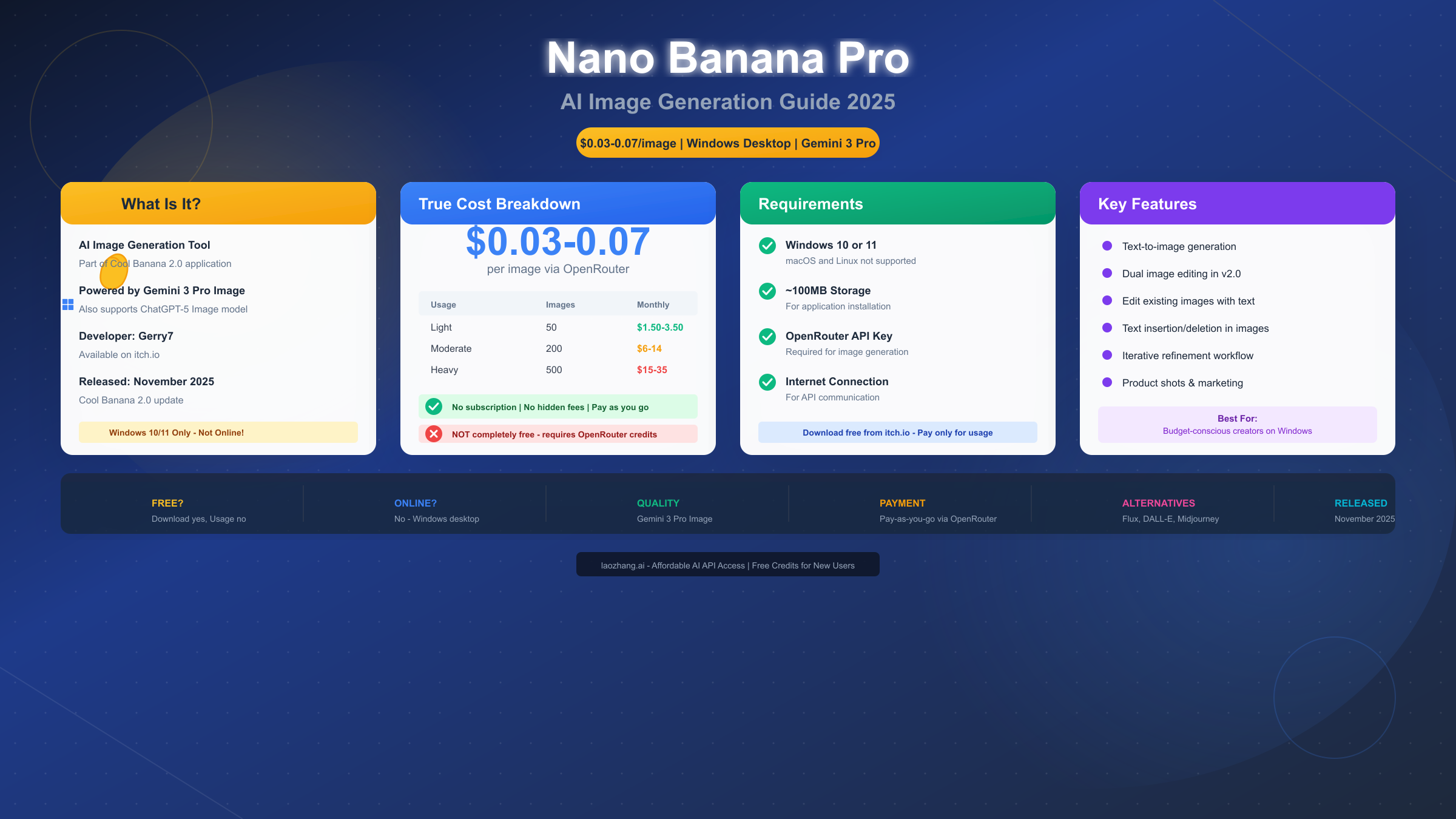
Nano Banana Pro is an AI image generation feature in Cool Banana 2.0, a Windows desktop application that uses Google Gemini 3 Pro Image to create professional images from text prompts. Despite searches for "free online" access, the tool is not browser-based—it requires a Windows 10/11 download and OpenRouter API key, with images costing $0.03-0.07 each. Released in November 2025, it offers pay-as-you-go pricing with no subscription required, making it affordable for occasional use but not completely free.

If you're searching for "Nano Banana Pro free online," you're likely looking for one of two things: either a browser-based version of this tool (which doesn't exist) or a completely free way to use it (which also doesn't exist—but there are very affordable options). This comprehensive guide will give you the complete truth about what Nano Banana Pro actually is, what it costs, how to set it up, and—if it's not right for you—what truly free online alternatives exist.

Throughout this guide, we'll cover everything from the technical specifications and real-world costs to step-by-step setup instructions and honest comparisons with competing tools. Whether you ultimately choose Nano Banana Pro or one of its alternatives, you'll leave this article with the knowledge to make an informed decision.

Let's dive into everything you need to know about Nano Banana Pro in 2025.

What is Nano Banana Pro? (Understanding the Basics)

Nano Banana Pro is not a standalone product—it's a specific AI image generation feature within Cool Banana 2.0, a Windows desktop application developed by Gerry7 and distributed through itch.io. Understanding this distinction is crucial because many users arrive at this topic expecting a web-based tool they can access from any browser, which is unfortunately not the case.

The confusion around Nano Banana Pro often stems from its name and the way it appears in search results. Some users expect it to be a game (there are "banana" themed games online), while others assume it's a browser-based AI tool similar to popular services like Midjourney or DALL-E. The reality is quite different, and understanding exactly what you're getting is essential before investing time in setup.

The Core Product: Cool Banana 2.0

Cool Banana 2.0 was released on November 20, 2025, as a major update to the original Cool Banana application. The software serves as a unified interface for accessing multiple AI image generation models, with Nano Banana Pro being the feature that specifically integrates with Google's Gemini 3 Pro Image model.

The developer, Gerry7, created Cool Banana as a passion project to make powerful AI image generation more accessible to Windows users who prefer desktop applications over browser-based tools. The "Nano Banana" name appears to reference the compact, efficient nature of the interface while paying homage to the broader "Cool Banana" branding.

Key facts about the product:

AttributeDetails
Product NameCool Banana 2.0 (containing Nano Banana Pro)
DeveloperGerry7
Distributionitch.io (gerry7.itch.io/cool-banana)
PlatformWindows 10/11 Desktop Only
Release DateNovember 20, 2025
Download Size~85MB
PriceFree download (usage requires API credits)
License TypeFreeware with API costs
Update FrequencyActive development

What AI Models Does It Use?

Nano Banana Pro leverages some of the most capable AI image generation models available through the OpenRouter API gateway:

  1. Google Gemini 3 Pro Image - The primary model powering Nano Banana Pro, known for excellent prompt adherence, photorealistic outputs, and strong performance on complex compositions. This model excels at understanding context and generating images that closely match user descriptions.

  2. ChatGPT-5 Image - An alternative model option available within Cool Banana 2.0, offering a different aesthetic style and particularly strong performance in creative and artistic prompts.

  3. Additional models - The application may support other providers through OpenRouter's extensive API catalog, including various Stable Diffusion variants and emerging models.

The flexibility to switch between models is one of Cool Banana 2.0's key advantages—you can experiment with different AI engines without switching applications or managing multiple accounts.

Technical Specifications

For those interested in the technical details, here's what Cool Banana 2.0 offers:

SpecificationDetails
Supported Resolutions512x512 to 1024x1024+
Output FormatsPNG, JPEG
Generation Speed5-15 seconds typical
Batch GenerationSupported
Image EditingBasic refinement tools
HistoryLocal save of generated images
Prompt LengthUp to 1000 characters
Negative PromptsSupported

Critical Clarification: It's NOT Online

This is perhaps the most important point to understand: Nano Banana Pro is NOT an online tool. Despite what search queries might suggest, there is no browser-based version. You cannot access it from:

  • Mac computers (macOS not supported)
  • Linux systems (no Linux client available)
  • Mobile devices (iOS/Android not supported)
  • Chromebooks (requires Windows)
  • Any web browser (desktop application only)
  • Virtual machines without GPU passthrough (may have performance issues)

If you're on a non-Windows platform or specifically need online access, you'll need to look at alternatives—which we cover in detail later in this guide. This platform limitation is significant and eliminates Nano Banana Pro as an option for a large portion of potential users.

Why the Name "Nano Banana"?

Interestingly, the term "nano banana" has appeared in different AI contexts throughout 2025. Some users may have encountered it as a nickname for Google's Gemini 2.5 Flash model (referencing the small "nano" size, similar to how some models are nicknamed based on their size tier). The AI community sometimes uses creative nicknames for various models, and "banana" themes have appeared in several unrelated projects.

However, in this specific context, Nano Banana Pro refers exclusively to the Gemini 3 Pro integration within the Cool Banana 2.0 application. It's worth noting that searching for "nano banana" might surface results about the Gemini Flash model, which is a completely different product with its own free tier options (more on this later).

Cool Banana 2.0 vs Version 1.0

For users familiar with the original Cool Banana, here's what changed in version 2.0:

FeatureVersion 1.0Version 2.0
AI ModelsLimited selectionGemini 3 Pro + ChatGPT-5
Image EditingBasicDual image editing
Text in ImagesPoor supportImproved text insertion
Batch ModeNoYes
UI DesignBasicModernized interface
PerformanceStandardOptimized

The 2.0 update, released in November 2025, represented a significant leap in functionality, making the application competitive with browser-based alternatives in terms of features.

True Cost Breakdown (What You'll Actually Pay)

One of the biggest misconceptions about Nano Banana Pro is that it's "free." The search term "Nano Banana Pro free online" suggests users expect a completely free, browser-based experience. Let's break down exactly what you'll pay to use this tool, with no hidden surprises and complete transparency about all costs involved.

The Pricing Model Explained

Nano Banana Pro operates on a pay-as-you-go model, which is fundamentally different from subscription-based services like Midjourney or the included features with ChatGPT Plus. Here's how the costs work:

  1. Cool Banana 2.0 Download: FREE (100% no cost to download and install)
  2. OpenRouter Account: FREE to create (no account fees)
  3. Per-Image Generation: $0.03-0.07 depending on parameters
  4. Subscription Fees: NONE (no monthly or annual subscriptions)
  5. Hidden Fees: NONE (what you see is what you pay)

The variable cost per image depends on several factors:

FactorImpact on Cost
ResolutionHigher resolution = higher cost
Model UsedGemini 3 Pro vs alternatives
Image ComplexityMore detailed prompts may cost slightly more
RefinementsEach iteration costs additional credits
Batch SizeEach image in a batch costs separately

The Gemini 3 Pro Image model through OpenRouter typically costs:

ResolutionApproximate CostTypical Use Case
Standard (512x512)$0.03Quick previews, social media thumbnails
Medium (768x768)$0.04Blog images, general content
High (1024x1024)$0.05-0.07Professional work, detailed images
With refinements$0.05-0.08Iterative design process
Complex prompts$0.06-0.10Detailed scenes, multiple elements

Monthly Cost Scenarios

To help you budget accurately, here's what different usage levels might cost with realistic examples:

Usage LevelImages/MonthMonthly CostCost Per DayExample User
Casual30$0.90-2.10~$0.03-0.07Hobbyist experimenter
Light50$1.50-3.50~$0.05-0.12Part-time blogger
Moderate200$6.00-14.00~$0.20-0.47Active content creator
Heavy500$15.00-35.00~$0.50-1.17Full-time freelancer
Professional1000+$30.00-70.00+~$1.00-2.33+Agency/production work
Enterprise2000+$60.00-140.00+~$2.00-4.67+Team or business use

Real-World Example: A blogger who creates 10 featured images per week for their posts, generating about 3 variations per final image, would produce roughly 120 images monthly. At $0.05 average per image, their monthly cost would be approximately $6.00—far less than a ChatGPT Plus subscription ($20) or Midjourney Basic ($10).

Compared to Subscription Services

When you compare these costs to subscription-based alternatives, the economics become interesting and favor different users based on their usage patterns:

ServiceMonthly CostImages IncludedCost Per ImageBreak-Even Point
Nano Banana ProPay-as-you-goUnlimited$0.03-0.07N/A
ChatGPT Plus$20/month~50-100 (limited)$0.20-0.40285-400 images
Midjourney Basic$10/month~200$0.05~200 images
Midjourney Standard$30/monthUnlimited (slow)Varies~500-600 images
DALL-E 3 APIPay-as-you-goUnlimited$0.04-0.12N/A
Adobe Firefly$5.99/month100 credits~$0.06~100 images

Key Insight: For users who generate fewer than 200-300 images per month, Nano Banana Pro's pay-as-you-go model is typically more economical than subscriptions. For bulk image generation at scale, API aggregators like laozhang.ai offer competitive pricing across multiple AI image models, often with free credits for new users to test before committing.

No Hidden Costs

Unlike some platforms that introduce hidden fees or unexpected charges, Nano Banana Pro via OpenRouter has transparent pricing with no surprises:

  • No monthly minimum fees - You can use it once a month and only pay for that one image
  • No storage fees for generated images - All images save locally at no extra cost
  • No additional charges for higher quality settings within the model's capabilities
  • No markup over base API costs - OpenRouter charges only the provider's rate plus minimal processing
  • No expiration on credits - Your balance doesn't disappear if unused
  • No premium features locked behind additional paywalls

This transparency makes it easy to predict and control your spending, which is particularly valuable for freelancers and small businesses managing tight budgets.

Cost Optimization Strategies

Want to minimize your costs while still getting great results? Here are proven strategies:

  1. Start with lower resolutions - Generate previews at 512x512, then upscale only the winners
  2. Refine your prompts - Better prompts mean fewer iterations needed
  3. Use batch generation strategically - Generate multiple variations in one session to find the best option
  4. Monitor your OpenRouter dashboard - Track spending patterns and adjust accordingly
  5. Set spending limits - OpenRouter allows you to set monthly caps

Complete Setup Guide (From Download to First Image)

Ready to get started with Nano Banana Pro? This step-by-step guide will take you from zero to your first AI-generated image. We'll cover every step in detail, including common issues and how to resolve them.

Nano Banana Pro Setup Process

Prerequisites Checklist

Before you begin, ensure you have everything needed for a smooth setup:

Hardware Requirements:

  • Windows 10 or Windows 11 computer (64-bit)
  • ~100MB free storage space for the application
  • Minimum 4GB RAM (8GB recommended)
  • Active internet connection (required for API calls)
  • Standard display (no special GPU required as processing is cloud-based)

Account Requirements:

  • Email address (for OpenRouter account)
  • Payment method (credit card, debit card, or supported payment services)

Time Needed:

  • Download and installation: 2-5 minutes
  • Account creation: 2-3 minutes
  • API key setup: 2-3 minutes
  • First image generation: 1-2 minutes
  • Total: Approximately 10-15 minutes

Step 1: Download Cool Banana 2.0

  1. Open your web browser (Chrome, Firefox, Edge, or any modern browser)
  2. Navigate to gerry7.itch.io/cool-banana
  3. Scroll down to find the "Download Now" button
  4. You'll see a payment prompt with two options:
    • Enter any amount ($1 or more) to support the developer
    • Or click "No thanks, just take me to the downloads" for the free version
  5. Select your download:
    • Click on setup.exe for Windows (approximately 85MB)
  6. Wait for the download to complete
  7. Locate the downloaded file (usually in your Downloads folder)
  8. Right-click and select "Run as Administrator" (recommended)
  9. Follow the installation wizard prompts
  10. Choose your installation directory (default is fine for most users)
  11. Complete the installation

Tip: The download is completely free. Any payment is optional and goes directly to supporting the indie developer. If you find the tool valuable, consider returning to make a contribution.

Troubleshooting Download Issues:

  • If the download is slow, try a different browser
  • If Windows Defender flags the file, it's a false positive—click "More info" then "Run anyway"
  • If installation fails, ensure you have administrator privileges

Step 2: Create an OpenRouter Account

OpenRouter is the API gateway that connects Cool Banana 2.0 to AI models like Gemini 3 Pro. Here's how to set it up:

  1. Visit openrouter.ai in your browser
  2. Click "Sign Up" or "Get Started" (usually in the top right corner)
  3. Choose your signup method:
    • Google account (fastest option, recommended)
    • GitHub account (good for developers)
    • Email and password (traditional method)
  4. If using email, enter your details and create a secure password
  5. Check your email for a verification link if required
  6. Click the verification link to activate your account
  7. Complete any profile setup prompts (usually minimal)
  8. You should now see the OpenRouter dashboard

For those unfamiliar with API gateways, OpenRouter acts as a unified access point for multiple AI providers. Instead of managing separate accounts with Google, OpenAI, and others, you use one OpenRouter account to access them all. You can learn more about how OpenRouter API gateways work in our dedicated guide, which covers advanced features and cost optimization.

Step 3: Get Your API Key

With your OpenRouter account created, you need to generate an API key that Cool Banana 2.0 will use:

  1. Log into your OpenRouter dashboard at openrouter.ai
  2. Look for the sidebar or navigation menu
  3. Navigate to the "Keys" or "API Keys" section
  4. Click "Create Key" or "New Key" button
  5. A form will appear—give your key a descriptive name:
    • Good examples: "CoolBanana-Main", "NanoBananaPro", "ImageGen-Dec2025"
    • This helps you identify the key later if you create multiple keys
  6. Set any optional restrictions (leave default for basic use)
  7. Click "Create" or "Generate"
  8. CRITICAL STEP: Your API key will be displayed ONCE. Copy it immediately!
  9. Save your API key in a secure location (password manager recommended)
  10. Click "Done" or close the dialog

Security Best Practices:

  • Treat your API key like a password—never share it publicly
  • Don't commit API keys to version control (GitHub, GitLab, etc.)
  • Don't paste your key in screenshots or screen recordings
  • Consider creating separate keys for different projects
  • Regularly audit your keys and revoke unused ones

What the Key Looks Like: OpenRouter API keys typically start with "sk-or-" followed by a long string of characters. Example format: sk-or-v1-abc123def456...

Step 4: Add Credits to OpenRouter

Before you can generate images, you need to add credits to your OpenRouter account:

  1. In OpenRouter, navigate to the "Credits" or "Billing" section
  2. Click "Add Credits" or "Top Up"
  3. You'll see various credit options—enter your desired amount
  4. Recommended starting amounts:
    • $5 for experimentation (~70-100 images)
    • $10 for extended testing (~140-200 images)
    • $20 for serious use (~280-400 images)
  5. Select your payment method:
    • Credit/debit card (most common)
    • Other supported payment methods (varies by region)
  6. Enter your payment details
  7. Review the total and confirm
  8. Credits appear immediately in your account

Starting Recommendation: We strongly suggest starting with $5 to test. This gives you approximately 70-100 images to experiment with different prompts, learn the interface, and determine if Nano Banana Pro meets your needs before adding more. You can always top up later.

Step 5: Configure Cool Banana 2.0

Now it's time to connect everything together:

  1. Launch Cool Banana 2.0 from your Windows Start menu or desktop shortcut
  2. The application will open to its main interface
  3. Look for a Settings gear icon or menu option
  4. Navigate to SettingsAPI Configuration (or similar)
  5. Find the field labeled "OpenRouter API Key" or "API Key"
  6. Paste your OpenRouter API key (the one starting with sk-or-)
  7. Look for a model selection dropdown
  8. Select "Gemini 3 Pro Image" or "google/gemini-3-pro-image"
  9. Optionally adjust default settings:
    • Default resolution (1024x1024 recommended)
    • Output format (PNG for quality, JPEG for smaller files)
    • Save location (where generated images are stored)
  10. Click "Save" or "Apply" to store your settings
  11. Close the settings panel

Verification: Most applications show a "Connected" status or green indicator when the API key is valid. If you see an error, double-check that you copied the complete key without extra spaces.

Step 6: Generate Your First Image

You're ready to create! Here's how to generate your first image:

  1. In the main Cool Banana 2.0 interface, find the text prompt input area
  2. Type a descriptive prompt. Start with something simple:
    • "A professional headshot of a friendly business person, studio lighting, neutral background"
    • "A modern minimalist office with large windows and indoor plants, professional photography"
    • "Product shot of a sleek smartphone on a marble surface with soft lighting"
  3. Review your settings (resolution, etc.)
  4. Click "Generate" button or press Enter
  5. Wait 5-15 seconds for your image to appear
  6. View the result in the preview panel
  7. If satisfied, click "Save" to store the image locally
  8. If not satisfied, adjust your prompt and try again

First Prompt Tips for Better Results:

  • Be specific about what you want—vague prompts give vague results
  • Include style descriptors (photorealistic, artistic, minimalist, cinematic)
  • Mention lighting and composition preferences
  • Specify camera angle if relevant (close-up, wide shot, eye-level)
  • Include color palette preferences
  • Start simple and add complexity as you learn the model's strengths

Example Prompts for Different Use Cases:

Use CaseExample Prompt
Product Photo"Product photography of wireless earbuds on white background, soft shadows, studio lighting, commercial quality"
Blog Header"Abstract geometric pattern in blue and gold, modern design, suitable for technology blog header, 16:9 aspect ratio"
Social Media"Inspiring quote background with subtle bokeh lights, warm colors, Instagram-ready, minimalist"
Portrait"Professional corporate headshot style portrait, neutral gray background, soft lighting, business casual"

While OpenRouter is required for Nano Banana Pro, developers building their own applications might prefer unified API services like laozhang.ai, which offer access to multiple AI providers through a single integration, often with better bulk pricing.

Troubleshooting Common Setup Issues

Issue: "API Key Invalid" Error

  • Verify you copied the complete key (should start with sk-or-)
  • Check for extra spaces before or after the key
  • Ensure your OpenRouter account is verified
  • Try generating a new key if the issue persists

Issue: "Insufficient Credits" Error

  • Check your OpenRouter dashboard for current balance
  • Add more credits if balance is low
  • Verify the model you selected is within your credit range

Issue: Images Not Generating

  • Check your internet connection
  • Verify OpenRouter service status (status.openrouter.ai)
  • Try a simpler prompt to test basic functionality
  • Restart Cool Banana 2.0

Issue: Poor Image Quality

  • Increase resolution settings
  • Add more descriptive details to your prompt
  • Try different model options if available
  • Use negative prompts to exclude unwanted elements

Best Use Cases (When Nano Banana Pro Makes Sense)

Nano Banana Pro excels in specific scenarios. Understanding where it shines—and where it doesn't—will help you determine if it's the right tool for your needs. Let's explore the ideal use cases in detail.

Ideal Use Cases

1. Product Photography and E-commerce

Nano Banana Pro's Gemini 3 Pro integration produces clean, professional product shots with impressive realism. It's particularly effective for:

  • Product mockups and prototypes - Visualize products before manufacturing
  • E-commerce listing images - Create professional photos without expensive shoots
  • Packaging visualization - See how products look in different packaging
  • Catalog imagery - Generate consistent product photography at scale
  • Lifestyle shots - Show products in context without complex photo shoots

Example prompt for product photography:

"Professional product photography of a luxury watch on black velvet, dramatic lighting,
reflections, high-end advertisement quality, sharp focus, 8K detail"

2. Blog and Marketing Content

For content creators who need consistent, on-brand imagery:

  • Blog post featured images - Create unique headers that match your content
  • Social media graphics - Generate platform-specific visuals
  • Newsletter visuals - Add engaging images to email campaigns
  • Presentation slides - Create professional visuals for presentations
  • Infographic backgrounds - Design base images for data visualizations
  • Ad creatives - Generate variations for A/B testing campaigns

3. Iterative Design Work

The pay-per-image model works exceptionally well when you need to:

  • Generate multiple variations quickly - Explore different visual directions
  • Refine images through iteration - Start rough, improve gradually
  • Experiment with different styles - Try photorealistic, artistic, minimalist
  • A/B test visual concepts - Create alternatives for testing
  • Mood boards - Quickly assemble visual references

4. Budget-Conscious Creators

If you generate images occasionally but want access to top-tier models without subscriptions:

  • Freelance designers with variable workloads - Pay only when working
  • Small businesses with fluctuating needs - No wasted subscription months
  • Side projects and personal use - Affordable experimentation
  • Testing concepts before committing - Low-cost validation
  • Students and learners - Affordable access to professional tools

When to Consider Alternatives

Nano Banana Pro might NOT be the best choice if:

SituationWhyBetter Alternative
You're on Mac/LinuxWindows-only applicationFLUX Playground, Midjourney, DALL-E
You need mobile accessDesktop-onlyCanva AI, Adobe Firefly app
You want truly freeRequires API creditsMicrosoft Designer (free)
You need team collaborationSingle-user applicationMidjourney, Canva Teams
You need enterprise featuresBasic desktop appDALL-E 3 API, Stability AI Enterprise
You need consistent brandingLimited style controlMidjourney with style references
You need video generationImage-onlyRunway, Pika

Realistic Expectations

Based on user feedback, testing, and community reports, here's what to realistically expect from Nano Banana Pro:

AspectReality
Image QualityExcellent (Gemini 3 Pro is a leading model)
Speed5-15 seconds per generation (network dependent)
ConsistencyGood, with occasional variations between generations
Text in ImagesImproved in 2.0 but not always perfect
Complex ScenesHandles well, occasional composition issues
Learning CurveLow to moderate (5-10 prompts to understand basics)
SupportCommunity-based (indie developer)
UpdatesRegular but not scheduled

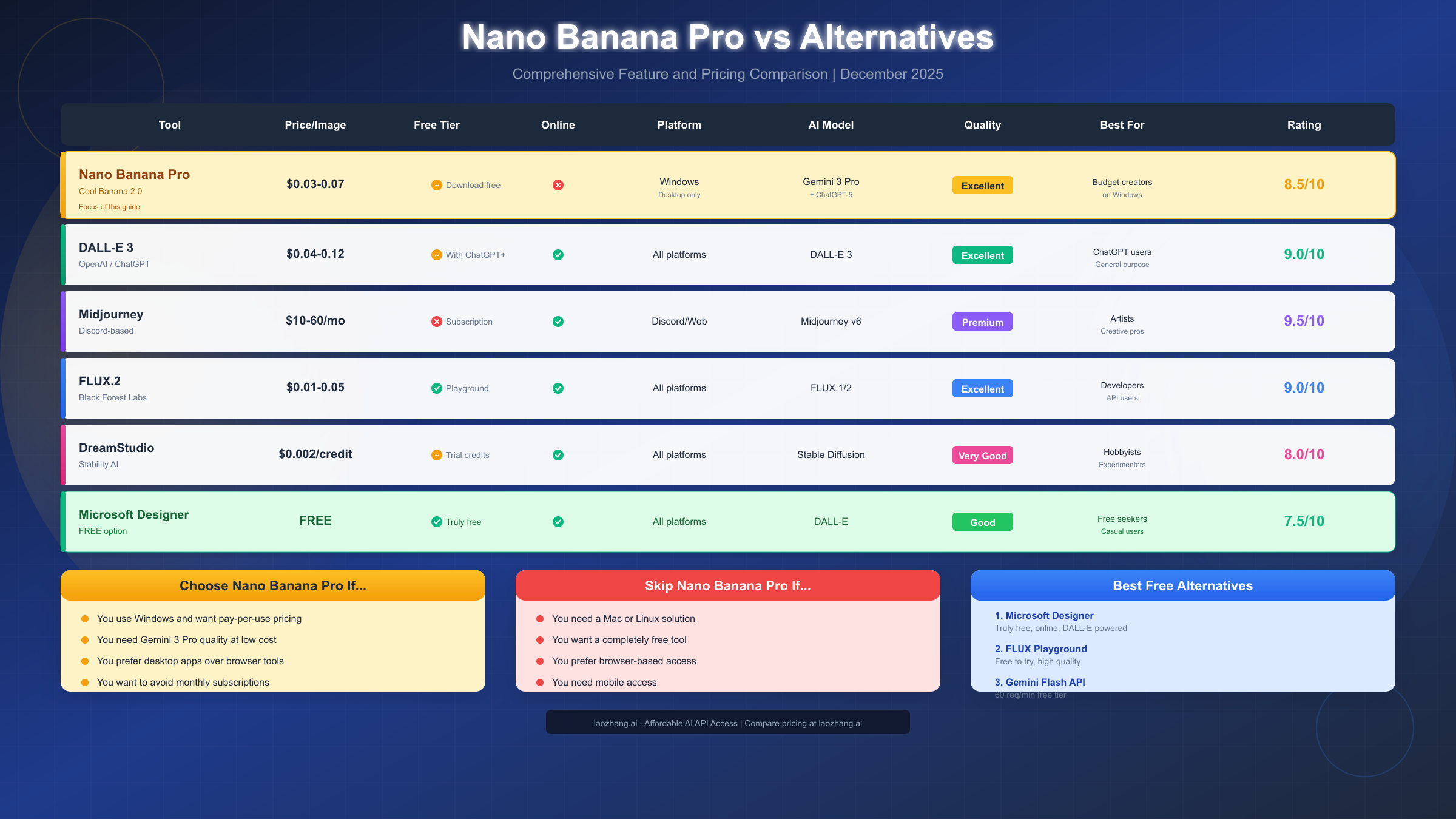
Nano Banana Pro vs Alternatives (Honest Comparison)

How does Nano Banana Pro stack up against other AI image generation options? Let's compare honestly across multiple dimensions to help you make an informed decision.

Nano Banana Pro vs Alternatives Comparison

Feature Comparison Table

FeatureNano Banana ProDALL-E 3MidjourneyFLUX.2Microsoft Designer
Price ModelPay-per-usePay-per-use/SubscriptionSubscriptionPay-per-useFree
Cost Per Image$0.03-0.07$0.04-0.12$0.05-0.30$0.01-0.05Free
Online AccessNoYesYesYesYes
PlatformWindows onlyAllDiscord/WebAllAll
AI ModelGemini 3 ProGPT-ImageMidjourney v6FLUX.1/2DALL-E
Quality Rating8.5/109/109.5/109/107.5/10
Free TierDownload onlyWith ChatGPT+NoLimitedYes
Best ForWindows budget usersChatGPT usersArtists/CreativesDevelopersFree seekers
Prompt AdherenceExcellentExcellentGoodVery GoodGood
Text in ImagesGoodVery GoodFairGoodFair
Commercial UseYesYesYesYesYes

Detailed Comparisons

vs DALL-E 3 / ChatGPT

DALL-E 3 offers similar quality through ChatGPT Plus ($20/month) with daily image limits or via API. Here's how they compare:

AspectNano Banana ProDALL-E 3
CostLower per imageHigher per image
AccessWindows desktop onlyOnline everywhere
IntegrationStandaloneChatGPT conversation
LimitsNone (pay per image)Daily caps with subscription
StylePhotorealistic focusVersatile styles

Winner depends on: If you're a Windows user who wants to avoid subscriptions and doesn't mind desktop-only access, Nano Banana Pro wins. If you need online access, mobile support, or ChatGPT integration, DALL-E 3 is better.

vs Midjourney

Midjourney produces arguably the most artistic results but requires Discord or web access with a subscription ($10-60/month):

AspectNano Banana ProMidjourney
QualityExcellentPremium
Cost ModelPay-per-useSubscription
CommunityLimitedMassive, active
Style ControlBasicAdvanced (style references)
Artistic OutputGoodExceptional

Winner depends on: If you prioritize artistic quality above all else and don't mind subscriptions, Midjourney wins. For budget-conscious occasional users on Windows, Nano Banana Pro is more economical.

vs FLUX

FLUX.2 from Black Forest Labs offers excellent quality at very competitive prices ($0.01-0.05). Read our comprehensive Flux API guide for detailed integration options:

AspectNano Banana ProFLUX.2
AccessDesktop appOnline/API
Cost$0.03-0.07$0.01-0.05
Ease of UseGUI interfaceRequires API knowledge
FlexibilityFixed integrationHighly customizable

Winner depends on: Developers and technical users should consider FLUX. Non-technical Windows users may prefer Nano Banana Pro's simpler interface.

vs DreamStudio/Stable Diffusion

DreamStudio (Stability AI) offers flexible credit-based pricing similar to Nano Banana Pro:

AspectNano Banana ProDreamStudio
AccessDesktopOnline
ModelGemini 3 ProStable Diffusion
StylePhotorealisticVersatile
CommunitySmallerLarge

Who Should Choose What?

If You...Choose...Reason
Want cheapest per-image on WindowsNano Banana Pro$0.03-0.07/image, no subscription
Need online access from anywhereFLUX.2 or DALL-E 3Browser-based access
Prioritize quality above allMidjourneyBest artistic output
Need it completely freeMicrosoft DesignerTruly free tier
Building an applicationFLUX API or laozhang.aiDeveloper-focused APIs
Use ChatGPT regularlyDALL-E 3 + ChatGPTIntegrated experience
Need enterprise featuresStability AI or OpenAIEnterprise support
Want community & learningMidjourneyActive Discord community

For bulk image generation at scale, API aggregators like laozhang.ai offer competitive pricing across multiple AI image models with unified access and often better rates than going directly to providers.

Free Online Alternatives (If Nano Banana Pro Isn't Right)

If you specifically need a free and/or online AI image generation tool, here are your best options in 2025, organized by how "free" they actually are.

Truly Free Options (No Payment Required)

1. Microsoft Designer (Bing Image Creator)

The best truly free option available with no credit card required:

AspectDetails
CostCompletely free
AccessOnline via designer.microsoft.com
ModelDALL-E powered
LimitsGenerous daily allowance (15+ boosts)
QualityGood (7.5/10)
RequirementsMicrosoft account only
Best ForCasual users who want zero cost
LimitationsSlower without boosts, Microsoft branding requirements

2. Google's Gemini Flash Image API

For developers, Google offers an extremely generous free tier:

AspectDetails
CostFree up to 60 requests/minute
AccessAPI-based (requires coding)
ModelGemini Flash Image
LimitsRate limits apply
QualityGood (8/10)
RequirementsGoogle Cloud account, API integration
Best ForDevelopers building applications

Check out our guide to the free Gemini Flash Image API with 60 requests/minute for detailed implementation instructions. This is one of the most generous free tiers available.

3. FLUX Playground

Black Forest Labs offers a free playground for testing:

AspectDetails
CostFree to try
AccessOnline at flux.ai
ModelFLUX.1
LimitsQueue-based, slower during peak
QualityExcellent (9/10)
RequirementsAccount registration
Best ForTesting FLUX before committing

Limited Free Tiers

4. Playground AI

  • Free Tier: 500 images/month (very generous)
  • Cost After: Subscription required
  • Quality: Good (8/10)
  • Note: One of the most generous free allowances

5. Canva AI

  • Free Tier: Limited generations per month
  • Cost After: Canva Pro subscription ($12.99/month)
  • Quality: Good (7.5/10)
  • Note: Best for integrated design work with templates

6. Leonardo.AI

  • Free Tier: 150 tokens/day (regenerates daily)
  • Cost After: Token purchases or subscription
  • Quality: Very Good (8.5/10)
  • Note: Good for experimentation, strong community

7. Ideogram

  • Free Tier: 25 images/day
  • Cost After: Subscription plans
  • Quality: Excellent (9/10)
  • Note: Exceptional at text in images

Free Option Comparison

ToolTruly Free?Online?QualityDaily LimitBest For
Microsoft DesignerYesYesGood15+ boostsCasual users
Gemini Flash APIYesAPIGood60/minDevelopers
FLUX PlaygroundYesYesExcellentQueue-basedTesting
Playground AIYes (500/mo)YesGood~16/dayHobbyists
Canva AIPartialYesGoodLimitedDesigners
Leonardo.AIPartialYesVery Good150 tokensArtists
IdeogramPartialYesExcellent25/dayText in images

For those who want to experiment with multiple AI image models, laozhang.ai offers free credits for new users, allowing you to test various AI image APIs before committing to any particular service.

Platform-Specific Recommendations

For Mac Users (Since Nano Banana Pro is Windows-only):

  1. Microsoft Designer (free, online, excellent start)
  2. FLUX Playground (free, online, highest quality)
  3. Midjourney (subscription, Discord/web, best quality)
  4. Canva AI (with free tier, integrated design tools)

For Mobile Users (iOS/Android):

  • Canva app (free tier available, full design suite)
  • Adobe Firefly app (limited free, Adobe integration)
  • Microsoft Designer mobile web (free, works well)
  • Ideogram (web-based, mobile-friendly)

For Linux Users:

  • Any browser-based option works perfectly
  • FLUX API for developers (free tier)
  • Microsoft Designer for casual use (free)
  • Stable Diffusion local installation (free, requires GPU)

Frequently Asked Questions

Is Nano Banana Pro really free?

Partially. The Cool Banana 2.0 application download is completely free with no cost to download and install. However, generating images requires OpenRouter API credits, which cost approximately $0.03-0.07 per image. There is no subscription fee, so you only pay for what you use—but it's not a completely free service.

Can I use Nano Banana Pro on Mac or Linux?

No. Nano Banana Pro (via Cool Banana 2.0) is exclusively available for Windows 10 and Windows 11. There are no Mac, Linux, or web versions available. Mac and Linux users should consider alternatives like Microsoft Designer (free, online), FLUX Playground, Midjourney, or running Windows in a virtual machine.

Is there a mobile version of Nano Banana Pro?

No. The application is desktop-only with no mobile apps for iOS or Android. For mobile AI image generation, consider Canva AI (app available on both platforms) or Microsoft Designer (mobile web version works well).

How many images can I generate?

Unlimited, as long as you have OpenRouter credits in your account. There are no artificial caps, daily limits, or monthly maximums—you simply pay per image generated ($0.03-0.07 each). This is one of the advantages over subscription services that impose usage limits.

Is Nano Banana Pro better than DALL-E 3?

It depends on your priorities. Both use top-tier AI models (Gemini 3 Pro vs GPT-Image). Nano Banana Pro is cheaper per image ($0.03-0.07 vs $0.04-0.12) but Windows-only. DALL-E 3 offers online access, mobile support, and ChatGPT integration but costs more per image. Quality is comparable between the two.

What's the difference between Nano Banana Pro and Cool Banana?

Nano Banana Pro is a feature within Cool Banana 2.0, specifically the integration with Google Gemini 3 Pro Image. Cool Banana 2.0 is the Windows desktop application that contains this feature along with support for other AI models like ChatGPT-5 Image.

Do I need technical knowledge to use it?

Minimal. Setting up OpenRouter requires creating an account and generating an API key, which takes about 5-10 minutes following our guide above. The Cool Banana 2.0 interface itself is straightforward for anyone familiar with basic desktop applications. No coding required.

Can I use generated images commercially?

Generally yes, but verify the terms of service for both Cool Banana 2.0 and the specific AI model used (Gemini 3 Pro). Most modern AI image generators allow commercial use of generated images. Check OpenRouter's terms and Gemini's usage policies for your specific use case.

What if I run out of credits mid-project?

You can add more instantly. OpenRouter allows you to top up credits at any time through their billing interface. There's no penalty for running low, no waiting period, and no minimum top-up amount. Just add more credits and continue generating immediately.

Is there customer support?

Limited. Cool Banana 2.0 is developed by an indie developer (Gerry7) on itch.io. Support is primarily community-based through itch.io comments. For OpenRouter issues, they have documentation and support channels available. Don't expect enterprise-level support for this indie tool.

How does billing work with OpenRouter?

You add credits upfront (prepaid), and each image generation deducts from your balance. You can see your current balance in the OpenRouter dashboard, set spending alerts, and add more credits anytime. There are no surprise bills—you control exactly how much you spend.

Can I use Nano Banana Pro offline?

No. The application requires an active internet connection because all image generation happens in the cloud via OpenRouter's API. The desktop app is essentially a interface for the cloud-based AI models.

Conclusion: Is Nano Banana Pro Worth It?

After this comprehensive exploration of Nano Banana Pro, here's our final assessment to help you decide:

Best For:

  • Windows users who want pay-as-you-go pricing without subscriptions
  • Budget-conscious creators who generate images occasionally (under 200/month)
  • Users who prefer desktop applications over browser-based tools
  • Those who want Gemini 3 Pro quality at the lowest possible cost
  • People who dislike subscriptions and want pure usage-based pricing
  • Freelancers with variable workloads who don't want to waste money on unused subscriptions

Not Recommended For:

  • Mac or Linux users (Windows-only, no alternatives)
  • Users who need truly free options (API credits always required)
  • Mobile users (desktop-only, no apps)
  • Teams needing collaboration features (single-user application)
  • Those wanting browser-based access (desktop installation required)
  • Users needing enterprise support (indie developer, community support only)

The Final Verdict

Nano Banana Pro offers legitimate value for its target audience: Windows users who want affordable access to top-tier AI image generation without subscription commitments. At $0.03-0.07 per image, it's one of the most economical ways to access Gemini 3 Pro Image quality.

However, the "free online" aspect that many users search for simply doesn't exist with this tool. The download is free, but usage is not free. And it's definitely not online—it's a Windows desktop application requiring local installation.

If that fits your needs: Nano Banana Pro is an excellent choice offering professional results at budget-friendly prices. The pay-as-you-go model is ideal for occasional users who don't want to commit to monthly subscriptions.

If you need free or online: Consider Microsoft Designer (truly free, online), FLUX Playground (free, online, excellent quality), or the free Gemini Flash Image API for developers looking to build their own applications.

For developers needing programmatic access to multiple AI image models, consider checking laozhang.ai's unified API gateway, which offers competitive pricing across providers including Gemini, DALL-E, and FLUX models—often with free credits for new users to test different options before committing to any particular service.

Quick Decision Guide

Your SituationOur Recommendation
Windows user, budget mattersTry Nano Banana Pro
Mac user, any budgetMicrosoft Designer or Midjourney
Need truly freeMicrosoft Designer
Developer/building appGemini Flash API or FLUX API
Maximum quality mattersMidjourney
Already using ChatGPTDALL-E 3 with ChatGPT Plus

Whatever you choose, the AI image generation landscape in 2025 offers incredible options at every price point. The key is matching your specific needs—platform, budget, usage pattern, and quality requirements—to the right tool.


Last updated: December 2025. Pricing and features may change as the AI landscape evolves. Always verify current information on official sources before making decisions.

Experience 200+ Latest AI Models

One API for 200+ Models, No VPN, 16% Cheaper, $0.1 Free

Limited 16% OFF - Best Price
99.9% Uptime
5-Min Setup
Unified API
Tech Support
Chat:GPT-5, Claude 4.1, Gemini 2.5, Grok 4+195
Images:GPT-Image-1, Flux, Gemini 2.5 Flash Image
Video:Veo3, Sora(Coming Soon)

"One API for all AI models"

Get 3M free tokens on signup

Alipay/WeChat Pay · 5-Min Integration