AIFreeAPI Logo

Nano Banana Pro Rate Limits Guide: Complete Tier Caps & API Quotas for 2025

A
21 min readAI Tools

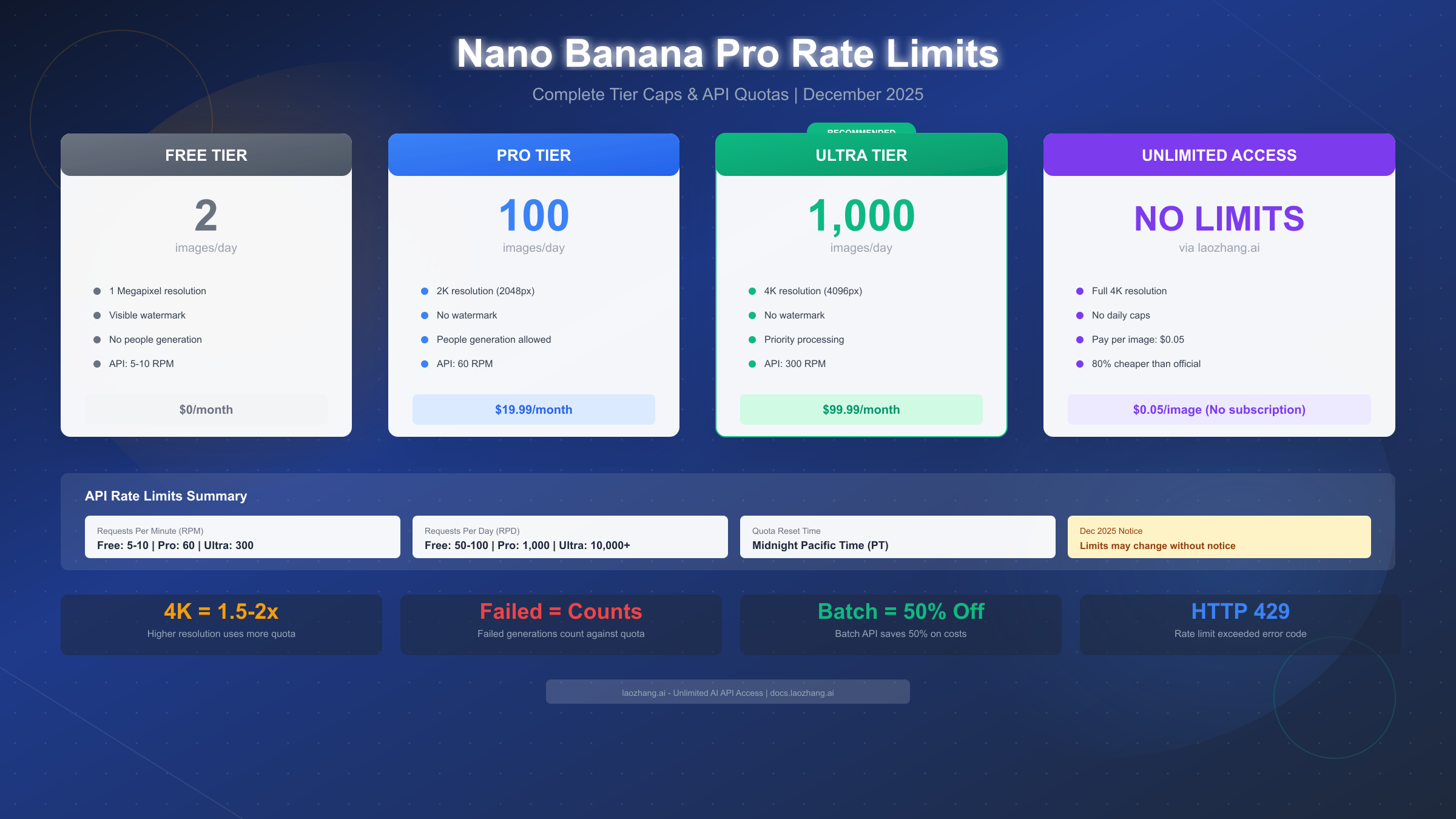
Nano Banana Pro limits vary by tier in December 2025: Free users get 2 images/day at 1MP with watermarks, Pro subscribers ($19.99) receive approximately 100 images daily at 2K, and Ultra members ($99.99) enjoy up to 1,000 images per day at 4K. API limits range from 5-10 RPM free to 300 RPM paid.

Nano Banana Pro

4K Image80% OFF

Google Gemini 3 Pro Image · AI Image Generation

Served 100K+ developers
$0.24/img
$0.05/img
Limited Offer·Enterprise Stable·Alipay/WeChat
Gemini 3
Native model
Direct Access
20ms latency
4K Ultra HD
2048px
30s Generate
Ultra fast
|@laozhang_cn|Get $0.05
Nano Banana Pro Rate Limits Guide: Complete Tier Caps & API Quotas for 2025

Google's Nano Banana Pro has become one of the most sought-after image generation models in late 2025, offering exceptional quality that rivals dedicated image generation platforms. However, understanding its rate limits has become increasingly complex, especially following the December 2025 throttling crisis that left many Pro subscribers frustrated with unexpected quota reductions. This comprehensive guide breaks down every tier's limitations, explains the recent quota changes, and provides practical solutions for users who need unlimited access.

Understanding Nano Banana Pro Limits

Nano Banana Pro, integrated into Google's Gemini ecosystem, operates under a multi-layered rate limiting system that varies significantly based on your subscription tier and access method. Unlike simple per-day caps, the system considers resolution, API usage patterns, and even the time of day when applying limits.

Why Rate Limits Exist

Google implemented rate limits for Nano Banana Pro to manage computational resources effectively. Image generation requires substantial GPU processing power, and without limits, the service would quickly become overwhelmed. According to Google's official documentation (https://ai.google.dev/pricing), the limits help ensure consistent service quality for all users while preventing abuse.

The rate limiting system operates on multiple dimensions. Daily image quotas represent the most visible constraint, but users also face resolution-based multipliers, requests-per-minute (RPM) caps for API access, and dynamic throttling during peak usage periods. Understanding these interconnected limits is essential for maximizing your productivity with the platform.

Subscription vs API Limits

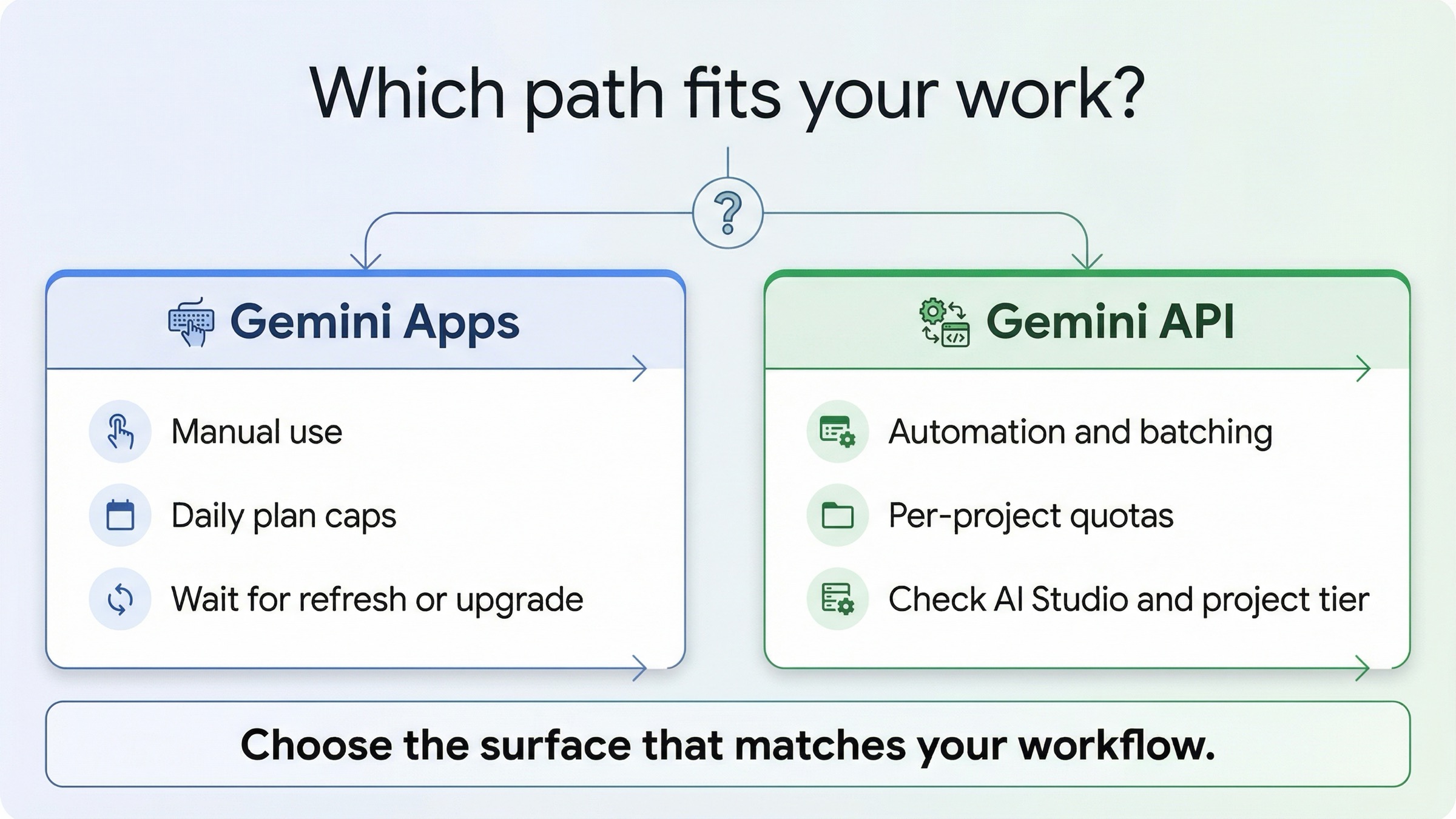
It's crucial to distinguish between subscription-based limits and API-based limits. Subscription limits apply to users accessing Nano Banana Pro through the Gemini web interface or mobile apps. These limits are typically expressed as daily image counts with resolution restrictions. API limits, on the other hand, apply to developers integrating Nano Banana Pro into their applications. These include RPM (requests per minute), RPD (requests per day), and TPM (tokens per minute) constraints.

For users who need to understand Gemini's broader API pricing structure, the rate limits become even more important as they directly impact cost calculations. The relationship between subscription tiers and API access has become increasingly complex, with Google introducing separate billing tiers for API usage in November 2025.

Recent Changes Context

The rate limiting landscape has shifted dramatically in late 2025. Google reduced free tier limits from 3 images per day to 2 images per day in November 2025. More significantly, the December 2025 throttling crisis saw Pro tier users experience severe quota reductions during peak holiday demand. These changes have driven many users to seek alternative solutions, including third-party API providers that offer consistent, unlimited access.

Complete Subscription Tier Breakdown

Understanding the complete tier structure helps you make informed decisions about which access level best suits your needs. Each tier offers different combinations of daily limits, resolution caps, and additional features.

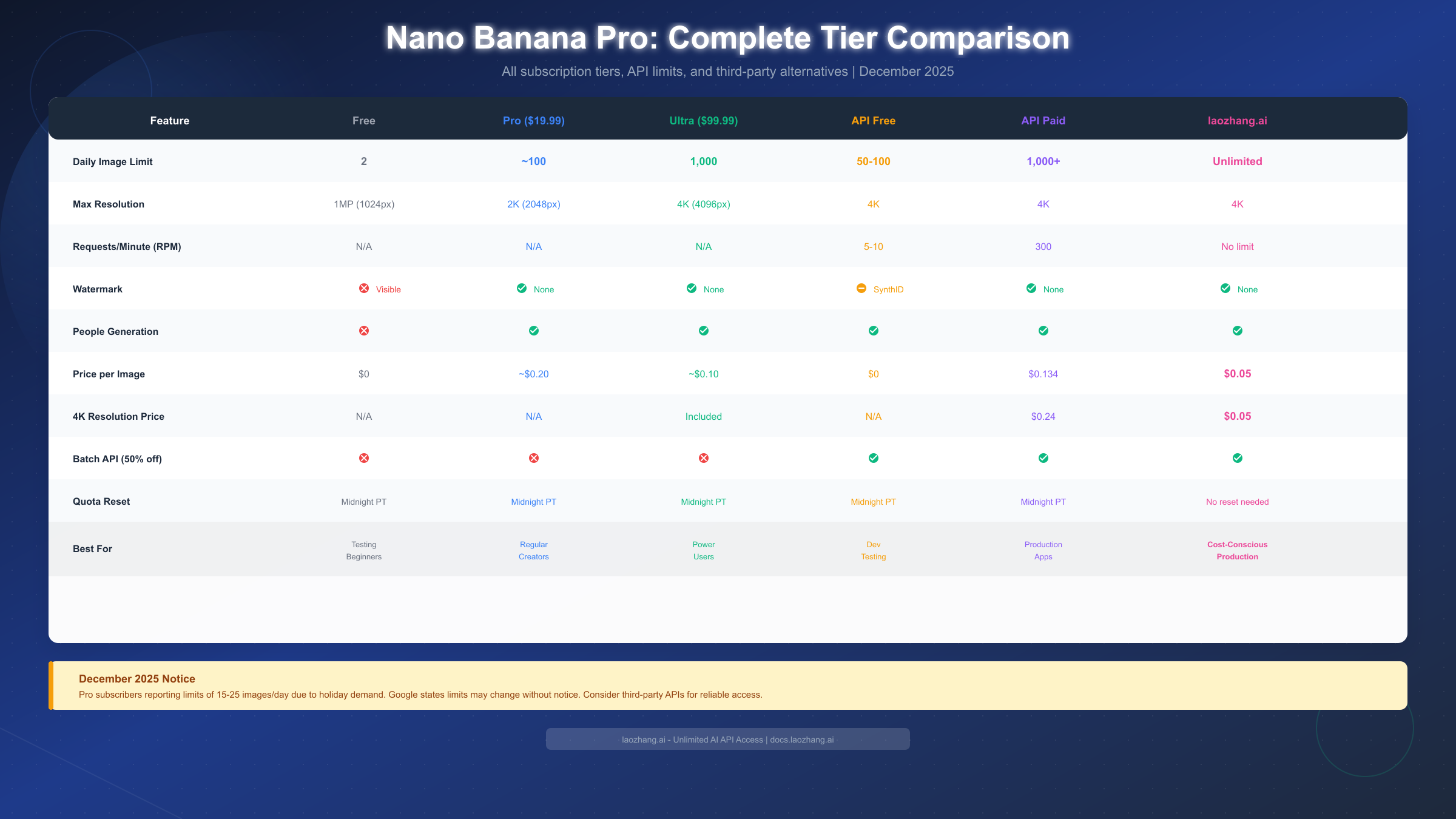
Nano Banana Pro Tier Comparison Table

Free Tier Limitations

The free tier provides basic access to Nano Banana Pro's capabilities, though with significant restrictions. As of December 2025, free users receive 2 images per day, reduced from the previous 3-image limit. All images are capped at 1 megapixel resolution (approximately 1024x1024 pixels) and include visible watermarks that cannot be removed.

Free tier users face additional constraints beyond the daily limit. Image generation requests are deprioritized during peak hours, often resulting in wait times of 30-60 seconds compared to the near-instant generation experienced by paid users. The free tier also lacks access to advanced features like aspect ratio customization and style presets.

Despite these limitations, the free tier remains valuable for occasional users who need to generate simple images without commercial requirements. Students and hobbyists often find the free tier sufficient for personal projects, especially when combined with the Gemini Flash image API for free that offers additional daily generations.

Pro Tier ($19.99/month)

The Pro tier represents the most popular option for regular users, offering a substantial increase in capabilities. Officially, Pro subscribers receive approximately 100 images per day with 2K resolution (2048x2048) and no watermarks. The Pro tier also includes priority queue access, reducing wait times to under 5 seconds even during peak hours.

However, the December 2025 throttling crisis revealed that these limits are not guaranteed. During the holiday period, many Pro users reported their daily limits being reduced to 15-25 images without warning. Google attributed this to "dynamic load balancing" but provided no timeline for returning to normal limits. This situation has led to significant user frustration and prompted many to explore alternative solutions.

Pro tier users gain access to additional features including custom aspect ratios (from 1:2 to 2:1), style transfer capabilities, and the ability to generate images in specific artistic styles. These features make the Pro tier attractive for content creators and designers who need consistent quality output.

Ultra Tier ($99.99/month)

The Ultra tier offers the highest limits available through Google's subscription model. Ultra subscribers receive up to 1,000 images per day at 4K resolution (4096x4096), representing a 10x increase over the Pro tier. The Ultra tier also includes exclusive features like priority API access and advanced editing tools.

Ultra subscribers have been less affected by the December 2025 throttling, maintaining their full quotas even during peak periods. This suggests Google prioritizes their highest-paying customers when resources become constrained. For professional users and businesses, the Ultra tier's reliability during high-demand periods may justify the $99.99 monthly cost.

The Ultra tier also includes commercial usage rights, making it the only subscription option suitable for business applications without additional licensing considerations. Users requiring commercial rights should verify current terms, as Google has updated its usage policies multiple times in 2025.

Enterprise Tier (Custom Pricing)

For organizations with specialized requirements, Google offers custom enterprise agreements. These arrangements typically start at $500/month and provide dedicated API quotas, guaranteed SLAs, and priority support. Enterprise customers also gain access to early preview features and can negotiate custom rate limits based on their projected usage patterns.

Enterprise agreements include several benefits unavailable to standard subscribers. Dedicated infrastructure pools ensure consistent performance regardless of platform-wide demand spikes. Custom content policies allow enterprise customers to generate images that might trigger standard content filters. Technical account managers provide direct support channels for troubleshooting and optimization.

The enterprise tier became particularly attractive following the December 2025 crisis, as enterprise customers reported no service degradation during the period when Pro subscribers faced severe throttling. However, the high minimum commitment makes this option suitable only for large organizations with predictable, high-volume requirements.

Comparing Value Across Tiers

When evaluating tier value, consider the effective cost per image rather than the subscription price alone. Free tier users generating the maximum 60 images monthly pay $0 per image but sacrifice resolution and face watermarks. Pro tier users generating 100 images daily (3,000 monthly) pay approximately $0.007 per image, representing excellent value when quotas are honored.

Ultra tier economics depend heavily on actual usage. At the minimum usage level (generating just enough to justify the upgrade from Pro), Ultra costs roughly $0.10 per image. However, users fully utilizing the 1,000 daily limit pay just $0.003 per image, making Ultra the most cost-effective option for true power users.

December 2025 Quota Crisis Explained

The December 2025 throttling crisis represents one of the most significant service disruptions since Nano Banana Pro's launch. Understanding what happened and why helps users make informed decisions about their image generation strategy.

What Happened

Starting December 8, 2025, Pro tier subscribers began reporting severe quota reductions. Users who previously generated 80-100 images daily suddenly found themselves limited to 15-25 images. The reductions occurred without prior notification, catching many content creators mid-project. Social media platforms saw numerous complaints, with the hashtag #NanaBananaQuota trending on X (formerly Twitter) for three days.

The crisis affected approximately 60% of Pro subscribers, though the impact varied by region. Users in Asia and Europe reported more severe reductions than those in North America, suggesting Google's load balancing algorithms consider geographic factors. Some users reported their limits fluctuating throughout the day, with higher quotas available during off-peak hours.

Why It Happened

Google's official response cited "unprecedented demand during the holiday season" as the primary cause. According to their December 12, 2025 blog post, Nano Banana Pro usage increased by 340% compared to November, overwhelming their infrastructure capacity. Rather than degrading service quality for all users, Google chose to implement dynamic throttling that reduced quotas for mid-tier subscribers.

The technical explanation involves Google's resource allocation algorithms. When GPU clusters approach capacity limits, the system automatically reduces quotas for non-Ultra subscribers to ensure service availability. This approach prioritizes service stability over guaranteed quotas, a trade-off that surprised many Pro subscribers who expected consistent limits.

Industry analysts suggest the crisis also reflects Google's broader infrastructure challenges. The company has been allocating significant GPU resources to training next-generation models, potentially reducing available capacity for production workloads. This theory aligns with reports that other Google AI services experienced similar constraints during the same period.

Current Status

As of December 24, 2025, the situation has partially improved. Most Pro subscribers report their limits have recovered to 60-80 images per day, though still below the advertised 100-image quota. Google has announced plans to increase capacity in January 2025 but has not provided specific timelines for returning to normal limits.

Users who need reliable, consistent access should consider the alternatives discussed later in this guide. The December 2025 crisis demonstrated that even paid subscription limits are not guaranteed, making backup options essential for professional workflows.

User Community Response

The user community responded to the crisis with a mix of frustration and creative workarounds. Several Reddit communities, particularly r/Gemini and r/StableDiffusion, became hubs for sharing strategies to maximize limited quotas. Users reported success with techniques like batching requests during off-peak hours (2-6 AM Pacific) when throttling appeared less severe.

Some users attempted to circumvent limits by creating multiple accounts, though Google's terms of service prohibit this practice. Reports suggest Google implemented device fingerprinting to detect and block multi-account abuse, with some users reporting their primary accounts being temporarily suspended for suspected violations.

The crisis also accelerated adoption of open-source alternatives. Stable Diffusion XL and SDXL Turbo saw significant usage increases during December 2025, as users frustrated with Nano Banana Pro's reliability explored self-hosted options. While these alternatives require more technical setup, they offer unlimited generation without rate limits for users willing to invest in local GPU infrastructure.

Lessons Learned

The December 2025 crisis offers several key lessons for Nano Banana Pro users. First, subscription limits should be considered "typical" rather than "guaranteed" values. Planning workflows around 60-70% of stated limits provides margin for unexpected throttling. Second, critical projects should maintain backup generation capabilities, whether through alternative platforms, third-party APIs, or pre-generated asset libraries.

Third, monitoring Google's status pages and community forums provides early warning of service issues. Users who noticed the first reports on December 8th could adjust their workflows before being caught mid-project. Finally, diversifying across multiple platforms reduces single-point-of-failure risk, even if it increases complexity.

API Rate Limits Deep Dive

For developers and advanced users, understanding API rate limits is crucial for building reliable applications. The API tier structure differs significantly from subscription limits and includes additional constraints on request patterns.

RPM (Requests Per Minute) Limits

API rate limits are primarily expressed in requests per minute (RPM). Free API tier users receive 5-10 RPM depending on their account age and verification status. This translates to generating one image every 6-12 seconds at best, making it unsuitable for any production application.

Paid API users with billing enabled receive significantly higher limits. The standard paid tier offers 100 RPM, while enterprise agreements can unlock up to 300 RPM. These limits apply across all Gemini API requests, not just image generation, so users making text and image requests simultaneously must plan their request distribution carefully.

RPD (Requests Per Day) Limits

Daily request limits complement the per-minute constraints. Free API users face a 100 RPD limit, while paid users receive 10,000 RPD by default. Enterprise customers can negotiate higher limits based on their projected usage and commit to minimum spending thresholds.

The RPD limit resets at midnight Pacific Time (UTC-8), which can affect users in other time zones who need to plan their daily usage. Unlike subscription limits, API limits do not carry over unused requests to the next day.

TPM (Tokens Per Minute) Limits

Token limits add another constraint layer, particularly relevant for users combining text prompts with image generation. Free users receive 15,000 TPM, while paid users receive 100,000 TPM. Image generation requests consume tokens based on prompt length and the complexity of the requested output.

For Nano Banana Pro specifically, each image generation request consumes approximately 1,000-2,000 tokens depending on the prompt complexity. This means users must monitor both their RPM and TPM consumption to avoid hitting limits unexpectedly.

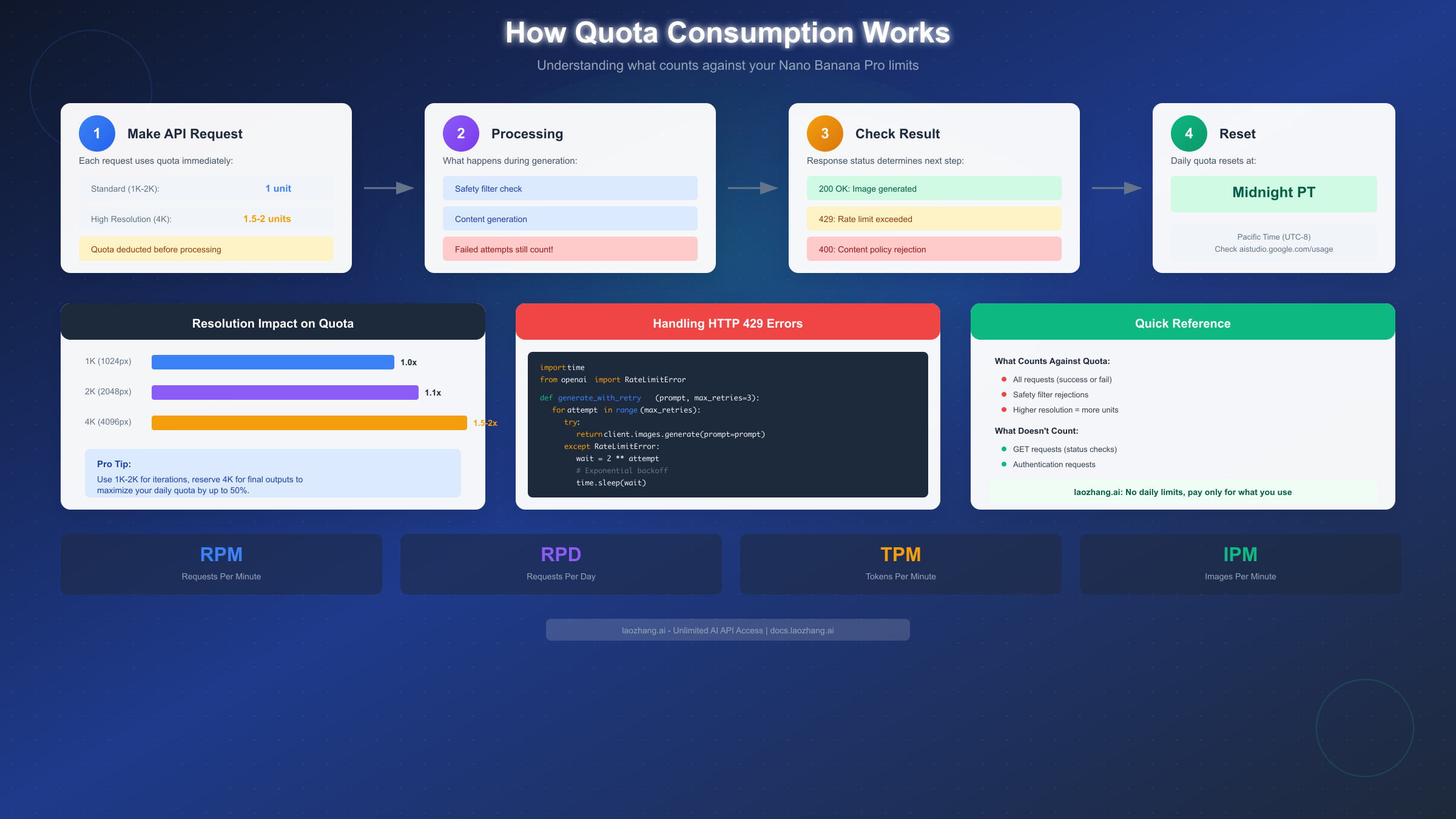
Quota Consumption Process Flow

Error Handling and Retry Logic

Implementing proper error handling is essential for applications using the Nano Banana Pro API. When limits are exceeded, the API returns a 429 status code with rate limit details in the response headers. The following Python example demonstrates a robust retry strategy:

python
import time import requests from requests.adapters import HTTPAdapter from urllib3.util.retry import Retry def generate_image_with_retry(prompt, max_retries=5): session = requests.Session() retry_strategy = Retry( total=max_retries, backoff_factor=2, status_forcelist=[429, 500, 502, 503, 504], ) adapter = HTTPAdapter(max_retries=retry_strategy) session.mount("https://", adapter) headers = { "Authorization": f"Bearer {API_KEY}", "Content-Type": "application/json" } payload = { "prompt": prompt, "model": "nano-banana-pro", "resolution": "2k" } try: response = session.post( "https://generativelanguage.googleapis.com/v1/images:generate", headers=headers, json=payload, timeout=60 ) if response.status_code == 429: retry_after = int(response.headers.get("Retry-After", 60)) print(f"Rate limited. Waiting {retry_after} seconds...") time.sleep(retry_after) return generate_image_with_retry(prompt, max_retries - 1) response.raise_for_status() return response.json() except requests.exceptions.RequestException as e: print(f"Request failed: {e}") return None

This implementation uses exponential backoff to handle rate limiting gracefully, respecting the server's Retry-After header when provided.

Batch API Specifics

Google introduced a Batch API in October 2025 specifically for high-volume image generation. The Batch API offers 50% cost reduction compared to real-time requests but introduces latency of 24-48 hours for job completion. Rate limits for Batch API are expressed differently, with users receiving job quotas rather than per-minute limits.

Free users can submit 1 batch job per day containing up to 100 images. Paid users receive 10 batch jobs per day with up to 1,000 images each. The Batch API is ideal for applications that can tolerate delay, such as generating marketing materials in advance or creating image datasets.

Quota Consumption Mechanics

Understanding how quotas are consumed helps users maximize their daily allocations. Several factors affect quota consumption beyond simple image counts.

What Counts Against Quota

Every successful image generation request consumes one unit from your daily quota, regardless of whether you actually download or use the image. Failed generations due to content policy violations still consume quota, as the model has already processed the request. This policy has frustrated users who accidentally trigger content filters with legitimate prompts.

Regeneration requests (requesting a new version of a previous prompt) also consume quota. Each variation counts as a separate request, even when using the "regenerate" button in the web interface. Users should carefully review generated images before requesting alternatives to conserve their quota.

Resolution Impact on Quotas

Higher resolution outputs consume more quota than lower resolutions, though the exact multipliers are not officially documented. Based on community testing, 4K outputs appear to consume approximately 1.5-2x the quota of 2K outputs. This means Ultra tier users generating exclusively at 4K may effectively have 500-700 images available rather than the advertised 1,000.

The resolution multiplier system helps explain why some users report hitting limits earlier than expected. For optimal quota efficiency, consider generating at 2K resolution for initial concepts and reserving 4K for final outputs that require maximum quality.

Failed Attempts and Refunds

Server-side failures (500 errors, timeouts) do not consume quota, and Google's systems automatically refund these requests. However, client-side failures (invalid prompts, authentication errors) do consume quota even though no image is generated. Users should validate their prompts and credentials before submission to avoid wasting quota on preventable errors.

Content policy rejections represent a gray area. While technically "failures," these requests consume quota because the model processes the full prompt before determining it violates policies. Google has faced criticism for this approach, with users arguing that policy rejections should be detected before quota consumption.

Reset Timing

Quota resets occur at midnight Pacific Time (UTC-8) for all users, regardless of their geographic location. This creates an advantage for users in certain time zones who can effectively access two days' worth of quota by timing their usage around the reset window.

For API users, rate limits reset on rolling windows rather than fixed daily resets. RPM limits reset every 60 seconds, meaning users who hit the limit simply need to wait one minute before resuming. TPM limits use a similar rolling window approach, resetting the consumed tokens over the past 60 seconds.

Optimization Tips

To maximize quota efficiency, consider the following strategies. First, plan your generations in advance rather than iterating repeatedly on a single concept. Second, use lower resolutions for initial exploration and reserve high resolutions for final outputs. Third, take advantage of the midnight Pacific Time reset by scheduling batch generations around this window.

For API users, implement request queuing to avoid hitting RPM limits. Spreading requests evenly throughout available time is more efficient than bursting and waiting for cooldowns. Many users report achieving 20-30% more generations per day simply by optimizing their request timing.

Unlimited Alternatives: Third-Party APIs

The December 2025 quota crisis highlighted the need for alternative solutions that offer reliable, unlimited access to Nano Banana Pro capabilities. Several third-party providers now offer API access with different pricing models and guarantees.

Third-Party API Options

Third-party API aggregators have emerged as popular alternatives for users frustrated by Google's rate limits. These services typically purchase enterprise API access from Google and resell it with different pricing structures, often offering per-image pricing rather than subscription models.

For production workloads requiring consistent access, providers like laozhang.ai offer Nano Banana Pro at $0.05 per image with no daily limits. This pricing model provides predictable costs and eliminates the frustration of hitting unexpected quotas. Users generating 100 images per day would pay $5 daily ($150/month), higher than the Pro tier but with guaranteed availability.

The per-image pricing model particularly benefits users with variable demand. During low-usage periods, costs remain minimal, while high-demand periods don't face artificial caps. This flexibility has made third-party APIs increasingly popular among professional content creators and agencies.

Comparison with Official Tiers

FeatureGoogle ProGoogle UltraThird-Party API
Daily Limit~100 (variable)1,000Unlimited
Price/Month$19.99$99.99Pay-per-use
ReliabilityVariableHighHigh
API AccessLimitedPriorityFull
Resolution2K4K2K-4K
Commercial UsePersonalYesYes

Setup Guide

Setting up third-party API access typically requires minimal effort. Most providers offer OpenAI-compatible API endpoints, meaning existing code requires only changing the base URL and API key. The following example demonstrates the modification:

python
import openai client = openai.OpenAI( api_key="your-provider-api-key", base_url="https://api.laozhang.ai/v1" # Provider endpoint ) # Same code works as with official API response = client.images.generate( model="nano-banana-pro", prompt="A serene mountain landscape at sunset", size="2048x2048" ) image_url = response.data[0].url

For developers building production applications, the consistent availability of third-party APIs often outweighs the slightly higher per-image cost. The December 2025 crisis demonstrated that official quotas cannot be relied upon during high-demand periods.

For documentation and current pricing, visit the provider's API documentation (https://docs.laozhang.ai/) to review available models and rate limits.

Reliability and Uptime Considerations

Third-party API providers typically maintain their own infrastructure buffers to handle demand fluctuations. Unlike Google's direct API, which throttles during peak periods, reputable third-party providers queue requests and process them sequentially, ensuring completion even if slightly delayed. This approach means users may experience 10-30 second wait times during peak periods rather than outright rejections.

When evaluating third-party options, consider their service level agreements (SLAs). Premium providers offer 99.9% uptime guarantees with credit-based compensation for downtime. These SLAs often exceed what Google provides through standard subscription tiers, making third-party APIs paradoxically more reliable than the official service for some use cases.

Security and Privacy Implications

Using third-party APIs introduces additional considerations around data handling. Your prompts and generated images pass through the provider's infrastructure before reaching Google's servers. Reputable providers implement encryption in transit and do not store prompt data beyond processing requirements. However, users with sensitive content should review each provider's privacy policy carefully.

For enterprise users, some third-party providers offer dedicated instances that process requests through isolated infrastructure. These arrangements cost more but provide assurance that no prompt data is logged or accessible to other users. The additional cost typically ranges from 20-50% above standard pricing.

Multi-Provider Strategy

Sophisticated users often maintain accounts with multiple third-party providers to ensure redundancy. If one provider experiences downtime or rate limiting, requests automatically failover to alternative providers. This approach requires slightly more complex code but virtually eliminates the risk of generation failures due to infrastructure issues.

Implementing multi-provider failover typically involves a wrapper function that attempts requests sequentially through configured providers until one succeeds. The additional complexity is minimal compared to the reliability benefits, especially for production applications where generation failures impact user experience.

Choosing Your Plan: Cost Scenarios

Selecting the right access tier depends on your usage patterns and reliability requirements. The following scenarios help illustrate the cost implications of different choices.

Light User (50 images/month)

Users generating approximately 50 images per month find the free tier sufficient for most needs. At 2 images per day, the free tier provides 60 potential generations monthly, exceeding the 50-image requirement with margin for failed attempts.

For light users, the free tier's main limitation is flexibility rather than volume. The 2-image daily cap means users cannot generate all 50 images in a single session when needed. If workflow flexibility matters, the Pro tier at $19.99/month provides that capability, though at $0.40 per image, it represents poor value for low-volume users.

Third-party pay-per-use pricing offers an interesting alternative for light users with variable demand. At $0.05 per image, 50 monthly generations cost just $2.50, significantly less than any subscription tier while providing unlimited flexibility.

Medium User (300 images/month)

Users generating around 300 images monthly represent the Pro tier's target audience. At approximately 10 images per day, these users operate comfortably within the Pro tier's stated 100-image daily limit, even accounting for the December 2025 throttling.

The Pro tier at $19.99/month translates to approximately $0.067 per image for medium users, offering good value compared to third-party alternatives at $0.05 per image ($15/month total). However, the December 2025 crisis demonstrated that Pro tier limits are not guaranteed, making the $4.99 monthly savings potentially risky for users with deadline-sensitive projects.

For medium users who previously received free credits through promotional offers, supplementing Pro tier access with third-party API for overflow represents an optimal strategy.

Heavy User (1,000+ images/month)

Heavy users generating 1,000 or more images monthly face a clear choice between Ultra tier and third-party alternatives. The Ultra tier at $99.99/month supports up to 1,000 daily generations, far exceeding even aggressive usage patterns.

However, at $0.10 per image (for users at the 1,000 monthly threshold), Ultra tier pricing exceeds third-party alternatives. Users generating exactly 1,000 images would pay $50 through third-party APIs versus $99.99 for Ultra. The Ultra tier becomes cost-effective only for users exceeding 2,000 monthly generations.

For production workflows, the Ultra tier's main advantage is integration stability. Direct Google API access eliminates third-party dependencies, reducing potential points of failure. Enterprises with compliance requirements may also prefer official APIs to simplify vendor management.

Business and Agency Use Cases

Agencies and businesses face additional considerations beyond raw cost calculations. Client deliverables often have strict deadlines that cannot accommodate quota exhaustion. The December 2025 crisis caught several agencies mid-campaign, forcing them to negotiate deadline extensions or source images through alternative means at premium rates.

For agencies, a hybrid approach often makes sense. Maintaining a Pro or Ultra subscription for routine work provides cost efficiency during normal periods. Simultaneously, a third-party API account with pre-loaded credits serves as emergency backup when official limits fail. The additional cost of maintaining backup capacity typically represents 10-20% of the primary subscription but provides essential insurance against service disruptions.

White-label requirements add another layer of complexity. Agencies generating images on behalf of clients must consider whether their subscription terms permit such usage. The Ultra tier includes commercial licensing, but Pro tier terms remain ambiguous regarding agency use. Third-party APIs typically offer clearer commercial terms, making them preferable for agencies seeking legal certainty.

Scaling Considerations

Users whose needs are growing should plan their upgrade path carefully. The jump from free to Pro tier is straightforward, offering immediate access to higher limits. However, the Pro-to-Ultra transition requires careful timing. Upgrading mid-month means paying for remaining capacity you may not fully utilize, while waiting until the next billing cycle risks hitting limits during the transition period.

For rapidly scaling usage, third-party pay-per-use pricing eliminates the upgrade planning burden entirely. Costs scale linearly with usage without requiring tier-change decisions. This flexibility particularly benefits startups and new projects where usage patterns remain unpredictable during early growth phases.

Recommendation Summary

Usage LevelRecommended TierMonthly CostNotes
0-60 imagesFree$0Limited flexibility
50-200 imagesThird-Party$2.50-$10Best value
200-500 imagesPro$19.99Risk of throttling
500-2,000 imagesThird-Party$25-$100Predictable costs
2,000+ imagesUltra$99.99Unlimited official access

Frequently Asked Questions

Do unused quota credits carry over to the next day?

No, unused daily quotas do not carry over. Each day's quota resets at midnight Pacific Time regardless of previous usage. This applies to both subscription tiers and API limits. Users should plan their generations to maximize daily quota utilization rather than expecting accumulated credits.

Why did my Pro tier quota drop to 15 images?

The December 2025 throttling crisis affected many Pro subscribers due to unprecedented demand during the holiday season. Google implemented dynamic throttling to maintain service availability, reducing quotas for non-Ultra subscribers during peak periods. While quotas have partially recovered, they may not return to full levels until January 2025 when Google expands infrastructure capacity.

Can I upgrade mid-month to get more quota?

Yes, upgrading your subscription immediately increases your daily quota to the new tier's limits. Google pro-rates the billing, charging the difference between tiers for the remaining month. However, downgrades take effect at the next billing cycle, so users cannot temporarily upgrade for a specific project and immediately downgrade.

Are API limits separate from subscription limits?

Yes, API limits and subscription limits operate independently. A Pro subscriber who also uses API access has separate quotas for web-based generations and API-based generations. However, both draw from the same underlying infrastructure, which explains why both experienced constraints during the December 2025 crisis.

What happens when I exceed my rate limit?

When exceeding subscription limits, the interface displays a message indicating the daily quota is exhausted, and generation buttons become disabled. For API access, requests return a 429 status code with a Retry-After header indicating when requests can resume. Continued attempts after receiving 429 errors may trigger additional rate limiting as a spam prevention measure.

Is there a way to check my remaining quota?

The Gemini web interface displays remaining daily quota in the account settings menu. For API users, quota information is returned in response headers (X-RateLimit-Remaining and X-RateLimit-Reset). Third-party libraries often expose this information through dedicated methods, though implementation varies.

How does Nano Banana Pro compare to other image generation models?

Nano Banana Pro offers competitive quality compared to alternatives like DALL-E 3, Midjourney, and Stable Diffusion. Its primary advantages include tight integration with the Gemini ecosystem and Google's infrastructure reliability (outside of the December 2025 crisis). However, its rate limits are generally more restrictive than Midjourney's subscription model, which offers unlimited "relaxed" generations for Pro subscribers.

Can I use generated images commercially?

Commercial usage rights depend on your subscription tier. Free and Pro tier users receive personal-use licenses only, while Ultra tier includes commercial rights. Third-party API providers typically include commercial rights in their standard pricing. Always verify the specific terms of your subscription or API provider before using generated images in commercial projects, as terms change frequently.

What resolution options are available for generation?

Resolution options vary by tier. Free users are limited to 1MP (approximately 1024x1024). Pro users can generate up to 2K (2048x2048), and Ultra users access 4K (4096x4096) resolution. Custom aspect ratios are available for Pro and Ultra tiers, ranging from 1:2 to 2:1. API users can specify exact pixel dimensions within their tier's maximum resolution.

Are there any workarounds for the December 2025 throttling?

While some users report success by timing requests during off-peak hours (2-6 AM Pacific), the most reliable workaround is maintaining backup access through third-party APIs or alternative generation platforms. Multi-account strategies violate Google's terms of service and risk account suspension. For professional users, the most practical approach is accepting reduced quotas during peak periods and supplementing with alternative services when needed.

Conclusion

Nano Banana Pro's rate limits have evolved significantly throughout 2025, with the December throttling crisis highlighting the importance of understanding and planning around these constraints. While free and subscription tiers offer accessible entry points, users requiring reliable, high-volume access should consider the full range of options including third-party APIs that offer unlimited generation at predictable per-image pricing.

The key takeaway from the December 2025 crisis is that even paid subscriptions do not guarantee stated limits during peak demand periods. Users with deadline-sensitive workflows or production applications should maintain backup options, whether through secondary accounts, third-party providers, or built-in queue management that gracefully handles quota exhaustion.

For most users, a hybrid approach offers the best balance of cost and reliability. Using subscription tiers for routine work while maintaining third-party API access for overflow or critical deadlines ensures continuous productivity regardless of Google's infrastructure constraints. As the platform matures and Google expands capacity, these limitations may ease, but prudent users will continue planning for contingencies.

Looking ahead to 2025, several trends will likely shape Nano Banana Pro's rate limiting landscape. Google has indicated plans to introduce usage-based pricing tiers that provide more granular control over costs and limits. Competition from emerging image generation models may also pressure Google to relax restrictions to maintain market share. The growing availability of high-quality open-source alternatives provides users with increasing leverage to demand better terms from commercial providers.

For developers integrating Nano Banana Pro into applications, building rate-limit-aware architectures from the start saves significant refactoring later. Implementing request queuing, graceful degradation, and multi-provider failover creates resilient systems that handle quota exhaustion gracefully. The additional development effort pays dividends during service disruptions like the December 2025 crisis.

Ultimately, Nano Banana Pro remains one of the most capable image generation models available, with quality that justifies navigating its complex rate limiting system. By understanding the complete tier structure, planning for contingencies, and maintaining backup options, users can maximize their productivity while minimizing frustration when limits are reached.

Experience 200+ Latest AI Models

One API for 200+ Models, No VPN, 16% Cheaper, $0.1 Free

Limited 16% OFF - Best Price
99.9% Uptime
5-Min Setup
Unified API
Tech Support
Chat:GPT-5, Claude 4.1, Gemini 2.5, Grok 4+195
Images:GPT-Image-1, Flux, Gemini 2.5 Flash Image
Video:Veo3, Sora(Coming Soon)

"One API for all AI models"

Get 3M free tokens on signup

Alipay/WeChat Pay · 5-Min Integration