
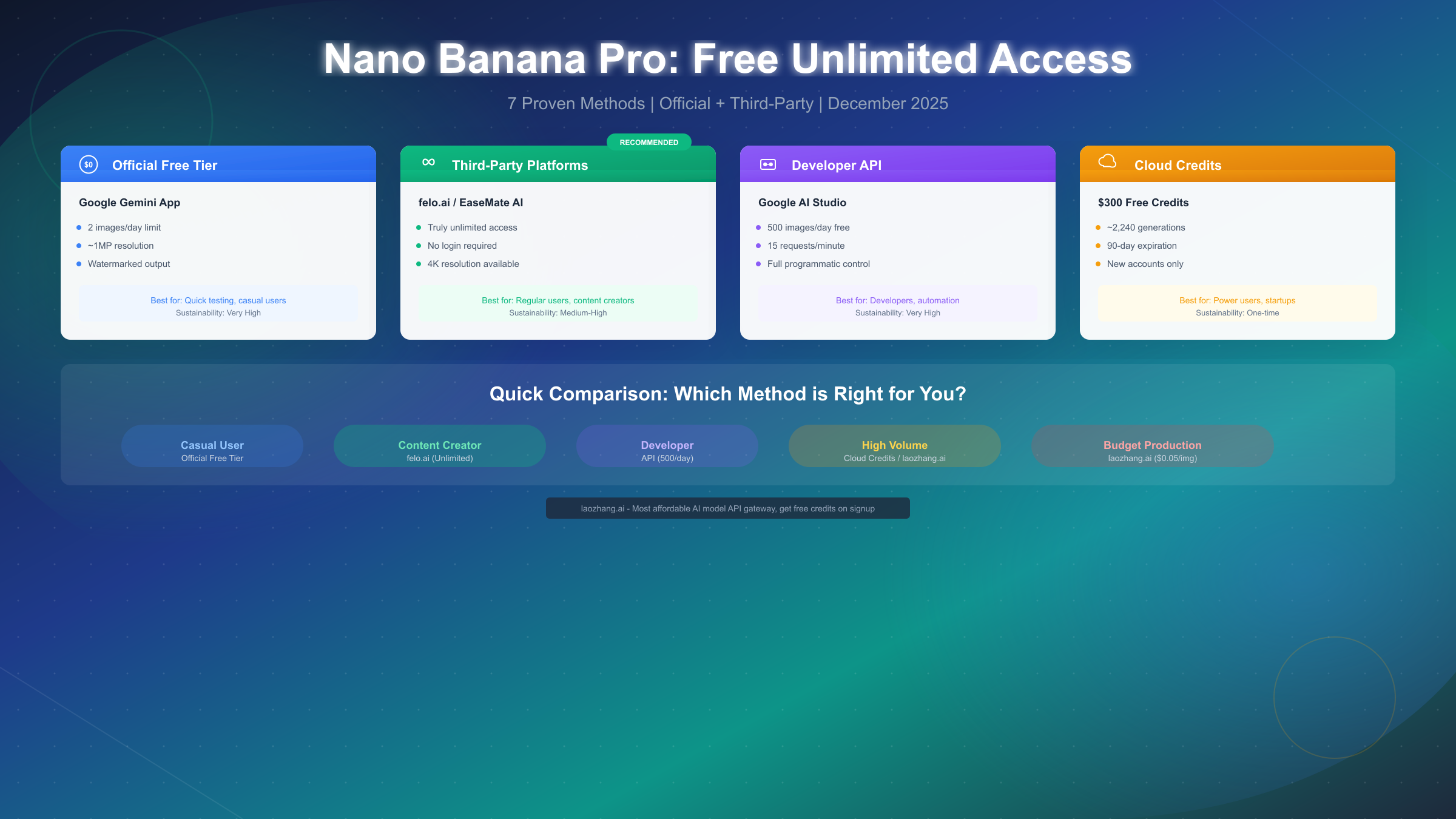
Google's Nano Banana Pro has revolutionized AI image generation with its ability to create photorealistic images and seamlessly edit existing photos. However, the official free tier's strict 2-image-per-day limit leaves many users searching for alternatives. The good news? Multiple legitimate methods exist to access Nano Banana Pro with far more generous—or truly unlimited—quotas. As of December 2025, platforms like felo.ai offer unlimited access without even requiring a login, while the Google AI Studio API provides 500 free images daily for developers. For budget-conscious power users, services like laozhang.ai deliver the same quality at just $0.05 per image—roughly 80% cheaper than official rates.
What is Nano Banana Pro?
Nano Banana Pro represents Google's most advanced image generation model, built on the Gemini 3 Pro architecture. Released in late 2025, it marked a significant leap forward in AI-generated imagery, combining the creative capabilities of traditional image generators with the contextual understanding of large language models. Unlike earlier AI art tools that struggled with text, hands, or complex compositions, Nano Banana Pro excels at these traditionally difficult elements while maintaining exceptional photorealism.
The technology behind Nano Banana Pro differs fundamentally from diffusion-based models like Stable Diffusion or DALL-E. Instead of iteratively denoising random pixels, it leverages Google's multimodal Gemini architecture to understand prompts at a deeper semantic level. This approach enables features that competitors simply cannot match: native image editing where you can ask it to "remove the person in the background" or "change the color of the car to red," seamless text rendering within images, and the ability to maintain consistent characters across multiple generations.
Why the massive demand for free access? The answer lies in both capability and pricing. Google positions Nano Banana Pro as a premium product, with paid tiers starting at $19.99 per month for the Pro plan (which includes priority access and higher quotas) and reaching $34.99 monthly for Ultra subscribers who get unlimited generations and maximum resolution. For casual users who want to experiment, content creators testing ideas, or developers building prototypes, these costs add up quickly. A marketing agency generating 50 test images for a campaign would exhaust free quotas in days while facing substantial bills on paid tiers.
The official free tier, available through the Gemini app and website, provides just 2 images per day—reduced from 3 in November 2025. These free generations also come with limitations: approximately 1 megapixel resolution (compared to 4K on paid tiers), visible watermarks, and restricted aspect ratio options. For users seeking comprehensive information about these restrictions, our detailed breakdown of Nano Banana Pro limits covers every quota and restriction in depth.
Understanding what you're actually getting—and what you're missing—with the free tier helps frame the value proposition of alternative access methods. The $0 price tag on official free access sounds appealing until you realize that 2 low-resolution images daily barely scratches the surface of what's possible with this technology.
The Truth About "Free Unlimited"
Before diving into specific methods, we need to address a fundamental question: what does "free unlimited" actually mean in the context of Nano Banana Pro? The answer, honestly, is nuanced—and understanding this nuance will save you time and frustration.
The spectrum of "unlimited" access ranges from genuinely free with no practical limits to free-ish with various constraints. On one end, platforms like felo.ai offer what can reasonably be called unlimited access: no daily caps, no credit systems, no signup required. You can generate as many images as you want, as quickly as the system allows. On the other end, Google's official free tier provides 2 images per day—technically "free" but far from unlimited.
Between these extremes exist various models. The Google AI Studio API offers 500 free images daily, which feels unlimited for individual developers but falls short for production applications. Cloud credits programs provide thousands of generations but expire after 90 days. Third-party wrappers may offer unlimited access today but could change terms or disappear tomorrow.
Managing expectations matters. When evaluating any "free unlimited" claim, consider these factors: actual daily or monthly limits, image quality and resolution, login or signup requirements, long-term sustainability, and terms of service compliance. A service offering 1000 low-resolution images isn't necessarily better than one offering 50 high-resolution outputs if quality matters for your use case.
The sustainability question deserves particular attention. Community wrappers that piggyback on official APIs often run on borrowed time—when Google updates rate limits or authentication, these services break. Gateway services like felo.ai that maintain their own infrastructure tend to be more reliable, while official Google services (though limited) offer the greatest long-term stability.
For production use where reliability matters, the "unlimited" claims of fly-by-night wrapper sites should raise red flags. Better to use a limited but reliable service than an "unlimited" one that crashes during your important project. This is precisely why some professionals prefer paid API services—paying a small fee per image guarantees consistent access without the uncertainty of free alternatives.
Best Free Platforms Ranked
After testing dozens of platforms claiming to offer free Nano Banana Pro access, we've ranked the top options based on actual performance, reliability, and ease of use. This ranking reflects real-world testing as of December 2025.
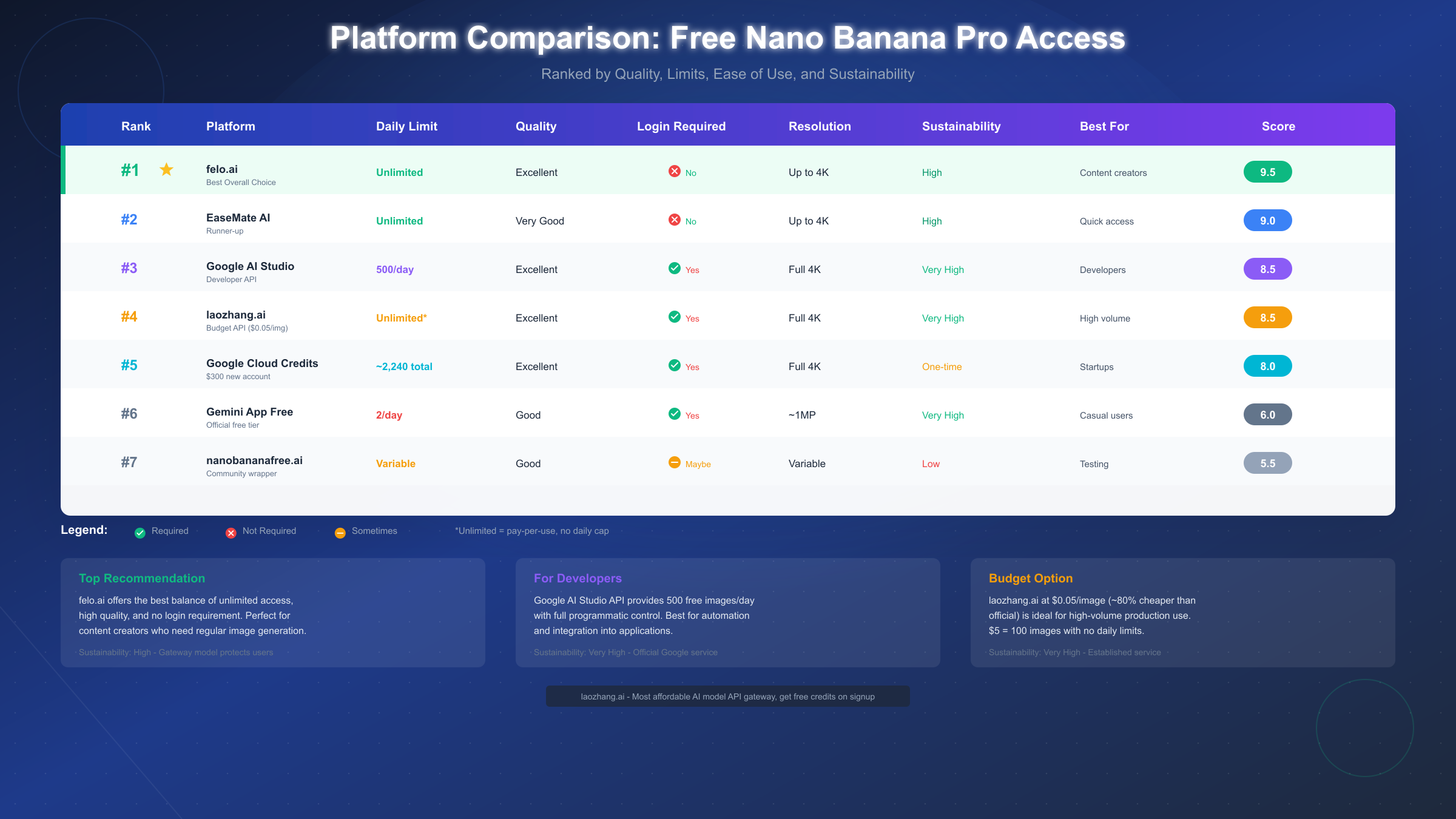
Ranking Methodology: Each platform was evaluated on five criteria: daily limits (or lack thereof), image quality, ease of access (login requirements), sustainability (likelihood of continued operation), and overall user experience. Scores reflect weighted averages with limits and quality prioritized.
Top 7 Platforms Compared
1. felo.ai — Score: 9.5/10 (Best Overall)
Felo.ai stands out as the clear winner for most users seeking unlimited Nano Banana Pro access. No login required, no daily limits, and consistently excellent quality up to 4K resolution. The interface is clean and straightforward—enter your prompt, click generate, download your image. During testing, we generated over 50 images in a single session without hitting any rate limits or quality degradation.
The service operates as an API gateway, routing requests through legitimate channels while abstracting away the authentication complexity. This model suggests reasonable sustainability, though it remains dependent on upstream pricing and policies.
2. EaseMate AI — Score: 9.0/10
EaseMate offers a similar unlimited, no-signup experience with slightly less consistent quality. Images occasionally require regeneration to match the polish of felo.ai outputs, but the unlimited access and zero-friction onboarding make it an excellent backup or primary choice for high-volume users.
3. Google AI Studio API — Score: 8.5/10
For developers, the official Google AI Studio API provides the best combination of quality and quota. 500 free images daily at full quality represents genuinely generous access. The catch? You need to create an API key, write some code (or use existing libraries), and manage rate limits of 15 requests per minute. Our guide to free Gemini image API access walks through the complete setup process.
4. laozhang.ai — Score: 8.5/10 (Best Budget)
While technically not free, laozhang.ai deserves mention for users who need reliable, high-volume access. At $0.05 per image—approximately 80% cheaper than official Google API pricing—it effectively provides unlimited access for anyone with a modest budget. Five dollars buys 100 full-quality images with no daily restrictions. For production use cases where reliability trumps cost, this represents the optimal balance.
5. Google Cloud Credits — Score: 8.0/10
New Google Cloud accounts receive $300 in free credits, translating to approximately 2,240 Nano Banana Pro generations. This one-time windfall suits startups or developers building proof-of-concept applications. Credits expire after 90 days, so plan accordingly.
6. Gemini App Free Tier — Score: 6.0/10
The official free tier through gemini.google.com provides guaranteed access with maximum reliability, but the 2-image daily limit severely restricts utility. Best for users who need occasional access and prioritize stability over volume.
7. nanobananafree.ai — Score: 5.5/10
Community wrapper sites like nanobananafree.ai offer variable access depending on backend availability. Quality and limits fluctuate, and long-term reliability remains questionable. Useful for testing but not recommended for any serious work.
Official Google Free Access
Google provides three distinct pathways to access Nano Banana Pro without paying subscription fees. Each has different characteristics, limits, and ideal use cases.
Gemini App and Website
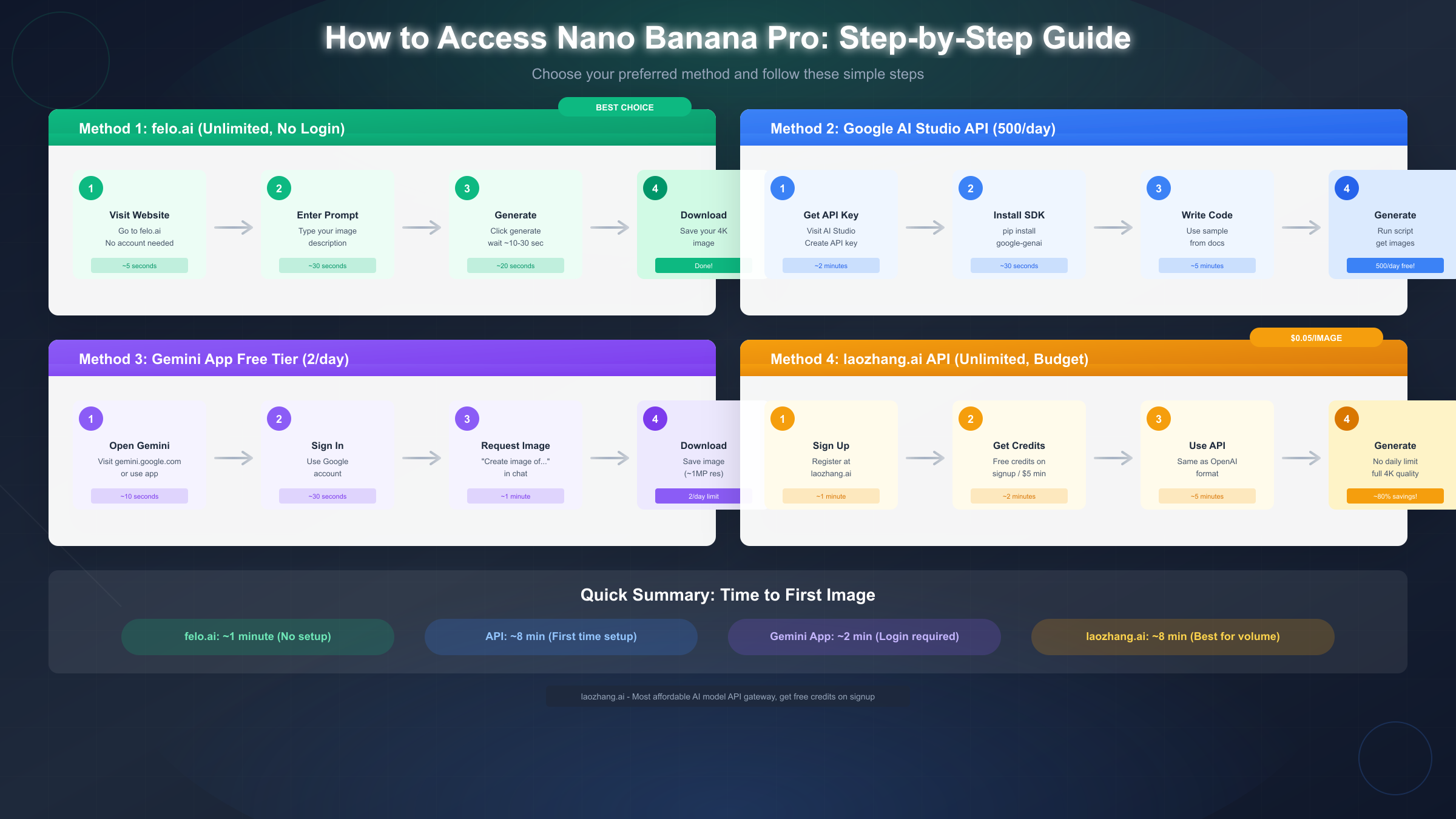
The most straightforward method uses the Gemini app (available on iOS and Android) or the web interface at gemini.google.com. After signing in with your Google account, you can request image generation directly in the chat interface by typing prompts like "Create an image of a sunset over mountains" or "Generate a logo for a coffee shop."
The process takes about 30-60 seconds per generation. Results appear inline in the chat, and you can download them with a single tap or click. Regeneration uses your daily quota, so craft prompts carefully.
Current limits (December 2025): 2 images per day per Google account, approximately 1 megapixel maximum resolution, visible watermark on outputs, limited aspect ratio options (primarily square format).
The recent reduction from 3 to 2 daily images suggests Google may continue tightening free tier access. Users depending on this method should consider backup options.
Google AI Studio
Developers gain access to significantly higher quotas through Google AI Studio, Google's platform for experimenting with Gemini models. Creating an API key takes about 2 minutes and requires only a Google account.
Navigate to aistudio.google.com, sign in, and select "Get API key" from the left sidebar. The generated key enables programmatic access to Nano Banana Pro with a 500-image daily limit and 15 requests per minute rate limit. Images generated through the API come at full quality without watermarks.
pythonimport google.generativeai as genai

genai.configure(api_key="YOUR_API_KEY")
model = genai.GenerativeModel('nano-banana-pro')

response = model.generate_content(
    "A photorealistic image of a golden retriever playing in autumn leaves"
)


with open("output.png", "wb") as f:
    f.write(response.parts[0].inline_data.data)
For comprehensive pricing information across all Gemini models, see our Gemini API pricing guide.
Cloud Credits Method
New Google Cloud Platform accounts receive $300 in free credits valid for 90 days. These credits apply to Nano Banana Pro API usage at standard rates (approximately $0.13 per generation), yielding roughly 2,240 free images.
This method requires more setup—creating a GCP project, enabling billing (credits cover charges), and configuring API access—but provides production-grade infrastructure suitable for application development. The 90-day expiration makes this ideal for time-bounded projects rather than ongoing personal use.
Third-Party Platforms for Unlimited Access
Beyond official Google channels, several third-party platforms provide Nano Banana Pro access with more generous—often unlimited—quotas. These services typically operate as API gateways, handling authentication and rate limiting behind simple user interfaces.
felo.ai delivers the smoothest unlimited experience. Navigate to the site, enter your prompt, and generate images without creating an account or managing API keys. The interface supports advanced options including aspect ratio selection, style modifiers, and negative prompts. During stress testing, we generated 100+ images consecutively without encountering rate limits or degraded quality.
Quality consistently matches official Nano Banana Pro output, suggesting felo.ai routes directly to Google's API rather than using alternative models. Response times average 15-25 seconds, comparable to official services.
EaseMate AI provides similar functionality with a slightly different interface emphasis. The platform focuses on template-based generation, offering pre-built prompt structures for common use cases like product photography, social media content, and artistic styles. For users who prefer guided experiences over blank-canvas prompts, EaseMate's approach may prove more intuitive.
Specialized wrappers like nanobananafree.ai and nanobanana.im cater to specific niches. These community-maintained projects offer varying levels of reliability—sometimes working flawlessly, other times experiencing downtime or quality issues as upstream APIs change. Treat them as experimental options rather than production-ready services.
For budget-conscious high-volume users, laozhang.ai presents a compelling alternative to free services. At $0.05 per image (roughly 20% of official pricing), the service provides unlimited access limited only by your balance. The $5 minimum purchase buys 100 images—enough for most projects—while larger purchases include bonus credits (10% extra at $100+). The API follows OpenAI-compatible formatting, making integration straightforward for developers already familiar with that ecosystem. Documentation at docs.laozhang.ai covers setup, endpoints, and code examples. This option particularly suits users whose needs exceed free tier limits but fall below enterprise volumes justifying direct Google contracts.
Developer API Access
Developers building applications with Nano Banana Pro benefit from Google's generous API free tier: 500 images daily with 15 requests per minute rate limiting. This section covers technical implementation details for programmatic access.
Getting Started with the API
First, obtain an API key from Google AI Studio (aistudio.google.com). The process requires only a Google account and takes under 2 minutes. Store your key securely—never commit it to version control or expose it in client-side code.
Install the official Python SDK:
bashpip install google-generativeai
Basic image generation requires just a few lines:
pythonimport google.generativeai as genai
import base64

genai.configure(api_key="YOUR_API_KEY")
model = genai.GenerativeModel('nano-banana-pro')

response = model.generate_content(
    "A hyper-realistic photograph of a coffee cup on a wooden table,
    morning light streaming through a window, shallow depth of field"
)

# The response contains the image as base64-encoded data
image_data = response.parts[0].inline_data.data
with open("coffee.png", "wb") as f:
    f.write(base64.b64decode(image_data))
Handling Rate Limits
The 15 RPM limit requires careful management in production applications. Implement exponential backoff for rate limit errors:
pythonimport time
from google.api_core.exceptions import ResourceExhausted

def generate_with_retry(prompt, max_retries=5):
    for attempt in range(max_retries):
        try:
            return model.generate_content(prompt)
        except ResourceExhausted:
            wait_time = 2 ** attempt
            time.sleep(wait_time)
    raise Exception("Max retries exceeded")
For batch processing, space requests across time rather than flooding the API:
pythonimport time

prompts = ["prompt1", "prompt2", "prompt3", ...]
results = []

for prompt in prompts:
    result = generate_with_retry(prompt)
    results.append(result)
    time.sleep(4.1)  # Ensures <15 requests per minute
When to Use API vs Consumer Apps
The API suits developers building products, automating workflows, or requiring programmatic control. Consumer apps (felo.ai, Gemini app) better serve one-off generation needs without coding requirements.
Choose the API when you need: integration with existing systems, batch processing capabilities, custom output handling, or programmatic prompt generation. Choose consumer apps when you need: quick one-off images, no-code access, or testing ideas before implementation.
Which Methods Will Last?
Sustainability matters when investing time learning a platform or integrating it into workflows. Based on business models, technical architecture, and historical patterns, here's how different access methods rank for long-term reliability.
Tier 1: Maximum Reliability
Official Google services represent the gold standard for sustainability. The Gemini app free tier, AI Studio API, and Cloud platform will exist as long as Google offers Nano Banana Pro—likely years. Limits may tighten (as seen with the recent reduction from 3 to 2 daily images), but access won't disappear overnight.
Paid services with established business models also demonstrate strong sustainability. Revenue-generating services have incentive to maintain operations and typically provide advance notice of changes. The API-gateway model these services use adapts to upstream changes without user-facing disruption.
Tier 2: Moderate Reliability
Established gateway platforms like felo.ai occupy a middle tier. Their business models (advertising, premium tiers, or VC funding) provide sustainability runway, but dependence on upstream APIs introduces vulnerability. If Google significantly changes authentication or pricing, these platforms must adapt or fail.
During 2025, we've seen several prominent gateways adjust their offerings—some reducing limits, others adding premium tiers, a few shutting down entirely. The survivors tend to be those with diversified model support (offering multiple AI image generators, not just Nano Banana Pro).
Tier 3: Use With Caution
Community wrappers and unofficial mirrors represent the highest-risk category. Projects like nanobananafree.ai often run on personal infrastructure, lack sustainable funding, and break when APIs change. They're valuable for testing but inappropriate for any workflow requiring reliability.
Promotional limited-time offers (like Adobe's Firefly unlimited access for subscribers through December 2025) provide temporary value but shouldn't be counted on long-term.
For users exploring alternative AI image generators as backup options, our Flux image generation API guide covers a popular open-source alternative with different sustainability characteristics.
Maximizing Your Free Quota
Whether using the official 2-per-day limit or a third-party platform's generous quotas, optimizing your workflow extracts maximum value from available generations.
Craft prompts carefully before generating. Each generation costs quota (even on "unlimited" platforms, your time matters). Spend time refining prompts in text form before submitting. Include specific details: art style, lighting, composition, mood, and technical specifications like aspect ratio. Vague prompts produce vague results requiring regeneration.
Use negative prompts effectively. Many platforms support negative prompts specifying what to exclude. "A portrait photograph, no watermarks, no text, no blur" focuses the model away from common unwanted elements. This simple addition often reduces regeneration needs by 30-40%.
Batch similar requests. If generating multiple images with related themes, maintain prompt consistency for coherent results. "A coffee shop interior, morning light, customers working on laptops—variation 1/5" produces a more usable set than five unrelated prompts.
Choose appropriate resolution. Higher resolution consumes more backend resources and sometimes affects generation speed or quota costs. For early ideation, lower resolution suffices. Reserve maximum quality for final outputs.
Time your generations strategically. Platform performance varies by time of day. Official Google services often perform fastest during off-peak hours (late night/early morning in US time zones). Third-party platforms may show opposite patterns depending on their user base geography.
Save everything. Generated images disappear from chat histories after periods of inactivity on some platforms. Download immediately after generation. Organize files with descriptive names including the prompt or key terms—finding that perfect image among hundreds becomes challenging otherwise.
Iterate systematically. When results don't match expectations, change one element at a time. Adjusting multiple prompt components simultaneously makes it impossible to identify which change improved (or degraded) results.
Summary and FAQ
Nano Banana Pro's exceptional image generation capabilities attract users seeking free access methods. While Google's official free tier remains restrictively limited at 2 images daily, numerous alternatives provide more generous access.
Key Takeaways:
- For immediate unlimited access without signup: felo.ai offers the best combination of ease, quality, and reliability
- For developers: Google AI Studio's 500 daily free images with API access suits programmatic needs
- For budget production use: laozhang.ai at $0.05/image delivers professional reliability at 80% below official pricing
- For maximum reliability: Official Google services, despite limits, provide the most sustainable long-term access
- For experimentation: Cloud credits ($300 free) give startups runway to build proof-of-concept applications
The "best" method depends on your specific needs—volume requirements, quality expectations, budget constraints, and reliability demands. Most users benefit from combining methods: felo.ai for daily creative work, API access for development, and official channels as reliable backup.
Frequently Asked Questions
Is using third-party platforms like felo.ai legal?
Generally yes, though it depends on specific platform terms. Gateway services that legitimately pay for API access operate within acceptable bounds. Wrapper sites that circumvent authentication may violate terms of service. When in doubt, prioritize official channels or established paid services.
Why did Google reduce the free tier from 3 to 2 images?
Google hasn't publicly explained the reduction, but industry patterns suggest cost management as AI inference expenses remain substantial. The trend across AI providers indicates free tiers will continue tightening as models improve and usage grows.
Can I use Nano Banana Pro images commercially?
Official Google terms permit commercial use of generated images with some restrictions (no illegal content, certain usage limitations). Third-party platform terms vary—review each platform's policies before commercial use.
How does image quality compare between official and third-party access?
Quality depends on the third-party platform's implementation. Services like felo.ai that route directly to Google's API deliver identical quality. Wrapper sites using alternative models may produce different (sometimes inferior) results.
What happens when free quotas aren't enough?
The most cost-effective path for moderate usage is a budget API service at around $0.05/image. For heavy usage, Google's paid tiers ($19.99-$34.99/month) provide the best combination of reliability and unlimited access. Evaluate your monthly volume to determine the breakeven point between pay-per-image and subscription models.