
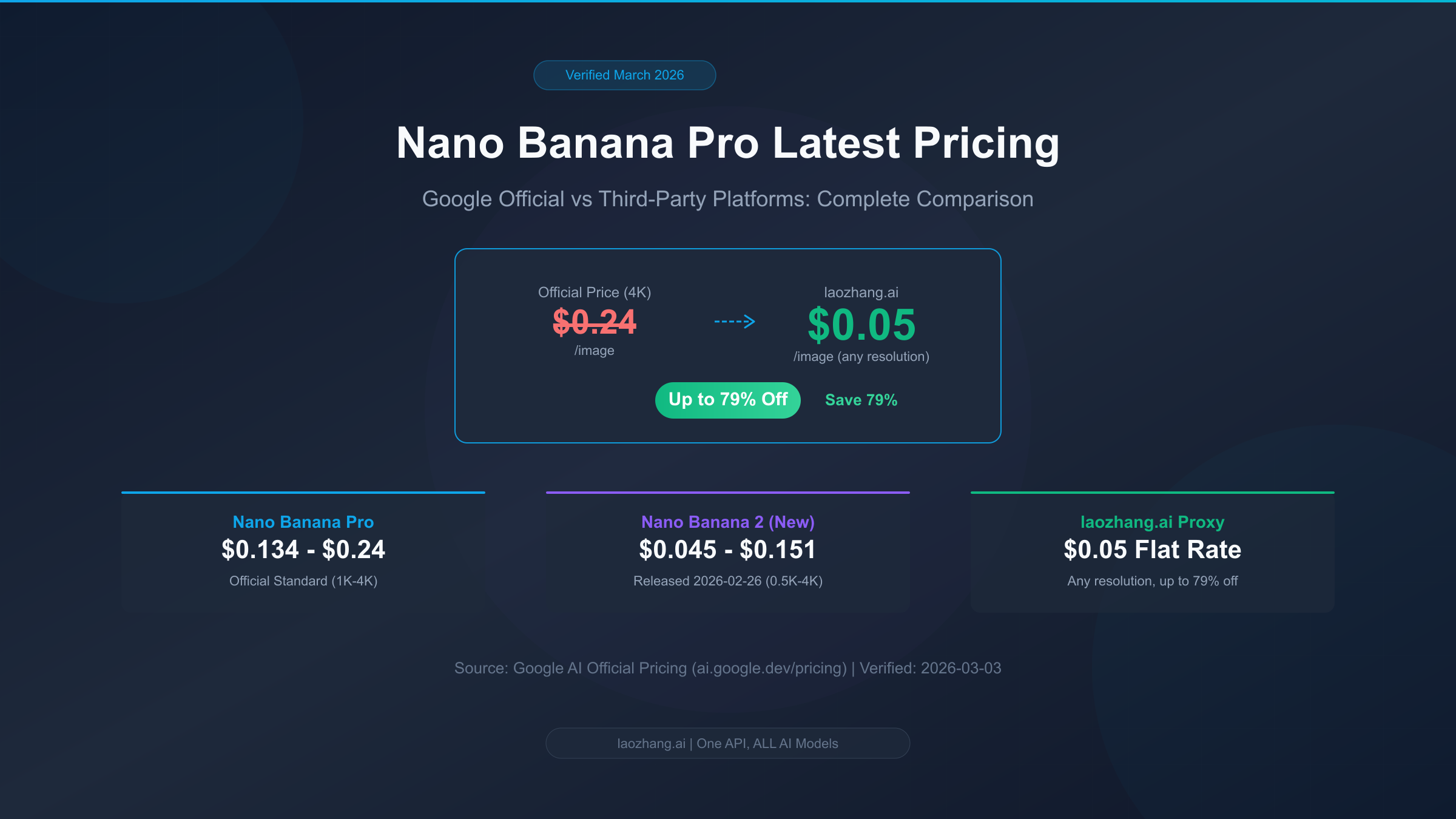
Nano Banana Pro is Google DeepMind's top-tier AI image generation model built on Gemini 3 Pro, renowned for its exceptional image quality and support for up to 4K resolution. As of March 2026, the official standard price ranges from $0.134/image (2K) to $0.24/image (4K), while the third-party API proxy platform laozhang.ai offers just $0.05/image regardless of resolution — equivalent to roughly 20% of the official 4K price, saving up to 79% (Google AI official pricing page, verified 2026-03-03).
TL;DR
Nano Banana Pro's pricing structure is more complex than most people realize. Google offers multiple pricing paths including standard API calls, Batch processing, and subscription plans. Add in the newly released Nano Banana 2 (late February 2026) and the earlier Imagen 4, and choosing the best plan requires a clear understanding of the full landscape. Here are the key numbers you need to know — all prices verified on March 3, 2026, sourced from the Google AI official pricing page (ai.google.dev/pricing).
- Nano Banana Pro official standard price: $0.134/image (1K/2K), $0.24/image (4K)
- Nano Banana 2 official standard price: $0.045/image (512px) to $0.151/image (4K), 25%-66% cheaper than Pro
- laozhang.ai proxy price: $0.05/image flat rate, regardless of resolution, as low as 20% of official 4K pricing
- Subscription plans: From free tier (2-3 images/day) to AI Ultra ($249.99/month for ~1,000 images)
Nano Banana Pro March 2026 Complete Pricing Breakdown
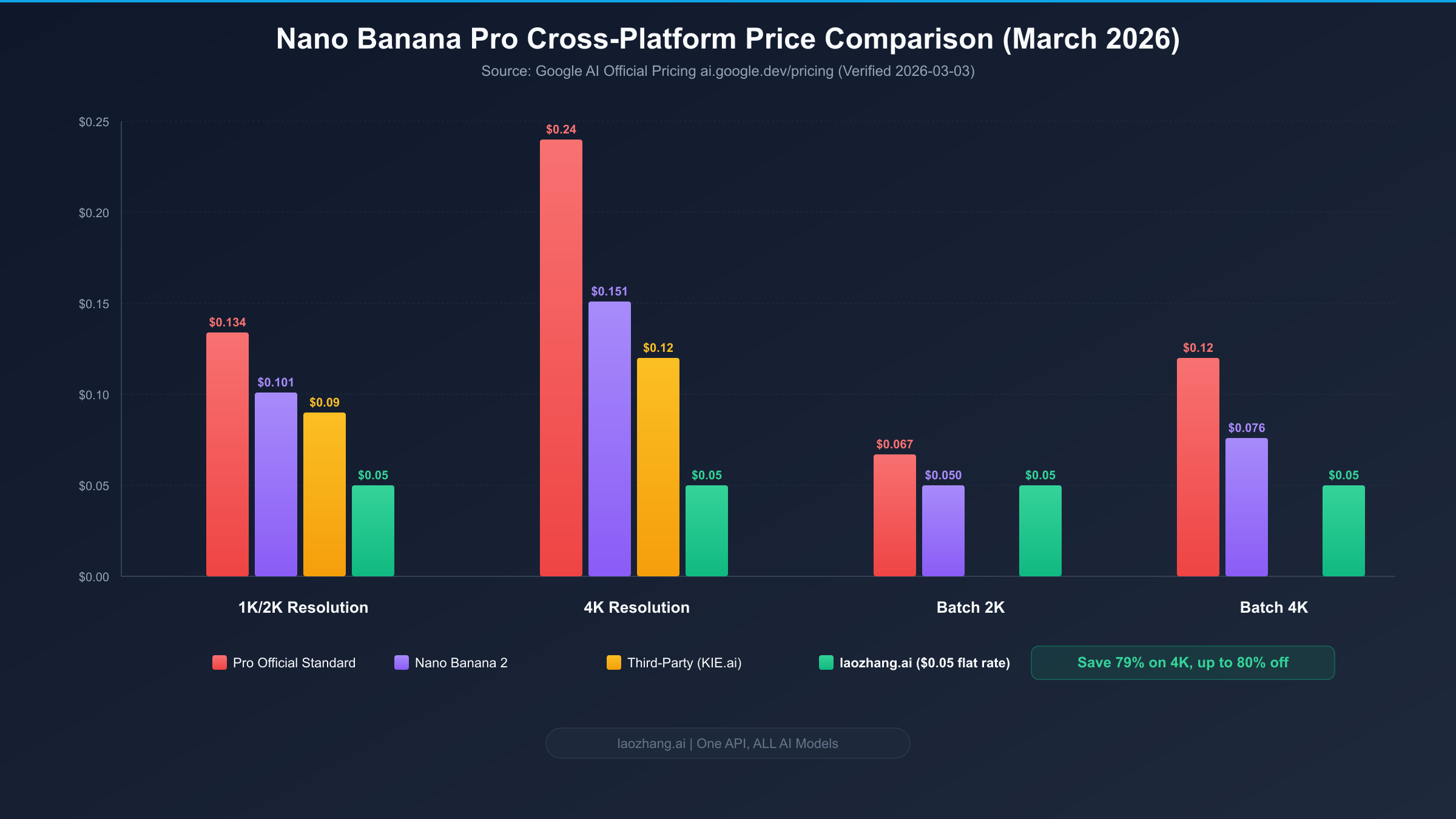
Understanding Nano Banana Pro's pricing structure starts with knowing that Google offers two fundamentally different API calling modes, and the price difference between them can be as much as twofold. Standard mode is real-time, ideal for scenarios requiring instant results, such as interactive image generation applications. Batch mode is asynchronous bulk processing, typically returning results within 24 hours, suited for large-scale image production scenarios that don't require real-time delivery — priced at exactly half the standard rate. This distinction is often overlooked by developers new to Nano Banana Pro. If your use case allows asynchronous processing, simply switching to Batch mode will immediately cut your costs by 50% (ai.google.dev/pricing, verified 2026-03-03).
Looking at the specific numbers, Nano Banana Pro in standard mode charges a uniform $0.134/image for 1K and 2K resolution, while 4K resolution jumps to $0.24/image — nearly an 80% increase. In Batch mode, 1K/2K costs $0.067/image and 4K costs $0.12/image. Notably, 1K and 2K are priced identically, meaning that if your application needs images between 1024px and 2048px, choosing 2K adds zero extra cost while delivering better clarity. For a deeper dive into the various API pricing details, check out our complete API pricing comparison guide.
Beyond the pay-per-call API model, Google also offers subscription plans through different AI Studio membership tiers for using Nano Banana Pro. The free tier allows 2-3 images per day at 1MP resolution (approximately 1K) with watermarks. The AI Plus subscription ($7.99/month) increases the daily quota to roughly 50 images and removes watermarks, AI Pro ($19.99/month) further increases this to about 100 images, and the top-tier AI Ultra ($249.99/month) provides approximately 1,000 images per month with 4K resolution support. The effective per-image cost of subscriptions depends on how much of your quota you actually use — if you consistently generate close to the monthly limit, AI Pro's equivalent unit price works out to about $0.20/image, actually more expensive than the standard API. However, if you also need other Google AI Studio features (such as text generation, code assistance, etc.), the subscription may offer better overall value.
Overall, Nano Banana Pro's official pricing places it in the mid-to-high range of the AI image generation market. Compared to Google's own Imagen 4 (Fast at $0.02/image, Standard at $0.04/image, Ultra at $0.06/image), Pro costs 2-4x more, but this premium buys you significantly better image quality and a higher resolution ceiling. For budget-conscious users who still need Pro-level quality, third-party proxy platforms offer an extremely attractive alternative.
$0.05 Per Image: How Third-Party Platforms Achieve 80% Off
Many developers react with skepticism when they first hear "Nano Banana Pro at $0.05 per image" — the official standard price starts at $0.134, so how could any platform possibly offer $0.05? Behind this seemingly unreasonable price lies a clear business logic, and understanding this logic will help you evaluate the reliability and sustainability of third-party platforms.
The core model of third-party API proxy platforms is bulk procurement plus aggregated distribution. Platforms like laozhang.ai secure significant volume discounts by signing enterprise-level agreements with Google Cloud, then resell API calls to developers at thin margins but high volume. Google's enterprise pricing structure offers substantial discounts to high-volume customers (typically in the 60%-80% discount range), which is the foundation that makes $0.05/image viable. For the platform, profits come from aggregating demand from many small and medium developers, earning a slim margin on each transaction but at significant total volume. For developers, it means bypassing the hurdle and complexity of negotiating enterprise contracts with Google Cloud directly, gaining access to near-enterprise pricing.
Let's do a precise discount calculation to see exactly what $0.05/image means at different resolutions. laozhang.ai's pricing strategy is a flat $0.05/image regardless of resolution, which means the higher the resolution, the greater the savings percentage. For 2K resolution, the official standard price is $0.134, so $0.05 represents a 63% discount (paying just 37% of the official price). For 4K resolution, the official standard price is $0.24, so $0.05 represents a 79% discount (paying just 21% of the official price) — this is the precise basis for the "as low as 20% of official pricing" claim. Even compared to Batch mode, $0.05 for 4K is only 42% of the Batch price ($0.05/$0.12), still saving more than half.
Looking across the broader third-party market, different platforms have notably different pricing strategies. laozhang.ai uses a flat $0.05/image rate regardless of resolution, which is extremely favorable for high-resolution users. KIE.ai prices at $0.09/image (2K) to $0.12/image (4K), roughly 33%-50% off the official price. fal.ai's price range is $0.09-$0.15/image, increasing with resolution. PiAPI has the highest pricing at $0.105/image (2K) to $0.18/image (4K), only about 25% off official pricing. In a comprehensive comparison, if you primarily use 4K resolution, laozhang.ai's $0.05 flat rate is arguably the most competitive option among all third-party platforms, as other platforms' 4K prices generally fall in the $0.12-$0.18 range while laozhang.ai maintains $0.05 with no upcharge.
Of course, price isn't the only consideration when choosing a third-party platform. You also need to evaluate API compatibility (whether it's compatible with Google's official SDK format), response latency (whether there's additional forwarding delay), availability SLA (what happens during outages), and billing transparency (whether there are hidden fees). laozhang.ai's performance in these areas includes: fully compatible OpenAI-format API interface, tested additional latency within 200-500ms, and detailed usage dashboard with spending records. Later sections will discuss in detail how to evaluate and mitigate third-party platform risks.
Nano Banana Pro vs Nano Banana 2: Which One Is More Cost-Effective
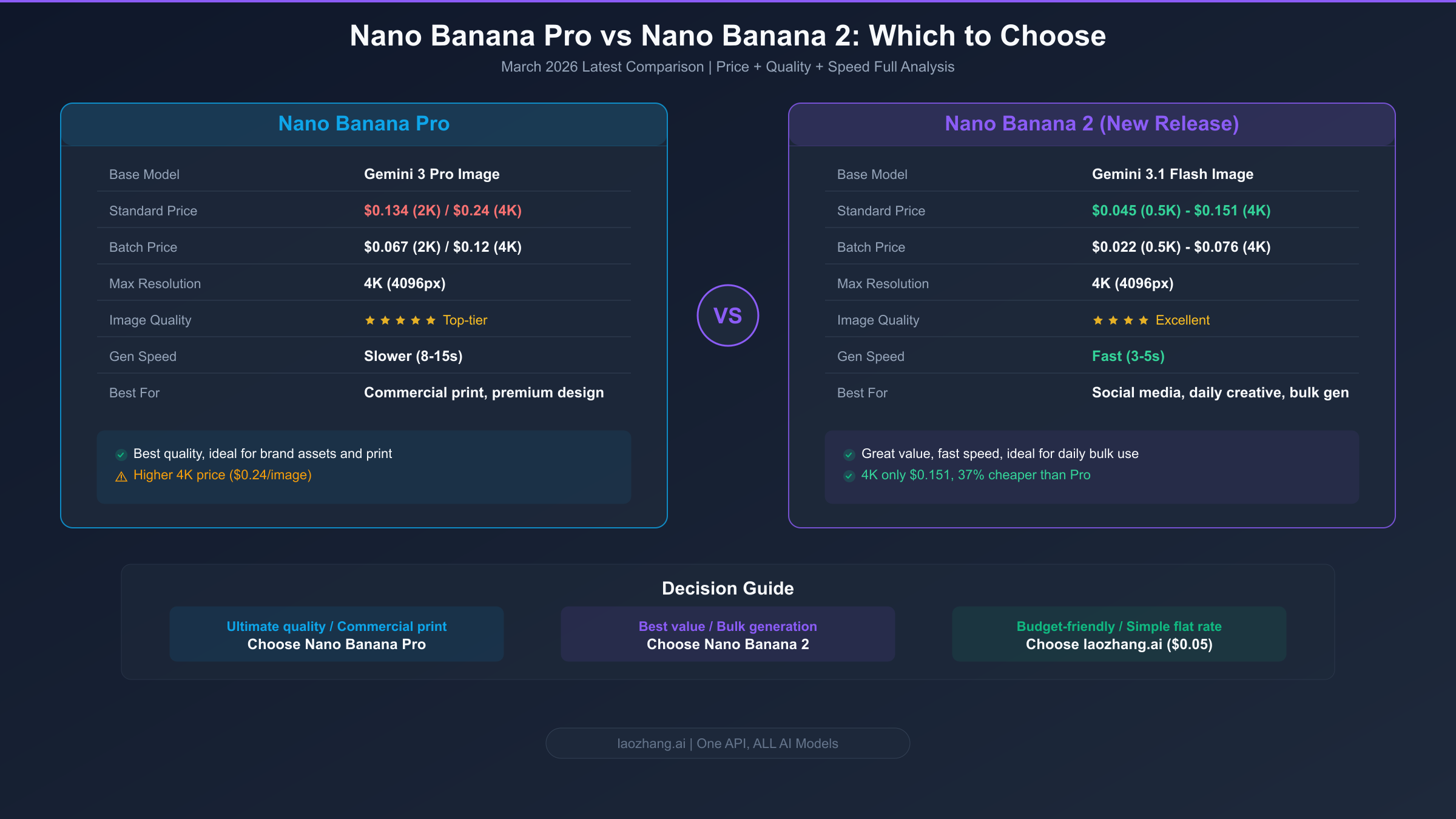
On February 26, 2026, Google officially released Nano Banana 2 (based on Gemini 3.1 Flash Image), presenting Nano Banana Pro users with a new choice to make. Nano Banana 2's pricing is significantly lower than Pro — standard mode at $0.045/image for 512px, $0.067/image for 1K, $0.101/image for 2K, and $0.151/image for 4K (ai.google.dev/pricing, verified 2026-03-03). At 2K resolution, Banana 2 is about 25% cheaper than Pro ($0.101 vs $0.134), and at 4K resolution it's 37% cheaper ($0.151 vs $0.24). If you're interested in a comprehensive comparison of these two models, we have a dedicated full comparison analysis of Nano Banana 2 vs Pro.
The price difference reflects a fundamental distinction in positioning between the two models. Nano Banana Pro is built on Gemini 3 Pro, the flagship large model, pursuing the current technical ceiling of image quality, with industry-leading performance in complex scene rendering, fine detail texture reproduction, and lighting/shadow depth — at the cost of slower generation speed (typically 8-15 seconds/image) and a higher unit price. Nano Banana 2 is built on Gemini 3.1 Flash, with a speed-first architecture design that achieves generation times of just 3-5 seconds/image, delivering significant cost optimization while maintaining excellent image quality. Simply put, Pro is the "quality ceiling" while Banana 2 is the "value benchmark."
When making your actual choice, I recommend starting from your specific use case. If your application demands the absolute highest image quality — such as brand design assets, commercial advertising images, premium e-commerce product photos, or print-ready materials — Nano Banana Pro's quality advantage justifies the extra cost. Specifically, Pro visibly outperforms Banana 2 in three dimensions: facial detail precision, text rendering clarity, and complex lighting effects. Conversely, if your use case involves social media graphics, blog post illustrations, casual creative exploration, or bulk generating candidate assets where quality needs to be "excellent but not necessarily top-tier," Banana 2's value proposition becomes very compelling — the same budget lets you generate more images to choose from, or redirect the savings to other parts of your workflow.
It's worth specifically highlighting the Batch mode comparison. Nano Banana 2's Batch pricing is extremely competitive: just $0.022/image at 512px, $0.034/image at 1K, $0.050/image at 2K, and $0.076/image at 4K. In the 2K Batch scenario, Banana 2's $0.050/image already matches laozhang.ai's proxy price. But if you need 4K resolution and can accept asynchronous processing, Banana 2 Batch at $0.076/image versus Pro Batch at $0.12/image still saves you 37%. For ultra-large-scale image production scenarios (tens of thousands of images and above), using Nano Banana 2 Batch mode directly may be the most cost-optimal official solution.
Decision summary: Choose Pro for ultimate quality, choose Banana 2 for best value, choose laozhang.ai ($0.05 flat rate) for the lowest per-image price without worrying about resolution tiers. There's no absolute winner among the three — only the question of which best matches your specific needs.
Cost Calculator by Volume: 100 to 10,000 Images Per Month
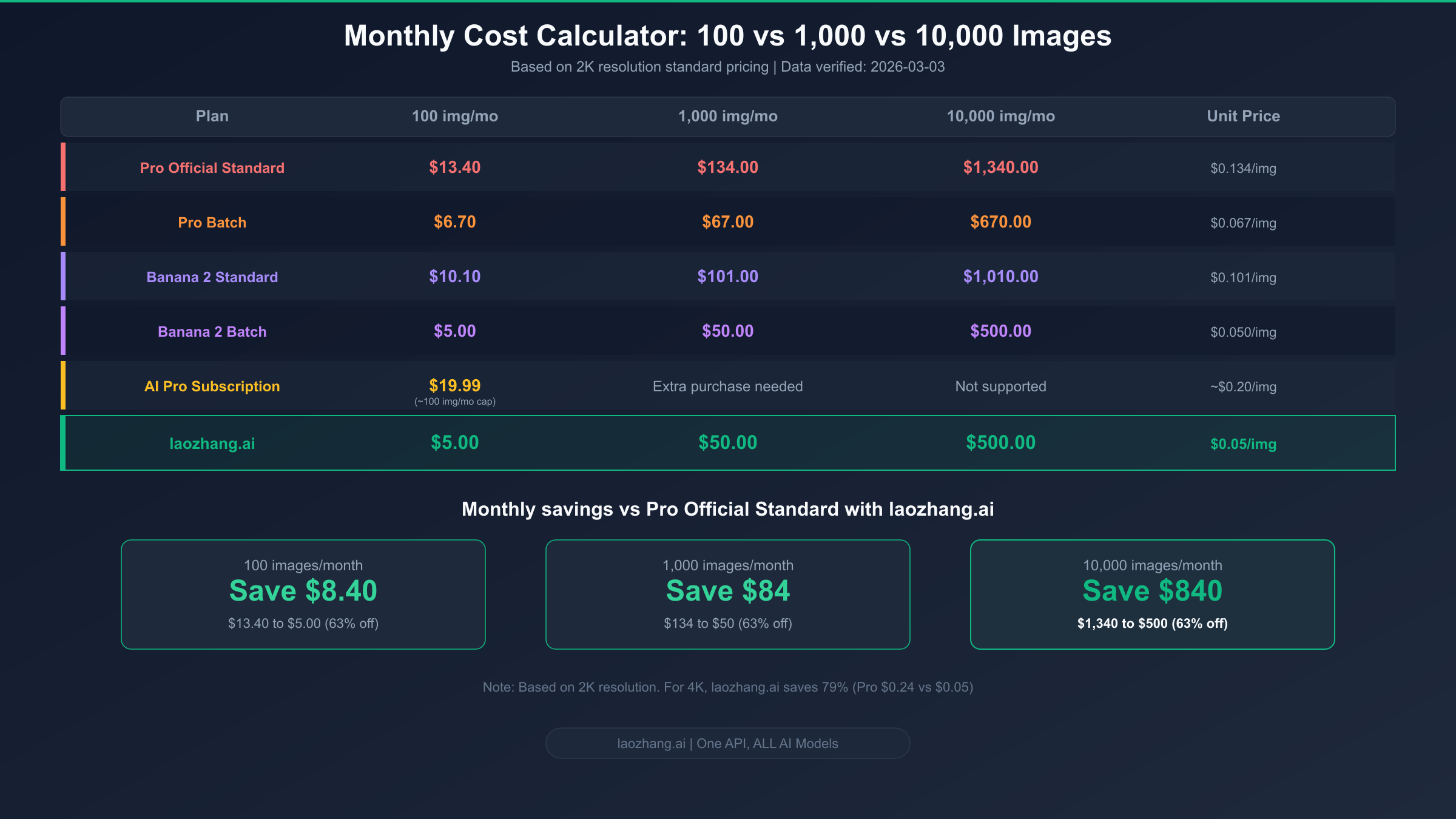
Price table numbers are hard to act on without the context of actual usage volumes, so let's run a real cost analysis across three typical volume tiers. The following calculations are based on 2K resolution in standard mode, which is the most common use case. All pricing data sourced from the Google AI official pricing page (verified 2026-03-03).
100 images/month: Typical volume for individual developers and small teams. If you generate about 100 images per month, Nano Banana Pro standard mode costs $13.40/month (100 x $0.134), Batch mode costs $6.70. Nano Banana 2 standard mode costs $10.10, Batch mode $5.00. The AI Pro subscription is $19.99/month (with ~100 image quota), making the effective per-image cost about $0.20 — actually the most expensive option. Through laozhang.ai, it's $5.00 (100 x $0.05). At this volume, Pro Batch and laozhang.ai are roughly comparable ($6.70 vs $5.00), but laozhang.ai has the advantage of not requiring you to wait for Batch's asynchronous returns — you get real-time results. For a more detailed look at how to optimize free tier usage, check out Nano Banana Pro free usage limits explained.
1,000 images/month: Medium-scale commercial applications. At 1,000 images per month, cost differences between plans start to widen significantly. Pro standard mode costs $134.00/month, Batch $67.00; Banana 2 standard $101.00, Batch $50.00; laozhang.ai comes to $50.00. At this volume, laozhang.ai and Banana 2 Batch cost exactly the same — both $50/month. But the former provides real-time responses and doesn't differentiate by resolution (you can switch to 4K anytime at no extra charge), while the latter requires accepting asynchronous processing but uses Google's direct official channel. The AI Ultra subscription ($249.99/month for ~1,000 image quota) is the least cost-effective option at this volume, with an effective unit price of about $0.25/image.
10,000 images/month: Large-scale production environments. At ten thousand images per month, cost control becomes the primary concern. Pro standard mode costs a hefty $1,340.00/month — a significant expense for most teams. Pro Batch can bring this down to $670.00. Banana 2 standard costs $1,010.00, Batch $500.00. laozhang.ai comes to $500.00. Comparing Pro standard mode to laozhang.ai, the latter saves $840 per month — enough to cover half a month's salary for a junior developer. Even compared to Pro Batch, laozhang.ai still saves $170 monthly. At the ten-thousand-image level, if your quality requirements don't absolutely demand Pro, strongly consider Banana 2 Batch ($500/month) or laozhang.ai ($500/month with real-time responses).
A clear pattern emerges from these calculations: the higher your volume, the greater the absolute savings from choosing the right plan. At 100 images/month, laozhang.ai saves $8.40 versus Pro standard; at 1,000 it saves $84; at 10,000 it saves $840. Annualized, a team producing ten thousand images monthly saves $10,080 per year just by switching to laozhang.ai. This is why pricing comparison isn't a "nice to know" exercise — it's a critical decision that directly impacts your project's P&L.
Saving Money and Avoiding Pitfalls: 5 Commonly Overlooked Hidden Costs
When evaluating the total cost of using Nano Banana Pro, many developers focus solely on API unit pricing while overlooking several factors that can significantly increase actual spending. Based on feedback from multiple developer communities and our own testing experience, the following five hidden costs are most commonly missed.
The resolution auto-upgrade fee trap. Nano Banana Pro's API can automatically select a higher output resolution under certain parameter configurations, particularly when you don't explicitly specify the output size. The default behavior is for the model to automatically determine the optimal resolution based on the prompt content, meaning a request you expected to output at 1K might be automatically upgraded to 2K or even 4K, with your bill charged at the actual output resolution. The fix is simple: explicitly set the sampleImageSize parameter in every API request (Pro supports 1024, 2048, 4096) to ensure the output resolution stays within your expectations. When using flat-rate platforms like laozhang.ai, this isn't a concern at all since every resolution costs $0.05/image.
Hidden costs from retries and failed requests. AI image generation isn't a 100% success-rate operation. Nano Banana Pro has a success rate of approximately 85%-95% on complex prompts, meaning every 100 requests may require 5-15 retries. While Google doesn't charge for explicit API errors (4xx/5xx status codes), each retry for a successfully generated but unsatisfactory result counts as a new paid call. High safety filter triggers are another common "invisible retry" scenario — your request gets blocked by the safety system, requiring prompt adjustments and resubmission. Experience shows that in production environments, you should estimate actual costs at 1.1-1.2x the API unit price, budgeting a 10%-20% buffer for retries.
Data transfer and storage costs. A single 4K resolution PNG image typically ranges from 5-15MB. If your application produces ten thousand 4K images per month, image storage alone requires 50-150GB. Google Cloud Storage standard storage costs approximately $0.020/GB/month, plus CDN distribution fees for images (approximately $0.08-$0.12/GB) — these seemingly small costs accumulate to significant amounts at scale. The optimization recommendation: unless you must preserve the original resolution, converting to WebP before storage can compress file sizes by 60%-80%, significantly reducing downstream storage and transfer costs.
Currency exchange rate fluctuations. Google's API is priced in USD. For developers settling in other currencies, exchange rate fluctuations directly affect actual costs. Using early 2026 rates (approximately 1 USD = 7.2-7.3 CNY) as an example, Nano Banana Pro standard mode for 2K images works out to roughly 0.96-0.98 CNY/image, and 4K to approximately 1.73-1.75 CNY/image. laozhang.ai supports multiple payment methods and typically settles at a fixed exchange rate, providing some hedge against exchange rate volatility.
The fee cliff when free quotas run out. If you rely on Google AI Studio's free quota to control costs, pay close attention to billing changes when the quota is exhausted. The free tier's 2-3 images per day may seem limited but can be sufficient for occasional personal use. Once exceeded, you need to switch to pay-per-call API or purchase a subscription, with the unit price jumping from $0 to $0.134+. This cliff-like cost change requires advance planning and a transition strategy.
5-Minute Integration Guide: From Sign-Up to Your First Image
Now that you have the full pricing picture, if you've decided to use a third-party platform for Nano Banana Pro to get the best price, here's a complete quick-start workflow. Using laozhang.ai as an example, the entire process from registration to successfully generating your first image typically takes just 5 minutes, with only three core steps: get an API Key, install the SDK, and send a request. For detailed technical documentation, see the laozhang.ai official docs. If you'd prefer to learn about the official direct-connect integration approach, you can also check out our paid API integration guide.
Step 1: Register and get your API Key. Visit laozhang.ai to complete registration (supports email sign-up and GitHub OAuth login). After registering, create a new Key on the "API Key Management" page in your dashboard. The platform provides an initial free credit for testing. The minimum top-up is $5 (supporting Alipay/WeChat Pay), and after that you're charged based on actual usage — no monthly fees or minimum spend requirements. The entire registration and top-up process typically takes under 2 minutes.
Step 2: Install the SDK and configure. laozhang.ai is compatible with OpenAI-format API interfaces, which means you can directly use OpenAI's official Python SDK or any client library compatible with the OpenAI API. Simply point the base_url to laozhang.ai's endpoint and use the API Key you obtained in the previous step. Here's a Python configuration example showing how to get started with minimal code changes:
pythonfrom openai import OpenAI

client = OpenAI(
    api_key="your-laozhang-api-key",
    base_url="https://api.laozhang.ai/v1"
)

response = client.images.generate(
    model="nano-banana-pro",
    prompt="A cat wearing a spacesuit standing on the lunar surface, with blue Earth in the background, ultra-high detail",
    size="2048x2048",
    n=1
)

print(response.data[0].url)
This code does three things: creates a client instance pointed at laozhang.ai's API endpoint, calls the Nano Banana Pro model to generate a 2K image, and prints the image download URL. Note that the model parameter should be nano-banana-pro (corresponding to Google's gemini-3-pro-image), and the size parameter supports three options: 1024x1024, 2048x2048, and 4096x4096.
Step 3: Verify results and optimize. After sending the request, you'll receive a JSON response containing the image URL — open this URL in a browser to view the generated image. For your first test, use a simple, clear prompt to verify API connectivity, then gradually try more complex scenarios once confirmed. For batch generation, you can improve efficiency through loop calls or async concurrency. laozhang.ai's default concurrency limit is 10 requests/second, which is sufficient for most use cases. Enterprise users needing higher concurrency can contact support to increase their quota.
The core advantage of this integration approach is "zero migration cost" — if your project previously used OpenAI's DALL-E or any other image generation service compatible with the OpenAI API format, switching to laozhang.ai for Nano Banana Pro calls requires changing only two lines of code (base_url and api_key), with no changes to any business logic.
Frequently Asked Questions
Is the quality difference between Nano Banana Pro and Nano Banana 2 significant?
In most common scenarios (social media graphics, blog illustrations, creative concept images, etc.), the quality difference between the two is barely noticeable to average users — both deliver excellent results. However, the gap becomes apparent in demanding scenarios: Pro has perceptible advantages in facial detail precision, complex text rendering, and subtle lighting transitions. If you place two 4K images generated from the same prompt side by side at 100% zoom, Pro's detail retention and color accuracy are noticeably superior. But at typical viewing scales — phone screens or social media thumbnails — these differences are essentially invisible.
How long will the $0.05 pricing from third-party platforms last?
Third-party proxy platform pricing depends on the bulk procurement prices they negotiate with Google Cloud. The $0.05/image price point has been maintained in the market for several months now, and a significant price increase in the near term is unlikely, as market competition drives platforms to compress margins to attract users. However, the possibility of price changes following Google's adjustment of enterprise pricing policies can't be ruled out. If you're price-sensitive, consider topping up in moderate amounts ($20-$50) — enough to lock in current pricing without taking on too much risk from potential future price changes.
Is there any difference in generation results between third-party APIs and direct official access?
Theoretically, no. Legitimate third-party proxy platforms forward your requests to Google's official API endpoints. Google's model doesn't know or care where the request was forwarded from when generating images. The generation results depend entirely on the model itself and your prompt, regardless of the calling source. The only potential minor differences are in network latency (proxying adds one network hop) and timeout handling (proxy platforms may have their own timeout policies), but neither affects the content or quality of generated images.
What is Nano Banana Pro's free quota?
Through Google AI Studio, the free tier allows approximately 2-3 images per day (1MP resolution, with watermark). API calls have no free quota — every call is charged at the standard rate. If you're a new Google Cloud user, Google typically provides a $300 initial free trial credit (applicable to all Cloud services), which can theoretically be used for Nano Banana Pro API calls, but this credit requires linking a credit card and has a 90-day expiration.
Is 4K resolution worth the extra cost?
It depends on your end use. For online display (web pages, social media, mobile apps), 2K resolution is more than sufficient for the vast majority of screens — even on 4K monitors, 2K images look perfectly acceptable at normal viewing distances. Scenarios where 4K is truly necessary include: large-format print output (posters, banners), design workflows requiring cropping and zooming into fine details, and brand assets with extreme clarity requirements. If these aren't your primary use cases, the combination of 2K + laozhang.ai ($0.05/image) saves $0.19 per image compared to the 4K official standard price ($0.24/image) — an 80% savings.
Summary and Recommendations
After this detailed analysis, Nano Banana Pro's pricing structure, while complex, can be simplified into a three-step decision framework. First, determine your quality requirements: if you absolutely need industry-leading quality, choose Nano Banana Pro; if excellent quality is sufficient, consider Nano Banana 2. Next, determine your volume level: under 100 images/month, you can consider a combination of free quota plus small top-ups; between 100-10,000 images/month, pay-per-call API plans are recommended. Finally, determine your price preference: official direct access offers the highest reliability but also the highest price, while third-party proxies provide significant price advantages with generally reliable service.
For most developers, calling Nano Banana Pro through laozhang.ai at $0.05/image is both a simple and economical choice. This price is just 20% of the official 4K standard price, and even at 2K it saves 63%, while the flat-rate pricing regardless of resolution makes cost estimation extremely straightforward. If your project can handle asynchronous processing and doesn't demand the absolute highest quality, Nano Banana 2's Batch mode (2K at just $0.050/image) is also an excellent high-value official direct-access option. Regardless of which plan you ultimately choose, the key is making a rational decision based on your actual use case and budget, rather than blindly chasing the lowest price or the highest quality.