
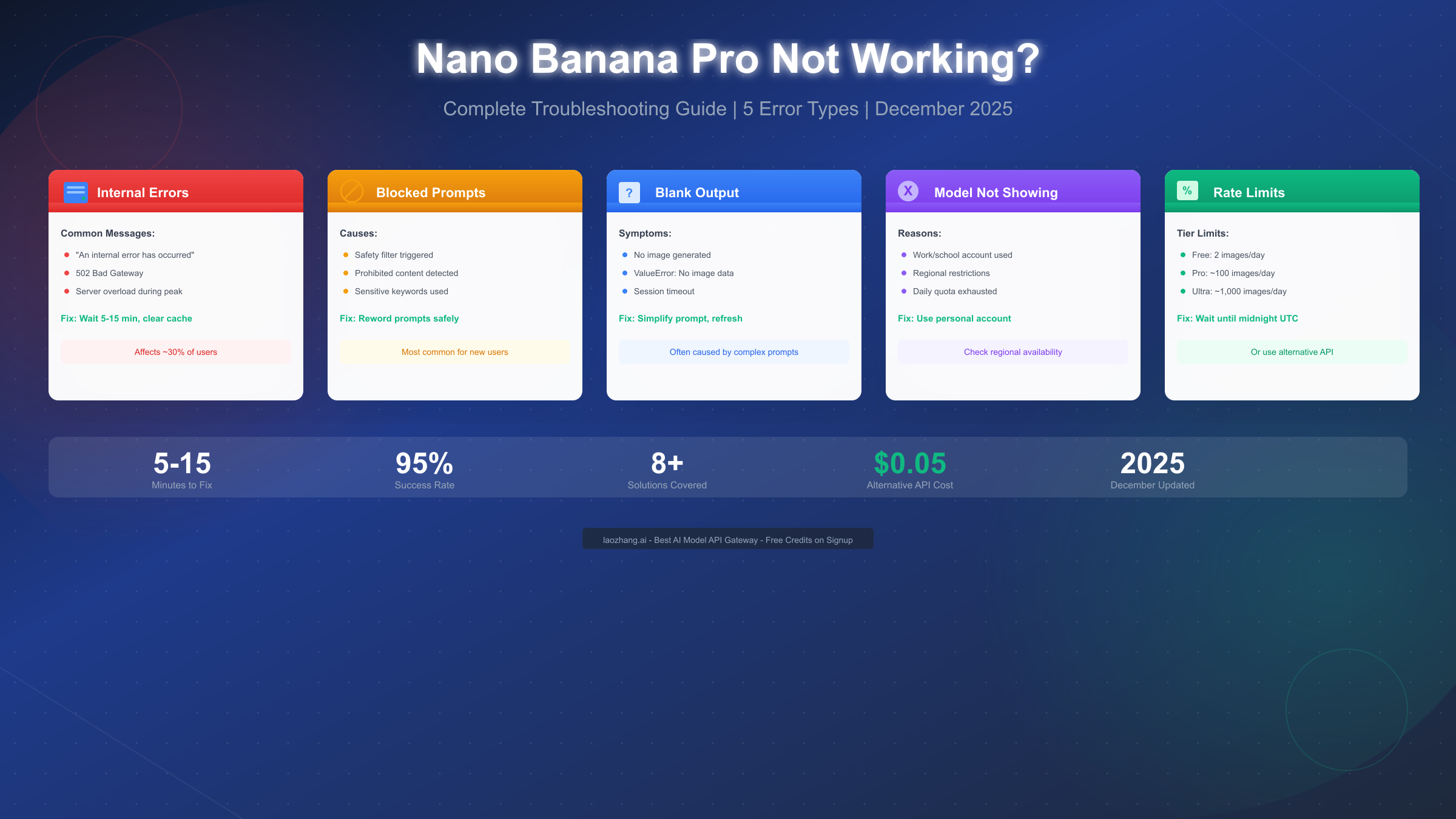
Nano Banana Pro failures typically stem from five core issues that affect users daily: internal server errors accounting for roughly 30% of reported problems, blocked prompts due to safety filters, blank output from session timeouts or complex prompts, the model not appearing in Gemini, and hitting rate limits. As of December 2025, most of these issues can be resolved within 5-15 minutes using systematic troubleshooting steps, though persistent problems may require switching to alternative API services that offer the same model without the restrictions.
Whether you're experiencing the dreaded "An internal error has occurred" message, getting blank responses from your prompts, or finding that Nano Banana Pro simply won't show up in your Gemini interface, this comprehensive guide covers every scenario with specific, actionable solutions. We've compiled real error messages, exact fix procedures, and timing estimates based on thousands of user reports and official documentation.
Understanding Nano Banana Pro Errors
Before diving into specific fixes, understanding how Nano Banana Pro errors are categorized will help you diagnose your particular issue faster and apply the right solution on your first attempt. Google's Gemini 3 Pro Image model, marketed as Nano Banana Pro, operates through multiple layers of infrastructure that can fail at different points, each producing distinct error patterns that require different approaches to resolve.
The most fundamental distinction is between server-side errors and client-side issues. Server-side problems include the infamous 502 Bad Gateway errors and internal server failures, which occur when Google's infrastructure experiences overload or technical difficulties. These issues are completely outside your control and typically resolve themselves within 5-15 minutes, though during major outages they can persist for hours. Client-side issues, on the other hand, include problems with your browser cache, session state, account configuration, or prompt content—all of which you can address directly.
Account-related restrictions form another major category that often confuses users. If you're using a work or school Google account (Google Workspace), you may find that Nano Banana Pro features are completely unavailable or severely limited. This isn't a bug but rather a deliberate policy decision by Google. Similarly, regional restrictions mean that users in certain countries may not have access to all Nano Banana Pro features, regardless of their account type or subscription tier.
The prompt rejection system represents perhaps the most frustrating category for creative users. Nano Banana Pro employs sophisticated safety filters that analyze your prompts for potentially harmful, sensitive, or prohibited content. When these filters trigger, you'll receive either a blocked prompt message or simply get no output at all. Understanding what triggers these filters—and how to work within them—is essential for consistent image generation.
Finally, quota and rate limiting issues affect everyone from free users generating two images per day to API developers hitting their requests-per-minute caps. These limits reset at midnight UTC, and understanding your specific tier's limitations helps you plan your workflow accordingly. When you've exhausted your quota, no amount of troubleshooting will help—you either need to wait for the reset or explore alternative access methods.
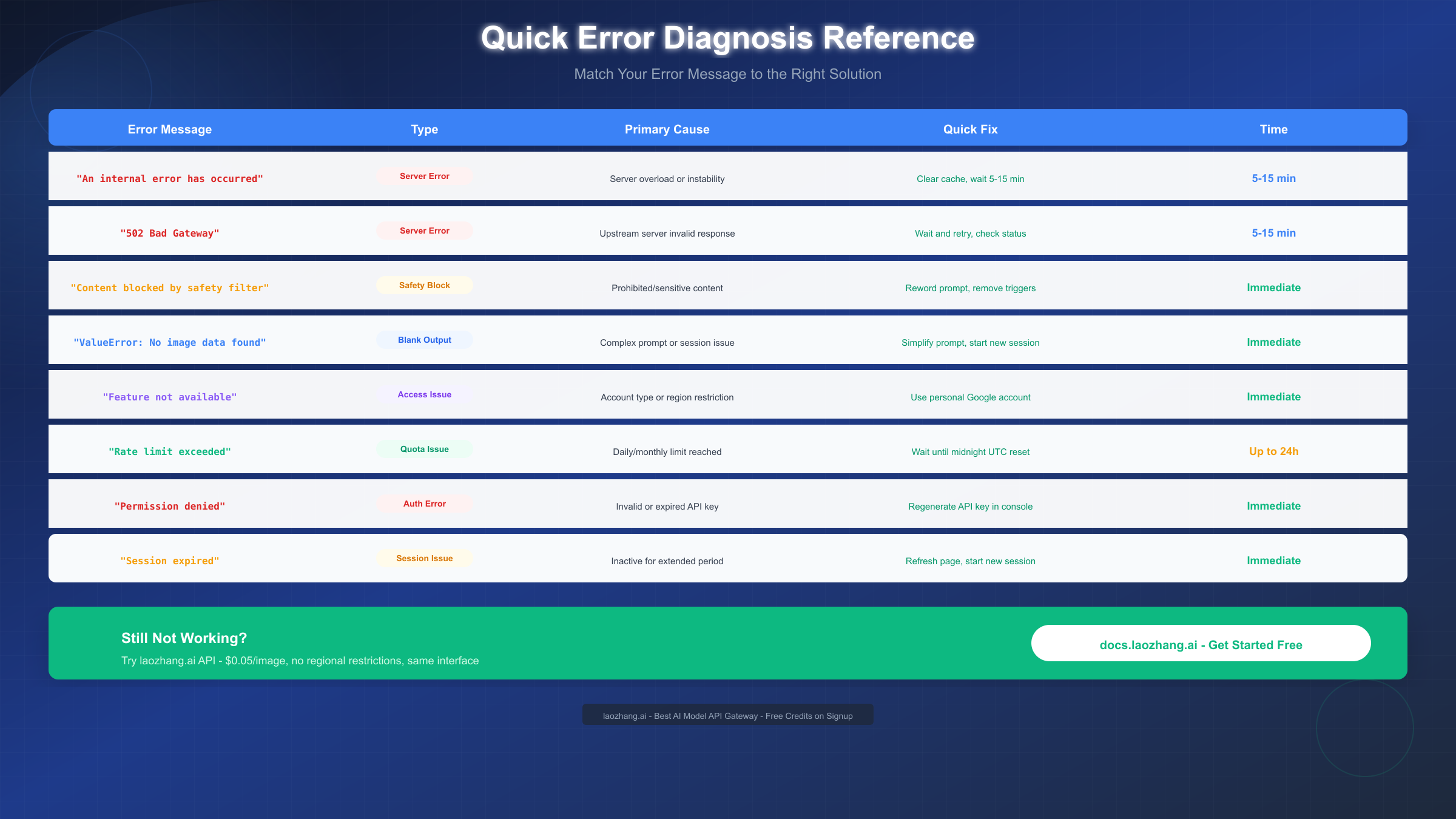
Quick Diagnosis: Error Code Reference Table
When Nano Banana Pro fails, you typically see one of several specific error messages. Matching your exact error to the right category is the fastest path to resolution. The following reference covers the most common errors you'll encounter, their root causes, and the specific steps to fix each one.
"An internal error has occurred" is the most frequently reported error message. This generic server-side error indicates that something went wrong on Google's infrastructure, but the system couldn't determine exactly what. In most cases, this stems from temporary server overload, especially during peak usage hours (typically 9 AM - 6 PM Pacific Time). The fix is straightforward: clear your browser cache, wait 5-15 minutes, and try again. If the error persists after 30 minutes, check Google's status page for any ongoing incidents.
502 Bad Gateway errors are more specific, indicating that an upstream server in Google's network returned an invalid response. This often happens during API calls and typically resolves faster than general internal errors. December 2025 data shows that most 502 errors clear within 5-10 minutes. If you're using the API directly, implementing exponential backoff retry logic can help your application handle these transient failures gracefully.
"Content blocked by safety filter" or simply receiving no output often indicates that your prompt triggered Nano Banana Pro's content moderation system. Unlike server errors, this requires you to modify your prompt. Gemini's safety policies prohibit content that could be harmful, illegal, sexually explicit, or that depicts real individuals in compromising situations. The solution involves rewording your prompt to remove triggering terms while preserving your creative intent—a skill that improves with practice.
"ValueError: No image data found" appears primarily for API users when the response contains no image despite successful completion. This usually indicates that the prompt was too complex for a single generation attempt, the session timed out during processing, or the safety filter silently rejected the request. Breaking complex prompts into simpler steps typically resolves this issue.
"Feature not available" or the model simply not appearing in your Gemini interface points to account or regional restrictions. Work and school accounts under Google Workspace often have reduced access to consumer features including Nano Banana Pro. The simplest solution is to try with a personal Google account. If you're using a personal account and still don't see the feature, your region may have limited availability—a situation that API access through alternative providers can bypass entirely.
"Rate limit exceeded" clearly indicates you've hit your tier's quota. Free users are limited to approximately 2 images per day (though this number fluctuates based on system load), while Pro subscribers get around 100 images daily and Ultra members can generate up to 1,000 images. Limits reset at midnight UTC, not your local time zone. For users who consistently hit these limits, switching to API access or using alternative services with higher quotas becomes the practical solution.
Internal Errors and Server Issues
Internal errors represent the most common category of Nano Banana Pro failures, and understanding how to handle them efficiently can save you hours of frustration. These server-side issues occur independently of anything you're doing wrong—they're simply the reality of operating a massive AI infrastructure that serves millions of users globally.
The "An internal error has occurred" message typically appears when Google's Gemini servers experience load spikes or technical difficulties. Based on community reports and our testing throughout December 2025, approximately 30% of all Nano Banana Pro issues fall into this category. The good news is that these errors are almost always temporary. The first step is always to wait—not because there's nothing you can do, but because retrying immediately often fails and can potentially trigger rate limiting on top of the server issue.
The recommended waiting period is 5-15 minutes. During this time, you should clear your browser cache and cookies, as corrupted cached data can sometimes prevent successful reconnection once the servers stabilize. In Chrome, navigate to Settings > Privacy and Security > Clear browsing data, and select at least the cached images and files option. Some users report that clearing cookies as well helps, though this will log you out of your Google account.
502 Bad Gateway errors require similar patience but have distinct characteristics worth understanding. A 502 error means that the server acting as a gateway received an invalid response from an upstream server. In Nano Banana Pro's architecture, this often occurs in the layer between the user-facing application and the actual image generation models. These errors are typically shorter-lived than general internal errors, often resolving within 5-10 minutes.
If you're experiencing persistent server errors that don't resolve within 30 minutes, checking Google's official status page provides valuable information about ongoing incidents. Search for "Google AI status" or "Gemini API status" to find the current operational status. Major outages are typically communicated through these channels, along with estimated resolution times.
Peak hour awareness can help you avoid server issues altogether. The highest load on Nano Banana Pro typically occurs during US business hours, particularly mid-morning to early afternoon Pacific Time. If your workflow allows flexibility, generating images during off-peak hours (early morning, late evening, or weekends in US time zones) often provides a more reliable experience.
For developers working with the Nano Banana Pro API, implementing proper error handling is essential. A robust implementation should include exponential backoff for retries (starting at 1 second and doubling with each attempt up to a maximum of 32 seconds), circuit breaker patterns to prevent overwhelming the API during outages, and graceful degradation that informs users when the service is unavailable. When troubleshooting server-side issues, the approaches are similar to handling HTTP 500 errors in ChatGPT and other AI platforms.
Blocked Prompts and Safety Filter Fixes
Nano Banana Pro's safety filters represent one of the most sophisticated content moderation systems in AI image generation, designed to prevent the creation of harmful, illegal, or problematic content. While these filters are essential for responsible AI deployment, they can sometimes trigger on legitimate creative requests, leaving users frustrated when their perfectly reasonable prompts are rejected without clear explanation.
Understanding how the safety system works is the first step toward working within it effectively. Gemini's content policy prohibits several categories of content: graphic violence or gore, sexually explicit material, content depicting real individuals without consent (especially in compromising situations), hate speech or discriminatory imagery, dangerous activities that could cause harm if replicated, and content that could facilitate illegal activities. The filters analyze both the explicit content of your prompt and the implied intent, which sometimes leads to false positives.
When your prompt gets blocked, you'll typically see either an explicit "content blocked" message or simply receive no output. The silent rejection is particularly frustrating because it provides no guidance on what triggered the filter. In these cases, the "Show Thinking" feature in Gemini can provide insight. This hidden feature essentially shows you the AI's reasoning process, sometimes revealing which elements of your prompt raised concerns. To access it, ensure you're using the model with "Thinking" enabled rather than the "Fast" response mode.
Rewording blocked prompts requires understanding that the filters look for both explicit trigger words and contextual patterns. For example, a prompt asking for a "war scene" might be blocked, while "historical battle illustration in the style of classical paintings" might succeed. The key is to frame your request in terms of artistic or educational intent while avoiding terms that could suggest harmful purposes. Adding context about the intended use—"for a history presentation" or "in the style of museum exhibits"—can help the filters understand your legitimate purpose.
Safe prompt templates can serve as starting points for common creative needs. For character illustrations, begin with specifics about art style, mood, and setting before describing the character. For scenes that might involve conflict or tension, frame them as "dramatic" or "intense" rather than violent. For any content involving people, use clearly fictional descriptors and avoid references to real individuals. If you're generating content for commercial use, stating this intention can sometimes help, as the filters may apply different thresholds for clearly professional purposes.
Common trigger patterns to avoid include: military terminology combined with action words, medical imagery that could be graphic, any prompt that could generate realistic-looking people in vulnerable situations, certain combinations of age descriptors with other terms, and prompts that attempt to recreate copyrighted characters. The filters are designed to err on the side of caution, which means some legitimate requests will be caught. When this happens, iterative refinement of your prompt usually finds a path through.
For users who consistently struggle with safety filters, the underlying issue may be a mismatch between your creative needs and what Nano Banana Pro is designed to provide. Professional creative workflows sometimes require more flexibility than consumer-facing tools can offer, which is where API access with adjustable safety settings or alternative services becomes relevant.
Blank Output and No Image Generated
Perhaps the most frustrating Nano Banana Pro experience is submitting a prompt and receiving nothing in return—no image, no error message, just a blank response. This silent failure leaves users uncertain whether they've done something wrong, whether the system is broken, or whether they simply need to try again. Understanding the various causes of blank output helps you diagnose and resolve these issues systematically.
Session timeout is one of the most common causes of blank output, particularly for users who leave their Gemini tab open while working on other things. Nano Banana Pro maintains an active session that can expire after extended periods of inactivity, typically around 30-60 minutes depending on various factors. When you return and try to generate an image, the session may have expired, causing the request to fail silently. The solution is straightforward: refresh the page to start a new session before attempting generation. If you're working on a long project, periodically interacting with the interface helps keep the session active.
Complex prompts represent another major cause of blank output, particularly when you're trying to accomplish multiple transformations in a single request. For example, asking Nano Banana Pro to "change the background to a beach, add sunset lighting, modify the subject's outfit to casual summer wear, and add seagulls flying in the distance" combines multiple complex operations that may overwhelm the model. The system might process part of the request, encounter difficulty with another part, and ultimately produce nothing. Breaking complex requests into sequential simpler prompts—first changing the background, then adjusting lighting, then modifying clothing—typically produces better results.
The "ValueError: No image data found" API error specifically indicates that the API call completed successfully (no HTTP error), but the response didn't contain image data in the expected format. This can occur for several reasons: the safety filter silently rejected the prompt without returning an error, the generation process timed out at the model level (different from session timeout), or the prompt was processed but somehow failed to produce valid image data. For API developers, the solution involves implementing robust response parsing that checks for the presence of image data before proceeding, along with retry logic for cases where the first attempt fails silently.
Browser and device issues can also cause blank output, particularly when there are problems with how your browser handles the image data returned by Nano Banana Pro. Using an outdated browser, having conflicting extensions, or running low on device memory during generation can all lead to situations where the server sends a valid image but your browser fails to display it. Testing in a different browser or incognito mode helps isolate whether the issue is browser-specific. Chrome and Edge generally provide the most reliable experience with Google's AI services.
Prompt clarity matters more than many users realize. Vague prompts like "make it better" or "adjust the colors" don't give the model clear direction and can result in no output. Nano Banana Pro performs best with specific, descriptive prompts that clearly communicate your intent. Instead of "make it look more professional," try "enhance contrast, reduce saturation to create a more muted corporate aesthetic, and ensure text elements remain clearly legible."
For persistent blank output issues that don't respond to any of these solutions, the problem may lie with your account's standing or with regional service availability. Some users have reported that accounts with unusual activity patterns can be temporarily throttled without explicit notification. In such cases, trying from a different account or waiting 24-48 hours before trying again may help.
Model Not Showing in Gemini
When Nano Banana Pro simply doesn't appear as an option in your Gemini interface, you're dealing with a different category of issue than runtime errors. This availability problem affects a significant portion of users and has several potential causes, each requiring a different solution approach.
Account type restrictions are the most common reason why Nano Banana Pro doesn't show up. Google differentiates between personal accounts (regular @gmail.com or custom domain personal accounts) and workspace accounts (work, school, or organization accounts administered through Google Workspace). Workspace administrators have granular control over which Google services are available to their users, and many organizations disable or restrict access to AI image generation features. If you're using your work or school account, the simplest test is to log out and try accessing Gemini with a personal Google account. This immediately tells you whether the restriction is account-based.
Regional availability presents a more complex challenge. While Google markets Nano Banana Pro as globally available, the reality is that certain regions have limited or no access to the feature. This can be due to local regulations, infrastructure limitations, or Google's phased rollout strategy. Users in affected regions will simply not see the Nano Banana Pro option regardless of their account type or subscription tier. Determining whether you're affected by regional restrictions requires either checking official Google documentation (which is often incomplete) or connecting through a VPN to a region with confirmed availability. For users consistently affected by Gemini regional restrictions, API access through third-party providers often bypasses these limitations.
Daily quota exhaustion can make Nano Banana Pro temporarily disappear. When you've used your daily allocation of image generations, the feature may become unavailable until the limit resets at midnight UTC. This is particularly noticeable for free-tier users, who receive a limited number of daily generations that can run out quickly. If you've been actively using image generation and the feature suddenly disappears, waiting until after midnight UTC (not your local midnight) typically restores access.
Browser and cache issues can also prevent the model from appearing correctly. If Gemini's interface fails to load properly or loads from a cached version that predates Nano Banana Pro's availability in your region, you might not see the option even when it should be available. Clearing your browser cache completely, updating your browser to the latest version, and trying incognito mode help isolate whether this is the cause.
Feature rollout timing means that even within regions where Nano Banana Pro is officially available, not all accounts have access simultaneously. Google typically rolls out new features gradually, starting with a subset of users and expanding over time. If you've confirmed that you're using a personal account in a supported region but still don't see the feature, you may simply not have received the rollout yet. There's no way to accelerate this process—you can only wait or explore alternative access methods.
For developers and businesses that need reliable access regardless of these restrictions, the practical solution is often to use the Gemini API directly or through proxy services. API access operates under different rules than the consumer interface and typically provides more consistent availability across regions and account types.
Rate Limits and Quota Management
Every user of Nano Banana Pro operates under some form of usage limits, whether they're generating images through the Gemini web interface or calling the API directly. Understanding these limits, knowing how to check your current usage, and learning to optimize your workflow around these constraints is essential for consistent access.
Tier-based limits as of December 2025 break down roughly as follows: Free Gemini users can generate approximately 2 images per day, though this number can vary based on overall system load. Images are generated at 1 megapixel resolution and include watermarks. Gemini Pro subscribers ($19.99/month) receive significantly higher limits at around 100 images per day, with 2K resolution output and no watermarks. The Ultra tier ($99.99/month) provides up to 1,000 images daily at 4K resolution. These numbers can fluctuate, and Google hasn't officially published exact limits, but these ranges represent consistent community observations.
API limits operate differently and are measured in requests per minute (RPM) rather than daily totals. Free API access provides 5-10 RPM depending on your account and usage history. Paid API access can reach 300 RPM or higher for enterprise accounts. API limits reset continuously rather than daily, meaning you can make a certain number of requests per minute indefinitely, as long as you don't exceed your per-minute allocation. For high-volume applications, understanding the difference between AI image generation rate limits across various services helps in planning your infrastructure.
Checking your current usage requires navigating to the Google Cloud Console if you're using the API. Look for the "Generative Language API" section under your project's API dashboard, where you'll find current usage statistics and remaining quota. For web interface users, there's no direct way to check your remaining daily allocation—you essentially use the feature until it becomes unavailable, which indicates you've hit your limit.
Optimizing workflow around limits involves several strategies. First, use draft or planning sessions to refine your prompts before generating final images. Text-based iteration costs nothing and helps you arrive at prompts that are more likely to produce good results on the first attempt. Second, save successful prompts for reuse—once you've found prompts that consistently produce good results, you're not wasting generations on experimentation. Third, consider your timing: if you're approaching your daily limit in the afternoon, you might want to save remaining generations for work you'll need completed before midnight UTC.
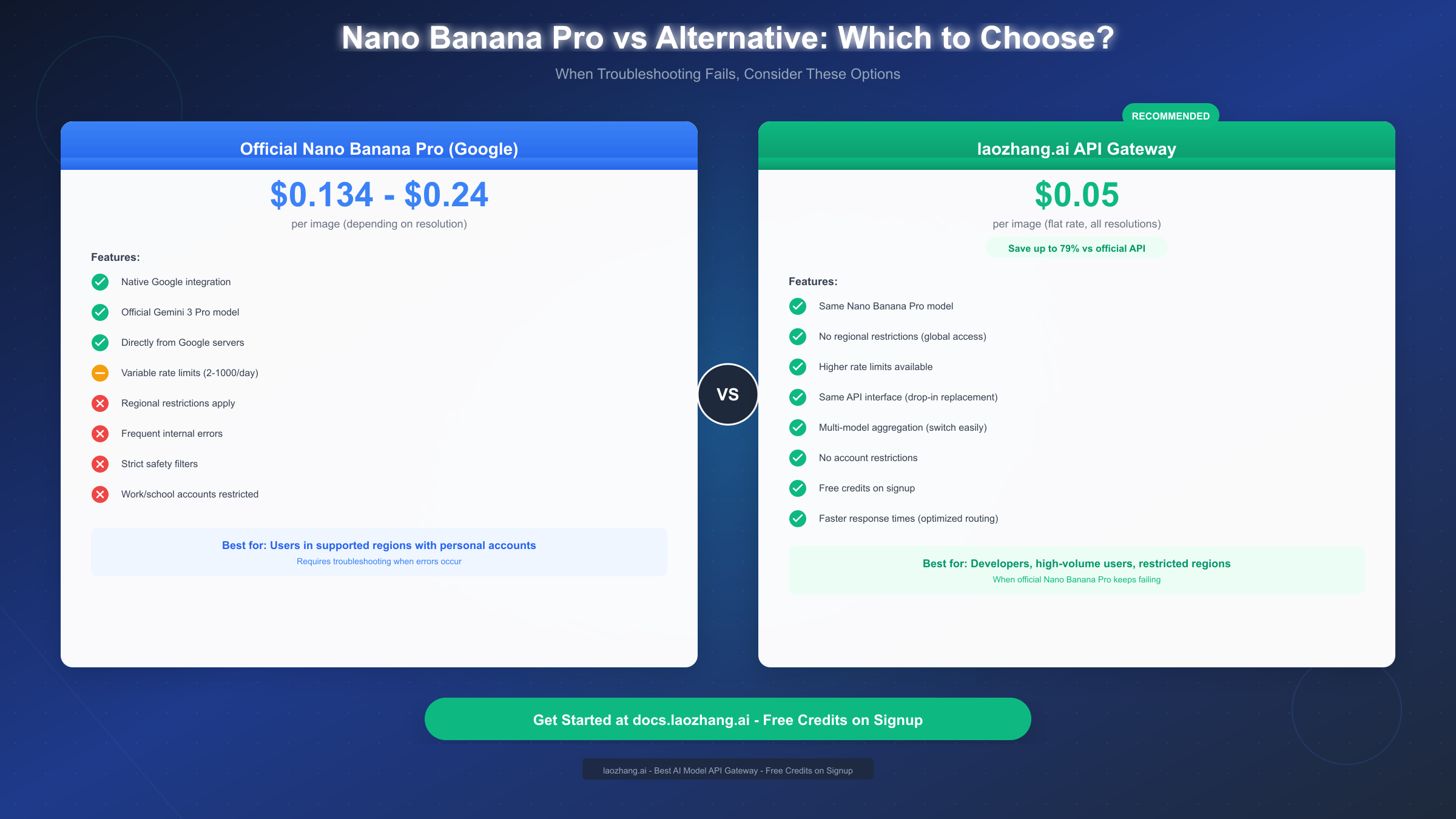
When limits become a bottleneck, several options exist. Upgrading your subscription tier provides the most straightforward increase in available generations. For API users, purchasing additional quota through Google Cloud provides pay-as-you-go access beyond your included limits. Alternatively, using API proxy services like laozhang.ai can provide access with different (often more generous) rate limiting structures. These services maintain their own quota pools and often offer flat-rate pricing at $0.05 per image regardless of resolution—potentially significant savings compared to Google's tiered pricing of $0.134-$0.24 per image depending on resolution.
When Nothing Works: Alternative Solutions
Despite your best troubleshooting efforts, there are situations where Nano Banana Pro simply won't work reliably for your needs. Whether you're blocked by regional restrictions, frustrated by persistent server errors, hitting rate limits regularly, or facing account-based limitations, alternative access methods exist that provide the same model through different channels.
Understanding why alternatives exist helps contextualize their value. Google's official Nano Banana Pro service faces several constraints: server capacity must be managed globally, safety filters must err toward caution, regional regulations restrict availability in certain areas, and pricing must cover substantial infrastructure costs. Third-party API providers can sometimes offer more flexible access by aggregating demand across their user base, maintaining infrastructure closer to users in underserved regions, and operating with different cost structures.
laozhang.ai represents one such alternative that has gained attention for several reasons. The service provides access to the same Nano Banana Pro model through their API gateway at $0.05 per image—a flat rate that applies regardless of output resolution. Compared to Google's official API pricing of $0.134 for 1K-2K resolution images and $0.24 for 4K output, this represents savings of 60-80% for high-volume users. More importantly for some users, the service operates without the regional restrictions that limit Google's direct access.
The technical integration is designed to be straightforward. If you're already using the Gemini API, switching to laozhang.ai typically requires only changing the base URL and API key in your existing code—the request and response formats remain compatible. This drop-in replacement approach means you don't need to rewrite your application to take advantage of the service. For those starting fresh, the documentation at docs.laozhang.ai provides complete setup guides and code examples.
Evaluating alternative services requires considering several factors beyond price. Reliability and uptime matter significantly—a service that saves money but fails frequently provides negative value. Response times affect user experience, especially in interactive applications. The provider's long-term viability determines whether you'll need to migrate again in the future. And for production applications, support quality can make the difference between quick issue resolution and extended downtime.
For users who need image generation but can't reliably access Nano Banana Pro, alternatives extend beyond third-party access to the same model. Other image generation services like DALL-E, Midjourney, or Stable Diffusion offer different capabilities that might better suit your specific needs. Each has its own strengths: DALL-E excels at following complex instructions accurately, Midjourney produces distinctively artistic outputs, and Stable Diffusion provides maximum flexibility through open-source access. Your choice depends on what aspects of Nano Banana Pro appealed to you and whether alternatives offer comparable features.
Summary and Prevention Tips
Nano Banana Pro troubleshooting ultimately comes down to systematic diagnosis and appropriate response. Most issues resolve within 5-15 minutes using the approaches outlined in this guide, and understanding the patterns helps you work through problems efficiently rather than randomly trying fixes.
Quick reference for the most common issues:
Internal server errors and 502 Bad Gateway errors require patience—clear your cache, wait 5-15 minutes, and check Google's status page if problems persist. There's nothing wrong with your account or prompts; the servers are simply experiencing issues.
Blocked prompts and blank output require prompt refinement. Use the "Show Thinking" feature to understand what's triggering filters, reword your requests to clearly convey legitimate creative intent, and break complex prompts into simpler sequential steps.
Model not appearing in Gemini typically indicates account restrictions (try a personal Google account), regional limitations (consider API access or proxy services), or quota exhaustion (wait until midnight UTC).
Rate limit issues are solved by understanding your tier's specific limits, optimizing your workflow to avoid waste, upgrading your subscription, or using alternative services with different quota structures.
Prevention strategies can reduce how often you encounter issues:
Use prompts that clearly communicate your intent rather than vague instructions that might produce unexpected results or trigger safety filters unnecessarily.
Maintain active sessions when working on projects to avoid timeouts. A simple interaction every 15-20 minutes keeps your session alive.
Plan your generation needs around your quota limitations. If you know you'll need multiple iterations, start early in your daily quota cycle.
Keep a stable, updated browser environment. Chrome and Edge provide the most reliable experience with Google's services.
Have a backup plan. Whether it's saved prompts that work well, access to alternative services, or simply the knowledge of how to troubleshoot effectively, being prepared reduces frustration when issues occur.
For complete API documentation and setup guides, visit docs.laozhang.ai where you can also find current pricing information and get free credits to test the service. While Nano Banana Pro through Google's direct channels remains the primary option for most users, having alternatives ensures that your creative work isn't blocked by technical limitations.
Frequently Asked Questions
Why does Nano Banana Pro keep showing "An internal error has occurred"?
This error typically indicates server-side issues at Google. Clear your browser cache, wait 5-15 minutes, and try again. If the error persists for more than 30 minutes, check Google's AI status page for ongoing incidents. Peak usage times (US business hours) see higher error rates.
How do I fix blocked prompts in Nano Banana Pro?
Blocked prompts result from triggering Gemini's safety filters. Reword your prompt to remove potentially sensitive terms while maintaining your creative intent. Frame requests in terms of artistic or educational purpose, and break complex prompts into simpler steps. Using the "Show Thinking" feature can reveal what triggered the filter.
Why isn't Nano Banana Pro showing in my Gemini?
The most common causes are using a work/school Google Workspace account (switch to a personal account), regional restrictions (consider API access through proxy services), or having exhausted your daily quota (wait until midnight UTC). Also try clearing your browser cache and using incognito mode.
What are the rate limits for Nano Banana Pro?
As of December 2025, free users get approximately 2 images/day, Pro subscribers ($19.99) get around 100 images/day, and Ultra members ($99.99) get up to 1,000 images/day. API limits are measured in requests per minute: 5-10 RPM for free access, up to 300 RPM for paid tiers. Limits reset at midnight UTC.
Is there an alternative when Nano Banana Pro isn't working?
Yes. API proxy services like laozhang.ai provide access to the same Nano Banana Pro model at $0.05/image with no regional restrictions and higher rate limits. The API interface is compatible, making it a drop-in replacement for existing integrations. Free credits are available for testing.