
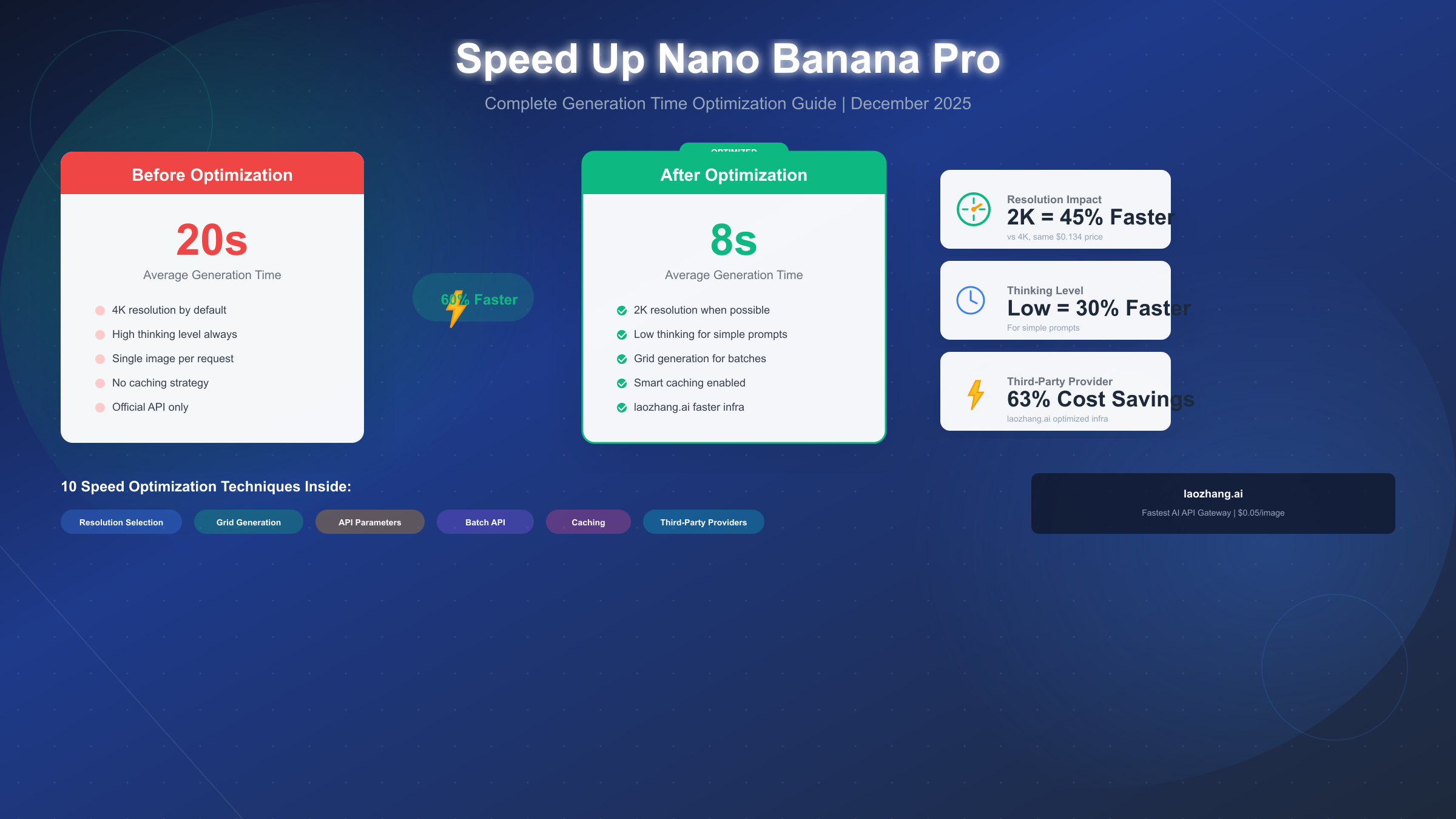
Nano Banana Pro (officially Gemini 3 Pro Image) delivers exceptional image quality, but generation speed varies significantly based on your configuration choices. As of December 2025, default settings can result in 15-20 second wait times for 4K images, while optimized configurations achieve the same quality in under 8 seconds. The key insight is that resolution selection, API parameters, and provider choice all dramatically impact generation speed—and most users are leaving performance on the table by not optimizing these settings.
This guide provides 10 proven techniques to accelerate your Nano Banana Pro image generation without sacrificing quality. Whether you're building a production application that needs consistent sub-10-second responses or simply want faster iteration cycles during development, these optimizations will transform your workflow. We'll cover everything from quick wins you can implement in 60 seconds to advanced strategies for enterprise-scale deployments.
Quick Answer: Speed Up Generation in 60 Seconds
The fastest path to immediate improvement involves three simple changes. First, switch from 4K to 2K resolution if you haven't already—this single change reduces generation time by approximately 45% while costing exactly the same ($0.134 per image). Since 2K (2048×2048) provides more than sufficient quality for web, social media, and most marketing applications, there's rarely a good reason to use 4K by default.
Second, consider the thinking_level parameter. Nano Banana Pro performs internal reasoning before generating images, and for straightforward prompts this thinking process adds unnecessary latency. Setting thinking_level to "low" instead of the default can reduce generation time by 20-30% for simple prompts. Reserve "high" thinking level for complex compositions requiring sophisticated reasoning about spatial relationships, multiple subjects, or unusual artistic directions.
Third, evaluate whether grid generation fits your workflow. When exploring ideas or generating variations, a 2×2 grid produces four distinct images in approximately 8 seconds total—about $0.034 per image. This approach is dramatically faster than generating four images sequentially and perfect for rapid iteration during the creative process. Once you identify a promising direction, you can then generate a single high-resolution version.
For developers building production applications, the combination of these three techniques typically reduces average generation time from 18-20 seconds to 7-9 seconds. That's a 60% improvement achievable without any code changes beyond parameter adjustments.
Understanding Generation Speed: What Affects Latency
Generation time in Nano Banana Pro depends on several interconnected factors, and understanding these relationships enables informed optimization decisions. The model operates as a sophisticated transformer architecture that processes your prompt, applies internal reasoning, and then generates the output image through multiple refinement passes. Each step in this pipeline contributes to total latency.
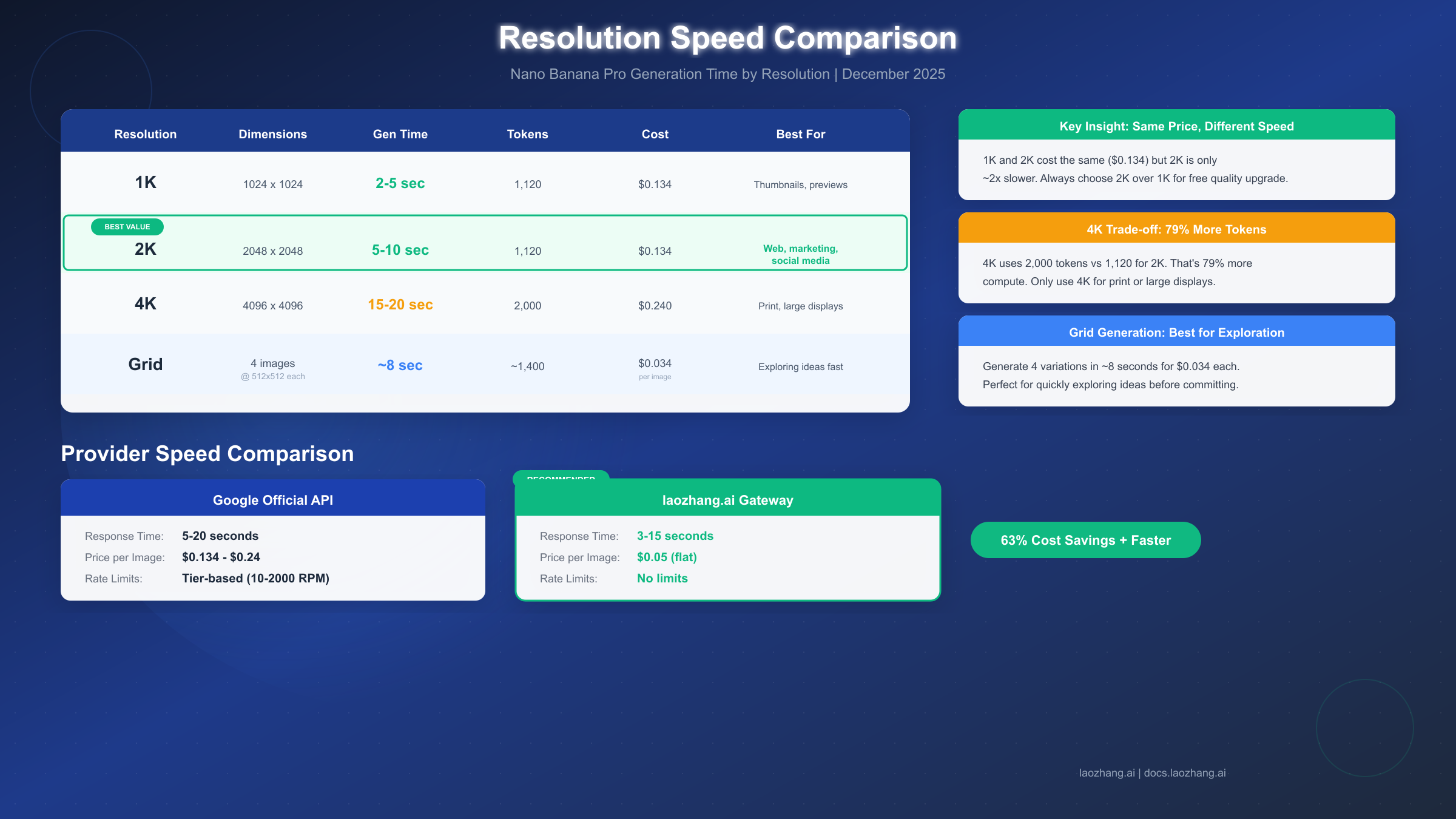
Resolution represents the single largest speed factor. A 4K image (4096×4096 pixels, 16 megapixels) requires approximately 2,000 output tokens to generate, while 2K (2048×2048, 4 megapixels) uses only 1,120 tokens—despite being one-quarter the pixel count. This 79% increase in token consumption directly translates to proportionally longer generation time. The relationship isn't perfectly linear due to batching optimizations in the underlying infrastructure, but expect roughly 15-20 seconds for 4K versus 5-10 seconds for 2K under normal conditions.
The thinking level parameter controls reasoning depth. Unlike earlier image models that simply translated prompts to pixels, Nano Banana Pro performs genuine reasoning about your request—understanding object relationships, inferring artistic style, and planning composition before generation begins. High thinking level enables more sophisticated reasoning at the cost of additional latency (typically 3-5 seconds), while low thinking level provides faster responses suitable for straightforward prompts where complex reasoning isn't necessary.
Infrastructure factors also matter significantly. Google's official API serves requests through distributed datacenters with variable load, meaning identical requests may complete in 8 seconds during off-peak hours but require 15+ seconds during high-demand periods. This variability makes benchmarking challenging but also explains why some users report dramatically different experiences. For more context on official API costs and tiers, see the complete pricing guide for Nano Banana Pro.
| Resolution | Dimensions | Gen Time | Tokens | Cost |
|---|---|---|---|---|
| 1K | 1024×1024 | 2-5 sec | 1,120 | $0.134 |
| 2K | 2048×2048 | 5-10 sec | 1,120 | $0.134 |
| 4K | 4096×4096 | 15-20 sec | 2,000 | $0.240 |
| Grid (4) | 512×512 ea | ~8 sec | ~1,400 | ~$0.034/ea |
10 Speed Optimization Techniques: Complete Checklist
This comprehensive checklist covers every proven technique for accelerating Nano Banana Pro generation, organized from quick wins to advanced strategies. Each technique can be applied independently or combined for cumulative improvements.
Technique 1: Default to 2K Resolution. Since 1K and 2K share identical pricing at $0.134 per image, always choose 2K as your baseline—it provides 4× the pixels for zero additional cost. The speed penalty versus 1K is minimal (typically 2-3 seconds additional), and you'll have higher quality output that can be downscaled if needed. Reserve 4K exclusively for print production, large-format displays, or archival purposes where the 79% token increase is justified.
Technique 2: Match Thinking Level to Prompt Complexity. Simple prompts like "a red apple on a wooden table" don't require extensive reasoning. Setting thinking_level to "low" for such requests saves 2-4 seconds without quality degradation. Reserve "high" thinking for complex compositions involving multiple interacting subjects, unusual artistic styles, or prompts requiring sophisticated spatial reasoning. The API defaults to automatic selection, but explicit control offers optimization opportunities.
Technique 3: Use Grid Generation for Exploration. When you're iterating on ideas, generate a 2×2 or 4×4 grid instead of individual images. A 4-image grid completes in approximately 8 seconds at $0.034 per sub-image—dramatically more efficient than four sequential generations. Once you identify a promising direction, generate a full-resolution single image of your chosen concept.
Technique 4: Optimize Prompt Token Efficiency. Verbose prompts consume more input tokens and require additional processing time. While input tokens cost only $2.00 per million (effectively negligible), the processing overhead adds latency. Aim for concise, specific prompts: "professional headshot, woman, neutral background, soft lighting" processes faster than lengthy descriptions with redundant details.
Technique 5: Implement Response Caching. If your application generates similar images repeatedly, cache results keyed by a hash of the prompt and configuration. Even partial cache hits (serving cached responses for 20% of requests) dramatically improve average response times and reduce costs. Most applications benefit from a 15-60 minute cache TTL depending on content freshness requirements.
Technique 6: Use Async Processing Patterns. For batch operations or background generation, implement async patterns that queue requests and process results when available. This doesn't reduce individual generation time but prevents blocking your application's main execution path. Node.js, Python asyncio, and similar frameworks handle this elegantly.
Technique 7: Consider Third-Party Providers. Services like laozhang.ai route requests through optimized infrastructure that often delivers faster response times than direct API access. These providers maintain persistent connections, implement intelligent load balancing, and may offer geographic routing advantages depending on your location. We'll explore this option in detail in a later section.
Technique 8: Batch Non-Urgent Requests. Google's Batch API offers 50% cost savings with 2-24 hour turnaround. For content that doesn't need immediate delivery—scheduled social media posts, marketing asset libraries, product catalog updates—batch processing provides significant cost reduction while freeing real-time capacity for urgent requests.
Technique 9: Monitor and Retry Intelligently. Implement exponential backoff for failed requests with jitter to avoid thundering herd problems. If a request times out, retry with slightly reduced settings (2K instead of 4K, low thinking instead of high) to maintain functionality under degraded conditions. Understanding rate limits and quotas helps design robust retry logic.
Technique 10: Choose Appropriate Aspect Ratios. Square images (1:1) process marginally faster than extreme aspect ratios, though the difference is small. More importantly, generating at your final display ratio avoids wasted computation on pixels you'll crop away. If you need a 16:9 hero image, generate at that ratio rather than square with cropping.
Resolution Selection: 1K vs 2K vs 4K Decision Guide
Choosing the right resolution requires balancing quality requirements against speed and cost, and most users default to settings that don't match their actual needs. Understanding when each resolution makes sense enables informed decisions that optimize all three factors simultaneously.
The critical insight is that 1K and 2K share identical pricing at $0.134 per image, making 2K the obvious default choice in nearly all scenarios. You get 4× the pixels (4 megapixels vs 1 megapixel) for zero additional cost, with only a modest 2-3 second speed penalty. The only reason to choose 1K is if you specifically need faster generation for high-volume thumbnail creation or similar use cases where the smaller size is actually desirable.
2K resolution serves as the optimal choice for the vast majority of use cases. At 2048×2048 pixels, it exceeds the resolution of 4K displays when viewed at typical distances and provides exceptional quality for web content, social media graphics, marketing materials, product photography, and digital artwork. The 5-10 second generation time offers a good balance of speed and quality. Most professional applications can default to 2K without quality concerns.
Reserve 4K for specific high-resolution requirements. Print production at larger sizes (posters, banners, trade show graphics), ultra-high-resolution displays where viewers examine details closely, and archival purposes where future-proofing matters justify the 79% token increase and roughly doubled generation time. The $0.24 per image cost and 15-20 second generation time represent real trade-offs that should be consciously evaluated.
| Use Case | Recommended Resolution | Reasoning |
|---|---|---|
| Social media graphics | 2K | Far exceeds platform requirements |
| Web blog images | 2K | Optimal for screen display |
| Marketing emails | 1K or 2K | Depends on final display size |
| Product photography | 2K | Sufficient for most e-commerce |
| Print posters | 4K | Required for large format |
| Archival assets | 4K | Future-proofing value |
| Rapid prototyping | Grid (1K) | Maximum iteration speed |
API Parameter Mastery: Optimize Every Setting
Beyond resolution, several API parameters directly impact generation speed, and understanding their effects enables fine-grained optimization. The Gemini 3 Pro Image API exposes configuration options that many developers overlook, leaving performance improvements unexploited.
The thinking_level parameter represents the most impactful speed optimization after resolution selection. This parameter controls how much internal reasoning Nano Banana Pro performs before beginning image generation. For straightforward prompts—"a golden retriever playing in a park"—low thinking level provides near-identical quality with 20-30% faster generation. High thinking level benefits complex compositions requiring sophisticated reasoning: "an art nouveau-style poster showing a woman holding a glowing orb, with intricate floral border designs in gold and deep blue." Match thinking level to prompt complexity rather than using a single setting universally.
The media_resolution parameter affects input processing for image-to-image operations. When providing reference images for style transfer or editing operations, this parameter (low/medium/high) controls the fidelity of input image analysis. Lower settings process inputs faster but capture less detail. For operations where subtle input features matter—style matching, precise editing—use higher settings. For loose inspiration or simple edits, lower settings reduce processing overhead.
pythonfrom google import genai
from google.genai import types

client = genai.Client(api_key="YOUR_API_KEY")


response = client.models.generate_content(
    model="gemini-3-pro-image-preview",
    contents=["A minimalist logo design for a tech startup"],
    config=types.GenerateContentConfig(
        image_config=types.ImageConfig(
            image_size="2K",
            aspect_ratio="1:1"
        ),
        thinking_level="low"  # Faster for simple prompts
    )
)
Batch API provides the most aggressive cost optimization for non-time-sensitive workloads. Submitting requests through the Batch API endpoint yields 50% cost savings ($0.067 for 2K, $0.12 for 4K) with processing windows of 2-24 hours. This approach works excellently for generating content libraries, scheduled posts, or any workflow where images don't need immediate delivery. The trade-off is unpredictable completion time within the window, making it unsuitable for user-facing real-time applications.
Third-Party Providers: Faster and Cheaper Options
Alternative access methods to Nano Banana Pro can offer both speed and cost advantages over direct API access, and understanding these options helps optimize your implementation. Third-party API gateways have emerged as legitimate production choices for organizations seeking to optimize image generation costs and performance.
The official Google API represents the reference implementation with guaranteed access to the latest model capabilities and enterprise SLA commitments (99.9% uptime). However, this comes with tier-based rate limits, variable response times during peak periods, and pricing at $0.134-0.24 per image depending on resolution. For applications with stringent uptime requirements or those requiring cutting-edge features immediately upon release, direct API access remains the appropriate choice.
Third-party providers like laozhang.ai offer compelling alternatives with several potential advantages. These services typically maintain persistent connections to Google's infrastructure, implement intelligent load balancing across regions, and can deliver faster average response times through infrastructure optimization. The laozhang.ai gateway charges $0.05 per image regardless of resolution—representing 63% savings versus official 2K pricing and 79% savings versus 4K. Without tier-based rate limiting, these services often provide more predictable throughput for high-volume applications.
| Provider | Response Time | Price/Image | Rate Limits | Best For |
|---|---|---|---|---|
| Google Official | 5-20 sec | $0.134-0.24 | Tier-based | SLA requirements |
| laozhang.ai | 3-15 sec | $0.05 (flat) | None | Cost optimization |
| Batch API | 2-24 hours | $0.067-0.12 | High volume | Non-urgent content |
For production deployments seeking the optimal balance of cost, speed, and reliability, laozhang.ai's gateway offers a compelling value proposition. The flat $0.05 pricing eliminates the resolution decision entirely—you can generate 4K images at the same cost as 1K, which fundamentally changes optimization calculus. Their documentation at https://docs.laozhang.ai/ provides integration guides for Python, JavaScript, and REST implementations. For teams generating 5,000+ images monthly, the cost differential (potentially $400+ monthly savings compared to official pricing) often justifies evaluating third-party options, understanding the Gemini API pricing structure.
Production Best Practices: Speed at Scale
Maintaining consistent performance at production scale requires architectural patterns beyond individual request optimization. When your application serves thousands of users generating images concurrently, system-level design becomes critical to reliable performance.
Implement async processing as a foundational pattern. Rather than blocking user-facing endpoints while awaiting image generation, queue generation requests and notify users when images are ready. This approach maintains responsive UIs, enables retry logic without timeout complications, and allows graceful degradation under load. Whether you're using Node.js, Python asyncio, or Go goroutines, async patterns should be the default for image generation workflows.
Queue management prevents overload scenarios. Production applications should implement request queues with configurable concurrency limits matching your API tier's rate limits. A queue depth metric provides early warning when generation demand exceeds capacity, enabling proactive scaling or request throttling before users experience failures. Redis, RabbitMQ, or cloud-native solutions like AWS SQS handle this elegantly.
pythonimport asyncio
from collections import deque

class ImageGenerationQueue:
    def __init__(self, max_concurrent=10):
        self.queue = deque()
        self.semaphore = asyncio.Semaphore(max_concurrent)

    async def generate(self, prompt, config):
        async with self.semaphore:
            # Rate-limited generation
            return await self._call_api(prompt, config)

    async def _call_api(self, prompt, config):
        # Implementation with retry logic
        for attempt in range(3):
            try:
                response = await client.generate_async(prompt, config)
                return response
            except RateLimitError:
                await asyncio.sleep(2 ** attempt)  # Exponential backoff
        raise MaxRetriesExceeded()
Error handling and circuit breakers protect against cascading failures. Implement circuit breaker patterns that temporarily disable generation after consecutive failures, preventing request pile-up that could exhaust rate limits and compound problems. Monitor error rates and response times, alerting operations teams when thresholds breach normal parameters. Health checks should verify not just API availability but also acceptable response latency.
Caching strategies extend beyond simple response caching. Consider implementing semantic caching that recognizes when similar prompts might return acceptable results from cache, reducing API calls for variations of common requests. Precomputation during low-demand periods can pre-populate caches for anticipated high-traffic content.
Summary: Your Speed Optimization Roadmap
Optimizing Nano Banana Pro generation speed requires a systematic approach combining parameter tuning, architectural patterns, and potentially alternative access methods. The techniques in this guide, applied thoughtfully to your specific use case, can reduce average generation time from 20+ seconds to under 8 seconds while simultaneously reducing costs.
For immediate improvements, start with the three-step quick optimization: default to 2K resolution (45% faster than 4K, same price), match thinking level to prompt complexity, and use grid generation for exploration. These changes require minimal implementation effort and deliver measurable improvements within minutes of deployment.
For production applications, layer in architectural patterns: async processing to maintain responsive UIs, queue management to prevent overload, caching to reduce redundant generation, and intelligent retry logic to handle transient failures gracefully. These patterns compound the parameter-level optimizations into reliable, scalable performance.
For organizations generating significant image volume (5,000+ monthly), evaluate third-party providers like laozhang.ai for both speed and cost optimization. The $0.05 flat-rate pricing (63-79% savings versus official API) combined with often-faster response times and unlimited rate provides compelling value for production deployments. Documentation and integration guides are available at https://docs.laozhang.ai/.
The optimal strategy for most applications combines: 2K default resolution, adaptive thinking level, grid generation for exploration, response caching, async processing, and potentially third-party provider routing. This combination typically achieves 7-9 second average generation times at significantly reduced cost compared to unoptimized default configurations. Monitor your specific metrics, as optimal settings vary based on prompt patterns and quality requirements.