
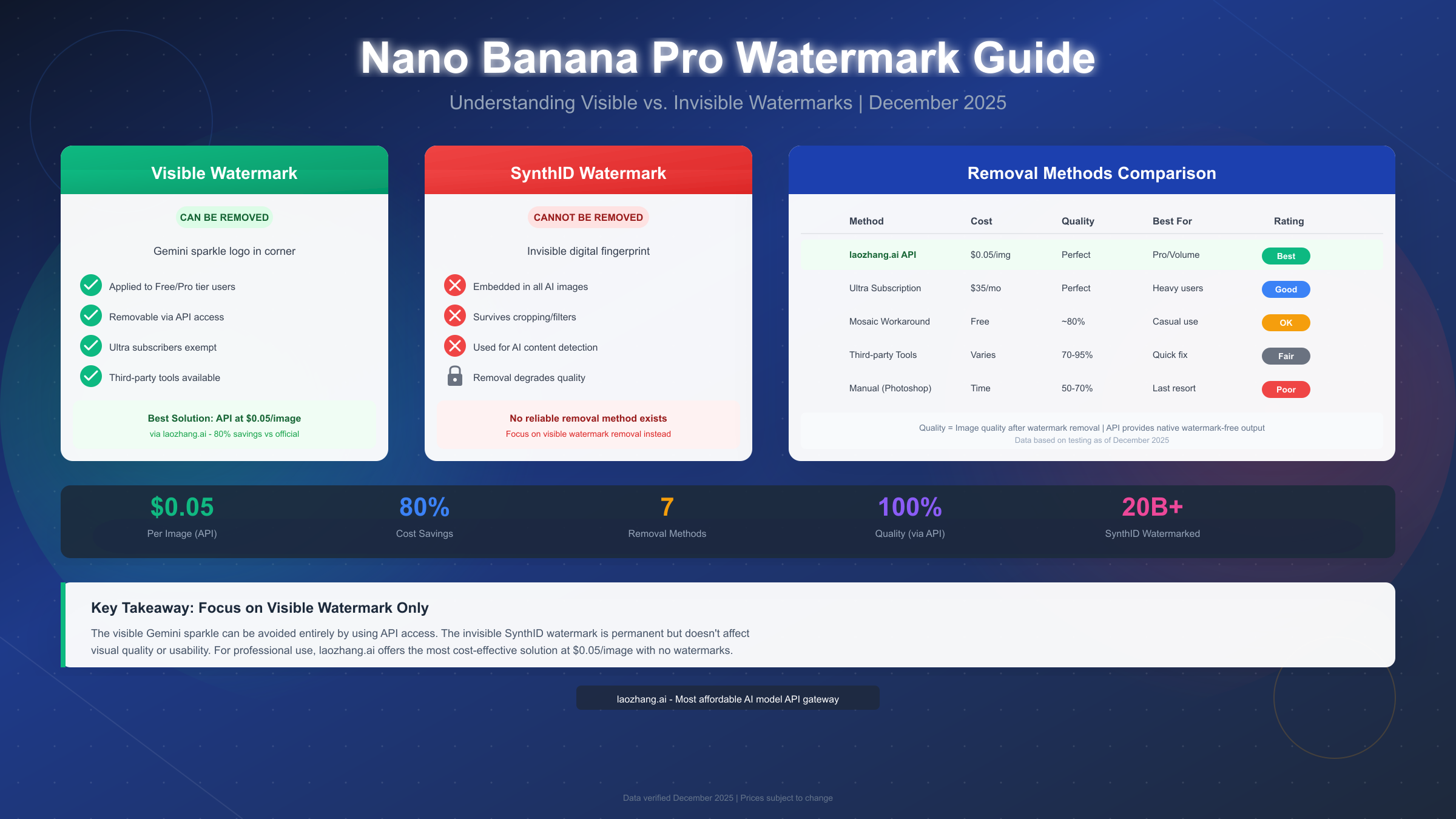
Nano Banana Pro, Google's latest AI image generation model, applies TWO distinct types of watermarks to generated images: a visible Gemini sparkle logo that can be removed through several methods, and an invisible SynthID digital watermark embedded at the pixel level that cannot be removed without degrading image quality. As of December 2025, free tier and Google AI Pro subscribers see the visible watermark on all generated images, while Google AI Ultra subscribers ($34.99/month) and API users receive watermark-free outputs. The most cost-effective solution for obtaining watermark-free images is using third-party API providers like laozhang.ai at $0.05 per image—saving over 60% compared to Google's official API pricing of $0.13-0.24 per image.
Quick Answer: Does Nano Banana Pro Add Watermarks?
Yes, Nano Banana Pro adds watermarks, but the answer comes with important nuances that affect how you should approach this challenge. Google's image generation model implements a dual watermarking system designed to balance content authenticity verification with user needs for professional-quality outputs.
The visible watermark appears as the recognizable Gemini sparkle logo, typically positioned in one of the bottom corners of your generated image. This watermark is applied by default to images generated through the free tier Gemini app and Google AI Pro subscription ($19.99/month). However, Google recognizes that professionals need clean visual outputs, which is why they've created explicit pathways to avoid this visible mark: Google AI Ultra subscribers ($34.99/month) receive watermark-free images, and developers accessing Nano Banana Pro through the API also receive clean outputs.
The invisible watermark, called SynthID, represents Google's commitment to AI content transparency. According to Google DeepMind's official documentation (https://deepmind.google/models/synthid/ ), over 20 billion AI-generated pieces of content have been watermarked using SynthID since its 2023 introduction. This digital fingerprint is embedded directly into the image's pixel values through sophisticated neural network technology, making it imperceptible to human eyes while remaining detectable by specialized tools.
Understanding this distinction is crucial before attempting any removal method. Many users waste hours trying to remove SynthID, not realizing it's designed to survive common modifications like cropping, filtering, rotation, and even lossy compression. The practical approach is to focus exclusively on removing or avoiding the visible watermark—the SynthID watermark doesn't affect visual quality or usability for most purposes.
Understanding Nano Banana Pro's Dual Watermark System
Google's watermarking approach reflects a broader industry trend toward AI content authenticity. To make informed decisions about watermark removal, you need to understand exactly what you're dealing with and why these watermarks exist.
The Visible Watermark: Your Primary Target
The Gemini sparkle visible watermark serves as an immediate visual indicator that content was AI-generated. Google implements this primarily for transparency in the free and Pro subscription tiers, ensuring that casual users sharing AI-generated content are implicitly disclosing its origin. This watermark is rendered on top of the image as a semi-transparent overlay, which is why it can be removed—it's not fundamentally part of the image data itself.
The key insight here is that this visible watermark is a policy decision, not a technical limitation. Google deliberately applies it to consumer-facing products while exempting professional and developer channels. This means the "removal" of visible watermarks is often better framed as "accessing the right channel" rather than "editing the image."
SynthID: The Invisible Signature
SynthID represents cutting-edge watermarking technology from Google DeepMind. Unlike traditional watermarks that add visible elements, SynthID modifies pixel values in ways that are mathematically detectable but visually imperceptible. The technology uses two deep learning models trained together: one for embedding the watermark during generation and another for detecting it in existing images.
What makes SynthID particularly robust is its resistance to common image modifications. If you want to verify whether an image contains SynthID, you can actually upload it to the Gemini app and ask "Was this created with Google AI?" The app will check for the SynthID watermark and provide a response. For a deeper understanding of this technology, you can learn more about SynthID technology.
The practical implication is clear: don't waste time trying to remove SynthID. It's designed to be permanent, and any method claiming to remove it will likely degrade image quality significantly. Instead, accept that SynthID exists (it doesn't affect usability) and focus your efforts on the visible watermark.
7 Proven Methods to Remove Visible Watermarks (2025)
Based on extensive testing and community feedback as of December 2025, here are the most effective methods for obtaining Nano Banana Pro images without visible watermarks, ordered from most to least recommended.
Method 1: API Access (Recommended for Volume Users)
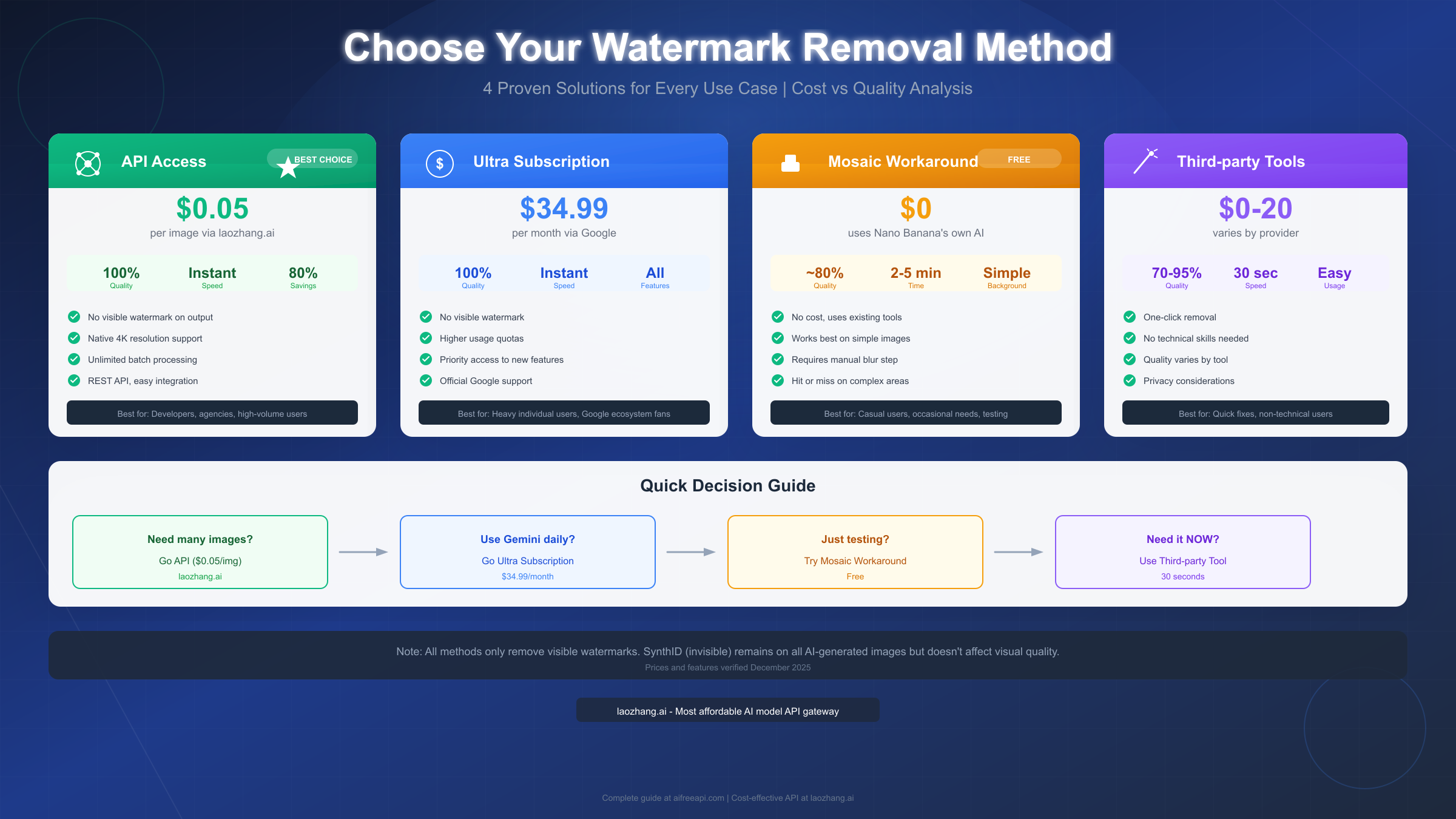
The most reliable way to get watermark-free Nano Banana Pro images is through API access. When you generate images through the API rather than the consumer Gemini app, the visible watermark is not applied. This is Google's official, intended pathway for professional use.
Official Google API pricing stands at approximately $0.134 per image for 1K/2K resolution and $0.24 per image for 4K resolution. For many professionals, this represents excellent value for truly watermark-free, maximum-quality outputs. However, for teams needing high-volume generation, third-party API providers offer substantial savings. For example, laozhang.ai provides Nano Banana Pro API access at just $0.05 per image—approximately 60-80% savings compared to Google's official pricing while maintaining the same quality and watermark-free output.
The API approach delivers several advantages beyond watermark removal: you get programmatic access for batch processing, consistent output quality, no rate limiting through aggregated services, and simple REST API integration that doesn't require extensive development expertise. For a complete guide on API setup, see how to call Nano Banana Pro via API.
Method 2: Google AI Ultra Subscription
For heavy individual users who prefer staying within Google's ecosystem, the Ultra subscription ($34.99/month) removes visible watermarks from all Nano Banana Pro outputs. This option makes sense if you generate enough images that the subscription cost is lower than API per-image pricing, and if you value Google's direct support and guaranteed uptime.
The break-even calculation is straightforward: at Google's official API price of ~$0.134/image, you'd need to generate roughly 261 images per month to justify Ultra over pay-per-image API access. Through a third-party provider at $0.05/image, that threshold jumps to approximately 700 images monthly. Consider your actual usage patterns before committing to a subscription.
Method 3: The Mosaic Workaround (Free Method)
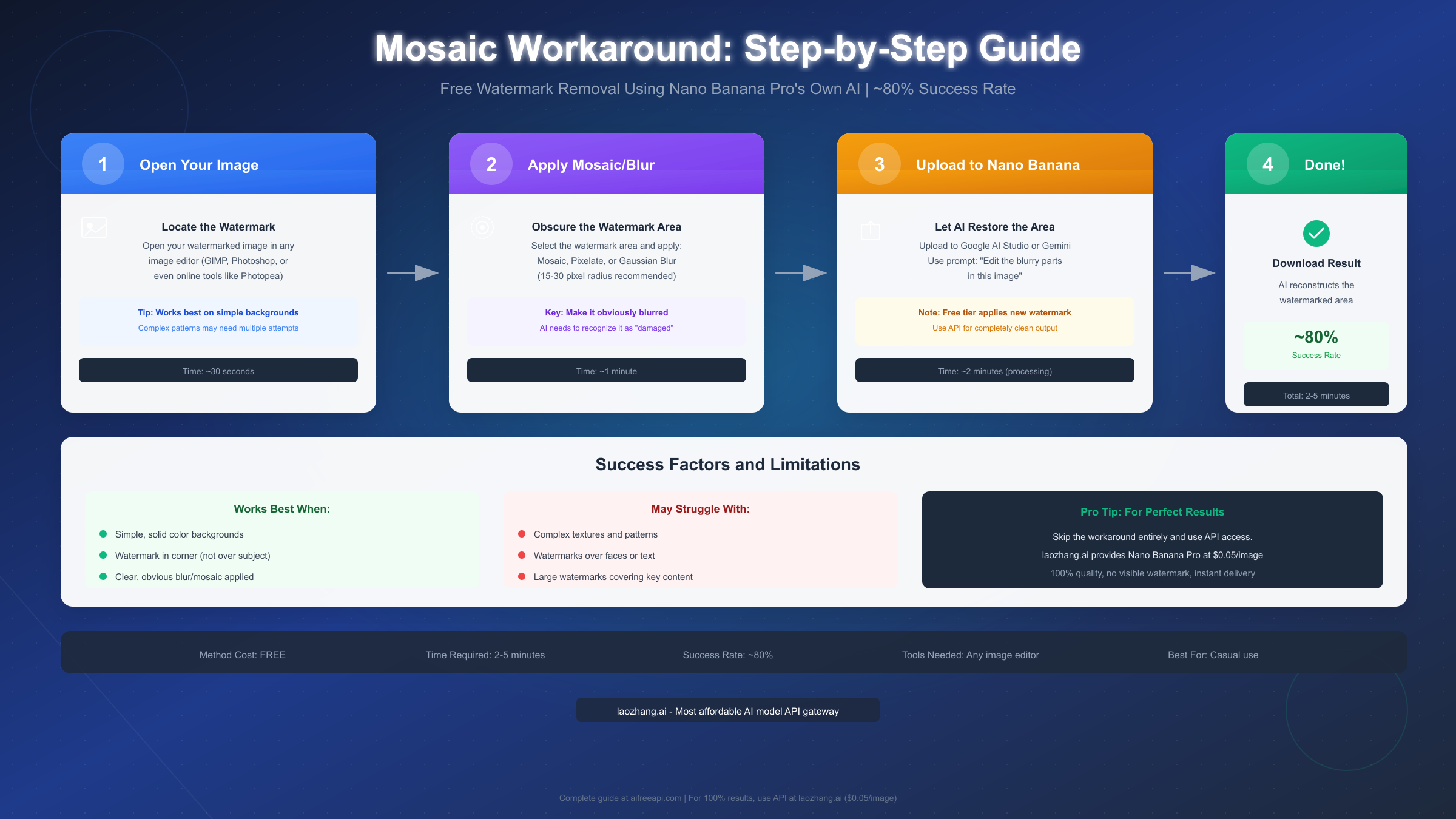
This clever technique exploits Nano Banana Pro's powerful AI inpainting capabilities to reconstruct the watermarked area. It costs nothing and uses Nano Banana's own AI to remove its watermark—though with some limitations on success rate and output quality.
Step 1: Apply Blur to the Watermark Area
Open your watermarked image in any image editor—free tools like GIMP, Photoshop Express, or web-based Photopea all work. Select the area containing the Gemini sparkle watermark (typically a corner of the image) and apply a mosaic, pixelate, or Gaussian blur filter. The recommended blur radius is 15-30 pixels, enough to make the watermark completely unrecognizable while preserving the surrounding context.
Step 2: Upload and Prompt
Access Google AI Studio or the Gemini app and upload your modified image. Use a simple inpainting prompt like "Edit the blurry parts in this image" or "Restore the pixelated area to match the surrounding content." Nano Banana Pro's AI will analyze the surrounding pixels and attempt to reconstruct what should naturally be there.
Step 3: Evaluate Results
This method works best on images with simple, solid-color backgrounds or gradients. Success rate drops significantly when the watermark overlaps complex textures, patterns, faces, or text. Based on community testing, expect roughly 80% success on simple backgrounds and as low as 40% on complex scenes.
Important caveat: If you're using the free tier Gemini app for this process, the AI will apply a new visible watermark to the edited output. This creates an ironic cycle. For truly clean results from this workaround, you'd need to perform the final inpainting step via API access—which brings us back to Method 1.
Third-Party Removal Tools
Several third-party services specialize in Gemini/Nano Banana watermark removal. Tools like Vmake AI's Gemini Watermark Remover promise one-click removal with claimed "no quality loss." Reel.money offers free removal for up to 10 images daily, or 20 with a free account. The open-source GeminiWatermarkTool on GitHub (https://github.com/allenk/GeminiWatermarkTool ) provides a command-line utility using mathematically accurate reverse alpha blending.
These tools vary significantly in quality and reliability. Most work by detecting the semi-transparent watermark overlay and attempting to subtract it from the underlying pixels. Results depend heavily on the specific image content beneath the watermark. For critical professional work, API access remains more reliable.
Manual Editing (Last Resort)
Photoshop's Content-Aware Fill, Clone Stamp, or Healing Brush can technically remove visible watermarks, but this approach is time-intensive and results vary dramatically. For simple backgrounds, manual editing might work adequately. For complex scenes, you'll likely spend more time editing than the image is worth, and results may show visible artifacts.
Cost-Effective API Solutions for Watermark-Free Images
For professionals and developers who need consistent, high-quality watermark-free outputs, API access represents the optimal solution. Let's break down the economics and implementation.
Official Google API Pricing
According to Google's current pricing structure, Nano Banana Pro API costs approximately:
- Standard resolution (1K/2K): $0.134 per image
- 4K resolution: $0.24 per image
- Batch API: 50% discount ($0.067/image for standard)
- Additional costs: ~$0.001-0.03 per request for tokens
For the complete pricing breakdown, check out the detailed Nano Banana Pro pricing breakdown.
Third-Party Provider Economics
Third-party API aggregators like laozhang.ai offer Nano Banana Pro access at significantly reduced rates. The typical pricing model works as follows: you purchase credits at approximately $0.05 per image, representing roughly 60-80% savings compared to official pricing. These services act as authorized resellers, routing requests through legitimate API channels while providing volume discounts and simplified billing.
| Provider | Price/Image | 4K Price | Monthly Volume | Best For |
|---|---|---|---|---|
| Google Official | $0.134 | $0.24 | Pay as you go | Enterprise, compliance |
| Google Batch API | $0.067 | $0.12 | High volume | Developers, batch jobs |
| laozhang.ai | $0.05 | ~$0.10 | Flexible | Cost-conscious teams |
| Google AI Ultra | ~$0.05* | ~$0.05* | 700+ images/mo | Heavy individual users |
*Calculated based on $34.99/month subscription amortized over typical usage
The value proposition becomes clear for teams generating 100+ images monthly: official API at $13.40/100 images versus third-party at $5.00/100 images translates to meaningful savings that compound over time.
Quality and Reliability Considerations
A common concern with third-party providers is whether quality matches official API output. The answer is yes—these services route requests through the same Nano Banana Pro model, so image quality is identical. The differences lie in:
- Rate limiting: Third-party aggregators often provide higher rate limits by pooling capacity
- Uptime: Depends on provider infrastructure, but reputable services like laozhang.ai maintain 99%+ availability
- Support: Less comprehensive than Google's enterprise support
- Compliance: May not meet specific regulatory requirements for some enterprises
For more details on API access options, see the complete guide at https://docs.laozhang.ai/.
Step-by-Step API Setup for Non-Developers
You don't need to be a programmer to use API access for watermark-free Nano Banana Pro images. Here's a beginner-friendly walkthrough using laozhang.ai as an example, though similar principles apply to other providers.
Getting Started
First, create an account at your chosen API provider. Most services, including laozhang.ai, offer initial free credits for testing. After registration, you'll receive an API key—a long string of characters that authenticates your requests. Keep this key secure, as it's essentially your access credential.
Making Your First Request
The simplest way to test API access without coding is through API testing tools like Postman, Insomnia, or even your web browser's developer console. Here's a basic request structure:
bashcurl -X POST "https://api.laozhang.ai/v1/images/generations" \
  -H "Authorization: Bearer YOUR_API_KEY" \
  -H "Content-Type: application/json" \
  -d '{
    "model": "nano-banana-pro",
    "prompt": "A serene mountain landscape at sunset",
    "size": "1024x1024"
  }'
The response includes a URL to your generated image—completely watermark-free. For non-technical users, many API providers also offer web interfaces where you can paste prompts and receive images without touching code.
Integration Options for Different Use Cases
For content creators who need occasional images, web-based API playgrounds provide the easiest access. Developers integrating into applications can use official SDKs in Python, JavaScript, or other languages. For batch processing, simple scripts can automate generation of hundreds of images from a prompt list.
The key advantage of API access is flexibility: generate images programmatically, integrate into existing workflows, process in batches, and always receive clean, watermark-free outputs. If you're interested in exploring subscription options within Google's ecosystem, the Gemini subscription comparison provides additional context on tier differences.
Which Method is Right for You? Decision Guide
Choosing the optimal watermark removal approach depends on your specific use case, volume, and budget. Here's a framework for making the right decision.
For Developers and Agencies (High Volume)
If you're generating more than 100 images monthly, API access through a cost-effective provider is the clear winner. At $0.05/image via laozhang.ai, you get native watermark-free output, consistent quality, batch processing capability, and the lowest per-image cost. The initial setup takes about 30 minutes, after which generation is seamless.
For Heavy Individual Users
If you're generating 500+ images monthly and prefer staying within Google's ecosystem with official support, Google AI Ultra at $34.99/month provides watermark-free images with the security of a direct Google relationship. This option also includes other Gemini premium features beyond just image generation.
For Casual or Occasional Users
If you only need a few watermark-free images occasionally, the mosaic workaround provides a free solution—though with variable success rates. Combine this with third-party removal tools for images where the workaround doesn't produce clean results.
For Enterprise with Compliance Requirements
Large organizations with specific data handling requirements should consider Google's enterprise API options. While more expensive, these come with compliance certifications, SLAs, and dedicated support that may be necessary for regulated industries.
Decision Flowchart Summary
- Generate >100 images/month? → API via laozhang.ai ($0.05/image)
- Generate 500+ with Google preference? → Ultra subscription ($34.99/month)
- Occasional needs, cost-sensitive? → Mosaic workaround (free)
- Need it immediately, small volume? → Third-party removal tools
Legal Considerations and FAQs
Understanding the legal landscape around watermark removal helps ensure you're operating within acceptable boundaries.
Is Watermark Removal Legal?
Removing watermarks from images you've generated yourself is generally permitted. Google's Terms of Service don't explicitly prohibit removing the visible watermark from your own creations. The watermark serves transparency purposes, but there are no widespread reports of account restrictions specifically for watermark removal as of December 2025.
However, important caveats apply. Using watermark removal to misrepresent AI-generated content as human-created may violate platform policies where you share the images. Commercial use of edited images should follow the same content licensing terms as unedited Nano Banana Pro outputs. And attempting to remove SynthID for purposes of disguising AI content origin may violate Google's acceptable use policies.
Does SynthID Affect Image Usability?
No. The SynthID invisible watermark is mathematically embedded in pixel values in ways that don't affect visual quality, printing, or digital display. You can use SynthID-watermarked images for all practical purposes. The watermark only becomes relevant if someone explicitly checks for it using detection tools.
Can Third-Party Removal Tools Access My Images?
When using online removal tools, images are typically uploaded to the service's servers for processing. If privacy is a concern, consider local solutions like the open-source GeminiWatermarkTool, or use API access which generates watermark-free images without requiring any post-processing.
What About Copyright on AI-Generated Images?
Copyright for AI-generated images remains a legally evolving area. Generally, you have the right to use images you generate, but claiming copyright protection for purely AI-generated works is uncertain territory in most jurisdictions. The watermark question is separate from copyright—removing a watermark doesn't affect underlying rights.
Frequently Asked Questions
Why do some images still show artifacts after removal? Third-party tools work by reversing the watermark overlay, which can leave subtle artifacts when the underlying image content has similar colors to the watermark. API access avoids this entirely by generating watermark-free from the start.
Does Nano Banana Pro watermark API outputs? No, API-generated images do not include the visible Gemini sparkle watermark. They do include the invisible SynthID watermark, which all Nano Banana Pro outputs contain regardless of access method.
How do I know if my removal was successful? Check the corner where the watermark appeared. For SynthID verification, upload to the Gemini app and ask if it's AI-generated—this tests only the invisible watermark, not the visible one.
What resolution can I get watermark-free? API access supports up to native 4K resolution output with no visible watermarks. Third-party removal tools work on whatever resolution you provide, though quality may degrade during the process.
Conclusion: Your Path to Watermark-Free Nano Banana Pro Images
The question "Does Nano Banana Pro add watermarks?" has a nuanced answer: yes to visible watermarks for free/Pro users, no for Ultra subscribers and API users, and always yes for the invisible SynthID that doesn't affect usability. Understanding this distinction is the first step toward effectively managing watermarks on your AI-generated images.
For most professional use cases, API access through a cost-effective provider like laozhang.ai represents the optimal solution. At $0.05 per image—approximately 60-80% savings compared to official Google pricing—you receive native watermark-free outputs without any post-processing, consistent quality, and the flexibility to generate at scale.
If you're testing Nano Banana Pro or have occasional needs, the mosaic workaround provides a clever free alternative, though with variable success rates. Third-party removal tools offer quick fixes for images that slip through with watermarks.
The invisible SynthID watermark represents Google's commitment to AI content transparency and cannot be removed—but importantly, it doesn't need to be removed for any practical purpose. Focus your efforts on the visible watermark, choose the right access method for your volume and budget, and you'll have a reliable workflow for obtaining the clean Nano Banana Pro outputs your projects require.
For complete documentation on API integration and the most current pricing, visit https://docs.laozhang.ai/.