
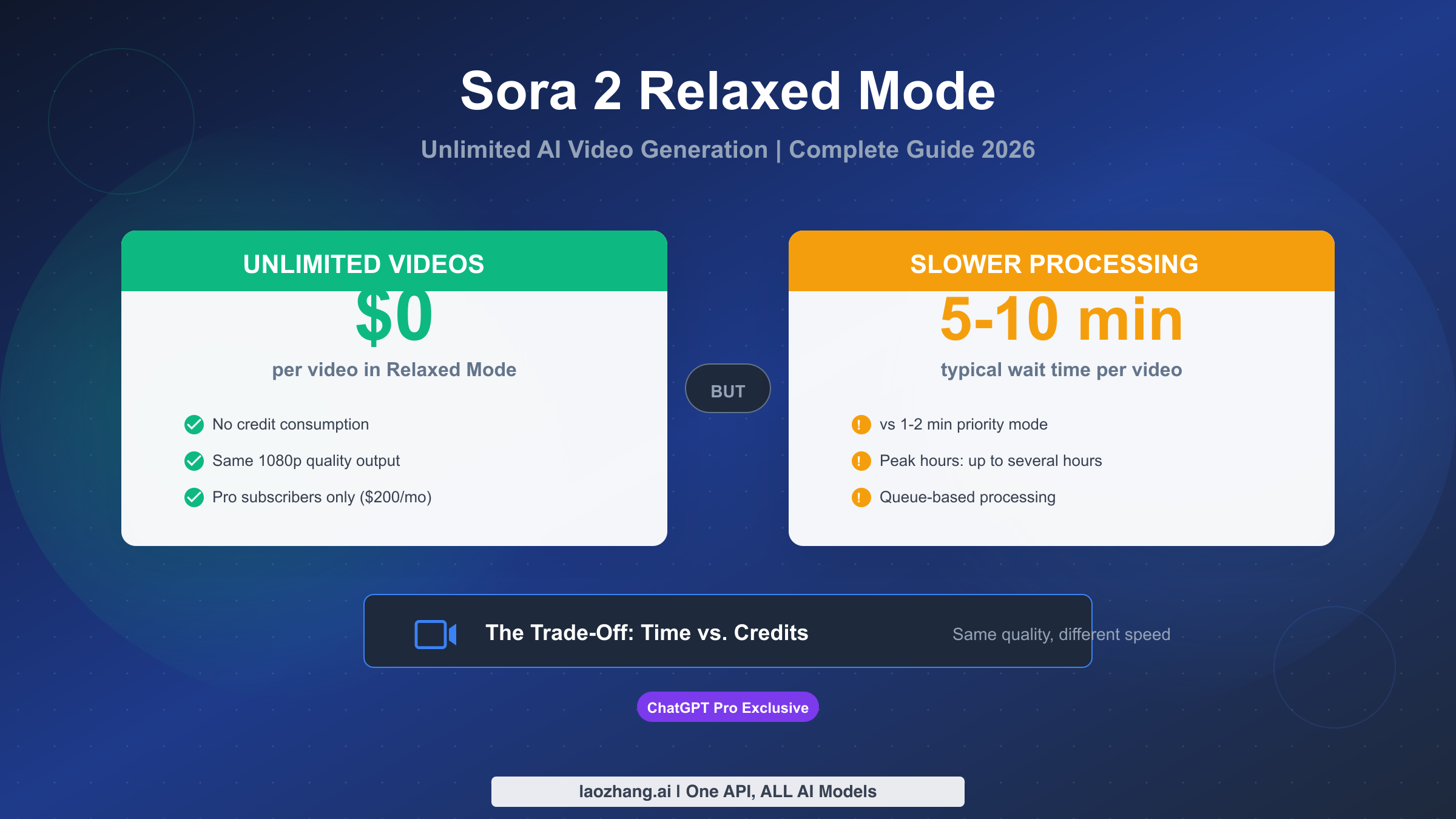
Sora 2 relaxed mode is an unlimited video generation queue available exclusively to ChatGPT Pro subscribers ($200/month). Unlike priority mode which consumes your monthly credits, relaxed mode processes videos for free but with longer wait times—typically 5-10 minutes compared to 1-2 minutes for priority processing. The key insight that many users miss: output quality is identical in both modes, making relaxed mode an incredibly valuable feature for anyone who generates lots of AI videos.
This comprehensive guide explains exactly what relaxed mode means, who can access it, how it compares to priority mode, and whether upgrading to ChatGPT Pro makes financial sense for your specific needs. Whether you're a content creator weighing your options or a Pro subscriber looking to optimize your workflow, you'll find practical strategies you can implement immediately.
What is Sora 2 Relaxed Mode?
Relaxed mode represents OpenAI's solution to a fundamental problem in AI video generation: balancing quality, speed, and cost. When you submit a video generation request to Sora 2, the system needs to allocate significant computational resources—GPUs, memory, and processing power. Priority mode gives you immediate access to these resources, which is why it costs credits. Relaxed mode, by contrast, places your request in a lower-priority queue that processes during periods of reduced demand or when computational resources become available.
The terminology "relaxed" refers to the relaxed timing constraints, not reduced quality. OpenAI's rendering pipeline is identical regardless of which mode you use. The same AI model, the same video generation algorithms, and the same quality controls apply to both modes. What differs is simply when your video gets processed and how quickly you receive the result.
How the Queue System Works
When you submit a relaxed mode request, your video enters a queue alongside other relaxed mode submissions. The system processes these requests on a first-in-first-out basis, though the exact processing time depends on current server load and demand. During normal hours, you can expect your video within 5-10 minutes. During peak usage periods—typically evenings and weekends in US time zones—wait times can extend to several hours. Some users have reported wait times of 2-3 hours during particularly busy periods, though this is relatively uncommon.
Understanding this queue system helps set realistic expectations. Relaxed mode isn't designed for time-sensitive projects where you need results immediately. Instead, it excels for experimentation, batch processing, and situations where you're willing to trade time for unlimited generation capacity. Many Pro subscribers develop a workflow where they submit multiple relaxed mode requests, work on other tasks, and return later to review completed videos.
The True Value Proposition
The value of relaxed mode becomes clear when you consider the economics of video generation. ChatGPT Pro costs $200/month and includes 10,000 credits for priority generation. A typical 5-second video at 720p might consume around 50 credits, meaning those 10,000 credits could generate roughly 200 priority videos per month. But what if you need more? Without relaxed mode, you'd be out of luck—there's no option to purchase additional credits. Relaxed mode removes this ceiling entirely. You can generate hundreds, even thousands of videos per month without any additional cost. For power users who iterate extensively on prompts or run large-scale creative projects, this unlimited capacity fundamentally changes what's possible.
Who Can Use Relaxed Mode? (Plus vs Pro)
One of the most common sources of confusion around Sora 2 relaxed mode involves subscription tier access. Let's clarify this definitively: relaxed mode is exclusively available to ChatGPT Pro subscribers. ChatGPT Plus users, despite having access to Sora 2 video generation, cannot use relaxed mode regardless of how much they pay or how long they've been subscribed.
ChatGPT Pro Subscribers: Full Access
Pro subscribers ($200/month) receive complete access to relaxed mode with no limitations on the number of videos they can generate. This includes all video durations (up to 20 seconds), all resolutions (up to 1080p), and full creative control over prompts and parameters. Pro users also receive 10,000 credits per month for priority generation, plus additional Pro-exclusive features across other ChatGPT capabilities including o1 model access and advanced voice mode.
The relaxed mode benefit alone justifies the Pro subscription for users who generate significant video content. If you were to purchase equivalent video generation through other platforms, even 100 additional videos could easily exceed $200 in API costs. The unlimited nature of relaxed mode means your cost per video approaches zero as your usage increases.
ChatGPT Plus Subscribers: No Relaxed Mode Access
Plus subscribers ($20/month) have access to Sora 2, but only through priority mode using their monthly credit allocation. The Plus plan includes 1,000 credits per month, which enables approximately 20 short videos or fewer longer/higher-resolution videos. Once these credits are exhausted, Plus users cannot generate additional videos until the next billing cycle—there's no relaxed mode fallback and no option to purchase more credits.
This limitation reflects OpenAI's pricing strategy, positioning Plus as an accessible tier for casual users while reserving unlimited generation for the premium Pro tier. If you find yourself consistently running out of credits before month's end, it's worth evaluating whether the Plus tier meets your needs. For many users, the credit limitations of the Plus plan become the deciding factor in considering an upgrade.
The Holiday Promotion Confusion
Some users may remember a brief period in December 2024 when OpenAI offered temporary relaxed mode access to Plus subscribers as a holiday promotion. This limited-time offer was announced by Sam Altman on social media and lasted approximately two weeks. Since early January 2025, relaxed mode has been exclusively Pro-only, and OpenAI has not indicated any plans to extend it to Plus subscribers permanently.
If you read forum posts or articles mentioning Plus access to relaxed mode, they're likely referring to this historical promotion rather than current availability. Always verify current feature access on OpenAI's official documentation, as the AI landscape changes rapidly.
Relaxed Mode vs Priority Mode: Complete Comparison
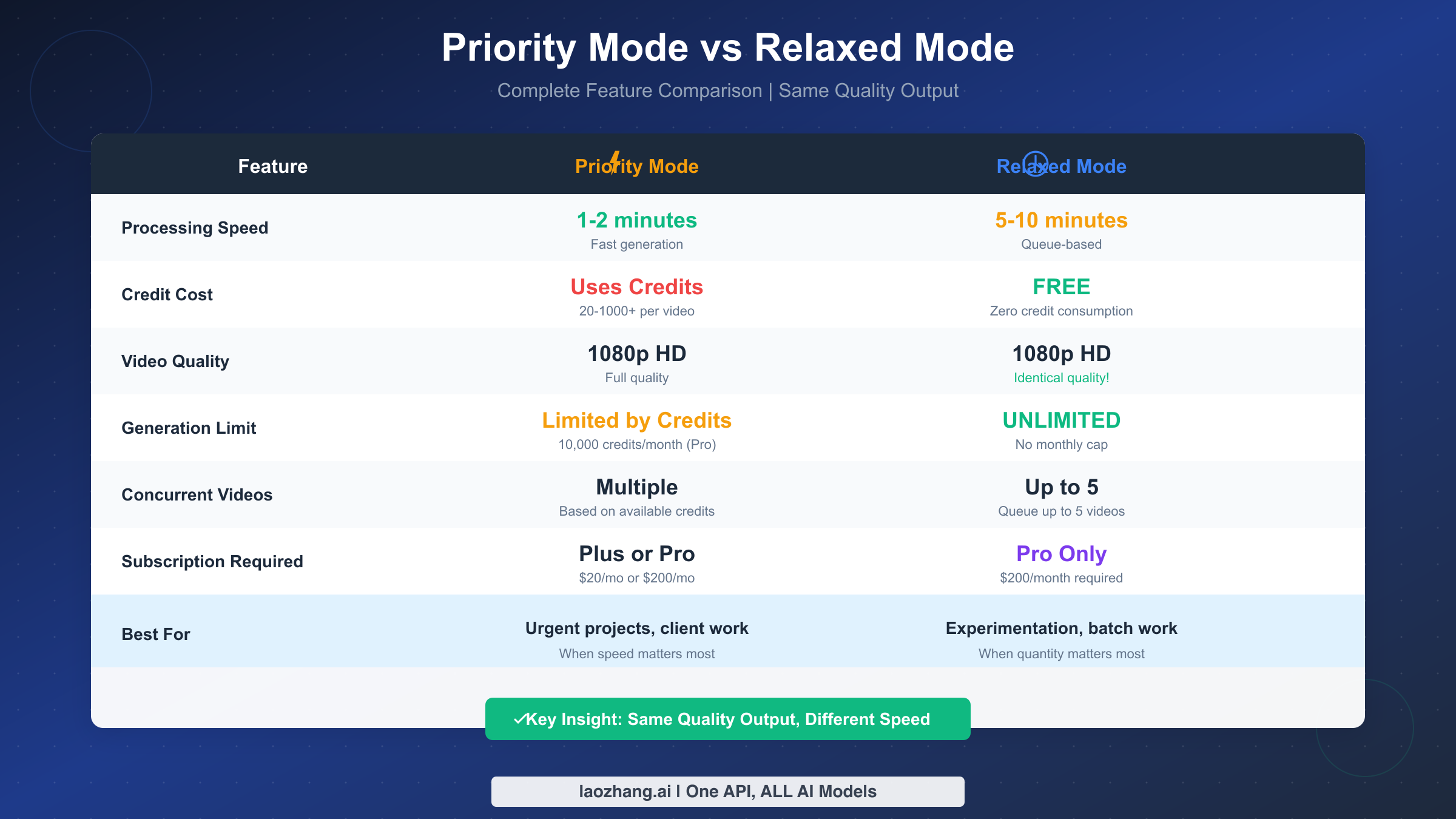
Understanding the differences between relaxed and priority mode helps you make informed decisions about when to use each. While both modes produce identical output quality, they differ significantly in processing speed, credit consumption, and optimal use cases.
Processing Speed
Priority mode delivers results quickly, typically within 1-2 minutes for standard video lengths. The system allocates dedicated computational resources to your request, processing it immediately upon submission. This makes priority mode ideal for time-sensitive work where you need to iterate quickly or meet deadlines.
Relaxed mode operates on a different timeline. During off-peak hours, you might receive results in 5-10 minutes—only slightly longer than priority. However, during peak demand periods, wait times can extend significantly. OpenAI doesn't guarantee specific processing times for relaxed mode, and users should expect variability based on server load and demand patterns.
Credit Consumption
Priority mode consumes credits based on video specifications. Credit costs scale with duration, resolution, and complexity, with typical 5-second videos at 720p consuming around 50 credits. Pro subscribers receive 10,000 credits monthly, while Plus subscribers receive 1,000 credits. Once depleted, you must wait until the next billing cycle for credit refresh.
Relaxed mode consumes zero credits. Every video you generate through relaxed mode is free, regardless of duration, resolution, or how many you create. This zero-cost structure makes relaxed mode invaluable for experimentation and iteration where you want to test many variations without worrying about depleting resources.
Output Quality
This is crucial: output quality is identical between modes. The same AI models, rendering pipelines, and quality controls process your video regardless of whether you use priority or relaxed mode. A 1080p video generated through relaxed mode is indistinguishable from one generated through priority mode.
This quality parity is often misunderstood. The term "relaxed" might suggest reduced quality, but it refers exclusively to timing constraints, not output specifications. OpenAI maintains consistent quality standards across all generation modes.
Concurrent Video Limits
Pro subscribers using relaxed mode can queue up to 5 concurrent videos simultaneously. This enables efficient batch processing—you can submit multiple prompts and have them all processing in parallel, then review the results when complete. Priority mode doesn't have explicit concurrency limits but is constrained by your credit balance.
When to Use Each Mode
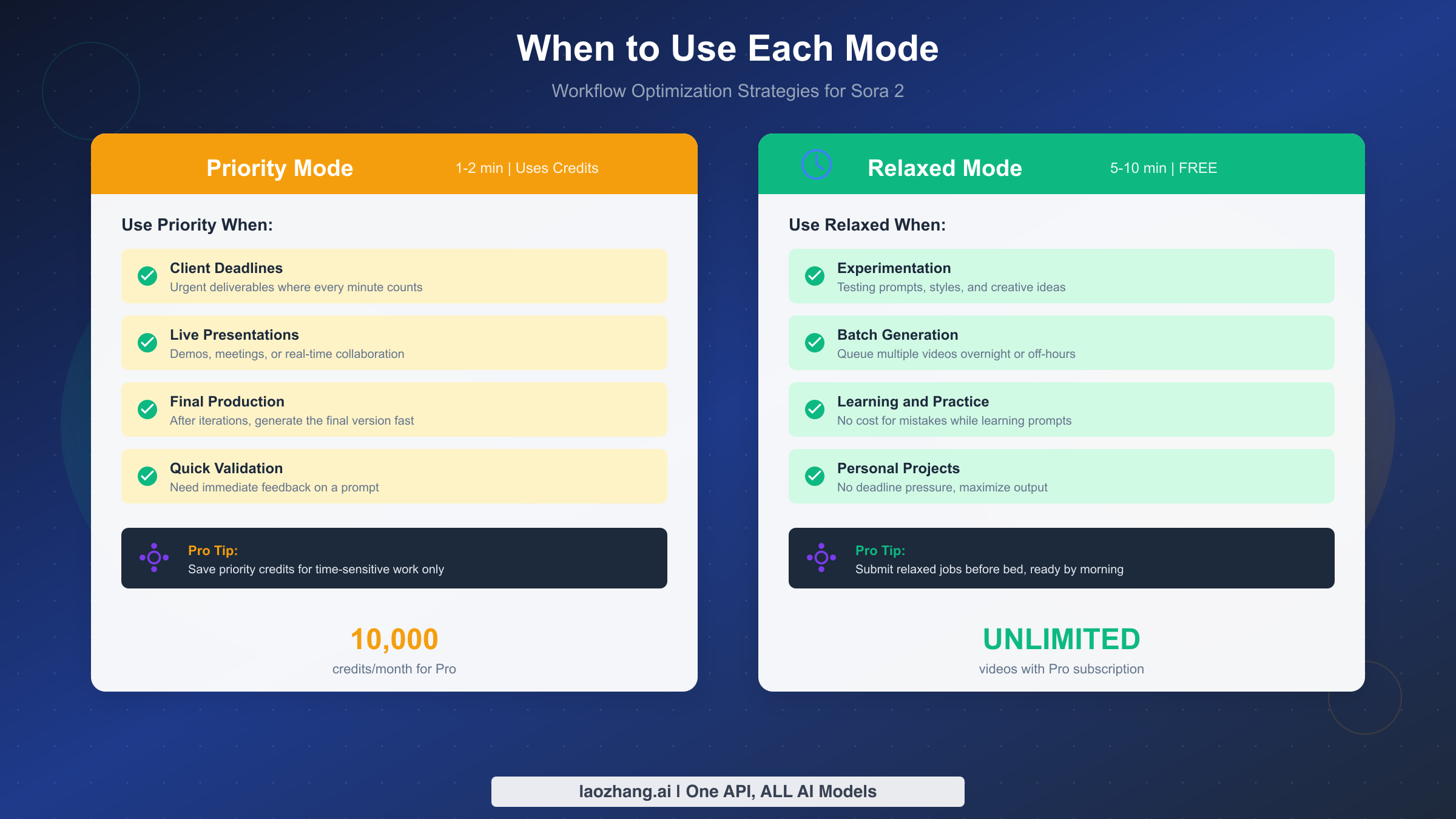
Priority mode excels when speed matters: client deadlines, live demonstrations, quick iterations during active creative sessions, or final production renders when you've already refined your prompt through experimentation. Use priority credits strategically for work that genuinely requires immediate results.
Relaxed mode shines for experimentation, learning, batch processing, and personal projects without time pressure. If you're testing prompt variations, exploring creative directions, or generating content for future use, relaxed mode lets you work without worrying about credit consumption. Many power users submit relaxed mode jobs before bed and wake up to completed videos.
How to Use Relaxed Mode Effectively
Maximizing relaxed mode's value requires developing workflows that account for its unique characteristics. The following strategies help you generate more videos while working efficiently around the queue-based processing model.
Understanding Wait Time Patterns
Wait times in relaxed mode vary significantly based on when you submit requests. Understanding these patterns helps you plan effectively. Generally, the fastest processing occurs during off-peak hours: early morning US time (before 9 AM ET), late night US time (after 11 PM ET), and weekday mornings. Peak demand typically occurs during US business hours and evenings, as well as weekend afternoons when more users are actively creating content.
Some users have documented wait time patterns across different days and times. While your experience may vary, typical ranges include 3-7 minutes during off-peak hours, 10-30 minutes during normal hours, and 1-3 hours during peak demand periods. During major events or product launches that drive increased Sora usage, wait times can extend further.
Batch Processing Strategies
Relaxed mode's 5-concurrent-video limit enables powerful batch processing workflows. Rather than submitting videos one at a time and waiting, queue multiple variations simultaneously and let them process in parallel. This approach maximizes throughput while minimizing active waiting time.
Consider developing prompt variations before entering a creation session. If you're exploring a concept, prepare 5 different angle or style variations, submit them all to relaxed mode, then work on other tasks while they process. When you return, you'll have multiple options to evaluate rather than a single video to accept or reject.
For large-scale projects requiring dozens of videos, develop a systematic submission cadence. Submit 5 videos, let them process, review and iterate, then submit the next batch. This assembly-line approach maintains continuous production without overwhelming the queue or waiting idle.
Optimizing for Success
Since relaxed mode videos take longer to generate, each failed generation represents more lost time than in priority mode. Invest effort in prompt quality before submission. Review your prompts for clarity, specificity, and potential interpretation issues. Consider submitting a priority-mode test video for complex or experimental prompts to validate the concept before committing relaxed-mode resources.
Keep records of successful prompts that generate quality results. When you find effective prompt structures or style descriptors, document them for reuse. This reduces iteration cycles needed for future videos and improves your relaxed mode efficiency over time.
Workflow Integration Tips
The most effective relaxed mode users integrate it into broader creative workflows rather than treating it as a standalone tool. Submit relaxed mode jobs at natural workflow transition points: before meetings, at end of day, before switching to different tasks. This transforms wait time from idle frustration into productive parallel processing.
Set up notifications or check periodically rather than watching the queue. Most users find that checking every 15-30 minutes during active sessions strikes a good balance between responsiveness and productivity. For overnight batch jobs, simply review results the next morning.
Is ChatGPT Pro Worth It for Relaxed Mode?
The decision to upgrade from ChatGPT Plus ($20/month) to ChatGPT Pro ($200/month) represents a significant cost increase—$180 more per month. For users primarily interested in Sora video generation, relaxed mode becomes a key factor in this calculation. Let's analyze when the upgrade makes financial sense.
The Break-Even Calculation
Consider relaxed mode's value in terms of video generation capacity. Plus subscribers can generate approximately 20 short videos with their 1,000 monthly credits before hitting limits. Pro subscribers receive 10,000 priority credits (roughly 200 videos) plus unlimited relaxed mode generation.
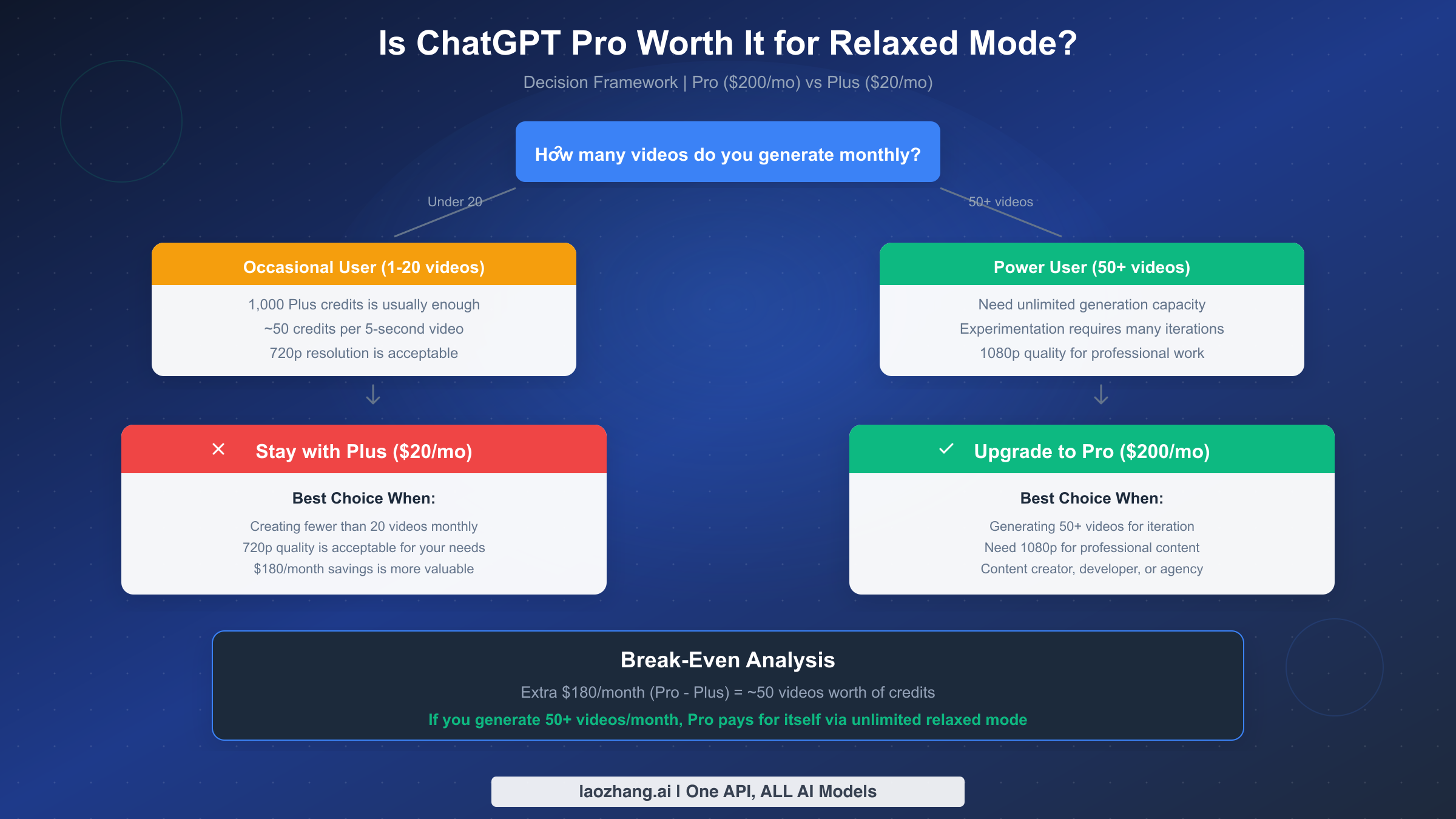
If you value unlimited generation capacity, the question becomes: how many additional videos would you need to generate for the upgrade to make sense? The extra $180 monthly cost divided by typical per-video value gives us a break-even point. If you'd otherwise need to pay for API access or alternative services at approximately $3.60 per video, generating 50+ additional videos monthly makes Pro worthwhile purely for the relaxed mode benefit.
For users who would generate 100+ videos monthly through experimentation and iteration, the per-video cost with Pro approaches negligible levels while Plus remains completely inaccessible for that volume.
User Type Recommendations
For casual users generating fewer than 20 videos monthly and satisfied with 720p resolution, Plus provides adequate capability at one-tenth the cost. The limited credits suffice for occasional projects, and the $180 monthly savings compounds significantly over time. Relaxed mode isn't worth paying for if you won't use the unlimited capacity.
For regular creators generating 20-50 videos monthly, the decision requires more nuanced analysis. If you consistently exhaust Plus credits before month's end, you're already constrained by the current tier. Pro's expanded priority credits (10,000 vs 1,000) plus relaxed mode for experimentation removes these constraints. Consider whether the creative freedom and reduced friction justify the cost.
For power users generating 50+ videos monthly—content creators, marketing teams, developers building video-related products, or creative professionals—Pro becomes nearly essential. The unlimited relaxed mode capacity fundamentally changes what's possible, enabling extensive iteration and exploration that would be impractical with credit-based limits. At this usage level, the per-video cost advantage makes Pro clearly worthwhile.
Beyond Relaxed Mode
Remember that Pro includes benefits beyond relaxed mode access. The 10x increase in priority credits (10,000 vs 1,000) enables substantially more immediate-turnaround work. Pro-exclusive model access including o1 reasoning models and advanced features across ChatGPT adds value for users of those capabilities. If you use ChatGPT extensively across multiple modalities, the combined benefits may justify the upgrade even with moderate Sora usage.
For developers exploring programmatic access, it's worth noting that Sora API access operates on a separate pricing model. API usage is credit-based regardless of subscription tier and may be more cost-effective for specific use cases involving automation or integration.
What About ChatGPT Plus Users?
If you're a Plus subscriber without access to relaxed mode, you're not without options. While you can't access unlimited generation, strategic approaches can maximize your 1,000 monthly credits and help you decide whether an upgrade makes sense.
Optimizing Your Credit Usage
Understanding how credits work helps you maximize their value. Credit consumption scales with video specifications—shorter durations and lower resolutions consume fewer credits. A 5-second video at 720p might consume 50 credits, while a 20-second video at 1080p could consume 500 credits or more. By choosing specifications strategically, you can generate more videos within your allocation.
For experimentation and concept validation, generate shorter videos at lower resolutions. Once you've refined your prompt and confirmed the creative direction works, use higher specifications only for final renders you intend to use. This tiered approach stretches credits significantly further than defaulting to maximum settings for every generation.
The detailed breakdown of Plus video generation limits provides specific credit costs for different configurations. Familiarize yourself with these costs to make informed decisions during creation sessions.
Alternative Access Methods
For developers and technically inclined users, API access provides an alternative path to Sora capabilities. While API usage isn't "free" like relaxed mode, it offers pay-per-use pricing that may be more economical for specific use patterns. Evaluate whether your needs align better with subscription-based or usage-based pricing models.
Some third-party platforms provide Sora API access with different pricing structures. Services like laozhang.ai offer unified API access to multiple AI models including video generation capabilities. These can be worth exploring if your usage patterns don't fit neatly into Plus or Pro subscription models, or if you need programmatic access without the full Pro subscription cost.
When to Consider Upgrading
Several signals suggest you might benefit from upgrading to Pro. If you consistently deplete your Plus credits before month's end, you're demonstrably constrained by current limits. If you find yourself not attempting creative experiments because you're conserving credits, the psychological overhead of limited resources is reducing your output. If video generation is becoming central to your work or creative practice rather than an occasional tool, the unlimited ceiling of relaxed mode becomes increasingly valuable.
Track your usage patterns over 2-3 months before deciding. Calculate how many additional videos you would have generated with unlimited access. This data-driven approach helps avoid both premature upgrades (paying for capacity you won't use) and delayed upgrades (constraining yourself unnecessarily when the value is clearly there).
Frequently Asked Questions
Is relaxed mode video quality lower than priority?
No, video quality is identical between relaxed and priority modes. Both modes use the same AI models, rendering pipelines, and quality controls. The "relaxed" terminology refers to relaxed timing constraints, not reduced quality specifications. A 1080p video from relaxed mode is indistinguishable from one generated through priority mode.
How long do relaxed mode videos actually take?
Wait times vary based on server load and demand. During off-peak hours, expect 5-10 minutes. During normal usage periods, 10-30 minutes is typical. During peak demand (US evenings and weekends), wait times can extend to 1-3 hours. OpenAI doesn't guarantee specific processing times for relaxed mode.
Can I queue multiple videos in relaxed mode?
Yes, Pro subscribers can queue up to 5 concurrent videos in relaxed mode. This enables efficient batch processing—submit multiple prompt variations simultaneously and review them together when complete. This concurrency limit applies specifically to relaxed mode; priority mode concurrency depends on credit availability.
What happens if I run out of priority credits?
Pro subscribers can switch to relaxed mode for continued generation at zero credit cost. Plus subscribers cannot generate additional videos until credits refresh at their next billing cycle—there's no relaxed mode fallback for Plus users and no option to purchase additional credits.
Why doesn't ChatGPT Plus include relaxed mode?
OpenAI's pricing strategy positions Plus as an accessible tier for casual users while reserving unlimited generation for the premium Pro tier. The significant computational resources required for unlimited video generation necessitate higher pricing to remain sustainable. The brief holiday promotion (December 2024) that gave Plus users temporary relaxed access was explicitly positioned as a limited-time offer.
Can I use relaxed mode via API?
The Sora API operates on a separate pricing model from subscription-based access. API usage is credit-based regardless of your ChatGPT subscription tier. The relaxed/priority mode distinction applies specifically to the ChatGPT interface, not API access. Developers using the API should evaluate pricing based on their expected usage patterns rather than subscription-based unlimited access.
Key Takeaways and Next Steps
Sora 2 relaxed mode represents a powerful capability for Pro subscribers who need extensive video generation capacity. By trading processing speed for unlimited generation, it enables experimentation and iteration that would be impractical with credit-based limits alone. The quality parity between relaxed and priority modes means you sacrifice nothing but time—an excellent trade-off for many use cases.
If you're a Pro subscriber, develop workflows that leverage relaxed mode strategically: batch processing, off-peak submission, and parallel task management. If you're considering upgrading from Plus, calculate your actual generation needs and compare the per-video economics. For Plus users who can't justify the upgrade, focus on optimizing credit usage through shorter durations and lower resolutions during experimentation.
The AI video generation landscape continues evolving rapidly. Stay current with OpenAI's announcements for potential changes to relaxed mode availability, processing times, or tier access. As more users discover Sora's capabilities, demand patterns and queue times may shift. Adapting your workflows to these changes ensures you continue maximizing value from whatever access tier you choose.
For developers exploring programmatic integration, remember that API access operates independently of subscription-based relaxed mode. Evaluate your needs across both access models to determine the most cost-effective approach for your specific use case.