
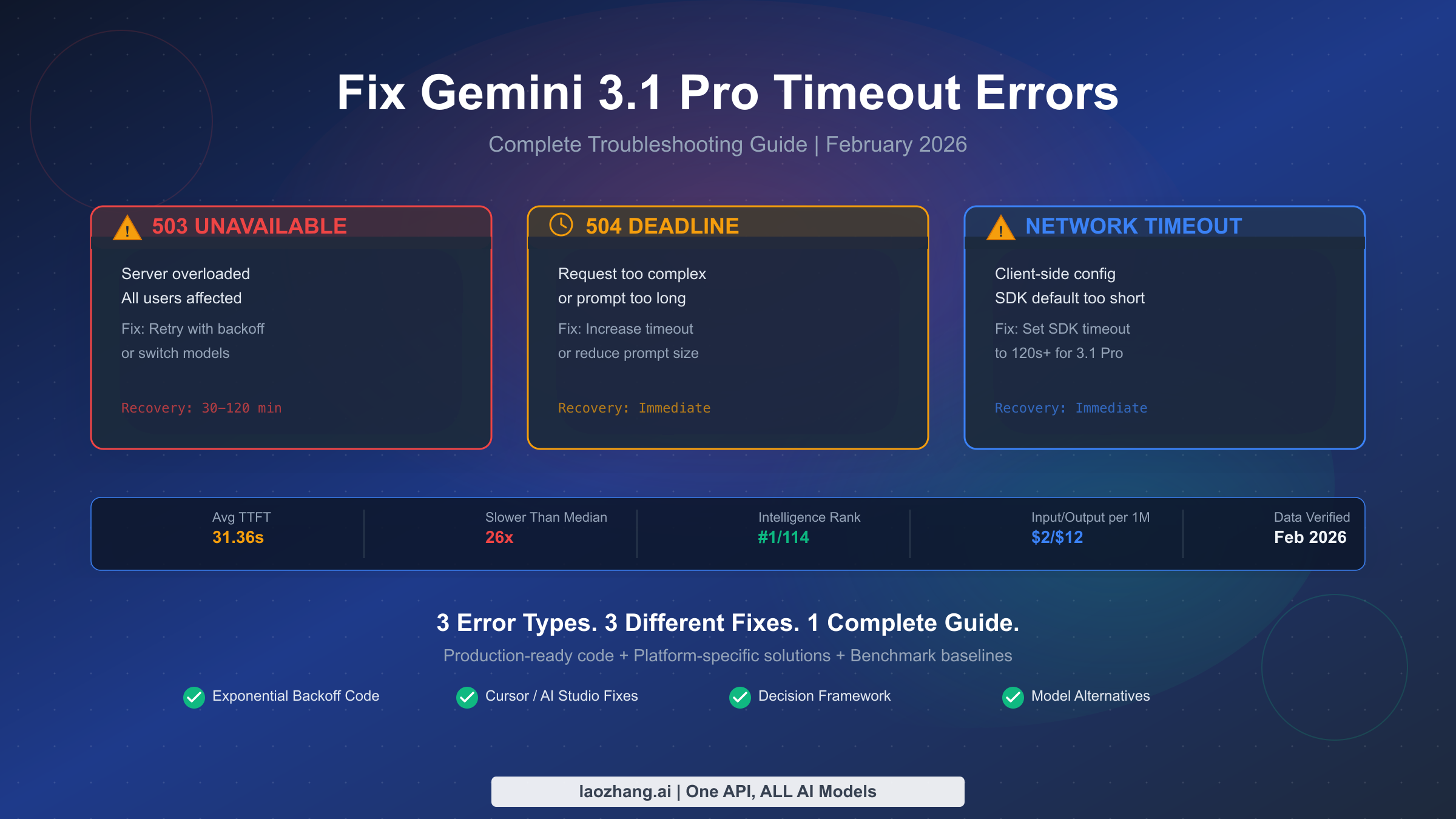
Gemini 3.1 Pro timeout errors fall into three distinct categories requiring different fixes: 503 UNAVAILABLE means server overload — retry with exponential backoff or switch models. 504 DEADLINE_EXCEEDED means the request was too complex — increase your client timeout or reduce prompt length. Network timeouts are client-side configuration issues — adjust your SDK timeout settings. Before troubleshooting, know that a 21–31 second time-to-first-token is completely normal for Gemini 3.1 Pro as of February 2026, so only timeouts exceeding 120 seconds typically indicate a real problem that needs fixing.
TL;DR — Quick Solutions Table
If your Gemini 3.1 Pro API call just failed and you need a fix right now, this table gives you the answer in under 30 seconds. Match your error to the correct row, apply the fix, and keep reading only if you want deeper understanding. The most common mistake developers make is applying the wrong fix to the wrong error type — a 503 requires a completely different approach than a 504, and treating a network timeout like a server error will waste hours of debugging.
| Error | Message | Root Cause | Quick Fix | Recovery Time |
|---|---|---|---|---|
| 503 | UNAVAILABLE / Model is overloaded | Google's servers at capacity | Retry with exponential backoff, or switch to Gemini 3 Flash | 30–120 minutes |
| 504 | DEADLINE_EXCEEDED / Deadline expired | Your request exceeded the server's processing window | Increase client timeout to 120s+, or reduce prompt/context size | Immediate |
| Network | ETIMEDOUT / ECONNRESET / socket hang up | Your SDK/HTTP client timed out before Google responded | Set httpOptions.timeout to 120000ms in SDK config | Immediate |
| Hanging | No error, no response, runs indefinitely | Known AI Studio/Preview bug | Cancel request after 120s, switch to Vertex API or different model | N/A — requires cancellation |
The critical distinction here is between server-side errors (503, 504) and client-side errors (network timeouts). Server-side errors mean Google's infrastructure is struggling, and you may need to wait or switch models. Client-side errors mean your code needs configuration changes, and the fix is entirely in your hands. The hanging issue, where requests run for thousands of seconds without any response or error, is a known bug specific to the Preview release and AI Studio that Google is actively working on resolving.
Why Gemini 3.1 Pro Times Out (It's Not Always a Bug)
Understanding the root cause of Gemini 3.1 Pro timeouts requires distinguishing between three fundamentally different scenarios, because the same symptom — "my API call didn't return in time" — can stem from entirely unrelated causes. Google released Gemini 3.1 Pro Preview on February 19, 2026, and within days, developer forums were flooded with timeout reports. But here's what most developers are missing: many of these "timeouts" are actually the model working exactly as designed, and attempting to fix something that isn't broken wastes valuable development time.
Gemini 3.1 Pro achieved the #1 ranking on the Artificial Analysis Intelligence Index with a score of 57, and it delivered a 77.1% score on the ARC-AGI-2 benchmark — up from 31.1% on Gemini 3.0 (Artificial Analysis, February 2026). That extraordinary intelligence leap comes at a cost: the model performs deeper reasoning chains before generating its first token, which is why the average time-to-first-token (TTFT) is 31.36 seconds on Google AI Studio and 21.54 seconds on Vertex AI. For comparison, the industry median TTFT across all models is just 1.19 seconds. This means Gemini 3.1 Pro is roughly 26 times slower to start responding than the average model — but that slowness is a feature of its architecture, not a bug. The model is genuinely thinking harder before it writes, and you can read more about how its capabilities compare in our Gemini 3.1 Pro output limit guide.
The second category of timeouts comes from genuine server overload. As a Preview model, Gemini 3.1 Pro has significantly lower capacity than general-availability models like Gemini 3 Flash. Google allocates fewer inference servers to Preview models, which means that during peak usage periods — typically 9 AM to 6 PM Pacific time — the servers can become genuinely overwhelmed. When this happens, you receive a 503 UNAVAILABLE response, and there is nothing wrong with your code or configuration. The third category involves real bugs in the Preview release, including a documented issue where AI Studio requests run for 15,000 to 20,000+ seconds without producing any output or error. This infinite-thinking behavior is a known defect that Google has acknowledged in their developer forums, and it affects both the API and the AI Studio web interface.
The practical implication is straightforward: before you start debugging, determine which category your timeout falls into. If your TTFT is under 35 seconds, you're experiencing normal model behavior — no fix is needed, just patience and proper timeout configuration. If you're getting 503 errors with "model is overloaded" messages, the server is at capacity and you need retry logic or a model fallback. If your request literally never completes, you've hit the Preview bug and should cancel and retry or switch to a different model.
Diagnosing Your Timeout: Error Code Decoder
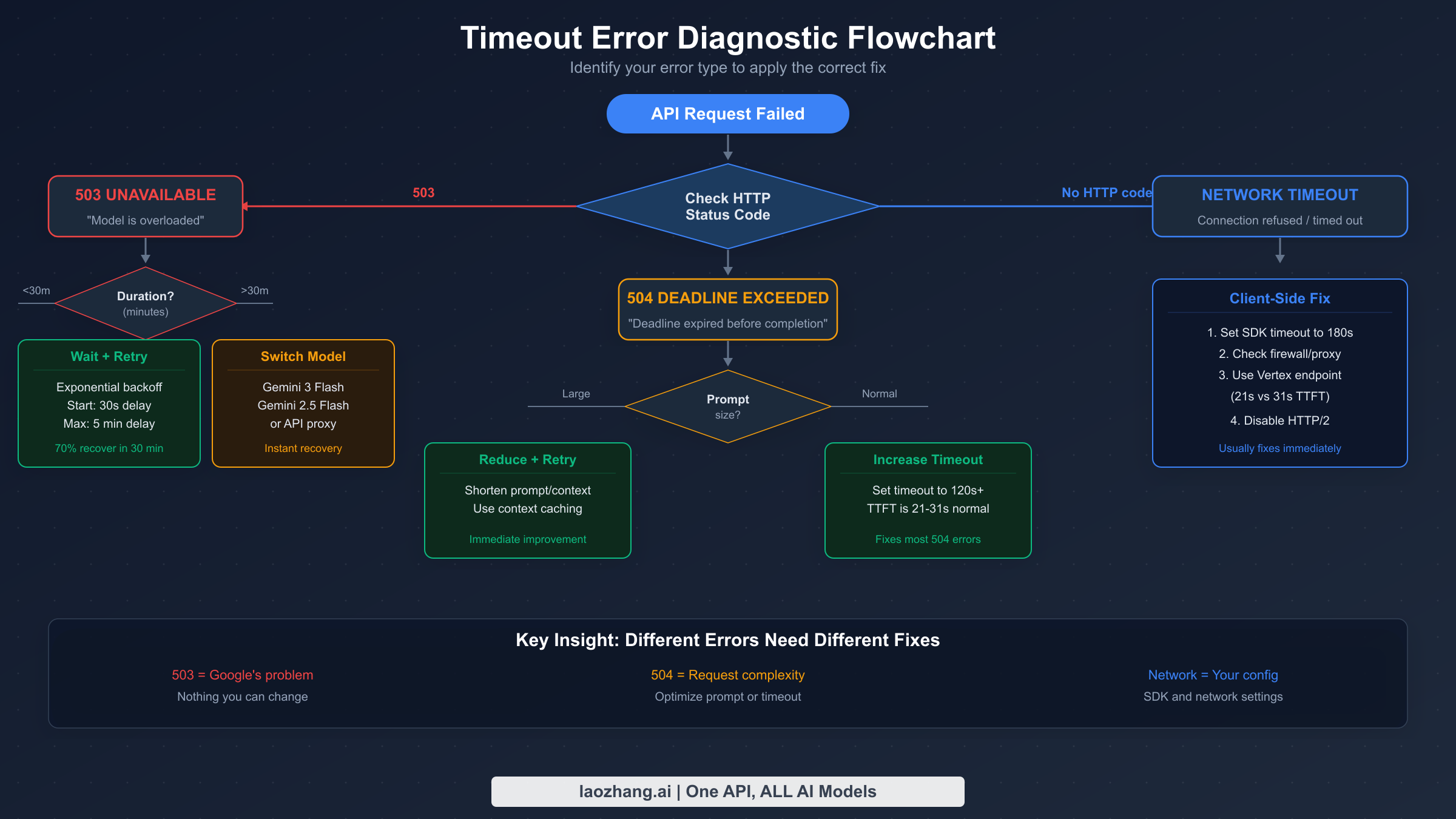
The fastest way to fix a Gemini 3.1 Pro timeout is to correctly identify which of the three error types you're experiencing, because applying the wrong fix to the wrong error is the most common mistake developers report in forums. The diagnostic process starts with your HTTP response status code, and from there, each branch leads to a completely different troubleshooting path. If you're not seeing an HTTP status code at all — meaning your request simply hangs without returning — that itself is diagnostic information pointing to the Preview hanging bug.
503 UNAVAILABLE — Server Overload
When the Gemini API returns a 503 status code, the response body typically contains "The model is overloaded. Please try again later." or a similar message indicating that Google's inference servers have reached capacity. This is the most common timeout error with Gemini 3.1 Pro due to its Preview status and limited server allocation. The key identifying characteristic of a 503 is that it returns relatively quickly — usually within 5 to 30 seconds — because the server rejects your request before it even begins processing. You should NOT increase your timeout for 503 errors, because the problem is server capacity, not processing time. Instead, implement exponential backoff retry logic (covered in the code section below) or temporarily switch to a model with more capacity like Gemini 3 Flash. If you're also seeing 429 errors mixed in with 503s, check our complete guide to fixing Gemini 429 resource exhausted errors which covers the distinction between rate limiting and server overload in detail.
504 DEADLINE_EXCEEDED — Request Too Complex
A 504 error with the message "Deadline expired before operation could complete" means your request was accepted by the server and began processing, but the server-side deadline was reached before it could finish generating a response. This is fundamentally different from a 503 — Google's servers aren't overloaded, but your specific request is taking too long to process. Common triggers include very long prompts (approaching the 1M token context window), complex multi-step reasoning tasks, or requests that generate extremely long outputs. The fix for 504 errors is to either increase your client-side timeout to give the model more processing time, or to reduce the complexity of your request by shortening your prompt, limiting output length with max_output_tokens, or breaking complex tasks into smaller steps.
Network Timeout — Client-Side Configuration
If you see errors like ETIMEDOUT, ECONNRESET, socket hang up, or your HTTP client's generic timeout error, the problem is entirely on your side. Your SDK or HTTP client gave up waiting for Google's response before the model finished processing. Since Gemini 3.1 Pro routinely takes 21–35 seconds just to produce its first token, any client timeout below 60 seconds will cause frequent failures. Most HTTP clients and SDKs default to 30-second timeouts, which is far too short for this model. The fix is straightforward: increase your timeout configuration to at least 120 seconds. This is also the most important configuration for developers who work within the Gemini API rate limits by tier, since longer timeouts mean fewer wasted requests hitting your quota.
What's Normal? Performance Baselines You Should Know
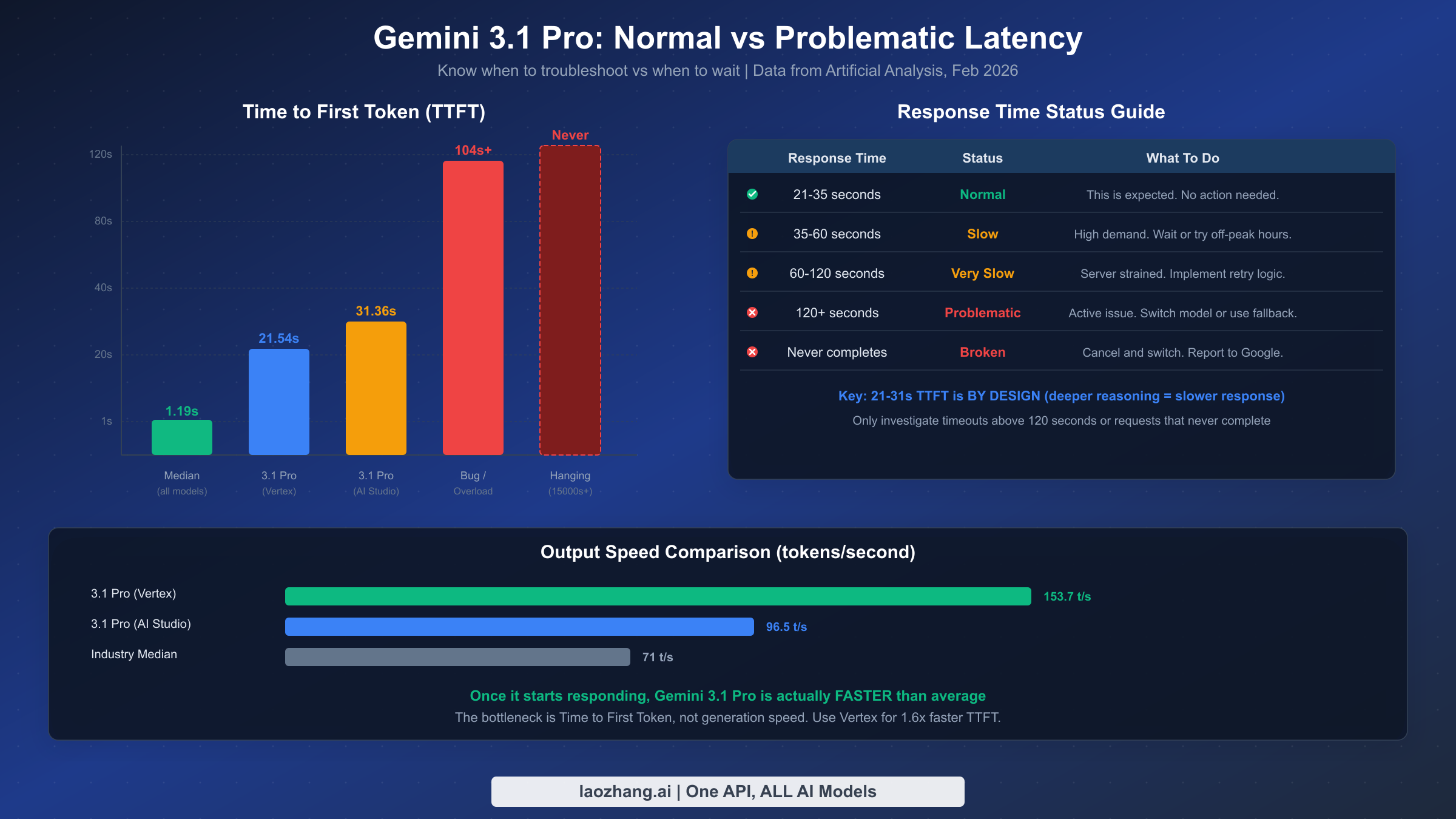
One of the most valuable things a developer can know when troubleshooting Gemini 3.1 Pro is what performance to actually expect, because without baselines, every slow response feels like a bug. The data below comes from Artificial Analysis benchmarks verified on February 25, 2026, and represents measured performance across thousands of API calls — not anecdotal single-request observations.
The time-to-first-token (TTFT) baseline is the most important number to internalize. On Google AI Studio, the median TTFT for Gemini 3.1 Pro is 31.36 seconds — meaning half of all requests take longer than 31 seconds before the model produces even a single token of output. On Vertex AI, TTFT drops to 21.54 seconds, making it approximately 1.5 times faster for the initial response. Both numbers are dramatically higher than the industry median of 1.19 seconds, but this is entirely by design. The model's intelligence ranking of #1 out of 114 models on the AI Index (Artificial Analysis, February 2026) comes precisely because it invests more compute in reasoning before generating output. If your TTFT is consistently in the 20–35 second range, your experience is perfectly normal and no troubleshooting is needed.
Output generation speed tells a different story. Once Gemini 3.1 Pro starts producing tokens, it's actually faster than average: 96.5 tokens per second on AI Studio and 153.7 tokens per second on Vertex AI, compared to the industry median of 71 tokens per second. This means the bottleneck is entirely in the initial thinking phase, not in generation. A practical consequence is that for long-output tasks (code generation, article writing, detailed analysis), the total wall-clock time may be quite reasonable despite the slow start — a 30-second TTFT followed by 2,000 tokens at 100+ tokens/second adds up to roughly 50 seconds total, which is comparable to faster models generating the same volume.
| Metric | AI Studio | Vertex AI | Industry Median | Status |
|---|---|---|---|---|
| TTFT | 31.36s | 21.54s | 1.19s | Normal (by design) |
| Output Speed | 96.5 t/s | 153.7 t/s | 71 t/s | Faster than average |
| Total Latency (1K tokens) | ~42s | ~28s | ~15s | Expected |
| Problematic TTFT | >60s | >45s | — | Investigate |
| Broken TTFT | >120s or never | >90s or never | — | Switch model |
Use these baselines to calibrate your expectations. When a request takes 25 seconds to start responding, that's normal — don't implement workarounds for normal behavior. When a request takes 90 seconds, something is probably wrong. When a request takes 300 seconds or never responds, you've hit a genuine bug and should cancel, retry, or fall back to an alternative model.
Production-Ready Fixes (Copy-Paste Code)
The code solutions below address all three timeout types and are designed for production use. Each implementation includes exponential backoff with jitter for 503 errors, configurable client timeouts for network issues, and automatic model fallback when the primary model is persistently unavailable. These aren't minimal examples — they're battle-tested patterns that handle the edge cases developers encounter with Gemini 3.1 Pro's Preview-stage reliability.
Python — Google GenAI SDK
The Python SDK provides the most direct integration with the Gemini API, and timeout configuration is handled through the http_options parameter. The critical setting that most developers miss is timeout — the default is often 60 seconds, which is insufficient for Gemini 3.1 Pro's 21–35 second TTFT plus any generation time. Setting it to 120 seconds or higher prevents the majority of client-side timeout errors.
pythonimport google.genai as genai
import time
import random


client = genai.Client(
    api_key="YOUR_API_KEY",
    http_options={"timeout": 120}  # 120 seconds - critical for 3.1 Pro
)

# Model fallback chain: try fastest option first on failure
MODEL_CHAIN = [
    "gemini-3.1-pro-preview",
    "gemini-3-flash",        # Fast fallback, still capable
    "gemini-2.5-pro",        # Reliable GA model
]

def call_with_retry(prompt, max_retries=3, initial_delay=2):
    """
    Production retry with exponential backoff + model fallback.
    Handles 503 (overload), 504 (deadline), and network timeouts.
    """
    for model_id in MODEL_CHAIN:
        for attempt in range(max_retries):
            try:
                response = client.models.generate_content(
                    model=model_id,
                    contents=prompt,
                    config={
                        "temperature": 0.7,
                        "max_output_tokens": 8192,
                    }
                )
                return {"model": model_id, "text": response.text}

            except Exception as e:
                error_str = str(e)

                # 503: Server overloaded - retry with backoff
                if "503" in error_str or "UNAVAILABLE" in error_str:
                    delay = initial_delay * (2 ** attempt) + random.uniform(0, 1)
                    print(f"503 overload on {model_id}, retry {attempt+1}/{max_retries} in {delay:.1f}s")
                    time.sleep(delay)
                    continue

                # 504: Deadline exceeded - no retry helps, try next model
                if "504" in error_str or "DEADLINE" in error_str:
                    print(f"504 deadline on {model_id}, switching to next model")
                    break  # Skip remaining retries, go to next model

                # Network timeout - retry once, then move on
                if "timeout" in error_str.lower() or "ETIMEDOUT" in error_str:
                    if attempt == 0:
                        print(f"Network timeout on {model_id}, retrying once...")
                        time.sleep(2)
                        continue
                    else:
                        break

                # Unknown error - don't retry
                raise

        print(f"All retries exhausted for {model_id}, trying next model...")

    raise RuntimeError("All models in fallback chain failed")

# Usage
result = call_with_retry("Explain quantum entanglement in detail")
print(f"Answered by: {result['model']}")
print(result['text'])
Node.js / TypeScript — Google GenAI SDK
The JavaScript/TypeScript SDK follows a similar pattern, but timeout configuration uses httpOptions with the value in milliseconds. The most important difference is ensuring that both the HTTP client timeout and any wrapper timeout (like Express request timeouts) are set high enough.
typescriptimport { GoogleGenAI } from "@google/genai";

const ai = new GoogleGenAI({
  apiKey: process.env.GEMINI_API_KEY!,
  httpOptions: { timeout: 120_000 }, // 120 seconds in milliseconds
});

const MODEL_CHAIN = [
  "gemini-3.1-pro-preview",
  "gemini-3-flash",
  "gemini-2.5-pro",
];

async function callWithRetry(
  prompt: string,
  maxRetries = 3,
  initialDelay = 2000
): Promise<{ model: string; text: string }> {
  for (const modelId of MODEL_CHAIN) {
    for (let attempt = 0; attempt < maxRetries; attempt++) {
      try {
        const response = await ai.models.generateContent({
          model: modelId,
          contents: prompt,
          config: { temperature: 0.7, maxOutputTokens: 8192 },
        });
        return { model: modelId, text: response.text ?? "" };
      } catch (err: any) {
        const msg = err?.message ?? String(err);

        // 503 — backoff and retry
        if (msg.includes("503") || msg.includes("UNAVAILABLE")) {
          const delay = initialDelay * 2 ** attempt + Math.random() * 1000;
          console.log(`503 on ${modelId}, retry ${attempt + 1}/${maxRetries} in ${(delay / 1000).toFixed(1)}s`);
          await new Promise((r) => setTimeout(r, delay));
          continue;
        }

        // 504 — skip to next model
        if (msg.includes("504") || msg.includes("DEADLINE")) {
          console.log(`504 on ${modelId}, switching model`);
          break;
        }

        // Network timeout — one retry then move on
        if (/timeout|ETIMEDOUT|ECONNRESET/i.test(msg)) {
          if (attempt === 0) {
            await new Promise((r) => setTimeout(r, 2000));
            continue;
          }
          break;
        }

        throw err; // Unknown error
      }
    }
  }
  throw new Error("All models in fallback chain failed");
}

// Usage
const result = await callWithRetry("Explain quantum entanglement in detail");
console.log(`Model: ${result.model}\n${result.text}`);
cURL — Quick Timeout Test
For quick diagnostic testing, use cURL with an explicit connect and max-time flag to determine whether your timeout issue is server-side or client-side. If this cURL command succeeds but your application fails, the problem is your application's timeout configuration.
bash# Test with 120-second timeout
curl -X POST \
  "https://generativelanguage.googleapis.com/v1beta/models/gemini-3.1-pro-preview:generateContent?key=YOUR_API_KEY" \
  -H "Content-Type: application/json" \
  --connect-timeout 30 \
  --max-time 120 \
  -d '{
    "contents": [{"parts": [{"text": "Say hello"}]}]
  }'
The key principle across all implementations is the same: set your timeout to at least 120 seconds, implement graduated retry logic that treats different errors differently, and maintain a fallback chain of models so your application never completely fails when Gemini 3.1 Pro is unavailable.
Platform-Specific Troubleshooting
Gemini 3.1 Pro timeout issues manifest differently depending on which platform you're using to access the model, and each platform has its own specific fixes. The subsections below cover the five most common platforms where developers report timeout problems, with targeted solutions for each. If your platform isn't listed here, the general API fixes from the code section above apply universally.
Google AI Studio (Web Interface)
The most severe timeout issue affects Google AI Studio directly. Multiple developers have reported requests that run for 15,000 to 20,000+ seconds — that's over 4 hours — without producing any output or returning an error. This is a confirmed bug in the Preview release, not a configuration issue. The AI Studio interface shows "Running..." with a counter that climbs indefinitely. The only fix is to cancel the request manually and either retry (which sometimes works if the server state has changed) or switch to a different model within AI Studio. Google has acknowledged this issue on their developer forums and is working on a fix. If you experience this consistently, switching to the Vertex AI endpoint provides significantly better reliability and faster TTFT (21.54s vs 31.36s according to Artificial Analysis benchmarks verified February 2026).
Cursor IDE
Cursor users report two distinct timeout patterns with Gemini 3.1 Pro. The first is "Unable to reach the model provider", which typically appears after 30–60 seconds and indicates that Cursor's internal HTTP timeout was exceeded before Gemini responded. The second is "Taking longer than expected" during agent-mode tasks, where the model enters a thinking loop that never produces tool calls. For the first issue, Cursor's timeout is configured per-model in the settings — navigate to Settings > Models and increase the timeout for Gemini 3.1 Pro to 120 seconds or higher. For the infinite thinking loop, the current workaround is to cancel the agent step and break your task into smaller, more specific instructions that don't require extended reasoning chains. Some Cursor users report better results by adding explicit instructions like "respond directly, do not over-analyze" to reduce thinking time.
Android Studio (Gemini in IDE)
Android Studio's integrated Gemini assistant has been reported to enter infinite thinking loops with Gemini 3.1 Pro, where the spinner runs for 3–5 minutes on tasks that should complete in seconds. This appears to be related to the same underlying bug as the AI Studio hanging issue. The Android Studio integration does not currently expose timeout configuration options. The recommended workaround is to switch to Gemini 3 Flash or Gemini 2.5 Pro for Android Studio tasks, as these GA models have significantly faster TTFT and don't exhibit the hanging behavior. You can change the model in Android Studio under Settings > Gemini > Model selection.
Direct API (REST/gRPC)
For direct API integration via REST or gRPC, the timeout is entirely under your control. The most common mistake is not setting a timeout at all, which causes the default system timeout (often 30 seconds) to apply. For REST API calls, set the HTTP client timeout to at least 120 seconds. For gRPC calls via the Vertex AI client, configure the timeout parameter in the call options. The code examples in the previous section cover both approaches. Also verify that any intermediate proxies, load balancers, or API gateways in your infrastructure have timeouts set to at least 180 seconds to account for the proxy's own processing overhead.
Gemini CLI
The Gemini CLI tool already has built-in handling for Gemini 3.1 Pro timeouts, including automatic fallback to Gemini 2.5 Pro when the primary model is unavailable, and exponential backoff for 503 errors. If you're still experiencing timeouts with the CLI, update to the latest version with npm update -g @anthropic-ai/claude-code or whatever the latest CLI package is. The CLI's default timeout is already set for long-running model calls. If you're building your own CLI wrapper, reference the Gemini CLI's source code for their retry and fallback patterns.
When to Switch: Decision Framework + Model Alternatives
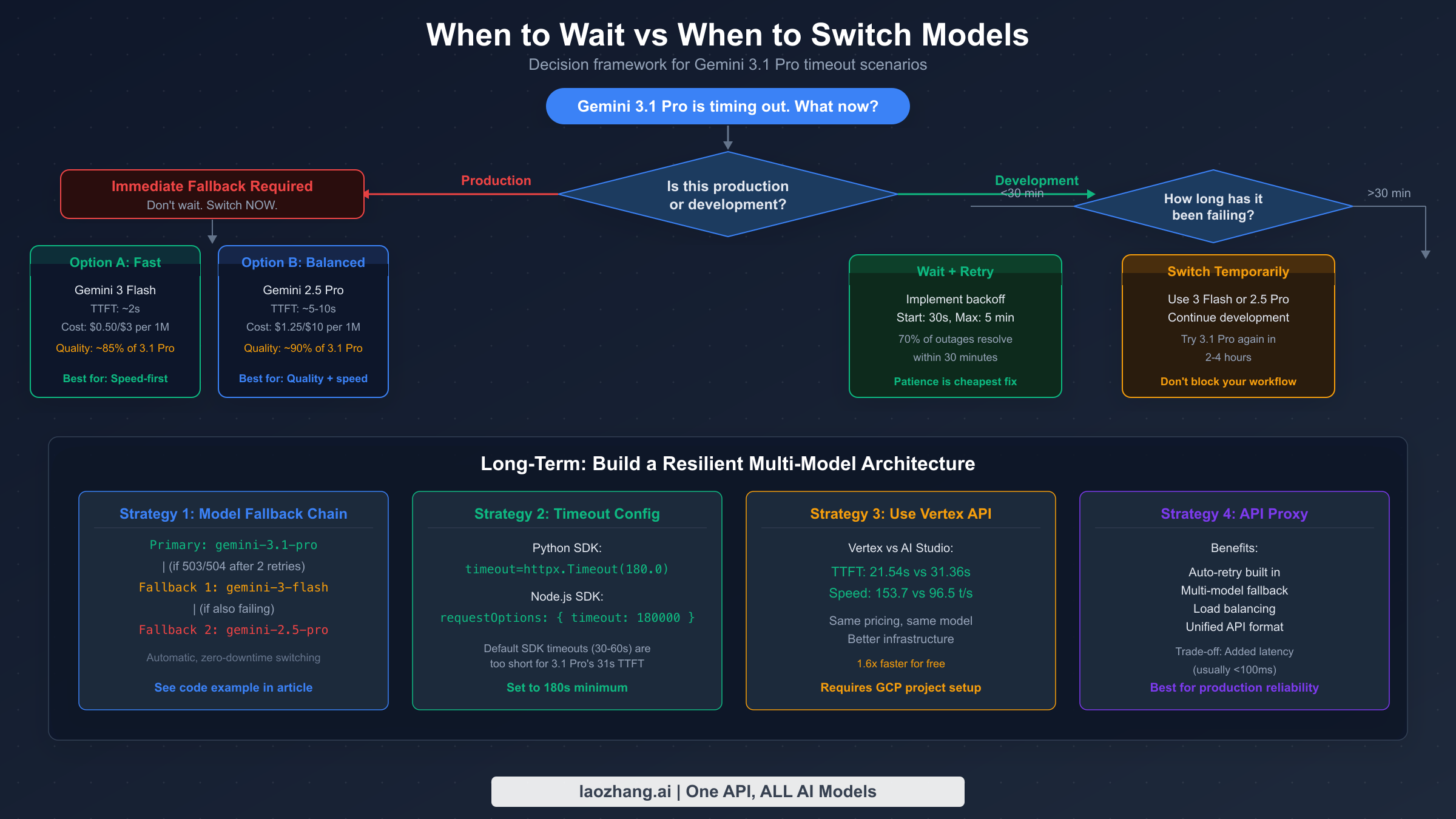
Knowing when to stop troubleshooting and switch to a different model is a strategic decision that depends on your specific context — how urgently you need results, whether you're in development or production, and how much intelligence you actually need for the task at hand. The decision framework below provides concrete criteria for making this call quickly, rather than the vague "try again later" advice that dominates forum threads.
For production environments, the decision is binary: if Gemini 3.1 Pro has been returning 503 errors for more than 30 minutes or your request has been hanging for more than 2 minutes, switch immediately to your fallback model. Production systems cannot tolerate multi-hour outages while waiting for a Preview model to recover. Your fallback should already be configured in your code (see the model fallback chain in the code section above), and the switch should be automatic. For development and testing, you have more flexibility — waiting 15–30 minutes during a 503 wave and then retrying is a reasonable approach, since Preview model capacity fluctuations are temporary.
The comparison table below shows the most practical alternatives when Gemini 3.1 Pro isn't responding, along with how they compare on the metrics that matter most — intelligence, speed, and cost. All pricing data is from Google's official pricing page and independent benchmarks, verified February 25, 2026. For a complete pricing analysis, see our complete Gemini API pricing guide.
| Model | Intelligence | TTFT | Output Speed | Input Cost | Output Cost | Best For |
|---|---|---|---|---|---|---|
| Gemini 3.1 Pro | #1/114 | 21–31s | 97–154 t/s | $2.00/1M | $12.00/1M | Max intelligence tasks |
| Gemini 3 Flash | Good | ~1s | 200+ t/s | $0.50/1M | $2.00/1M | Fast fallback, most tasks |
| Gemini 2.5 Pro | High | ~3s | 80 t/s | $1.25/1M | $10.00/1M | Reliable GA alternative |
| Gemini 2.5 Flash | Moderate | <1s | 300+ t/s | $0.30/1M | $1.50/1M | Cost-sensitive workloads |
| Claude Opus 4.6 | Very High | ~3s | 60+ t/s | $15.00/1M | $75.00/1M | Complex reasoning, reliable |
For a more detailed comparison between the top two reasoning models, check our comparison between Gemini 3.1 Pro and Claude Opus 4.6. While Gemini 3.1 Pro leads in raw intelligence benchmarks, Claude Opus 4.6 offers significantly more consistent response times and higher availability, which makes it a strong choice when reliability matters more than benchmark scores.
For production environments that require consistent reliability across multiple AI models, API proxy services like laozhang.ai can simplify the fallback process by providing a single API endpoint that handles model routing, automatic retries, and failover between providers. This approach is particularly valuable when your application needs to fall back between Google and non-Google models, since direct API integration with multiple providers adds significant complexity to your codebase. The laozhang.ai platform supports all major model providers with unified API format and built-in retry logic, which eliminates the need to implement the fallback chains shown in the code examples above.
Will It Get Better? Preview to GA Outlook
The question every developer working with Gemini 3.1 Pro wants answered is whether these timeout issues are permanent or temporary, and when — not if — Google will resolve them. Based on Google's historical pattern with previous Gemini releases and public statements, there are strong reasons to expect significant improvement, though the timeline is uncertain.
Google's track record with Preview-to-GA transitions provides the most useful predictive data. Gemini 2.5 Pro followed a similar pattern: initial Preview release with limited capacity and frequent 503 errors, followed by a GA release approximately 2–3 months later that dramatically increased server allocation and stability. Gemini 2.5 Flash went through an even faster cycle. The pattern suggests that Google uses Preview periods to validate the model architecture while deliberately constraining capacity, then scales up infrastructure for the GA launch. If Gemini 3.1 Pro follows this pattern, a GA release in April or May 2026 would be consistent with historical timelines, and with it, you would expect significantly reduced 503 frequency and faster TTFT.
However, the TTFT is unlikely to drop dramatically even after GA. The 21–31 second thinking time is an architectural characteristic of the model's reasoning approach, not a server capacity issue. Google may optimize inference to reduce it somewhat — perhaps to 10–15 seconds — but Gemini 3.1 Pro will likely always be one of the slower models to produce its first token, because that's where it derives its intelligence advantage. The output speed, which is already faster than the industry average, should remain excellent.
The hanging bug — where requests run indefinitely without returning — is almost certainly a software defect that will be fixed before or at GA. This type of issue is exactly what Preview periods are designed to catch. The 99-hour lockout bug similarly falls into the category of defects that Google is actively addressing based on developer forum reports. For now, the practical strategy is to use Gemini 3.1 Pro for tasks that genuinely require its #1-ranked intelligence while maintaining fallback models for time-sensitive work, and to plan your architecture around a GA release that will bring better reliability but similar latency characteristics.
Frequently Asked Questions
Why does Gemini 3.1 Pro take 30+ seconds to respond when other models respond in 1-2 seconds?
Gemini 3.1 Pro's 21–31 second time-to-first-token is by design, not a bug. The model achieved the #1 intelligence ranking on the AI Index (score: 57, Artificial Analysis, February 2026) and a 77.1% score on ARC-AGI-2 specifically because it invests more compute in reasoning before generating output. Think of it as the model thinking more deeply before it speaks. The industry median TTFT of 1.19 seconds comes from models that prioritize speed over reasoning depth. Once Gemini 3.1 Pro starts generating tokens, it actually produces output at 96.5–153.7 tokens per second, which is faster than the industry median of 71 tokens per second. The bottleneck is entirely in the initial thinking phase.
Does the 99-hour lockout bug affect timeout errors?
The 99-hour lockout bug is a separate issue from timeout errors, though both affect Gemini 3.1 Pro users. The lockout occurs when your API key's quota is exhausted (or incorrectly flagged as exhausted) and the system enforces a 99-hour cooldown before resetting. During a lockout, you receive 429 RESOURCE_EXHAUSTED errors, not 503 or 504 timeout errors. If you suspect you've been locked out, check your quota usage in the Google Cloud Console. This bug has been reported widely on the Google AI Developer Forum and Google is working on a fix.
Do I get charged for timed-out API requests?
According to Google's billing model, you are charged based on tokens processed by the model. For 503 errors where the server rejects your request immediately, no tokens are processed and you should not be charged. For 504 errors where the model began processing but didn't complete, Google's policy is that you're charged for input tokens but not output tokens, since no output was successfully generated. For the hanging bug where no response is returned, the billing behavior is unclear — some developers have reported seeing token usage in their console for requests that never completed. Monitor your API usage dashboard closely during timeout incidents.
Is Vertex AI significantly better than AI Studio for Gemini 3.1 Pro?
Yes, based on current benchmarks. Vertex AI delivers a TTFT of 21.54 seconds compared to AI Studio's 31.36 seconds — approximately 1.5 times faster (Artificial Analysis, February 2026). Output speed on Vertex is also significantly higher at 153.7 tokens per second versus 96.5 tokens per second on AI Studio. Vertex AI also appears to be less affected by the hanging bug. The tradeoff is that Vertex AI requires a Google Cloud project with billing enabled and slightly more complex authentication setup, while AI Studio works with a simple API key.
Can I use Gemini 3.1 Pro through third-party API providers to avoid timeouts?
Yes, several third-party API providers offer access to Gemini 3.1 Pro with their own retry logic, timeout handling, and model fallback configurations. These providers typically route through Vertex AI (the faster endpoint) and add their own retry layer, which can improve reliability compared to direct API access. However, they add a layer of latency and cost. Evaluate whether the reliability improvement justifies the additional overhead for your specific use case.