
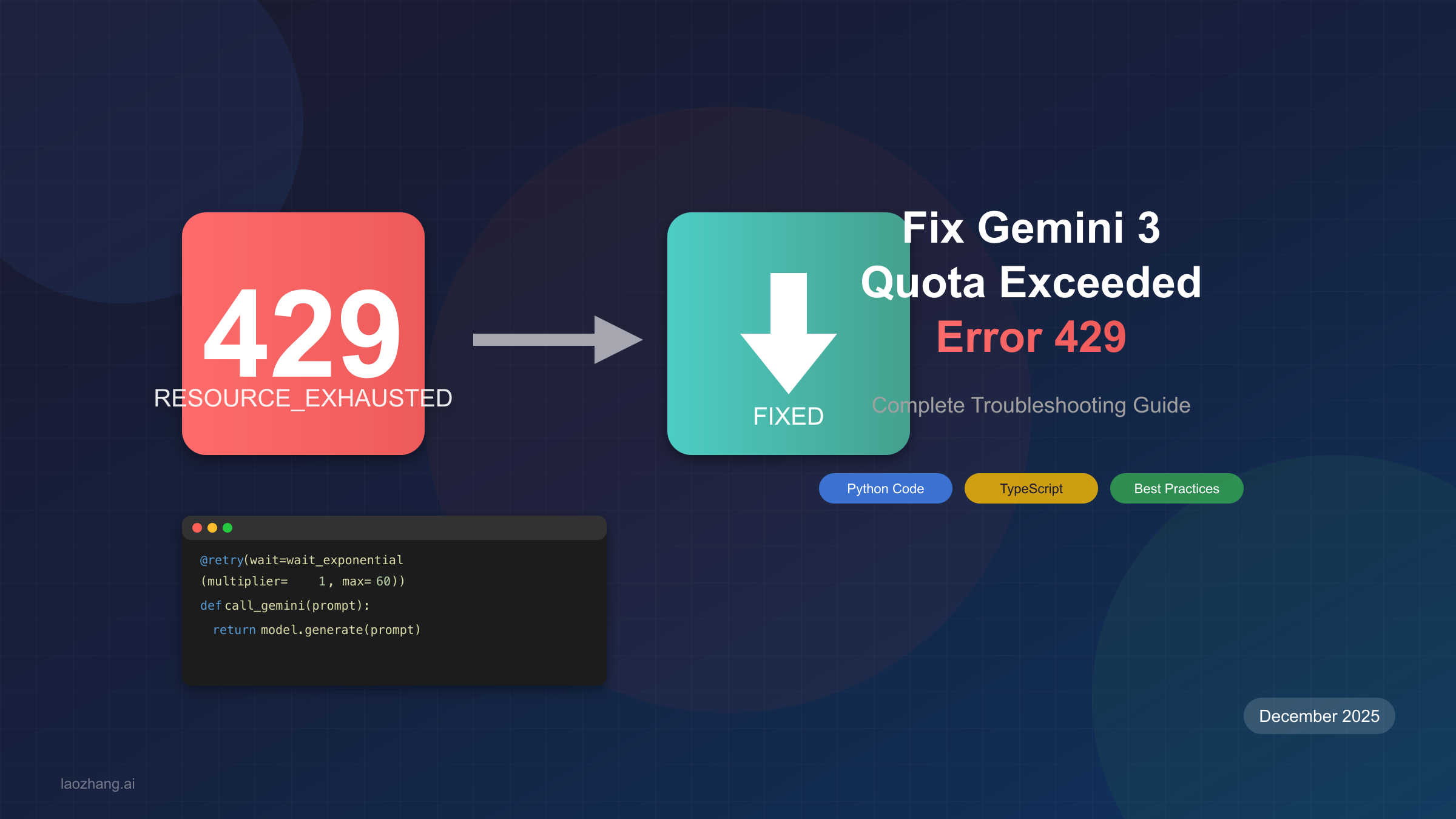
If you're reading this, you've probably just encountered the dreaded 429 RESOURCE_EXHAUSTED error from the Gemini 3 API. Your application has stopped working, your users are frustrated, and you need a solution fast. Don't worry—you're not alone, and this guide will walk you through exactly how to diagnose, fix, and prevent this error from happening again.
The Gemini 3 API rate limit error is one of the most common issues developers face when building AI-powered applications. Whether you're on the free tier testing your prototype or running a production system serving thousands of users, understanding how to handle rate limits is essential for building reliable applications. In this comprehensive guide, we'll cover everything from immediate fixes to long-term architectural strategies.
Understanding the 429 RESOURCE_EXHAUSTED Error
The HTTP 429 status code with RESOURCE_EXHAUSTED message indicates that your application has exceeded one or more rate limits set by Google for the Gemini API. This isn't a bug in your code or a server issue—it's a protective mechanism that ensures fair resource distribution across all API users.
When this error occurs, the Gemini API has temporarily blocked your requests because your project has sent too many requests in a short period, processed too many tokens, or exceeded daily quotas. The error typically looks like this in your application logs:
pythongoogle.api_core.exceptions.ResourceExhausted: 429 Resource has been exhausted (e.g. check quota).
Why does this happen? Google implements rate limits for three primary reasons. First, they protect server stability by preventing any single user from overwhelming the infrastructure. Second, they ensure fair access so that all developers can use the API without one user monopolizing resources. Third, they help Google manage costs and allocate resources efficiently across their AI infrastructure.
The impact on your application can range from minor inconvenience to critical failure depending on how you've implemented error handling. Without proper retry logic, a single rate limit hit can cascade into application crashes, lost user requests, and degraded user experience. This is why implementing robust rate limit handling isn't optional—it's essential for any production application using the Gemini API.
Diagnosing Your Rate Limit Issue
Before implementing fixes, you need to understand exactly which limit you're hitting. The Gemini API enforces multiple rate limits simultaneously, and exceeding any single one triggers the 429 error. Here's a systematic approach to diagnosing your specific issue.
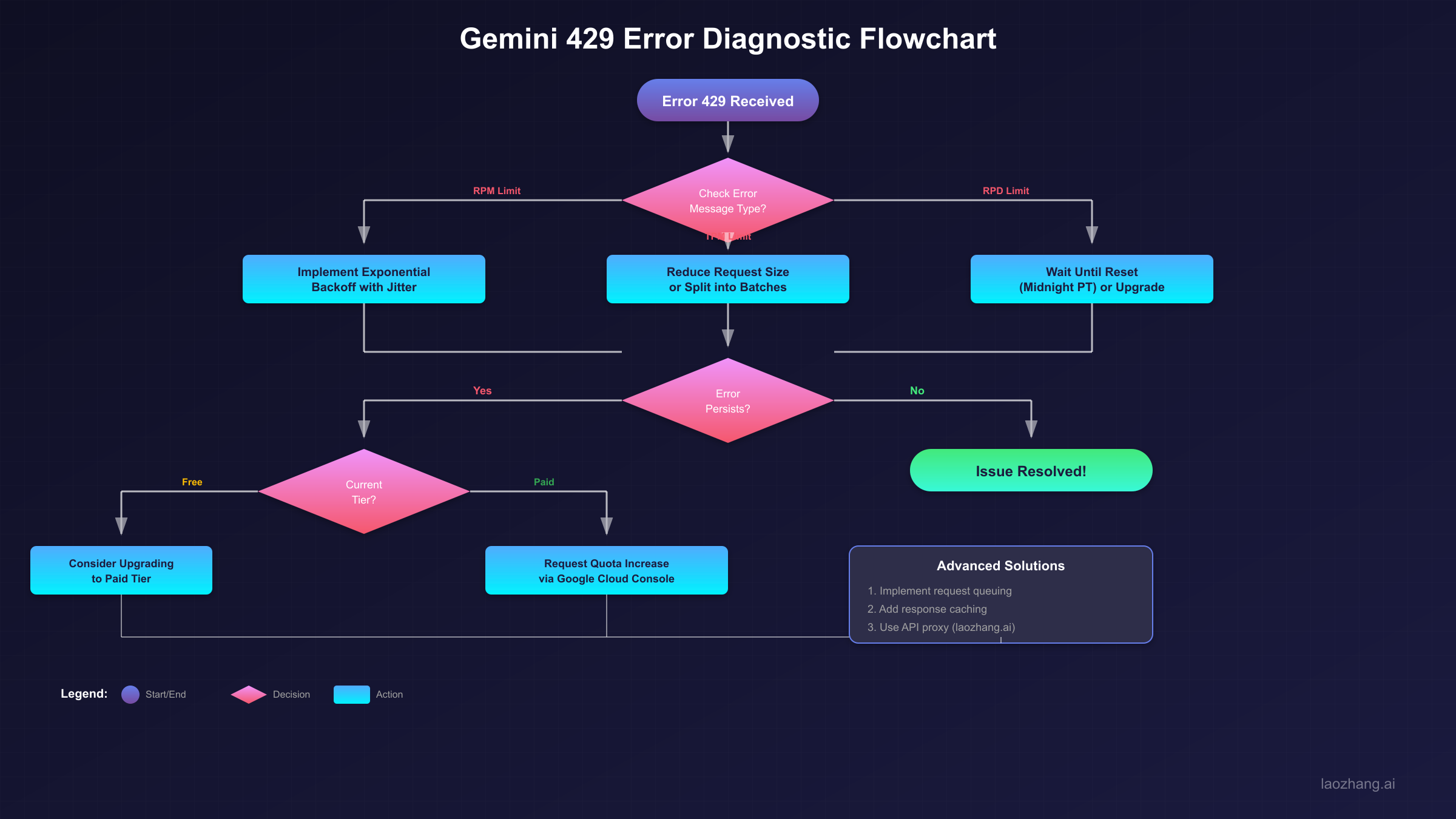
Step 1: Check the Error Message Details. The error response often includes information about which specific limit was exceeded. Look for mentions of RPM (requests per minute), TPM (tokens per minute), or RPD (requests per day) in the error details.
Step 2: Review Your AI Studio Dashboard. Navigate to AI Studio and check your usage statistics. The dashboard shows real-time quota consumption and can reveal patterns in your API usage that might be causing the issue.
Step 3: Identify the Limit Type. There are three main categories of limits to consider. RPM limits restrict how many API calls you can make per minute—if you're making rapid-fire requests, this is likely your bottleneck. TPM limits cap the total tokens processed per minute, meaning even a few requests with large prompts or responses can hit this limit. RPD limits set a daily ceiling on total requests, resetting at midnight Pacific Time.
Common Error Patterns and Their Causes. If you see errors occurring in bursts followed by periods of success, you're likely hitting RPM limits. If errors correlate with the size of your requests (longer prompts or responses), TPM limits are the culprit. If errors increase throughout the day and clear after midnight PT, you've exhausted your daily quota.
For users encountering the similar Claude API 429 error, the diagnostic approach is comparable though the specific limits differ. Understanding one helps with the other since both APIs use similar rate limiting strategies.
Gemini 3 Rate Limits Explained
Google's December 2025 update significantly changed the rate limit landscape for Gemini API users. Understanding the current tier structure is crucial for planning your API usage strategy.
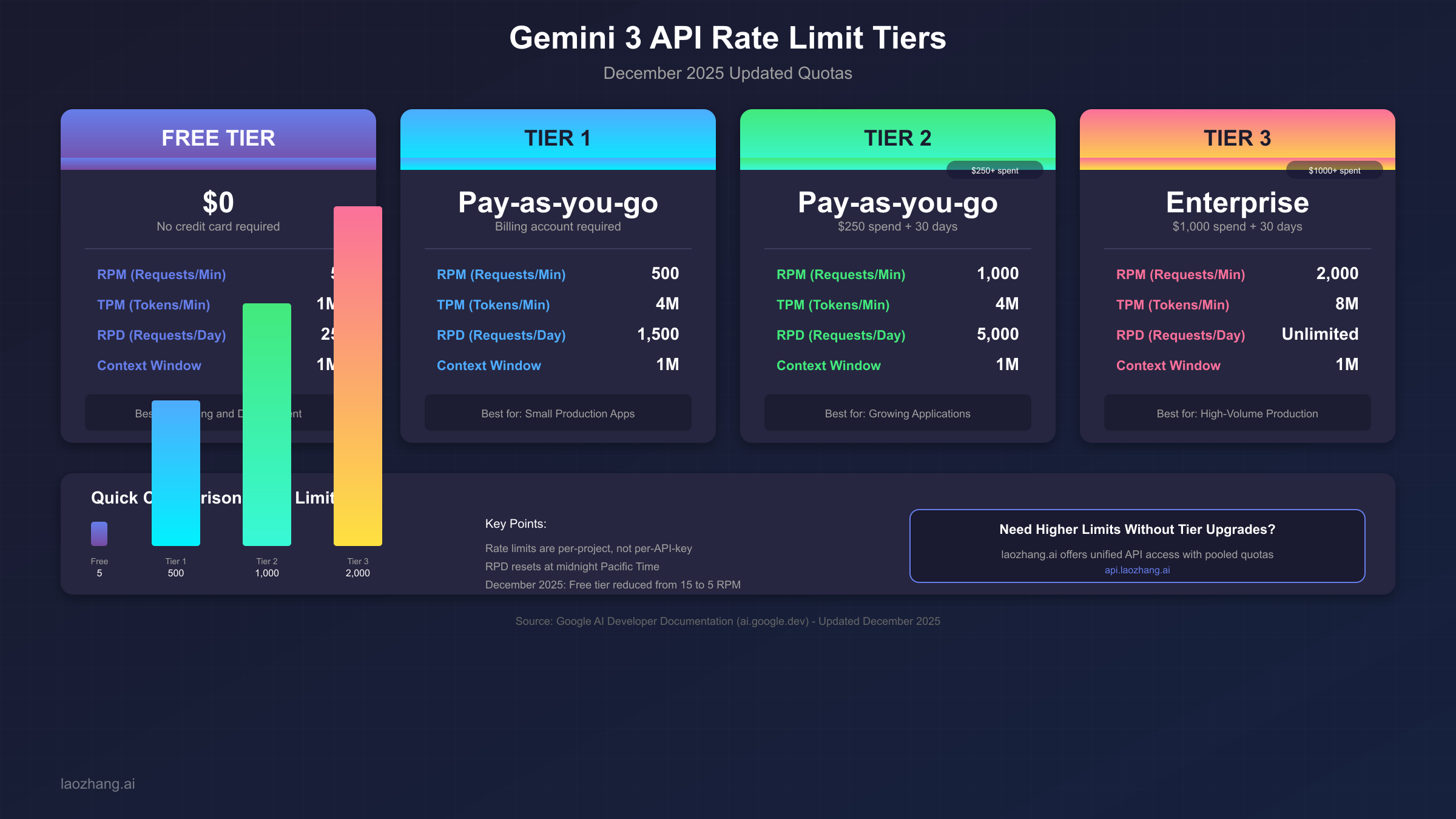
The Gemini API uses a tiered system where your limits depend on your account status and payment history. Here's the complete breakdown of all tiers and their quotas:
| Tier | RPM | TPM | RPD | Qualification |
|---|---|---|---|---|
| Free | 5 | 1,000,000 | 25 | No payment required |
| Tier 1 | 500 | 4,000,000 | 1,500 | Billing account linked |
| Tier 2 | 1,000 | 4,000,000 | 5,000 | $250+ spend, 30+ days |
| Tier 3 | 2,000 | 8,000,000 | Unlimited | $1,000+ spend, 30+ days |
Critical Update for December 2025. Starting December 7, 2025, Google reduced the free tier RPM from 15 to 5 requests per minute. This change caught many developers off guard and resulted in unexpected 429 errors in applications that were previously working fine. If your application suddenly started failing in December 2025, this reduced limit is likely the cause.
Understanding Project-Level Limits. Rate limits apply at the project level, not per API key. This means if you have multiple API keys within the same Google Cloud project, they all share the same rate limit pool. Creating additional keys won't increase your limits—you need to either optimize your usage or upgrade your tier.
Token Counting Matters. TPM limits consider both input and output tokens. A single request with a large prompt and detailed response can consume significant token quota even if you're well under your RPM limit. For applications using Gemini's full context window, token management becomes especially important.
For developers just getting started with Gemini, our guide on generating your Gemini 3 API key covers the initial setup process, including how to check your current tier and usage.
Implementing Retry Logic with Exponential Backoff
The gold standard for handling rate limit errors is exponential backoff with jitter. This approach automatically retries failed requests with progressively longer wait times, preventing the "thundering herd" problem where many clients retry simultaneously.
Python Implementation Using Tenacity. The following production-ready code implements robust retry logic with proper error handling:
pythonimport os
import random
import time
from tenacity import retry, wait_exponential_jitter, stop_after_attempt
from google import generativeai as genai
from google.api_core.exceptions import ResourceExhausted


genai.configure(api_key=os.environ.get("GEMINI_API_KEY"))
model = genai.GenerativeModel("gemini-2.0-flash")

@retry(
    wait=wait_exponential_jitter(initial=1, max=60, jitter=5),
    stop=stop_after_attempt(5),
    retry=lambda e: isinstance(e, ResourceExhausted)
)
def call_gemini_with_retry(prompt: str) -> str:
    """
    Call Gemini API with automatic retry on rate limit errors.

    Uses exponential backoff: waits 1s, then 2s, 4s, 8s up to 60s max.
    Jitter adds randomness to prevent synchronized retries.
    """
    try:
        response = model.generate_content(prompt)
        return response.text
    except ResourceExhausted as e:
        print(f"Rate limited, will retry: {e}")
        raise  # Re-raise to trigger retry
    except Exception as e:
        print(f"Non-retryable error: {e}")
        raise

# Usage example
if __name__ == "__main__":
    result = call_gemini_with_retry("Explain quantum computing in simple terms")
    print(result)
TypeScript/Node.js Implementation. For JavaScript developers, here's an equivalent implementation using async/await:
typescriptimport { GoogleGenerativeAI } from "@google/generative-ai";

const genAI = new GoogleGenerativeAI(process.env.GEMINI_API_KEY!);

interface RetryConfig {
  maxRetries: number;
  baseDelay: number;
  maxDelay: number;
}

async function callGeminiWithRetry(
  prompt: string,
  config: RetryConfig = { maxRetries: 5, baseDelay: 1000, maxDelay: 60000 }
): Promise<string> {
  const model = genAI.getGenerativeModel({ model: "gemini-2.0-flash" });

  for (let attempt = 0; attempt < config.maxRetries; attempt++) {
    try {
      const result = await model.generateContent(prompt);
      return result.response.text();
    } catch (error: any) {
      const isRateLimited =
        error.message?.includes("429") ||
        error.message?.includes("RESOURCE_EXHAUSTED");

      if (!isRateLimited || attempt === config.maxRetries - 1) {
        throw error;
      }

      // Calculate delay with exponential backoff and jitter
      const delay = Math.min(
        config.baseDelay * Math.pow(2, attempt) + Math.random() * 1000,
        config.maxDelay
      );

      console.log(`Rate limited, waiting ${delay}ms before retry ${attempt + 1}`);
      await new Promise(resolve => setTimeout(resolve, delay));
    }
  }

  throw new Error("Max retries exceeded");
}

// Usage
async function main() {
  const response = await callGeminiWithRetry("Explain machine learning basics");
  console.log(response);
}

main().catch(console.error);
Testing Your Implementation with cURL. Before integrating retry logic, you can test the API behavior directly:
bash# Test basic API call
curl -X POST \
  "https://generativelanguage.googleapis.com/v1beta/models/gemini-2.0-flash:generateContent?key=${GEMINI_API_KEY}" \
  -H "Content-Type: application/json" \
  -d '{"contents":[{"parts":[{"text":"Hello, world!"}]}]}'

# Simulate rapid requests to trigger rate limiting
for i in {1..10}; do
  curl -s -X POST \
    "https://generativelanguage.googleapis.com/v1beta/models/gemini-2.0-flash:generateContent?key=${GEMINI_API_KEY}" \
    -H "Content-Type: application/json" \
    -d '{"contents":[{"parts":[{"text":"Quick test '$i'"}]}]}' &
done
wait
Using the Official SDK's Built-in Retry. The Google Generative AI SDK includes built-in retry support through RequestOptions:
pythonfrom google.generativeai.types import RequestOptions
from google.api_core import retry

response = model.generate_content(
    "Your prompt here",
    request_options=RequestOptions(
        retry=retry.Retry(
            initial=1.0,
            multiplier=2.0,
            maximum=60.0,
            timeout=300.0
        )
    )
)
Advanced Rate Limit Solutions
When basic retry logic isn't enough, you need more sophisticated approaches to manage rate limits effectively. These advanced strategies are essential for applications with high throughput requirements or strict reliability standards.
Request Queue Implementation. A queue-based approach gives you fine-grained control over request timing and ensures you never exceed rate limits:
pythonimport asyncio
from collections import deque
from dataclasses import dataclass
from typing import Callable, Any
import time

@dataclass
class QueuedRequest:
    prompt: str
    callback: Callable[[str], None]
    timestamp: float = 0

class GeminiRateLimitedQueue:
    def __init__(self, rpm_limit: int = 5, tpm_limit: int = 1_000_000):
        self.rpm_limit = rpm_limit
        self.tpm_limit = tpm_limit
        self.request_times: deque = deque(maxlen=rpm_limit)
        self.queue: asyncio.Queue = asyncio.Queue()
        self.running = False

    async def enqueue(self, prompt: str) -> str:
        """Add a request to the queue and wait for result."""
        future = asyncio.Future()
        await self.queue.put((prompt, future))
        return await future

    async def process_queue(self):
        """Background task that processes queued requests."""
        self.running = True
        while self.running:
            prompt, future = await self.queue.get()

            # Wait if we've hit the rate limit
            await self._wait_for_capacity()

            try:
                result = await self._make_request(prompt)
                future.set_result(result)
            except Exception as e:
                future.set_exception(e)

            self.request_times.append(time.time())

    async def _wait_for_capacity(self):
        """Wait until we have capacity for another request."""
        if len(self.request_times) >= self.rpm_limit:
            oldest = self.request_times[0]
            wait_time = 60 - (time.time() - oldest)
            if wait_time > 0:
                await asyncio.sleep(wait_time)

    async def _make_request(self, prompt: str) -> str:
        # Your actual API call here
        response = await model.generate_content_async(prompt)
        return response.text
Monitoring Setup for Proactive Alerts. Don't wait for users to report errors—set up monitoring to detect rate limit issues early:
pythonimport logging
from datetime import datetime
from collections import Counter

class RateLimitMonitor:
    def __init__(self):
        self.error_counts = Counter()
        self.logger = logging.getLogger("rate_limit_monitor")

    def record_error(self, error_type: str):
        """Record a rate limit error occurrence."""
        hour_key = datetime.now().strftime("%Y-%m-%d-%H")
        self.error_counts[f"{error_type}:{hour_key}"] += 1

        # Alert if threshold exceeded
        if self.error_counts[f"{error_type}:{hour_key}"] > 10:
            self.logger.warning(
                f"High rate limit errors: {error_type} - "
                f"{self.error_counts[f'{error_type}:{hour_key}']} in last hour"
            )

    def get_stats(self) -> dict:
        """Get current error statistics."""
        return dict(self.error_counts)
Response Caching Strategy. Reduce unnecessary API calls by caching responses for identical or similar requests:
pythonimport hashlib
from functools import lru_cache
from typing import Optional

class CachedGeminiClient:
    def __init__(self, cache_size: int = 1000):
        self.cache = {}
        self.cache_size = cache_size

    def _get_cache_key(self, prompt: str) -> str:
        """Generate a cache key from the prompt."""
        return hashlib.md5(prompt.encode()).hexdigest()

    def get_cached_response(self, prompt: str) -> Optional[str]:
        """Check if we have a cached response."""
        key = self._get_cache_key(prompt)
        return self.cache.get(key)

    def cache_response(self, prompt: str, response: str):
        """Store a response in cache."""
        if len(self.cache) >= self.cache_size:
            # Simple eviction: remove oldest entry
            oldest_key = next(iter(self.cache))
            del self.cache[oldest_key]

        key = self._get_cache_key(prompt)
        self.cache[key] = response
For applications requiring unified access across multiple AI providers, services like laozhang.ai provide built-in rate limit management with pooled quotas, automatic retry handling, and request queuing—eliminating the need to implement these patterns yourself.
Free Tier Optimization Strategies
The free tier's 5 RPM and 25 RPD limits are restrictive but still useful for development and small-scale applications. Here's how to maximize what you can do within these constraints.
Request Batching. Instead of sending individual requests, combine multiple prompts into single API calls:
pythondef batch_prompts(prompts: list[str]) -> str:
    """Combine multiple prompts into a single request."""
    combined = "\n---\n".join([
        f"Task {i+1}: {prompt}"
        for i, prompt in enumerate(prompts)
    ])

    system_prompt = """Process each task below and provide numbered responses.
    Format: [Task N]: Your response"""

    full_prompt = f"{system_prompt}\n\n{combined}"
    return call_gemini_with_retry(full_prompt)
Token Optimization. Reduce token consumption without sacrificing quality. Trim unnecessary context from prompts—include only information relevant to the current request. Use shorter system prompts by being concise while still being clear. Set appropriate max_tokens limits to prevent unnecessarily long responses when short answers suffice.
Strategic Request Timing. Spread requests throughout the day to avoid hitting daily limits early. Remember that RPD resets at midnight Pacific Time, so if you're in a different timezone, plan accordingly:
pythonfrom datetime import datetime
import pytz

def get_rpd_reset_time() -> datetime:
    """Get the next RPD reset time (midnight PT)."""
    pt = pytz.timezone('America/Los_Angeles')
    now_pt = datetime.now(pt)
    reset = now_pt.replace(hour=0, minute=0, second=0, microsecond=0)
    if now_pt.hour >= 0:
        reset = reset + timedelta(days=1)
    return reset

def requests_until_reset() -> int:
    """Estimate remaining requests until RPD reset."""
    # Track your usage and return remaining quota
    pass
When Free Tier Is Enough. The free tier works well for development and testing, personal projects with low usage, prototyping before production deployment, and applications with built-in delays (like scheduled tasks). If you're consistently hitting limits during development, consider whether your testing approach can be optimized before upgrading.
For comparison with other providers' free offerings, check our guide on free Gemini 2.5 Pro API access which covers additional strategies for maximizing free-tier usage.
When to Upgrade: Cost-Benefit Analysis
Upgrading from free to paid tiers involves real costs, so let's analyze when it makes financial sense.
Calculating Your Actual Needs. Before upgrading, measure your real requirements. Track your peak RPM usage over several days. Monitor your average daily request count. Calculate your typical token consumption per request. Then use this formula to determine your minimum tier:
| If You Need | Minimum Tier | Monthly Cost Estimate |
|---|---|---|
| > 5 RPM | Tier 1 | $10-50 |
| > 500 RPM | Tier 2 | $250+ |
| > 1000 RPM | Tier 3 | $1000+ |
Cost Comparison: Direct API vs Alternatives. Direct Gemini API pricing is competitive but can become expensive at scale. For many use cases, API aggregation services offer cost savings through volume pricing negotiated with providers, pooled quotas across users, built-in rate limit handling, and no minimum spend requirements for tier upgrades.
Services like laozhang.ai provide access to Gemini 3 and other AI models at competitive rates while handling rate limiting automatically. This can be particularly cost-effective for applications that don't quite justify Tier 2 or Tier 3 pricing but need more than the free tier offers.
Decision Framework. Upgrade to paid tiers when your application has consistent, predictable high-volume needs, you need guaranteed availability for production systems, or the cost of occasional failures exceeds the subscription cost. Consider alternatives when your usage is variable or unpredictable, you need access to multiple AI providers, or you want to avoid managing rate limits yourself.
For detailed Gemini API pricing information and model-specific costs, our dedicated pricing guide covers the complete cost structure.
Production Best Practices
Building reliable production systems requires more than just retry logic. Here's a comprehensive checklist for production-ready Gemini API integration.
Structured Logging. Log all API interactions for debugging and monitoring. Include request timestamps, response times, and error codes:
pythonimport logging
import json
from datetime import datetime

logger = logging.getLogger("gemini_api")

def log_api_call(prompt: str, response: str, duration: float, success: bool):
    """Log API call details for monitoring."""
    log_entry = {
        "timestamp": datetime.utcnow().isoformat(),
        "prompt_length": len(prompt),
        "response_length": len(response) if response else 0,
        "duration_ms": round(duration * 1000),
        "success": success
    }
    logger.info(json.dumps(log_entry))
Graceful Degradation. Your application should handle API failures without crashing. Implement fallback behaviors like showing cached responses when rate limited, displaying user-friendly error messages, and queueing requests for later processing.
Circuit Breaker Pattern. Prevent cascading failures by temporarily stopping requests when error rates spike:
pythonclass CircuitBreaker:
    def __init__(self, failure_threshold: int = 5, reset_timeout: int = 60):
        self.failure_count = 0
        self.failure_threshold = failure_threshold
        self.reset_timeout = reset_timeout
        self.last_failure_time = 0
        self.state = "closed"  # closed, open, half-open

    def can_execute(self) -> bool:
        if self.state == "closed":
            return True
        if self.state == "open":
            if time.time() - self.last_failure_time > self.reset_timeout:
                self.state = "half-open"
                return True
            return False
        return True  # half-open allows one request

    def record_success(self):
        self.failure_count = 0
        self.state = "closed"

    def record_failure(self):
        self.failure_count += 1
        self.last_failure_time = time.time()
        if self.failure_count >= self.failure_threshold:
            self.state = "open"
Production Checklist Summary. Before deploying, ensure you have implemented exponential backoff retry logic, configured monitoring and alerting for rate limit errors, added request logging for debugging, implemented response caching where appropriate, and tested behavior under rate limiting conditions. Consider using an API proxy service for additional reliability if your application requires high availability or you want to avoid implementing all these patterns yourself.
The handling of rate limits is similar across AI APIs—if you've mastered Gemini rate limiting, you'll find concurrent request handling in other APIs follows comparable patterns.
Conclusion
Handling Gemini 3 API 429 RESOURCE_EXHAUSTED errors effectively requires understanding the rate limit system, implementing proper retry logic, and building resilient applications. The key takeaways from this guide are that rate limits exist at three levels (RPM, TPM, RPD) and are enforced at the project level, not per API key. Exponential backoff with jitter is the gold standard for retry logic. The free tier's 5 RPM limit (as of December 2025) is strict but manageable with proper optimization. Production applications need monitoring, caching, and graceful degradation beyond basic retries.
Start with the retry implementations provided in this guide, monitor your actual usage patterns, and upgrade only when the data shows you need higher limits. For applications requiring robust rate limit handling without implementation complexity, API aggregation services provide a turnkey solution.
With these strategies in place, you'll transform rate limit errors from application-crashing problems into gracefully handled events that your users never even notice.