Google's Gemini API offers one of the most generous free tiers in the AI industry, but understanding its rate limits has become more critical than ever following significant quota reductions in December 2025. Whether you're building a personal AI assistant, automating workflows, or prototyping a production application, knowing exactly what you can do within the free tier determines your project's viability. This comprehensive guide breaks down every rate limit dimension, explains the recent changes, and provides actionable strategies for maximizing your free tier usage.
TL;DR
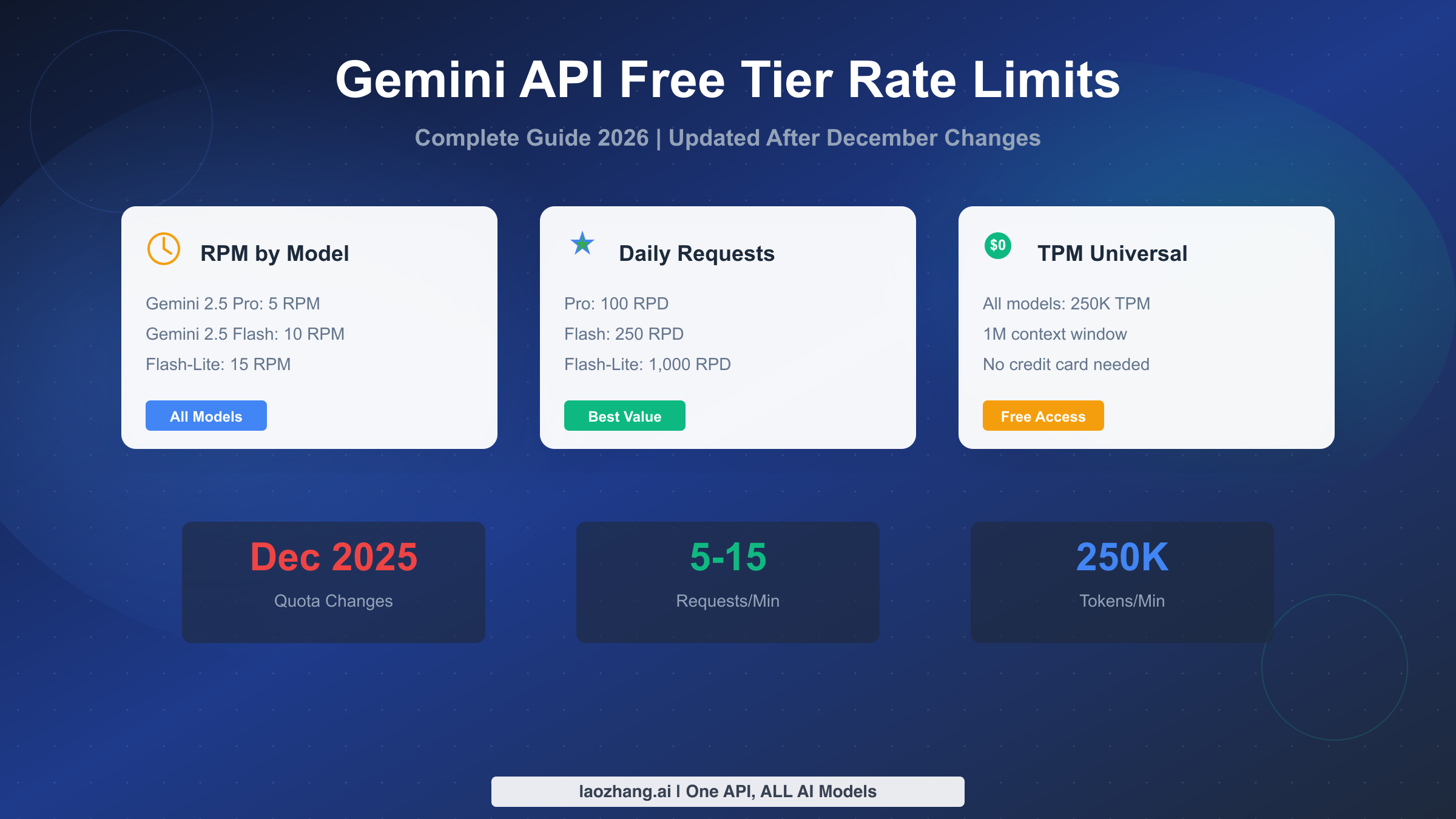
Gemini API free tier rate limits vary by model: Gemini 2.5 Pro offers 5 RPM and 100 RPD, Gemini 2.5 Flash provides 10 RPM and 250 RPD, while Flash-Lite leads with 15 RPM and 1,000 RPD. All models share a 250,000 TPM limit and access to the 1 million token context window. Limits apply per project (not per API key), and daily quotas reset at midnight Pacific Time. On December 7, 2025, Google reduced free tier quotas by 50-80%, making optimization strategies essential for developers who rely on free access.
Understanding Gemini API Rate Limits
Rate limits govern how frequently and intensively you can use the Gemini API, protecting Google's infrastructure while ensuring fair access across millions of developers. Before diving into specific numbers, understanding how these limits work helps you plan your application architecture and avoid frustrating 429 errors that can disrupt user experiences.
The Gemini API measures usage across three primary dimensions that work independently. Requests per minute (RPM) caps how many individual API calls you can make within any 60-second window, regardless of request size. Tokens per minute (TPM) limits the total number of tokens (input and output combined) processed in a minute, controlling computational load. Requests per day (RPD) sets an overall daily ceiling that resets at midnight Pacific Time, preventing any single project from monopolizing resources over time.
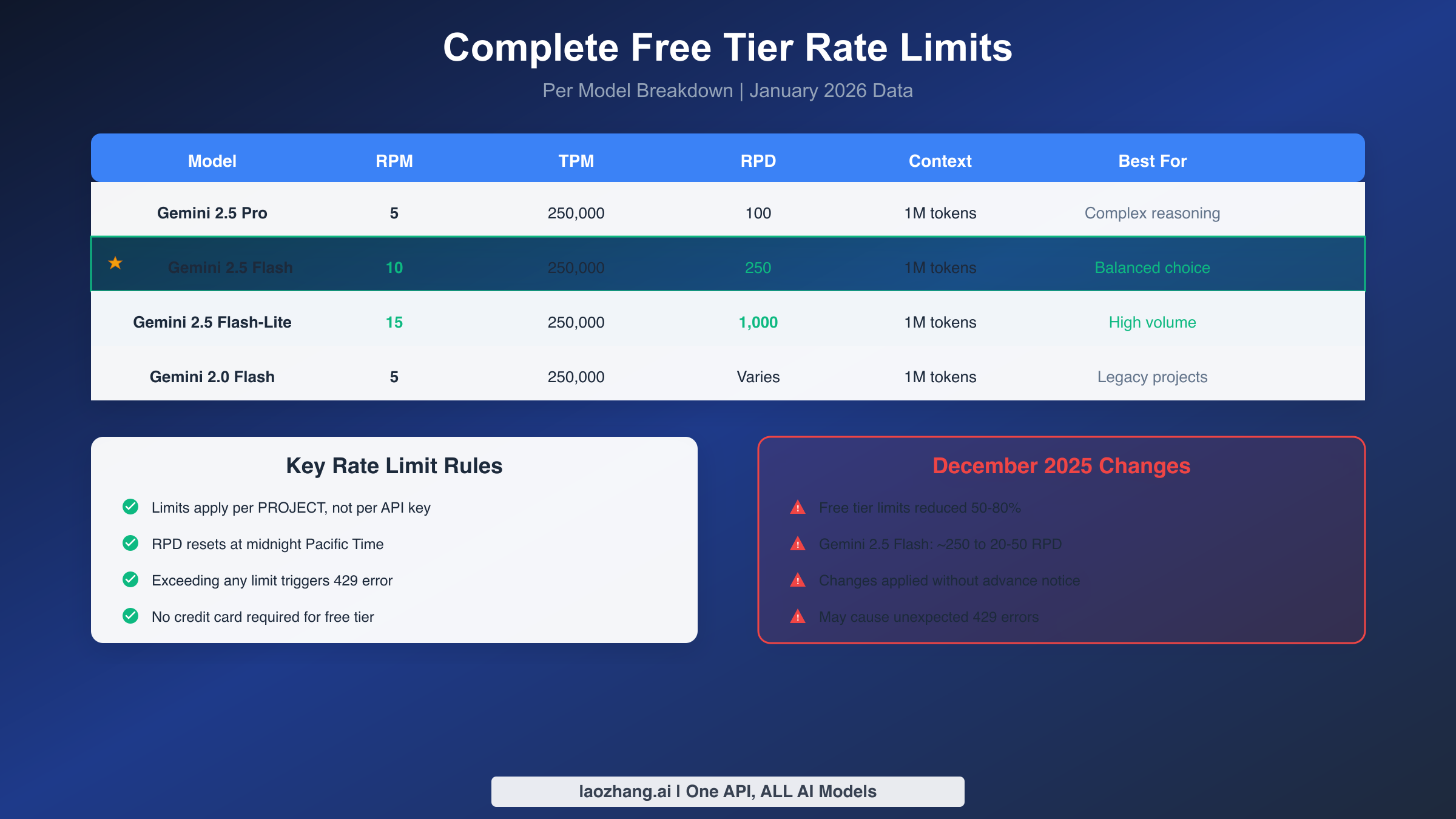
A critical detail that trips up many developers: rate limits apply at the project level, not per API key. Creating multiple API keys within the same Google Cloud project does not multiply your quota. If you need genuinely separate quotas, you must create separate Google Cloud projects, each with its own billing and configuration. This architectural decision affects how you structure applications with multiple components or environments.
When you exceed any single limit dimension, the API returns an HTTP 429 status code with a RESOURCE_EXHAUSTED error type. The response includes retry-after headers suggesting when to attempt again. Properly handling these errors is essential for production applications, as rate limit hits are expected behavior during peak usage, not bugs to eliminate entirely. For a deeper understanding of rate limiting concepts, our dedicated guide covers the technical mechanisms in detail.
Complete Free Tier Rate Limits by Model
Understanding exactly which limits apply to each model enables informed decisions about model selection and usage patterns. The free tier includes access to Google's latest Gemini models with varying rate limits that balance capability and accessibility. All data below reflects current quotas as of January 2026, following the December 2025 adjustments.
Pro Models
Gemini 2.5 Pro represents Google's most capable offering on the free tier, delivering the strongest reasoning abilities and highest quality outputs. The trade-off for this capability comes in the form of the most restrictive rate limits among free tier models. You can make 5 requests per minute with this model, process up to 250,000 tokens per minute, and are limited to 100 requests per day. Despite these constraints, the 1 million token context window remains fully accessible, enabling analysis of extensive documents or maintaining very long conversation histories.
Developers on Hacker News report that 100 daily Pro requests typically suffice for a full day of development work, especially when combined with conversation management strategies like clearing history periodically. The token limit of 6 million tokens per day (calculated from RPD times maximum tokens per request) provides substantial headroom for most use cases, though the 5 RPM constraint can feel limiting for interactive applications requiring rapid response cycles.
Flash Models
Gemini 2.5 Flash strikes the optimal balance between capability and availability for most free tier users. With 10 RPM, 250,000 TPM, and 250 daily requests, Flash handles the majority of practical applications without significant throttling concerns. The model processes requests faster than Pro while maintaining quality sufficient for content generation, code assistance, and conversational interfaces.
Gemini 2.5 Flash-Lite prioritizes throughput above all else, offering the most generous free tier limits at 15 RPM, 250,000 TPM, and an impressive 1,000 requests per day. While less capable than full Flash, Flash-Lite handles basic tasks competently and serves exceptionally well for high-volume, lower-complexity workloads like classification, simple Q&A, and automation triggers.
Specialized and Legacy Models
Gemini 2.0 Flash, the previous generation, remains available with 5 RPM limits similar to the Pro model. Projects built on this version continue functioning, though Google encourages migration to 2.5 models for improved capabilities. Embedding models operate under different rate structures focused on batch processing efficiency rather than real-time requests.
For developers needing multimodal capabilities, the free tier includes image and video processing within the same rate limits. Images count toward TPM based on their processed token equivalent, and longer videos consume proportionally more quota. The Imagen image generation models have separate IPM (images per minute) limits not covered by standard text model quotas.
For complete pricing information when you're ready to scale beyond free tier, our Gemini API pricing guide provides detailed breakdowns of all paid tier costs.
December 2025 Quota Changes
On December 7, 2025, Google implemented substantial reductions to Gemini API free tier quotas, catching many developers off guard. Understanding what changed and why helps you adapt your applications and plan for potential future adjustments. This section documents the specific changes and their practical implications.
What Changed
The most dramatic reduction affected Gemini 2.5 Flash, which saw its daily request limit drop from approximately 250 requests to just 20-50 requests per day in some configurations. This 80% reduction broke numerous automation projects that had been operating within previous limits for months. Home Assistant users, in particular, reported failures in video doorbell integrations and smart home automations that relied on frequent API calls.
Paid Tier 1 also experienced adjustments, though less severe than the free tier cuts. Google's official documentation notes that both Free Tier and Paid Tier 1 quotas were adjusted, potentially causing unexpected 429 errors for applications that previously operated comfortably within limits. The changes applied without advance notice through user communication channels, though they were documented in the Firebase AI Logic quotas page.
Why Google Made These Changes
While Google hasn't publicly detailed the reasoning, several factors likely contributed. The explosive growth of AI applications created infrastructure strain as more developers discovered Gemini's generous free tier. Competition with OpenAI and Anthropic may have prompted Google to better manage costs while maintaining a compelling free offering. Additionally, Google's shift toward monetizing their most capable models (like Gemini 3 Pro, which has no free API access) suggests strategic repositioning of the free tier as a development and testing resource rather than a production runtime.
Impact Assessment
Projects with consistent, moderate usage patterns felt minimal impact. Personal AI assistants processing dozens of requests daily continue working, as do development and testing workflows. The changes hit hardest on automation systems making frequent background API calls, applications serving multiple users from a single project, and production systems relying on free tier for cost savings.
The community response included significant discussion on Hacker News and Reddit, with developers sharing workarounds and expressing frustration at the lack of advance notice. Some users reported moving to alternative providers like GroqCloud or deploying local models via Ollama for applications requiring higher reliability.
Choosing the Right Model for Your Project
Model selection within the free tier involves balancing capability against rate limit constraints. The right choice depends on your specific use case, usage patterns, and tolerance for occasional throttling. This framework helps you make informed decisions rather than defaulting to the most capable model.
Selection Criteria
For complex reasoning tasks like code debugging, multi-step analysis, or creative writing requiring high coherence, Gemini 2.5 Pro justifies its lower limits. The 5 RPM and 100 RPD constraints work well for developer tools, occasional assistant queries, and quality-focused applications where each request matters. Projects prioritizing output quality over quantity should start here.
Gemini 2.5 Flash serves as the recommended default for most applications. The 10 RPM and 250 RPD limits support moderate interactive use, content generation workflows, and applications with multiple users making occasional requests. Flash quality satisfies most use cases while providing double the minute-by-minute capacity of Pro.
Flash-Lite excels for high-volume, lower-stakes operations. Classification tasks, simple information extraction, automation triggers, and preprocessing pipelines benefit from the 15 RPM and 1,000 RPD limits. Accept slightly lower capability in exchange for dramatically higher throughput.
Real-World Usage Scenarios
Consider a personal AI assistant receiving 30-50 messages daily. Gemini 2.5 Flash handles this comfortably within the 250 RPD limit, with 10 RPM supporting responsive conversations even during active sessions. You could process roughly 8 messages per hour continuously throughout the day without hitting limits.
For a home automation system triggering on motion detection events, Flash-Lite's 1,000 RPD allows approximately 40 triggers per hour sustained, or burst periods of 15 events per minute. This covers typical home monitoring patterns while leaving headroom for unusual activity days.
A content generation workflow producing 10 articles daily, each requiring 5-10 API calls for research, drafting, and refinement, needs 50-100 daily requests. Either Flash or Flash-Lite accommodates this with substantial margin, though Pro might be preferable if output quality is paramount.
Optimization Strategies for Free Tier
Maximizing free tier value requires intentional design decisions beyond simply hoping you don't hit limits. These strategies reduce API calls, manage tokens efficiently, and handle throttling gracefully when it occurs.
Token Management
Clear conversation history strategically rather than maintaining endless context. While the 1 million token window enables extensive history, each message in that history counts toward your TPM limit on every request. Periodically summarize important context and restart conversations to reduce token usage per request, often by 60-80% for long-running sessions.
Batch similar requests when possible. Instead of making three separate API calls for three questions, combine them into a single request asking all three. While the output token count increases, you reduce RPM consumption and often get more coherent, interconnected answers.
Use the appropriate model for each task tier. Route simple queries to Flash-Lite, moderate complexity to Flash, and reserve Pro for genuinely difficult tasks. Implementing model routing based on task classification can reduce effective costs and limit consumption significantly.
Request Optimization
Implement client-side caching for repeated queries. If your application frequently asks similar questions, cache responses for reasonable time periods. Even a 15-minute cache on common queries can dramatically reduce actual API calls while maintaining responsive user experiences.
Design asynchronous workflows where possible. Rather than making blocking API calls that must complete before user interaction continues, queue requests and process them in managed batches that respect rate limits. This approach works especially well for content generation, analysis pipelines, and background automation.
Avoid tight loops that rapidly consume quota. Agent frameworks and automation tools can inadvertently create retry loops or exploration patterns that exhaust limits within minutes. Implement explicit rate limiting in your client code, not just error handling after limits are hit.
Handling Rate Limit Errors
Even with careful optimization, rate limit errors occur in production systems. Proper error handling transforms these from application-breaking failures into manageable conditions that users barely notice.
Understanding 429 Errors
When you exceed any rate limit dimension, Gemini API returns an HTTP 429 response with error type RESOURCE_EXHAUSTED. The response body identifies which limit was exceeded (RPM, TPM, or RPD) and typically includes a retry-after header suggesting wait time before retrying. Different limit types require different handling strategies.
RPM exhaustion resolves within a minute. Short delays with retry logic handle these transparently. TPM exhaustion similarly clears quickly but may indicate requests are too token-heavy and should be optimized. RPD exhaustion requires waiting until midnight Pacific Time or upgrading to a paid tier, making it the most impactful limit type to hit.
Retry Strategies
Implement exponential backoff with jitter for RPM errors. Start with a 1-second delay, double on each retry, and add random jitter (10-30% variation) to prevent synchronized retry storms when multiple clients hit limits simultaneously. Cap maximum delays at 60 seconds for RPM issues, as the limit refreshes every minute.
pythonimport time
import random

def call_with_backoff(api_function, max_retries=5):
    for attempt in range(max_retries):
        try:
            return api_function()
        except RateLimitError as e:
            if attempt == max_retries - 1:
                raise
            delay = min(60, (2 ** attempt) + random.uniform(0, 1))
            time.sleep(delay)
For TPM errors, reduce request size before retrying. Truncate input context, summarize conversation history, or split large requests into smaller chunks. Simply waiting and retrying the same oversized request often fails repeatedly.
Fallback Strategies
Implement model fallback chains for resilience. When Pro hits limits, automatically retry with Flash. When Flash limits, fall back to Flash-Lite. This tiered approach maximizes availability while progressively accepting capability tradeoffs only when necessary.
Consider alternative provider fallback for critical applications. Services like laozhang.ai aggregate multiple AI providers through OpenAI-compatible endpoints, enabling automatic failover when any single provider faces issues. This approach adds complexity but provides higher reliability than depending on a single API.
Paid Tier Comparison and Upgrade Path
Understanding paid tier capabilities helps you recognize when free tier constraints genuinely limit your application versus when optimization can address the issue. The upgrade path from free to enterprise involves graduated steps with specific qualification requirements.
Tier Comparison
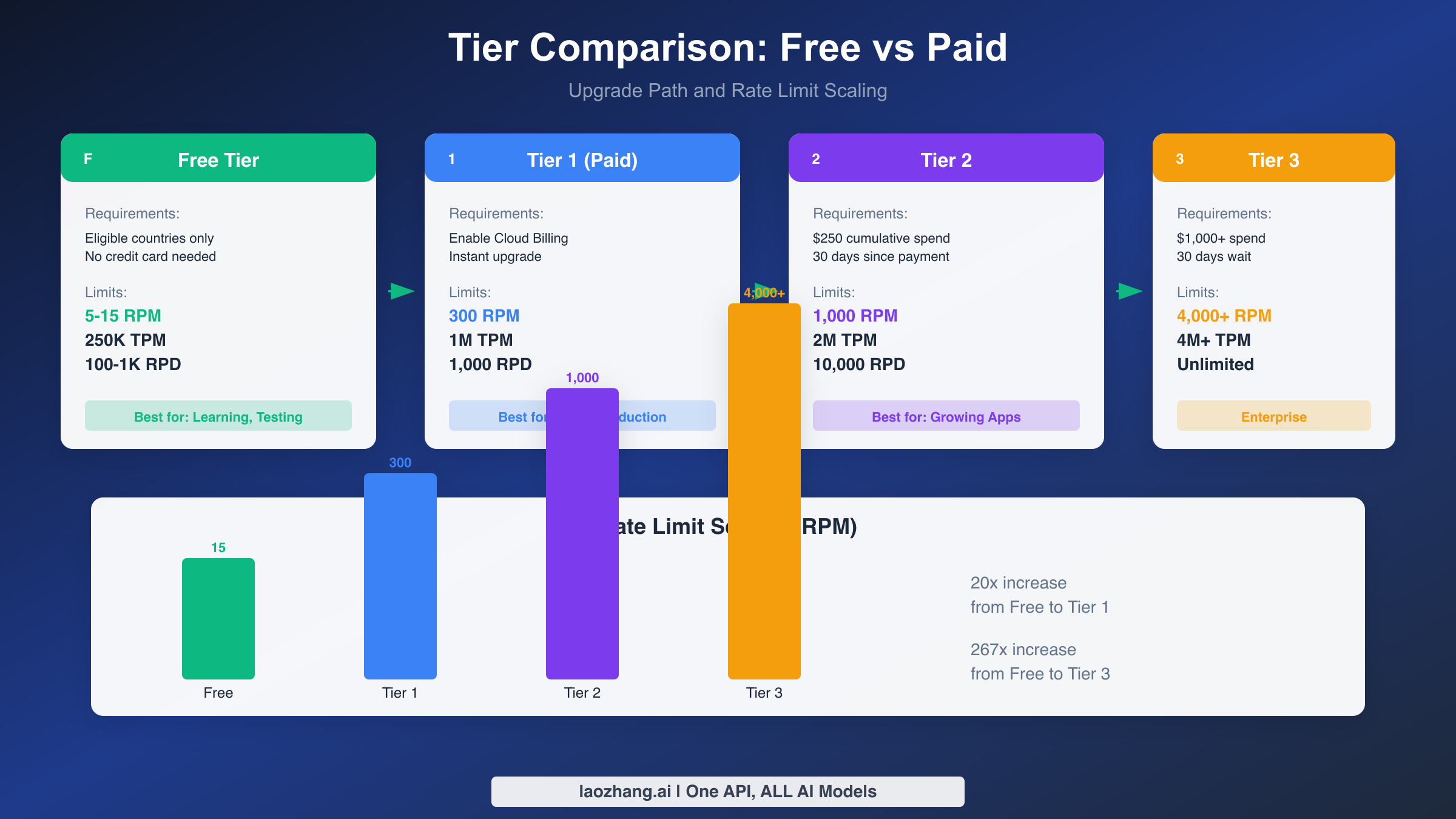
Tier 1 unlocks immediately when you enable Cloud Billing on your Google Cloud project. The limits jump dramatically: 300 RPM (60x free tier Flash-Lite), 1 million TPM (4x free tier), and 1,000 RPD (equal to Flash-Lite's generous free limit). For many applications, this single upgrade removes rate limiting as a practical concern while costing pennies per thousand requests.
Tier 2 requires $250 in cumulative Google Cloud spending (across all services, not just Gemini) plus 30 days since your first payment. This waiting period ensures stable, legitimate usage patterns. Limits increase to 1,000 RPM, 2 million TPM, and 10,000 RPD, supporting high-traffic applications and multiple concurrent users.
Tier 3 and beyond operate on custom agreements negotiated with Google Cloud sales. Enterprise customers typically receive 4,000+ RPM, 4 million+ TPM, and effectively unlimited daily requests. These tiers suit applications with substantial scale requirements and organizations needing guaranteed SLAs.
For a detailed breakdown of Gemini API rate limits per tier, including batch API limits and specialized model constraints, our comprehensive tier guide provides complete information.
When to Upgrade
Consider upgrading when optimization no longer suffices and rate limits actively impair user experience or block necessary functionality. Specific triggers include hitting RPD limits before noon regularly, user-facing delays due to RPM throttling, or architecture changes required solely to work around free tier constraints.
Calculate the cost-benefit carefully. Gemini 2.5 Flash costs $0.30 per million input tokens and $2.50 per million output tokens. A moderate application making 500 daily requests with 2,000 tokens per request (1 million tokens daily) costs approximately $1.40 per day or $42 per month. Compare this against development time spent on optimization and the value of removing rate limit concerns.
For many developers, starting on Tier 1 immediately provides peace of mind worth the minimal cost. The upgrade is instant once billing is enabled, requires no waiting period, and unlocks capabilities that free tier optimization can never match.
Conclusion
Gemini API's free tier remains genuinely useful despite December 2025 quota reductions, offering developers real capabilities for learning, prototyping, and moderate-scale applications. The key limits to remember are 5-15 RPM depending on model, 250,000 TPM universal across models, and 100-1,000 RPD based on your model choice. All limits apply per project, reset daily at midnight Pacific Time, and trigger 429 errors when exceeded.
Success with free tier requires intentional model selection matching your use case to available limits, optimization strategies that reduce API calls while maintaining functionality, and proper error handling that gracefully manages inevitable throttling. The combination of Flash-Lite's generous 1,000 RPD for high-volume tasks and Pro's superior capability for complex operations covers most development scenarios.
When free tier constraints genuinely limit your application, the upgrade path is straightforward. Tier 1 unlocks instantly with billing enablement, providing 20-60x increases across rate limit dimensions for minimal cost. The December 2025 changes indicate Google's direction toward monetizing AI capabilities, suggesting that long-term production use should plan for paid tier access rather than depending on free tier stability.
Your next step depends on your current situation. If you're starting fresh, begin with the free tier using Flash as your default model and implement proper error handling from day one. If you're hitting limits, analyze your usage patterns against the optimization strategies above before assuming upgrade is necessary. And if you're planning production deployment, budget for Tier 1 from the start to ensure reliable user experiences regardless of free tier fluctuations.