
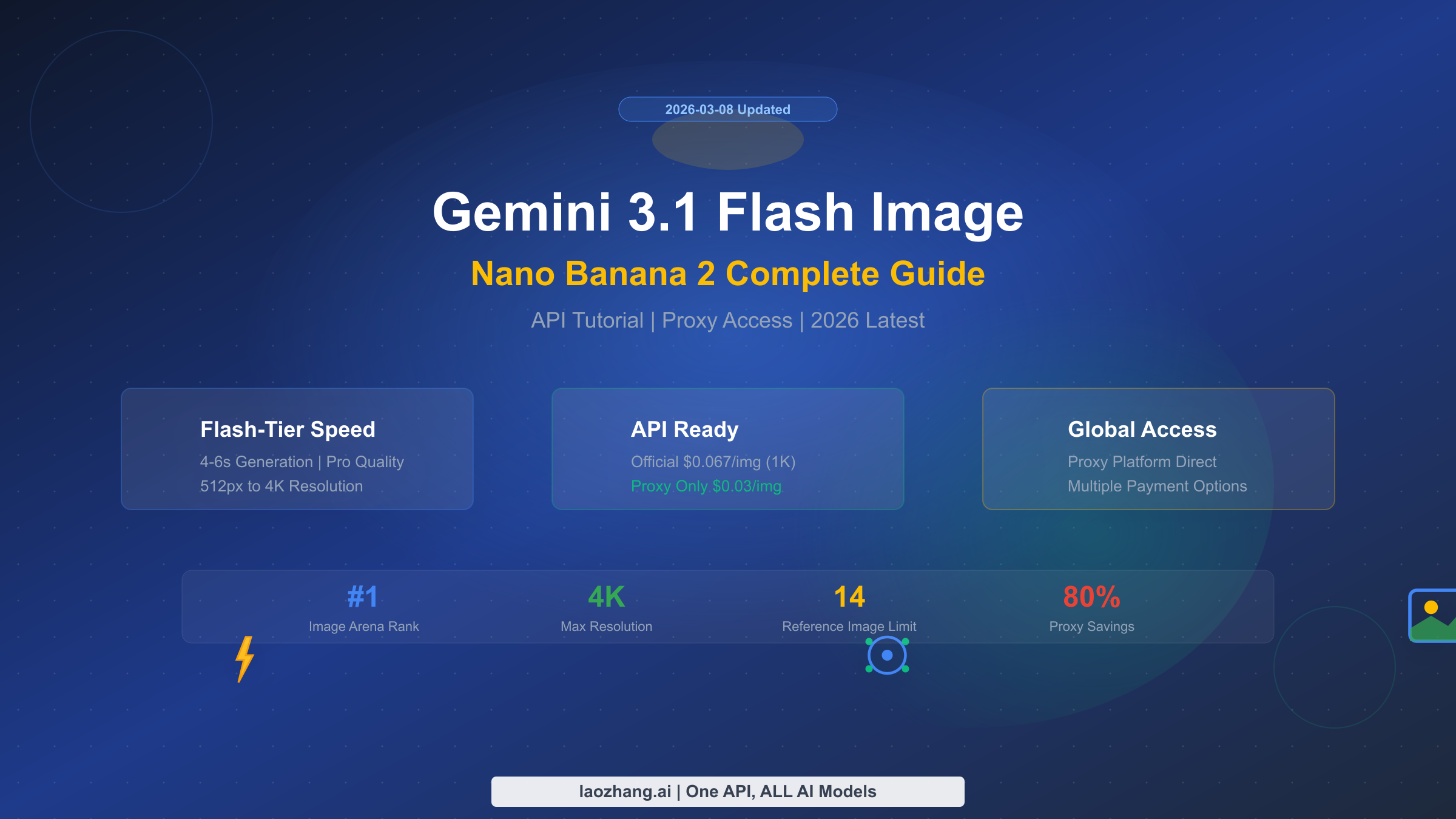
Gemini 3.1 Flash Image (codename Nano Banana 2) is Google's latest AI image generation model, released on February 26, 2026. With Flash-tier speed (4-6 seconds) and near-Pro image quality, it quickly topped the Chatbot Arena Image leaderboard at #1. This guide covers everything from API integration and pricing to proxy access and production best practices — a one-stop reference for developers. Official 1K image pricing is $0.067/image, while proxy platforms offer as low as $0.03/image (Google AI website, verified 2026-03-08).
What Is Gemini 3.1 Flash Image (Nano Banana 2)
Google officially released Gemini 3.1 Flash Image Preview on February 26, 2026, internally codenamed Nano Banana 2 (NB2 for short). The name follows Google AI's fruit-themed codename tradition — the previous generation Gemini 3 Pro Image was codenamed Nano Banana Pro. NB2's core value proposition is clear: deliver near-Pro quality image generation at Flash-tier speed and cost. For most commercial use cases, this means you can get virtually the same visual results at less than half the price, with nearly twice the generation speed.
From a technical architecture standpoint, NB2 is built on the multimodal capabilities of the Gemini 3.1 Flash model, with model ID gemini-3.1-flash-image-preview. It is not a standalone image generation model, but rather a multimodal large model that can simultaneously understand text and images while natively outputting images. This means you can perform text conversations and image generation in the same API call, without switching between different endpoints or models. This "native multimodal" design gives NB2 approximately 90% text rendering accuracy, far exceeding traditional image-only generation models.
NB2 serves as the "best value" option in the Gemini ecosystem. If you have been using Nano Banana Pro (Gemini 3 Pro Image) for image generation, NB2 offers a more economical alternative: faster speed, lower cost, and quality differences that are virtually imperceptible in most use cases. Google's official positioning is also clear — NB2 is ideal for batch processing, rapid iteration, and cost-sensitive scenarios, while Pro targets professional users with extreme requirements for detail and quality. For the vast majority of developers, NB2 is the model you need.
Nano Banana 2 Core Features and Pro Comparison
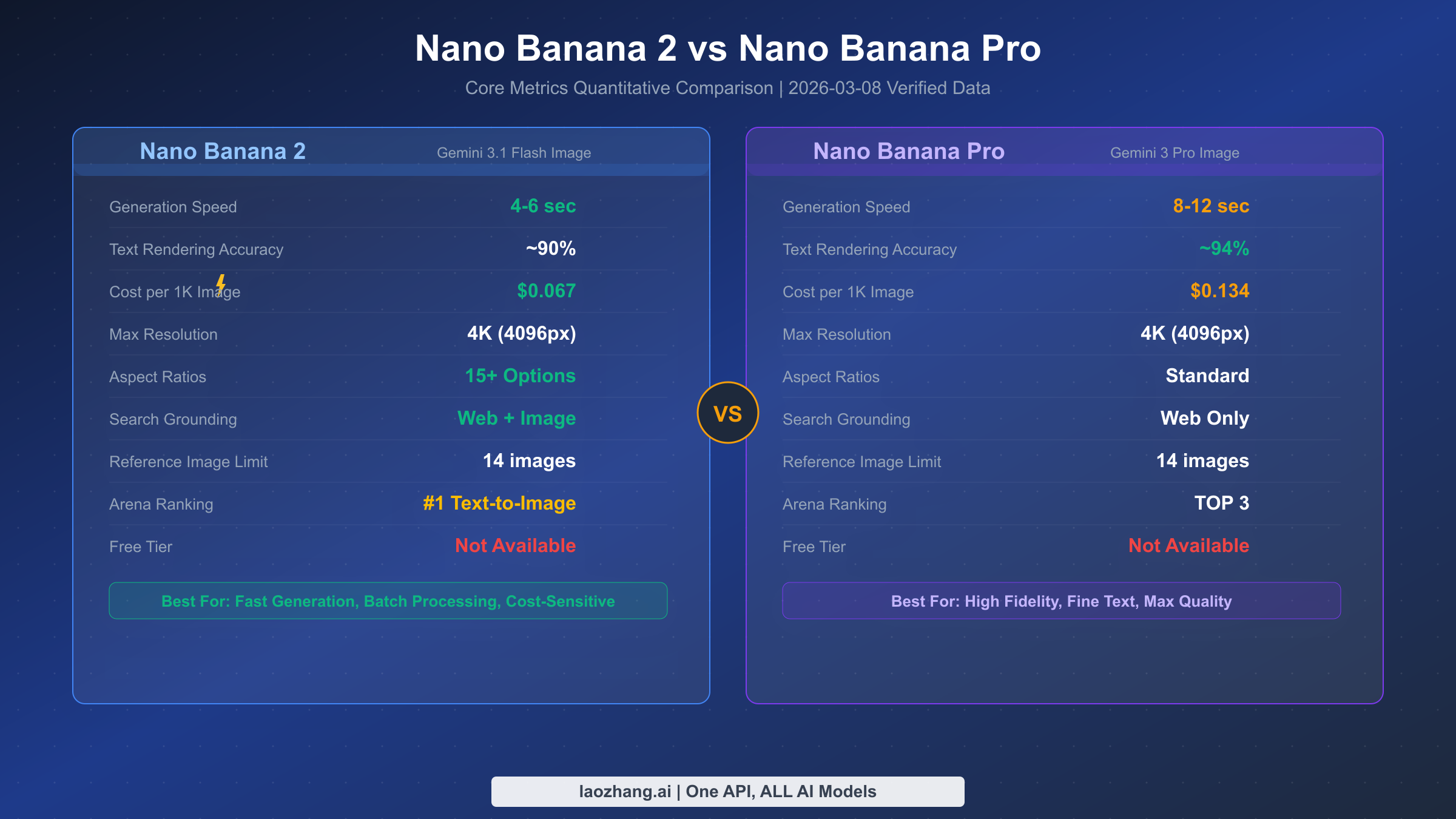
Choosing between NB2 and Nano Banana Pro is the first decision many developers face. Rather than listing feature checklists, let's look directly at the data — here is a quantitative comparison based on Google's official documentation and real-world testing (Google AI website, verified 2026-03-08).
In terms of generation speed, NB2 has a clear advantage. For the same 1K resolution image, NB2 averages 4-6 seconds while Pro typically takes 8-12 seconds. This gap amplifies in batch generation scenarios — if you need to generate 100 images at once, NB2 saves over 10 minutes of waiting time. On pricing, NB2 costs $0.067 per 1K image while Pro costs $0.134 at the same resolution — exactly half the price.
Text rendering capability is one of the key quality indicators for image generation models. NB2 achieves approximately 90% text rendering accuracy, meaning text content renders correctly in most posters, social media images, and product showcase images. Pro's accuracy is slightly higher at about 94%, but in practice, this 4% difference typically only manifests with small font sizes or complex typography. If your application doesn't involve extensive fine-grained text layout, NB2's performance is more than sufficient.
There are also some noteworthy differences in feature support. NB2 supports over 15 aspect ratios, from standard 1:1 and 16:9 to portrait 9:16, while Pro primarily supports standard ratios. For search enhancement, NB2 supports both Web search and image search grounding (Google Search grounding), while Pro only supports Web search. Both support up to 14 reference images as input, and both can reach 4K (4096px) maximum resolution. On the Chatbot Arena rankings, NB2 topped the Text-to-Image category at #1, while Pro sits in the TOP 3.
The selection advice is straightforward: if you prioritize speed, low cost, and batch processing, choose NB2; if you need the highest text rendering precision or top-quality advertising creatives and product photography, choose Pro. For over 80% of use cases, NB2 is the better choice. For more detailed comparison data, check our in-depth evaluation — Nano Banana 2 vs Pro Detailed Comparison.
Pricing and Cost Deep Dive
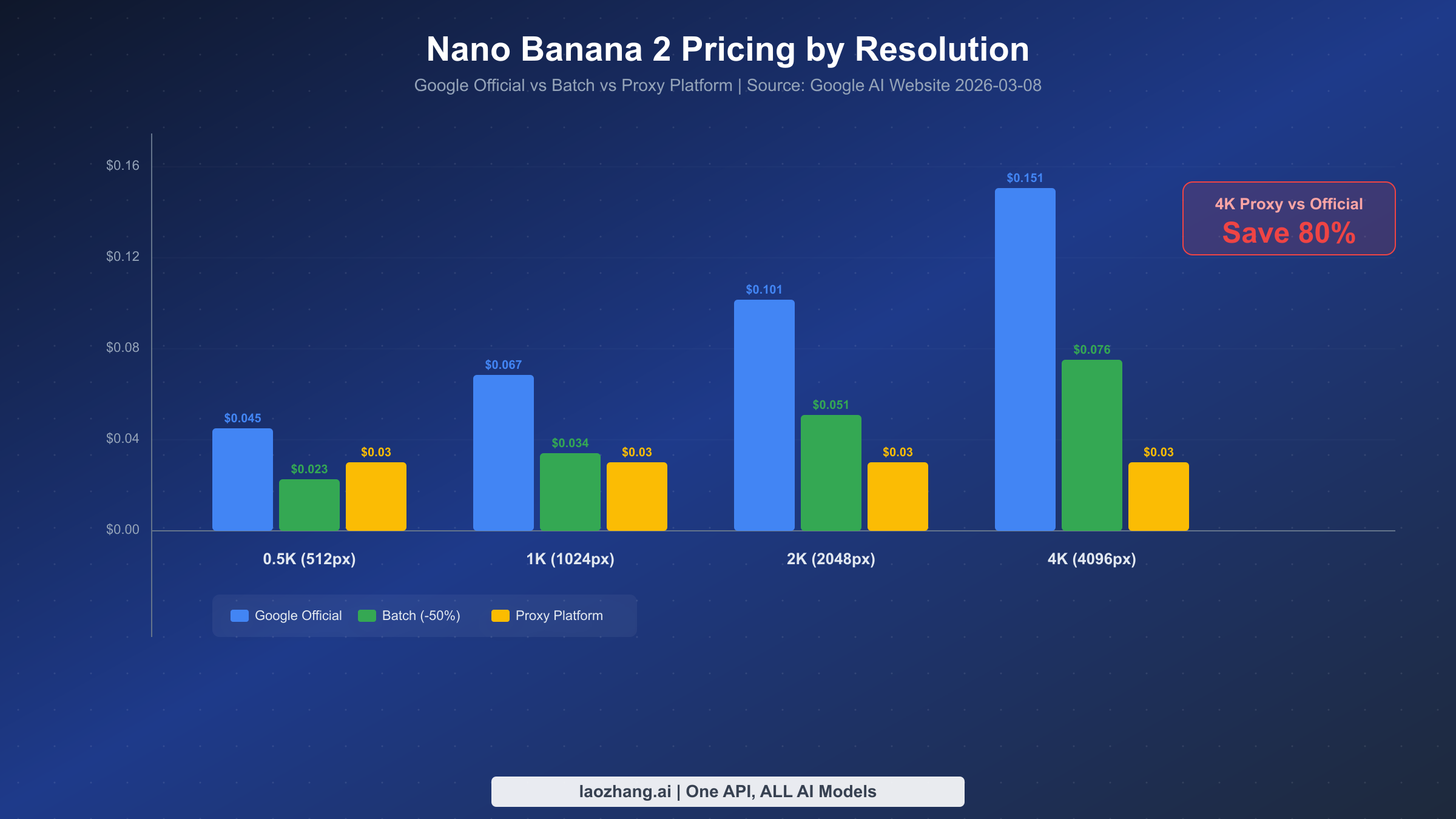
Understanding NB2's pricing mechanism is the first step to controlling costs. Unlike traditional per-image billing, Gemini Flash Image uses a token-based pricing model — input and output are billed separately by token count, and image output token count depends on resolution. This mechanism may seem a bit complex at first, but once you understand it, you can precisely predict the cost of each API call (Google AI website, verified 2026-03-08).
Token Pricing Mechanism Explained
NB2's billing has three components: input tokens ($0.50/million tokens), text output tokens ($3.00/million tokens), and image output tokens ($60.00/million tokens). Image output token pricing is 20x that of text output, which is why image generation costs are primarily driven by the output side. Different resolutions consume different token counts: 512px images consume 747 tokens, 1024px consumes 1,120 tokens, 2048px consumes 1,680 tokens, and 4096px consumes 2,520 tokens.
Converting these numbers into actual per-image costs yields the table below. Note that this only accounts for image output token costs — input prompts typically use only a few dozen to a few hundred tokens, making their cost negligible.
| Resolution | Output Tokens | Official Price | Batch (-50%) | Proxy Platform |
|---|---|---|---|---|
| 512px (0.5K) | 747 | $0.045 | $0.023 | $0.03 |
| 1024px (1K) | 1,120 | $0.067 | $0.034 | $0.03 |
| 2048px (2K) | 1,680 | $0.101 | $0.051 | $0.03 |
| 4096px (4K) | 2,520 | $0.151 | $0.076 | $0.03 |
As the table clearly shows, Google offers a Batch API discount at 50% off. If your scenario doesn't require real-time responses — such as batch generating marketing images overnight for the next day — batch processing is the most cost-effective option through official channels. However, batch processing has latency constraints and isn't suitable for interactive use cases.
For developers looking for an even more competitive pricing option, proxy platforms offer a compelling alternative. Take laozhang.ai as an example — regardless of resolution, every image costs a flat $0.03. This is roughly on par with official pricing at low resolutions, but the advantage becomes massive at higher resolutions — 4K images are about 80% cheaper than official pricing. For a deeper dive into billing options, read our Complete Gemini Flash Image Pricing Guide.
Cost Optimization Strategies
In real projects, several proven strategies can effectively control costs. First is the resolution selection strategy: if images are ultimately used for social media or web display (typically under 1200px), 1K resolution is sufficient — no need for 4K. The visual quality of 1K images is more than adequate for most screen display scenarios. Second, leverage NB2's multimodal capabilities to generate multiple images consecutively within the same conversation, which reuses the input context tokens and reduces repeated prompt overhead. Finally, for non-real-time scenarios, prioritize the Batch API — same image quality at half the cost. For free usage options, see our Gemini 3.1 Flash Image Free API Usage Guide.
API Integration Tutorial (5-Minute Setup)
Integrating NB2's API is straightforward — you need a Google AI API Key, then send requests through the standard Gemini API. The entire process takes less than 5 minutes. Below are examples in Python, Node.js, and curl.
Getting Your API Key
Before starting, head to Google AI Studio to create an API Key. After logging in with your Google account, click the "Get API key" button in the left sidebar, then select "Create API key in new project." Note that NB2 is currently in Preview, and the free tier is not available — you need to activate a paid Gemini API plan to make calls. Your API Key will look like AIzaSy... — keep it secure.
Python Code Example
Python is the most popular integration method. Using Google's official google-genai SDK, you can generate images in just a few lines of code. Here is a complete, ready-to-run example with image saving and error handling:
pythonimport os
import base64
from google import genai


client = genai.Client(api_key=os.environ.get("GEMINI_API_KEY"))

# Generate image
response = client.models.generate_content(
    model="gemini-3.1-flash-image-preview",
    contents="A ginger cat sitting on a windowsill watching the sunset, watercolor style",
    config=genai.types.GenerateContentConfig(
        response_modalities=["TEXT", "IMAGE"],  # Return both text and image
    ),
)

# Process response
for part in response.candidates[0].content.parts:
    if part.inline_data:  # Image data
        image_bytes = base64.b64decode(part.inline_data.data)
        with open("output.png", "wb") as f:
            f.write(image_bytes)
        print(f"Image saved, format: {part.inline_data.mime_type}")
    elif part.text:  # Text description
        print(f"Model response: {part.text}")
The key parameter here is response_modalities=["TEXT", "IMAGE"] — it tells the model to return both text and images. If you only need images, set it to ["IMAGE"]. Image data in the response is returned as base64-encoded PNG, which you simply decode and save.
Node.js Code Example
If your project is Node.js-based, use the @google/genai official SDK. Here is the equivalent Node.js implementation:
javascriptimport { GoogleGenAI } from "@google/genai";
import fs from "fs";

const ai = new GoogleGenAI({ apiKey: process.env.GEMINI_API_KEY });

async function generateImage() {
  const response = await ai.models.generateContent({
    model: "gemini-3.1-flash-image-preview",
    contents: "A ginger cat sitting on a windowsill watching the sunset, watercolor style",
    config: { responseModalities: ["TEXT", "IMAGE"] },
  });

  for (const part of response.candidates[0].content.parts) {
    if (part.inlineData) {
      const buffer = Buffer.from(part.inlineData.data, "base64");
      fs.writeFileSync("output.png", buffer);
      console.log(`Image saved, format: ${part.inlineData.mimeType}`);
    } else if (part.text) {
      console.log(`Model response: ${part.text}`);
    }
  }
}

generateImage().catch(console.error);
curl Command Line
For quick testing or Shell script integration, curl is the most direct approach. The following command sends a request and saves the returned image locally:
bashcurl -s "https://generativelanguage.googleapis.com/v1beta/models/gemini-3.1-flash-image-preview:generateContent?key=${GEMINI_API_KEY}" \
  -H "Content-Type: application/json" \
  -d '{
    "contents": [{"parts": [{"text": "A ginger cat sitting on a windowsill watching the sunset, watercolor style"}]}],
    "generationConfig": {"responseModalities": ["TEXT", "IMAGE"]}
  }' | python3 -c "
import sys, json, base64
data = json.load(sys.stdin)
for part in data['candidates'][0]['content']['parts']:
    if 'inlineData' in part:
        with open('output.png', 'wb') as f:
            f.write(base64.b64decode(part['inlineData']['data']))
        print('Image saved as output.png')
"
All three methods share the same core call logic — send a text prompt and receive a JSON response containing image data. Which one you choose depends on your tech stack. Worth noting, NB2 supports passing reference images in the prompt, enabling advanced features like image editing and style transfer — these are covered in detail in the advanced features section below.
Developer Access Solutions
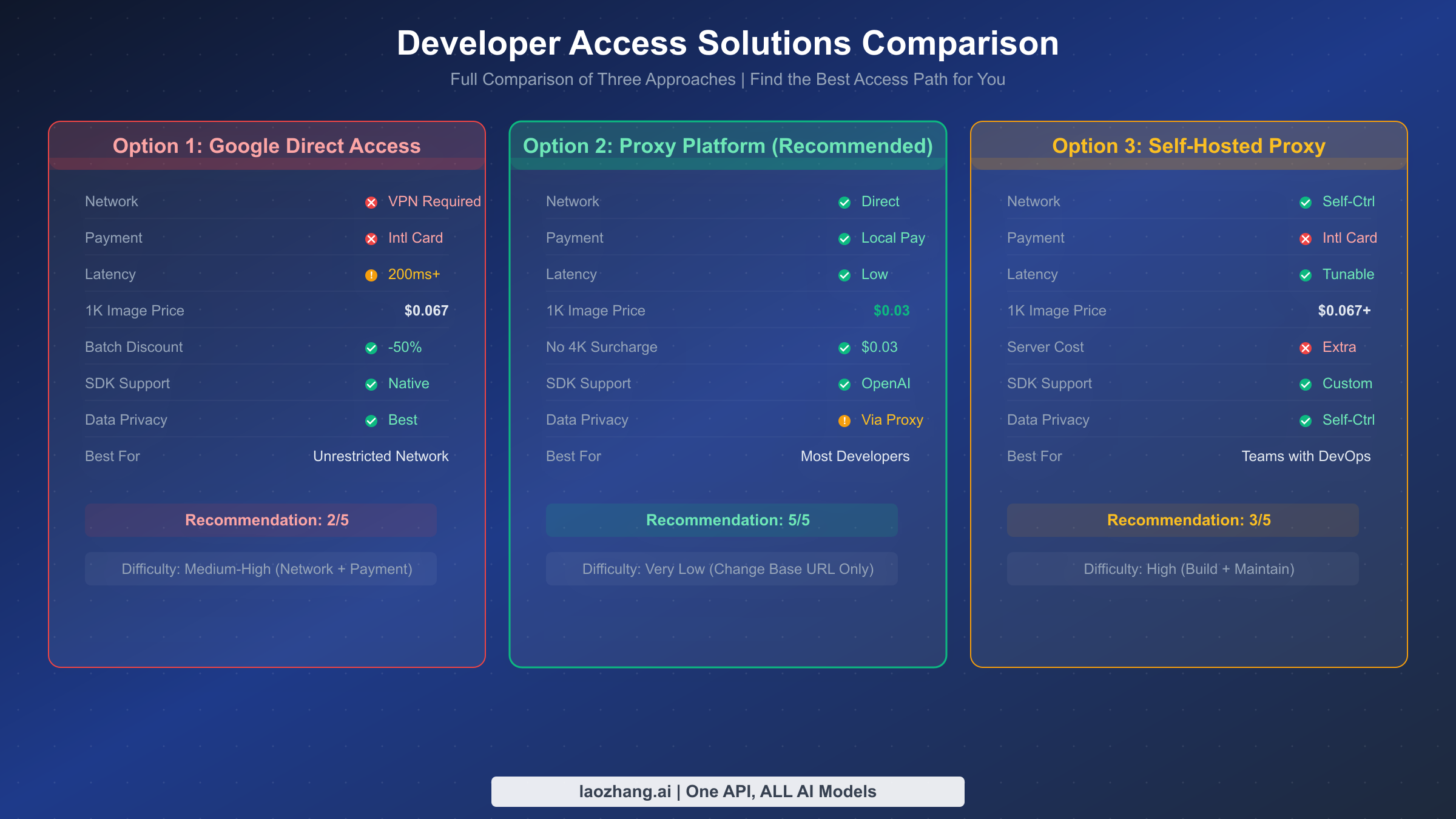
For developers who face network restrictions when accessing Google's API directly, there are three mainstream solutions: direct official access (requires VPN), proxy platforms, and self-hosted proxies. Each approach has its own pros and cons, suited for different use cases and technical capabilities.
Option 1: Direct Official Access
Direct official access is the most straightforward method — calling generativelanguage.googleapis.com directly from a server with unrestricted network access. The advantages are the lowest pricing (official rates directly), minimal latency, and data that never passes through third parties. The drawbacks are clear: you need an overseas server or stable network tunnel, it doesn't support local payment methods in some regions (requires an international credit card), and network fluctuations may cause request timeouts. If your team already has overseas server infrastructure, or you have stable network access, direct official access is the lowest-cost option.
Option 2: Proxy Platform (Recommended)
Proxy platforms are currently the most popular choice for developers facing network restrictions. These platforms deploy servers overseas and relay Google API requests to users, while providing local-friendly payment methods and native-language technical support. Take laozhang.ai as an example — the integration steps are remarkably simple: just replace the API's base URL from Google's official address to the proxy address, and the rest of your code stays exactly the same.
Here is a Python example using laozhang.ai proxy to access NB2:
pythonfrom openai import OpenAI

# Using OpenAI-compatible format
client = OpenAI(
    api_key="your-laozhang-api-key",  # Get from laozhang.ai
    base_url="https://api.laozhang.ai/v1"
)

response = client.chat.completions.create(
    model="gemini-3.1-flash-image-preview",
    messages=[
        {"role": "user", "content": "A ginger cat sitting on a windowsill watching the sunset, watercolor style"}
    ],
)
print(response.choices[0].message.content)
The core advantage of proxy platforms is zero-configuration integration — no VPN needed, no international credit card required, no infrastructure to set up. And because it supports the OpenAI-compatible format, if your project already integrates OpenAI's SDK, you only need to change one line (the base URL) to switch to NB2. Price-wise, laozhang.ai charges a flat $0.03 per image regardless of resolution, which is 50%-80% cheaper than official prices at 2K and 4K resolutions. For more proxy channel comparisons, see Cheapest Gemini Flash Image API Channels.
Option 3: Self-Hosted Proxy
Self-hosted proxies are suited for enterprise users with strict data privacy requirements. The approach involves purchasing a cloud server overseas (e.g., Singapore, Japan), deploying an Nginx reverse proxy, and forwarding requests to the Google API. This way, data only passes through your own server and never touches a third party. The tradeoffs include server costs (typically $5-20/month), operational overhead, and potential IP blocking risks.
For most developers, proxy platforms strike the best balance between ease of use, cost, and stability. If your monthly call volume is moderate (thousands to tens of thousands), a proxy platform is almost certainly the optimal choice. If monthly volume reaches millions or more, consider a self-hosted proxy to further reduce per-call costs. For more details on proxy solutions, we cover them in our Gemini API Proxy Complete Guide.
Production Environment Best Practices
The leap from demo to production is often not about the API call itself, but about error handling, concurrency control, and cost monitoring — the "peripheral" capabilities. Below are battle-tested best practices to help you build a stable and reliable image generation service.
Error Handling and Retry Strategy
NB2's API may return several error types: 429 (rate limit), 500 (internal server error), and 503 (service unavailable). For these retryable errors, use an exponential backoff strategy — wait 1 second after the first failure, 2 seconds after the second, 4 seconds after the third, with a maximum of 3 retries. For non-retryable errors like 400 (malformed request) or 403 (authentication failure), throw an exception immediately rather than retrying. Here is a practical retry wrapper:
pythonimport time
import random

def generate_with_retry(client, prompt, max_retries=3):
    """Image generation with exponential backoff"""
    for attempt in range(max_retries):
        try:
            response = client.models.generate_content(
                model="gemini-3.1-flash-image-preview",
                contents=prompt,
                config={"response_modalities": ["TEXT", "IMAGE"]},
            )
            return response
        except Exception as e:
            error_code = getattr(e, 'code', None)
            if error_code in [400, 403, 404]:
                raise  # Non-retryable errors, raise immediately
            if attempt < max_retries - 1:
                wait = (2 ** attempt) + random.uniform(0, 1)
                print(f"Request failed, retrying in {wait:.1f}s... ({e})")
                time.sleep(wait)
            else:
                raise  # Retries exhausted
Concurrency Control
NB2's API has rate limits — paid accounts typically allow 60-200 requests per minute (depending on your quota tier). In batch generation scenarios, hitting 429 errors is easy without concurrency control. Using a semaphore to cap concurrent requests is recommended. With Python's asyncio, keeping concurrency between 10-20 is a safe choice — this fully utilizes your quota without frequently triggering limits.
It's also advisable to add a brief cooldown period (e.g., 1-2 seconds) between batch tasks, giving the API's rate counter time to reset. This approach is more stable than "maxing out the quota then waiting for the next minute" and produces more consistent response times. For more stable high-concurrency channels, see our Stable Gemini Image Generation Channel evaluation.
Cost Monitoring
For production-grade applications, logging token consumption after every API call and setting daily budget caps is recommended. NB2's response includes a usage_metadata field with detailed prompt_token_count and candidates_token_count data. Piping this data to a database or monitoring system (like Prometheus/Grafana) enables real-time cost tracking. A simple but effective approach: set a daily budget, trigger an alert when cumulative spending hits 80% of the threshold, and automatically pause new requests at 100%. This effectively prevents cost overruns caused by bugs or abnormal traffic.
Advanced Features and Pro Tips
NB2 is more than a simple "text-to-image" tool — it supports reference image input, search grounding, thinking mode, and other advanced features. Mastering these capabilities unlocks many practical application scenarios.
Image Reference
NB2 supports passing up to 14 reference images in the prompt. This capability makes image editing, style transfer, and brand consistency maintenance remarkably simple. For example, you can upload a product photo and ask NB2 to "convert this photo to watercolor style" or "replace the background with a beach scene." Reference images are passed as base64-encoded data in the inline_data field alongside the text prompt. In practice, 1-3 reference images work best — too many references may "confuse" the model about which to prioritize.
A particularly practical scenario is brand asset generation: upload your brand logo and color standard guide, then let NB2 generate marketing images for different scenarios based on these references, ensuring visual style consistency with your brand. This is extremely valuable in e-commerce and social media operations — work that previously required manual designer effort can now be done in batch via API.
Google Search Grounding
NB2 uniquely supports Google Search grounding, covering both Web and image search. In simple terms, you can have NB2 search the internet for the latest information before generating an image, then base the generation on search results. For example, the prompt "generate an outdoor activity illustration based on today's weather" — NB2 will first search for current weather information and then generate a matching illustration. This feature is particularly useful when generating current events or time-sensitive content.
Resolution and Aspect Ratio Selection Strategy
NB2 supports 4 resolutions (512px, 1K, 2K, 4K) and over 15 aspect ratio combinations. Choosing the right resolution and aspect ratio requires balancing two factors: final use case and cost. For social media cover images (typically 16:9), 1K resolution meets most platform requirements; for print materials or large posters, 2K or 4K is recommended; for thumbnails or avatars, 512px is sufficient. Note that NB2 will automatically select the nearest supported aspect ratio — if you request a non-standard ratio (like 2.35:1), the model will intelligently adjust to the closest available ratio. You can specify aspect ratio in the prompt by adding "aspect ratio 16:9."
Thinking Mode
NB2 also supports thinking mode with two levels: minimal and high. When enabled, the model reasons before generating — analyzing prompt intent, planning composition, selecting color schemes, and more. This adds minimal latency (about 1-2 seconds) but can significantly improve image quality in complex scenarios. The recommendation is to enable high thinking mode for precise composition needs (e.g., "person standing at the left third of the frame") or complex scenes (e.g., "city skyline at sunset reflected on a lake"), and use minimal or disable it for simple scenarios.
FAQ and Summary
Should I choose NB2 or Nano Banana Pro? If you prioritize value, speed, and batch processing, choose NB2. If you need the highest quality advertising creatives and precise text rendering, choose Pro. For over 80% of scenarios, NB2 is the better choice.
Can I call NB2's API directly from regions with network restrictions? You may not be able to access Google's API directly depending on your location. Using a proxy platform (like laozhang.ai) is recommended — just swap the base URL and you're set, with local payment support. API documentation: docs.laozhang.ai.
Does NB2 have a free tier? According to Google AI's website (verified 2026-03-08), NB2's free tier currently shows "not available." You need to activate a paid Gemini API plan to use it.
What if image generation fails? Common causes include the prompt triggering safety filters (adjust wording to avoid sensitive content), request timeouts (check network or use a proxy), and rate limiting (reduce concurrency or retry after waiting).
Does NB2 support generating images with Chinese text? Yes. NB2's text rendering accuracy is approximately 90%, and this applies to Chinese text as well. It's recommended to explicitly specify font size and position in the prompt for better rendering results.
Summary and Next Steps: Gemini 3.1 Flash Image (Nano Banana 2), with its Flash-tier speed, near-Pro quality, and highly competitive pricing, stands as the most noteworthy AI image generation model of 2026. For developers, proxy platform access is the simplest and most efficient path — change one line of code and you're ready to go. Whether you're doing rapid prototyping, batch generating marketing assets, or building a production-grade image generation service, NB2 delivers reliable support. Get started now — 5 minutes of setup time gets you a powerful and cost-effective AI image generation capability.