
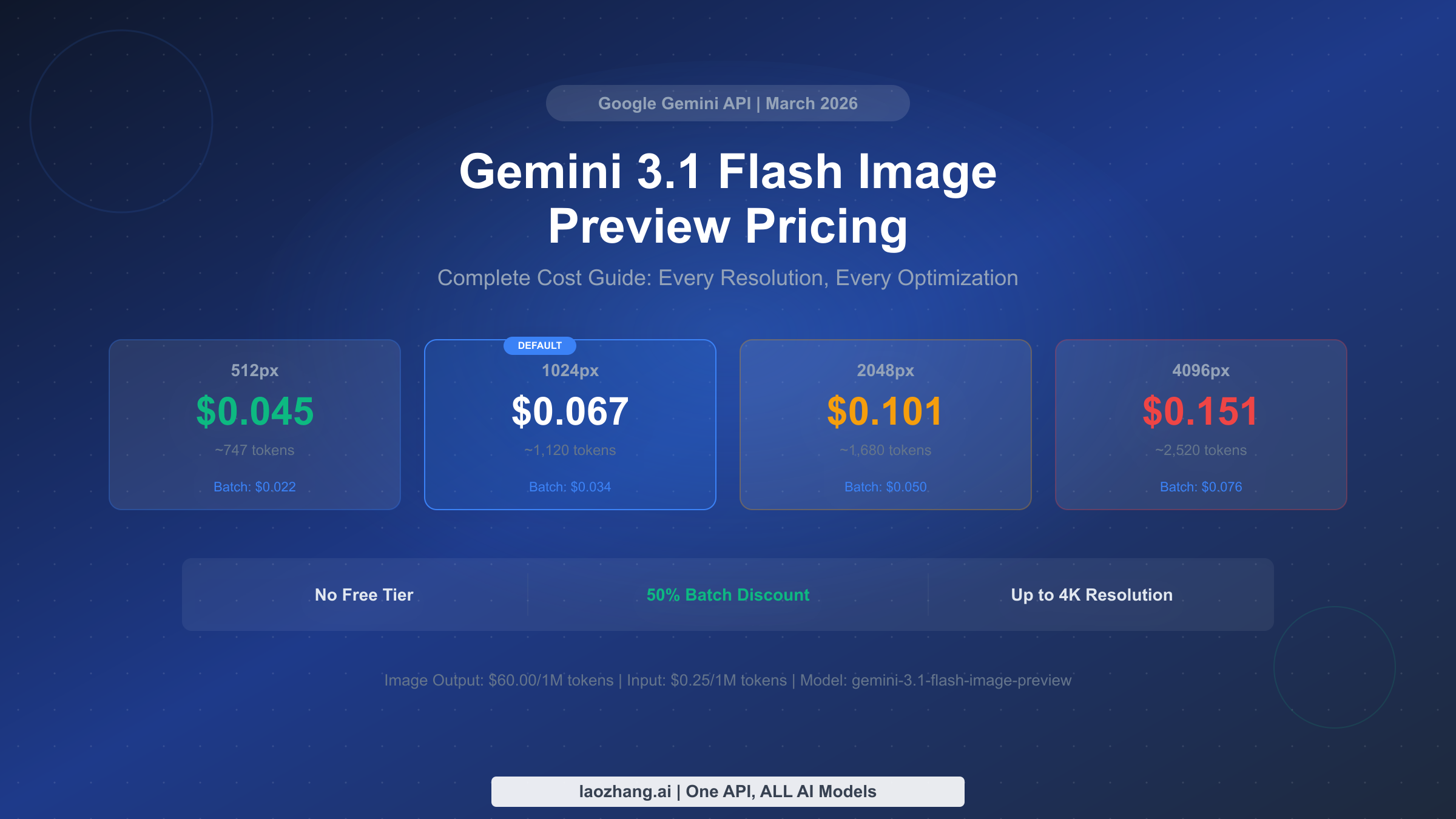
Gemini 3.1 Flash Image Preview costs between $0.045 and $0.151 per generated image depending on resolution, calculated from Google's rate of $60 per million output image tokens. The default 1024px image runs $0.067 each, with batch processing cutting that to $0.034 — a flat 50% discount. There is no free tier for this model as of March 2026, and a pricing discrepancy between Google AI Studio and the API documentation remains officially unresolved. This guide breaks down every cost at every resolution, compares pricing against 10 competing models, and provides actionable strategies to reduce your image generation expenses by up to 67%.
TL;DR
- Standard pricing: $0.045 (512px) to $0.151 (4K) per image, with 1024px at $0.067
- Batch mode: 50% off everything — 1024px drops to $0.034
- No free tier: Unlike other Gemini models, image generation always costs money
- Pricing discrepancy: AI Studio shows 2x higher input/text output rates than API docs — image output pricing ($60/1M tokens) is consistent
- Best value: Batch mode + 1024px resolution = $0.034/image; third-party providers drop to ~$0.030
- Compared to alternatives: 60% cheaper than GPT Image 1 High ($0.167), similar to DALL-E 3 Standard ($0.040)
What Is Gemini 3.1 Flash Image Preview (and Why Does Price Matter)?
Google's Gemini 3.1 Flash Image Preview, internally codenamed Nano Banana 2 (Gemini 3.1 Flash Image Preview), represents a significant shift in how Google approaches AI image generation. Rather than offering image creation through a separate model like Imagen 4, this model integrates native image generation directly into the Gemini conversational architecture. The model ID is gemini-3.1-flash-image-preview, and it launched in February 2026 with support for resolutions from 512 pixels up to 4096 pixels and aspect ratios spanning from 1:1 all the way to 8:1.
Understanding the pricing structure matters far more than you might initially think, because the token-based billing model creates a non-obvious cost curve. Unlike flat-rate image generation APIs such as DALL-E 3 where every image costs exactly the same regardless of resolution, Gemini charges based on the number of output tokens consumed during generation. A 4K image costs roughly 3.4 times more than a 512px image, and choosing the wrong resolution for your use case can inflate your monthly bill by thousands of dollars at scale. The model currently sits in "Preview" status, meaning Google could adjust pricing, capabilities, or availability without the typical deprecation notice periods applied to generally available models.
The pricing question is especially relevant because this model has no free tier whatsoever. Developers familiar with Google's generous free quotas on other Gemini models — including free access to Gemini 2.0 Flash for text generation — often assume they can experiment with image generation at no cost. They cannot. Every single image generated through the Gemini 3.1 Flash Image Preview endpoint incurs a charge, making accurate cost estimation essential before committing to this model in any production pipeline.
What makes the pricing analysis particularly interesting is how this model's cost structure compares to its capabilities. Gemini 3.1 Flash Image Preview is not simply an image generator — it is a full multimodal model that can understand text, analyze images, and create new visuals within a single conversation thread. This means a single API call can combine text reasoning with image generation, potentially replacing what would otherwise require two separate API calls to different models. When you factor in the cost of running a text model plus a dedicated image generator separately, the effective per-image premium of Gemini's integrated approach shrinks considerably, especially for applications that need contextual image generation rather than standalone prompts.
The Complete Pricing Breakdown (Including the Hidden Discrepancy)
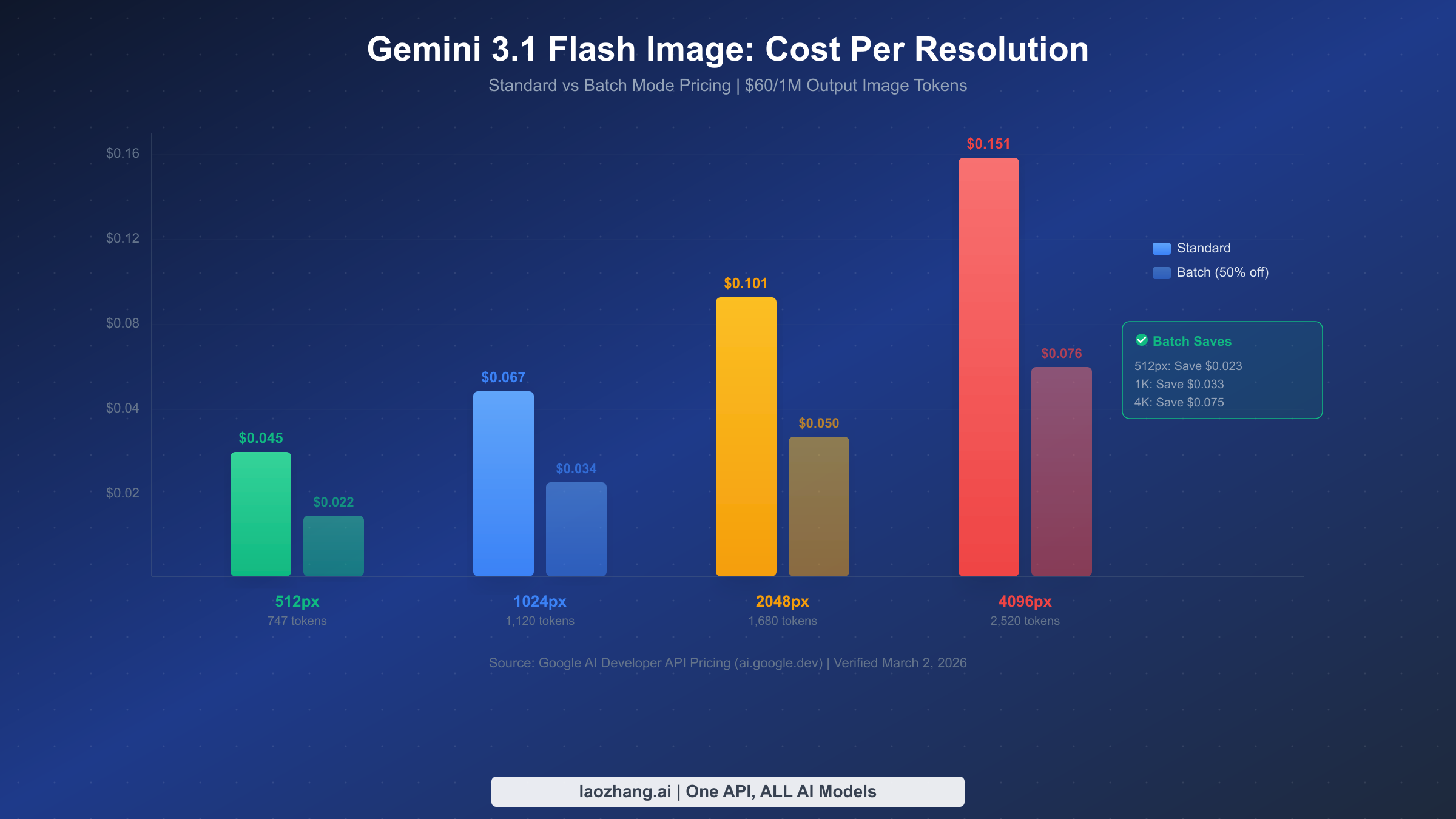
The pricing for Gemini 3.1 Flash Image Preview operates on Google's standard token-based billing system, but the image output token rate sits dramatically higher than text output rates. According to Google's official API documentation verified on March 2, 2026, the model charges $0.25 per million input tokens, $1.50 per million text output tokens, and $60.00 per million image output tokens. That $60/1M rate for image tokens is what drives the per-image cost, since each generated image consumes between 747 and 2,520 tokens depending on the resolution you request.
For a deeper look at how these rates fit into Google's broader pricing structure, see our complete Gemini API pricing guide which covers all Gemini models including text, vision, and audio endpoints.
Standard Per-Image Costs
The practical cost per image depends entirely on resolution. Google's documentation specifies exact token counts for each output size, making the calculation straightforward by multiplying the token count by the $60/1M rate.
| Resolution | Output Tokens | Cost Per Image | Monthly Cost (1K/day) |
|---|---|---|---|
| 512px | ~747 | $0.045 | $1,350 |
| 1024px (default) | ~1,120 | $0.067 | $2,010 |
| 2048px | ~1,680 | $0.101 | $3,030 |
| 4096px | ~2,520 | $0.151 | $4,530 |
These figures reveal a nearly linear relationship between resolution and cost: doubling the pixel dimensions increases the price by roughly 50-67%. The default 1024px resolution represents the sweet spot for most web applications, balancing visual quality against cost at $0.067 per image.
Batch Mode: 50% Across the Board
Google offers a batch processing API that applies a flat 50% discount to all token costs, including image output tokens. The trade-off is latency: batch requests are processed within a 24-hour window rather than returning results in real-time. For applications where immediate results are not critical — marketing asset generation, catalog image creation, social media content pipelines — batch mode offers substantial savings.
| Resolution | Standard | Batch Mode | Savings Per Image |
|---|---|---|---|
| 512px | $0.045 | $0.022 | $0.023 |
| 1024px | $0.067 | $0.034 | $0.033 |
| 2048px | $0.101 | $0.050 | $0.051 |
| 4096px | $0.151 | $0.076 | $0.075 |
At scale, batch mode savings become enormous. A business generating 1,000 images per day at 1024px resolution would save roughly $990 per month by switching from standard to batch processing, with absolutely no difference in output quality.
The Pricing Discrepancy You Need to Know About
There is a documented pricing inconsistency between two official Google sources that remains unresolved as of March 2026. Google AI Studio displays input token pricing at $0.50 per million and text output at $3.00 per million, while the API documentation shows $0.25 and $1.50 respectively — exactly half the AI Studio prices. The image output token rate of $60 per million remains consistent across both sources, so the per-image costs listed above are unaffected by this discrepancy.
Community members on the Google AI Developer Forum reported this inconsistency in early 2026 without receiving an official response from Google. Based on our analysis and cross-referencing with actual billing data shared in developer communities, the API documentation pricing ($0.25/$1.50) appears to reflect the actual billing rates. However, if you are building cost projections for a business case, we recommend using the higher AI Studio prices as your conservative estimate until Google officially clarifies the discrepancy. The practical impact is limited for image generation since the dominant cost component — image output tokens at $60/1M — is identical across both sources.
Cost Per Image at Every Resolution (512px to 4K)
Choosing the right resolution is the single fastest way to optimize your Gemini image generation costs without sacrificing quality for your specific use case. The resolution you select should match the intended display context, not default to the highest available quality. A 4K image displayed as a 200-pixel thumbnail wastes over three times the cost for zero perceptible quality improvement.
Resolution-to-Use Case Mapping
The four available resolutions each serve distinct production contexts. Understanding which resolution matches your actual requirements prevents the common mistake of over-specifying output dimensions, which is the leading cause of unexpectedly high image generation bills among developers who deploy Gemini image capabilities at scale.
512px ($0.045/image) serves thumbnail generation, preview images, small avatar creation, and any context where the final display size is below 500 pixels. At this resolution, Gemini generates images that are perfectly adequate for social media profile pictures, product listing thumbnails on e-commerce platforms, and small illustration elements in blog posts. The visual quality is surprisingly good for the price point, and the 747-token output means faster generation times as well as lower costs.
1024px ($0.067/image) is the default resolution and the ideal choice for the vast majority of web applications. Standard social media posts, blog hero images, email newsletter graphics, and general marketing visuals all display optimally at this resolution. The quality-to-cost ratio at 1024px is the best across all four options, which is presumably why Google selected it as the default. Unless you have a specific reason to go higher or lower, this resolution should be your standard choice.
2048px ($0.101/image) enters the territory of print-quality production. Marketing brochures, high-resolution product photography for zoom-capable galleries, presentation slides displayed on large screens, and digital advertising assets intended for retina displays all benefit from the additional detail that 2K resolution provides. The 50% price premium over 1024px is justified only when the output will actually be displayed at or near its native resolution.
4096px ($0.151/image) is designed for large-format output: poster prints, billboard graphics, large-format digital displays, and archival-quality image generation. At $0.151 per image, this resolution costs 3.4 times more than the base 512px option. The use cases that genuinely require 4K output are relatively narrow, and developers should carefully evaluate whether their application truly needs this level of detail before selecting it as a default.
Monthly Budget by Resolution and Volume
Planning your budget requires mapping your expected volume against your required resolution. The table below provides monthly cost estimates at common production volumes to help you forecast expenses accurately.
| Daily Volume | 512px | 1024px | 2048px | 4096px |
|---|---|---|---|---|
| 100 images | $135 | $201 | $303 | $453 |
| 500 images | $675 | $1,005 | $1,515 | $2,265 |
| 1,000 images | $1,350 | $2,010 | $3,030 | $4,530 |
| 5,000 images | $6,750 | $10,050 | $15,150 | $22,650 |
| 10,000 images | $13,500 | $20,100 | $30,300 | $45,300 |
These figures assume standard (non-batch) pricing and 30-day months. Applying the 50% batch discount would halve every number in this table, making high-volume production significantly more feasible for cost-sensitive applications.
The relationship between volume and cost reveals an important threshold effect. At low volumes of 100 images per day, the difference between 512px and 1024px is only $66 per month — barely noticeable in most project budgets. But at enterprise-scale volumes of 10,000 images per day, that same resolution choice creates a $6,600 monthly gap that can make or break the financial viability of an entire image generation pipeline. This is why resolution selection deserves careful attention during the architecture phase of any project, not as an afterthought during cost optimization. Teams that default to the highest available resolution during development and then try to reduce costs later often discover that their prompts, downstream processing, and quality expectations have all been calibrated to the higher resolution, making the switch more expensive than getting it right from the start.
How Gemini 3.1 Flash Compares to Every Alternative
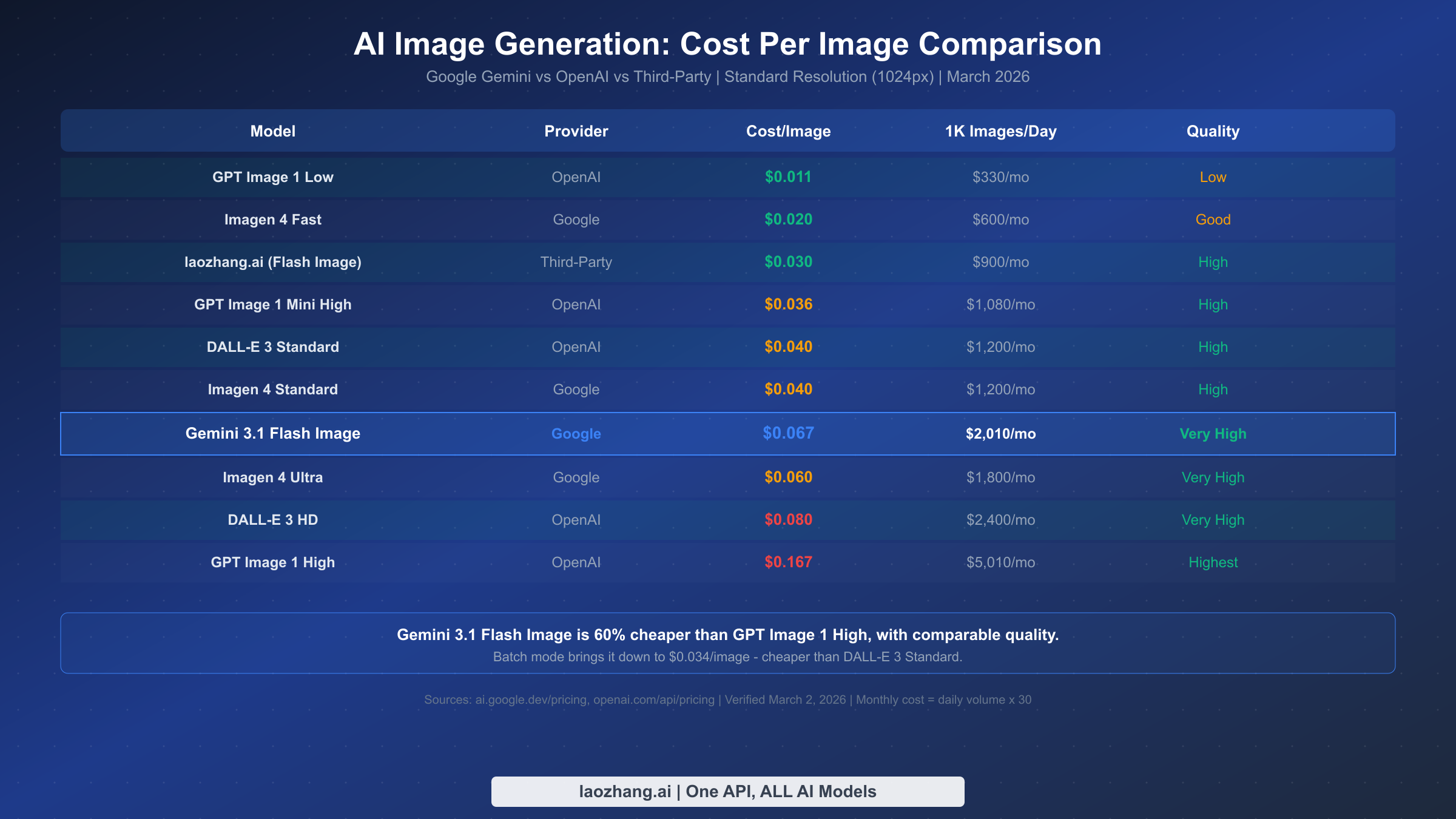
The AI image generation market in 2026 offers more options than ever, with pricing ranging from $0.011 per image at the low end to $0.167 at the high end. Positioning Gemini 3.1 Flash Image Preview within this landscape requires considering not just raw cost but also quality, capabilities, and integration requirements.
Complete 10-Model Comparison
| Model | Provider | Cost/Image | Monthly (1K/day) | Quality Tier | Key Advantage |
|---|---|---|---|---|---|
| GPT Image 1 Low | OpenAI | $0.011 | $330 | Low | Cheapest option |
| Imagen 4 Fast | $0.020 | $600 | Good | Fast, affordable | |
| laozhang.ai (Flash Image) | Third-Party | $0.030 | $900 | High | Same model, lower price |
| GPT Image 1 Mini High | OpenAI | $0.036 | $1,080 | High | Good quality/cost ratio |
| DALL-E 3 Standard | OpenAI | $0.040 | $1,200 | High | Established quality |
| Imagen 4 Standard | $0.040 | $1,200 | High | Best Google dedicated | |
| Imagen 4 Ultra | $0.060 | $1,800 | Very High | Premium quality | |
| Gemini 3.1 Flash Image | $0.067 | $2,010 | Very High | Native multimodal | |
| DALL-E 3 HD | OpenAI | $0.080 | $2,400 | Very High | HD output |
| GPT Image 1 High | OpenAI | $0.167 | $5,010 | Highest | Best quality available |
Several patterns emerge from this comprehensive comparison. Gemini 3.1 Flash Image Preview sits in the upper-middle of the pricing spectrum, costing 60% less than GPT Image 1 High while delivering comparable visual quality. However, it costs 67% more than DALL-E 3 Standard and over three times the price of Imagen 4 Fast from Google's own portfolio.
The critical differentiator for Gemini 3.1 Flash Image is not raw cost — it is the native multimodal architecture. Unlike dedicated image generation models, Gemini 3.1 Flash Image can generate images as part of a conversational flow, understand context from previous messages, edit existing images through natural language instructions, and seamlessly mix text and image generation within a single API call. This architectural advantage makes it the ideal choice for applications where image generation needs to be contextually aware rather than operating as a standalone endpoint.
When Gemini 3.1 Flash Image Is the Right Choice
Gemini 3.1 Flash Image justifies its premium over simpler alternatives in several specific scenarios. Conversational image generation where context matters — such as iterative design workflows, visual question answering, or multi-turn creative sessions — leverages the model's native multimodal capabilities in ways that standalone image generators cannot match. Applications requiring both text analysis and image generation in a single pipeline benefit from the reduced complexity of using one model instead of chaining two separate APIs. The combination of text understanding and image generation also enables unique features like generating images based on document analysis or creating visuals that accurately reference information from a provided text context.
For pure image generation without contextual requirements, however, Imagen 4 Standard at $0.040 or DALL-E 3 Standard at $0.040 offer better cost efficiency. The decision ultimately depends on whether your application needs the multimodal capabilities that justify the additional cost per image.
Price vs Quality Trade-Off Analysis
The comparison table reveals three distinct pricing tiers that correspond roughly to quality and capability levels. The budget tier below $0.040 per image includes GPT Image 1 Low, Imagen 4 Fast, and third-party provider access — these options prioritize cost savings and are suitable for draft generation, internal testing, and high-volume applications where per-image quality is less critical than throughput. The mid-range tier from $0.040 to $0.080 includes DALL-E 3, Imagen 4 Standard and Ultra, and Gemini 3.1 Flash Image, offering the best balance of quality, capabilities, and cost for production web content. The premium tier above $0.080 per image, occupied by DALL-E 3 HD and GPT Image 1 High, delivers the highest visual quality but at costs that limit practical deployment to low-volume, high-value applications such as premium marketing materials and professional creative work.
Most production applications find their optimal model in the mid-range tier. Within that bracket, the choice between Gemini 3.1 Flash Image at $0.067 and DALL-E 3 Standard at $0.040 comes down to whether you need Gemini's conversational context capabilities. For straightforward text-to-image generation where each prompt is self-contained, DALL-E 3 offers a 40% cost advantage. For workflows involving iterative refinement, image editing through conversation, or generation that needs to reference previous context, Gemini's architecture provides unique value that justifies the premium.
5 Cost Optimization Strategies That Actually Work
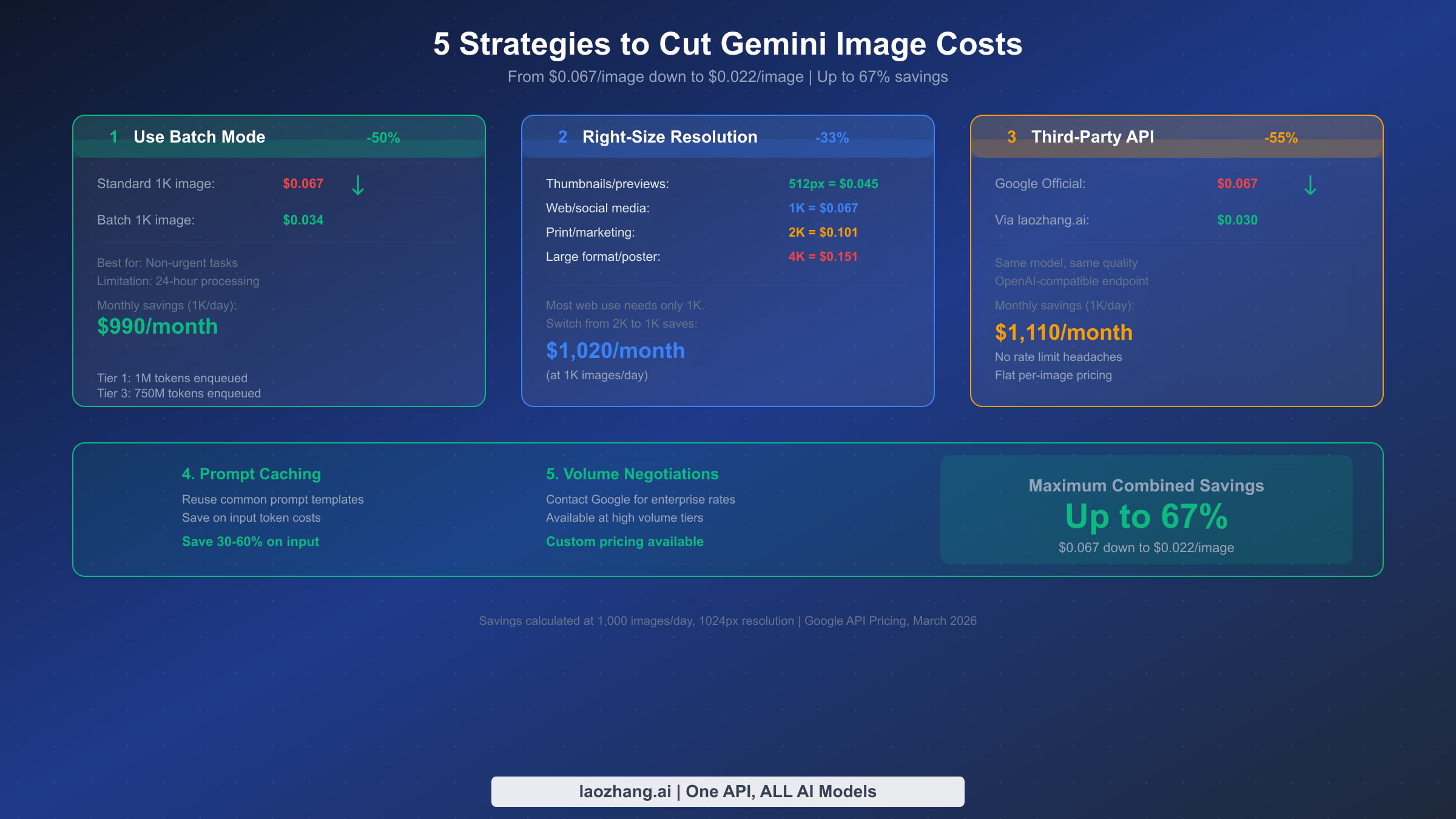
Reducing your Gemini image generation costs does not require sacrificing quality or switching to inferior alternatives. These five strategies can be combined to achieve up to 67% cost reduction from the standard 1024px rate of $0.067 per image, bringing your effective cost down to approximately $0.022 per image.
Strategy 1: Use Batch Mode for Non-Urgent Tasks. The single highest-impact optimization is switching eligible workloads to Google's batch processing API, which delivers a flat 50% discount on all token costs. Batch requests are processed within a 24-hour window, making this unsuitable for real-time user-facing applications but perfect for background processing, content pipeline generation, and bulk asset creation. A team generating 1,000 marketing images daily at 1024px resolution saves $990 per month by routing those requests through the batch endpoint instead of the standard API. The batch API supports the same model parameters, resolutions, and quality settings as the standard endpoint — the only difference is latency.
Strategy 2: Right-Size Your Resolution. Most web-displayed images do not need 2048px or 4096px resolution. Auditing your actual display contexts and matching resolution to requirement is the second most effective cost lever. Switching from 2048px to 1024px for web content saves 33% per image ($0.101 down to $0.067), and the quality difference is invisible when images are displayed at typical web dimensions. If you are generating images at 2K because "higher is better" without a specific large-format use case, you are spending $1,020 more per month than necessary at 1,000 images per day volume.
Strategy 3: Consider Third-Party API Providers. Third-party aggregation platforms offer access to the same Gemini 3.1 Flash Image Preview model at significantly reduced prices. Providers like laozhang.ai offer the same model through an OpenAI-compatible API endpoint at approximately $0.030 per image — a 55% discount from Google's official $0.067 rate. These platforms work by aggregating API access across multiple accounts and passing volume discounts to users. The trade-offs include potential latency differences and dependence on a third-party intermediary, but for cost-sensitive applications generating thousands of images daily, the savings of over $1,110 per month at 1,000 images/day volume make this worth serious consideration. For those exploring free tier alternatives for Gemini image generation, third-party providers with free credits on signup offer the closest thing available since the official model has no free tier.
Strategy 4: Implement Prompt Caching for Repeated Templates. When generating multiple images with similar prompt structures — product photography with consistent styling, branded social media templates, or batch variations on a theme — Google's prompt caching feature can reduce input token costs by 30-60%. While input tokens are a small fraction of the total image generation cost (the $60/1M image output rate dominates), prompt caching adds up at high volumes especially when your prompts include detailed system instructions or style references that repeat across requests.
Strategy 5: Negotiate Volume Discounts for Enterprise Use. Organizations generating more than 100,000 images per month should contact Google Cloud sales for custom enterprise pricing. Google offers committed-use discounts and custom rate negotiations at high volume tiers, though these arrangements are not publicly listed on the pricing page. Based on industry reports, enterprise agreements can reduce per-image costs by an additional 15-25% on top of any batch discounts, though specific terms vary by commitment level and contract duration.
Combined Savings Potential
Combining strategies 1, 2, and 3 can reduce your effective cost from $0.067 per standard 1024px image to approximately $0.022 — a 67% reduction. The maximum savings scenario uses batch processing through a third-party provider at 1024px resolution, which several production teams have reported achieving in developer community discussions as of early 2026.
How to Access Gemini 3.1 Flash Image at Lower Prices
Accessing Gemini 3.1 Flash Image Preview at prices below Google's official rate is possible through third-party API aggregation platforms that provide the same model through alternative endpoints. These platforms offer legitimate access by pooling API quotas and negotiating volume terms, then passing those savings to individual developers and small teams who would not qualify for enterprise pricing on their own.
The most practical option for developers seeking the cheapest ways to access Gemini Flash Image is through OpenAI-compatible API providers that support Gemini models. These services accept the same request format as OpenAI's API, making integration trivially simple if you already have OpenAI-based code — typically requiring only a change to the base URL and API key, with no modifications to your prompt structure or response handling logic.
laozhang.ai is one such platform that provides access to Gemini 3.1 Flash Image Preview at approximately $0.030 per 1024px image, representing a 55% savings over Google's direct pricing. The platform offers an OpenAI-compatible endpoint, no rate limit constraints beyond what Google imposes at the account level, and flat per-image pricing that eliminates the complexity of token-based cost calculations. For teams generating high volumes of images, the cost difference compounds significantly: 1,000 images per day at $0.030 versus $0.067 saves $1,110 monthly.
When evaluating third-party providers, there are several factors to consider beyond raw price. Response latency may vary depending on the provider's infrastructure and geographic proximity. Uptime guarantees differ from Google's direct SLA commitments. Data processing and privacy policies may not match Google's enterprise-grade standards. For non-sensitive image generation tasks such as marketing assets, social media content, and general creative work, these trade-offs are typically acceptable. For applications involving sensitive data or requiring guaranteed SLAs, Google's direct API remains the appropriate choice despite the higher cost.
The setup process for most third-party providers follows a consistent pattern. You register for an account, obtain an API key, configure your existing code to point at the provider's base URL instead of Google's endpoint, and keep the rest of your integration unchanged. Most providers offer initial free credits (typically $0.50-$1.00) to test the service before committing to a paid plan, which provides a risk-free way to verify quality and latency for your specific use case.
Quick Start: Generate Your First Image
Getting started with Gemini 3.1 Flash Image Preview requires a Google AI Studio API key and a straightforward API call. The following examples demonstrate the minimum viable request for generating an image, which you can extend with additional parameters for resolution control, style guidance, and multi-turn conversations.
Python Example
pythonimport google.generativeai as genai
from PIL import Image
from io import BytesIO
import base64


genai.configure(api_key="YOUR_API_KEY")

# Initialize the model
model = genai.GenerativeModel("gemini-3.1-flash-image-preview")

# Generate an image
response = model.generate_content(
    "Generate a professional product photo of a sleek wireless mouse "
    "on a clean white background with soft studio lighting"
)

# Extract and save the image
for part in response.candidates[0].content.parts:
    if hasattr(part, "inline_data"):
        image_data = base64.b64decode(part.inline_data.data)
        image = Image.open(BytesIO(image_data))
        image.save("generated_image.png")
        print(f"Image saved: {image.size[0]}x{image.size[1]}px")
cURL Example
bashcurl -X POST \
  "https://generativelanguage.googleapis.com/v1beta/models/gemini-3.1-flash-image-preview:generateContent?key=YOUR_API_KEY" \
  -H "Content-Type: application/json" \
  -d '{
    "contents": [{
      "parts": [{
        "text": "Generate a professional product photo of a sleek wireless mouse on a clean white background"
      }]
    }],
    "generationConfig": {
      "responseModalities": ["TEXT", "IMAGE"]
    }
  }'
Key Parameters to Control Cost
Three parameters directly impact your cost per request. The responseModalities field must include "IMAGE" to trigger image generation — omitting this generates text-only responses at the much lower $1.50/1M text output rate. Resolution is controlled through the generation configuration, where specifying a lower resolution directly reduces the output token count and therefore the cost. The candidateCount parameter determines how many image variations are generated per request, with each additional candidate multiplying the image output token cost proportionally.
For cost-efficient production use, we recommend setting resolution to match your actual display requirements, generating one candidate per request unless you specifically need variations, and implementing prompt caching for repeated template-based generation patterns. These three configuration choices, combined with the batch API for non-urgent workloads, form the foundation of cost-optimized Gemini image generation.
It is worth noting that the response format differs from typical image generation APIs. Gemini returns images as inline data within the response content parts, encoded in base64. Each response can contain multiple parts mixing text and image data, which means your parsing logic needs to iterate through all parts and handle each type appropriately. The Python SDK abstracts much of this complexity, but if you are working with the REST API directly via cURL or a custom HTTP client, you will need to decode the base64 image data from the response JSON and write it to a file. Error handling should account for cases where the model returns text-only responses (which can happen if the prompt does not clearly request image generation or if content safety filters are triggered), as well as rate limit responses during high-traffic periods.
Frequently Asked Questions
Is Gemini 3.1 Flash Image Preview free to use?
No. Unlike most other Gemini models which offer generous free tiers through Google AI Studio, the Gemini 3.1 Flash Image Preview model has no free tier. Every image generated incurs a charge based on the output token count, starting at $0.045 for 512px images. Google has not indicated any plans to introduce a free tier for this model, though the "Preview" status means this could change. For testing purposes, generating a single 1024px image costs $0.067, so experimenting with 10-15 test images costs less than a dollar.
How much does it cost to generate 1,000 images per day with Gemini?
At the default 1024px resolution using standard (non-batch) pricing, generating 1,000 images per day costs approximately $2,010 per month ($0.067 × 1,000 × 30). Switching to batch mode reduces this to $1,020 per month. Using a third-party provider with batch-equivalent pricing brings the total to approximately $900 per month. The resolution you choose significantly affects this number: 512px images at batch pricing would cost just $660 per month for the same volume.
Is Gemini image generation cheaper than DALL-E 3 or GPT Image?
Gemini 3.1 Flash Image at $0.067 per 1024px image is more expensive than DALL-E 3 Standard ($0.040) and GPT Image 1 Medium ($0.042), but significantly cheaper than GPT Image 1 High ($0.167) and DALL-E 3 HD ($0.080). However, Gemini's batch mode at $0.034 makes it competitive with DALL-E 3 Standard, and the native multimodal capabilities — contextual understanding, conversation-based generation, image editing through natural language — provide functionality that standalone image generators cannot match at any price.
What causes the pricing discrepancy between AI Studio and the API documentation?
As of March 2026, Google has not officially explained why AI Studio shows input token pricing at $0.50/1M and text output at $3.00/1M, while the API documentation lists $0.25/1M and $1.50/1M respectively. The image output token rate ($60/1M) is identical on both sources, so per-image costs are unaffected. Developer community reports suggest actual billing follows the lower API documentation rates, but we recommend budgeting with the higher AI Studio rates until Google publishes an official clarification.
Can I use Gemini 3.1 Flash Image for commercial projects?
Yes, images generated through the Gemini 3.1 Flash Image Preview API can be used for commercial purposes under Google's standard API terms of service. However, the "Preview" designation means that Google reserves the right to modify or discontinue the model with less notice than generally available models receive. For mission-critical production applications, ensure your architecture can fall back to alternative generation models if the preview model experiences changes. Generated images do not carry watermarks and are owned by the user per Google's current terms, though you should review the latest API terms of service for any updates specific to generated content.
What are the rate limits for Gemini 3.1 Flash Image Preview?
Rate limits vary by tier. Tier 1 accounts (the default for new API keys) start with lower request-per-minute limits that gradually increase as your usage history grows. Google's tiered system means that high-volume production use requires either time to build up your tier level or a direct arrangement with Google Cloud sales. Batch API requests have separate, typically higher, enqueuing limits — Tier 1 allows 1 million tokens enqueued, while Tier 3 supports up to 750 million tokens. For applications requiring consistently high throughput from day one, third-party providers often offer more predictable rate limits without the tiered ramp-up period, which is another factor to consider when choosing your API access method.
Will the pricing change when Gemini 3.1 Flash Image moves out of Preview?
Google has not made any public commitments about pricing changes when the model transitions from Preview to General Availability. Historically, Google has both increased and decreased prices during GA transitions depending on the model. The current $60 per million image output tokens rate could go up if Google determines the model is underpriced relative to demand, or down if competitive pressure from OpenAI and other providers warrants a price cut. For budgeting purposes, we recommend using the current pricing as a baseline while maintaining flexibility to adjust if rates change. Monitoring Google's pricing page and developer blog for announcements is the most reliable way to stay ahead of any changes.