
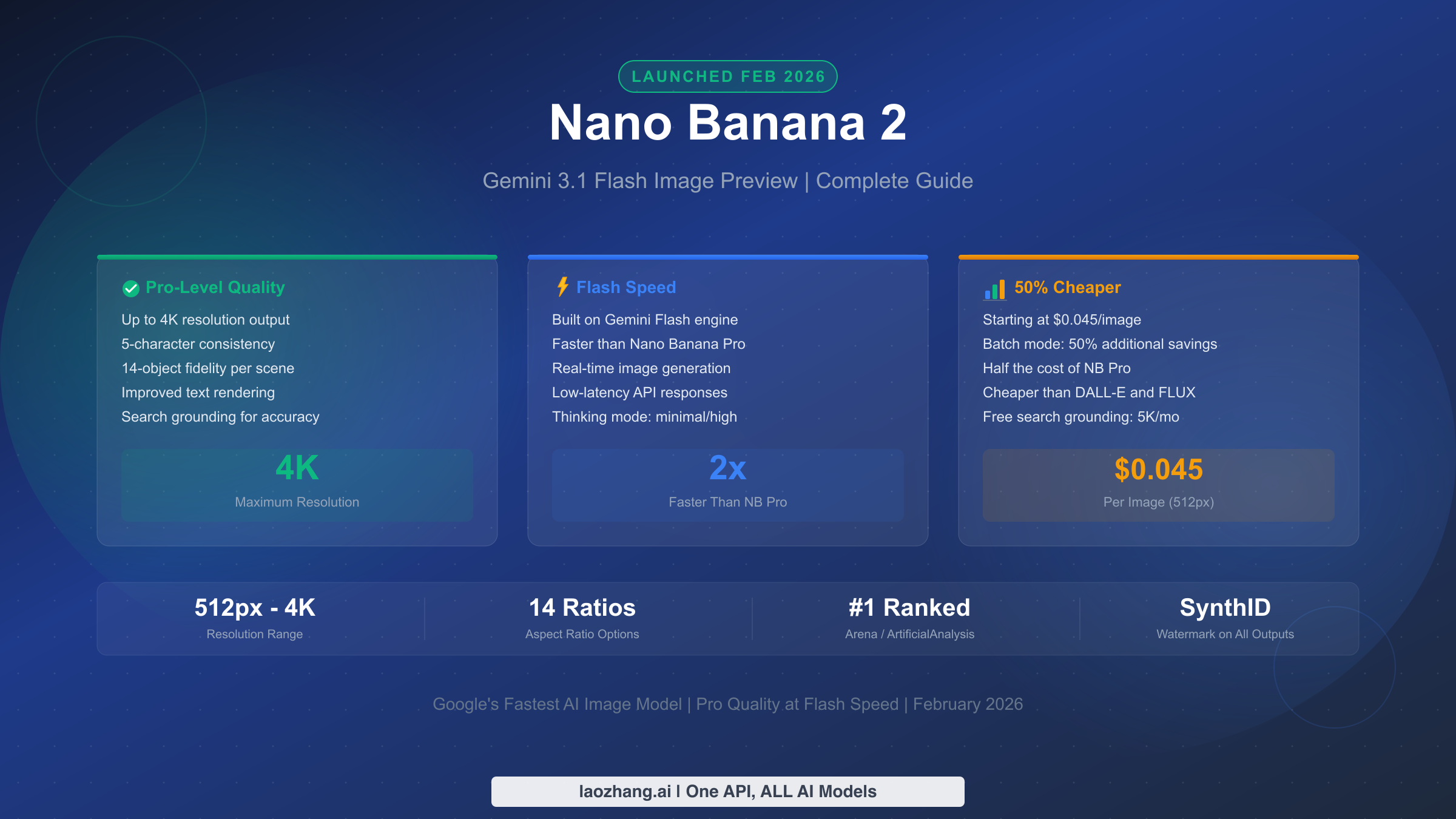
Nano Banana 2 (officially Gemini 3.1 Flash Image Preview) is Google's latest AI image generation model, launched on February 26, 2026. It combines the high-quality output of Nano Banana Pro with the speed of Gemini Flash, supporting resolutions from 512px to 4K at prices starting from $0.045 per image. The model features improved text rendering, up to 5-character consistency, 14-object fidelity, and real-time web search grounding for factual accuracy.
TL;DR
- What: Nano Banana 2 is Google's newest image model combining Pro-level quality with Flash-level speed and dramatically lower pricing
- Price: $0.045–$0.151 per image (standard), with batch mode offering an additional 50% discount (ai.google.dev/pricing, verified Feb 28, 2026)
- Key features: 4K resolution, improved text rendering, 5-character consistency, 14 aspect ratios, search grounding
- Model ID:
gemini-3.1-flash-image-preview - Access: Gemini API, Google AI Studio, Vertex AI, Gemini App, and third-party aggregators
- Bottom line: NB2 offers the best price-to-quality ratio of any major image generation model available today
What Is Nano Banana 2 and Why Does It Matter?
If you have been following Google's AI image generation developments, you are probably familiar with the naming confusion. Google uses two parallel naming systems: consumer-facing names like "Nano Banana" and technical model identifiers like "Gemini 3.1 Flash Image Preview." Nano Banana 2 is the consumer brand name for what developers know as gemini-3.1-flash-image-preview, and understanding this mapping is essential for navigating documentation, pricing pages, and API references without getting lost.
The lineage of Google's image models helps explain why NB2 matters so much. The original Nano Banana (based on Gemini 2.5 Flash) offered decent quality at low cost but lacked high-resolution support and had limited text rendering capabilities. Nano Banana Pro (based on Gemini 3 Pro) dramatically improved quality but came at a significantly higher price point — $0.134 per image at 1K resolution (ai.google.dev/pricing, verified Feb 28, 2026). The problem was clear: users had to choose between affordable but basic generation, or expensive but high-quality output. Nano Banana 2 eliminates that tradeoff entirely.
What makes NB2 genuinely significant is that it represents a rare moment in AI where a newer model delivers better quality while simultaneously cutting costs in half. Built on the Gemini Flash architecture rather than the Pro architecture, NB2 inherits Flash's speed advantages while matching or exceeding Pro's output quality. Google has already begun replacing Nano Banana Pro with NB2 across the Gemini app, signaling that this is not an experimental release but a production-ready successor. The model currently holds the #1 ranking on both Arena and ArtificialAnalysis benchmarks, placing it ahead of DALL-E, Midjourney, and FLUX in third-party quality evaluations.
For developers, content creators, and businesses evaluating image generation tools, NB2's launch changes the competitive landscape. A model that is simultaneously the highest-ranked in quality benchmarks and the cheapest among major competitors creates a compelling case for adoption — especially when it also supports 4K resolution, something that was previously exclusive to much more expensive options.
Key Features That Set Nano Banana 2 Apart
The headline feature of Nano Banana 2 is its resolution range. While most competing models output images at a single fixed resolution (typically 1024x1024), NB2 supports four distinct resolution tiers: 512px, 1024px, 2048px, and 4096px. This flexibility is not just about image size — it directly impacts cost and use-case optimization. A social media thumbnail does not need 4K resolution, and being able to generate a perfectly acceptable 512px image at $0.045 instead of paying $0.151 for unnecessary resolution is a meaningful cost advantage that no other major model currently offers.
Text rendering has been one of the most persistent weaknesses in AI image generation. Models like DALL-E and Midjourney have historically struggled with generating readable text within images — misspelling words, distorting letterforms, and producing gibberish characters. NB2 addresses this with what Google describes as "improved text rendering," and early testing confirms that the model handles short text strings (product names, signs, labels) with significantly higher accuracy than its predecessors. This improvement opens up practical use cases that were previously unreliable: generating mockup product labels, creating social media graphics with text overlays, and producing images with visible signage or branding.
Subject consistency is another area where NB2 pushes the boundaries of what image generation models can do. The model supports maintaining visual consistency for up to 5 characters and 14 objects within a single workflow. In practical terms, this means you can generate a series of images featuring the same character across different scenes while preserving their appearance — a capability that is essential for creating coherent visual narratives, character-driven content, and branded marketing materials. Previous models required extensive prompt engineering and often produced inconsistent results across generations.
Perhaps the most unique feature is search grounding. NB2 can integrate real-time web search results to ensure factual accuracy in generated images. When generating an image that involves recognizable locations, real products, or current events, the model can reference Google Search data to produce more accurate visual representations. Google provides 5,000 free search grounding queries per month, after which additional queries cost $0.014 each (ai.google.dev/pricing, verified Feb 28, 2026). In practice, search grounding transforms NB2 from a purely generative tool into something closer to an informed visual assistant. If you ask it to generate an image of a specific restaurant in Tokyo, it can reference search data to get architectural details correct rather than inventing them. For e-commerce use cases, search grounding helps generate product images that align with real-world expectations — generating a "2026 MacBook Pro" will reference actual product images rather than hallucinating random laptop designs.
The thinking mode feature further enhances output quality by allowing users to choose between "minimal" and "high" thinking levels. At the "minimal" level, NB2 generates images quickly with standard quality — suitable for rapid prototyping and iterative prompt testing. At the "high" level, the model takes more time to plan and refine the image composition, resulting in noticeably better lighting, perspective accuracy, and detail consistency. The tradeoff is generation time: high thinking mode typically takes 2-3x longer than minimal mode. For production workflows, the recommended approach is to use minimal thinking during the prompt refinement phase and then switch to high thinking for final output generation. This two-phase approach optimizes both development speed and output quality without significantly impacting costs, since thinking mode does not change the per-image pricing.
Nano Banana 2 vs Nano Banana Pro — What Changed?
The transition from Nano Banana Pro to Nano Banana 2 represents more than a version bump — it reflects a fundamental shift in Google's approach to image generation architecture. NB Pro was built on the Gemini 3 Pro foundation, which prioritized quality above all else. NB2, by contrast, is built on the Gemini 3.1 Flash architecture, which was designed from the ground up to deliver high performance at lower computational cost. The result is a model that matches Pro's quality while being both faster and cheaper. For a detailed Nano Banana 2 vs Pro comparison, we have published a dedicated analysis.
| Feature | Nano Banana Pro | Nano Banana 2 |
|---|---|---|
| Model ID | gemini-3-pro-image-preview | gemini-3.1-flash-image-preview |
| Base Architecture | Gemini 3 Pro | Gemini 3.1 Flash |
| Resolution | 1K, 2K, 4K | 512px, 1K, 2K, 4K |
| 1K Price | $0.134/image | $0.067/image |
| 4K Price | $0.240/image | $0.151/image |
| Batch Pricing | Not available | 50% off standard |
| Text Rendering | Basic | Improved |
| Subject Consistency | Up to 3 characters | Up to 5 characters |
| Object Fidelity | Up to 8 objects | Up to 14 objects |
| Search Grounding | Not available | 5,000 free/month |
| Thinking Mode | Not available | Minimal / High |
| Aspect Ratios | Limited | 14 options |
| Arena Ranking | Top 5 | #1 |
The pricing difference is the most immediately impactful change. At 1K resolution, NB2 costs $0.067 compared to NB Pro's $0.134 — exactly 50% less (ai.google.dev/pricing, verified Feb 28, 2026). At 4K resolution, the savings are even larger: $0.151 versus $0.240, a 37% reduction. When you factor in NB2's batch pricing (which cuts costs by another 50%), the gap becomes dramatic. A batch of 1,000 images at 1K resolution costs just $34 with NB2 versus $134 with NB Pro — a 75% total cost reduction.
Beyond pricing, NB2 adds the 512px tier that NB Pro never offered, providing an ultra-affordable entry point for use cases where maximum resolution is not needed. The expanded aspect ratio support (14 options including extreme ratios like 4:1 and 1:8) gives creators more flexibility for different content formats. And the addition of search grounding and thinking modes brings capabilities that have no equivalent in NB Pro at all. Google's decision to replace NB Pro with NB2 across the Gemini app is a clear signal that they consider NB2 to be the superior model in every meaningful dimension.
Pricing Breakdown — How Much Does Nano Banana 2 Cost?
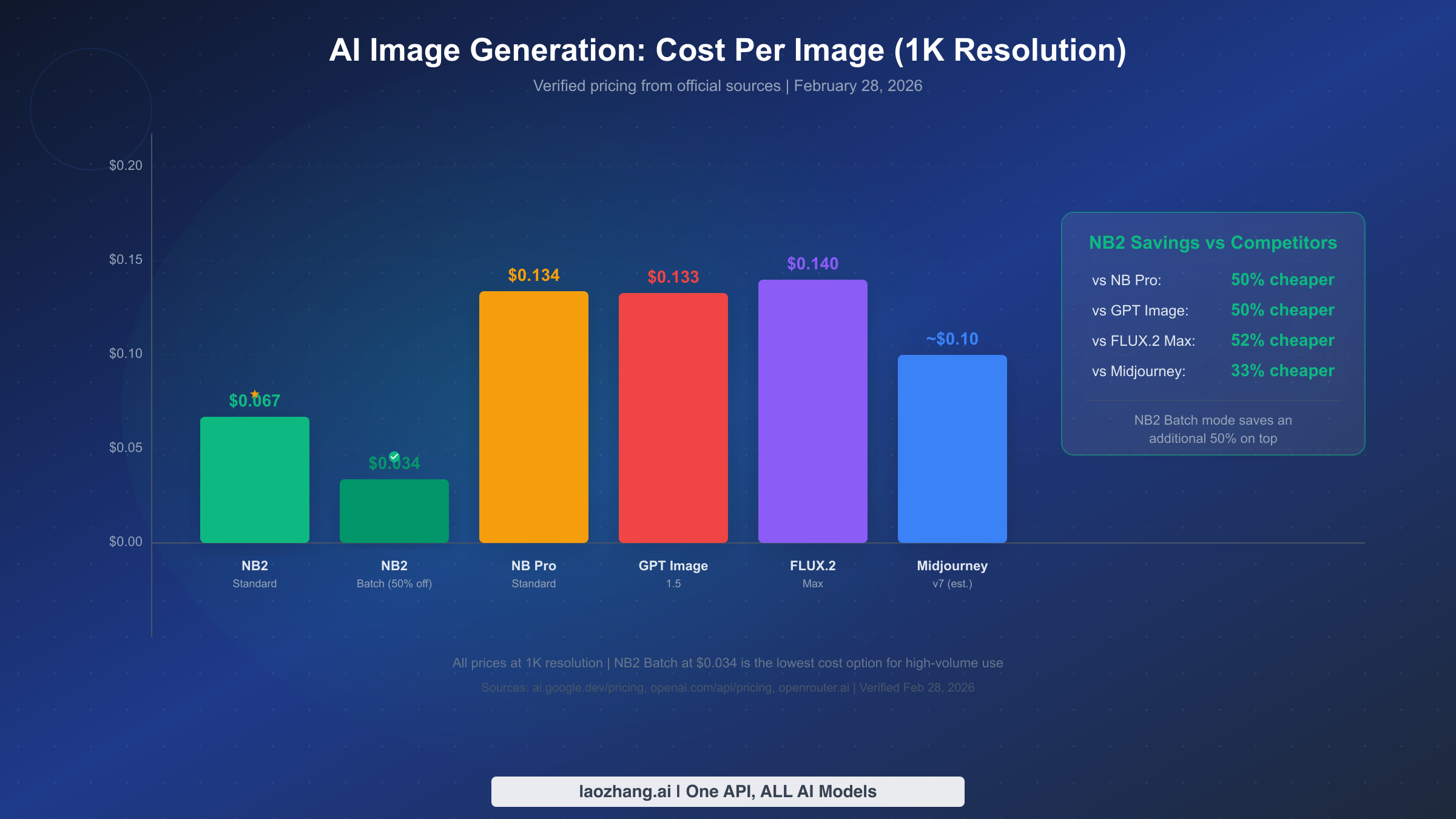
Understanding NB2's pricing structure is critical for anyone planning to use the model at scale. Unlike subscription-based services like Midjourney, NB2 uses a token-based pricing model that translates to a per-image cost depending on the resolution you select. All pricing data below is verified directly from ai.google.dev/pricing on February 28, 2026.
Standard API Pricing
| Resolution | Cost per Image | Tokens per Image | Batch Price (50% off) |
|---|---|---|---|
| 512px | $0.045 | ~750 output tokens | $0.022 |
| 1024px | $0.067 | ~1,100 output tokens | $0.034 |
| 2048px | $0.101 | ~1,700 output tokens | $0.050 |
| 4096px | $0.151 | ~2,500 output tokens | $0.076 |
The underlying token pricing is $0.25 per million input tokens and $60.00 per million output image tokens (ai.google.dev/pricing, verified Feb 28, 2026). Text output from the model is priced at $1.50 per million tokens. The per-image costs above are calculated from these token rates based on typical image generation.
Batch pricing deserves special attention for high-volume users. NB2's batch API costs exactly half of the standard rate, making it one of the most cost-effective image generation options available. If you are generating hundreds or thousands of images — for example, product catalog images, social media content libraries, or marketing asset batches — batch mode can cut your costs dramatically. For more details on finding the most affordable access, see our guide on cheapest Nano Banana 2 API options.
Cost Scenarios at Scale
To put these numbers in perspective, here is what different usage levels would cost per month with NB2 at 1K resolution:
| Monthly Volume | Standard Cost | Batch Cost | NB Pro Equivalent | Savings vs Pro |
|---|---|---|---|---|
| 100 images | $6.70 | $3.40 | $13.40 | 50-75% |
| 500 images | $33.50 | $17.00 | $67.00 | 50-75% |
| 1,000 images | $67.00 | $34.00 | $134.00 | 50-75% |
| 5,000 images | $335.00 | $170.00 | $670.00 | 50-75% |
| 10,000 images | $670.00 | $340.00 | $1,340.00 | 50-75% |
For developers building applications that require high-volume image generation, third-party API aggregators like laozhang.ai offer NB2 access at competitive rates (approximately $0.05 per image), often with simplified billing and unified access to multiple AI models through a single API endpoint. You can also use our Nano Banana pricing calculator to estimate costs for your specific use case.
How to Use Nano Banana 2 — Complete Getting Started Guide
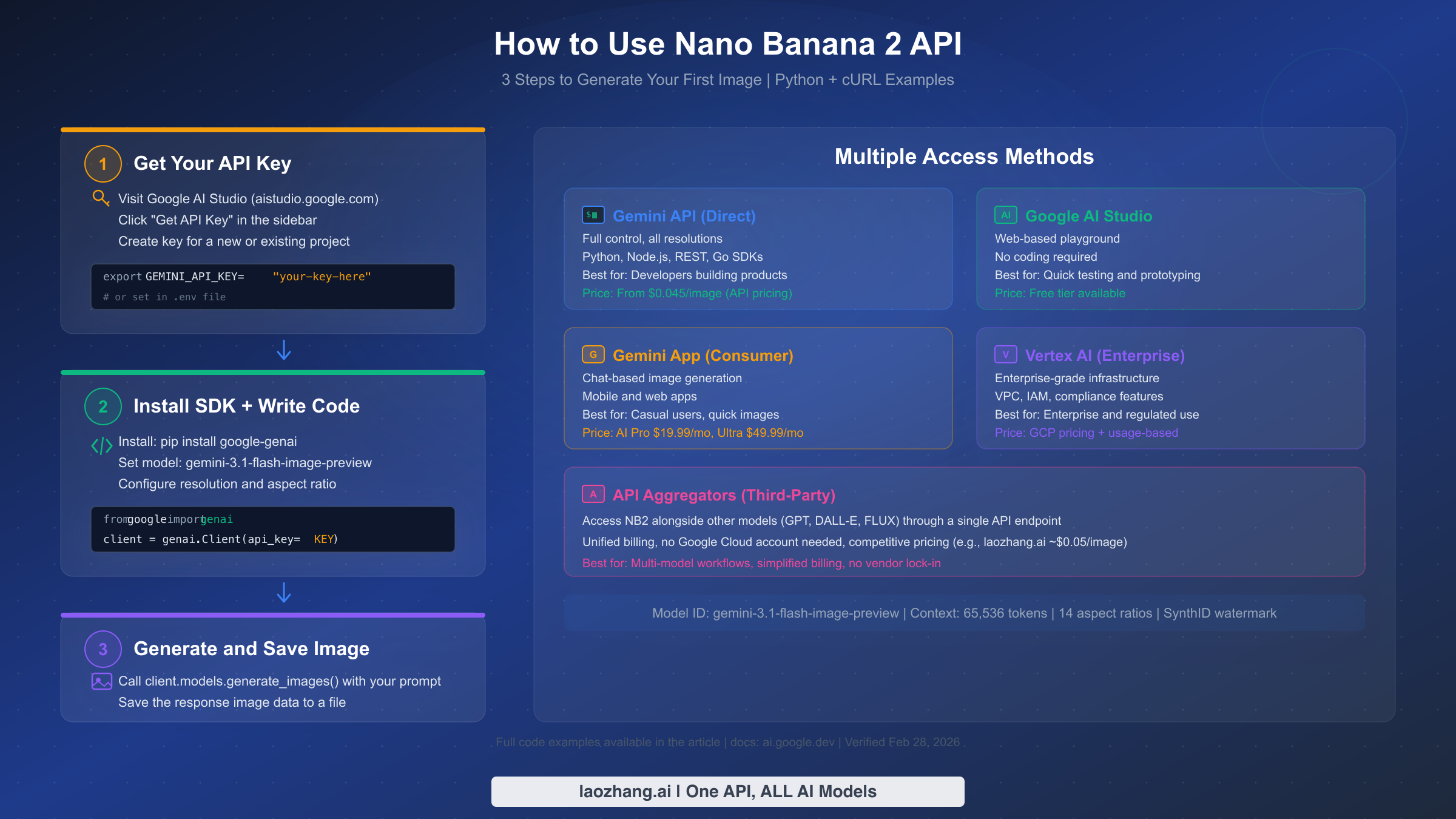
Getting started with Nano Banana 2 requires choosing an access method that matches your technical level and use case. There are five primary ways to use NB2, ranging from no-code web interfaces to enterprise-grade API deployments. This section walks through the developer-focused API approach step by step, and then briefly covers the alternatives.
API Quickstart (Python)
The fastest way to start generating images programmatically is through the Gemini API using the official Python SDK. The entire setup takes about five minutes if you already have Python installed. First, you need an API key from Google AI Studio — visit aistudio.google.com, click "Get API Key" in the left sidebar, and create a key for a new or existing Google Cloud project. There is no credit card required for the free tier, though image generation is a paid feature. For free Gemini 3.1 Flash Image API access, check our dedicated guide on maximizing free-tier usage.
Install the SDK and set up your environment:
bashpip install google-genai
export GEMINI_API_KEY="your-api-key-here"
Generate your first image with a simple Python script:
pythonfrom google import genai
from google.genai import types
import base64

client = genai.Client(api_key="your-api-key-here")

response = client.models.generate_images(
    model="gemini-3.1-flash-image-preview",
    prompt="A serene mountain lake at sunset with reflections",
    config=types.GenerateImagesConfig(
        number_of_images=1,
        aspect_ratio="16:9",
    ),
)


for i, image in enumerate(response.generated_images):
    with open(f"output_{i}.png", "wb") as f:
        f.write(base64.b64decode(image.image.image_bytes))
    print(f"Saved output_{i}.png")
For cURL users who prefer direct REST API calls, the equivalent request looks like this:
bashcurl -X POST \
  "https://generativelanguage.googleapis.com/v1beta/models/gemini-3.1-flash-image-preview:generateImages" \
  -H "x-goog-api-key: YOUR_API_KEY" \
  -H "Content-Type: application/json" \
  -d '{
    "prompt": "A serene mountain lake at sunset with reflections",
    "config": {
      "numberOfImages": 1,
      "aspectRatio": "16:9"
    }
  }'
Alternative Access Methods
Beyond the direct API, NB2 is accessible through several other channels. Google AI Studio (aistudio.google.com) provides a web-based playground where you can test prompts and generate images without writing any code — this is the best option for quick prototyping and experimentation. The Gemini App (available on mobile and web) offers a chat-based interface for casual image generation, bundled with Google AI Pro ($19.99/month) or Google AI Ultra ($49.99/month) subscriptions. Vertex AI provides enterprise-grade access with VPC integration, IAM controls, and compliance features for organizations with strict security requirements.
For developers working in JavaScript/TypeScript environments, the Gemini API also supports Node.js through the official SDK. The setup process mirrors the Python approach:
bashnpm install @google/genai
javascriptconst { GoogleGenAI } = require("@google/genai");
const fs = require("fs");

const ai = new GoogleGenAI({ apiKey: "your-api-key-here" });

async function generateImage() {
  const response = await ai.models.generateImages({
    model: "gemini-3.1-flash-image-preview",
    prompt: "A serene mountain lake at sunset with reflections",
    config: {
      numberOfImages: 1,
      aspectRatio: "16:9",
    },
  });

  const imageBytes = Buffer.from(
    response.generatedImages[0].image.imageBytes, "base64"
  );
  fs.writeFileSync("output.png", imageBytes);
  console.log("Image saved to output.png");
}

generateImage();
One important consideration for production deployments is error handling and rate limiting. The Gemini API enforces rate limits that vary by billing tier — free tier users are limited to a relatively low number of requests per minute, while paid tier users get significantly higher limits. Your production code should implement exponential backoff retry logic and queue management for high-volume generation scenarios. The API returns standard HTTP error codes (429 for rate limiting, 500 for server errors), making it straightforward to integrate with existing retry middleware.
Third-party API aggregators provide another compelling access path, particularly for developers who work with multiple AI models. Services like laozhang.ai offer NB2 access alongside GPT Image, DALL-E, FLUX, and other models through a single unified API endpoint, simplifying billing and eliminating the need for separate accounts with each provider. This approach is particularly attractive for applications that need to compare or switch between different image models dynamically — for example, using NB2 for most generation tasks but falling back to a specialized model for particular artistic styles.
Choosing the Right Resolution — From 512px to 4K
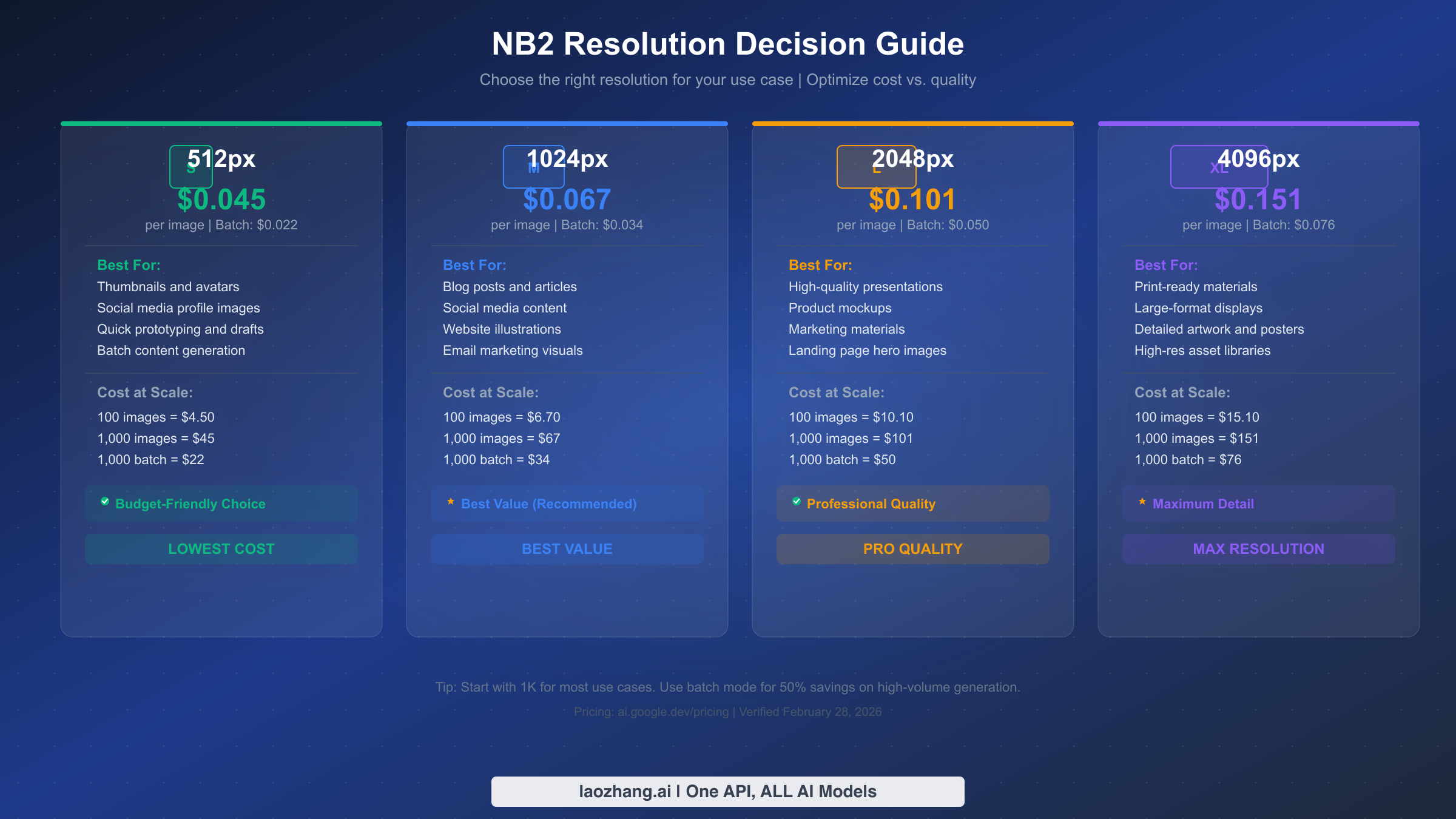
One of NB2's most practical advantages over competing models is its four-tier resolution system, which lets you match image quality to your actual needs rather than paying for resolution you do not use. This section provides a decision framework based on real-world use cases and the cost implications of each choice.
The 512px tier ($0.045/image) is ideal for thumbnails, avatars, social media profile pictures, and any context where images will be displayed at small sizes. At this resolution, you are paying less than five cents per image, and with batch pricing that drops to just $0.022. If you are building an application that generates hundreds of small images — like user avatars or product thumbnails in a catalog — the 512px tier makes generation costs almost negligible. The quality at 512px is entirely sufficient for images displayed below 300px on screen, which covers the majority of thumbnail and avatar use cases.
The 1024px tier ($0.067/image) represents the best overall value and is the resolution we recommend for most general-purpose use cases. Blog post illustrations, social media content, email marketing visuals, and website graphics all look excellent at 1K resolution. This is the sweet spot where quality meets affordability — sharp enough for full-width display on most screens, but priced at less than seven cents per image. For batch workflows, the cost drops to $0.034 per image, making 1K resolution batch generation one of the most cost-effective image creation methods available from any provider.
The 2048px tier ($0.101/image) is the right choice when you need noticeably higher detail — presentations that will be projected on large screens, product mockups that need to show fine details, marketing materials for print or high-resolution displays, and landing page hero images that need to look crisp on retina screens. The jump from 1K to 2K doubles the pixel count in each dimension (quadrupling the total pixels), which makes a visible difference in sharpness and detail, particularly for images with fine textures or small text elements.
The 4096px tier ($0.151/image) is designed for professional and print-ready applications. Large-format prints, detailed artwork, high-resolution asset libraries, and any context where the image will be viewed at close range or enlarged substantially will benefit from 4K resolution. While it is the most expensive tier, $0.151 per image is still dramatically cheaper than NB Pro's 4K pricing ($0.240/image) or equivalent pricing from competing models. In batch mode, 4K images cost just $0.076 each — less than NB Pro charges for its cheapest resolution.
For teams building automated image generation pipelines, a hybrid resolution strategy often yields the best cost-quality tradeoff. The approach works like this: generate all images at 512px first as a rapid preview pass, review or algorithmically filter the results to identify the best outputs, and then regenerate only the selected winners at your target resolution. Since NB2 produces consistent quality across resolution tiers (the same prompt produces stylistically identical output at 512px and 4K, just at different pixel counts), the 512px preview accurately predicts what the higher-resolution output will look like. This preview-then-upgenerate workflow can reduce total generation costs by 40-60% compared to generating everything at the final target resolution, especially when your acceptance rate is below 50%.
The key optimization principle is simple: always start with the lowest resolution that meets your quality requirements, and only move up when you have a specific reason to do so. For automated pipelines generating large volumes of images, the difference between 512px ($0.022 batch) and 4K ($0.076 batch) scales significantly — a batch of 10,000 images costs $220 at 512px versus $760 at 4K. Another practical consideration is storage and bandwidth: a 4K PNG typically runs 8-15MB compared to 200-500KB for a 512px image, which adds up quickly in cloud storage costs and CDN bandwidth when serving images to end users.
NB2 vs the Competition — DALL-E, Midjourney, and FLUX Compared
Choosing an image generation model in 2026 means evaluating NB2 against several strong competitors. Each model has distinct strengths, pricing structures, and use-case specializations. This comprehensive comparison covers the key decision factors based on publicly available pricing and capability data. For a detailed head-to-head breakdown, see our in-depth Nano Banana 2 vs Midjourney comparison.
| Feature | NB2 | GPT Image 1.5 | Midjourney v7 | FLUX.2 Max |
|---|---|---|---|---|
| 1K Price | $0.067 | ~$0.133 | ~$0.10 (est.) | ~$0.140 |
| 4K Support | Yes | No | No (upscale only) | No |
| Batch Pricing | 50% off | Not available | Not available | Not available |
| Text Rendering | Improved | Good | Moderate | Good |
| API Access | Full REST API | Full REST API | Limited API | Via providers |
| Free Tier | AI Studio (limited) | No | No | No |
| Search Grounding | Yes (5K free/mo) | No | No | No |
| Arena Ranking | #1 | Top 3 | Top 5 | Top 5 |
| Subject Consistency | 5 characters | Moderate | Strong | Limited |
| Aspect Ratios | 14 options | Limited | Multiple | Limited |
On pure pricing, NB2 is the clear winner. At $0.067 per 1K image (or $0.034 in batch mode), it costs roughly half what GPT Image 1.5 charges and is 33% cheaper than Midjourney's estimated per-image cost. The pricing advantage becomes even more pronounced with batch processing, which no competitor currently offers as a formal pricing tier.
Midjourney remains the strongest competitor for artistic and stylistic image generation. Its v7 model produces images with a distinctive aesthetic quality that many designers and artists prefer, and its Discord-based community provides inspiration and shared prompt techniques. However, Midjourney's pricing model (subscription-based at $10-$120/month) and limited API access make it less suitable for programmatic integration or high-volume generation.
GPT Image 1.5 (used in ChatGPT and via the OpenAI API) offers strong prompt understanding and good overall quality, but it is significantly more expensive than NB2 and lacks features like 4K resolution, batch pricing, and search grounding. FLUX.2 Max delivers competitive quality, particularly for photorealistic generation, but its pricing through providers like Replicate and Together AI tends to run higher than NB2's direct pricing.
For high-volume production use cases, the competitive picture becomes even more favorable for NB2. Consider a typical content creation pipeline that generates 5,000 images per month at 1K resolution. With NB2 batch pricing, that costs $170/month. The equivalent volume with GPT Image 1.5 at ~$0.133/image would cost $665/month — nearly four times more. With Midjourney's $120/month "Mega" plan, you get unlimited relaxed generations but limited fast generations, and the lack of a proper REST API means building automated pipelines requires unofficial Discord integrations that can break without notice.
Quality comparisons across these models reveal interesting tradeoffs that go beyond benchmark scores. NB2 excels at photorealistic generation, architectural visualization, and any prompt that benefits from factual accuracy through search grounding. Midjourney produces images with a more artistic, stylized quality that is difficult to replicate with other models — its images tend to have distinctive lighting and color grading that many creative professionals prefer. GPT Image 1.5 has the strongest prompt comprehension, understanding nuanced instructions and complex spatial relationships better than its competitors, though it occasionally overprocesses images with excessive detail. FLUX.2 Max delivers perhaps the most consistently photorealistic outputs, making it the preferred choice for product photography and commercial imagery where realism is paramount.
The bottom line is that NB2 currently offers the best combination of quality, features, and pricing among major image generation models. If your primary requirements are cost-efficiency, API access, and resolution flexibility, NB2 is the strongest choice. If you prioritize artistic style and community, Midjourney remains worth considering. And if you are already invested in the OpenAI ecosystem, GPT Image 1.5 provides a seamless but more expensive alternative.
Frequently Asked Questions About Nano Banana 2
Is Nano Banana 2 the same as Gemini 3.1 Flash Image Preview?
Yes, they are the same model. "Nano Banana 2" is Google's consumer-facing brand name, while "Gemini 3.1 Flash Image Preview" is the technical model identifier used in API calls. The model ID you use in code is gemini-3.1-flash-image-preview. This dual naming can be confusing, but both names refer to exactly the same underlying model and capabilities.
Can I use Nano Banana 2 for free?
There is limited free access through Google AI Studio for testing and prototyping purposes, but image generation is primarily a paid feature. The Gemini API requires at minimum a Tier 1 billing account for NB2 batch operations. Consumer access through the Gemini App is included with Google AI Pro ($19.99/month) or Google AI Ultra ($49.99/month) subscriptions. For the most affordable API access, batch mode at $0.022 per 512px image offers near-free-tier pricing for low-volume use.
Should I build on a "preview" model?
The "preview" designation indicates that the model may receive updates and improvements, but Google has a strong track record of transitioning preview models to stable versions without breaking changes. Google is already using NB2 as the primary image generation model across the Gemini App, which signals high confidence in the model's stability. For most use cases, building on NB2 is a reasonable decision, but you should pin to a specific model version in production code and test against updates when they are released.
Does NB2 support image editing or only generation?
NB2 supports both image generation from text prompts and image editing workflows. You can provide an input image along with editing instructions to modify specific aspects of an existing image. The model also supports multi-turn conversations where you can iteratively refine an image through successive prompts — for example, generating an initial image and then asking the model to change the background, add elements, or adjust colors.
What happens to my images and prompts?
All images generated through the Gemini API include a SynthID watermark — an invisible digital watermark embedded in the image data that identifies it as AI-generated. Your prompts and generated images are subject to Google's data handling policies, which vary depending on whether you use the consumer Gemini App or the developer API. API usage through Google AI Studio and Vertex AI provides stronger data privacy guarantees, including options for data residency and retention controls.
How does NB2 compare to NB Pro for existing users?
NB2 is strictly superior to NB Pro in every measured dimension: lower pricing, more resolution options, better text rendering, stronger subject consistency, additional features (search grounding, thinking mode), and higher benchmark rankings. Google is actively migrating NB Pro users to NB2 across the Gemini App. If you are currently using NB Pro via API, switching to NB2 requires changing the model ID from gemini-3-pro-image-preview to gemini-3.1-flash-image-preview and updating any resolution-specific configuration.
What are the rate limits for Nano Banana 2?
Rate limits for NB2 vary by billing tier and access method. Free tier users in Google AI Studio have relatively restrictive limits suitable for testing and prototyping. Paid tier users get significantly higher request-per-minute (RPM) and tokens-per-minute (TPM) allocations. For the batch API, Google processes requests asynchronously with a 24-hour completion window, which means rate limits are less of a concern for high-volume generation — you submit large batches and retrieve results when they are ready. If you need real-time generation at high throughput, enterprise customers can negotiate custom rate limits through Vertex AI. For specific current limits, check the rate limits section of the Gemini API documentation (ai.google.dev/gemini-api/docs/rate-limits), as Google periodically adjusts these numbers.
Can NB2 generate images with specific brand logos or copyrighted characters?
NB2 includes safety filters that restrict generation of exact reproductions of copyrighted brand logos, trademarked characters, and recognizable IP. This is a deliberate design decision by Google to minimize legal liability. The model will typically produce "inspired by" versions that evoke the general style without exact reproduction. For legitimate brand work where you own the IP, the recommended approach is to use NB2 for initial concept generation and then refine with dedicated design tools. The search grounding feature can help with accuracy for real-world scenes and locations, but it does not bypass the copyright safety filters for branded content.
Final Verdict — Is Nano Banana 2 Worth Using?
Nano Banana 2 represents one of those rare releases where a new model improves on its predecessor in every meaningful dimension simultaneously. It is faster than Nano Banana Pro, produces higher-quality output, costs 50% less, and adds entirely new capabilities like search grounding and thinking modes. The fact that it also ranks #1 in independent quality benchmarks — beating DALL-E, Midjourney, and FLUX — while being the cheapest option among major competitors makes the value proposition essentially unambiguous.
For developers and businesses evaluating image generation tools, NB2 should be at the top of your consideration list. The combination of flexible resolution tiers (512px to 4K), aggressive batch pricing (as low as $0.022 per image), comprehensive API support across multiple languages and platforms, and the backing of Google's infrastructure makes it a production-ready choice for everything from small creative projects to enterprise-scale image pipelines.
The practical recommendation depends on your specific situation. If you are starting fresh with AI image generation, NB2 via the Gemini API is the default recommendation — it offers the best price-to-quality ratio available today. If you are currently using Nano Banana Pro, switching to NB2 is a straightforward upgrade that will reduce costs while improving quality. If you are using a competitor like Midjourney or DALL-E, NB2 is worth testing against your current workflow to see if the cost savings justify migration.
Here is your action plan to get started with Nano Banana 2 today:
- Quick test: Visit Google AI Studio (aistudio.google.com) and try NB2 with a few prompts — no code or credit card needed
- API setup: Get an API key, install the Python SDK (
pip install google-genai), and run the quickstart code from this guide - Optimize costs: Start with 1K resolution for general use, use 512px for thumbnails, and enable batch mode for high-volume generation
- Scale up: For multi-model workflows, consider API aggregators like laozhang.ai for unified access to NB2 alongside other models