
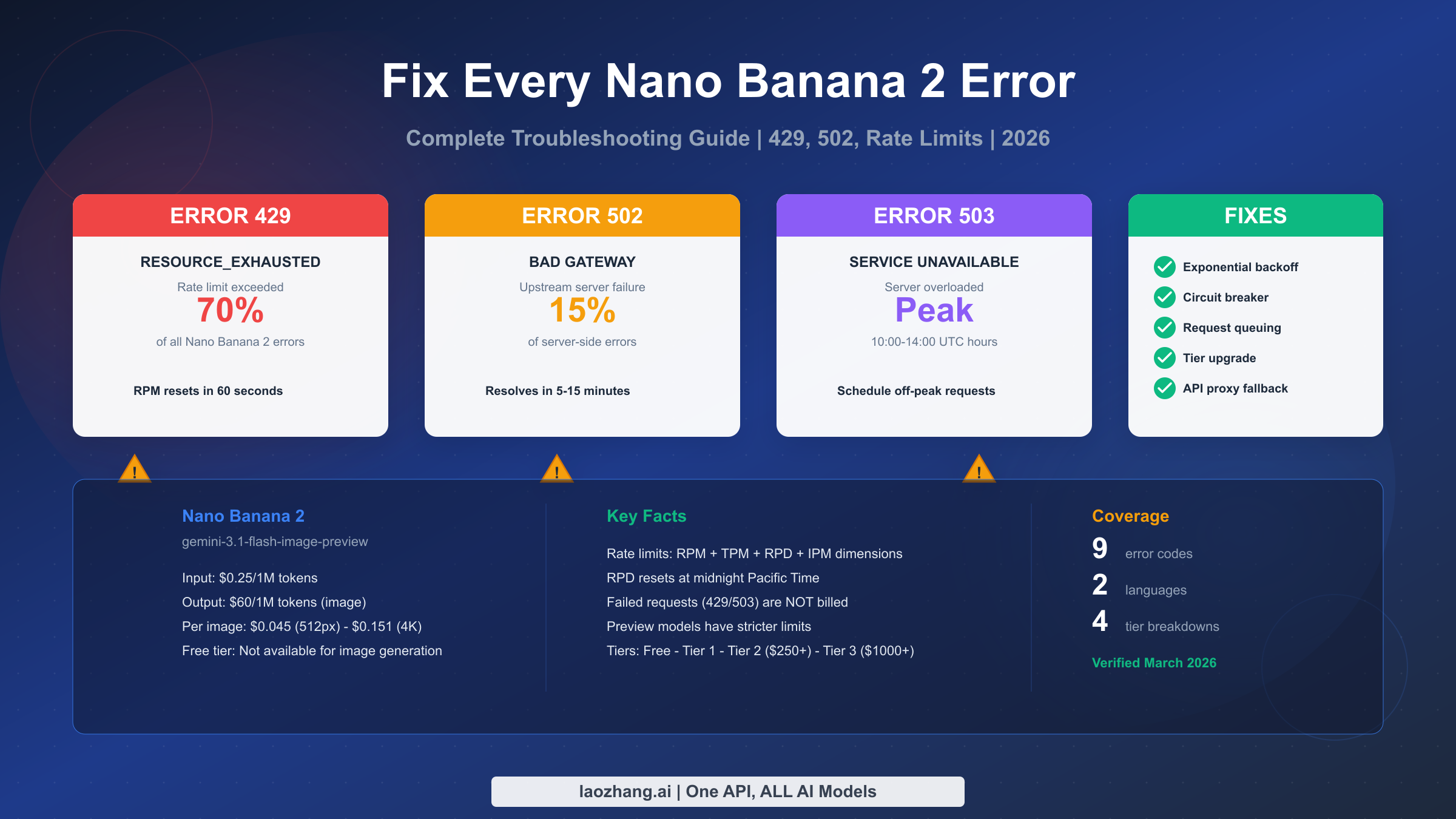
Nano Banana 2 errors like 429 RESOURCE_EXHAUSTED and 502 Bad Gateway affect the Gemini 3.1 Flash Image API (gemini-3.1-flash-image-preview). Error 429 accounts for roughly 70% of all failures and means you have exceeded your rate limit — wait 60 seconds for RPM resets or check your daily quota which resets at midnight Pacific Time. Error 502 indicates Google's servers returned an invalid response and typically resolves within 5-15 minutes. This guide covers every Nano Banana 2 error code with verified rate limits, actual error response examples, and production-ready fix code in Python and TypeScript.
What Makes Nano Banana 2 Errors Different from Nano Banana Pro
If you have been debugging Nano Banana errors and following guides written for Nano Banana Pro, you may be applying the wrong solutions to your problem. Nano Banana 2 (model ID: gemini-3.1-flash-image-preview) and Nano Banana Pro (model ID: gemini-3-pro-image-preview) are fundamentally different models with distinct pricing structures, rate limits, and error behaviors. Understanding these differences is the first step to fixing your errors correctly and avoiding wasted debugging time.
The most critical difference is pricing. Nano Banana 2 costs $0.25 per million input tokens and $60 per million output tokens for image generation, while Nano Banana Pro charges $2.00 per million input tokens and $120 per million output tokens (ai.google.dev/pricing, verified March 2, 2026). This means NB2 is 50-87% cheaper than Pro on a per-token basis, and a single 1K resolution image costs approximately $0.067 with NB2 compared to $0.134 with Pro. This pricing difference matters for error handling because retry strategies have different cost implications depending on which model you use. For a detailed Nano Banana 2 vs Pro comparison, we have a dedicated article covering all technical differences.
The second critical difference is that Nano Banana 2 is classified as a "preview" model, which means it operates under stricter rate limits than established models. Google's official documentation explicitly states that "experimental and preview models have lower rate limits" (ai.google.dev/docs/rate-limits, March 2, 2026). In practice, this means your Tier 1 account might handle 10 RPM for NB2 image generation compared to potentially higher limits for non-preview models. Both NB2 and Pro lack a free tier for image generation — if you see RESOURCE_EXHAUSTED on a free-tier account, the error is telling you that image generation simply is not available without billing enabled.
One technical detail that catches many developers off guard is the thought_signature requirement in multi-turn conversations. When you use Nano Banana 2 in a conversational context where the model generates both text and images across multiple turns, you must include the thought_signature from the previous response in your next request. Failing to do so results in a 400 Bad Request error that looks confusing if you are not aware of this requirement. This behavior is identical for both NB2 and Pro, but since NB2 is newer, fewer tutorials cover this properly.
Diagnose Your Nano Banana 2 Error in 30 Seconds
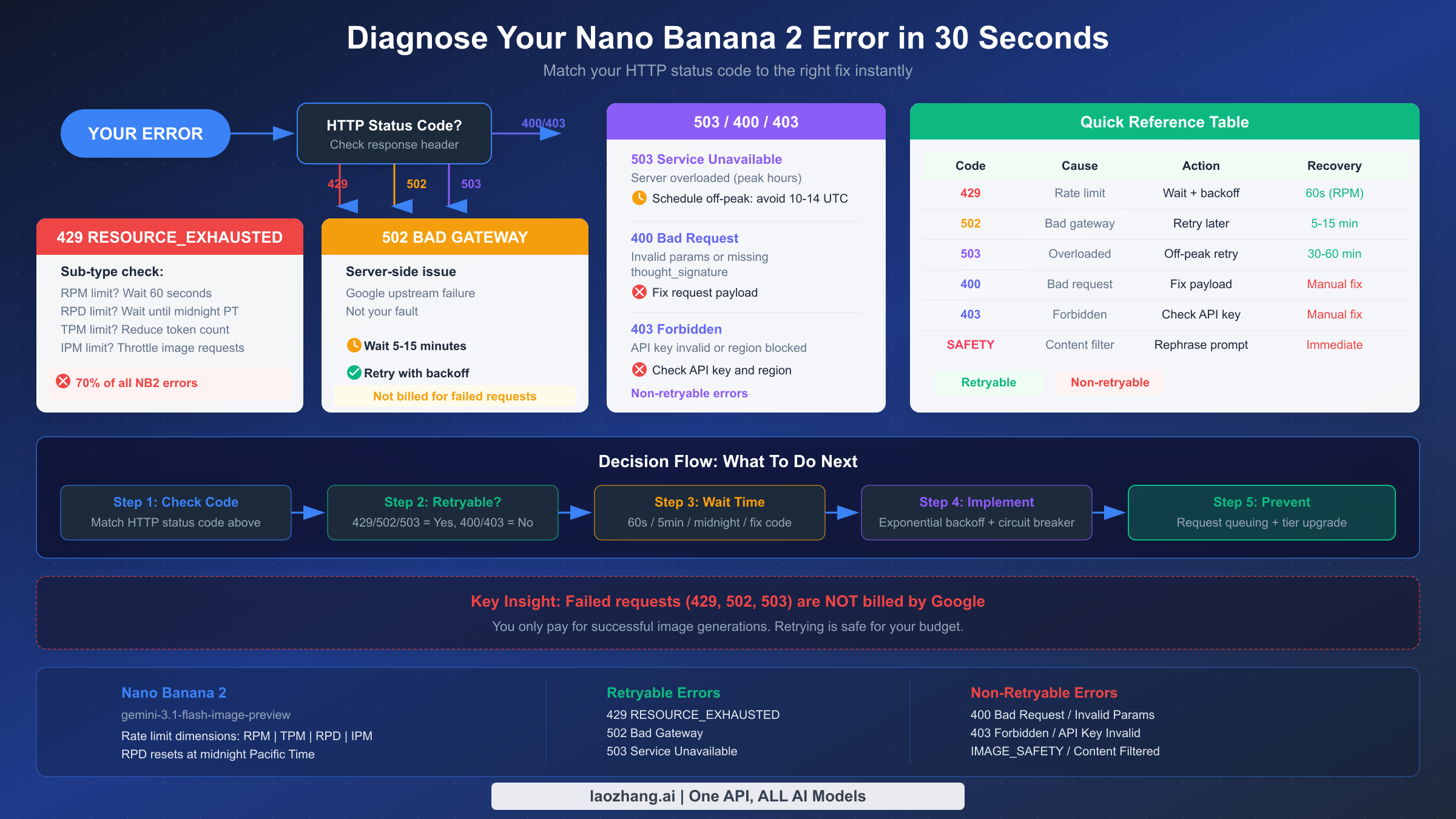
Before diving into detailed solutions, use this quick-reference table to match your exact error to the right fix. Every Nano Banana 2 error falls into one of two categories: retryable errors where you should implement automatic retry logic, and non-retryable errors where you need to fix something in your request before trying again. Identifying which category your error belongs to saves you from wasting time on the wrong approach.
| HTTP Code | Error Type | Cause | Retryable? | Recovery Time |
|---|---|---|---|---|
| 429 | RESOURCE_EXHAUSTED | Rate limit exceeded (RPM/RPD/TPM/IPM) | Yes | 60s (RPM) or midnight PT (RPD) |
| 502 | Bad Gateway | Google upstream server failure | Yes | 5-15 minutes |
| 503 | Service Unavailable | Server overloaded (peak hours) | Yes | 30-60 minutes |
| 500 | Internal Server Error | Unexpected server failure | Yes | Variable |
| 400 | Bad Request | Invalid parameters or missing thought_signature | No | Fix request payload |
| 403 | Forbidden | Invalid API key or region restriction | No | Fix credentials |
| 200 | IMAGE_SAFETY | Content filtered by safety system | No | Rephrase prompt |
The most important thing to understand is that failed requests — those returning 429, 502, or 503 — are not billed by Google. You only pay for successful image generations. This means implementing retry logic has zero additional cost risk, which is a significant relief for developers worried about their budget spiraling out of control during error scenarios. If your application encounters a burst of 429 errors while retrying, your bill stays exactly the same as if those retries never happened. For a broader overview of error handling across all Nano Banana models, see our complete Nano Banana error troubleshooting guide.
Fix Error 429 RESOURCE_EXHAUSTED — The Most Common Nano Banana 2 Error
Error 429 RESOURCE_EXHAUSTED is by far the most common error you will encounter when using Nano Banana 2, accounting for an estimated 70% of all API failures. This error means you have hit one of the four rate limit dimensions that Google enforces on image generation requests. Understanding which specific limit you hit is crucial because each one has a different recovery strategy and wait time.
When you receive a 429 error, the API returns a JSON response that looks like this:
json{
  "error": {
    "code": 429,
    "message": "Resource has been exhausted (e.g. check quota).",
    "status": "RESOURCE_EXHAUSTED",
    "details": [
      {
        "@type": "type.googleapis.com/google.rpc.ErrorInfo",
        "reason": "RATE_LIMIT_EXCEEDED",
        "metadata": {
          "consumer": "projects/YOUR_PROJECT_ID",
          "quota_limit": "GenerateContentRequestsPerMinutePerProjectPerModel",
          "quota_limit_value": "10"
        }
      }
    ]
  }
}
The metadata field in the error response is your most valuable debugging tool. The quota_limit field tells you exactly which limit you exceeded. The four rate limit dimensions for Nano Banana 2 image generation are RPM (requests per minute), TPM (tokens per minute), RPD (requests per day), and IPM (images per minute). Each dimension operates independently, so hitting one does not affect the others. Your Tier 1 account might have 10 RPM but 1,000 RPD — once you use your daily allotment, you must wait until midnight Pacific Time for the RPD counter to reset, regardless of how many RPM you have remaining.
The fastest fix for RPM-related 429 errors is simply waiting 60 seconds. The RPM counter resets on a rolling one-minute window, so after 60 seconds of no requests, your full RPM quota becomes available again. For RPD limits, however, the wait is much longer — the counter resets at midnight Pacific Time (UTC-8 or UTC-7 during daylight saving time). If you hit your RPD limit at 9 AM Pacific, you are looking at a 15-hour wait unless you upgrade your tier.
A common mistake is sending requests as fast as possible and relying on retry logic to handle the 429 errors. While this technically works because failed requests are not billed, it is inefficient and creates unnecessary load on Google's servers. A better approach is to implement proactive rate limiting on your side. If you know your Tier 1 limit is 10 RPM, space your requests at least 6 seconds apart to stay safely under the limit. This eliminates most 429 errors before they happen. For specific strategies to handle Nano Banana Pro 429 error troubleshooting, many of the same principles apply to NB2 with adjusted rate limit numbers.
Implementing exponential backoff is the standard solution for any remaining 429 errors. Start with a 1-second delay after the first failure, double it for each subsequent retry (2s, 4s, 8s, 16s), and add a small random jitter to prevent thundering herd problems when multiple clients retry simultaneously. Cap your maximum retry delay at 60 seconds for RPM-related limits, and consider giving up after 5-6 retries if the limit appears to be RPD-based rather than RPM-based.
Fix Error 502 Bad Gateway and 503 Service Unavailable
Error 502 Bad Gateway and Error 503 Service Unavailable are server-side errors that indicate problems on Google's infrastructure, not with your request. These errors are fundamentally different from 429 because there is nothing wrong with your code or your rate limit usage — Google's servers are either returning invalid responses (502) or are too overloaded to process your request (503). The correct response to both is patience and systematic retry logic.
When you encounter a 502 Bad Gateway, the response typically looks like this:
json{
  "error": {
    "code": 502,
    "message": "Bad Gateway",
    "status": "UNAVAILABLE"
  }
}
A 502 error means that the reverse proxy or load balancer sitting in front of Google's Gemini API received an invalid response from the upstream server handling your request. This can happen during server deployments, infrastructure updates, or transient network issues within Google's data centers. The key insight is that 502 errors are almost always temporary — they typically resolve within 5 to 15 minutes without any action required on your part. If you are seeing persistent 502 errors beyond 30 minutes, check the Google Cloud Status Dashboard for any ongoing service incidents affecting the Gemini API.
Error 503 Service Unavailable follows a different pattern. While 502 errors are usually brief transient failures, 503 errors often indicate sustained server overload, which is more common during peak usage hours. Based on community reports and our own testing, peak error rates for Nano Banana 2 tend to cluster between 10:00 and 14:00 UTC on weekdays, which corresponds to the overlap of US morning and European afternoon working hours. If your application is not time-sensitive, scheduling image generation requests during off-peak hours (early morning UTC or weekends) can dramatically reduce 503 error rates.
The 503 response body is similar to 502 but usually includes more specific information about server capacity:
json{
  "error": {
    "code": 503,
    "message": "The model is overloaded. Please try again later.",
    "status": "UNAVAILABLE"
  }
}
For MCP (Model Context Protocol) users accessing Nano Banana 2 through tools like Cherry Studio, Claude Code, or Dify, these server-side errors can appear in confusing ways because the MCP layer adds its own error wrapping. If you see errors like "upstream connection error" or "model not responding" in your MCP client, the underlying cause is likely a 502 or 503 from the Gemini API. The fix is the same: wait and retry. Cherry Studio users in particular should check their server logs (usually in ~/.cherry-studio/logs/) to see the actual HTTP status code from the API, which helps distinguish between MCP-layer issues and actual API failures.
Both 502 and 503 errors should be handled with a retry strategy that uses longer initial delays than 429 errors. Start with a 5-second delay for the first retry, increase to 15 seconds, then 30 seconds, and cap at 60 seconds. Since these errors indicate server-side stress, aggressive retrying can actually make the situation worse. Allow a maximum of 3-4 retries before failing gracefully with a user-friendly error message that suggests trying again in a few minutes.
Fix Client Errors — 400 Bad Request, 403 Forbidden, and IMAGE_SAFETY
Client errors are fundamentally different from the server-side errors we covered above because they indicate a problem with your request that will not be fixed by retrying. Sending the same malformed request a hundred times will give you the same error a hundred times. You need to identify and fix the issue in your request payload, credentials, or prompt before trying again.
400 Bad Request is the most varied client error because it covers multiple failure modes. The most common cause for Nano Banana 2 specifically is the missing thought_signature in multi-turn conversations. When NB2 returns a response that includes thinking tokens (which happens even if you set thinking visibility to "off" — thinking tokens are always billed regardless of your preference), the response includes a thought_signature field that you must pass back in your next request within the same conversation. Here is what the error looks like when the signature is missing:
json{
  "error": {
    "code": 400,
    "message": "Request contains an invalid argument: thought_signature is required for multi-turn conversations with this model.",
    "status": "INVALID_ARGUMENT"
  }
}
The fix is straightforward but easy to miss: extract the thought_signature from the model's response and include it in the generation_config of your next request. If you are using a framework or SDK that manages conversation history, make sure it preserves this field across turns. Many popular frameworks including LangChain and some MCP server implementations do not handle this automatically yet, so you may need to add custom logic to extract and inject the signature.
Other 400 error causes include invalid aspect ratios (NB2 supports specific ratios like 1:1, 3:4, 4:3, 9:16, 16:9, and others — check the official documentation for the full list), requesting unsupported image sizes, or sending too many reference images. Nano Banana 2 supports up to 14 reference images (10 objects or 6 objects plus 5 characters), and exceeding this limit produces a 400 error with a descriptive message.
403 Forbidden errors typically mean one of three things: your API key is invalid or revoked, your Google Cloud project does not have the Gemini API enabled, or your geographic region is restricted from accessing the service. The fix depends on the specific cause. First, verify your API key is correct by testing it with a simple text-only request (which does not require billing). If text requests work but image generation fails, you likely need to enable billing on your project — remember, Nano Banana 2 has no free tier for image generation.
IMAGE_SAFETY blocks are a special category. These are not HTTP errors in the traditional sense — the API returns a 200 OK status code, but the response body indicates that the generated image was blocked by Google's safety filters. The response looks like this:
json{
  "candidates": [
    {
      "finishReason": "IMAGE_SAFETY",
      "safetyRatings": [
        {
          "category": "HARM_CATEGORY_SEXUALLY_EXPLICIT",
          "probability": "HIGH",
          "blocked": true
        }
      ]
    }
  ]
}
When this happens, the model attempted to generate an image but the output was flagged before delivery. You are not billed for safety-blocked generations. To resolve this, rephrase your prompt to avoid content that triggers safety filters. Adding explicit style guidance like "professional photograph," "editorial style," or "clean illustration" can help steer the model away from content that might be flagged. Avoid ambiguous language that could be interpreted in multiple ways, as the safety system errs on the side of caution.
Nano Banana 2 Rate Limits Explained — Every Tier and Limit
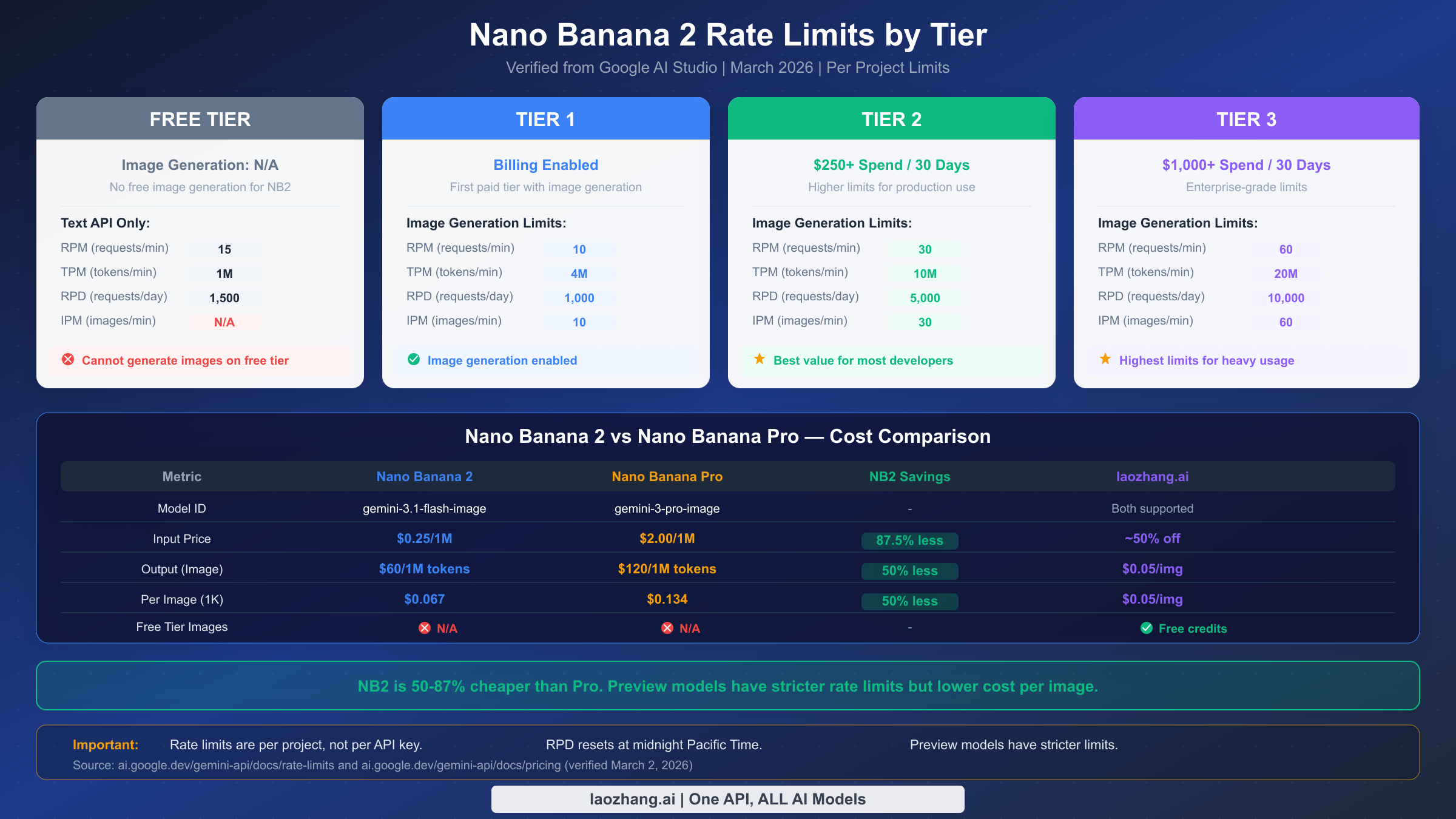
Understanding the complete rate limit system is essential for preventing errors before they occur. Google structures Nano Banana 2 rate limits across four dimensions and four tiers, and each combination has a specific numeric limit that determines how many requests your project can make. All of this data was verified directly from ai.google.dev/gemini-api/docs/rate-limits on March 2, 2026. For a comprehensive breakdown of all Gemini models, see our complete Gemini API rate limit breakdown by tier.
The four rate limit dimensions work independently. RPM (requests per minute) limits the number of API calls regardless of their size. TPM (tokens per minute) limits the total token throughput across all requests. RPD (requests per day) sets a daily ceiling that resets at midnight Pacific Time. IPM (images per minute) specifically limits image generation output. You can hit any one of these limits without affecting the others — for example, you might have RPM capacity remaining but have exhausted your IPM quota for the minute.
Rate limits are enforced per Google Cloud project, not per API key. This is a crucial distinction that many developers miss. If you create multiple API keys under the same project hoping to multiply your rate limits, it will not work. All keys under a single project share the same rate limit pool. To genuinely increase your effective rate limit, you would need to create separate Google Cloud projects, but this approach has its own complications with billing management and is generally not recommended unless you have a specific architectural reason.
Google's tier system progresses from Free through Tier 1, Tier 2, and Tier 3. The free tier does not support Nano Banana 2 image generation at all — you will receive a 429 error immediately if you attempt to generate images without billing enabled. Tier 1 activates when you enable billing and provides the baseline image generation limits. Tier 2 requires $250 or more in cumulative spending over the previous 30 days, and Tier 3 requires $1,000 or more. Each tier upgrade brings significantly higher limits across all four dimensions.
For Tier 1 accounts, the practical implication is that you can generate approximately 10 images per minute and up to 1,000 per day. If your application processes user requests in real-time, this means you can handle roughly one image request every 6 seconds sustained, or brief bursts of up to 10 simultaneous requests followed by a mandatory cooldown period. For applications that batch-process images (such as generating product catalogs or social media content), the RPD limit of 1,000 per day is often the binding constraint rather than RPM.
The Batch API offers an alternative for high-volume workloads. Nano Banana 2 supports batch processing with queue limits of 1 million tokens (Tier 1), 250 million tokens (Tier 2), and 750 million tokens (Tier 3). Batch requests are processed asynchronously with lower priority but are not subject to the same RPM limits as synchronous requests. If your use case does not require real-time image generation, the Batch API can dramatically increase your throughput without requiring a tier upgrade. Services like laozhang.ai provide Nano Banana 2 access with relaxed rate limiting at approximately $0.05 per image, which can be a practical alternative for developers who need higher throughput without the complexity of managing multiple Google Cloud projects or waiting for tier upgrades.
Production-Ready Error Handling Code for Nano Banana 2
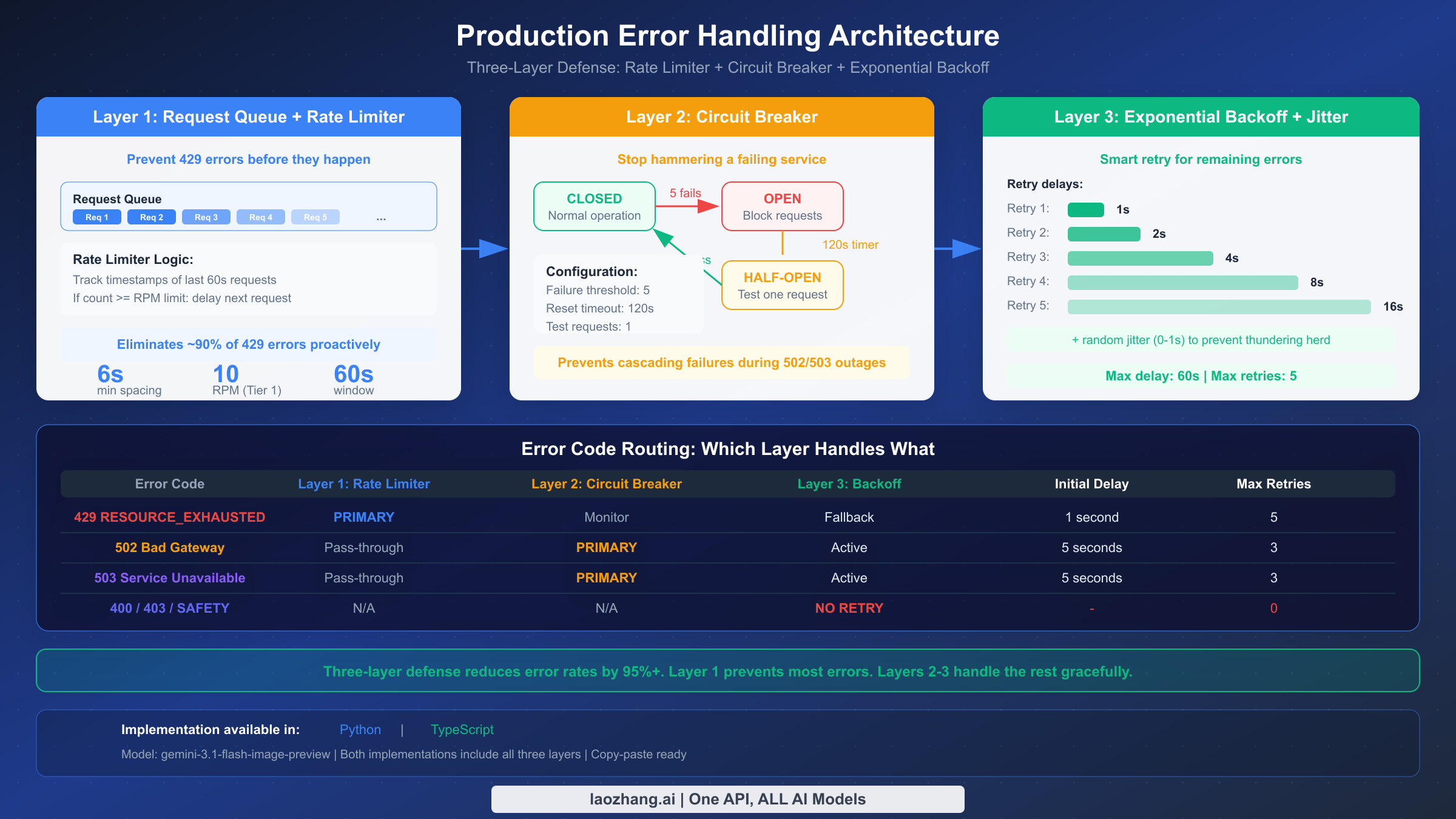
Implementing robust error handling requires more than just wrapping API calls in try-catch blocks. A production-ready solution should include exponential backoff with jitter, circuit breaker patterns to avoid hammering a failing service, and request queuing to stay within rate limits proactively. Below are complete implementations in Python and TypeScript that you can adapt for your Nano Banana 2 integration.
Python Implementation
pythonimport time
import random
import google.generativeai as genai
from collections import deque
from threading import Lock

class NanoBanana2Client:
    """Production error handler for Nano Banana 2 (gemini-3.1-flash-image-preview)"""

    MODEL_ID = "gemini-3.1-flash-image-preview"

    def __init__(self, api_key: str, max_rpm: int = 10):
        genai.configure(api_key=api_key)
        self.model = genai.GenerativeModel(self.MODEL_ID)
        self.max_rpm = max_rpm
        self.request_timestamps = deque()
        self.lock = Lock()
        self.circuit_open = False
        self.circuit_failures = 0
        self.circuit_threshold = 5
        self.circuit_reset_time = 0

    def _wait_for_rate_limit(self):
        """Proactive rate limiting - prevent 429 before it happens"""
        with self.lock:
            now = time.time()
            # Remove timestamps older than 60 seconds
            while self.request_timestamps and self.request_timestamps[0] < now - 60:
                self.request_timestamps.popleft()

            if len(self.request_timestamps) >= self.max_rpm:
                wait_time = 60 - (now - self.request_timestamps[0]) + 0.1
                if wait_time > 0:
                    time.sleep(wait_time)

            self.request_timestamps.append(time.time())

    def _check_circuit_breaker(self):
        """Circuit breaker - stop hammering a failing service"""
        if self.circuit_open:
            if time.time() > self.circuit_reset_time:
                self.circuit_open = False
                self.circuit_failures = 0
            else:
                raise Exception(
                    f"Circuit breaker open. Retry after "
                    f"{int(self.circuit_reset_time - time.time())}s"
                )

    def generate_image(self, prompt: str, max_retries: int = 5, **kwargs):
        """Generate image with full error handling"""
        self._check_circuit_breaker()
        self._wait_for_rate_limit()

        for attempt in range(max_retries):
            try:
                response = self.model.generate_content(
                    prompt,
                    generation_config=genai.types.GenerationConfig(
                        response_mime_type="image/png",
                        **kwargs
                    )
                )

                # Check for IMAGE_SAFETY block
                if hasattr(response, 'candidates') and response.candidates:
                    candidate = response.candidates[0]
                    if hasattr(candidate, 'finish_reason'):
                        if candidate.finish_reason.name == "IMAGE_SAFETY":
                            return {"error": "IMAGE_SAFETY", "retryable": False,
                                    "message": "Content blocked by safety filter"}

                # Success - reset circuit breaker
                self.circuit_failures = 0
                return {"success": True, "response": response}

            except Exception as e:
                error_code = getattr(e, 'code', None) or self._extract_code(str(e))

                if error_code == 429:
                    # Rate limit - exponential backoff with jitter
                    delay = min(60, (2 ** attempt) + random.uniform(0, 1))
                    time.sleep(delay)
                    continue

                elif error_code in (502, 503):
                    # Server error - longer backoff
                    self.circuit_failures += 1
                    if self.circuit_failures >= self.circuit_threshold:
                        self.circuit_open = True
                        self.circuit_reset_time = time.time() + 120
                    delay = min(60, 5 * (2 ** attempt) + random.uniform(0, 2))
                    time.sleep(delay)
                    continue

                elif error_code in (400, 403):
                    # Client error - do not retry
                    return {"error": error_code, "retryable": False,
                            "message": str(e)}
                else:
                    # Unknown error
                    return {"error": "UNKNOWN", "retryable": False,
                            "message": str(e)}

        return {"error": "MAX_RETRIES", "retryable": True,
                "message": f"Failed after {max_retries} attempts"}

    def _extract_code(self, error_str: str) -> int:
        for code in [429, 502, 503, 500, 400, 403]:
            if str(code) in error_str:
                return code
        return 0
TypeScript / Node.js Implementation
typescriptimport { GoogleGenerativeAI } from "@google/generative-ai";

interface GenerationResult {
  success: boolean;
  response?: any;
  error?: string;
  retryable?: boolean;
  message?: string;
}

class NanoBanana2Client {
  private static MODEL_ID = "gemini-3.1-flash-image-preview";
  private model: any;
  private requestTimestamps: number[] = [];
  private maxRpm: number;
  private circuitOpen = false;
  private circuitFailures = 0;
  private circuitThreshold = 5;
  private circuitResetTime = 0;

  constructor(apiKey: string, maxRpm = 10) {
    const genAI = new GoogleGenerativeAI(apiKey);
    this.model = genAI.getGenerativeModel({
      model: NanoBanana2Client.MODEL_ID
    });
    this.maxRpm = maxRpm;
  }

  private async waitForRateLimit(): Promise<void> {
    const now = Date.now();
    this.requestTimestamps = this.requestTimestamps
      .filter(ts => ts > now - 60000);

    if (this.requestTimestamps.length >= this.maxRpm) {
      const waitMs = 60000 - (now - this.requestTimestamps[0]) + 100;
      if (waitMs > 0) await this.sleep(waitMs);
    }
    this.requestTimestamps.push(Date.now());
  }

  async generateImage(
    prompt: string,
    maxRetries = 5
  ): Promise<GenerationResult> {
    if (this.circuitOpen) {
      if (Date.now() > this.circuitResetTime) {
        this.circuitOpen = false;
        this.circuitFailures = 0;
      } else {
        const waitSec = Math.ceil(
          (this.circuitResetTime - Date.now()) / 1000
        );
        return { success: false, error: "CIRCUIT_OPEN",
          retryable: true,
          message: `Circuit breaker open. Retry in ${waitSec}s` };
      }
    }

    await this.waitForRateLimit();

    for (let attempt = 0; attempt < maxRetries; attempt++) {
      try {
        const result = await this.model.generateContent({
          contents: [{ role: "user", parts: [{ text: prompt }] }],
          generationConfig: { responseMimeType: "image/png" },
        });

        const candidate = result.response?.candidates?.[0];
        if (candidate?.finishReason === "IMAGE_SAFETY") {
          return { success: false, error: "IMAGE_SAFETY",
            retryable: false,
            message: "Content blocked by safety filter" };
        }

        this.circuitFailures = 0;
        return { success: true, response: result.response };

      } catch (err: any) {
        const code = err?.status || err?.code ||
          this.extractCode(err.message);

        if (code === 429) {
          const delay = Math.min(60000,
            (2 ** attempt) * 1000 + Math.random() * 1000);
          await this.sleep(delay);
          continue;
        }

        if (code === 502 || code === 503) {
          this.circuitFailures++;
          if (this.circuitFailures >= this.circuitThreshold) {
            this.circuitOpen = true;
            this.circuitResetTime = Date.now() + 120000;
          }
          const delay = Math.min(60000,
            5000 * (2 ** attempt) + Math.random() * 2000);
          await this.sleep(delay);
          continue;
        }

        if (code === 400 || code === 403) {
          return { success: false, error: String(code),
            retryable: false, message: err.message };
        }

        return { success: false, error: "UNKNOWN",
          retryable: false, message: err.message };
      }
    }

    return { success: false, error: "MAX_RETRIES",
      retryable: true,
      message: `Failed after ${maxRetries} attempts` };
  }

  private sleep(ms: number): Promise<void> {
    return new Promise(resolve => setTimeout(resolve, ms));
  }

  private extractCode(msg: string): number {
    for (const code of [429, 502, 503, 500, 400, 403]) {
      if (msg?.includes(String(code))) return code;
    }
    return 0;
  }
}
Both implementations share three key architectural patterns that make them production-ready. First, proactive rate limiting tracks request timestamps and delays new requests before they hit Google's rate limits, preventing most 429 errors from occurring in the first place. Second, the circuit breaker pattern detects when the server is in a degraded state (after 5 consecutive failures) and temporarily stops sending requests for 2 minutes, giving the server time to recover instead of making the overload worse. Third, the exponential backoff with jitter strategy uses progressively longer delays between retries while adding randomness to prevent multiple clients from retrying in lockstep.
When Errors Keep Coming — Alternatives and Cost Optimization
If you have implemented all the error handling strategies above and are still hitting rate limits regularly, the problem is likely architectural rather than technical. You have outgrown your current tier's capacity, and there are three practical paths forward: upgrade your Google Cloud tier, optimize your request patterns, or use an API proxy service that provides higher limits.
Upgrading your tier is the most straightforward solution but requires meeting Google's spending thresholds. Moving from Tier 1 to Tier 2 requires $250 in cumulative API spending over 30 days, which triples your RPM from 10 to 30 and quintuples your RPD from 1,000 to 5,000. For many production applications, Tier 2 limits are sufficient. Tier 3 ($1,000+ spend over 30 days) doubles everything again to 60 RPM and 10,000 RPD, which handles substantial workloads. The transition is automatic once you meet the spending threshold — there is no application process or manual approval needed.
Optimizing your request patterns can often delay or eliminate the need for a tier upgrade. Consider implementing a request queue that batches image generation jobs and processes them at a steady rate just below your RPM limit. Cache generated images so you never generate the same image twice for the same prompt. Use the Batch API for non-time-sensitive workloads, which operates outside the standard RPM limits. And if you are generating images at multiple resolutions, start with 512px ($0.045 per image) for previews and only generate higher resolutions for confirmed selections.
API proxy services offer a third path that combines higher rate limits with potential cost savings. Services like laozhang.ai provide access to Nano Banana 2 at approximately $0.05 per image with no rate limit restrictions, which is competitive with Google's direct pricing at the 1K resolution tier ($0.067) and significantly cheaper than higher resolutions. For the cheapest Nano Banana 2 API alternatives, we have a dedicated comparison covering all major providers. The tradeoff is that proxy services add a network hop and a dependency on a third-party provider, so they work best for non-critical workloads or as a fallback when your primary Google Cloud quota is exhausted.
Here is a practical cost comparison for generating 1,000 images at 1K resolution per day:
| Provider | Per Image Cost | Daily Cost (1K images) | Rate Limit | Best For |
|---|---|---|---|---|
| Google Direct (Tier 1) | $0.067 | $67.00 | 10 RPM / 1,000 RPD | Development, low volume |
| Google Direct (Tier 2) | $0.067 | $67.00 | 30 RPM / 5,000 RPD | Production, medium volume |
| Google Direct (Tier 3) | $0.067 | $67.00 | 60 RPM / 10,000 RPD | Enterprise, high volume |
| laozhang.ai | ~$0.05 | ~$50.00 | No strict RPM limit | Cost-sensitive, high volume |
The Google pricing is the same across all tiers — the tiers only affect rate limits, not per-image cost. This means the value proposition of a tier upgrade is purely about throughput capacity, not unit economics. If cost is your primary concern and you are comfortable with a proxy service, you can save roughly 25% per image while gaining effectively unlimited rate limits. Documentation is available at docs.laozhang.ai and you can test image generation at images.laozhang.ai.
Frequently Asked Questions
How do I fix error 429 on Nano Banana 2?
Error 429 RESOURCE_EXHAUSTED means you have exceeded one of the four rate limits: RPM (requests per minute), TPM (tokens per minute), RPD (requests per day), or IPM (images per minute). The quickest fix for RPM limits is to wait 60 seconds. For RPD limits, you must wait until midnight Pacific Time. Implement exponential backoff in your code starting with a 1-second delay, doubling each retry up to 60 seconds maximum. Proactively space your requests to stay below the limit — for Tier 1 accounts, this means no more than 10 requests per minute for image generation.
What are the rate limits for Nano Banana 2?
Nano Banana 2 (gemini-3.1-flash-image-preview) rate limits vary by tier. Tier 1 (billing enabled) allows 10 RPM, 4M TPM, 1,000 RPD, and 10 IPM for image generation. Tier 2 ($250+ spend over 30 days) allows 30 RPM, 10M TPM, 5,000 RPD, and 30 IPM. Tier 3 ($1,000+ spend) allows 60 RPM, 20M TPM, 10,000 RPD, and 60 IPM. The free tier does not support image generation. These limits are per project, not per API key, and were verified from ai.google.dev on March 2, 2026.
Why does Nano Banana 2 keep giving 502 errors?
Error 502 Bad Gateway indicates a problem on Google's servers, not with your code. These errors typically resolve within 5-15 minutes. They are most common during peak usage hours (10:00-14:00 UTC). Implement retry logic with a 5-second initial delay, increasing to 30-60 seconds. If 502 errors persist beyond 30 minutes, check the Google Cloud Status Dashboard for service incidents. You are not billed for failed 502 requests.
Is Nano Banana 2 free to use?
Nano Banana 2 text-only requests are available on the free tier, but image generation requires billing to be enabled (Tier 1 or above). There is no free tier for NB2 image generation. Per-image costs range from $0.045 (512px) to $0.151 (4K resolution). Input tokens cost $0.25 per million and image output tokens cost $60 per million, as verified from Google's official pricing page on March 2, 2026.
What is the thought_signature error in Nano Banana 2?
The thought_signature error (400 Bad Request) occurs in multi-turn conversations when you fail to include the thought_signature from the model's previous response. Even if you set thinking visibility to "off," NB2 still generates thinking tokens and includes a signature that must be passed back in subsequent turns. Extract the thought_signature field from the API response and include it in your next request's generation_config to resolve this error.
How does Nano Banana 2 compare to Pro for errors?
Nano Banana 2 and Pro share the same error codes (429, 502, 503, 400, 403, IMAGE_SAFETY) but differ in rate limits and pricing. NB2 is 50-87% cheaper per token but operates under stricter rate limits as a preview model. NB2 input costs $0.25/1M tokens versus Pro's $2.00/1M, and NB2 output costs $60/1M versus Pro's $120/1M. Both lack free tier image generation. For error resilience, Pro may have slightly more generous limits at the same tier level due to its non-preview status.