
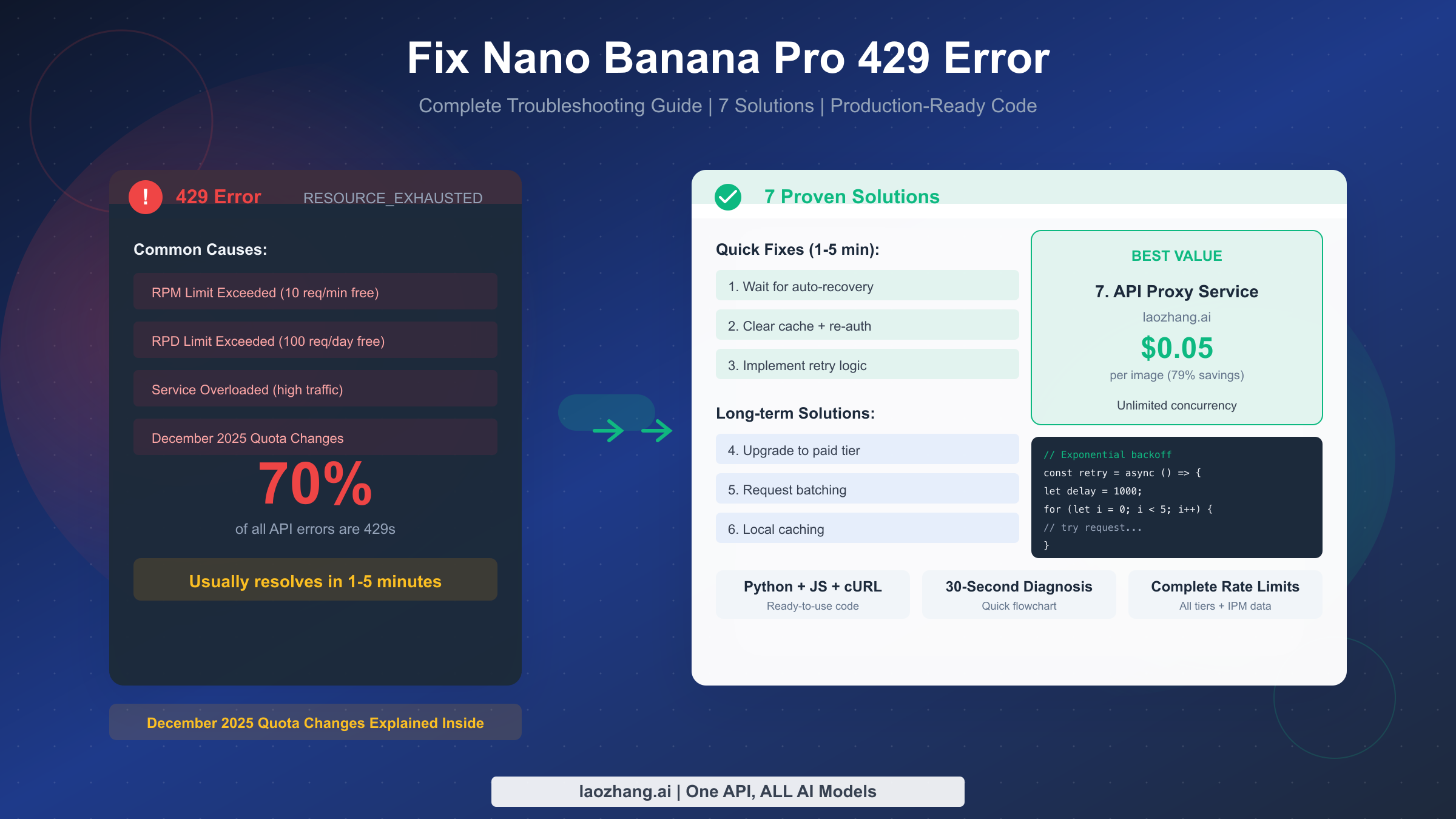
Getting a 429 error on Nano Banana Pro? Wait 1-5 minutes for automatic recovery, or implement one of 7 proven solutions—from simple retry logic to cost-effective API proxies that eliminate rate limits entirely. The 429 RESOURCE_EXHAUSTED error accounts for approximately 70% of all Nano Banana Pro API errors (as of January 2026), making it the most common issue developers face. This guide provides everything you need: a 30-second diagnosis flowchart, complete rate limit tables, production-ready code examples in Python and JavaScript, and a detailed cost comparison showing how to save 79% while avoiding 429 errors completely.
TL;DR
The fastest path to fixing your 429 error depends on your situation. If you just hit the error, wait 60 seconds for RPM limits or until midnight Pacific Time for RPD limits—most errors resolve automatically within 1-5 minutes. For recurring issues, implement exponential backoff retry logic (code examples below) or upgrade your Google Cloud billing tier. For production applications requiring zero downtime, laozhang.ai offers the most reliable solution at $0.05 per image with unlimited concurrency—no 429 errors ever, same Gemini 3 Pro model quality, 79% savings compared to Google's $0.134 pricing.
Quick Diagnosis
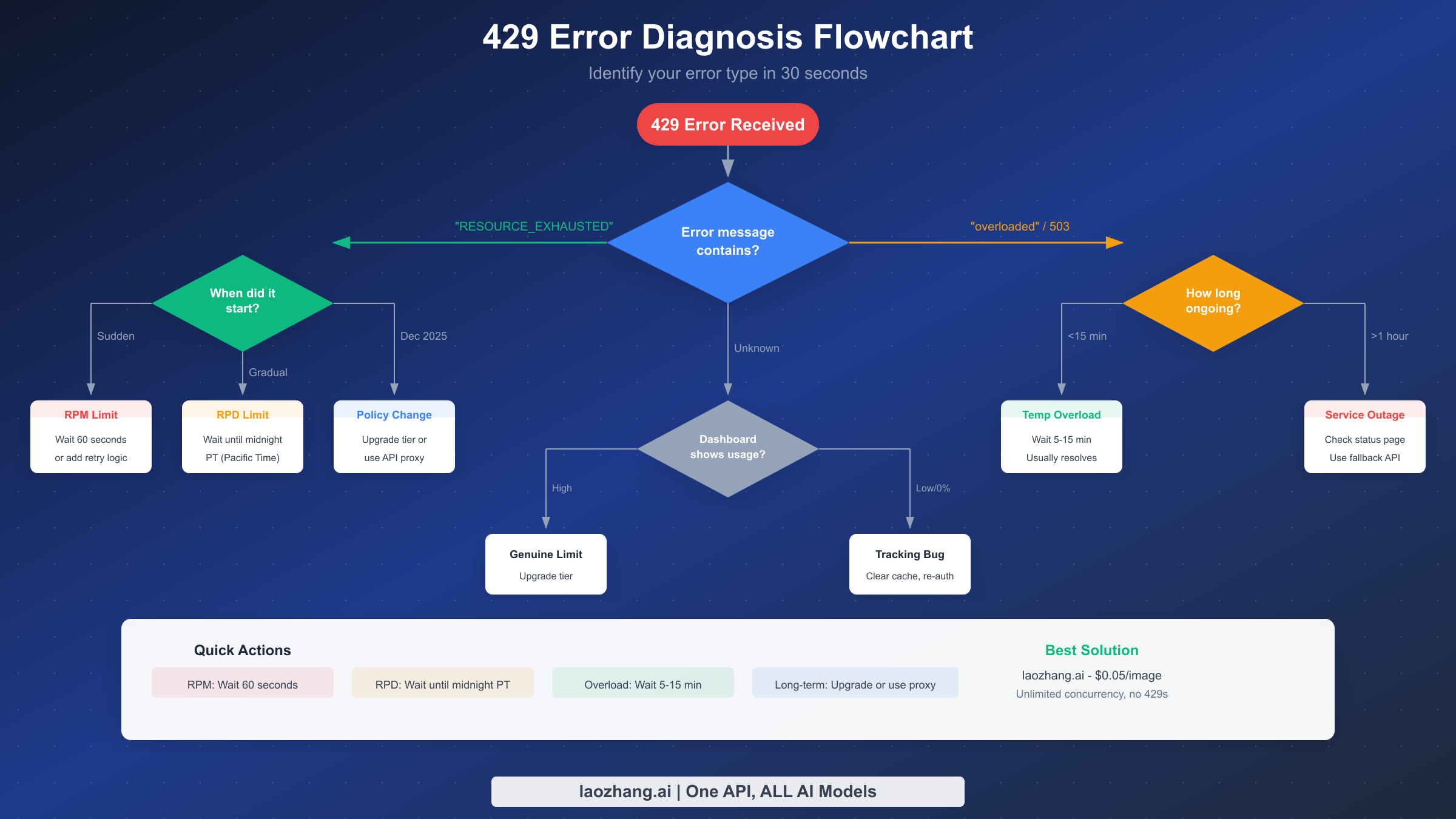
Understanding which type of 429 error you're experiencing is crucial because different causes require different solutions. The diagnosis takes less than 30 seconds and will save you significant troubleshooting time by pointing you directly to the right fix.
Start by checking your error message. If it contains "RESOURCE_EXHAUSTED," you're hitting rate limits—the most common cause. Look at when the error started appearing. A sudden onset typically indicates you've exceeded your requests-per-minute (RPM) limit, which resets every 60 seconds. A gradual increase in errors throughout the day suggests you're approaching your requests-per-day (RPD) limit, which resets at midnight Pacific Time. If you started experiencing frequent 429 errors after December 2025 without changing your usage patterns, you're likely affected by Google's quota changes that tightened limits for free and Tier 1 users.
If your error message mentions "overloaded" or you're seeing 503 errors alongside 429s, the issue is server-side congestion rather than your personal quota. These temporary overloads typically resolve within 5-15 minutes. For outages lasting more than an hour, check the Google Cloud status page and consider switching to a fallback API provider.
The most frustrating scenario occurs when your Google Cloud dashboard shows 0% quota usage yet you're still receiving 429 errors. This indicates a tracking bug in Google's systems—clear your browser cache, re-authenticate with your Google account, and the issue usually resolves. This problem appeared frequently during the December 2025 infrastructure changes and affected both free and paid users.
Understanding Rate Limits
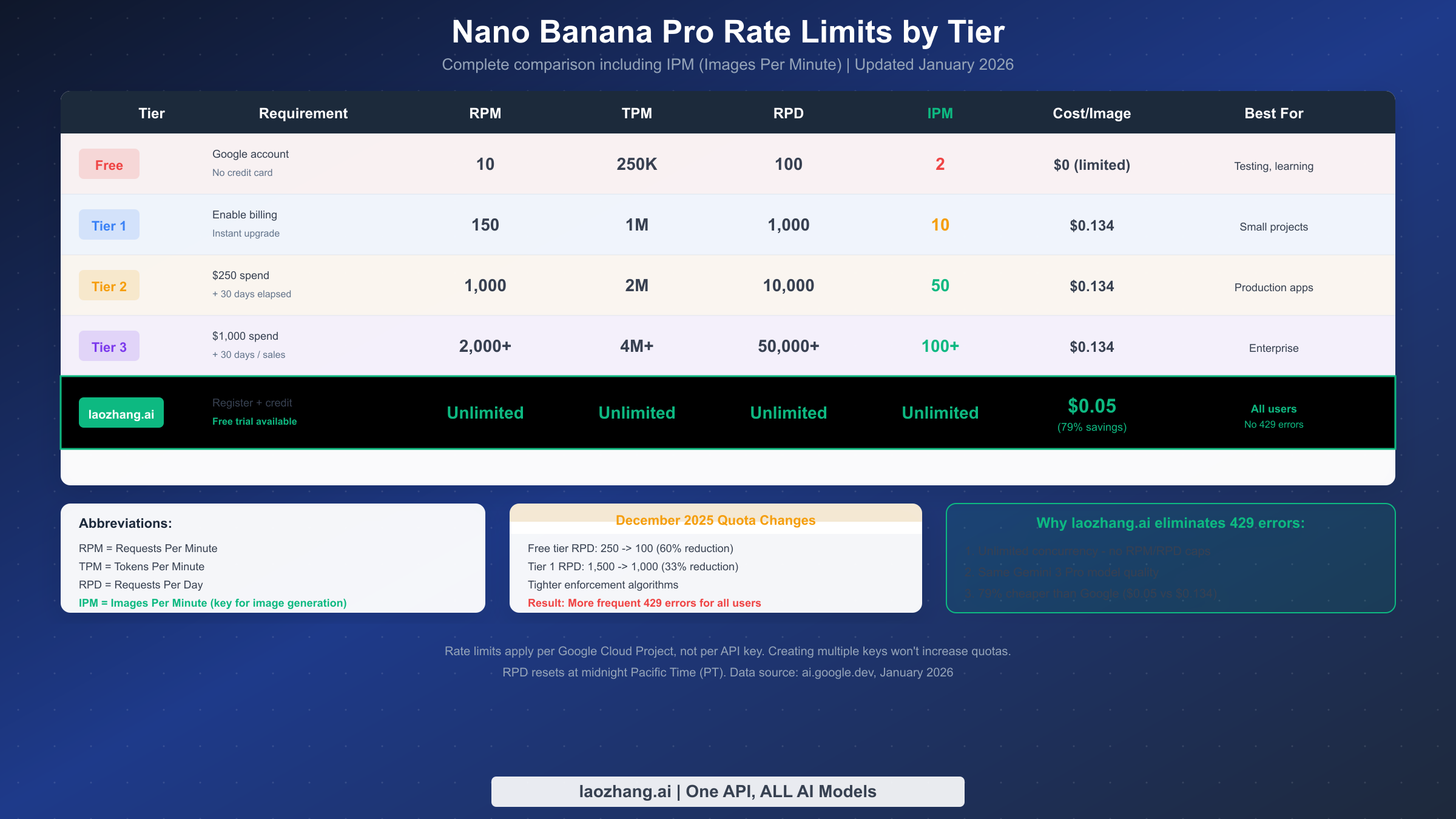
Rate limits on Nano Banana Pro operate across four dimensions simultaneously, and exceeding any single dimension triggers a 429 error. The four metrics are RPM (requests per minute), TPM (tokens per minute), RPD (requests per day), and IPM (images per minute). For image generation specifically, IPM is the critical metric that most developers overlook—free tier users can only generate 2 images per minute regardless of their RPM allowance.
Google structures rate limits across four tiers. The free tier requires only a Google account with no credit card, providing 10 RPM, 250,000 TPM, 100 RPD, and just 2 IPM—suitable only for learning and occasional testing. Tier 1 activates instantly when you enable billing on your Google Cloud project, expanding limits to 150 RPM, 1 million TPM, 1,000 RPD, and 10 IPM. Tier 2 requires $250 in cumulative Google Cloud spending plus 30 days since your first payment, offering 1,000 RPM, 2 million TPM, 10,000 RPD, and 50 IPM. Tier 3 enterprise requires $1,000 cumulative spend or direct sales engagement, providing 2,000+ RPM and 100+ IPM with negotiable limits.
The December 2025 quota changes significantly impacted users at lower tiers. Google reduced free tier RPD from 250 to 100 requests daily—a 60% reduction—and tightened Tier 1 RPD from 1,500 to 1,000. More importantly, enforcement algorithms became stricter, causing users who previously operated within limits to suddenly encounter 429 errors. If you started experiencing problems in late 2025 without changing your usage, these policy changes are the likely cause.
A critical detail that catches many developers: rate limits apply per Google Cloud Project, not per API key. Creating multiple API keys within the same project does not increase your quota. To genuinely expand your limits, you need either multiple Google Cloud projects (each with its own billing account) or a third-party service like laozhang.ai that handles quota management for you. For complete rate limit documentation, see our Nano Banana Pro rate limits guide.
7 Solutions From Quick Fix to Long-Term
The solutions below progress from immediate fixes requiring no code changes to architectural improvements for production systems. Choose based on your urgency and technical requirements.
Solution 1: Wait for Automatic Recovery. The simplest approach for occasional 429 errors is patience. RPM limits reset every 60 seconds, so waiting one minute often resolves the issue. RPD limits reset at midnight Pacific Time. Temporary server overloads typically clear within 5-15 minutes. This solution costs nothing but only works for sporadic errors—not sustainable for production applications.
Solution 2: Clear Cache and Re-authenticate. Sometimes 429 errors persist despite quota availability due to corrupted session data. Navigate to your browser settings and clear cached data for Google domains, then sign out of your Google account completely and sign back in. This resolves the tracking bugs that caused many phantom 429 errors during the December 2025 infrastructure changes.
Solution 3: Implement Exponential Backoff. For programmatic access, adding retry logic with exponential backoff dramatically improves success rates. The approach starts with a short delay after the first error, then doubles the wait time for each subsequent retry. This prevents overwhelming the API while maximizing throughput. Implementation code for Python and JavaScript appears in the next section.
Solution 4: Upgrade Your Billing Tier. If you're on the free tier, enabling billing immediately multiplies your limits by 10-15x with no waiting period. Moving from Tier 1 to Tier 2 requires $250 cumulative Google Cloud spending and 30 days elapsed time—plan ahead if you anticipate growth. Tier upgrades provide more headroom but don't eliminate rate limits entirely.
Solution 5: Request Batching and Scheduling. For non-time-sensitive workloads, batch your requests during off-peak hours. Server load typically peaks between 9 AM and 6 PM Pacific Time on weekdays. Scheduling generation jobs for overnight or weekend windows reduces 429 error frequency significantly. Google's Batch API offers 50% cost savings for requests that can tolerate up to 24-hour delivery times.
Solution 6: Local Caching. Cache generated images locally to avoid regenerating identical content. Hash your prompts to create unique cache keys, then check the cache before making API calls. This approach reduces unnecessary requests, lowering both costs and 429 error exposure. Particularly effective for applications where users might request similar or identical images.
Solution 7: Use an API Proxy Service. For production applications requiring guaranteed availability, third-party API proxies like laozhang.ai eliminate 429 errors entirely. These services maintain their own quota pools, offering unlimited concurrency regardless of your individual tier. The model quality remains identical—all providers access the same Gemini 3 Pro infrastructure—while removing the complexity of quota management. At $0.05 per image versus Google's $0.134, you save 79% while gaining reliability.
For a deeper dive into obtaining API access, see our complete API key guide.
Production-Ready Code Examples
The following code examples implement exponential backoff with jitter—the industry-standard approach for handling rate limits. Jitter adds randomization to prevent synchronized retry storms when multiple clients hit limits simultaneously.
Python Implementation with Tenacity:
pythonimport os
import time
import random
from google import genai
from tenacity import retry, stop_after_attempt, wait_exponential


client = genai.Client(
    api_key=os.environ["LAOZHANG_API_KEY"],
    base_url="https://api.laozhang.ai/v1"
)

# For Google Official (with rate limits):
# client = genai.Client(api_key=os.environ["GOOGLE_API_KEY"])

@retry(
    stop=stop_after_attempt(5),
    wait=wait_exponential(multiplier=1, min=4, max=60)
)
def generate_image_with_retry(prompt: str) -> bytes:
    """Generate image with automatic retry on 429 errors."""
    response = client.models.generate_content(
        model="gemini-3-pro-image-preview",
        contents=prompt
    )
    return response.candidates[0].content.parts[0].data

# Usage
try:
    image_data = generate_image_with_retry(
        "A futuristic cityscape at sunset with flying vehicles"
    )
    with open("output.png", "wb") as f:
        f.write(image_data)
    print("Image generated successfully")
except Exception as e:
    print(f"Failed after 5 retries: {e}")
JavaScript/Node.js Implementation:
javascriptconst { GoogleGenerativeAI } = require("@google/generative-ai");

// Configure client - use laozhang.ai for no rate limits
const genAI = new GoogleGenerativeAI(process.env.LAOZHANG_API_KEY, {
  baseUrl: "https://api.laozhang.ai/v1"
});

// For Google Official: new GoogleGenerativeAI(process.env.GOOGLE_API_KEY)

async function generateWithRetry(prompt, maxRetries = 5) {
  let delay = 1000; // Start with 1 second

  for (let attempt = 1; attempt <= maxRetries; attempt++) {
    try {
      const model = genAI.getGenerativeModel({
        model: "gemini-3-pro-image-preview"
      });

      const result = await model.generateContent(prompt);
      return result.response;

    } catch (error) {
      if (error.status === 429 && attempt < maxRetries) {
        // Add jitter: delay * (0.5 to 1.5)
        const jitter = delay * (0.5 + Math.random());
        console.log(`429 error, retry ${attempt}/${maxRetries} in ${jitter}ms`);
        await new Promise(r => setTimeout(r, jitter));
        delay *= 2; // Exponential backoff
      } else {
        throw error;
      }
    }
  }
}

// Usage
generateWithRetry("A serene mountain landscape at dawn")
  .then(response => console.log("Success:", response))
  .catch(error => console.error("Failed:", error));
cURL with Retry Script (Bash):
bash#!/bin/bash
# Simple retry wrapper for curl requests

API_KEY="${LAOZHANG_API_KEY}"
BASE_URL="https://api.laozhang.ai/v1"
MAX_RETRIES=5
DELAY=2

for ((i=1; i<=MAX_RETRIES; i++)); do
  response=$(curl -s -w "\n%{http_code}" \
    -X POST "${BASE_URL}/models/gemini-3-pro-image-preview:generateContent" \
    -H "Authorization: Bearer ${API_KEY}" \
    -H "Content-Type: application/json" \
    -d '{"contents": [{"parts": [{"text": "A beautiful sunset"}]}]}')

  http_code=$(echo "$response" | tail -n1)

  if [ "$http_code" = "200" ]; then
    echo "$response" | head -n-1
    exit 0
  elif [ "$http_code" = "429" ]; then
    echo "Retry $i/$MAX_RETRIES after ${DELAY}s..."
    sleep $DELAY
    DELAY=$((DELAY * 2))
  else
    echo "Error: HTTP $http_code"
    exit 1
  fi
done

echo "Failed after $MAX_RETRIES retries"
exit 1
For more detailed API integration patterns, see our complete API integration guide.
Cost Comparison
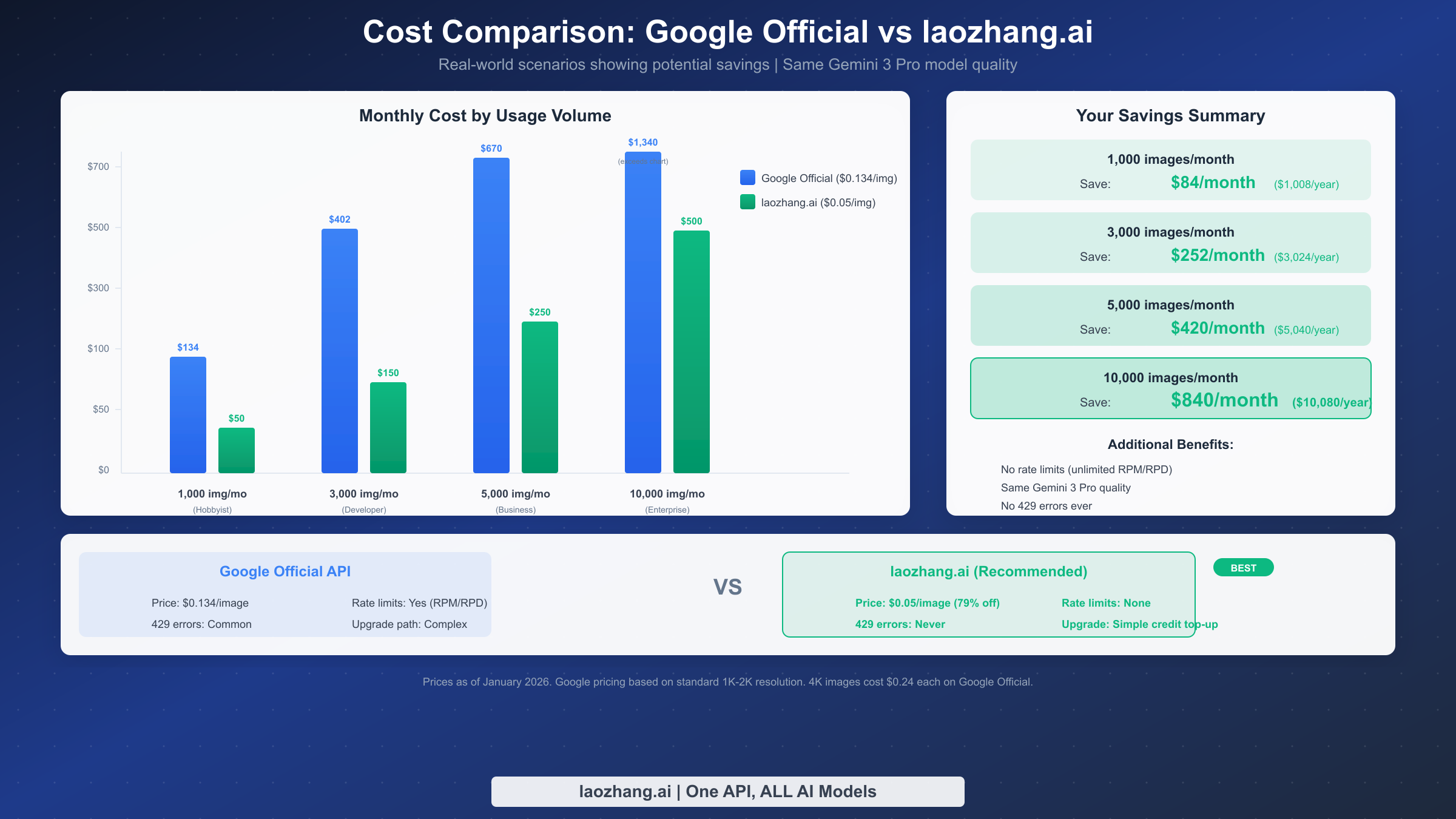
Understanding the true cost of different solutions helps you make informed decisions about handling 429 errors. The comparison below shows actual monthly costs across usage volumes.
Google's official pricing stands at $0.134 per image for 1K-2K resolution outputs, scaling to $0.24 for 4K resolution. At 1,000 images monthly—typical for individual developers or small projects—Google costs $134 per month. At 5,000 images monthly—common for production applications—that rises to $670. Enterprise volumes of 10,000 images monthly cost $1,340 with Google's standard pricing.
In contrast, laozhang.ai offers $0.05 per image regardless of resolution. The same 1,000 images cost just $50 monthly—saving $84 or $1,008 annually. At 5,000 images, you pay $250 versus $670, saving $420 monthly or $5,040 yearly. Enterprise volumes of 10,000 images cost $500 versus $1,340, representing $840 in monthly savings or over $10,000 annually.
Beyond raw pricing, the hidden cost of 429 errors includes developer time debugging issues, failed user experiences, and architectural complexity managing rate limits. Services like laozhang.ai eliminate these costs entirely through unlimited concurrency. The model quality remains identical—both access Google's Gemini 3 Pro infrastructure—making the price difference pure savings without quality tradeoff.
For users who need occasional image generation without recurring costs, free options exist. Google AI Studio provides 1,500 free API requests daily. Puter.js enables unlimited free access through a user-pays model. For complete coverage of free access methods, see our free API access guide.
How to Choose Your Solution
Different situations call for different approaches. Here's specific guidance based on your use case.
Learning and Experimentation: Start with Google AI Studio's free tier. The 100 RPD and 2 IPM limits suffice for tutorials and prototyping. When you hit 429 errors, simply wait—there's no urgency during learning. Implement basic retry logic as practice, but don't overcomplicate your setup.
Development and Testing: Enable Google Cloud billing to unlock Tier 1 limits (10 IPM, 1,000 RPD). Add exponential backoff to your codebase from the start—it's good practice regardless of current error frequency. Monitor your usage through the Cloud Console to anticipate when you might need Tier 2.
Production Applications: For applications serving real users, 429 errors translate directly to poor user experience. Evaluate whether Tier 2 limits (50 IPM, 10,000 RPD) meet your needs. If your usage is variable or growing, laozhang.ai's unlimited concurrency provides predictable behavior without surprise rate limit errors. The 79% cost savings often exceeds the investment in engineering time to handle rate limits gracefully.
High-Volume Generation: At enterprise scale, negotiate with Google for Tier 3 terms or use laozhang.ai for guaranteed capacity. Local caching becomes essential—most high-volume applications have significant prompt overlap. Consider Google's Batch API for non-urgent workloads to reduce costs by 50%.
Mission-Critical Systems: When downtime is unacceptable, architect for resilience. Use laozhang.ai as your primary provider (no rate limits), maintain Google API access as a fallback, and implement circuit breakers that automatically switch providers when errors occur. This multi-provider strategy ensures continuous operation regardless of any single provider's status.
For detailed Gemini API rate limits across all models, see our per-tier rate limits guide.
FAQ
What does 429 error mean on Nano Banana Pro?
The HTTP 429 status code means "Too Many Requests"—you've exceeded one of your rate limits. The specific limit could be RPM (requests per minute), RPD (requests per day), TPM (tokens per minute), or IPM (images per minute). Check your error message for "RESOURCE_EXHAUSTED" to confirm it's a quota issue rather than a server overload.
How long do I need to wait for 429 errors to resolve?
Wait times depend on which limit you hit. RPM limits reset every 60 seconds. RPD limits reset at midnight Pacific Time. Server overload (503/overloaded messages) typically clears within 5-15 minutes. If you're unsure, waiting 5 minutes handles most scenarios.
Why am I getting 429 errors when my dashboard shows 0% usage?
This indicates a tracking bug in Google's systems, commonly reported after the December 2025 infrastructure changes. Clear your browser cache, sign out of your Google account completely, and re-authenticate. The issue usually resolves after these steps.
Do third-party APIs like laozhang.ai provide the same quality?
Yes, absolutely. All providers access the identical gemini-3-pro-image-preview model running on Google's infrastructure. Third-party services function as API proxies—your request goes to them, they forward it to Google, and return the result. The generated images are indistinguishable regardless of which provider you use.
Can I increase my rate limits without paying?
Free tier limits are fixed. However, new Google Cloud users receive $300 in free credits that can offset initial costs on the paid tier. Some third-party providers like laozhang.ai offer free trial credits for testing. Beyond that, expanding limits requires either enabling billing (Tier 1) or using a third-party service with different quota management.
What changed in December 2025 that's causing more 429 errors?
Google tightened quotas and enforcement algorithms. Free tier RPD dropped from 250 to 100 (60% reduction). Tier 1 RPD reduced from 1,500 to 1,000 (33% reduction). The stricter enforcement means users who previously operated within limits now trigger 429 errors at the same usage levels.
Conclusion
The 429 RESOURCE_EXHAUSTED error on Nano Banana Pro, while frustrating, has clear solutions ranging from simple waiting to architectural improvements. For most developers, implementing exponential backoff retry logic handles sporadic errors effectively. For production applications, laozhang.ai eliminates 429 errors entirely while saving 79% compared to Google's pricing—same Gemini 3 Pro quality, unlimited concurrency, no rate limit worries.
Start with the diagnosis flowchart to identify your specific situation, apply the appropriate solution from the 7 options provided, and use the production-ready code examples to implement robust error handling. With these tools, 429 errors become a solved problem rather than an ongoing frustration.
For ongoing API documentation and updates, visit docs.laozhang.ai.