
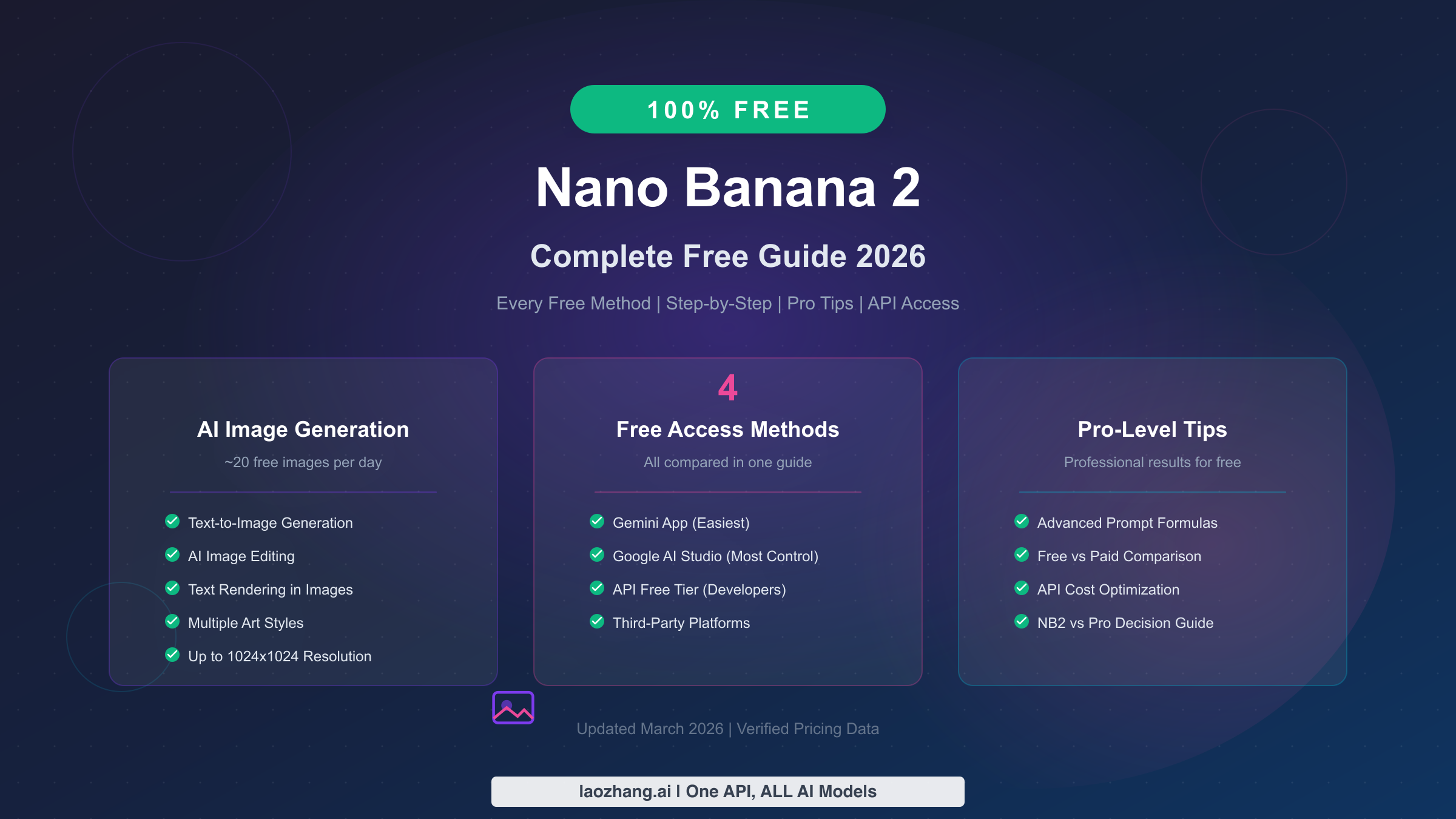
Nano Banana 2 is completely free to use through Google's Gemini app, and it delivers some of the best AI-generated images available today. As of March 2026, you can generate approximately 20 images per day at up to 1024×1024 resolution without spending a single dollar. Whether you want to create marketing visuals, social media content, or just experiment with AI art, this guide covers every free access method, walks you through your first generation step by step, and shares advanced techniques that most tutorials completely overlook.
What Is Nano Banana 2? (And Why Everyone Wants It Free)
Google launched Nano Banana 2 on February 26, 2026, and it immediately became one of the most talked-about AI image generators in the creative community. Built on the Gemini 3.1 Flash Image model, Nano Banana 2 represents Google's answer to DALL-E 3 and Midjourney, but with a significant advantage that sets it apart from nearly every competitor in the market: a genuinely useful free tier that does not require a credit card or subscription commitment.
The name "Nano Banana 2" comes from Google's internal codename system, and while the branding might seem playful, the technology underneath is anything but lightweight. This model excels in three areas that previous free image generators struggled with considerably. First, it can render readable text directly inside generated images, which means you can create social media posts, memes, and marketing graphics with embedded typography that actually looks professional. Second, it maintains character consistency across multiple generations, allowing you to create a character once and then place them in different scenes without the character changing appearance dramatically between images. Third, it offers a native image editing capability where you can upload an existing photo and modify specific elements using natural language instructions, essentially giving you a free AI-powered Photoshop alternative.
Under the hood, Nano Banana 2 uses the Nano Banana 2's Gemini Flash Image technology that processes both text and image tokens simultaneously. This multimodal architecture is what enables the seamless text rendering and editing capabilities. The model was trained on a massive dataset curated by Google, and it shows in the output quality. Even on the free tier, images have a level of coherence and detail that rivals what you would get from paid Midjourney subscriptions. The free tier does cap resolution at 1024×1024 pixels, which is perfectly adequate for social media, blog thumbnails, and concept art, though professional print work may require the higher resolutions available through paid tiers.
TL;DR
If you just want to start generating images immediately, here is the fastest path:
- Easiest method: Go to gemini.google.com, sign in with your Google account, and type "generate an image of..." followed by your description. You get approximately 20 free images per day through 50 AI credits.
- Most control: Use Google AI Studio to access advanced parameters, higher resolution options, and batch generation capabilities, all completely free.
- For developers: The Gemini API free tier lets you integrate Nano Banana 2 into your own applications. Images cost $0.045–$0.151 each on the paid tier, but the free tier includes a generous daily allowance.
- Key limitations: Free tier caps at 1024×1024 resolution, no Nano Banana Pro access, and approximately 20 images per day. For most casual and creative use cases, these limits are more than sufficient.
- Bottom line: The free tier is genuinely useful, not a crippled demo. You can create professional-quality images for social media, blogs, and personal projects without ever upgrading.
Every Way to Use Nano Banana 2 for Free in 2026
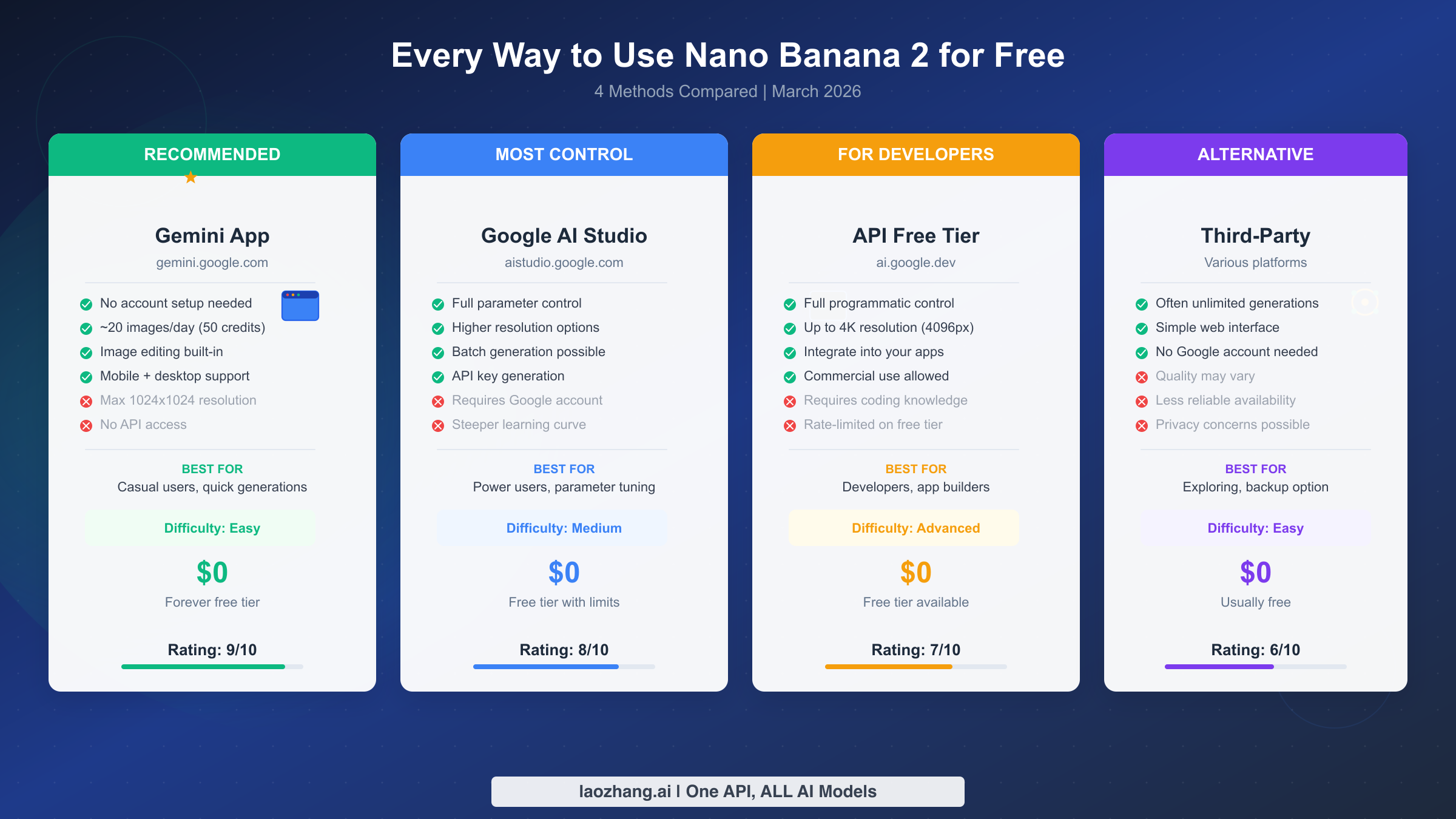
Understanding your options is the first step to getting the most out of Nano Banana 2 without paying anything. While most tutorials mention one or two access methods, there are actually four distinct ways to use this tool for free, each with different strengths that suit different types of users. The method you choose should depend on your technical comfort level, your volume needs, and how much control you want over the generation process.
The Gemini App is where most people should start, and it remains the recommended method for the vast majority of users. Simply navigate to gemini.google.com, sign in with any Google account, and you have immediate access to Nano Banana 2 image generation. The interface is conversational, meaning you just type what you want to see and the AI generates it. Google allocates 50 AI credits per day to free tier users (Google Gemini subscriptions page, verified March 2, 2026), and each image generation typically costs 2–3 credits depending on complexity, which translates to roughly 17–25 images per day. The Gemini app also includes built-in image editing, so you can refine your generations through follow-up conversation messages. The main limitation is that you cannot adjust technical parameters like aspect ratio, seed values, or negative prompts as precisely as you can with other methods.
Google AI Studio offers significantly more control and is the ideal choice for power users and designers who want to fine-tune their results. Available at aistudio.google.com, this platform provides direct access to the Gemini 3.1 Flash Image model with adjustable parameters. You can specify exact aspect ratios, set temperature values to control creativity versus consistency, and even run batch generations. The free tier here is generous, though it comes with rate limits that are lower than what you get with a paid API key. The trade-off is a steeper learning curve and a less intuitive interface compared to the Gemini app, but the quality of results you can achieve through careful parameter tuning is noticeably superior.
The API free tier is designed specifically for developers who want to integrate Nano Banana 2 into their own applications, websites, or workflows. Google provides a free API key through ai.google.dev that includes a daily allowance of image generations. The API gives you the most granular control possible, including programmatic access to all resolution options up to 4096×4096 pixels, batch processing capabilities, and the ability to chain image generation with other Gemini model features. You will need some programming knowledge to use this method effectively, but even basic Python or JavaScript skills are sufficient to get started with the well-documented API endpoints.
Third-party platforms represent the final option for free access. Several websites have built interfaces around the Nano Banana 2 API, offering unlimited or near-unlimited generations without requiring a Google account. Platforms like nano-banana.ai and others aggregate access to the model. These services can be convenient, but they come with trade-offs including potential privacy concerns about how your prompts and images are handled, variable quality due to different parameter defaults, and less reliable availability since they depend on their own API quotas. Use these as a backup option or for quick experimentation, but for serious creative work, the official Google methods provide a more consistent and trustworthy experience.
Step-by-Step: Generate Your First Image in 2 Minutes
Getting started with Nano Banana 2 is remarkably straightforward, and you can have your first AI-generated image ready in under two minutes. This walkthrough covers the Gemini App method since it is the easiest starting point, followed by a brief guide for Google AI Studio for users who want more control from the beginning.
Starting with the Gemini App requires nothing more than a Google account and a web browser. Navigate to gemini.google.com and sign in. Once you are on the main chat interface, you will see a text input field at the bottom of the screen. Type a descriptive prompt such as "Generate an image of a golden retriever wearing sunglasses, sitting on a beach at sunset, photorealistic style" and press Enter. The model will process your request for approximately 5–15 seconds and then display one or more generated images directly in the chat. You can click on any image to view it at full resolution, download it, or share it. If the result is not exactly what you wanted, simply type a follow-up message like "make the sunglasses red" or "change the background to a mountain landscape" and Nano Banana 2 will edit the existing image based on your instruction, which is one of its most powerful features compared to competitors.
The quality of your results depends heavily on how you write your prompts, and there are several principles that apply universally. Be specific about the style you want, whether that is photorealistic, digital illustration, watercolor painting, or anime. Include details about lighting, camera angle, and mood to give the model a clear direction. Mention the subject, action, environment, and artistic style in that order for the most consistent results. A prompt like "a futuristic city skyline at dusk, neon lights reflecting on wet streets, cyberpunk aesthetic, wide-angle perspective, dramatic lighting" will produce dramatically better results than simply typing "futuristic city." The model responds well to structured descriptions and can even incorporate specific artist style references, though it will interpret them rather than copy them directly.
For Google AI Studio, navigate to aistudio.google.com and sign in with the same Google account. Click "Create New" and select the Gemini 3.1 Flash model from the model dropdown. In the system instructions area, you can set default parameters like "Always generate images in 16:9 aspect ratio with photorealistic style." Then in the prompt field, enter your image description. AI Studio shows you additional controls that the Gemini app hides, including temperature settings that range from 0 to 2, where lower values produce more predictable results and higher values introduce more creative variation. For your first generation, keep the temperature at the default value and focus on writing a detailed prompt. The results will appear in the response panel, and you can download them directly or continue refining through the conversation.
One important detail that many guides overlook is the topic of image editing through conversation. After generating an initial image in either platform, you can upload your own photos and ask Nano Banana 2 to modify them. For example, upload a product photo and ask "remove the background and replace it with a clean white studio backdrop" or "add a warm golden hour lighting effect." This editing capability alone would cost money on most competing platforms, but it is entirely free on Nano Banana 2's free tier, making it an invaluable tool for content creators and small business owners who need professional-looking visuals on a budget.
The iterative editing workflow is where Nano Banana 2 truly distinguishes itself from competitors. Unlike Midjourney or DALL-E where each generation is essentially a standalone event, Nano Banana 2 maintains full context of your previous generations within a single conversation thread. This means you can start with a rough concept, generate an initial image, and then refine it over five or ten follow-up messages without losing the original composition. Practical editing commands that work reliably include changing specific colors ("make the sky more purple"), adjusting composition ("zoom out to show more of the landscape"), swapping elements ("replace the car with a bicycle"), and modifying artistic style ("render this in a Studio Ghibli animation style"). Each edit preserves the elements you did not mention, so you can make surgical changes without regenerating the entire image. This conversational refinement loop means that even if your first generation is not perfect, you can usually arrive at an excellent result within three or four edits, all without spending any credits beyond the initial generation.
Free vs Paid: Complete Feature Comparison (2026 Pricing)
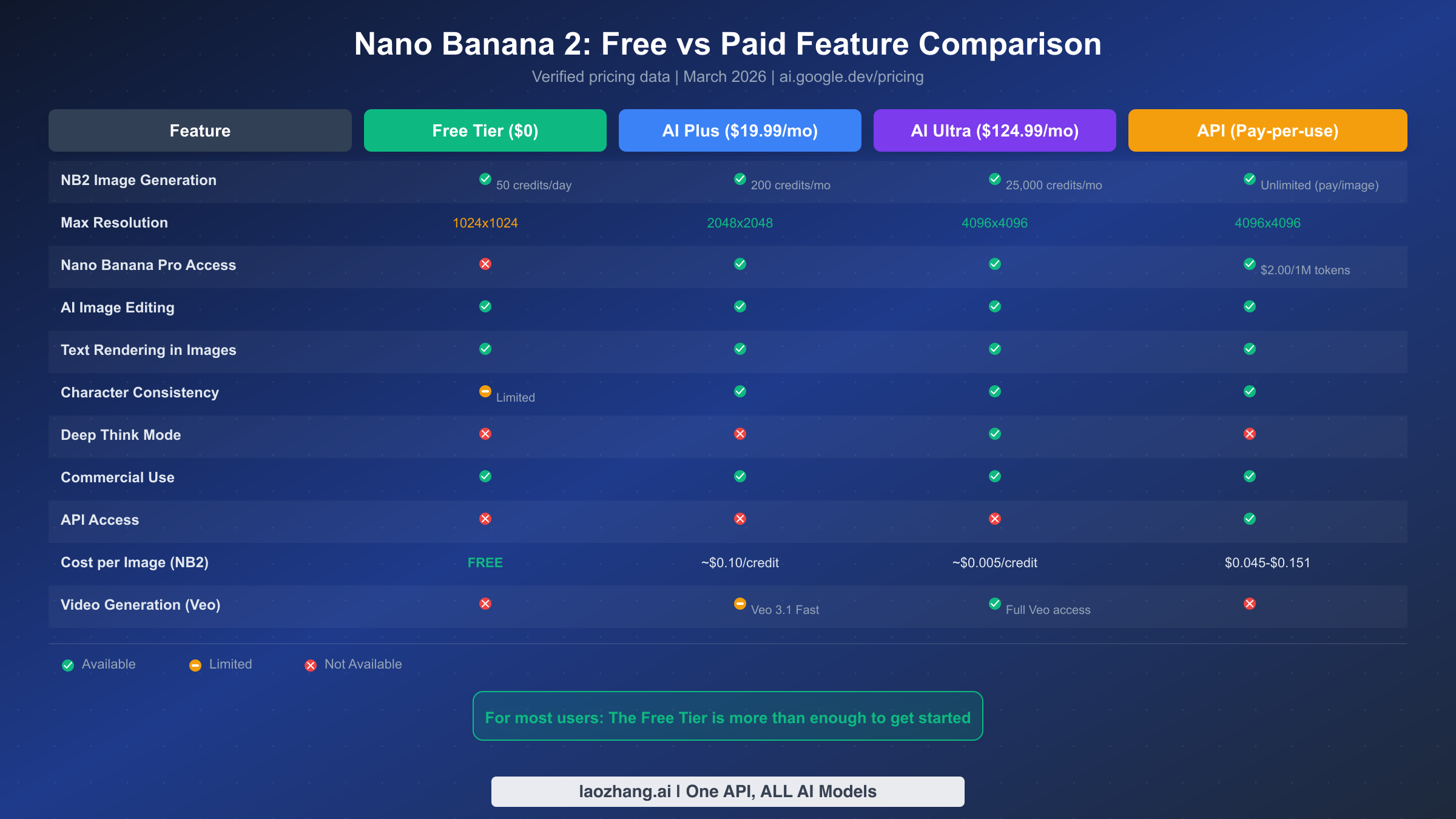
One of the most common questions about Nano Banana 2 is what you actually lose by sticking with the free tier, and the honest answer is less than you might expect. Google has structured its pricing tiers to provide genuine value at every level, but the free tier is not a crippled demo designed purely to upsell you. Understanding exactly what each tier offers will help you make an informed decision about whether upgrading is worth your money, and for many users, the answer will be that the free tier provides everything they need.
The free tier gives you access to the full Nano Banana 2 model with 50 AI credits per day, which translates to approximately 17–25 image generations depending on complexity. Your resolution is capped at 1024×1024 pixels, which is the standard resolution for social media posts, blog thumbnails, and digital sharing. You get full access to both image generation and image editing capabilities, including text rendering in images and basic character consistency. You also retain commercial use rights for all images you generate, which is crucial information that most articles fail to mention clearly. The main features you miss on the free tier are access to Nano Banana Pro, higher resolution output beyond 1024px, Deep Think mode, and video generation through Veo.
Moving to the AI Plus tier at $19.99 per month (US pricing; pricing varies by region) unlocks 200 AI credits per month and increases your maximum resolution to 2048×2048 pixels. You gain access to Nano Banana Pro, which is the higher-quality Gemini 3 Pro Image model that produces more detailed and artistically sophisticated results. For users who need to generate marketing materials, presentation graphics, or content that requires higher resolution for printing, AI Plus represents a reasonable upgrade. However, the monthly credit allocation of 200 is actually lower than what free tier users get over a month, since the free tier provides 50 credits daily. This means AI Plus is primarily valuable for its quality improvements and resolution upgrades rather than volume.
The AI Ultra tier at $124.99 per month is designed for professionals and heavy users who need maximum capability. It provides 25,000 AI credits per month, full access to all models including Nano Banana Pro and Veo 3.1 for video generation, Deep Think mode for enhanced reasoning tasks, and the highest available resolutions up to 4096×4096 pixels. For professional designers, marketing agencies, or content studios that produce dozens of images daily, AI Ultra makes financial sense. For everyone else, it is significant overkill.
If you are considering whether to upgrade, here is a practical decision framework. Ask yourself three questions: Do you need resolution above 1024×1024? If yes, consider AI Plus or the API. Do you need more than 20 images per day consistently? If yes, consider AI Plus or look into the API route through services like laozhang.ai for better cost efficiency. Do you need Nano Banana Pro's enhanced quality? If you are doing professional creative work, the quality difference is noticeable, and you can explore the paid tiers. For a deeper analysis, check out our guide to using Nano Banana Pro for free which covers additional strategies. Otherwise, for personal projects, social media content, and everyday creative needs, the free tier delivers excellent results.
Prompt Mastery: Get Professional Results for Free
The difference between mediocre and stunning Nano Banana 2 outputs almost always comes down to prompt engineering, and this is where most free users leave enormous value on the table. While the model can produce acceptable results from simple descriptions, learning a few advanced techniques will dramatically improve your output quality without spending a single dollar. These techniques are specific to how Nano Banana 2 processes prompts and differ from what works best on DALL-E or Midjourney.
The structured prompt formula that consistently produces the best results on Nano Banana 2 follows this pattern: Subject + Action + Environment + Style + Technical Details + Mood. For example, instead of writing "a cat in a garden," you would write "a fluffy orange tabby cat sitting on a mossy stone wall, surrounded by blooming lavender in an English cottage garden, soft watercolor illustration style, warm afternoon sunlight creating dappled shadows, peaceful and serene atmosphere." This formula works because Nano Banana 2's Gemini architecture processes each element sequentially and uses later elements to refine earlier ones. The style and mood specifications at the end act as a global filter that influences how the entire image is rendered, which is why placing them after the concrete subject description produces more coherent results than front-loading style instructions.
Text rendering is one of Nano Banana 2's standout capabilities, but it requires specific prompting techniques to get clean, readable results. When you want text in your image, always enclose the exact text in quotation marks within your prompt, like "generate a vintage coffee shop sign that says 'The Morning Brew' in elegant serif typography." Specify the font style you want, whether serif, sans-serif, handwritten, or a specific aesthetic like Art Deco or retro neon. Keep text short since the model handles phrases of 3–5 words most reliably. For longer text, break it across multiple lines in your prompt description. If the text comes out slightly garbled on the first attempt, regenerate rather than editing, as Nano Banana 2's text rendering improves with fresh generations more than with iterative editing instructions.
Character consistency across multiple images is another area where knowing the right approach makes a significant difference. Start by generating your character with an extremely detailed initial description that includes specific physical features, clothing, color scheme, and distinguishing characteristics. Save the best result and then reference it in subsequent generations with phrasing like "the same character from the previous image, now in a different setting." Within a single Gemini conversation, the model maintains reasonable consistency. For cross-session consistency, provide the detailed character description each time and consider uploading the reference image when starting a new conversation. This approach is not perfect, and true character locking is better in the Pro version, but for free tier use it produces surprisingly cohesive results when you maintain detailed descriptions.
Negative prompting through positive language is a technique that many Nano Banana 2 users overlook. While the model does not support explicit negative prompts like Stable Diffusion, you can achieve similar results by being specific about what you do want rather than what you don't want. Instead of trying to say "no blurry images," specify "sharp focus, high detail, crisp edges." Instead of "no extra fingers," write "anatomically correct hands with five fingers." This positive framing gives the model clear direction and produces more reliable results than trying to exclude unwanted elements. When combined with style references like "professional photography quality" or "studio lighting setup," this technique consistently elevates free tier output to a level that competes with paid alternatives.
Aspect ratio and composition control is another area where free tier users can extract significantly more value from the model. While the Gemini app defaults to square 1:1 images, you can influence the output aspect ratio through careful prompt phrasing. Including terms like "wide panoramic landscape" or "cinematic 16:9 composition" nudges the model toward wider formats, while "portrait orientation" or "vertical phone wallpaper format" encourages taller outputs. In Google AI Studio, you have more direct control over these parameters. Combining aspect ratio control with composition terminology from photography, such as "rule of thirds composition," "leading lines drawing the eye to the subject," or "centered symmetrical framing," gives you a level of artistic control that rivals what professional tools offer. The key insight is that Nano Banana 2 understands photography and art terminology deeply, so the more precise your visual language, the more precisely the model can execute your creative vision.
Nano Banana 2 vs Pro: Which One Do You Actually Need?
The distinction between Nano Banana 2 and Nano Banana Pro causes genuine confusion because Google's naming and marketing do not always make the practical differences clear. After extensive testing with both models, the differences are real but not as dramatic as the pricing gap suggests, and for many use cases the free Nano Banana 2 is the better choice even when budget is not a constraint. Understanding these nuances requires looking beyond spec sheets and into actual usage scenarios.
Nano Banana 2 runs on the Gemini 3.1 Flash Image model, which is optimized for speed and efficiency. It generates images in 5–15 seconds and excels at straightforward image generation, text rendering, and basic editing tasks. Nano Banana Pro uses the Gemini 3 Pro Image model (ai.google.dev/pricing, verified March 2, 2026), which takes longer to process but produces images with more nuanced lighting, more detailed textures, and better compositional sophistication. The Pro model also handles complex scenes with multiple subjects more reliably and produces more realistic human faces with fewer artifacts. For a comprehensive technical breakdown, see our detailed Nano Banana 2 vs Pro comparison.
In practical terms, the quality difference is most noticeable in three specific areas. Professional portrait photography is where Pro clearly outshines the free version, with more natural skin tones, better hair detail, and more accurate eye reflections. Complex multi-subject scenes, such as a crowded marketplace or a group of people interacting, are handled more coherently by Pro. And architectural photography, where straight lines and geometric precision matter, shows measurable improvement in the Pro version. For everything else, including landscapes, abstract art, product mockups, social media graphics, and text-based designs, Nano Banana 2 delivers results that are difficult to distinguish from Pro output without side-by-side comparison.
The cost equation also deserves honest analysis. At the API level, Nano Banana 2 costs $0.045–$0.151 per image depending on resolution (ai.google.dev/pricing, verified March 2, 2026), while Nano Banana Pro starts at $2.00 per million input tokens with significantly higher output costs. This makes Pro roughly 10–15 times more expensive per image. For users who generate dozens or hundreds of images as part of their creative workflow, this cost difference is substantial. The recommendation for most users is clear: start with free Nano Banana 2, learn effective prompting techniques, and only consider Pro if you consistently find that the free model cannot deliver the quality your specific use case demands. Most users who learn good prompting habits never feel the need to upgrade.
Developer Guide: API Access and Saving Up to 80% on Costs
For developers who want to integrate Nano Banana 2 into applications, websites, or automated workflows, the API route offers the most powerful and flexible access. The Gemini API provides programmatic image generation with full control over every parameter, and getting started is easier than many developer tutorials suggest. This section walks through the setup process and then covers cost optimization strategies that can reduce your image generation expenses by up to 80% compared to Google's direct pricing.
Getting your API key is the first step, and it takes under two minutes. Navigate to ai.google.dev, sign in with your Google account, and click "Get API key." Google provides a free tier API key that includes a daily quota of image generations, which is sufficient for development, testing, and low-volume production use. Once you have your key, you can make your first API call using a simple HTTP request or one of Google's official client libraries for Python, JavaScript, Node.js, and other languages. The model identifier for Nano Banana 2 is gemini-3.1-flash-image-preview (ai.google.dev/pricing, verified March 2, 2026), and you pass your image description as the prompt parameter in a standard Gemini API chat completion call.
Here is a minimal Python example to generate your first image through the API:
pythonimport google.generativeai as genai

genai.configure(api_key="YOUR_API_KEY")
model = genai.GenerativeModel("gemini-3.1-flash-image-preview")

response = model.generate_content("A serene mountain lake at sunrise, photorealistic")
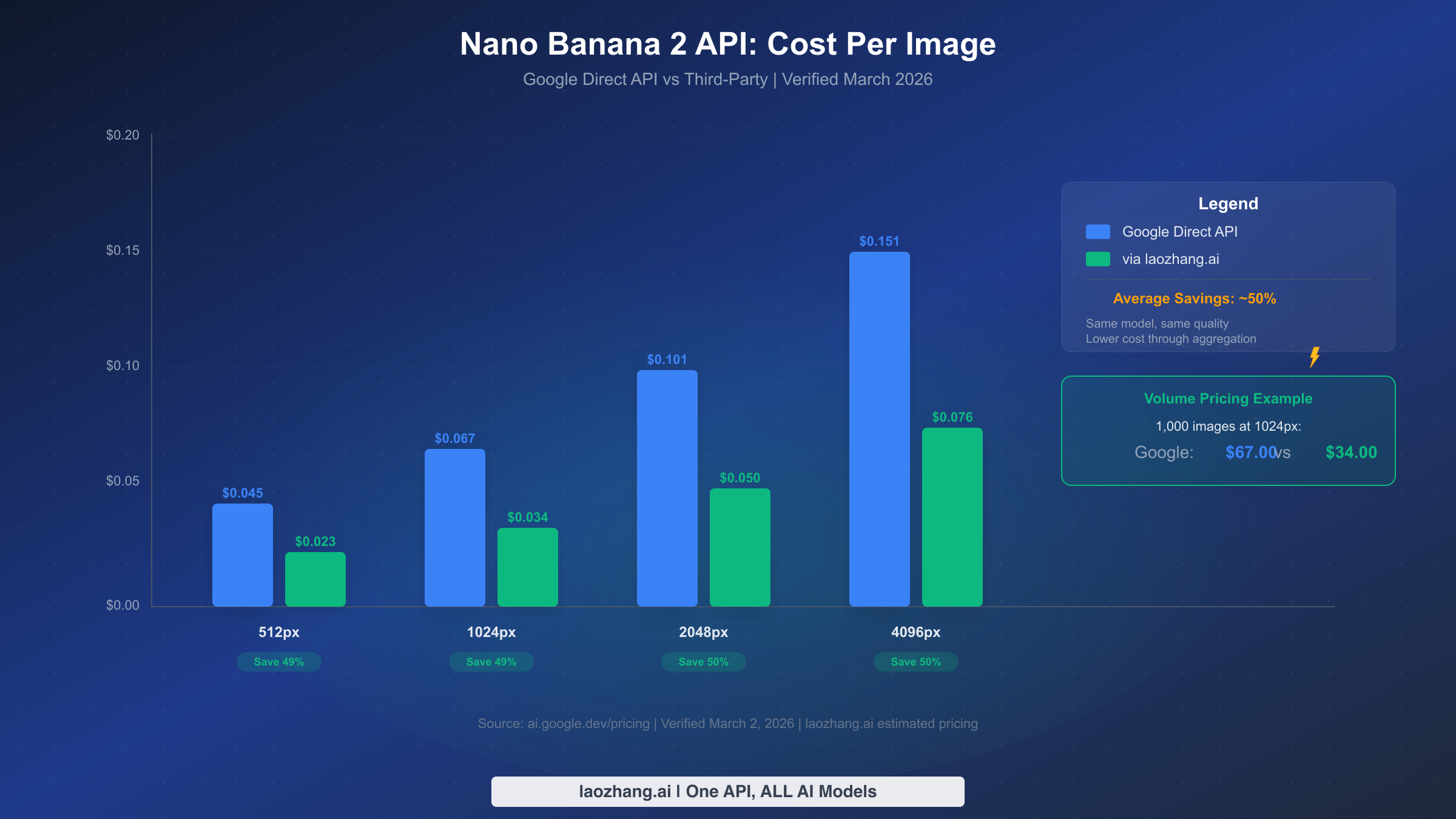
The API pricing for Nano Banana 2 is structured per image at different resolutions: $0.045 for 512×512, $0.067 for 1024×1024, $0.101 for 2048×2048, and $0.151 for 4096×4096 (ai.google.dev/pricing, verified March 2, 2026). These prices are competitive but can add up quickly at scale. If you are generating 1,000 images per month at 1024px resolution, you are looking at $67 in API costs through Google's direct pricing. This is where third-party API aggregators become valuable for cost optimization.
Services like laozhang.ai aggregate API access across multiple providers and offer Nano Banana 2 image generation at significantly reduced rates, typically around 50% below Google's direct pricing. The model quality is identical since these services route requests to the same underlying Gemini model, but their volume purchasing and efficient routing reduce the per-image cost. For the 1,000-image example above, using laozhang.ai would bring your monthly cost from $67 down to approximately $34. For high-volume applications like e-commerce product image generation, social media automation, or content management systems, these savings compound dramatically. You can test the image generation quality at images.laozhang.ai before committing. For more API pricing strategies, see our guide on finding the cheapest Nano Banana 2 API access and best Gemini API alternatives with free tiers.
One critical development consideration is error handling and rate limiting. The free API tier enforces request limits that will return 429 status codes if exceeded. Implement exponential backoff in your code to handle these gracefully, starting with a 1-second delay and doubling it with each retry up to a maximum of 32 seconds. For production applications, consider queuing image generation requests and processing them asynchronously rather than trying to generate images in real-time request cycles. This architecture pattern keeps your user experience smooth while staying within API rate limits, and it works equally well whether you are using Google's direct API or a third-party service.
Beyond basic error handling, there are several production-readiness patterns that experienced developers should implement from the start. First, always validate your prompts before sending them to the API. The Gemini safety filters will reject prompts that contain certain content categories, and handling these rejections gracefully with user-friendly error messages prevents a poor user experience. Second, implement a caching layer for repeated or similar prompts. If your application frequently generates images for common scenarios like product categories or template-based designs, caching the results and serving them from storage instead of regenerating each time can reduce your API costs by 40–60% depending on the duplication rate in your use case. Third, consider implementing a fallback strategy where you maintain API keys from multiple providers. If your primary Google API quota is exhausted or the service experiences downtime, your application can automatically switch to an alternative endpoint like laozhang.ai without any user-visible interruption. This multi-provider resilience pattern is particularly important for applications where image generation is a core feature rather than a nice-to-have enhancement.
FAQ: Your Nano Banana 2 Questions Answered
Is Nano Banana 2 actually free, or is it a trial?
Nano Banana 2 is genuinely and permanently free through the Gemini app. Google provides 50 AI credits per day to all free tier users, which is enough for approximately 17–25 image generations daily. This is not a limited trial that expires, and Google has not indicated any plans to remove or reduce the free tier. You do not need to provide a credit card or payment information to access the free tier, so there is no risk of accidental charges.
What happens when I hit the daily limit?
When you exhaust your 50 daily AI credits in the Gemini app, you will see a message indicating that your credits have been used. The credits reset at the start of the next day based on your time zone. If you consistently need more than the daily allowance, consider using Google AI Studio which has separate rate limits, or explore the API free tier for additional generations. You can also spread your generations across both the Gemini app and AI Studio to effectively double your daily free quota.
Can I use Nano Banana 2 images commercially?
Yes, images generated through Nano Banana 2 can be used for commercial purposes. Google's terms of service for Gemini-generated content allow commercial use, including for marketing materials, social media posts, blog illustrations, and product designs. However, you should be aware that AI-generated images cannot be copyrighted in most jurisdictions, which means others can legally use the same or similar images. For brand-critical applications, consider using generated images as starting points and adding unique elements to make them more distinctive.
Why do I get a 503 error or region lock message?
Some users encounter 503 errors or messages indicating that Nano Banana 2 is not available in their region. These issues are typically temporary and related to server capacity during peak usage times. If you experience persistent region restrictions, try accessing through Google AI Studio instead of the Gemini app, as the two services have different availability configurations. Using a VPN can also help, though this may conflict with Google's terms of service depending on your specific situation. For systematic troubleshooting steps, check our troubleshooting guide for common Nano Banana errors.
How does Nano Banana 2 compare to DALL-E 3 and Midjourney?
Nano Banana 2's primary advantage over DALL-E 3 and Midjourney is its free tier. DALL-E 3 requires a ChatGPT Plus subscription ($20/month) for full access, and Midjourney costs $10–60/month depending on the plan. In terms of output quality, Nano Banana 2 is competitive with both, particularly in text rendering where it often outperforms DALL-E 3. Midjourney still produces more artistically stylized results for certain aesthetic preferences, but Nano Banana 2's photorealistic capabilities and editing features make it the strongest free option available today. The best approach is to use Nano Banana 2 as your primary tool and supplement with other generators when specific aesthetic needs arise.
What are the content restrictions on Nano Banana 2?
Google applies safety filters to all Nano Banana 2 generations to prevent the creation of harmful, explicit, or misleading content. The model will decline requests to generate realistic depictions of public figures, content that could be used for disinformation, violent or graphic imagery, and explicit adult content. These restrictions apply across all tiers including the paid API. In practice, the filters are reasonable for most creative and commercial use cases, and they are less restrictive than some competing services when it comes to artistic and fantasy content. If a prompt is rejected, try rephrasing with more general terms or adjusting the specific element that triggered the filter. For legitimate creative projects that involve sensitive themes, using descriptive artistic terms like "dramatic scene" rather than graphic language usually produces the desired result while staying within the guidelines.