
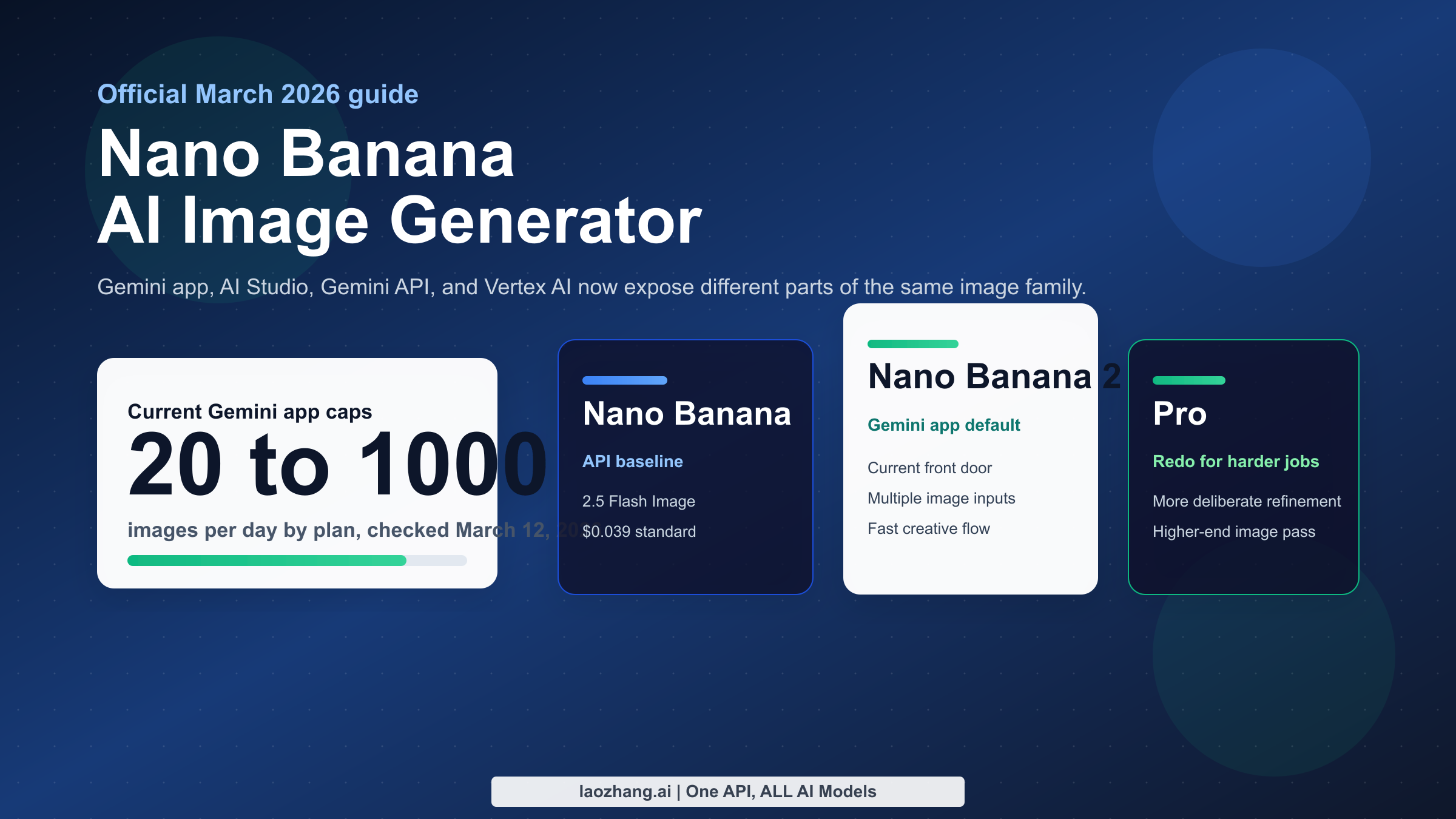
As of March 12, 2026, Nano Banana AI image generator is not one single Google product. In Google's current stack, the phrase can point to gemini-2.5-flash-image in the Gemini API, Nano Banana 2 in the Gemini app, or Nano Banana Pro when Google surfaces the Pro regeneration path for higher-end image work. That naming overlap is the main reason older tutorials now feel wrong: the same nickname is describing different models, different interfaces, and different limits.
If you only want the fastest way to make images, use the Gemini app and treat Nano Banana 2 as the default consumer experience. If you need predictable model IDs, prompt iteration, or code integration, use Google AI Studio and then move to the Gemini API or Vertex AI. If you care about higher-fidelity edits, better text handling, or a more deliberate second pass, Nano Banana Pro still matters, but in March 2026 it is no longer the clean default path for most Gemini users.
TL;DR
If you need the short answer, here it is. Nano Banana is now a family label, not a single button. On February 26, 2026, Google introduced Nano Banana 2 in the Gemini app and replaced the previous Nano Banana default there. The API side still exposes older and more explicit model IDs, which is why developers and end users often think they are using the same generator when they are not.
The fastest way to avoid confusion is to separate the problem into three layers. The Gemini app is the easiest place to create images with current Google consumer limits. Google AI Studio is the easiest place to test model behavior without building a full app. The Gemini API and Vertex AI are for production use, where model IDs, quotas, and failure handling matter more than friendly UI labels.
| If your real goal is... | Best surface now | What you are probably using | Why |
|---|---|---|---|
| Generate a few good images quickly | Gemini app | Nano Banana 2 | Fastest consumer flow and no model-ID juggling |
| Compare prompt behavior across versions | Google AI Studio | Usually Gemini 2.5 Flash Image or preview image models | Best bridge between casual use and API work |
| Ship a product with code | Gemini API or Vertex AI | gemini-2.5-flash-image or gemini-3.1-flash-image-preview | Explicit model control, auth, logging, and retries |
| Push a stronger second-pass result | Gemini app redo flow or Pro-capable surfaces | Nano Banana Pro | Better fit for higher-end regeneration and text-heavy work |
Two operational details matter immediately. First, the current Gemini Apps limits page says Nano Banana 2 generation can reach up to 20, 50, 100, or 1,000 images per day depending on plan, while Nano Banana Pro redo is not available on Basic and rises to 50, 100, or 1,000 images per day on paid tiers. Second, the official Gemini API pricing page lists $0.039 per standard output image for Gemini 2.5 Flash Image and $0.0195 per batch image equivalent, which is the clearest public pricing baseline Google currently publishes for the Nano Banana family.
If you already read our older guide on Nano Banana free online, the March 2026 adjustment is simple: keep using Gemini if you want convenience, but stop assuming the Gemini app, AI Studio, and API are interchangeable. They are not.
The model map: Nano Banana vs Nano Banana 2 vs Nano Banana Pro
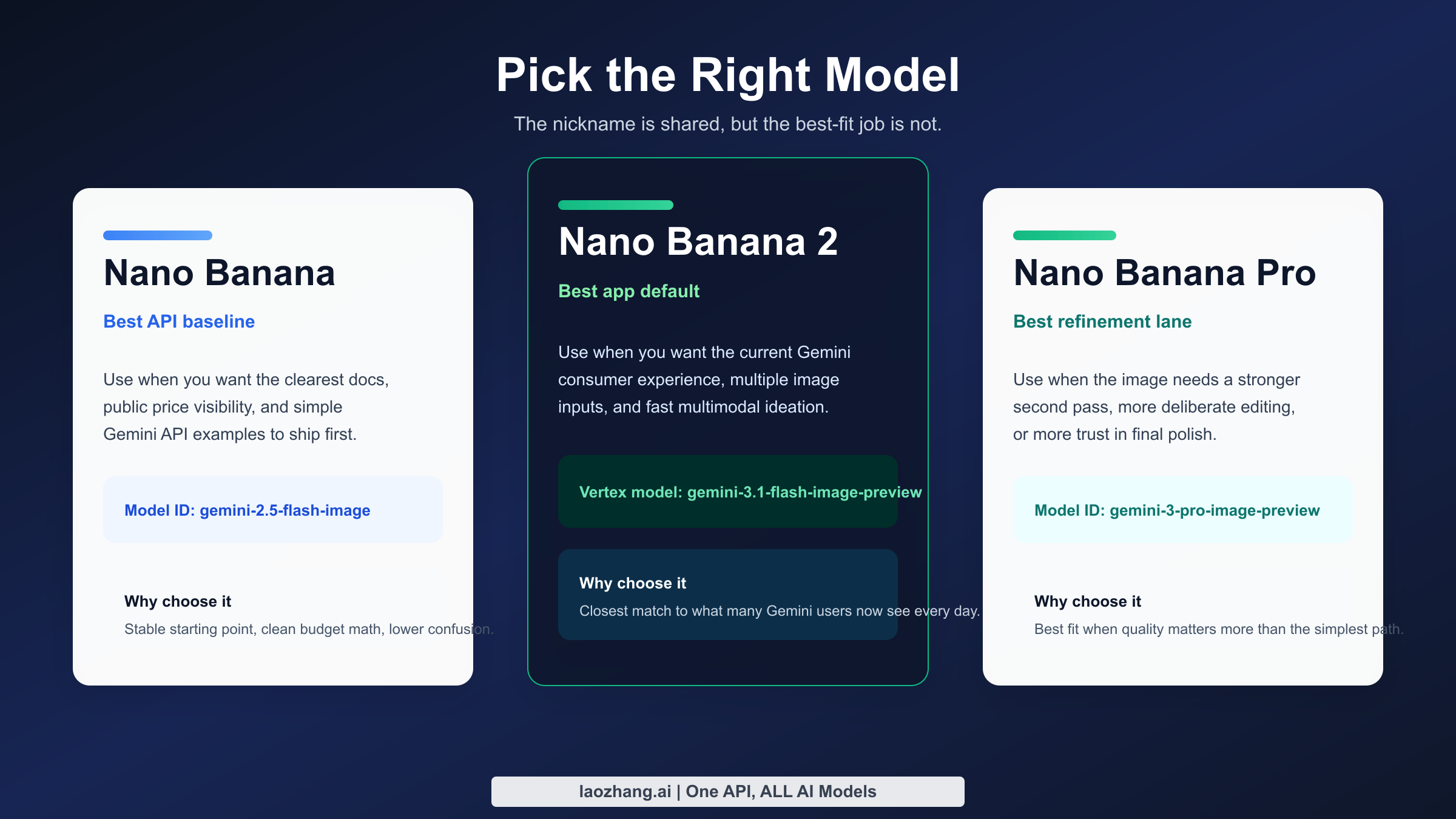
The naming problem gets easier once you stop treating "Nano Banana" as a brand name and start treating it as a shorthand for Google's Gemini-native image generation line. Google's current image-generation documentation is the most useful official source because it groups the relevant models together instead of pretending there is only one. In practical terms, that page tells you there are three meaningful lanes in March 2026: the older gemini-2.5-flash-image, the newer gemini-3.1-flash-image-preview, and the premium gemini-3-pro-image-preview.
The first lane, Gemini 2.5 Flash Image, is the most stable mental model for developers because Google publishes a straightforward public price for it and documents it clearly in the Gemini API. If you see older posts describing Nano Banana as the fast, broad-access Google image model, this is usually what they meant. It is still the cleanest reference point when you want a baseline image generator that fits API tutorials, code samples, and cost calculations.
The second lane, Nano Banana 2, is what consumer Gemini users now feel most directly. Google's February 26, 2026 Workspace update says Nano Banana 2 replaced the previous Nano Banana model in the Gemini app. On the production side, the best official analog is the Vertex AI page for gemini-3.1-flash-image-preview, which documents several capabilities that matter to serious users: up to 14 images per prompt, support for aspect ratios from 1:1 through 21:9, and generated image outputs up to 1024 x 1024 pixels in the documented flow. That combination tells you what Nano Banana 2 is optimized for: faster multimodal image work with more flexible composition and multiple inputs.
The third lane, Nano Banana Pro, is best understood as the quality-oriented or specialized branch. Google's November 20, 2025 Workspace post introduced it as the stronger image-generation tier for Slides, Vids, Gemini app, and NotebookLM. In March 2026, Google no longer positions Pro as the default first-touch model inside Gemini for everyone, but the official rollout language still matters because it explains why so many users care about getting it back. The Pro variant is associated with higher-end regeneration, more deliberate image editing, and better fit for complex prompts where text layout, fidelity, or refinement matter more than raw speed.
Here is the cleanest way to compare them.
| Label users say | Model ID or surface | Current default surface | Best for | Main limit or caveat |
|---|---|---|---|---|
| Nano Banana | gemini-2.5-flash-image | AI Studio / Gemini API docs | Lowest-friction API baseline, official public pricing, fast iterations | Public docs emphasize API usage more than Gemini-app branding now |
| Nano Banana 2 | gemini-3.1-flash-image-preview on Vertex AI; default Nano Banana 2 in Gemini app | Gemini app | Consumer creation, multiple input images, newer app default | Preview-state production behavior and changing frontend rollout |
| Nano Banana Pro | gemini-3-pro-image-preview and Gemini redo-with-Pro path | Specialized regeneration path | Higher-end redo, stronger refinement, text-heavy or fidelity-sensitive work | No longer the universal consumer default, so access depends on plan and context |
There are two more details most SERP pages skip. The first is that all generated images include a SynthID watermark, according to Google's image-generation documentation. The second is that Google does not present the same controls everywhere. Gemini app users see plan tiers and product language. API users see model IDs, per-project limits, and request behavior. Vertex AI users see preview docs and production-style constraints. That is why people can argue online about Nano Banana quality while technically talking about different routes into Google's stack.
This is also where comparison shopping starts to make sense. If you are deciding between Google's image stack and something like Nano Banana Pro vs ChatGPT Image Generator, the right question is not "which nickname is better?" It is "which exact model and surface gives me the behavior I need?"
Where you can use Nano Banana right now
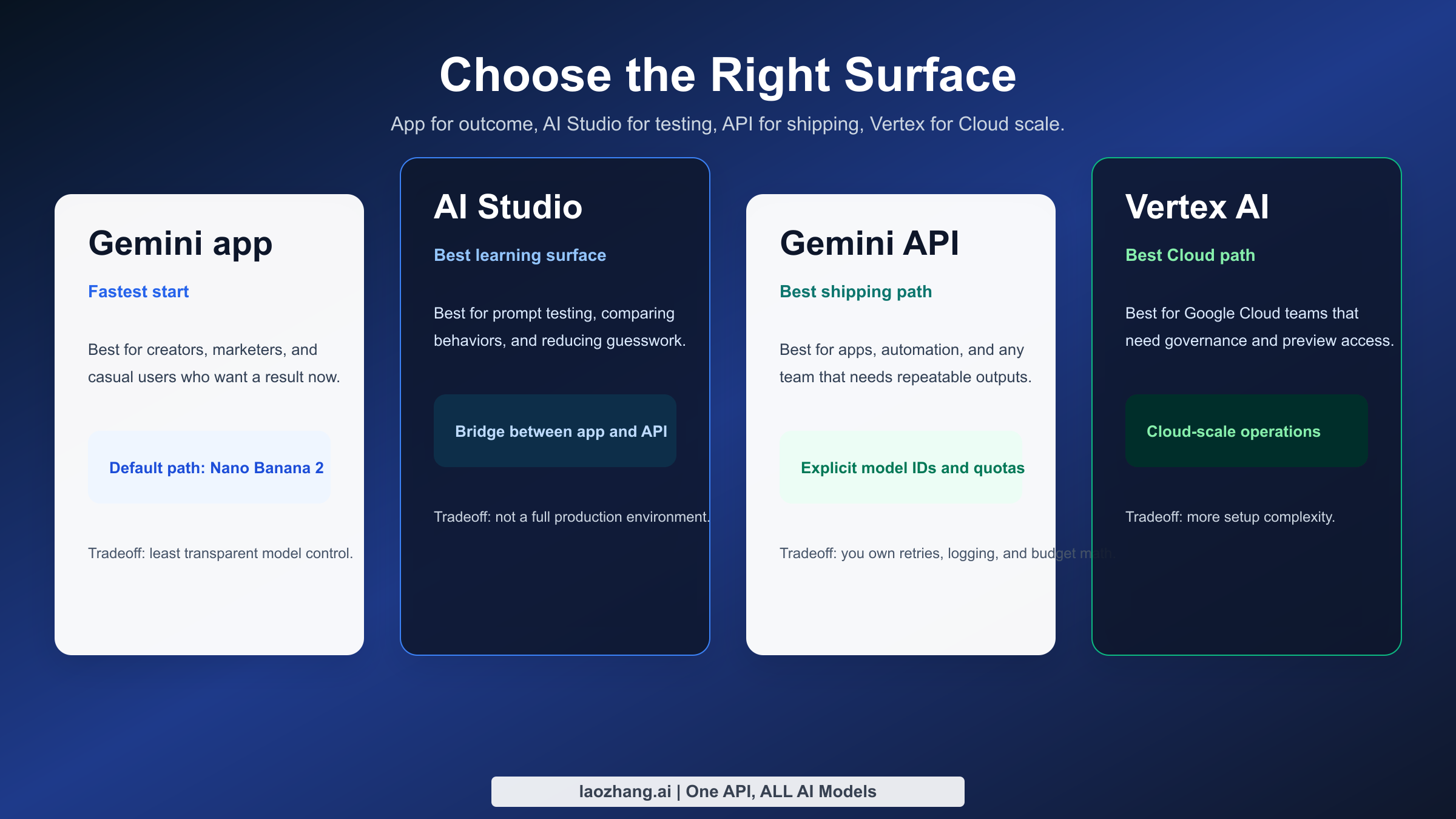
In March 2026, there are four realistic places to use Nano Banana-related image generation: the Gemini app, Google AI Studio, the Gemini Developer API, and Vertex AI. Each route answers a different operational need. The Gemini app is built for speed and convenience. AI Studio is for prompt testing and manual experimentation. The Gemini API is for developers who want a simpler direct integration. Vertex AI is for teams that already operate inside Google Cloud and want project-level control, enterprise governance, or preview-model experimentation.
The Gemini app is what most searchers mean when they ask whether Nano Banana is "free" or whether it still exists. The answer is yes, but the surface changed. You now create with Nano Banana 2 under current plan-based image limits, and some users can still call Nano Banana Pro when Google offers the redo path. This makes the app the best option for marketers, social creators, teachers, and casual users who care more about getting an image quickly than about knowing the exact model name behind it.
Google AI Studio sits in the middle. It is the easiest place to test prompts, compare outputs, and understand how Gemini image generation behaves without committing to a full application build. AI Studio matters because it exposes the Google ecosystem more directly than the Gemini app. When a team is not yet ready for quota management, project keys, and retry logic, AI Studio is the correct environment for learning how the model behaves on product shots, mood boards, image edits, and multi-image composition.
The Gemini Developer API is where naming ambiguity becomes a deployment problem. Once you build with code, you must choose an explicit model. That is why the official image-generation guide and rate-limits page are more valuable than generic roundup articles. The API makes you confront the real decisions: which model ID to call, how often to retry, when RPD resets, and what to log when an image response fails silently.
Vertex AI is the most specialized path, but it is the clearest choice when your team already uses Google Cloud. The Vertex documentation for Gemini 3.1 Flash Image Preview exposes production-oriented details such as prompt structure, image-input counts, image token budgets, and the fact that preview models can carry tighter operational expectations. That is not casual-user information, but it is exactly the information a product manager or backend engineer needs before committing a team to the stack.
| Surface | Best user type | What you gain | What you give up | Current reality check |
|---|---|---|---|---|
| Gemini app | Casual users, creators, light power users | Fastest start, plan-based limits, friendly UX | Less transparency about exact model behavior | Default consumer route for Nano Banana 2 |
| Google AI Studio | Prompt engineers, marketers, prototype builders | Fast manual experimentation and easier debugging | Not a full production environment | Best bridge between consumer and API use |
| Gemini Developer API | Developers and startups | Explicit model IDs, code integration, automation | You must handle quotas, errors, and logging | Best route for app integration with fewer Cloud layers |
| Vertex AI | Cloud-native teams and enterprise builders | Governance, project control, preview access, Cloud workflows | More setup complexity and more product surface area | Strongest option for teams already on Google Cloud |
Most SERP pages flatten these surfaces into a single sentence like "use Nano Banana on Google." That advice is too vague to be useful. A design team that needs 10 exploratory outputs a day should not read the same recommendation as a startup generating 10,000 images a month through an API, and a solo creator troubleshooting a missing Pro option should not be told to study enterprise Cloud documentation first.
The most useful mental shortcut is this: Gemini app for outcome, AI Studio for understanding, API for shipping, Vertex for operating at scale. Once you adopt that frame, most of the confusion disappears.
How to use it in the Gemini app without getting trapped by the naming confusion
Using Nano Banana in the Gemini app is easy once you understand what changed. The old instinct was to look for a single model selector that said Nano Banana or Nano Banana Pro. In March 2026, that expectation is outdated. Google now treats Nano Banana 2 as the standard experience inside the app, while Nano Banana Pro is surfaced more selectively through image regeneration and plan-dependent flows.
The practical workflow is straightforward. Open Gemini, choose the image-creation path, and write the request in natural language. Start with a concrete subject, then add style, lighting, camera framing, and the intended use case. For example, a request like "Create a clean ecommerce hero shot of a matte black mechanical keyboard on white acrylic, soft side lighting, shallow depth of field, with space for headline text on the left" gives Gemini enough structure to produce a commercially usable first pass instead of a vague concept render.
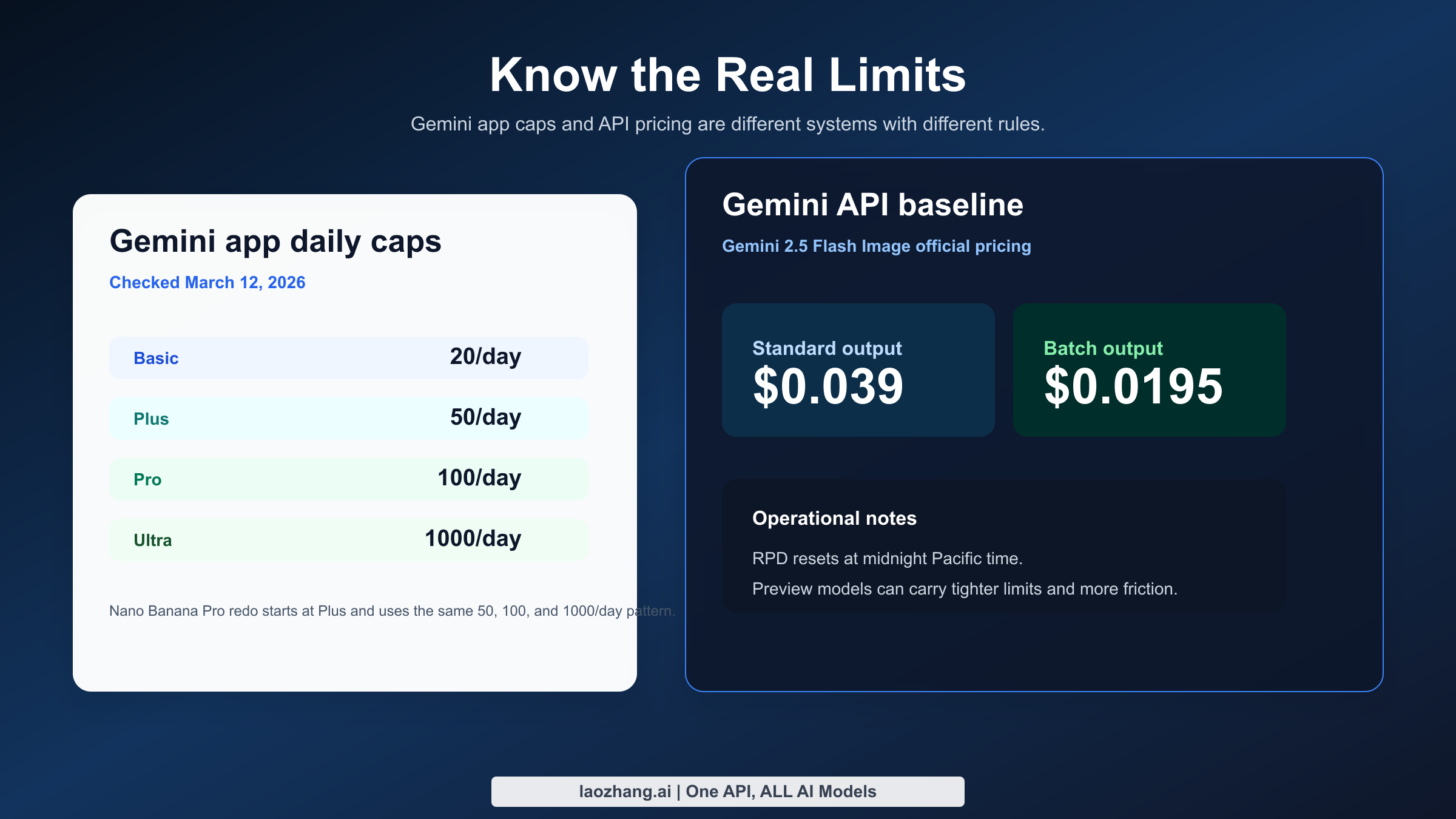
The plan question matters more than it used to. Google's current help page lists Nano Banana 2 generation quotas of up to 20 images per day for Google AI Basic, 50 for Google AI Plus, 100 for Google AI Pro, and 1,000 for Google AI Ultra. For Nano Banana Pro redos, the same page lists not available on Basic, then up to 50, 100, and 1,000 per day for Plus, Pro, and Ultra. Those are the current official numbers I verified on March 12, 2026, but Google also warns that limits can change frequently and may be distributed through the day.
That plan table changes how you should think about the app. A Basic-tier user is not choosing between "good" and "bad" models. They are choosing whether the default Nano Banana 2 experience is enough for their workload. A Pro-tier user is really deciding when to spend a higher-value generation or redo on a prompt that deserves it. And an Ultra user is effectively being told that Gemini can serve as a serious everyday image workbench rather than just a toy.
| Gemini plan | Nano Banana 2 generation | Nano Banana Pro redo | Who this tier actually fits |
|---|---|---|---|
| Google AI Basic | Up to 20 images/day | Not available | Casual testing, light personal use |
| Google AI Plus | Up to 50 images/day | Up to 50 images/day | Frequent creators who still want simple app UX |
| Google AI Pro | Up to 100 images/day | Up to 100 images/day | Heavy users who regularly refine outputs |
| Google AI Ultra | Up to 1,000 images/day | Up to 1,000 images/day | Intensive creative use, team-like throughput, or power-user experimentation |
The biggest practical trap is assuming that if you cannot see a clean "Nano Banana Pro" selector, Pro no longer exists. That is not what Google's February 2026 rollout says. The official Workspace update explicitly says some existing Pro-access users can still regenerate images with Nano Banana Pro through the three-dot menu for specialized tasks. In other words, Pro is still part of the stack, but Google moved it out of the simplest front-door path.
If you are troubleshooting the Gemini app, start with the obvious account checks before you blame the model. Confirm which Google AI plan the account actually has. Confirm you are in the image-generation flow rather than a generic text conversation. Confirm you are looking for a redo or refinement path instead of a top-level model picker that an older tutorial may show. And if the interface still looks inconsistent, assume rollout variance before assuming the documentation is lying. Google's consumer rollouts often reach users unevenly.
One more point matters for creators doing client work. The Gemini app is excellent for first-pass ideation, but it is not the best place to reason about model reproducibility. If a prompt works beautifully once and you need to reproduce it under controlled conditions later, move the workflow into AI Studio or the API sooner rather than later.
How to use Nano Banana from AI Studio and the Gemini API
The best builder workflow is not to jump straight into production code. Start in Google AI Studio, find the prompt structure that consistently works, and only then move into code with the Gemini API or Vertex AI. This order saves real time because you debug prompt logic before you debug auth, quotas, or JSON parsing.
AI Studio is especially useful when you are comparing what the Gemini app feels like versus what the documented model outputs actually do. For example, if a packaging mockup, recipe card, or annotated UI concept looks soft in the app, test a tighter version in AI Studio and push the prompt harder on layout, typography, or image editing instructions. If the AI Studio result improves materially, the issue was probably prompt or surface choice. If it still fails, the limitation is more likely model-side.
Once you move to the Gemini API, the most important decision is the model ID. If you want the clearest public pricing baseline and the broadest documentation footprint, start with gemini-2.5-flash-image. If you need the newer multimodal image lane with multiple-image composition and you are comfortable with preview caveats, evaluate gemini-3.1-flash-image-preview. If you are specifically chasing higher-end regeneration behavior or Pro-tier refinement, keep gemini-3-pro-image-preview in view, but treat it as a specialized option rather than your only plan.
Here is a minimal Python example for the stable baseline route:
pythonfrom google import genai

client = genai.Client(api_key="YOUR_GEMINI_API_KEY")

response = client.models.generate_content(
    model="gemini-2.5-flash-image",
    contents="Create a clean product ad image for a stainless steel water bottle on a pale blue background, soft commercial lighting, premium ecommerce style."
)

print(response)
And here is the same idea in JavaScript:
javascriptimport { GoogleGenAI } from "@google/genai";

const ai = new GoogleGenAI({ apiKey: process.env.GEMINI_API_KEY });

const response = await ai.models.generateContent({
  model: "gemini-2.5-flash-image",
  contents: "Create a clean product ad image for a stainless steel water bottle on a pale blue background, soft commercial lighting, premium ecommerce style."
});

console.log(response);
Those examples are intentionally simple because the first real production lesson is not syntax. It is failure handling. Google's own rate-limit docs say quotas are per project, not per API key, and that requests-per-day reset at midnight Pacific time. That matters because teams often rotate keys and assume a rate-limit error will disappear. If the project itself is saturated, rotating keys does not solve the problem.
The second production lesson is to expect preview friction. Multiple March 2026 threads in the Google AI Developers Forum report a frustrating symptom: the API returns no image and no obvious error, even for simple prompts. That does not mean Nano Banana is unusable. It means your integration should log raw responses, store request metadata, retry idempotently, and fall back to a second model or a second request path when the response contains no usable image payload.
If you already know your team is headed to production, read this guide alongside our existing coverage of Nano Banana 2 in Gemini Flash Image Preview. That combination gives you a better view of both the consumer and developer sides of the current stack.
Pricing, quotas, and production limits you should actually care about
The most common pricing mistake is mixing consumer limits and API cost into one mental bucket. They are related, but they are not the same thing. A Gemini app plan gives you a daily generation envelope. The Gemini Developer API gives you billable model access, quotas, and project-level operational rules. If you are serious about budget planning, you have to separate those two conversations.
The cleanest public number Google gives today is on the official Gemini API pricing page. For Gemini 2.5 Flash Image, Google lists $0.039 per standard output image and $0.0195 per image in batch mode. That means 100 images cost $3.90 at standard pricing, 1,000 images cost $39, and 10,000 images cost $390 before you add storage, moderation, retries, or downstream delivery costs. If you run the same volume in batch, the math drops to $1.95, $19.50, and $195 respectively.
Those numbers are useful not because every workload uses 2.5 Flash Image forever, but because they give you a public benchmark. Google does not currently make every preview-model price equally obvious in one clean consumer-facing table, so teams need a stable baseline to model unit economics. If your feature design breaks at $0.039 per generated image, you should know that before you design a workflow that assumes three or four regeneration passes per user action.
The next operational number is the RPD reset window. Google's rate-limit page says requests per day reset at midnight Pacific time. That sounds minor until you run a multi-region product. A user in Shanghai, London, and San Francisco can all describe their quota as "resetting tomorrow," but they are talking about different local moments. If support tickets pile up around quota resets, convert every explanation into a Pacific-time reference and then translate it for the user.
Another number that matters comes from Vertex AI's Gemini 3.1 Flash Image Preview documentation. Google says generated images in that documented flow are up to 1024 x 1024 pixels, the model can take up to 14 input images, and an output image can consume up to 2520 tokens in the documented accounting. That is not the same as a simple per-image sticker price, but it tells you something important: the newer preview lane is optimized for richer multimodal workflows, not only cheap single-image generation.
Here is the practical budgeting table most teams should use first.
| Metric | Gemini app | Gemini API baseline | Why it matters |
|---|---|---|---|
| Core limit type | Daily per-plan usage | Per-project quotas and billable usage | Consumer caps and developer caps are not interchangeable |
| Public baseline price | Bundled in plan | $0.039 standard / $0.0195 batch for 2.5 Flash Image | Gives teams a starting unit cost |
| Reset behavior | Daily limits that Google can adjust | RPD resets at midnight Pacific | Support and operations need an exact time basis |
| Best for | Lightweight creation and redo | Apps, automation, internal tools, content pipelines | Different cost models imply different product choices |
If you are choosing a production path, ask four questions in order. How many images will the product generate per day: 20, 200, 2,000, or 20,000? How many of those requests will need a second or third pass? How often will users upload reference images? And how painful is a silent failure in your workflow? Those four questions tell you more than brand names do.
This is also the section where many users realize the app and API should coexist in their workflow. The app is great for discovery, testing prompts, and stakeholder alignment. The API is where you enforce repeatability, instrumentation, retry logic, and cost discipline. Mature teams use both.
Prompt patterns that work better than generic "best prompt" lists
The reason most "best Nano Banana prompts" pages underperform is that they treat the model like a magic phrase engine. Real image quality usually comes from constraint quality, not adjective volume. Better prompts define the subject, frame, lighting, texture, composition, and delivery context in a stable order, then add one or two constraints about what must remain unchanged.
The most reliable structure I found for March 2026 Google image generation work is this: subject -> scene -> visual style -> camera or composition -> constraints -> intended use. That order works because it tells the model what the image is, where it lives, how it should look, how it should be framed, what it must preserve, and why the image exists. A prompt like "A premium oat milk carton standing on warm stone, editorial kitchen light, modern Scandinavian food photography, slight top-down angle, leave negative space on the right for a headline, label must stay readable" consistently outperforms a bag of mood words.
For product marketing, focus on materials, reflections, and use context. For example, specify brushed aluminum, softbox reflections, shallow depth of field, and an ecommerce hero layout instead of saying "beautiful premium product photo." For poster or text-heavy work, be explicit that the result is a graphic with readable headline text, and treat Nano Banana Pro or a second-pass redo as the better choice when typography is central rather than decorative.
For image editing, the key is preservation language. Tell the model exactly what should change and what should stay fixed. A good edit prompt sounds like this: "Keep the subject, camera angle, and hand position unchanged. Replace the gray studio background with a warm bookstore interior, preserve the original jacket texture, and add soft afternoon window light." That is better than "Make this more aesthetic," because it reduces accidental drift.
For multi-image composition, the newer preview lane is especially valuable because Google documents support for multiple input images. That makes it a stronger fit for style transfer, reference-board synthesis, or combining a hero product with packaging, logo, and background references. But the same rule applies: name each reference role. Tell the model which image is the product reference, which is the lighting reference, and which is the style reference.
Here are four prompt patterns worth copying and adapting.
| Use case | Better prompt pattern | Why it works |
|---|---|---|
| Ecommerce hero | Subject + material + lighting + background + negative space + conversion goal | Keeps the image commercial instead of merely pretty |
| Social graphic with text | Message + style + hierarchy + required readable words + safe margins | Forces the model to respect layout intent |
| Image edit | Preserve list + change list + unchanged elements + target mood | Reduces drift and over-editing |
| Multi-image blend | Reference roles + dominant subject + harmonization style + output framing | Helps the model decide what to keep from each source |
If your prompt depends on precision more than novelty, make the model's job smaller. Ask for one strong composition, not five simultaneous concepts. Ask for one hero phrase of readable text, not a paragraph. Ask for one edit at a time, not an entire art direction overhaul. Nano Banana, like every leading image model, rewards specificity but punishes overloaded instructions.
Troubleshooting: missing redo options, blank outputs, and account mismatch
The first troubleshooting category is front-end mismatch. You watched a tutorial that shows a Nano Banana Pro selector, but your Gemini app does not. The most likely explanation is not that Google killed the model. It is that the February 2026 rollout changed the default flow and your account tier or region is showing the new path. Start by checking plan, app surface, and whether the tutorial predates February 26, 2026.
The second category is quality mismatch. You expected Nano Banana Pro quality but got a softer result from the default Gemini path. In that case, assume you are comparing different surfaces, not necessarily inconsistent model performance. Move the same prompt to AI Studio. If the result tightens up, the frontend flow or its defaults were the limiting factor. If it still looks wrong, you need a more constrained prompt or a different model lane.
The third category is blank or missing image outputs in the API. This is not just a hypothetical edge case. Multiple March 2026 forum threads report exactly this behavior for Gemini 2.5 Flash Image: no obvious error, no usable image. Your remediation stack should be simple and boring. Log the full raw response. Check whether the response contains a text-only candidate. Retry once with the same prompt and once with a trimmed version. If both fail, alert the caller and fall back to a second route rather than pretending the request succeeded.
The fourth category is quota confusion. Gemini app users think in images per day. API users think in project quotas, RPD, and cost. Support teams often mix these two models and confuse everyone. If a user says "I still have credits but the model stopped," clarify whether they are talking about a paid consumer plan, AI Studio experimentation, or API project usage. The fix path is different in each case.
The fifth category is output-size confusion. Some community complaints are really about downloaded resolution, UI previews, or output expectations rather than pure model quality. If your use case is printable collateral, high-resolution creative assets, or brand-safe typography, do not assume the default Gemini app path will satisfy the requirement. That is when Pro-centric or production-side workflows become more relevant.
Here is the shortest troubleshooting checklist that still works:
- Confirm the exact surface: Gemini app, AI Studio, Gemini API, or Vertex AI.
- Confirm the exact plan or project, including whether the limit is consumer or API-side.
- Confirm the date on any tutorial you followed, especially if it is older than February 26, 2026.
- Re-test the same prompt in AI Studio before escalating to model-quality conclusions.
- Log and inspect raw API responses whenever no image arrives.
That checklist is not glamorous, but it solves more real Nano Banana problems than another page of viral prompt ideas.
FAQ
Is Nano Banana free? Partly. In March 2026, the easiest free-or-bundled path is the Gemini app, where image generation is governed by your Google AI plan. For builders, the Gemini Developer API should be treated as a billable product surface with official pricing and quotas instead of as a permanent free sandbox.
Is Nano Banana 2 the same as Gemini 2.5 Flash Image? No. They are related, but they are not the same thing. Nano Banana 2 is the current Gemini-app default branding, while gemini-2.5-flash-image remains a documented model in the Gemini API. Conflating them is the main source of user confusion.
Can I still use Nano Banana Pro? Yes, but do not expect the March 2025 or late-2025 front-door UX. Google's February 26, 2026 rollout says some users can still regenerate with Nano Banana Pro through the three-dot menu for specialized tasks, and current plan-based limits for Pro redo still appear on the Gemini help page.
Is Google AI Studio the same as the Gemini app? No. AI Studio is a testing and builder-oriented environment, while Gemini app is the consumer-facing product experience. If reproducibility, model choice, or API readiness matters, AI Studio is the better learning surface.
Which model should developers start with today? For most teams, start with gemini-2.5-flash-image because Google publishes the clearest public pricing and documentation for it. Then evaluate gemini-3.1-flash-image-preview if your use case benefits from newer multi-image flows, richer composition, or you want to align more closely with what Gemini-app users are seeing under Nano Banana 2.
Does Google watermark Nano Banana images? Yes. Google's image-generation documentation says all generated images include a SynthID watermark. That is important for compliance planning, client expectations, and internal review workflows.