
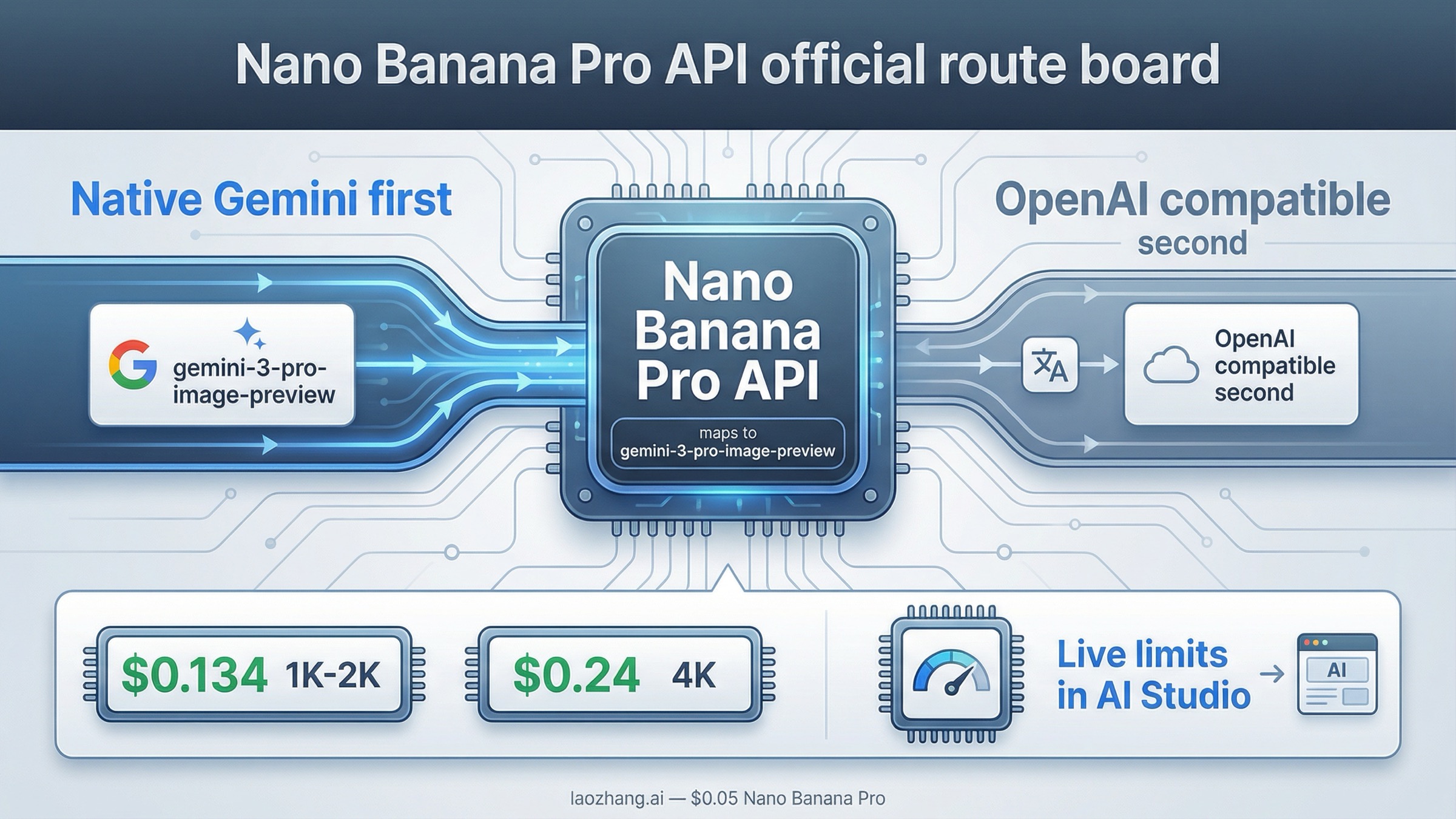
As of March 27, 2026, Nano Banana Pro API means Google's gemini-3-pro-image-preview. If you are building a new integration, start with the native Gemini image-generation route first, not a third-party alias and not the Gemini OpenAI-compatible layer by default. Use the compatibility route only when you already have an OpenAI-shaped client and the biggest goal is minimizing rewrite work.
That is the right default because the live SERP is still fragmented. The exact keyword is dominated by provider pages that front-load Nano Banana Pro API, price badges, and curl snippets, but most of them do not explain the official model ID, the paid-tier billing requirement, or where your active limits actually live. Google's own answer is more trustworthy, but it is spread across the image-generation docs, the OpenAI compatibility docs, the pricing page, and the rate-limits page.
The safest way to use this keyword is to solve the routing first. Confirm the official model name, pick the right API surface, then check billing and live limits before you compare relay pricing or copy a playground example into production.
TL;DR
| Your situation | Start here | Model | Why this is the safest default | Main caveat |
|---|---|---|---|---|
| New official Google integration | Native Gemini generateContent route | gemini-3-pro-image-preview | It is the clearest first-party contract and matches Google's current image docs | Paid-tier billing is required for the full route, and live limits vary by project |
| Existing OpenAI-style app or SDK | Gemini OpenAI-compatible endpoint | gemini-3-pro-image-preview | Lowest-friction way to keep an OpenAI-shaped client | The compatibility layer is a different contract and not the best default for learning the model |
| Cost-first evaluation | Official Google price first, then compare relays | gemini-3-pro-image-preview | You need the official baseline before wrapper prices mean anything | Provider pages often hide billing and limit differences |
| Premium text-heavy or infographic work | Stay on the official route | gemini-3-pro-image-preview | This is the premium Gemini 3 image lane for professional asset production | It costs more than Flash Image lanes and is still preview-labeled |
If your next question becomes setup rather than routing, the better deep-dive is Nano Banana Pro API Setup. If your main question becomes price instead of API shape, use Nano Banana Pro API Pricing.
Nano Banana Pro API is the nickname, not the official Google model name
The first thing this keyword needs to fix is naming. Nano Banana Pro is the public nickname Google uses for the premium Gemini 3 image lane, but the official API model name is gemini-3-pro-image-preview. Google's current image-generation docs explicitly map the Nano Banana family this way:
Nano Banana 2=gemini-3.1-flash-image-previewNano Banana Pro=gemini-3-pro-image-previewNano Banana=gemini-2.5-flash-image
That sounds small, but it changes how you should read almost every page on page one. Many provider pages use proprietary aliases such as nano-banana-pro, which may work inside their own gateway but are not the canonical Google model string. If you copy those aliases into a direct Google request, you are debugging the wrong layer before you even begin.
Google's current release notes say gemini-3-pro-image-preview was released on November 20, 2025. That date matters because a lot of older pages still mix pre-release naming, legacy 2.5 image lanes, or vague Gemini 3.0 Pro wording into what should be a straightforward API article.
Google's own positioning also matters here. The DeepMind model page describes Nano Banana Pro as the Gemini 3 image model for studio-quality precision and control. The image-generation docs say it is designed for professional asset production and complex instructions, and that Gemini 3 image models can mix up to 14 reference images, with the exact object-and-character split varying by model. Google also says all generated images include SynthID.
So the clean mental model is:
Nano Banana Prois the product-facing nickname.gemini-3-pro-image-previewis the string you should expect in official API work.- third-party pages may expose different aliases, but those are wrappers, not the canonical first-party name.
Once that is clear, the next question becomes practical: which API path should you actually use?
Which API path should you start with?
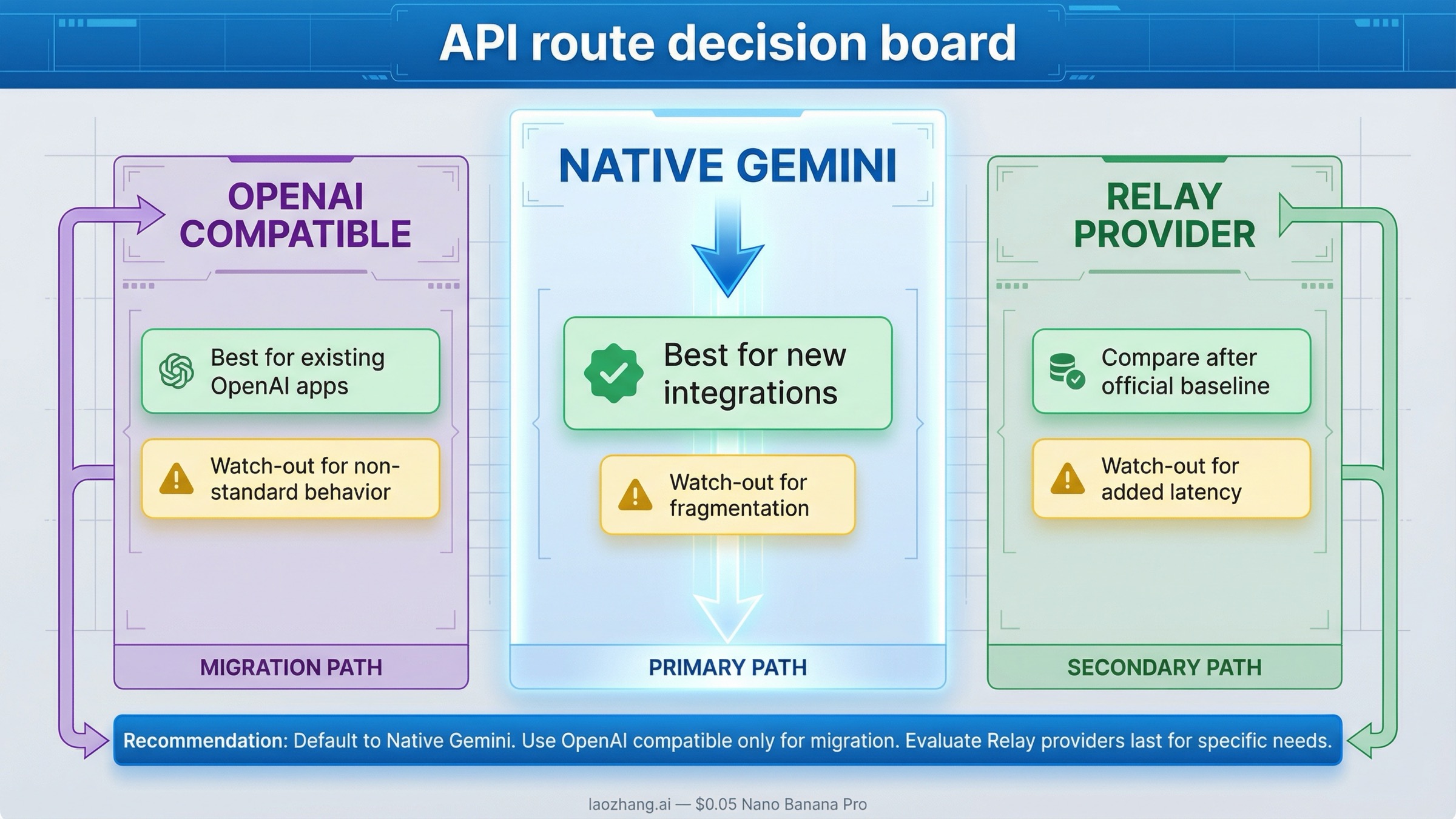
For most readers, the answer is simple: start with the native Gemini API route. That is the best default when you are new to the model, using raw HTTP, following the official Gemini docs, or trying to debug the first successful request.
The reason is not ideology. It is clarity. Google's current image-generation guide teaches image output through the native Gemini generateContent contract. That is where model mapping, image sizing, aspect ratio, and the current Gemini 3 image lanes are explained most directly. If you want the shortest path from "I searched the keyword" to "I have a correct Google request," this is the cleanest surface.
The Gemini OpenAI-compatible route is real, and Google documents it on the OpenAI compatibility page. It can generate images with gemini-3-pro-image-preview through client.images.generate, which is useful when you already have an OpenAI-based application or SDK conventions you do not want to unwind. But it is still the wrong default for most fresh integrations because it hides the native Gemini contract behind a compatibility layer.
That leads to a reliable split:
- Start with native Gemini when you are learning the official route, building from scratch, or debugging raw requests.
- Start with Gemini OpenAI compatibility when preserving an OpenAI client shape is the primary requirement.
- Start with a relay or provider gateway only after you understand the official model, pricing baseline, and billing surface you are abstracting away.
That third branch matters because page one is full of provider pages that look like the product. They are not. They are one access path to the product. If you do not understand that difference, you can end up comparing someone else's gateway rules instead of Google's actual API behavior.
Billing, pricing, and where rate limits really live
The routing question and the billing question are tied together more tightly than most landing pages admit.
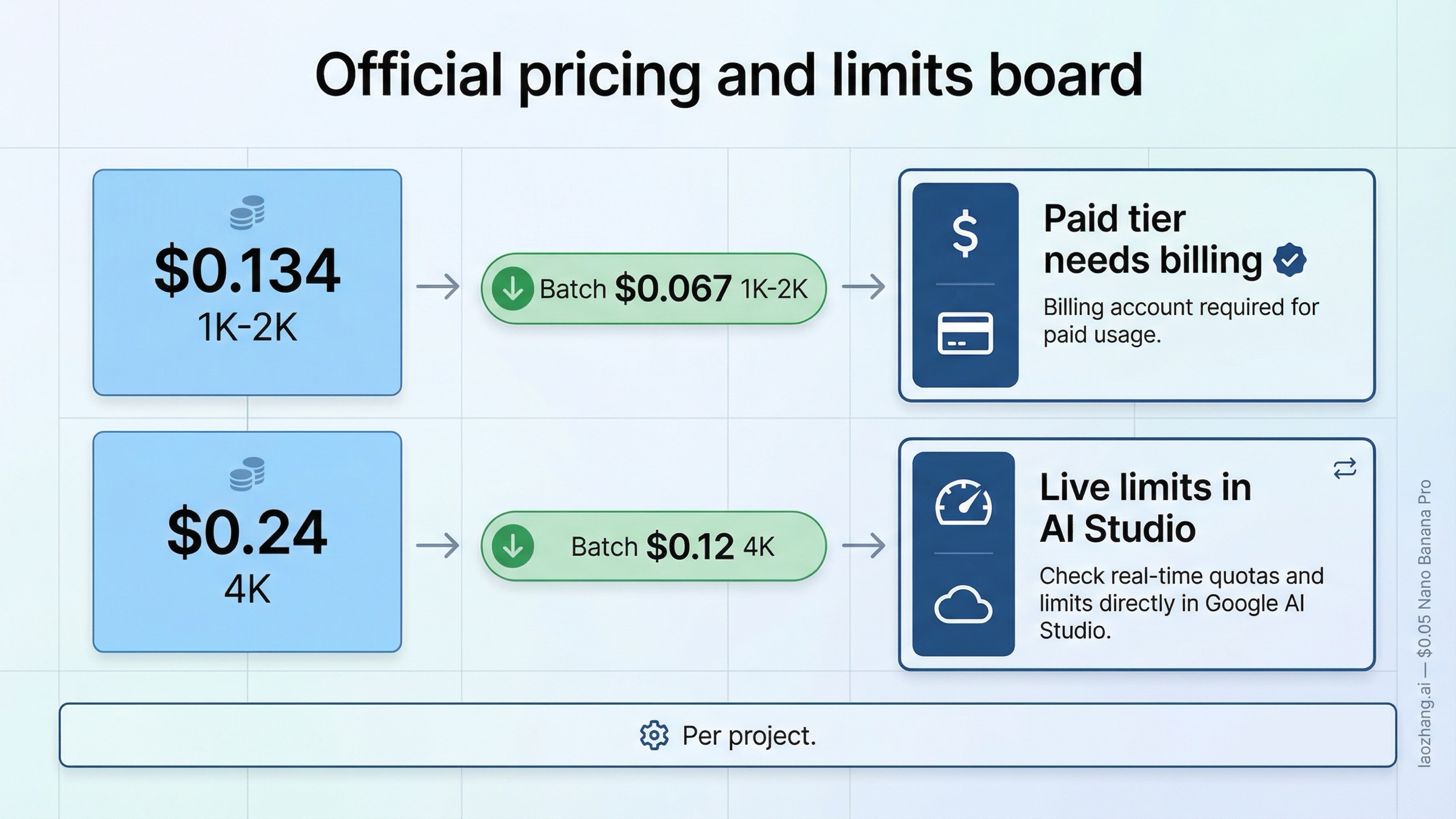
Google's billing page says new Gemini API accounts begin on the Free Tier and that moving to the Paid Tier means linking a billing account and prepaying at least $10. The same page also notes a temporary prepay-to-postpay migration state that started on March 23, 2026. The practical takeaway is straightforward: do not assume that getting an API key is the whole setup. If your route is correct but billing is not configured the way your project needs, image calls can still fail or behave differently than you expect.
For pricing, the current official baseline from Google's pricing page is:
| Official Google route | Current paid price |
|---|---|
| Gemini 3 Pro Image Preview, 1K or 2K output | $0.134 per image |
| Gemini 3 Pro Image Preview, 4K output | $0.24 per image |
| Gemini 3 Pro Image Preview, Batch API, 1K or 2K | $0.067 per image |
| Gemini 3 Pro Image Preview, Batch API, 4K | $0.12 per image |
Those are the numbers you should anchor first, because almost every provider page on page one is trying to get you to think in wrapper pricing before you have an official reference point. Once you know the Google baseline, comparing relay pricing becomes meaningful. If the cheaper-path question is your real next step, use Nano Banana Pro Cheap API Alternative rather than forcing that entire decision tree into this hub page.
Rate limits are where most stale content does the most damage. Google's rate-limits page does not give one simple public RPM number that applies to every user forever. Instead, it says:
- limits are applied per project
- requests per day reset at midnight Pacific time
- preview models have more restrictive limits
- live limits should be checked in AI Studio
That is why this article does not repeat a fixed universal RPM claim. A lot of pages still do that. Google's own guidance is more conditional than those headlines suggest. The only safe default is to treat AI Studio as the place where your current live limits are confirmed.
Quick start: make your first Nano Banana Pro API call
The fastest safe test is one official Google request, one correct model name, and one image back. Do not start with a wrapper, a batch pipeline, or a complex provider alias if the first goal is simply proving the route.
Native Gemini route
bashcurl -s -X POST \
  "https://generativelanguage.googleapis.com/v1beta/models/gemini-3-pro-image-preview:generateContent" \
  -H "x-goog-api-key: $GEMINI_API_KEY" \
  -H "Content-Type: application/json" \
  -d '{
    "contents": [{
      "parts": [
        {
          "text": "Create a clean 16:9 product hero image of a matte black travel mug on a light concrete surface with soft studio lighting and premium ecommerce styling."
        }
      ]
    }],
    "generationConfig": {
      "responseModalities": ["IMAGE"],
      "imageConfig": {
        "aspectRatio": "16:9",
        "imageSize": "2K"
      }
    }
  }'
This request proves the official route directly. It uses the canonical Google model string, the current native Gemini contract, and the image-specific configuration fields Google documents for Gemini 3 image generation.
On the native route, expect the returned image bytes inside the response content rather than as a friendly hosted file URL. That is another reason the native contract is the better first proof. Once you can see the real response shape, you know whether you are debugging access, model selection, or your own save logic instead of guessing which layer failed.
Gemini OpenAI-compatible route
If you already have an OpenAI-shaped client and want the compatibility layer on purpose, Google's own docs support that too:
pythonfrom openai import OpenAI

client = OpenAI(
    api_key="GEMINI_API_KEY",
    base_url="https://generativelanguage.googleapis.com/v1beta/openai/",
)

result = client.images.generate(
    model="gemini-3-pro-image-preview",
    prompt="Create a clean 16:9 product hero image of a matte black travel mug on a light concrete surface with soft studio lighting and premium ecommerce styling.",
    size="2K",
    n=1,
)
Use that route when client compatibility is the reason you are here, not just because the example looks shorter.
After you get one successful response, the better next step depends on what still feels unclear:
- If the blocker is billing, go to Nano Banana Pro Google AI Studio Billing.
- If the blocker is API key acquisition, go to Nano Banana Pro API Key.
- If the blocker is deeper step-by-step setup, go to Nano Banana Pro API Setup.
Common failures after setup
The query often becomes a support question one click after the first code sample. That is why this section matters more than another generic list of features.
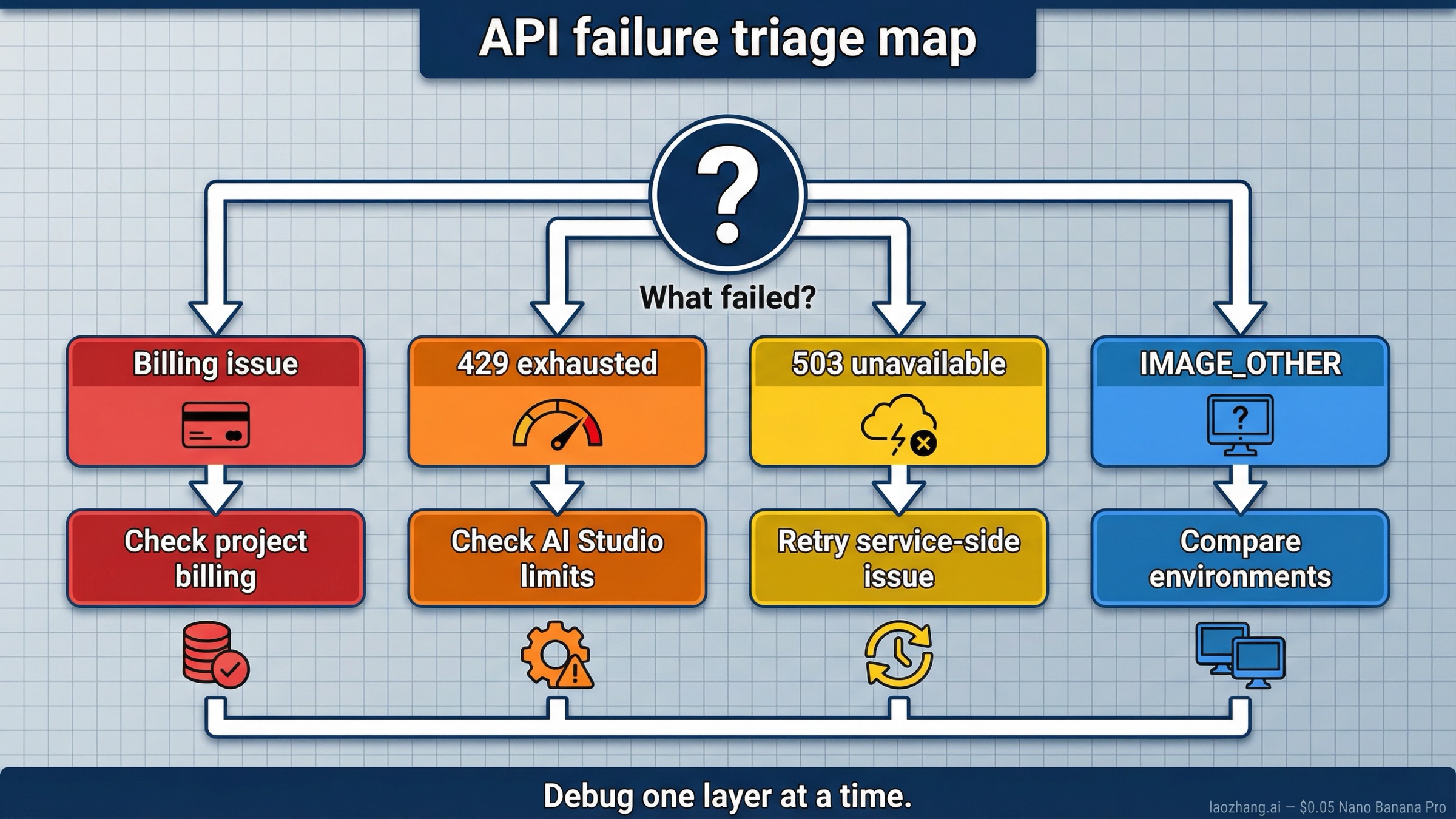
Google's own docs explain where limits and billing live, but the implementation-friction threads show the patterns users actually trip over. The Google Developers Forum thread documents IMAGE_OTHER failures that reproduce in AWS Lambda but not locally. A widely shared Reddit thread shows how often users confuse rate-limit exhaustion with backend-capacity failures.
The fastest triage table is:
| What you see | What it usually means | What to check first |
|---|---|---|
| Billing-related error or missing paid access | Your route is right, but the project is still on the wrong billing state | Confirm Paid Tier setup and project linkage |
429 Resource Exhausted | You hit a real project-level limit or a stricter preview-model quota window | Check live limits in AI Studio before changing code |
503 Service Unavailable | This is usually service-side capacity trouble, not a model-name typo | Retry, reduce pressure, and avoid assuming the endpoint is wrong |
IMAGE_OTHER or image-generation failure with the right model ID | The model accepted the request shape but could not complete generation under current conditions | Re-run with a simpler prompt, compare environments, and isolate runtime differences |
| Native route works but compatibility route behaves differently | You are debugging two contracts as if they were the same | Pick one surface and finish debugging there before comparing |
The most important habit is to debug one layer at a time. First prove the official model ID. Then prove billing. Then prove the route. Then prove the compatibility layer or provider gateway if you still need it. That order saves more time than another page of generic optimization tips.
When should you use a relay or provider page instead?
After the official route is clear, relay pages can make sense. They are not automatically bad, and the SERP is full of them for a reason. They usually help in one of four situations:
- you want one OpenAI-style gateway across multiple image models
- you want unified billing across vendors
- you need a provider-specific pricing plan that is better for your traffic shape
- you need a faster commercial onboarding path than direct Google billing provides
What they should not replace is your understanding of the official baseline. If a provider page uses nano-banana-pro instead of gemini-3-pro-image-preview, or leads only with its own credit cost, you should still know what the underlying official model is, what Google charges directly, and where the underlying live limit behavior comes from.
That is why this hub page stays official-first. It is fine to compare relays after that. It is a mistake to start there without understanding the Google route you are abstracting away.
If your real next step is choosing a cheaper or easier gateway, the better follow-up pages are:
- Nano Banana Pro Cheap API Alternative
- How to Call Nano Banana Pro via API
- Nano Banana Pro API Pricing
FAQ
What is the official Google model name for Nano Banana Pro API?
The official Google model string is gemini-3-pro-image-preview. Nano Banana Pro is the nickname, not the canonical API model name.
Do I have to use the native Gemini API, or can I use an OpenAI-compatible client?
You can use both. The native Gemini route is the safest default for new integrations. The Gemini OpenAI-compatible route is the better choice when preserving an OpenAI-shaped client is the main goal.
Where do I see my real live limits?
Google's current rate-limits page says active limits should be checked in AI Studio. The public docs explain the rules, but AI Studio is where your current project-level limit state is visible.
Do I need billing before I can use Nano Banana Pro API seriously?
Yes. Google's billing docs say moving to the Paid Tier means linking a billing account and prepaying at least $10. Do not assume an API key alone gives you the production route you want.
Do generated images include SynthID?
Yes. Google's image-generation docs say generated images include SynthID watermarking.
Bottom line
Nano Banana Pro API is not a mystery product. It is Google's gemini-3-pro-image-preview.
If you are starting fresh, use the native Gemini route first. If you already have an OpenAI-shaped client and want the shortest migration path, use the Gemini OpenAI-compatible route on purpose. In both cases, anchor your decisions to Google's official pricing, billing, and limit pages before you let provider landing pages define the whole story for you.