
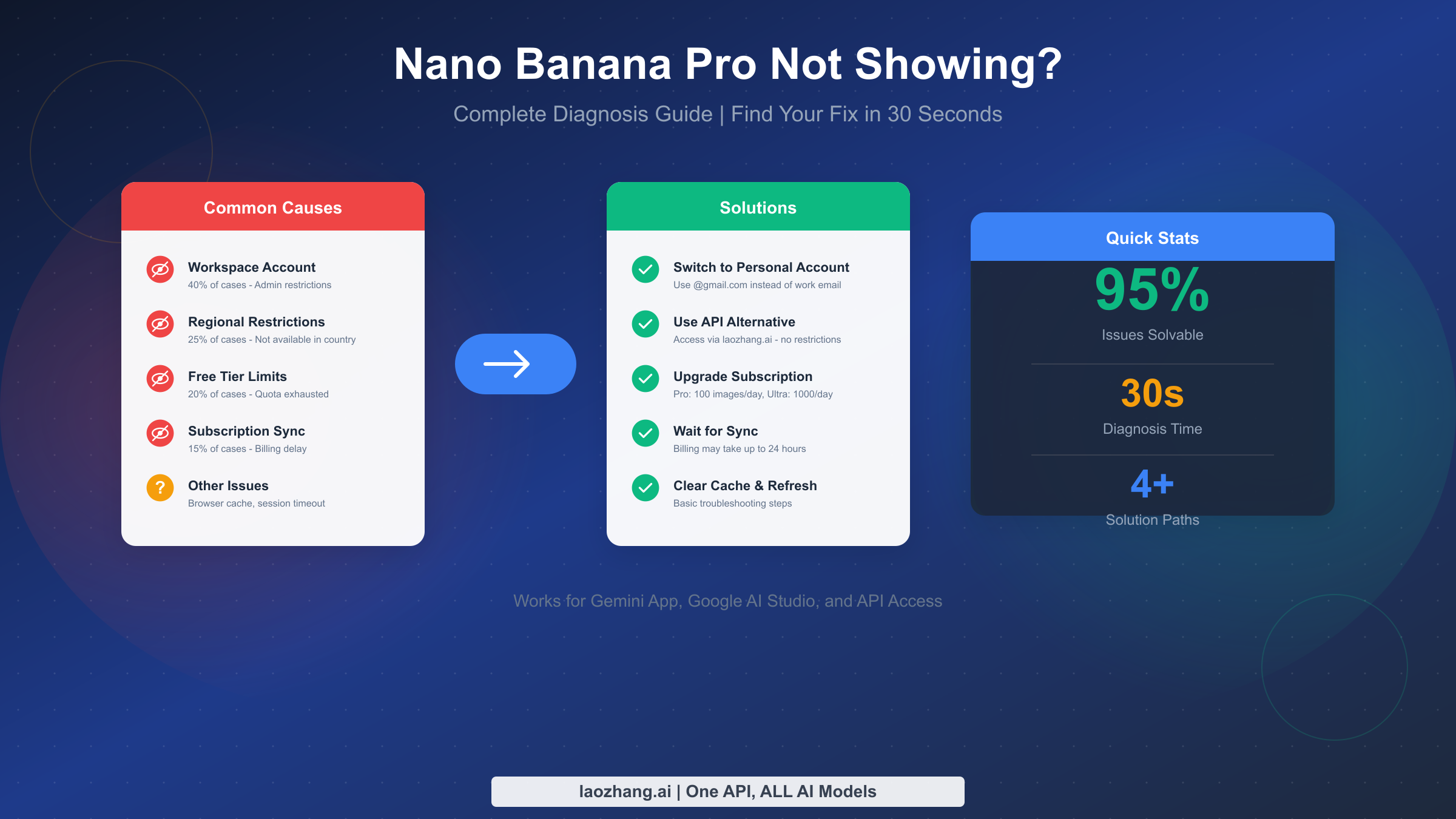
Frustrated because Nano Banana Pro isn't showing up in your Gemini app? You're not alone. Thousands of users have reported this exact issue across Google's support forums, and the good news is that 95% of cases are solvable once you identify the root cause. Whether you're seeing a completely blank interface where image generation should be, or the "Create images" option has mysteriously vanished, this guide will help you diagnose your specific problem in under 30 seconds and implement the right fix.
TL;DR
Nano Banana Pro not showing in your Gemini app? The most common causes are:
- Account type (40%): Work or school Google Workspace accounts often have this feature disabled by administrators—this is the single most frequent reason
- Regional restrictions (25%): Nano Banana Pro isn't available in all countries, and VPNs are increasingly detected and blocked
- Subscription tier (20%): Free users have extremely limited access (2-3 images per day), and once exhausted, the feature may disappear entirely
- Quota exhausted (15%): Daily limits reset at midnight UTC, not your local time
Quick fix: First, check if you're using a personal Google account (not Workspace). If the feature still doesn't show, try the API alternative through laozhang.ai for reliable access regardless of your region or account type.
Quick Diagnosis: Find Your Problem in 30 Seconds
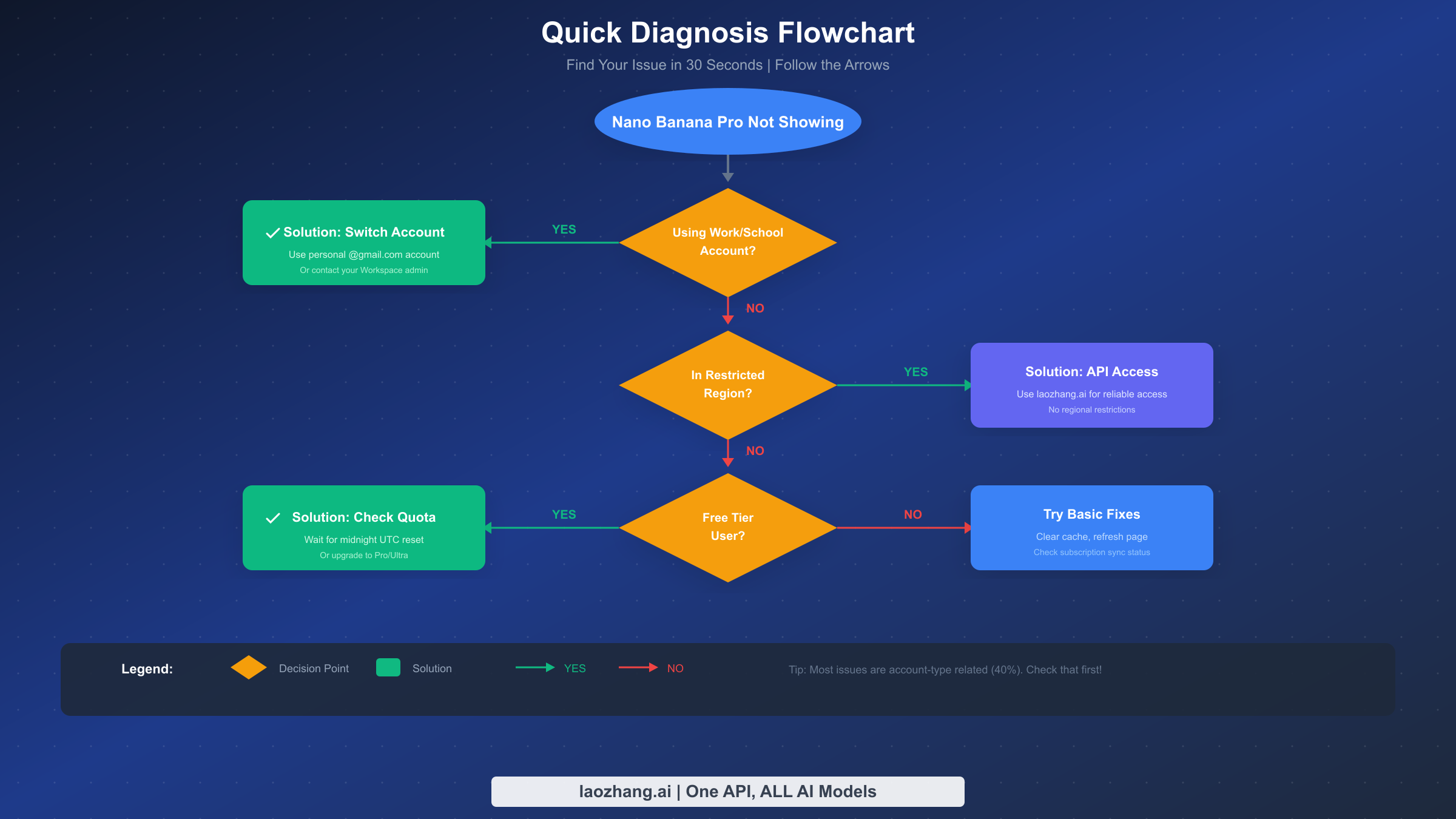
Before diving into detailed troubleshooting, use this quick diagnostic process to identify your specific issue. The flowchart above provides a visual guide, but here's the text version for accessibility.
Question 1: Are you using a work or school Google account?
If your email address is from your company or educational institution rather than @gmail.com, you're likely using a Google Workspace account. This is the most common cause of the feature not appearing, responsible for approximately 40% of all reports. Skip directly to the Account Type section below.
Question 2: Are you in a region with known restrictions?
Google limits Nano Banana Pro availability in certain countries due to regulatory requirements or infrastructure limitations. If you're in China, Russia, Iran, or certain other regions, this is likely your issue. Jump to the Regional Availability section for solutions.
Question 3: What subscription tier are you on?
Free tier users receive extremely limited quotas (as few as 2-3 images per day), and once exhausted, the feature may not appear at all until the next reset. If you've been generating images today, this could be your culprit. Check the Subscription and Quotas section.
Question 4: Did the feature suddenly disappear after working previously?
If Nano Banana Pro was working fine and suddenly vanished, you might be experiencing a session timeout, cache issue, or temporary service disruption. The Basic Troubleshooting section has steps for this scenario.
Understanding which category applies to you saves significant time. Most users spend hours trying random fixes when a quick diagnosis would have pointed them to the right solution immediately. Now let's dive deep into each potential cause and its specific fix.
Account Type: The Number One Reason Features Don't Appear
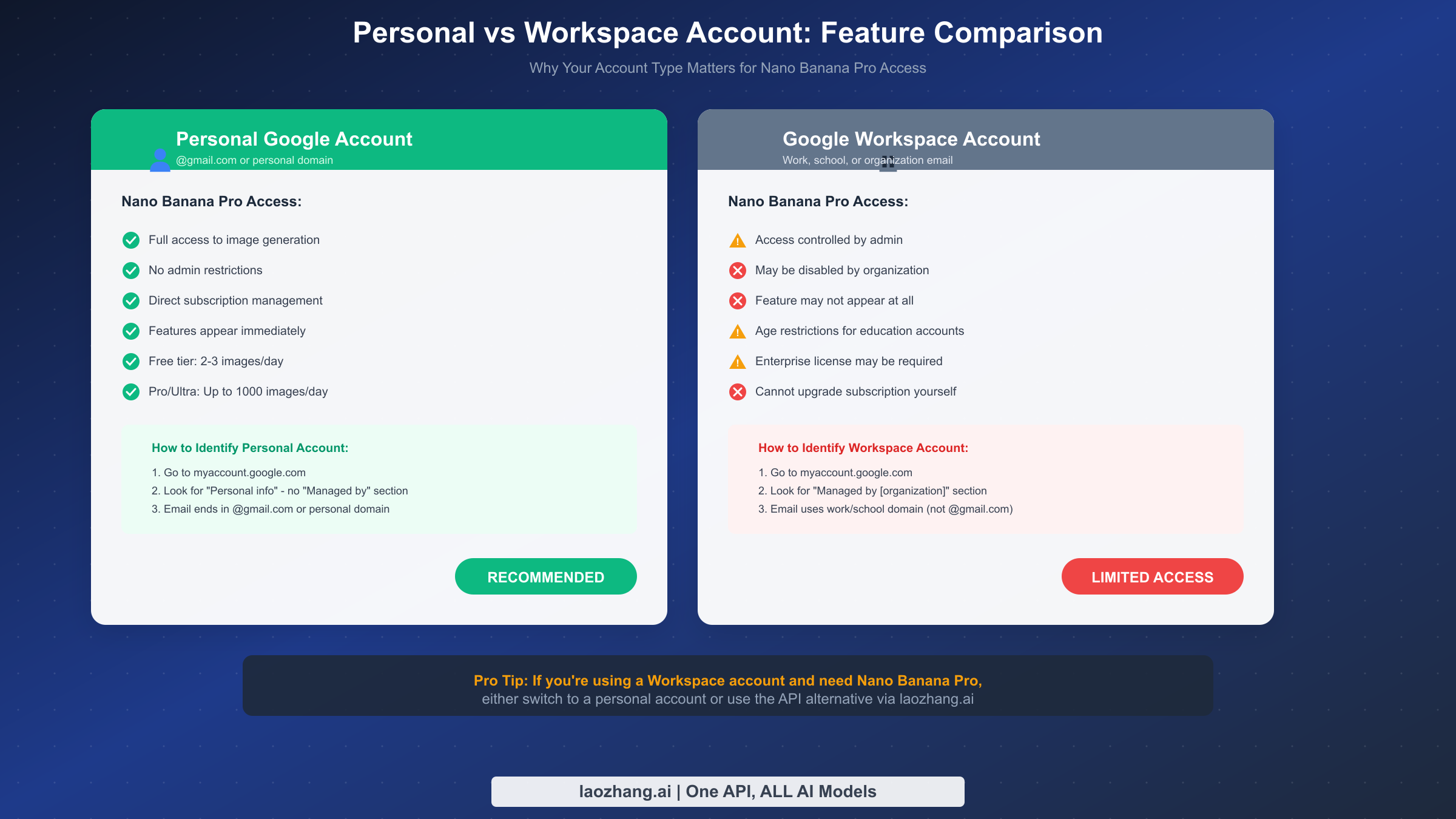
The account type distinction is crucial and often overlooked. Based on analysis of community reports, account-related issues account for roughly 40% of all "Nano Banana Pro not showing" cases. Understanding the difference between personal Google accounts and Google Workspace accounts is the first step to solving your problem.
Personal Google Account characteristics:
A personal account is one you created yourself, typically ending in @gmail.com or connected to a personal domain you own. With personal accounts, you have full control over your Google services. Nano Banana Pro features appear automatically once available in your region, and you can upgrade to Pro or Ultra subscriptions directly without any organizational approval.
When you visit myaccount.google.com with a personal account, you'll see your account settings without any "Managed by" section. This is the key identifier. Personal accounts give you direct access to new features as Google rolls them out, including experimental features in AI services.
Google Workspace Account characteristics:
Workspace accounts are managed by an organization—your employer, school, or any entity using Google Workspace for business. Your email might be something like yourname@company.com or student@university.edu. Even if the domain looks personal, if it was set up through Google Workspace, it's subject to administrative controls.
The critical difference is that Workspace administrators can disable specific features, including AI image generation, for their entire organization. This is often done for compliance, security, or cost-management reasons. Even if you personally have a Gemini Pro subscription, your admin's policy takes precedence.
How to check your account type:
Navigate to myaccount.google.com and look for these indicators:
First, check the top of the page for any "Managed by [organization name]" banner. If you see this, you're on a Workspace account. Second, click on "Personal info" and look for any section mentioning your organization or administrator. Third, try accessing admin.google.com—if you get an access denied error mentioning your organization, you're definitely on Workspace.
Solutions for Workspace account users:
If you've confirmed you're on a Workspace account and Nano Banana Pro isn't appearing, you have three options. The first and simplest is to use a personal Gmail account instead. Sign out of your Workspace account, create or sign into a personal @gmail.com account, and access Gemini there.
If you must use your Workspace account, contact your IT administrator or Google Workspace admin. They can enable Gemini Apps and AI features through the Admin Console by navigating to Apps → Additional Google services → Gemini for Workspace → Service status → turning on image generation features. Note that this requires appropriate licensing.
For users who need reliable access without organizational restrictions, the API alternative through laozhang.ai provides consistent access regardless of account type, as it bypasses the consumer interface entirely.
Subscription Tiers and Daily Quotas Explained
Understanding the subscription system is essential because quota exhaustion is responsible for approximately 20% of "feature not showing" reports. Google's tiered system determines not just how many images you can generate, but whether the feature appears at all.
Free tier limitations:
Free users receive the most restricted access. The exact quota varies based on server load and demand, but typically ranges from 2-5 images per day during peak times to potentially 50-100 during low-demand periods. Once you exhaust your free quota, Gemini doesn't display an error—the image generation option simply becomes unavailable or hidden until your quota resets.
This silent failure mode causes significant confusion. Users often don't realize they've hit a limit because there's no explicit "quota exhausted" message. The feature just vanishes, leading many to search for solutions to a problem that will resolve itself at midnight UTC.
Pro tier ($19.99 per month):
Gemini Pro subscribers receive significantly higher quotas, typically around 100 images per day. The Pro tier provides consistent access to Nano Banana Pro features with faster generation times and priority server access. Pro users rarely experience the feature disappearing due to quota issues.
However, even Pro users need to understand that quotas reset at midnight UTC, not local time. If you're in Pacific Time, for example, your quota resets at 4 PM or 5 PM your time (depending on daylight saving). This timing difference catches many users off guard.
Ultra tier ($34.99 per month):
The Ultra tier provides the highest quotas, approximately 1000 images per day, along with access to the highest quality 4K resolution outputs. For professional users or those with heavy image generation needs, this tier essentially removes quota concerns entirely.
Verifying your subscription status:
To confirm your subscription tier, visit gemini.google.com and look at the badge displayed near your profile icon or in the app settings. You should see either no badge (free tier), a "Pro" badge, or an "Ultra" badge. If you've recently upgraded and don't see the appropriate badge, the system may need up to 24 hours to sync your billing status.
If you're a paying subscriber but the feature still isn't showing, the issue is likely not quota-related. Move to the next diagnostic category. For users frequently hitting quota limits, the API access through laozhang.ai offers pay-as-you-go pricing without daily limits, at approximately 79% lower cost than official subscriptions.
Google Workspace: Admin Settings and Enterprise Access
For enterprise and educational users, the Workspace administrative layer adds complexity that individual consumers don't experience. If you're using a work or school account and have confirmed that's causing your access issues, this section explains what's happening and how to potentially resolve it.
Why organizations restrict AI features:
Workspace administrators disable AI features for various legitimate reasons. Data privacy concerns lead many organizations to limit AI tools that might process sensitive information. Regulatory compliance requirements in industries like healthcare, finance, or education often mandate restrictions on AI usage. Cost management also plays a role—some AI features require additional licensing that organizations haven't purchased.
Understanding your organization's rationale helps frame your request if you choose to ask for access.
The Admin Console path for AI features:
If you're a Workspace administrator or can communicate with one, here's the specific path to enable Nano Banana Pro features. In the Admin Console (admin.google.com), navigate to Apps, then Additional Google services, then Gemini for Workspace. Within this section, there's a Service status setting that controls whether Gemini Apps are available to users.
For image generation specifically, the admin needs to ensure that image generation features are enabled within the Gemini configuration. This may require specific licensing depending on the organization's Workspace plan.
Requesting access from your administrator:
If you need Nano Banana Pro for legitimate work purposes, prepare a clear request for your IT team. Explain the specific use case—such as creating presentation graphics, marketing materials, or design concepts. Address potential data concerns by noting what information you'd input (typically just text prompts, no sensitive data). Offer to follow any usage guidelines they establish.
Many organizations are more receptive to enabling AI tools when presented with specific, bounded use cases rather than general requests for "access to AI features."
When organizational access isn't possible:
If your organization cannot or will not enable AI image generation features, you have two main alternatives. First, use a personal Google account for non-work-related image generation. Second, for work-related needs, consider API access through services like laozhang.ai, which provides programmatic access that may fit better within organizational compliance frameworks since it operates as a development tool rather than a consumer service.
Regional Availability: Countries and Workarounds
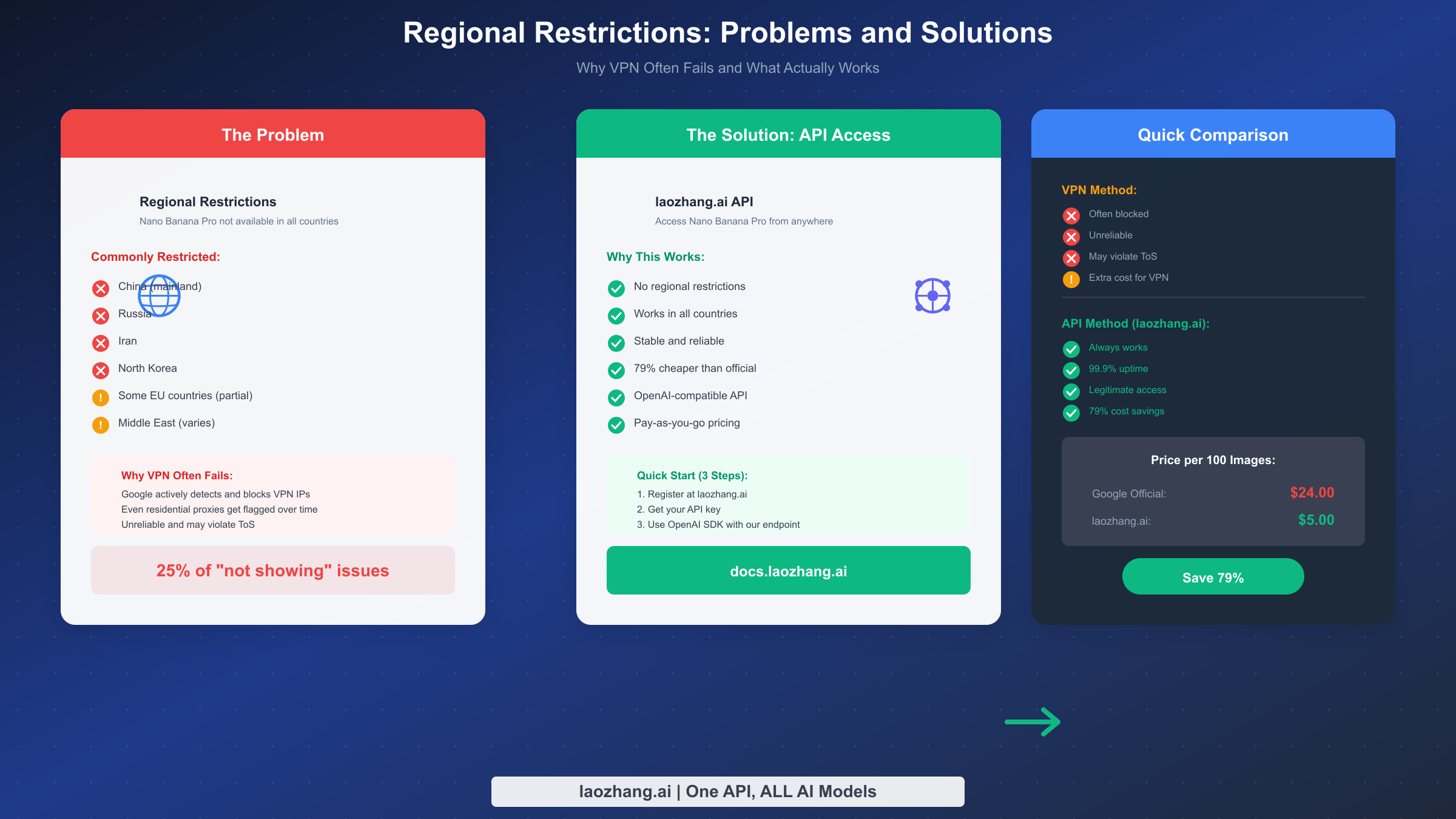
Regional restrictions account for approximately 25% of access issues. Unlike account-type restrictions that can be resolved by switching accounts, regional limitations require different approaches. Google restricts Nano Banana Pro in certain regions due to local regulations, infrastructure requirements, or strategic business decisions.
Understanding regional restrictions:
The availability of AI features varies significantly by country. Some regions have complete blocks—features simply don't exist for users in those areas. Other regions have partial availability, where some features work but advanced image generation is limited. Google doesn't publish a comprehensive list of restricted regions, which adds to user confusion.
Based on community reports, users in mainland China, Russia, Iran, and North Korea consistently report inability to access Nano Banana Pro. Users in some Middle Eastern countries, certain African nations, and parts of Southeast Asia report intermittent or partial access. European users generally have access, though some specific features may be limited due to GDPR-related considerations.
Why VPN solutions often fail:
The first instinct for users in restricted regions is to use a VPN. While this worked initially, Google has become increasingly sophisticated at detecting VPN usage. The company employs multiple detection methods including IP reputation databases, connection pattern analysis, and behavioral fingerprinting.
Modern VPN detection means that even if you successfully connect through a VPN, Google may still identify your actual region and restrict features accordingly. Worse, attempting to bypass restrictions this way may violate Google's Terms of Service, potentially putting your account at risk.
Residential proxy services offer slightly better success rates than commercial VPNs, but they're expensive, often unreliable, and still face the same ToS concerns. The cat-and-mouse game between VPN providers and detection systems means today's working solution might fail tomorrow.
The reliable alternative: API access:
For users consistently affected by regional restrictions, API access through third-party aggregators represents the most reliable long-term solution. Services like laozhang.ai provide access to Nano Banana Pro through their API infrastructure, effectively bypassing regional restrictions entirely.
The API approach works because it routes requests through properly authorized infrastructure rather than trying to mask your location. This is legitimate, reliable, and actually offers cost advantages—approximately 79% lower than official pricing for equivalent image generation.
Setting up API access takes only a few minutes: register at laozhang.ai, obtain your API key, and use standard OpenAI-compatible SDK calls with the laozhang.ai endpoint. For users who need consistent, reliable access regardless of their physical location, this approach eliminates regional uncertainty entirely. For detailed pricing information, see our comprehensive Nano Banana Pro API pricing guide.
Troubleshooting Steps That Actually Work
After ruling out account type, region, and subscription issues, there's a category of problems caused by temporary glitches, session timeouts, or browser-related issues. These affect approximately 15% of users and are usually the easiest to resolve.
Clearing browser data effectively:
Cache and cookie issues are real, but the "clear your cache" advice is often given too broadly. For Gemini-specific issues, you don't need to clear your entire browser—focus on google.com and gemini.google.com domains specifically. In Chrome, go to Settings, Privacy and security, Cookies and other site data, See all cookies and site data, then search for "google" and clear those entries specifically.
After clearing site data, close your browser completely (not just the tab) and reopen it. This forces a fresh session establishment that resolves many display issues.
Session timeout recognition:
If you left a Gemini tab open while working on other things and returned to find features missing, session timeout is likely the culprit. Gemini maintains active sessions that expire after 30-60 minutes of inactivity. When you return, the interface may display incorrectly until you establish a fresh session.
The fix is simple: refresh the page or navigate away and back. If that doesn't work, sign out and sign back in to force a complete session reset.
Browser compatibility checks:
Gemini works best in Chrome, which isn't surprising given Google's ecosystem. While other browsers generally work, some users report issues with Safari, Firefox, or Edge, particularly with newer AI features. If you're experiencing problems, try accessing Gemini through Chrome before investing time in other troubleshooting.
Browser extensions can also interfere with Gemini's functionality. Ad blockers, privacy extensions, or JavaScript modifiers may prevent features from loading correctly. Try accessing Gemini in an incognito or private browsing window, which typically disables extensions by default.
When basic troubleshooting doesn't help:
If you've tried cache clearing, session resets, and browser changes without success, your issue likely falls into one of the earlier categories (account type, region, or subscription) that you may have initially ruled out incorrectly. Go back through the diagnostic flowchart with fresh eyes.
For users who continue experiencing issues despite exhausting troubleshooting options, the complete troubleshooting guide for Nano Banana Pro errors covers additional edge cases and error-specific solutions. If you're seeing safety-related errors or blocked prompts rather than a missing feature, check our IMAGE_SAFETY error resolution guide.
Reliable Alternative: API Access Through laozhang.ai
When official channels don't work—whether due to account restrictions, regional limitations, or other access barriers—API access provides a robust alternative that many professional users actually prefer to direct Gemini access.
Why API access solves most problems:
API (Application Programming Interface) access routes your image generation requests through authorized infrastructure that isn't subject to the same restrictions as the consumer interface. This means no account type limitations (Workspace or personal doesn't matter), no regional blocks (the API works globally), and no silent quota failures (you always know exactly where you stand).
The misconception that API access is "only for developers" keeps many users from exploring this option. In reality, modern API interfaces are designed to be accessible, and several wrapper tools exist that provide user-friendly interfaces on top of API functionality.
Getting started with laozhang.ai:
The setup process takes less than five minutes. First, visit laozhang.ai and create an account. You'll receive an API key that authenticates your requests. The service uses OpenAI-compatible endpoints, meaning any tool or code designed for OpenAI's API works with laozhang.ai by simply changing the base URL.
For non-developers, tools like image generation web interfaces built on top of API access provide the same experience as using Gemini directly, but with the reliability of API infrastructure. Check the laozhang.ai documentation for recommended client applications.
Cost comparison:
One of the significant advantages of API access is cost efficiency. Google's official pricing for Nano Banana Pro image generation comes to approximately $0.24 per image at standard rates. Through laozhang.ai, the same generation costs approximately $0.05 per image—a 79% reduction.
For users generating dozens or hundreds of images, this cost difference is substantial. The pay-as-you-go model also means you only pay for what you use, unlike subscription tiers where unused quota simply expires.
When to choose API over direct access:
Consider API access if you're in a restricted region and need reliable access, if your organization's Workspace policy blocks AI features but you need them for work, if you're hitting quota limits frequently and need predictable pricing, or if you're building applications that integrate image generation functionality.
The API approach isn't right for everyone—casual users who occasionally generate an image and have full access through Gemini may find the consumer interface more convenient. But for anyone facing systematic access barriers, API access through laozhang.ai provides a professional-grade solution.
Summary and Frequently Asked Questions
We've covered the main reasons why Nano Banana Pro might not appear in your Gemini interface and the specific solutions for each scenario. Here's a quick recap and answers to the most common questions.
Key takeaways:
First, account type is the most common culprit. If you're using a work or school account, switch to a personal Gmail account or explore API alternatives. Second, regional restrictions are real and VPNs increasingly fail to bypass them—API access is the reliable solution for affected regions. Third, quota exhaustion on free tier causes silent feature disappearance—understand that limits reset at midnight UTC. Fourth, basic troubleshooting (cache clearing, session refresh) solves about 15% of issues when done correctly. Fifth, API access through laozhang.ai provides reliable, cost-effective access regardless of account type or region.
Frequently Asked Questions:
Why did Nano Banana Pro suddenly disappear from my Gemini?
The most common reason for sudden disappearance is quota exhaustion on free tier. Free users have limited daily quotas that reset at midnight UTC. If you've been generating images and the feature vanishes, wait for the reset. Other causes include session timeout (refresh the page), service outages (check Google's status page), or A/B testing where Google temporarily disables features for some users.
Can I use Nano Banana Pro with my work email?
It depends entirely on your organization's Workspace configuration. Your IT administrator controls whether AI features are enabled. Even if you have a personal Gemini Pro subscription, your organization's policy takes precedence when you're signed in with your work account. For guaranteed access, use a personal account or API access.
How do I know if my region restricts Nano Banana Pro?
Google doesn't publish an official list, but you can infer restrictions if the feature never appears despite using a personal account with verified subscription status. Users in China, Russia, Iran, and some other countries consistently report restrictions. If you suspect regional blocking, API access through laozhang.ai provides an immediate test—if it works there but not in Gemini, regional restriction is confirmed.
Is using API access as good as using Gemini directly?
For image quality, yes—you're accessing the same Nano Banana Pro model. The main difference is interface: API access requires using compatible tools or interfaces rather than Gemini's native interface. For many users, particularly those generating images for professional purposes, API access is actually preferred due to its reliability and cost advantages.
Why doesn't Google just tell me why the feature isn't showing?
Google's consumer products typically don't provide detailed error explanations, particularly for features still in development or limited rollout. The silent failure mode—where features simply don't appear rather than showing an error—is unfortunately common. This guide exists because that lack of transparency leaves users frustrated and searching for answers.
What should I do if nothing in this guide solved my problem?
If you've worked through every section and still can't access Nano Banana Pro, consider these steps. First, try accessing from a completely different device and network to rule out any local factors. Second, create a fresh Gmail account specifically for testing—if the feature appears there, your original account has some unknown restriction. Third, report the issue to Google through Gemini's feedback mechanism, though response times vary widely. Fourth, consider API access as your primary solution while waiting for your direct access issue to resolve.
For related troubleshooting needs, see our guides on fixing Nano Banana Pro errors and blocked prompts, resolving IMAGE_SAFETY filter issues, and handling 429 rate limit errors.