
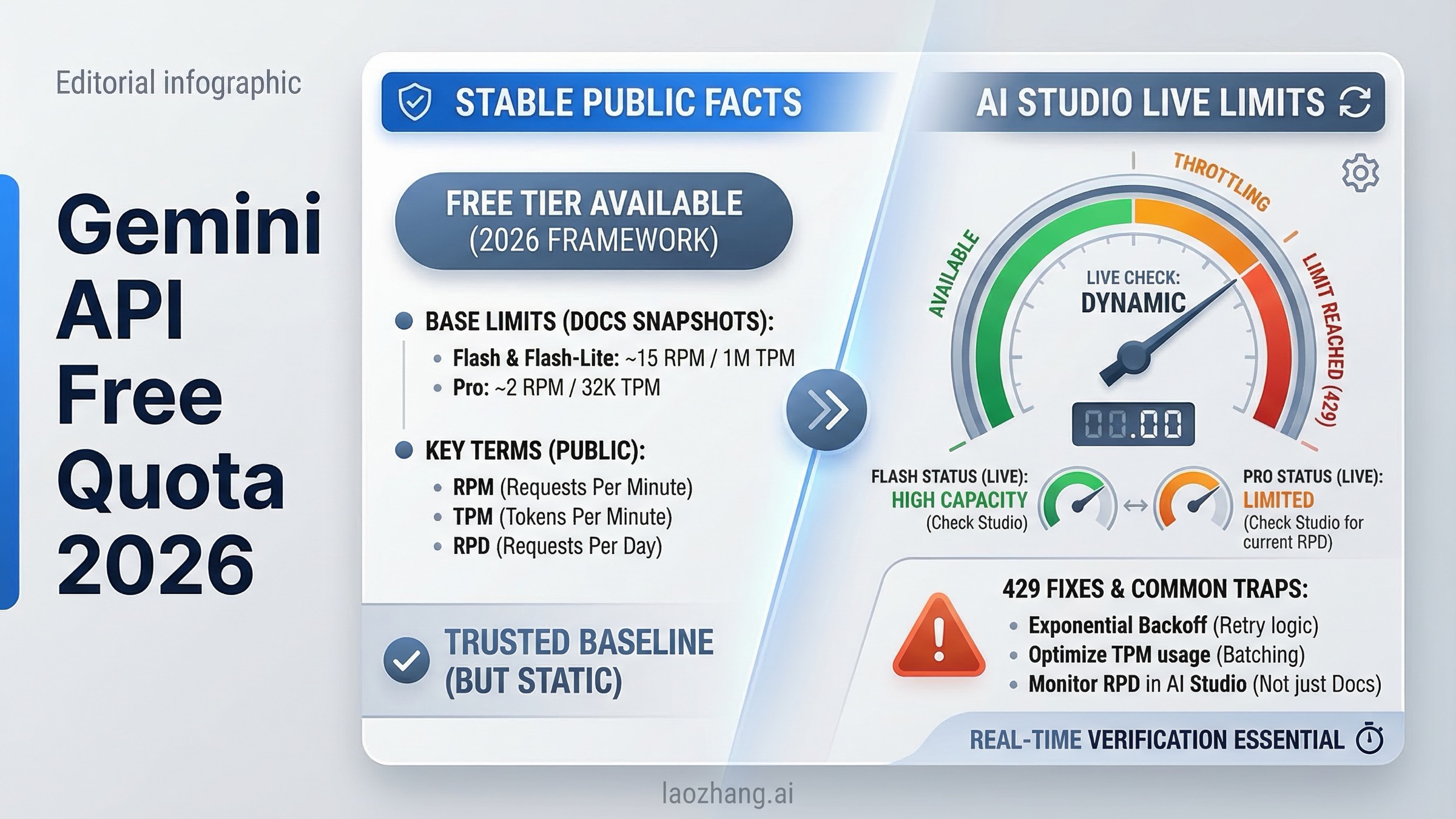
As of March 18, 2026, the short answer is yes: Gemini Developer API still offers unpaid quota, and Google still says you can create a Gemini API key for free. The part that changed is the trust model. Google's live public rate limits page no longer gives a full guaranteed per-model free-tier matrix the way older guides imply. Instead, it tells you to view your active limits in AI Studio, notes that actual capacity may vary, and keeps the stable mechanics on the doc side.
That difference matters more than most quota guides admit. If you are only trying to validate a prototype, Gemini's free path is still one of the best API on-ramps in the market. If you are trying to plan a production workload, handle sensitive data, or support users in Europe, "free of charge" is not the same thing as "reliably published and contract-like." This guide separates what Google still verifies publicly from what you now need to confirm inside AI Studio, explains why many developers keep running into 429 errors, and gives you a clean rule for when to stop squeezing the free tier and turn on billing.
TL;DR
Gemini API free quota is still real in March 2026, but you should think about it in two layers. Layer one is the stable public layer: Google still documents free API key creation, per-project quota enforcement, midnight Pacific resets, usage-tier thresholds, and free-of-charge pricing for Gemini 2.5 Pro, 2.5 Flash, and 2.5 Flash-Lite on the public docs. Layer two is the live quota layer: the exact active limits for your project are now something Google expects you to confirm inside AI Studio rather than infer from an old public table.
That is why older quota articles feel inconsistent. Many late-2025 pages still repeat figures like 5 RPM for Pro or 10 to 15 RPM for Flash variants. Some of those numbers appeared in older public/community contexts, and some may still resemble what certain projects see, but the current public rate-limit page no longer presents them as a durable March 2026 matrix. If you want a safe operating answer, read the public docs for mechanics and policy, then check AI Studio for the ceiling your project actually has today.
| Question | Best answer on March 18, 2026 |
|---|---|
| Does Gemini API still have a free quota? | Yes. Google still lets you create an API key for free and still lists unpaid standard usage for key Gemini 2.5 text models. |
| Where do I see my exact live limits? | In AI Studio, not from a complete public per-model rate-limit table. |
| What is publicly stable? | Per-project quotas, RPM/TPM/RPD mechanics, midnight Pacific reset, tier thresholds, free-vs-paid pricing status, and unpaid-service terms. |
| Is it safe to treat free tier as production capacity? | No. Google's own messaging and community history point to best-effort behavior, not a guaranteed production entitlement. |
| Which model should most people start with? | Gemini 2.5 Flash for balance, or 2.5 Flash-Lite if maximizing free throughput matters more than reasoning depth. |
| When should I pay? | When you need reliability, privacy protections, European end-user deployment, or more than a small prototype can tolerate. |
If you also need a full pricing picture after the prototype stage, the next page to read is our Gemini API pricing 2026 guide. If you are deciding between providers because OpenAI has no genuinely useful ongoing free API path, our OpenAI API free trial guide explains the current reality there.
What Gemini API Free Quota Still Means in March 2026
The most useful way to understand Gemini's free quota now is to stop treating it like one clean public table and instead treat it as a combination of published policy plus live account state. Google still clearly supports free entry into the platform. The public quickstart says you can create an API key for free. The public pricing page still shows standard free-of-charge usage for Gemini 2.5 Pro, Gemini 2.5 Flash, and Gemini 2.5 Flash-Lite. So the answer is not "free tier is gone." That would be wrong.
What changed is that Google has become more conservative about what it promises publicly. The public rate limits page still explains the mechanics, but instead of showing a full always-current matrix for every project's live free-tier limits, it tells you to view your active rate limits in AI Studio. It also says specified rate limits are not guaranteed and actual capacity may vary. That combination is Google's quiet way of telling you that the live ceiling depends on more than one static doc.
This is also why the December 2025 change caused so much confusion. Developers had trained themselves to think of Gemini free tier as a stable published number set. Then Google tightened and reshaped access, the docs became less explicit in public, and a lot of search results froze the old worldview in place. Community threads on the Google AI Developers Forum show that users felt blindsided because their mental model was "public table equals entitlement." Google's current model is closer to "free quota exists, but active limits are part of the live AI Studio state."
That sounds subtle, but it changes how you should use Gemini:
- For learning, testing, prompt experiments, and small internal prototypes, free quota is still excellent.
- For public product planning, you should budget as if the free tier can shrink, throttle, or stop being the thing that carries your workload.
- For sensitive workloads, free tier has a data-use caveat that may disqualify it even before you hit a limit.
So when people ask "is Gemini API really free?", the best honest answer is: yes for getting started, no if what you really mean is stable production-grade quota without billing.
What Google Publicly Verifies Today
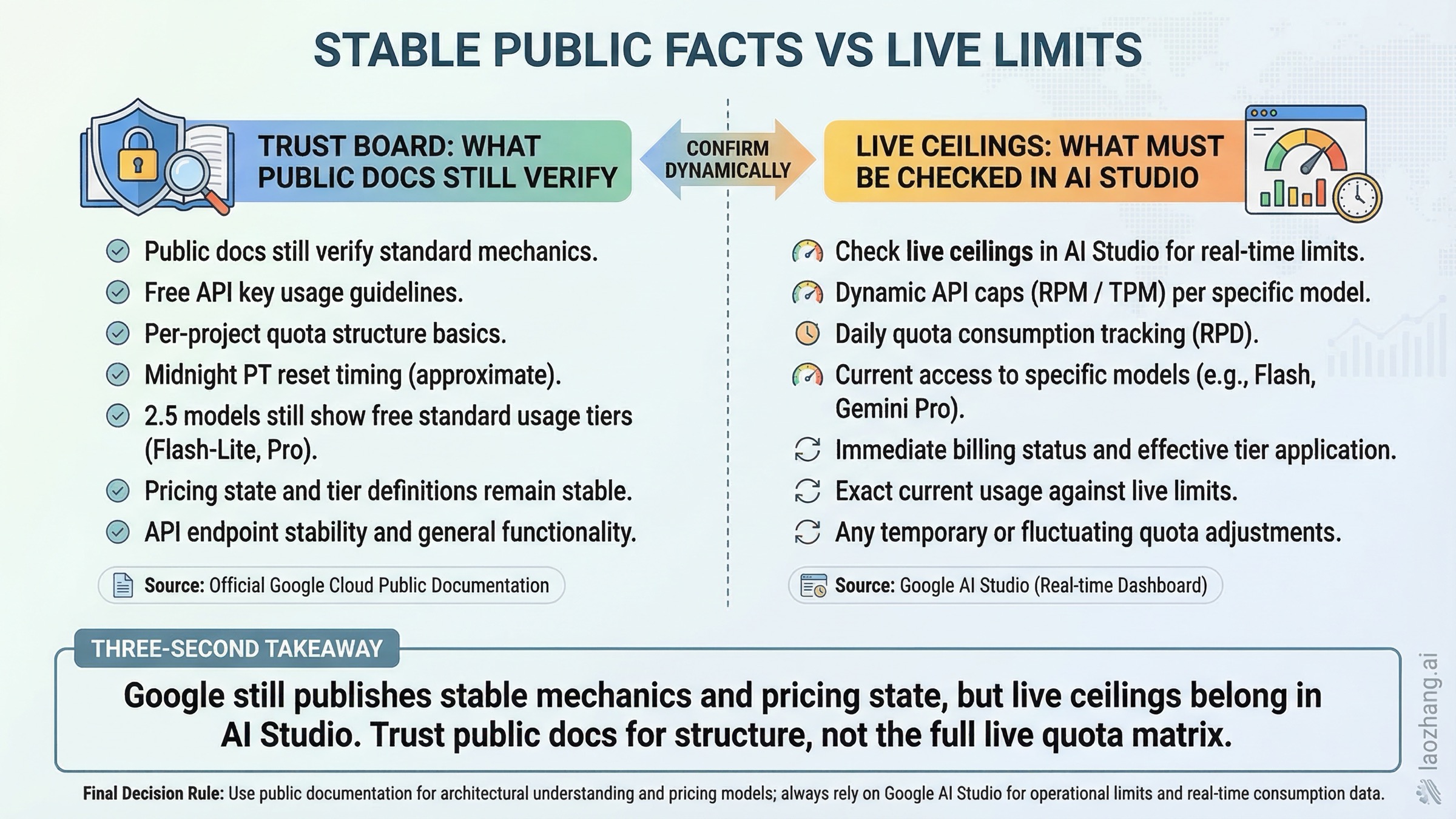
The table below is intentionally strict. Every row is something that is still visible on current public Google documentation as of March 18, 2026. This is the layer you can trust more than recycled quota screenshots.
| Topic | Publicly verified today | Why it matters |
|---|---|---|
| Free entry | Google says you can create a Gemini API key for free in the quickstart. | Confirms unpaid access still exists. |
| Quota scope | Quotas apply per project, not per API key. | Multiple API keys do not multiply free quota. |
| Reset behavior | Requests-per-day reset at midnight Pacific Time. | Helps explain why your quota "comes back" on a US schedule. |
| Quota dimensions | The public docs still define RPM, TPM, and RPD as the main rate-limit dimensions. | You need to know which dimension you actually exhausted. |
| Live limit source | Google tells you to view active limits in AI Studio. | Exact live ceilings are no longer fully public-doc driven. |
| Tier 1 path | Tier 1 starts when you activate billing. | This is the first real escape hatch when free quota stops working. |
| Tier 2 threshold | Tier 2 requires $100 paid spend and at least 3 days since first successful payment. | Useful if you are planning growth and want to know when bigger limits arrive. |
| Tier 3 threshold | Tier 3 requires $1,000 paid spend and at least 30 days since first successful payment. | Important for teams planning sustained high volume. |
| Free pricing status | Gemini 2.5 Pro, 2.5 Flash, and 2.5 Flash-Lite still show free-of-charge standard usage on the pricing page. | Confirms free access remains an official product state. |
| Search grounding on Flash | Flash and Flash-Lite still list free Google Search grounding up to 500 RPD with a shared limit. | One of the few exact free-tier limits still stated publicly. |
| Long context on Pro | Gemini 2.5 Pro lists a 1,048,576 input token limit and 65,536 output token limit. | Important for document-heavy and codebase-heavy prototypes. |
| Unpaid data use | Google says unpaid Gemini API usage can be used to provide, improve, and develop Google products and services. | Free quota is not the right choice for sensitive inputs. |
| Europe/UK rules | End-user apps in the EEA, Switzerland, and the UK may use only paid services. | Free quota is not the compliance-safe launch path there. |
This table also explains why a lot of existing blog content feels "kind of right but not fully trustworthy." The older guides are often built around hard numbers. The public docs today are built around mechanics, model status, pricing state, and tier rules. If you keep those categories separate, the whole picture becomes easier to reason about.
One more important distinction: Google's public docs still make free quota visible on the pricing side, but that does not mean every free-tier model is equally practical. Gemini 2.5 Pro, Flash, and Flash-Lite may all show free-of-charge standard pricing, yet the experience of using them can differ significantly once you factor in live limits, preview restrictions, or sudden demand spikes. That is why this guide focuses less on one magical number and more on what you can count on operationally.
How to Check Your Actual Active Limits in AI Studio
If you only remember one operational step from this article, make it this one: after you create your key, open the AI Studio rate-limit view for the project you are actually going to use. Google's public rate limits page links directly to it for a reason.
The safe workflow looks like this:
- Create the API key through AI Studio.
- Confirm which Google Cloud project the key belongs to.
- Open the AI Studio limit page for that project.
- Check the exact model names you plan to call, not just the family label.
- Record RPM, TPM, RPD, and whether the model is stable, preview, or experimental.
That sounds basic, but it prevents several expensive mistakes. The first is assuming every key under your Google account gets its own free quota. It does not. Quotas are per project. If your teammate, cron job, playground testing, and staging service all hit the same project, the limits are shared. The second mistake is assuming a stable model and a preview model in the same family behave the same way. The public docs explicitly note that preview and experimental models can have more restrictive rate limits.
I also recommend taking a screenshot of the AI Studio limits page when you start a project and another one after you turn on billing. That gives you a concrete before-and-after reference and helps your team stop arguing from old blog posts. In practice, a lot of "Gemini is broken" conversations are really "we are looking at a stale quota assumption from a different month or a different project state."
When you check AI Studio, pay attention to four things besides the raw number:
- Whether the project has billing enabled.
- Whether you are on a stable or preview model.
- Whether you are sharing the project with other workloads.
- Whether your use case depends on search grounding, image generation, or another feature with its own extra constraint.
That last part matters because the public pricing page still exposes a few exact free-tier limits for grounding on Flash and Flash-Lite, but not a complete public matrix for every model. So your "real quota" is often a mixture of public facts plus the live UI state.
Which Free-Tier Model Should You Use: Flash vs Flash-Lite vs Pro
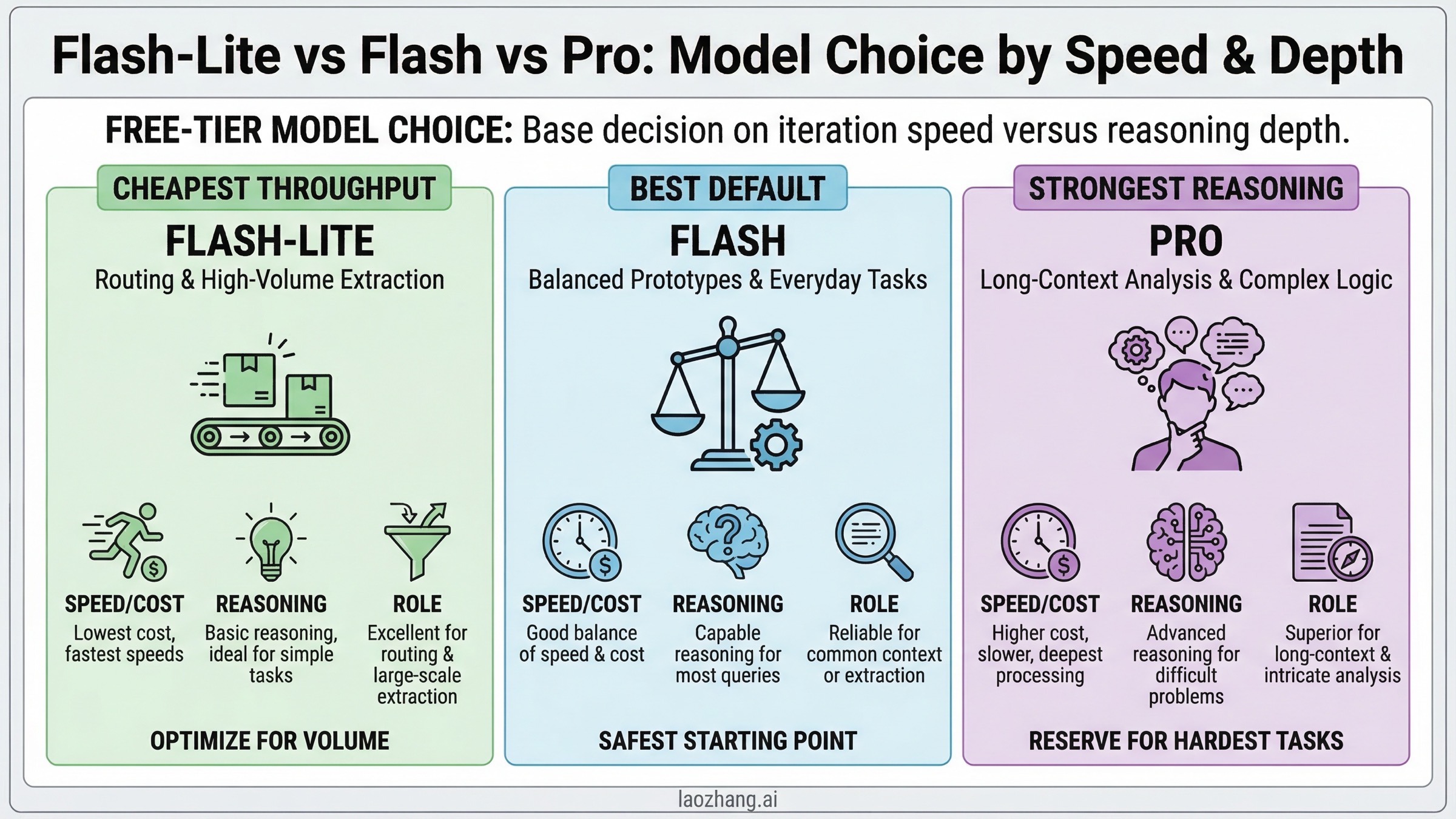
For most developers, the right free-tier model is not the most powerful one. It is the one that lets you iterate often enough to finish the prototype. That usually means starting with Gemini 2.5 Flash or Gemini 2.5 Flash-Lite, not Gemini 2.5 Pro.
| Model | Best fit on free tier | Why it usually wins | Main caveat |
|---|---|---|---|
| Gemini 2.5 Flash-Lite | High-volume prototyping, extraction, classification, cheap routing | Lowest published paid pricing, fast responses, good for simple repeated tasks | Not the best choice when deeper reasoning or nuanced coding quality matters |
| Gemini 2.5 Flash | General chat, product prototypes, balanced reasoning | Best all-around default for most teams starting on unpaid quota | Exact live limits still need to be confirmed in AI Studio |
| Gemini 2.5 Pro | Long-context reasoning, document analysis, difficult coding tasks | Strongest reasoning and long-context option still publicly visible as free-of-charge on pricing | Free access can be tighter and is the easiest place to run into frustration if you expect high iteration speed |
If your main job is trying ideas quickly, Flash-Lite is often the best economic mindset even when Flash looks more exciting. You want the model that lets you run enough tests to learn, not the model that gives you the best answer once and then rate-limits you. Flash-Lite is especially good for classification, guardrails, extraction, lightweight formatting, routing, and first-pass summarization.
If you are building a user-facing prototype and need the best chance of "this feels good enough to demo," start with Flash. It has the cleanest balance of quality and practicality, and it is the model Google itself uses in the current public quickstart. That is not proof that it has the best free-tier limits, but it is a strong signal that Flash remains the default developer path.
Use Pro only when the task really needs it. Pro makes sense for large documents, codebase reasoning, or tasks where the 1,048,576-token input window materially changes what is possible. But Pro is also the easiest model to misuse on free tier because developers fall in love with its strongest-case output and then discover their iteration loop is too constrained for day-to-day work. In other words, Pro is what you choose when task difficulty is your bottleneck. Flash or Flash-Lite are what you choose when quota practicality is your bottleneck.
If you are weighing Gemini against other free or low-cost APIs, our Gemini vs OpenAI vs Claude cost guide gives the broader market view. The key comparison for this page is simpler: Gemini is still the easiest major platform for getting started without immediate spend, but the free path is no longer something you should model like a stable service plan.
Troubleshooting: Why You Still Hit 429 on the Free Tier
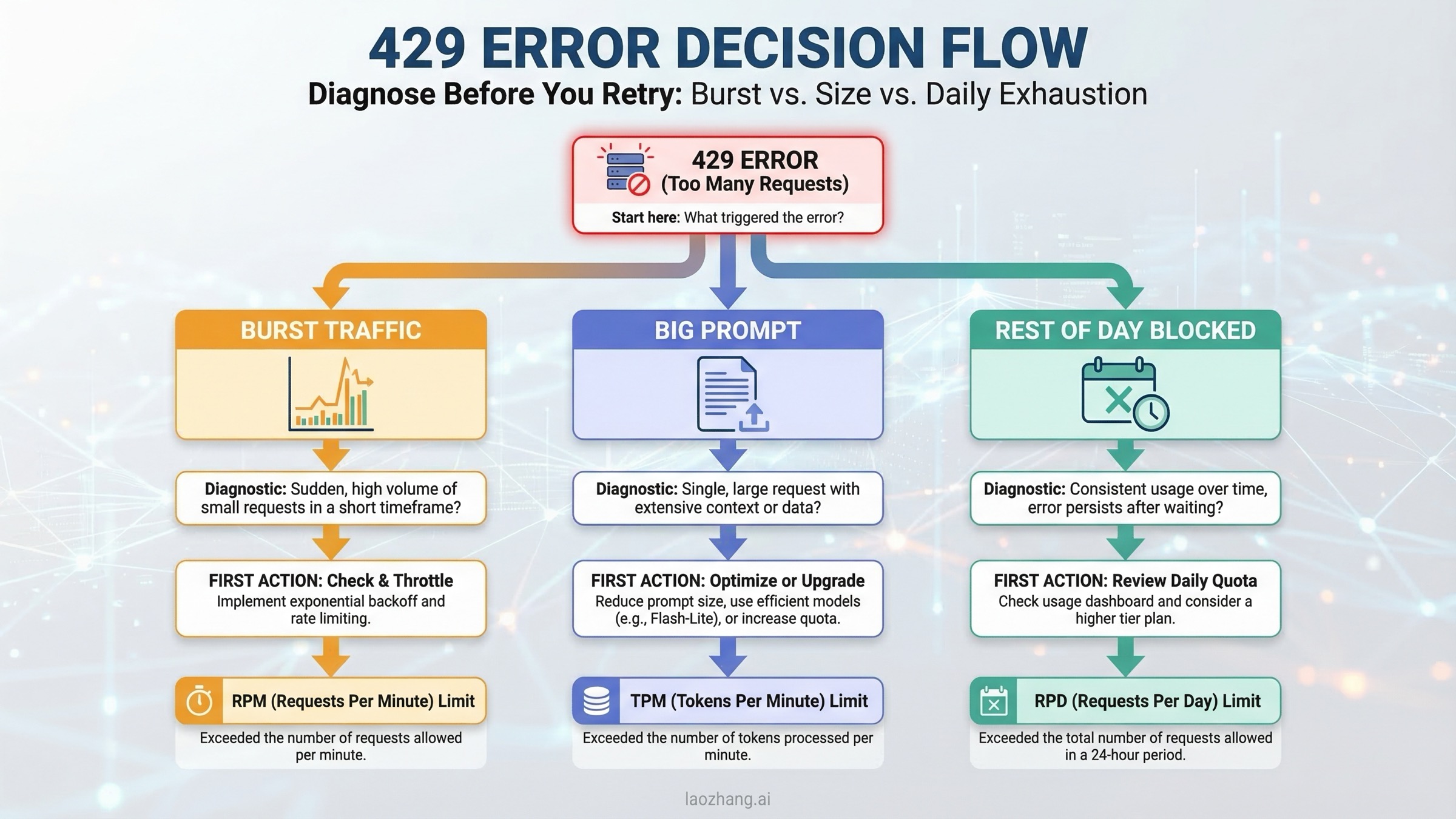
Most Gemini free-tier frustration shows up as a 429 error, but 429 is only the outer shell of the problem. The real question is which limit you hit and whether waiting is the right fix.
| Symptom | Most likely cause | What to do |
|---|---|---|
| A burst of requests fails almost immediately | RPM exhaustion | Slow down concurrent requests, add queueing, add jittered backoff |
| Large prompts fail even though request count is low | TPM exhaustion | Cut prompt size, chunk long inputs, use caching or a smaller context |
| Everything works for a while and then stops for the rest of the day | RPD exhaustion | Wait for midnight Pacific reset or enable billing |
| Two services hit limits unexpectedly at the same time | Shared project quota | Split workloads by project or reduce background traffic |
| A preview model fails more often than expected | Tighter preview capacity | Move to the stable version if available |
| Billing is enabled but limits still feel too low | Tier state, project mismatch, or live capacity issue | Confirm the correct project in AI Studio and re-check the tier shown there |
The first thing to understand is that not every 429 is solved by retrying. Exponential backoff is good for RPM collisions and some transient overload conditions. It is useless when you have exhausted the daily bucket. If the issue is RPD, you need a reset or a paid tier, not a fancier retry loop.
The second thing to understand is that Google's own public language now leaves room for capacity variation. The rate-limit page says actual capacity may vary, and community threads show that developers have experienced periods where real behavior felt harsher than the numbers they expected. That does not mean the docs are false. It means free tier is not a promise of constant service quality. Treat it like a prototyping subsidy, not like a service-level agreement.
For production-minded code, your retry policy should be simple and explicit:
pythonimport asyncio
import random
from google import genai

client = genai.Client(api_key="YOUR_GEMINI_API_KEY")

async def generate_with_retry(prompt: str, retries: int = 5):
    for attempt in range(retries):
        try:
            return client.models.generate_content(
                model="gemini-2.5-flash",
                contents=prompt,
            )
        except Exception as exc:
            if "429" not in str(exc) or attempt == retries - 1:
                raise
            delay = min(2 ** attempt + random.random(), 30)
            await asyncio.sleep(delay)
That code is not magic. It only handles the class of failures where retrying is sensible. If you are seeing repeated 429s late in the day, the more honest fix is to reduce traffic, split the project, or turn on billing. For a deeper breakdown of error anatomy, our Gemini API rate limit explained guide goes into the mechanics in more detail.
One last operational tip: if your prototype includes a playground tab, a background job, and an app server using the same project, you are effectively load-testing yourself. Many teams blame Gemini when the real issue is that internal experimentation and app traffic are sharing one small bucket.
When Free Tier Stops Making Sense
Gemini free tier is excellent when the cost of failure is low. It stops making sense when the cost of unpredictability becomes higher than the money you are trying to save.
| Situation | Stay on free tier? | Why |
|---|---|---|
| Personal learning, hackathon, or proof-of-concept | Yes | Free tier is ideal for this exact use case |
| Small internal tool with occasional traffic | Maybe | Acceptable if outages and daily caps are tolerable |
| Public product with user-facing reliability expectations | No | You need billing-enabled capacity and clearer operational headroom |
| App handling sensitive prompts or documents | No | Unpaid usage can be used to improve Google products |
| End-user app in the EEA, Switzerland, or the UK | No | Google's terms require paid services there |
| Workload that already needs queues, backoff, and manual quota juggling | Usually no | You are spending engineering time to avoid an obvious paid-tier decision |
The most common mistake is to wait too long. Developers often keep patching the free-tier experience with local caches, longer backoff windows, and operator rituals because "the paid plan can wait." Sometimes that is rational. More often, it is false economy. If your prototype is successful enough that it can break, then your free-tier phase may already be over.
A good upgrade rule is this:
- If you need reliability, pay.
- If you need privacy guarantees on prompts, pay.
- If you need European launch compatibility, pay.
- If you need predictable team-wide iteration speed, pay.
Free tier is still the best place to prove that your product idea deserves a budget. It is not the budget.
If you need a comparison point, OpenAI's API no longer offers the kind of genuinely useful ongoing free path that Gemini does, which is why many budget-conscious teams begin on Gemini and only later compare paid options. Our ChatGPT free tier limits guide covers the end-user side of that difference.
How to Get a Free API Key and Make Your First Request
Once you accept the current tradeoff, setup is still straightforward. The official Gemini quickstart remains the right reference.
The short version:
- Open Google AI Studio.
- Create a Gemini API key.
- Put it in the
GEMINI_API_KEYenvironment variable. - Make your first request with Gemini 2.5 Flash.
- Open AI Studio again and record your active limits before you build anything serious.
Python with the current SDK:
pythonfrom google import genai
import os

client = genai.Client(api_key=os.environ["GEMINI_API_KEY"])

response = client.models.generate_content(
    model="gemini-2.5-flash",
    contents="Explain vector databases in plain English.",
)

print(response.text)
Node.js with the current package:
tsimport { GoogleGenAI } from "@google/genai";

const ai = new GoogleGenAI({ apiKey: process.env.GEMINI_API_KEY });

const response = await ai.models.generateContent({
  model: "gemini-2.5-flash",
  contents: "Explain vector databases in plain English.",
});

console.log(response.text);
Two practical setup notes matter more than the code:
First, do not paste the key into a frontend app. Put it on your server or use a secure backend. Second, if you are trying Pro or a preview model, check AI Studio before you assume your limit matches some screenshot from social media. The current Gemini onboarding flow is still simple. The quota interpretation is the part that now requires discipline.
FAQ
Do I need a credit card to create a Gemini API key?
No. Google's quickstart still says you can create a Gemini API key for free to get started. You only need billing if you want paid quota and higher tiers.
Does Google use free-tier prompts and responses to improve its products?
Yes, for unpaid services. Google's additional terms say unpaid Gemini API usage can be used to provide, improve, and develop Google products and services. Do not use free tier for sensitive, confidential, or personal data unless that risk is acceptable.
Can I use Gemini free tier for an app with end users in the EEA, Switzerland, or the UK?
No, not as your launch path. Google's additional terms say you may use only paid services when making API clients available to users in those regions.
Are the old 5 RPM, 10 RPM, and 15 RPM quota tables still correct in 2026?
Treat them as historical guidance, not as a guaranteed March 2026 public truth. Late-2025 public/community references preserved those numbers, but the live public rate-limit page now tells you to view active limits in AI Studio and says actual capacity may vary.
Which model should I start with if I only care about getting a prototype working?
Start with Gemini 2.5 Flash unless you know your workload is mostly high-volume and simple, in which case Flash-Lite may be the better default. Use Pro only when the task difficulty clearly justifies tighter practical headroom.
Does turning on billing instantly solve everything?
It solves the biggest structural problem, but not every operational one. The public rate-limit page says Tier 1 begins when you activate billing, and Google says later tier upgrades follow spend and time thresholds. You still need to check the actual project state in AI Studio, especially if multiple workloads share a project or you are using preview models.
What is the safest mental model for Gemini free quota in 2026?
Think of it as a generous prototyping allowance with real value, not as a stable service plan. Use it to learn, validate, and ship early internal versions. Move to paid quota when reliability, privacy, geography, or business risk become the real constraint.