The Gemini Developer API still has a real free tier as of October 1, 2026. A new developer can create a project and API key in Google AI Studio, choose an eligible model, and send an API request without first moving the project to paid service.
For a new project, the free text models to start with are gemini-3.8-flash and gemini-3.5-flash-lite. Four more stable Flash and Flash-Lite IDs are also free. The current Pro model, every image model, video, and music need billing when called through the API. The full list by model ID is below.
“Free” can mean that a model has a zero-dollar input and output row, that your project currently has an active quota, or that Google AI Studio lets you test a model in the browser. Those are separate conditions. A usable decision also depends on region, data handling, and how much failure your application can tolerate.
The four gates an unpaid project must pass
Use this order before you spend time integrating:
- Region: Google AI Studio and the Gemini API must be available where you access the service and where the relevant terms permit your client to operate.
- Model price: the exact model ID must show a free input and output path on Google's current pricing page.
- Project limits: AI Studio must show useful active RPM, TPM, and RPD for the project that owns the key.
- Workload fit: the data terms and variable capacity of unpaid service must be acceptable for the job.
Passing one gate does not waive the others. A model can show free token pricing while your project has little usable headroom. A generous-looking project quota is irrelevant if the input is confidential. An API key is not a separate allowance: keys inherit the project and its tier.
Which Gemini models currently show free pricing?
Google's Gemini Developer API pricing page is the authoritative place to answer this question. As of October 1, 2026, ten text model IDs show “Free of charge” for both input and output in the Free Tier column. A free row is not the same as access, so the table adds what Google's models page says about each one.
| Model ID | Free Tier price row | Status | Can a new project plan on it? |
|---|---|---|---|
gemini-3.8-flash | Free of charge | Stable, newest Flash | Yes. Google names it for new projects |
gemini-3.5-flash-lite | Free of charge | Stable | Yes. Google names it for new projects |
gemini-3.7-flash | Free of charge | Stable, previous-generation Flash | Yes. No restriction listed |
gemini-3.6-flash | Free of charge | Stable | Yes. No restriction listed |
gemini-3.5-flash | Free of charge | Stable, labeled legacy Flash | Yes, but it is the oldest stable Flash |
gemini-3.1-flash-lite | Free of charge | Stable | Yes. No restriction listed |
gemini-3-flash-preview | Free of charge | Preview, labeled legacy Flash | Not for anything you need to keep running |
gemini-2.5-pro | Free of charge | Served, access limited | Only if you actively used 2.5 models before |
gemini-2.5-flash | Free of charge | Served, access limited | Only if you actively used 2.5 models before |
gemini-2.5-flash-lite | Free of charge | Served, access limited | Only if you actively used 2.5 models before |
This table says nothing about how many requests you get. Pricing answers what one eligible token costs. The rate-limit view in AI Studio answers how much your project may process.
New projects and the 2.5 models
The three 2.5 rows are the ones most likely to mislead. Google's models page says it is “limiting access to the 2.5 models to users who have actively used them in the past” and tells new projects to use 3.5 Flash-Lite or 3.8 Flash. The 2.5 models are not deprecated, and Google does not define “actively used.” If your project is new, treat those rows as unavailable even though the price is zero.
This also settles the common “Is Gemini Pro free?” question. The only Pro row with free pricing is gemini-2.5-pro, which falls under that restriction. The current Pro model, gemini-3.1-pro-preview, has no free API row.
Preview models and names that sound alike
“Gemini 3 Flash” is a specific preview model, gemini-3-flash-preview. It is not a nickname for the current Flash line. Google says preview models “will typically have billing enabled, might come with more restrictive rate limits and will be deprecated with at least 2 weeks notice.” A free row on a preview model is fine for a quick test and a weak base for anything longer.
Check any ID you copied from a forum post or an older tutorial against this list of models Google now marks as shut down: gemini-2.0-flash, gemini-2.0-flash-lite, gemini-3.1-flash-lite-preview, and gemini-3-pro-preview. Calls to those IDs fail regardless of your tier.
Other free rows: audio, embeddings, and Gemma
The pricing page also shows free input and output for several non-chat models:
- Live audio:
gemini-3.8-live,gemini-3.8-live-extended-thinking,gemini-3.1-flash-live-preview, andgemini-2.5-flash-native-audio-preview-12-2025 - Transcription and translation:
gemini-3.5-transcribe,gemini-3.5-transcribe-live, andgemini-3.5-live-translate-preview - Text to speech:
gemini-3.8-flash-tts,gemini-3.8-flash-lite-tts,gemini-3.1-flash-tts-preview, andgemini-2.5-flash-preview-tts - Embeddings: Gemini Embedding 2. The pricing page writes the ID as
gemini-embedding-2, while the models page listsgemini-embedding-2-preview, so confirm the ID in AI Studio before you hard-code it. - Gemma 4: free only. Its Paid Tier column says “Not available.”
Some tools are free on the free tier as well. Grounding with Google Search allows 500 requests per day, shared across Flash and Flash-Lite and not available for Pro. Google Maps grounding has the same 500-per-day allowance. Code execution, URL context, and File search are free of charge. Computer use is not available on the free tier.
Gemini models that need billing through the API
These rows say “Not available” in the Free Tier column as of October 1, 2026:
| Family | Model IDs or products | Free through the API? |
|---|---|---|
| Current Pro text | gemini-3.1-pro-preview, gemini-3.1-pro-preview-customtools | No |
| Image | gemini-3.1-flash-image (Nano Banana 2), gemini-3.1-flash-lite-image (Nano Banana 2 Lite), gemini-3-pro-image (Nano Banana Pro) | No |
| Video | gemini-omni-1.1-flash, gemini-omni-flash-preview, Veo 3.1 (standard, fast, lite) | No |
| Music | Lyria 3.5, Lyria 3 | No |
| Pro text to speech | gemini-2.5-pro-preview-tts | No |
The older image model gemini-2.5-flash-image is also paid only, and the pricing page schedules it to shut down on October 2, 2026. Move image code to gemini-3.1-flash-image or gemini-3.1-flash-lite-image.
“Can be tested in Google AI Studio” means the web UI
The pricing page adds a footnote to 3.1 Pro Preview, Nano Banana 2, and Nano Banana Pro: “Can be tested in Google AI Studio.” That refers to typing prompts in the AI Studio website. It does not give your API key free calls to those models. If a script requests gemini-3.1-pro-preview from a project without billing, the free tier does not cover it.
For image work specifically, the options across the app, AI Studio, and the API are covered in Gemini Image Generation Free Tier: App, AI Studio, or API?.
Which free model to start with
Start with gemini-3.8-flash for general text, code, and multimodal prompts. It is the newest stable Flash model, it has a free row, and Google names it for new projects. Choose gemini-3.5-flash-lite when the task is simple and high volume, such as classification, extraction, or short replies.
Pin the exact ID. The alias gemini-flash-latest is convenient for experiments, but Google swaps the model behind it with each release, so behavior can change without a code change on your side.
The Gemini 3.8 Flash API guide covers that model's ID, pricing, limits, and migration. For choosing by task across the family, see which Flash, Flash-Lite, or Pro to use.
Is the free Gemini app the same as the free API tier?
No. The Gemini app at gemini.google.com is a consumer product with its own free plan, and it gives you no API key or API quota.
As of October 1, 2026, Google's plans page lists a Free plan for the app that uses 3.6 Flash, notes that access to 3.1 Pro may change, and includes image generation and editing, Deep Research, Gemini Live, Canvas, and Gems. App usage is counted by compute, which depends on prompt complexity, features used, and conversation length. It resets every five hours up to a weekly limit. The page gives no daily prompt count, and plan contents vary by country.
The practical difference: the app can let you try a Pro model or make images for free in a chat window, while the same models are paid only through the API. A model being free in the app tells you nothing about your API project.
Your real allowance lives in the project
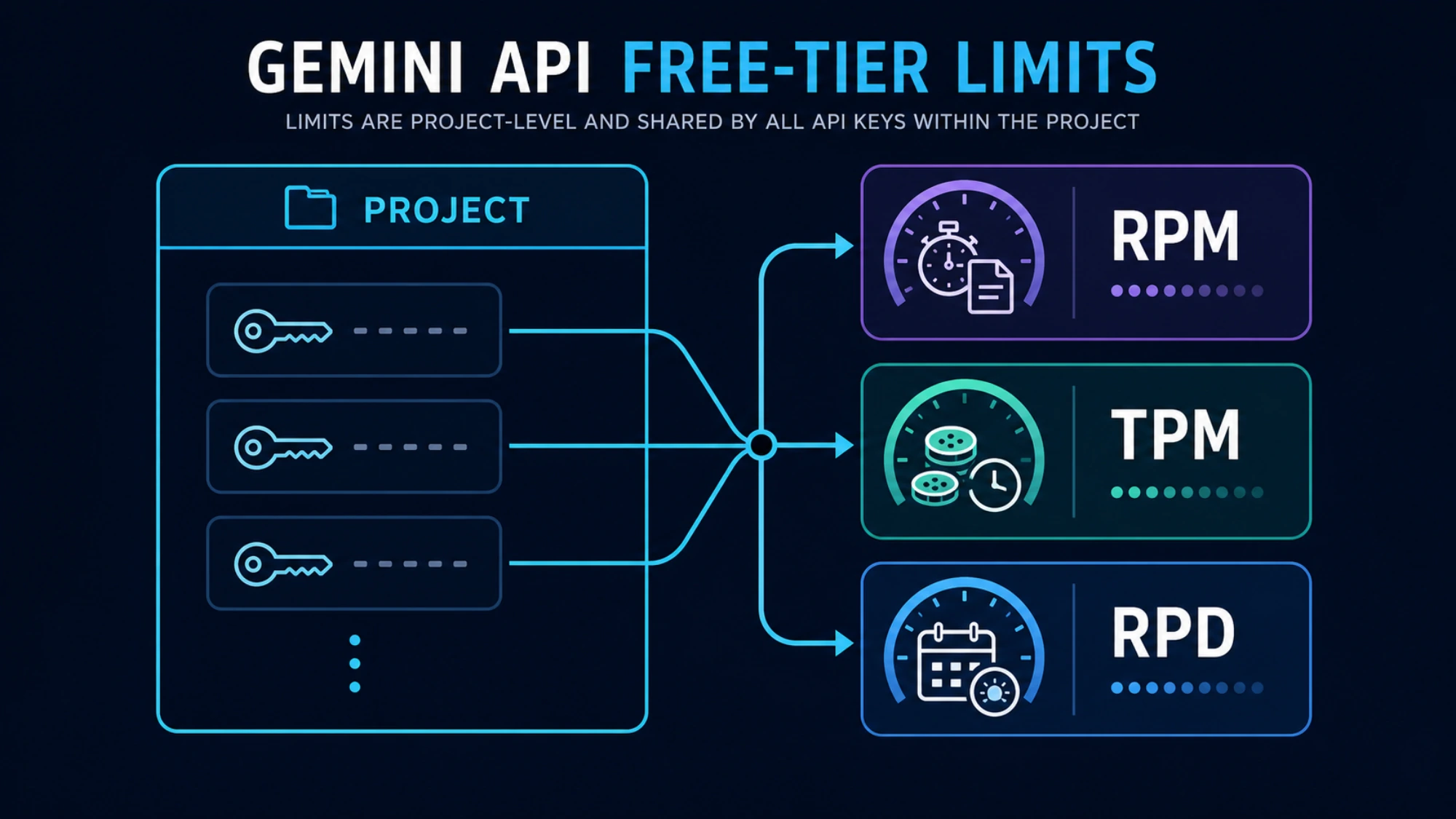
Google's rate-limit documentation describes three main dimensions:
| Limit | What it measures | Typical failure pattern |
|---|---|---|
| RPM | Requests per minute | A burst or too much concurrency fails quickly |
| TPM | Input tokens per minute | A few large documents can exhaust it |
| RPD | Requests per day | Calls work until the daily pool is spent |
Every request is evaluated against the relevant limits, and exceeding any one can produce a rate-limit error. RPD resets at midnight Pacific Time. Preview and experimental models have stricter limits.
Most importantly, limits apply per project, not per API key. The key itself costs nothing, but no free key is unlimited, and creating another key in the same project does not multiply quota. A notebook, cron job, staging deployment, and demo server can quietly compete for the same pool if they share that project.
Google publishes no per-model table of free-tier RPM, TPM, and RPD. Its documentation sends developers to AI Studio for the limits in force and says “Specified rate limits are not guaranteed and actual capacity may vary.” That makes a copied table of fixed request numbers a poor planning tool, even when it was correct for one model and date. For an implementation decision, open the project in AI Studio, select the exact model, and record the displayed RPM, TPM, RPD, and tier. Gemini API Rate Limits by Tier walks through reading those active limits.
A quick capacity estimate becomes meaningful only after that check. If a document workflow sends 30,000 input tokens per call, divide the displayed TPM by that input size to estimate the maximum token-bound call rate. If a chat endpoint sends tiny prompts to many users, RPM is more likely to be the first constraint. Keep the estimate below the maximum because free capacity can vary.
Make a current first call
Google's getting-started guide uses the Interactions API, available through the Python and JavaScript SDKs and REST. AI Studio creates a project and an API key automatically for new users. Keep the key in an environment variable:
export GEMINI_API_KEY="YOUR_API_KEY"
pip install -U google-genai
Then send a minimal request with a model that has a free row and is open to new projects:
from google import genai

client = genai.Client()

interaction = client.interactions.create(
    model="gemini-3.8-flash",
    input="Explain vector databases in three short sentences.",
)

print(interaction.output_text)
After it succeeds, inspect AI Studio again. Verify that usage landed on the project you expected and that the exact model still has the limits you planned around. This catches a wrong environment variable, a key from another project, or a stale model ID before those mistakes become application bugs.
If the call fails on a model ID taken from an older example, compare the ID with the tables above before you change anything else. A shut-down ID, a 2.5 model on a new project, and a paid-only model each fail for a different reason, and none of them is fixed by a new key.
Never put a raw Gemini key in a public frontend or commit it to source control. The free tier does not change normal credential security.
Diagnose 429 by the exhausted dimension
429 RESOURCE_EXHAUSTED is a category, not a complete diagnosis.
- A failure immediately after concurrent traffic usually points to RPM. Reduce concurrency and add jittered exponential backoff.
- Failure with a small request count but very large prompts points to TPM. Shorten, chunk, or schedule the input.
- A project that worked for hours and then stops for the rest of the day may have exhausted RPD. Backoff cannot refill a daily bucket.
- Several keys failing together points back to shared project limits.
- A preview model failing while a stable model works can reflect stricter preview capacity.
Retrying makes sense for a short window or transient capacity event. It does not solve an exhausted daily allowance. Blind retries also have a cost: Google's billing FAQ says requests that fail with a 400 or 500 error are not billed for tokens but still count against quota.
If you need a deeper error decision tree, use the focused Gemini API 429, 400, and 500 guide. When the message appears inside AI Studio itself, see “You've Reached Your Rate Limit” in AI Studio.
Free service has a data contract
Google's Gemini API Additional Terms say content submitted to unpaid services, along with generated responses, is used to provide, improve, and develop Google products and machine-learning technologies. Human reviewers may read, annotate, and process that material, and Google tells users not to submit sensitive, confidential, or personal information to unpaid services.
That makes unpaid service a poor fit for private source code, customer records, contracts, health or financial documents, and internal material your organization does not allow to be used for model improvement. Paid-service prompts and responses are not used to improve Google's products under the paid-service terms, although normal security, retention, and compliance review still applies. The API counts as a paid service only when the call goes through a Cloud project with an active billing account.
Region can also change the answer. Google's availability page lists supported locations, and Gemini Isn't Available in Your Country? covers the region error itself. Two statements about Europe apply to different situations. Google's billing FAQ answers “Yes” to whether the Gemini API can be used for free in the EEA, the UK, and Switzerland, so a developer there can test on the free tier. The terms separately require paid services when an API client is made available to users in the EEA, Switzerland, or the UK. An individual experiment and a public product therefore reach different decisions in the same country.
When paying is the cheaper engineering decision

Stay unpaid when the workload is low-volume, non-sensitive, easy to queue, and inexpensive to interrupt. Enable billing, or choose a different route, when any of these becomes true:
- real users depend on predictable availability;
- free-tier capacity forces operational workarounds;
- prompts contain data that is unsuitable for unpaid terms;
- end-user geography requires paid service;
- a paid-only model or capability is necessary, such as the current Pro model, images, video, or music;
- the engineering time spent protecting a tiny quota exceeds the API cost.
Google's billing guide says moving from free to paid requires linking a Cloud Billing account and prepaying at least $5, or the local equivalent that AI Studio shows for your region. The move from Free to Tier 1 typically takes effect instantly. API keys inherit the project and billing state; they do not have independent billing switches.
Prepaid credit changes how a project fails. Unused credits expire after 12 months. When the balance reaches $0, requests fail with HTTP 402, and the project is not moved back to the free tier automatically. To return to free service you unlink the project from the billing account.
Do not confuse this with Google's general $300 Cloud welcome credit. Google says welcome credit for billing accounts opened after March 2, 2026 cannot pay for Gemini API or AI Studio usage. If you enable billing, set project spending controls, monitor the prepaid balance, and keep tracking RPM, TPM, and RPD rather than assuming payment removes every limit.
For the payment side in more detail, see the safe way to pay for Gemini API access. The Gemini API token pricing guide covers per-token rates as of March 2026, so confirm current numbers on Google's pricing page.
The durable answer
Gemini API free access remains useful in 2026, especially for learning, prompt validation, hackathons, and low-traffic prototypes. The durable way to use it is not to memorize a model list or a quota table. Confirm the region and data contract, check that the exact model ID still has a free price row and is open to your project, read the project's live limits in AI Studio, make a minimal call, and observe usage.
Once privacy, reliability, geography, a paid-only model, or engineering effort becomes the real constraint, the free phase has done its job. Treat paid service as a production decision, not as a failure to optimize the free tier.